© 2014 VMware Inc. All rights reserved.
Troubleshooting Methodology for
VMware NSX
NET5488
Dmitri Kalintsev @dkalintsev
Oct 2015
Session outline
1. Does network virtualisation make fault finding harder?
2. What do I need to know to be good at fault finding?
3. Where do I need to look when troubleshooting?
4. Example scenario walk-through
2
Is network virtualisation that new?
• You’re likely using virtualised networks all the time
• But we’re just calling them something else - “VPN”:
– MPLS L3 VPNs
– Carrier Ethernet
– IPSec VPNs
3
Core principle is the same
• There’s a common “Transport” portion, providing carriage to..
• ..lots of “Services”, implemented in network edge:
– MPLS VPN:
• MPLS transport network, providing carriage to..
• ..IP VPN or L2 VPN services on the top (may be at the same time)
– NSX:
• IP transport network, providing carriage to..
• ..Logical Switching, Routing, and Security services on top.
4
Separation of concerns and troubleshooting
• Separation between “Transport” and “Services” is beneficial:
– Transport is simple, therefore can be checked quickly
– If transport is OK, you can focus on validating the Services
• For NSX, “Transport” is IP connectivity between VTEP IPs
– Easy to check with existing tools (ping/vmkping)
• But what about these “Services”?
5
NSX Services
• NSX includes both integrated and distributed services
– Integrated services provided by NSX Edge (Routing, FW, LB, etc)
– Distributed are delivered in kernel on hypervisor
• Integrated services work similar to physical appliances under the
hood, therefore easy to understand, but..
• Distributed services worth a more detailed look
6
What do I need to know so I can troubleshoot?
• To troubleshoot is to find where the “it’s not working”
– Need to first understand what “working” is
• “Working” is a combination of:
– Current state, and
– How it is reached
• Let’s examine this combination for NSX Logical Switching.
7
Terminology
• VTEP: VXLAN Tunnel Endpoint
– An IP interface on ESXi host that performs VXLAN encap/decap
• Logical Switch, also referred to as “VXLAN”
– One or more VXLAN-backed dvPortgroups forming a single L2-over-L3
domain
• VNI: VXLAN Network Identifier
– VXLAN ID; called “VXLAN Segment ID” in the UI
– Each LS has a unique VNI associated with it
8
What is Logical Switching?
• NSX Logical Switching implements L2 connectivity services on top
of L3 (IP) Transport
• vCenter sees Logical Switches as slightly “special” dvPortgroups
• If an LS spans multiple VDS, NSX Manager creates a dvPortgroup
on each VDS in Transport Zone (see https://goo.gl/4OcOM5 for a bit
more on Transport Zones)
• dvPortgroups making up an LS have opaque attributes to signal
them being different from VLAN-backed ones (more on that later)
• Only one VDS on a given cluster can have Logical Switches
9
Logical Switching: how forwarding works (1/2)
• Logical Switching operates on per-VNI (VXLAN Network Identifier)
basis
– One or many – they all work on same principle, therefore we’ll just look
at one
• Inside each LS/VNI, forwarding process is the same:
1. Look at the destination MAC address of a frame; if it’s not local, then
2. Find VTEP IP of the host that has that MAC
3. Encapsulate original frame in VXLAN and send it to that IP
10
Logical Switching: how forwarding works (2/2)
• Therefore, Logical Switching need answers to either first, or to both
questions:
1. “Which VTEP IP do I need to send this frame to?”
a) If I can have explicit answer (this MAC goes to that VTEP IP), I’m all good
b) If not, I need a way to send frame to all VTEPs, hoping for the best
2. “If 1.b, what are all VTEPs where our destination MAC can
possibly be?”
• It is the list of VTEP IPs of hosts that have “something” on that LS/VNI; but
– How do we find that out?
11
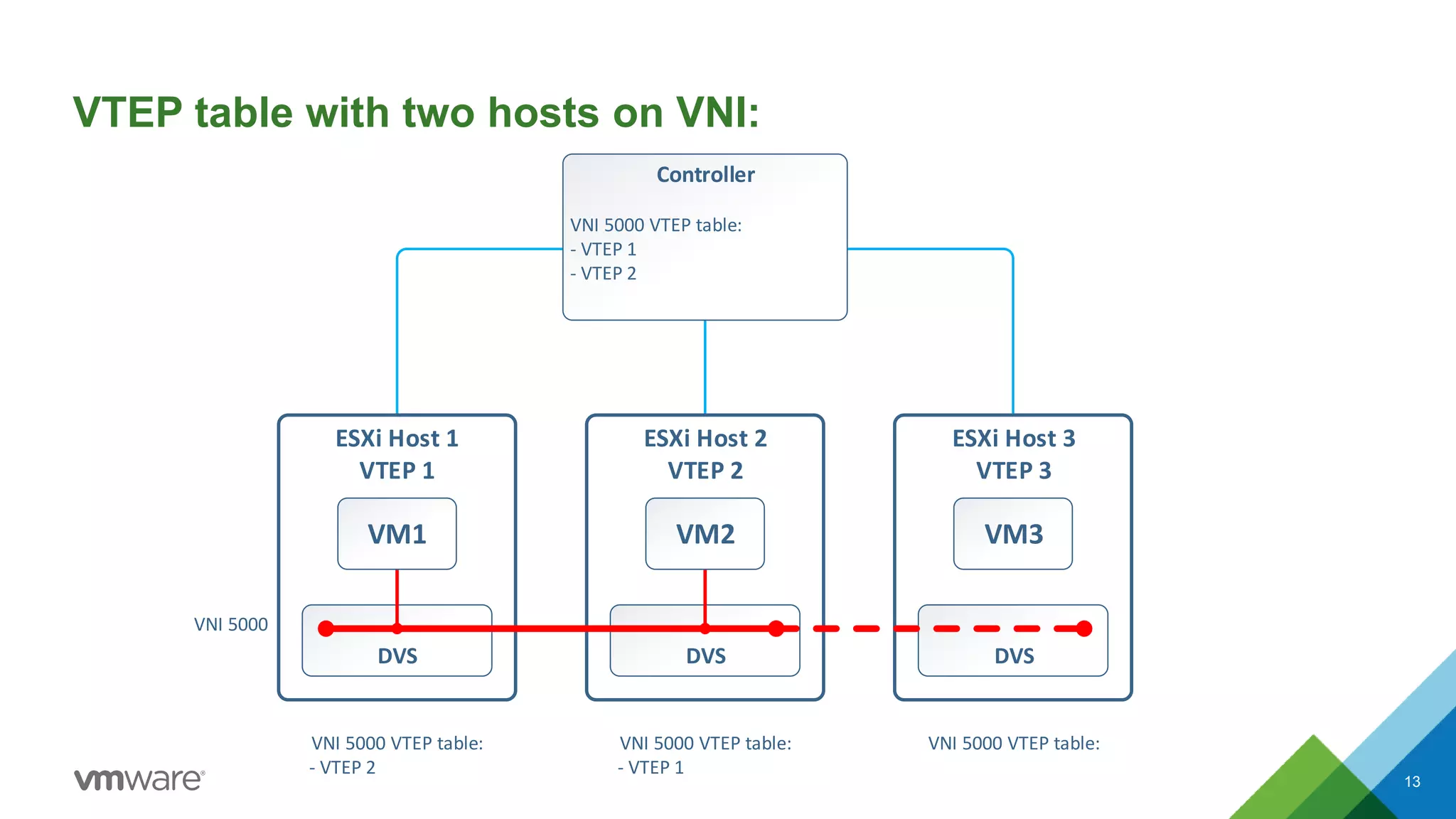
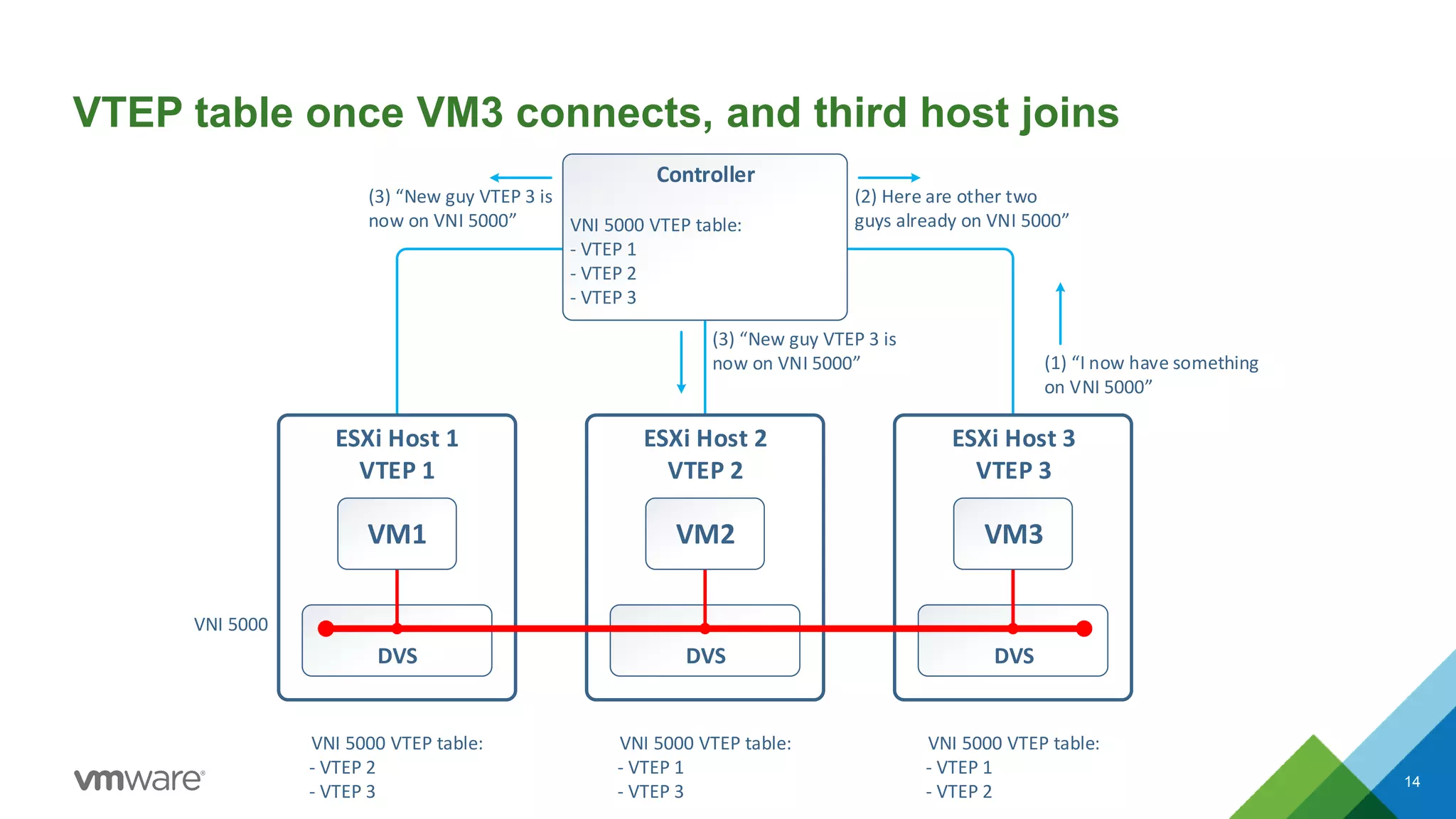
Logical Switching: VTEP table
• The answer to the second question is in per-LS/VNI VTEP table
– First VM on a host connecting to an LS causes that host to join the VNI
– Controller updates its VTEP table for that VNI, and tells other hosts on
VNI about new VTEP addition
• Therefore, we should see:
– On controller, VTEPs of all hosts that have something connected to
LS/VNI
– On these hosts, same list of VTEPs, minus host’s own VTEP IP
12
VTEP table with two hosts on VNI:
13
ESXi Host 3
VTEP 3
DVS
ESXi Host 2
VTEP 2
DVS
ESXi Host 1
VTEP 1
DVS
Controller
VNI 5000 VTEP table:
- VTEP 1
- VTEP 2
VNI 5000
VNI 5000 VTEP table:
- VTEP 2
VNI 5000 VTEP table:
- VTEP 1
VNI 5000 VTEP table:
VM1 VM3VM2
ESXi Host 3
VTEP 3
DVS
ESXi Host 2
VTEP 2
DVS
ESXi Host 1
VTEP 1
DVS
Controller
VNI 5000 VTEP table:
- VTEP 1
- VTEP 2
Controller
VNI 5000 VTEP table:
- VTEP 1
- VTEP 2
- VTEP 3
VNI 5000
VNI 5000 VTEP table:
- VTEP 2
- VTEP 3
VNI 5000 VTEP table:
- VTEP 1
- VTEP 3
VNI 5000 VTEP table:
- VTEP 1
- VTEP 2
VM1 VM3VM2
(1) “I now have something
on VNI 5000”
(3) “New guy VTEP 3 is
now on VNI 5000”
(3) “New guy VTEP 3 is
now on VNI 5000”
(2) Here are other two
guys already on VNI 5000”
VTEP table once VM3 connects, and third host joins
14
Logical Switching: VTEP table
Let’s have a look at these tables using new NSX 6.2 Central CLI.
15
esxcomp-01a
DVS (Compute_VDS)
esxcomp-02a
DVS (Compute_VDS)
VXLAN 10000
VM
web-sv01a
dvPort
VXLAN
dvUplink
IOChain
vNIC
VTEP VLAN
VTEP: 192.168.125.51
VXLAN
VXLAN 10000
VM
web-sv02a
dvPort
dvUplink
IOChain
vNIC
VTEP VLAN
VTEP: 192.168.125.52
pNICpNIC
MAC: 00:50:56:b9:eb:14 MAC: 00:50:56:b9:12:ce
Encapsulated VXLAN
traffic
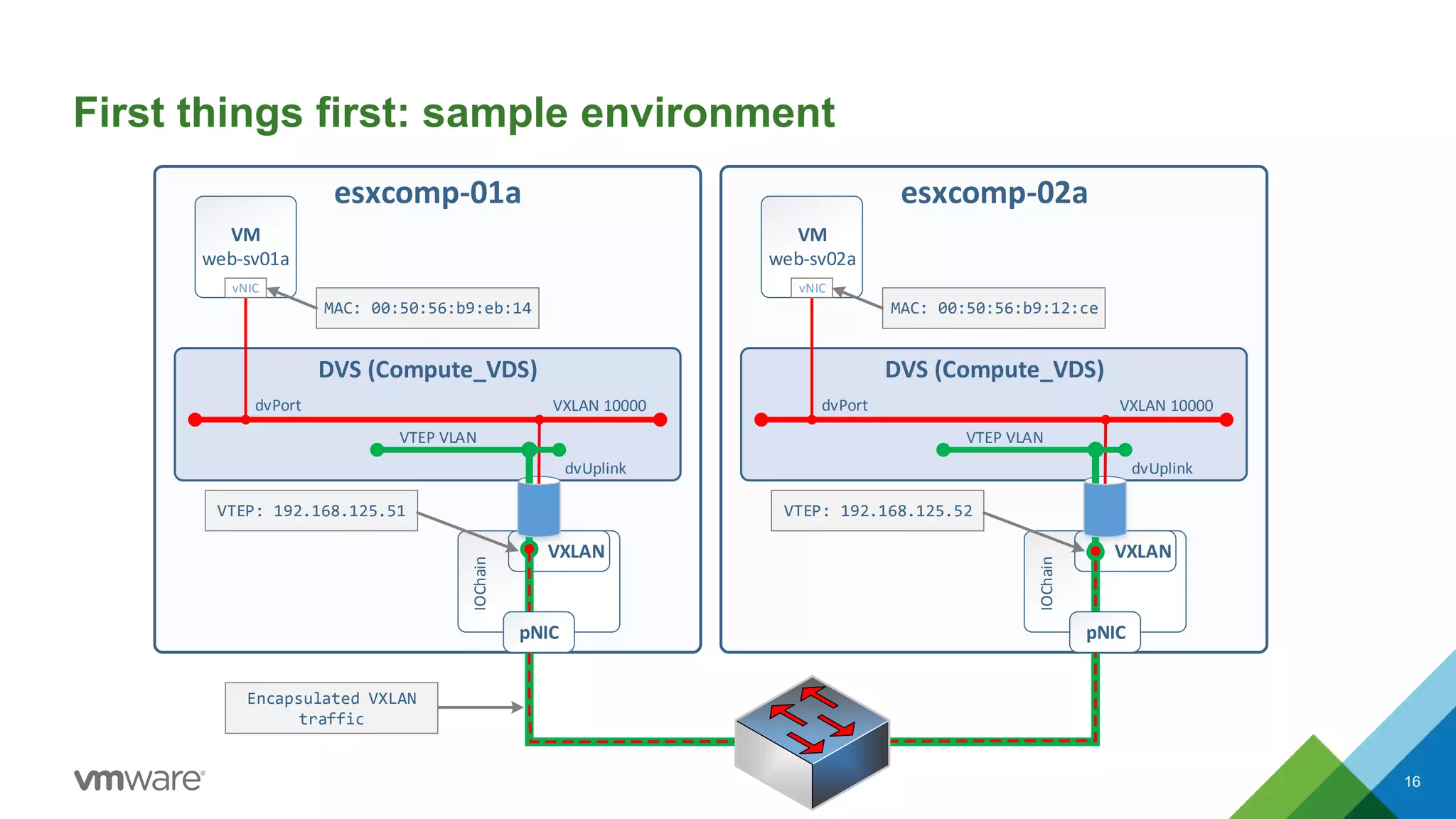
First things first: sample environment
16
Transport connectivity verification
• Let’s verify that Transport connectivity works. To do this, log into one of the
ESXi hosts and run a vmkping command against other host’s VTEP IP. Force it
to set “do not fragment” flag and size of 1572 to test e2e MTU is correct, too:
[root@esxcomp-01a:~] vmkping ++netstack=vxlan -d -s 1572 192.168.125.52
PING 192.168.125.52 (192.168.125.52): 1572 data bytes
1580 bytes from 192.168.125.52: icmp_seq=0 ttl=64 time=0.715 ms
1580 bytes from 192.168.125.52: icmp_seq=1 ttl=64 time=1.094 ms
1580 bytes from 192.168.125.52: icmp_seq=2 ttl=64 time=0.860 ms
--- 192.168.125.52 ping statistics ---
3 packets transmitted, 3 packets received, 0% packet loss
round-trip min/avg/max = 0.715/0.890/1.094 ms
17
Transport connectivity verification: notes
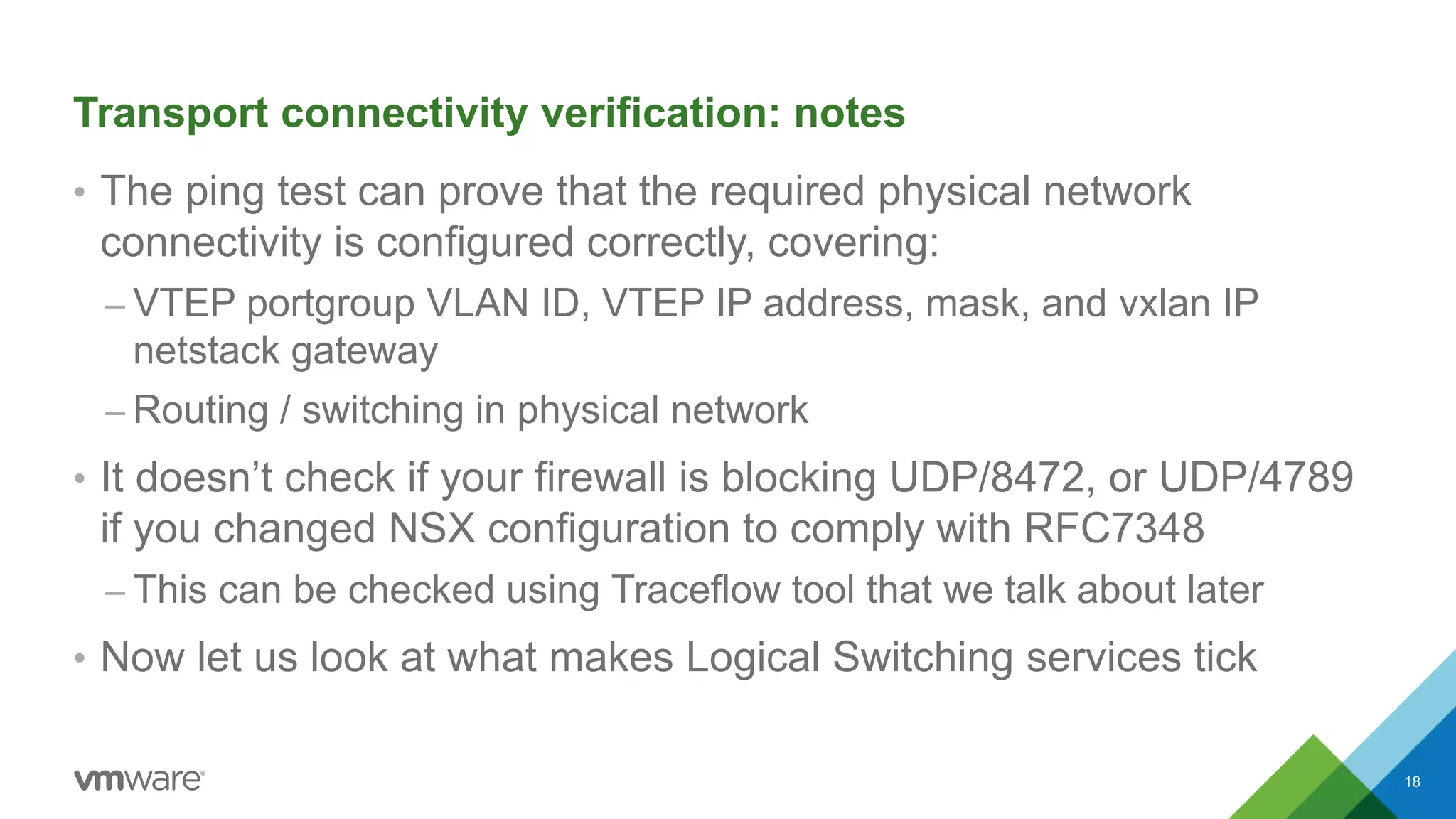
• The ping test can prove that the required physical network
connectivity is configured correctly, covering:
– VTEP portgroup VLAN ID, VTEP IP address, mask, and vxlan IP
netstack gateway
– Routing / switching in physical network
• It doesn’t check if your firewall is blocking UDP/8472, or UDP/4789
if you changed NSX configuration to comply with RFC7348
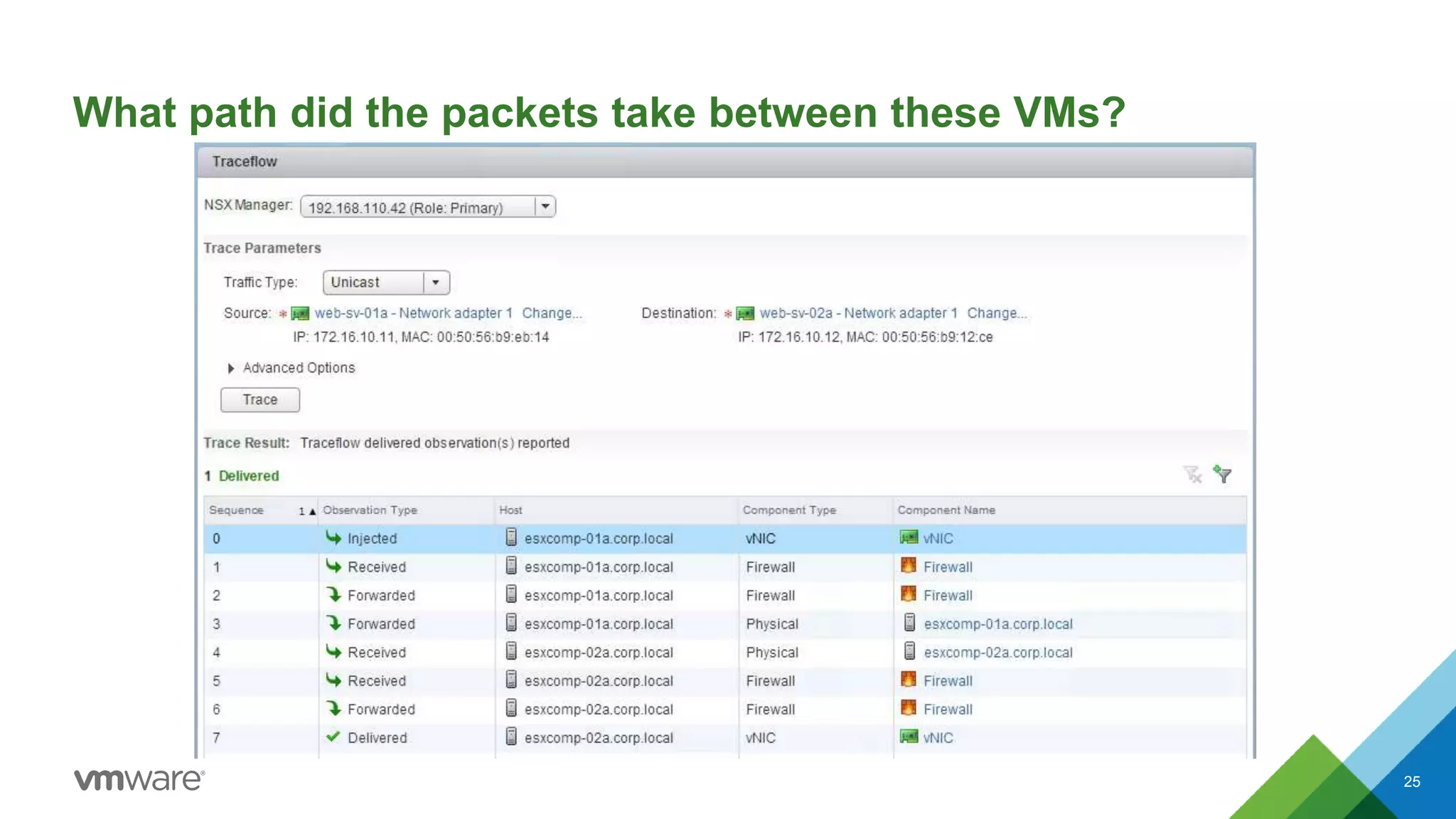
– This can be checked using Traceflow tool that we talk about later
• Now let us look at what makes Logical Switching services tick
18
Logical Switching: VTEP table CLI commands
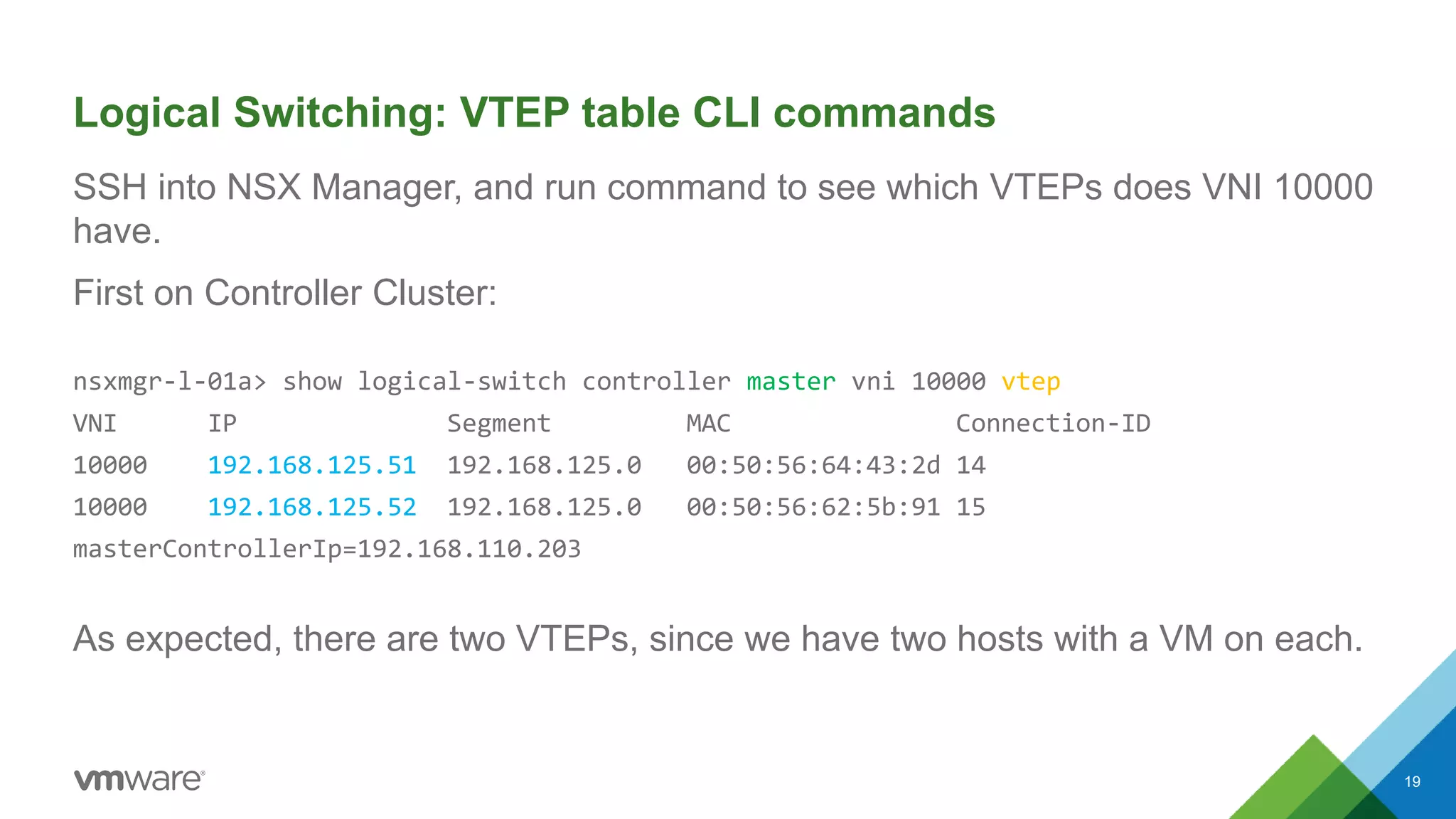
SSH into NSX Manager, and run command to see which VTEPs does VNI 10000
have.
First on Controller Cluster:
nsxmgr-l-01a> show logical-switch controller master vni 10000 vtep
VNI IP Segment MAC Connection-ID
10000 192.168.125.51 192.168.125.0 00:50:56:64:43:2d 14
10000 192.168.125.52 192.168.125.0 00:50:56:62:5b:91 15
masterControllerIp=192.168.110.203
As expected, there are two VTEPs, since we have two hosts with a VM on each.
19
Logical Switching: VTEP table CLI commands
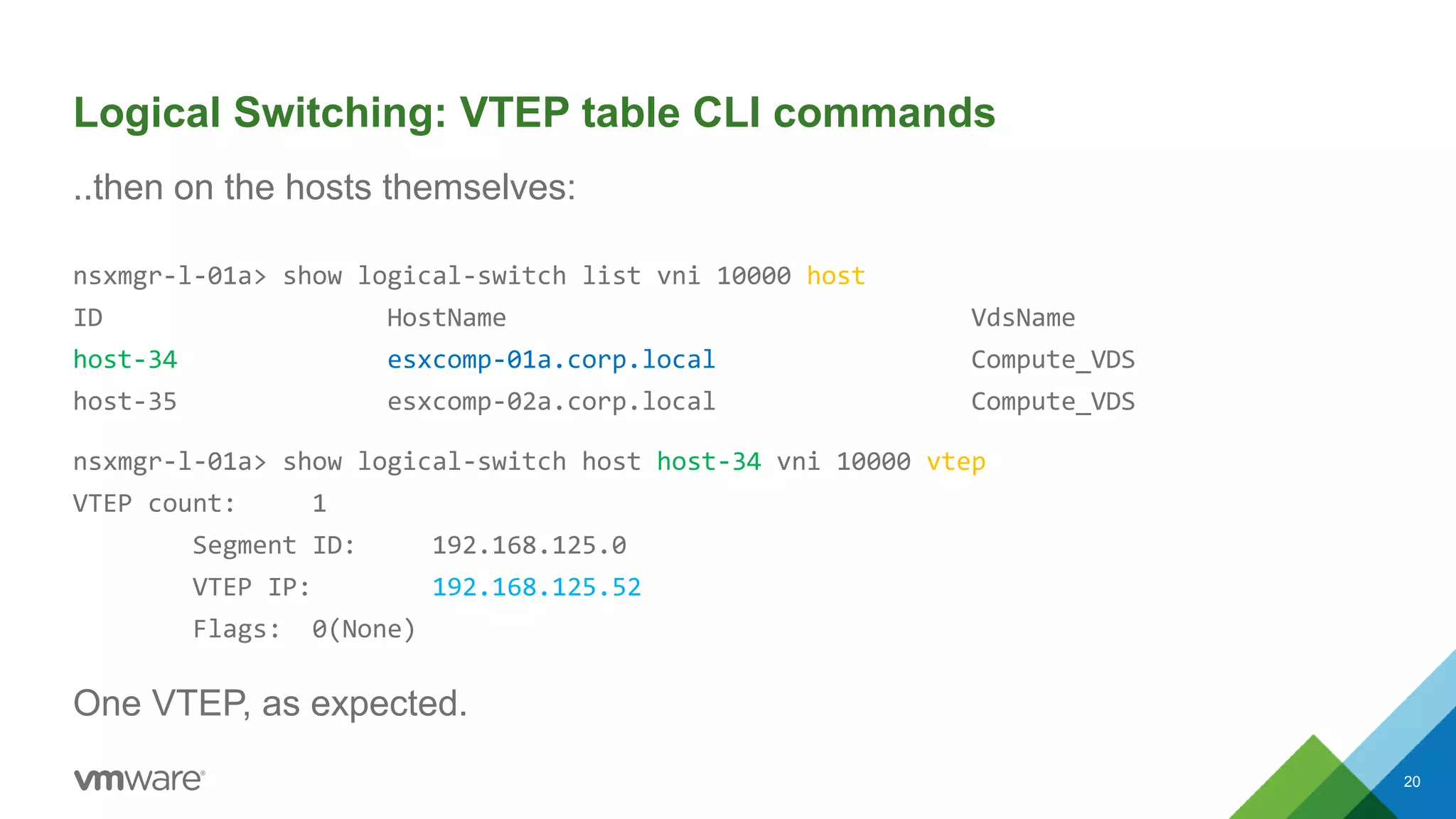
..then on the hosts themselves:
nsxmgr-l-01a> show logical-switch list vni 10000 host
ID HostName VdsName
host-34 esxcomp-01a.corp.local Compute_VDS
host-35 esxcomp-02a.corp.local Compute_VDS
nsxmgr-l-01a> show logical-switch host host-34 vni 10000 vtep
VTEP count: 1
Segment ID: 192.168.125.0
VTEP IP: 192.168.125.52
Flags: 0(None)
One VTEP, as expected.
20
Looks like VTEPs are all good; what about MAC addresses?
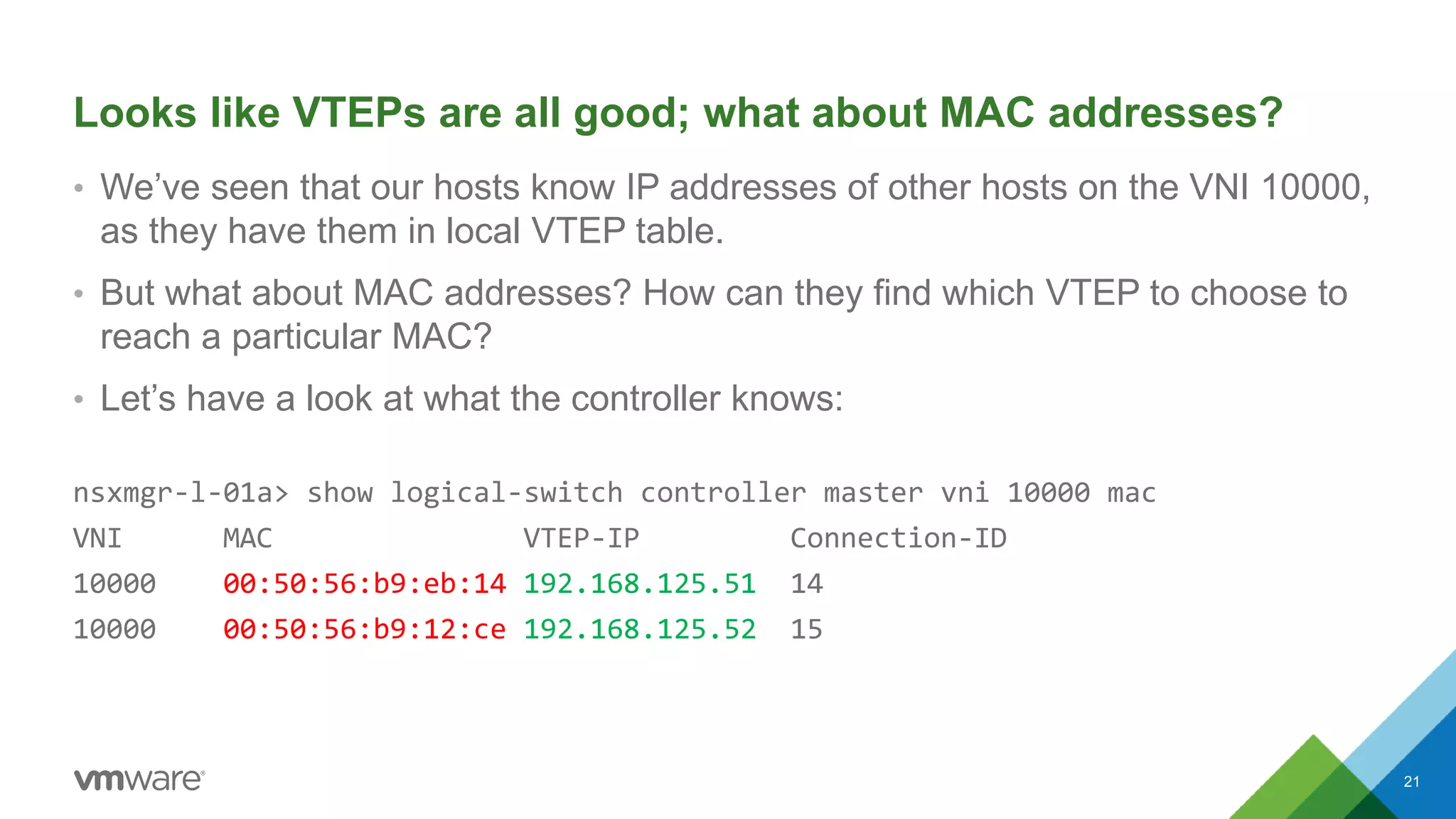
• We’ve seen that our hosts know IP addresses of other hosts on the VNI 10000,
as they have them in local VTEP table.
• But what about MAC addresses? How can they find which VTEP to choose to
reach a particular MAC?
• Let’s have a look at what the controller knows:
nsxmgr-l-01a> show logical-switch controller master vni 10000 mac
VNI MAC VTEP-IP Connection-ID
10000 00:50:56:b9:eb:14 192.168.125.51 14
10000 00:50:56:b9:12:ce 192.168.125.52 15
21
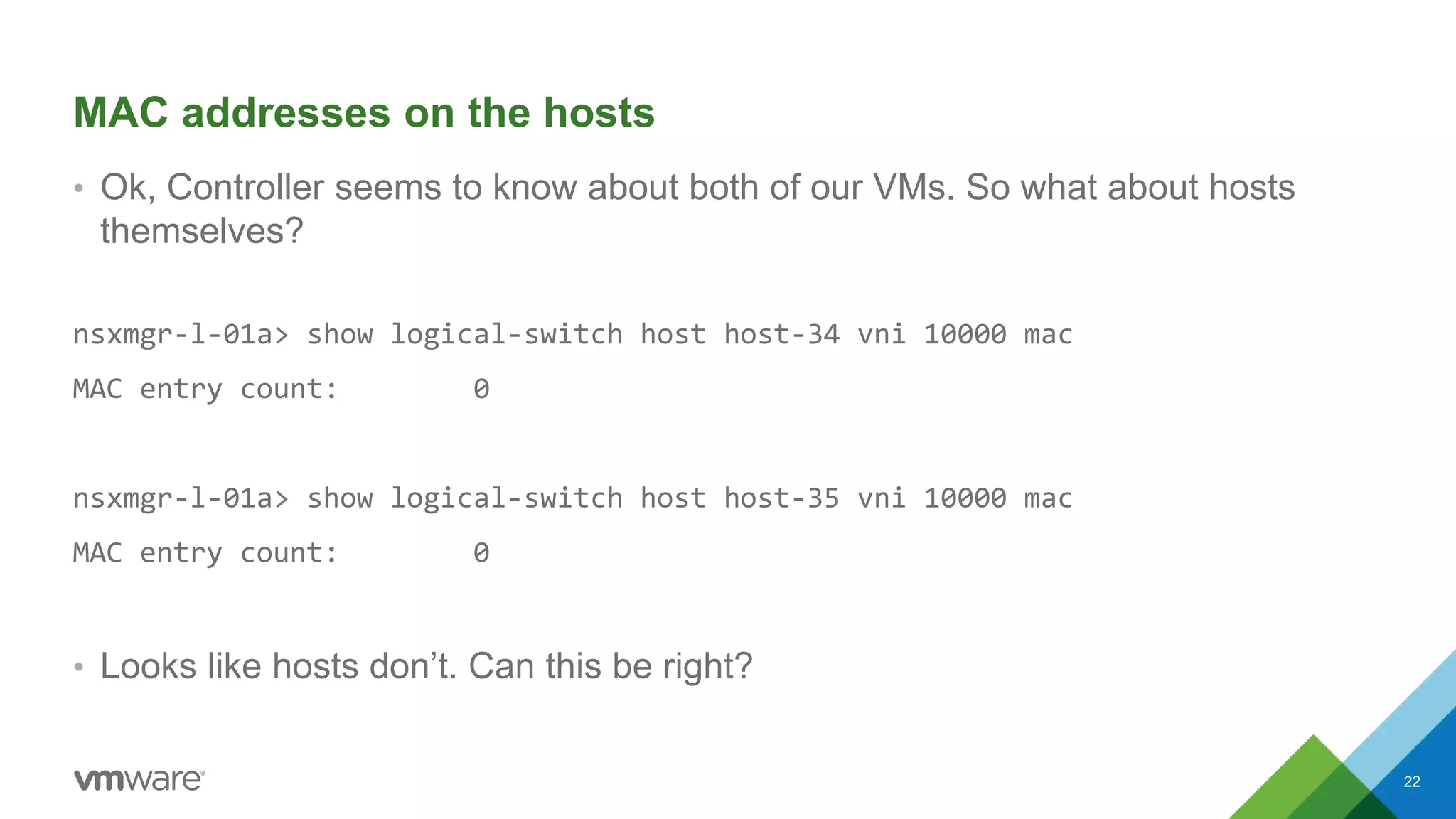
MAC addresses on the hosts
• Ok, Controller seems to know about both of our VMs. So what about hosts
themselves?
nsxmgr-l-01a> show logical-switch host host-34 vni 10000 mac
MAC entry count: 0
nsxmgr-l-01a> show logical-switch host host-35 vni 10000 mac
MAC entry count: 0
• Looks like hosts don’t. Can this be right?
22
MAC addresses on the hosts, continued
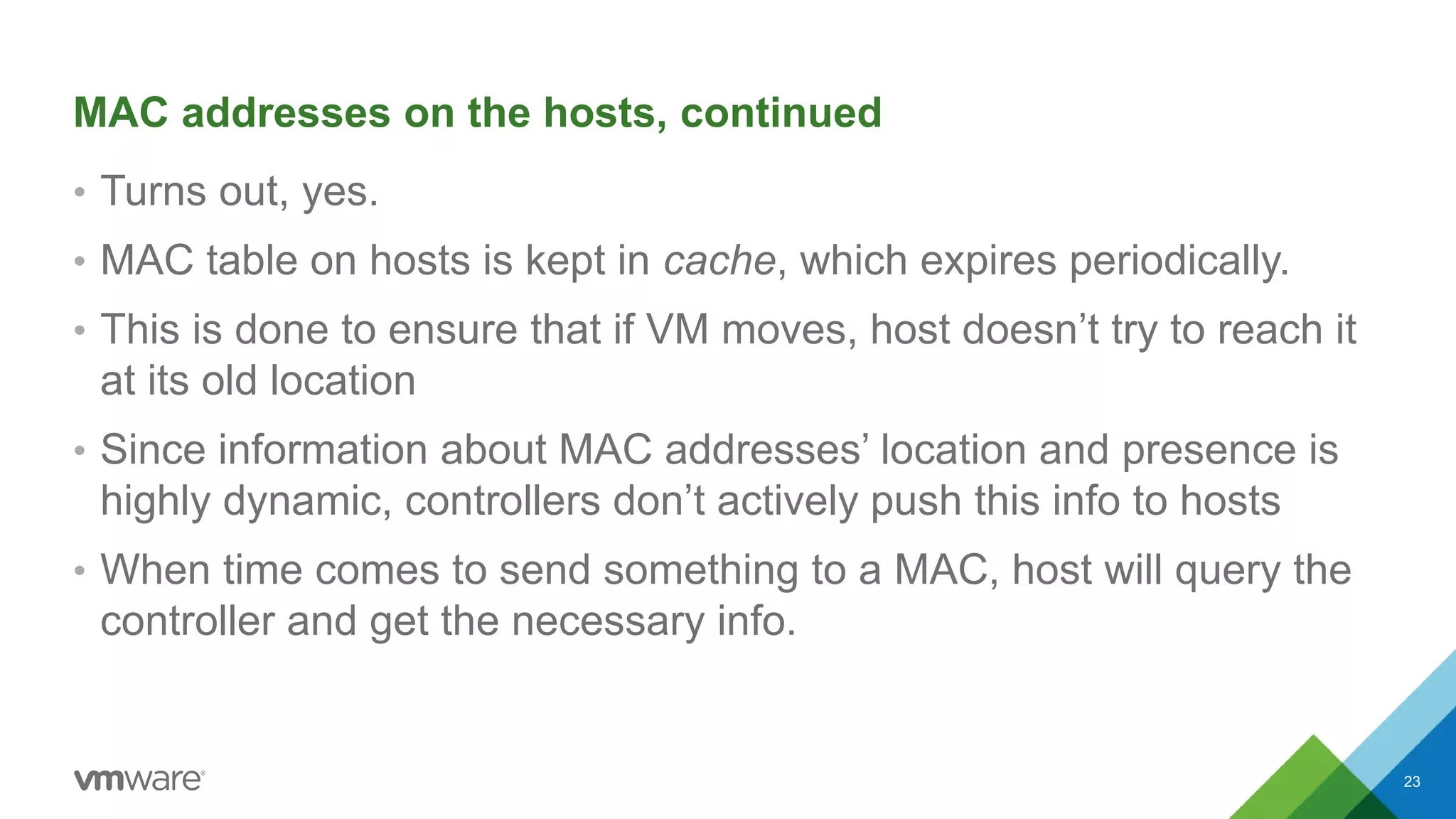
• Turns out, yes.
• MAC table on hosts is kept in cache, which expires periodically.
• This is done to ensure that if VM moves, host doesn’t try to reach it
at its old location
• Since information about MAC addresses’ location and presence is
highly dynamic, controllers don’t actively push this info to hosts
• When time comes to send something to a MAC, host will query the
controller and get the necessary info.
23
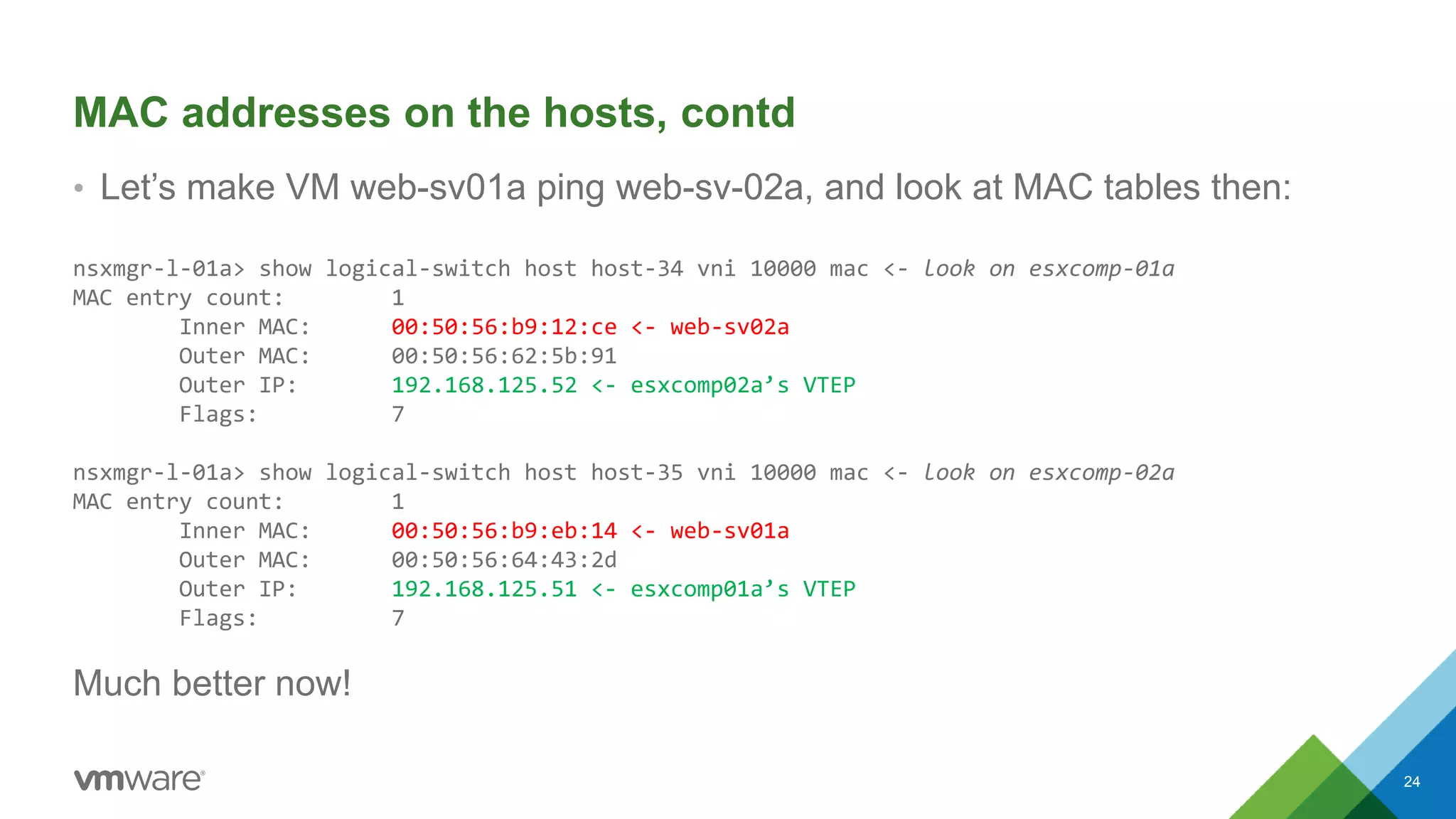
MAC addresses on the hosts, contd
• Let’s make VM web-sv01a ping web-sv-02a, and look at MAC tables then:
nsxmgr-l-01a> show logical-switch host host-34 vni 10000 mac <- look on esxcomp-01a
MAC entry count: 1
Inner MAC: 00:50:56:b9:12:ce <- web-sv02a
Outer MAC: 00:50:56:62:5b:91
Outer IP: 192.168.125.52 <- esxcomp02a’s VTEP
Flags: 7
nsxmgr-l-01a> show logical-switch host host-35 vni 10000 mac <- look on esxcomp-02a
MAC entry count: 1
Inner MAC: 00:50:56:b9:eb:14 <- web-sv01a
Outer MAC: 00:50:56:64:43:2d
Outer IP: 192.168.125.51 <- esxcomp01a’s VTEP
Flags: 7
Much better now!
24
What path did the packets take between these VMs?
25
What we talked about so far:
• Per-VNI VTEP table tells ESXi host about other hosts on that VNI
• Controller maintains MAC:VTEP table of all VMs connected to an
LS/VNI
• If a host has no entry in its MAC:VTEP cache, it will ask controller
• If controller has no answer (eg, MAC is on a VLAN bridged to
VXLAN), it will respond saying so, and host will flood to all VTEPs*
* Night time reading for extra curious: http://goo.gl/rKDvLN
26
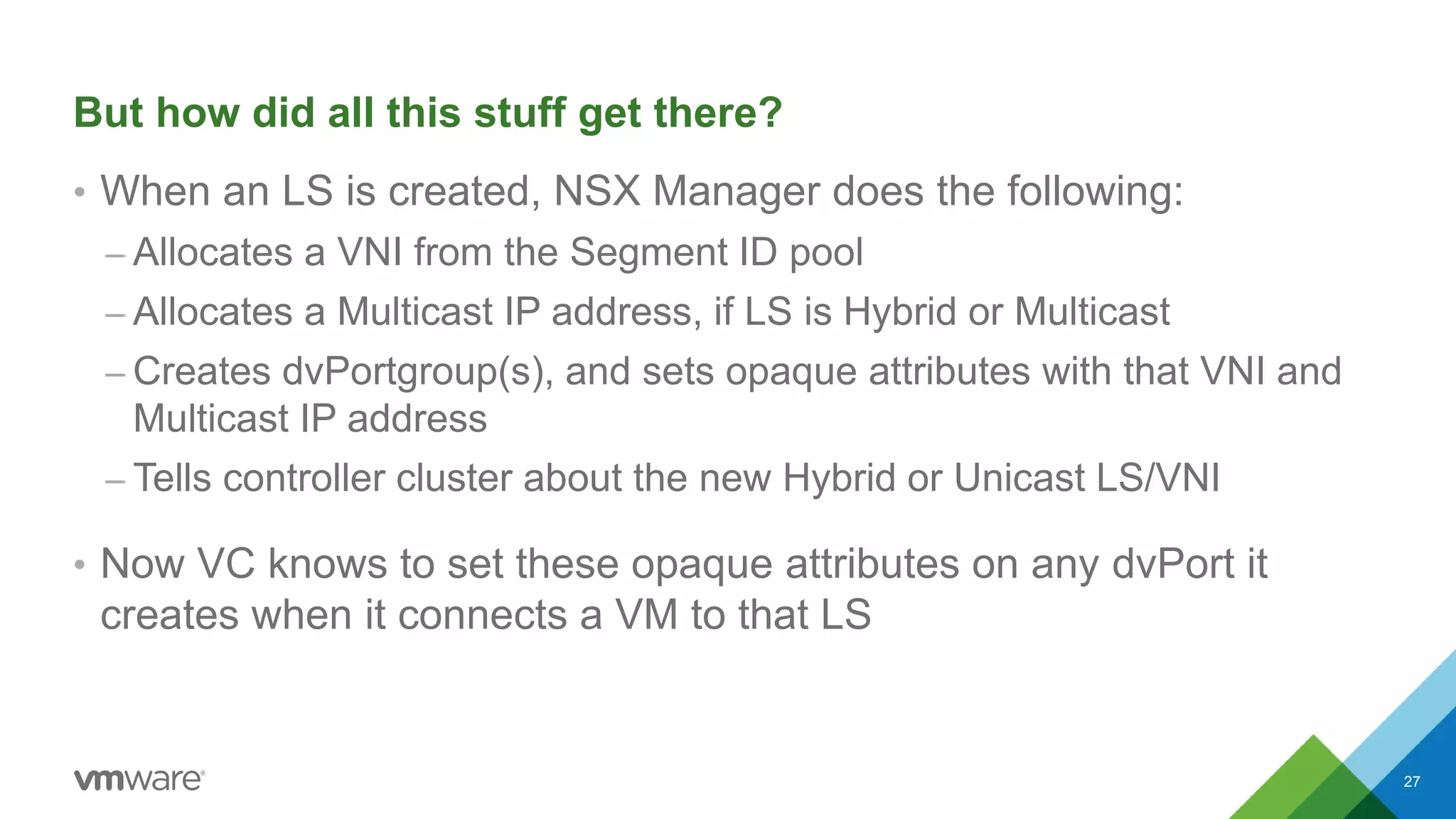
But how did all this stuff get there?
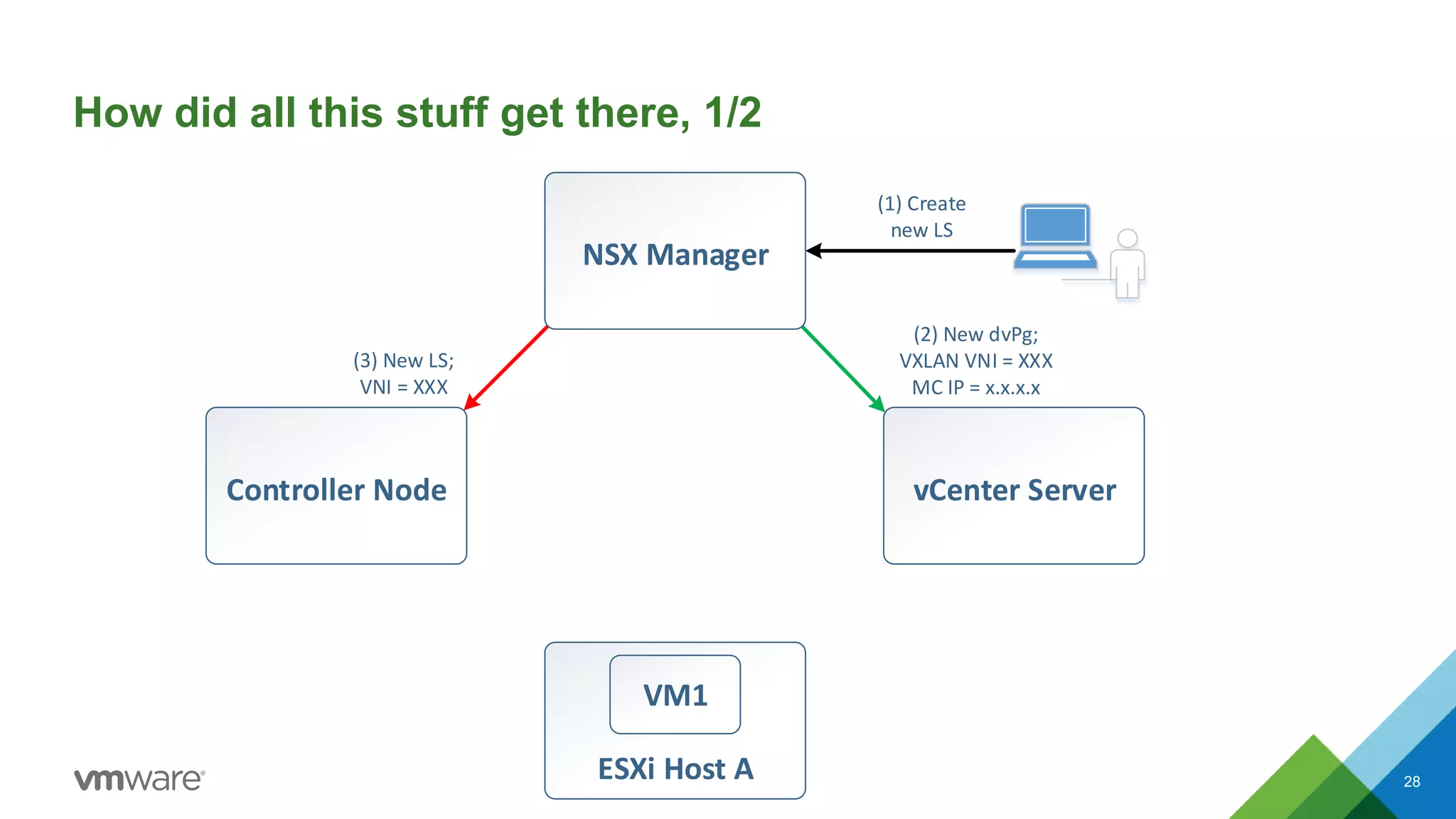
• When an LS is created, NSX Manager does the following:
– Allocates a VNI from the Segment ID pool
– Allocates a Multicast IP address, if LS is Hybrid or Multicast
– Creates dvPortgroup(s), and sets opaque attributes with that VNI and
Multicast IP address
– Tells controller cluster about the new Hybrid or Unicast LS/VNI
• Now VC knows to set these opaque attributes on any dvPort it
creates when it connects a VM to that LS
27
(1) Create
new LS
Controller Node
ESXi Host A
(3) New LS;
VNI = XXX
(2) New dvPg;
VXLAN VNI = XXX
MC IP = x.x.x.x
VM1
NSX Manager
vCenter Server
How did all this stuff get there, 1/2
28
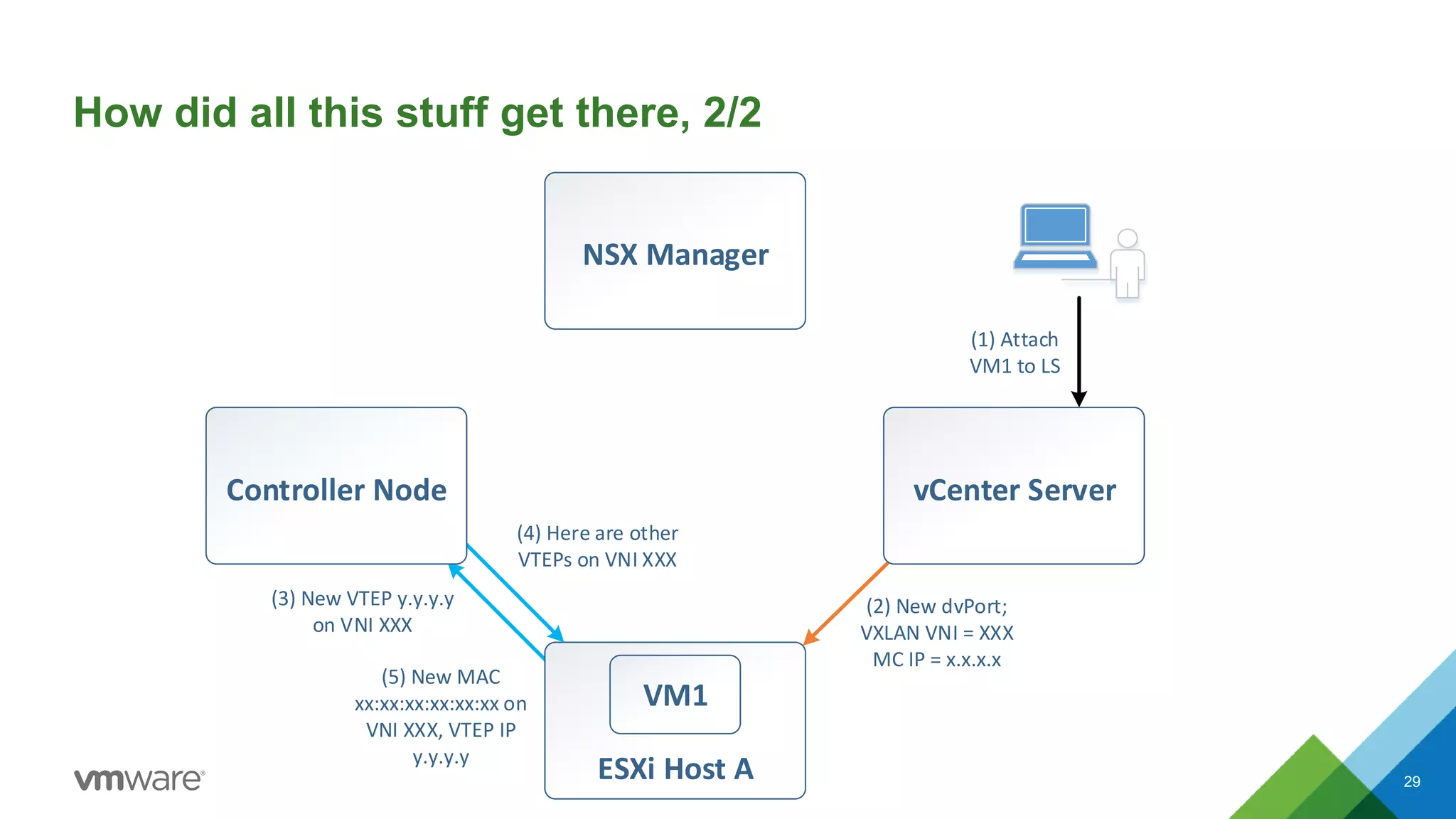
NSX Manager
(1) Attach
VM1 to LS
vCenter Server
ESXi Host A
(2) New dvPort;
VXLAN VNI = XXX
MC IP = x.x.x.x
VM1
(3) New VTEP y.y.y.y
on VNI XXX
(5) New MAC
xx:xx:xx:xx:xx:xx on
VNI XXX, VTEP IP
y.y.y.y
(4) Here are other
VTEPs on VNI XXX
Controller Node
How did all this stuff get there, 2/2
29
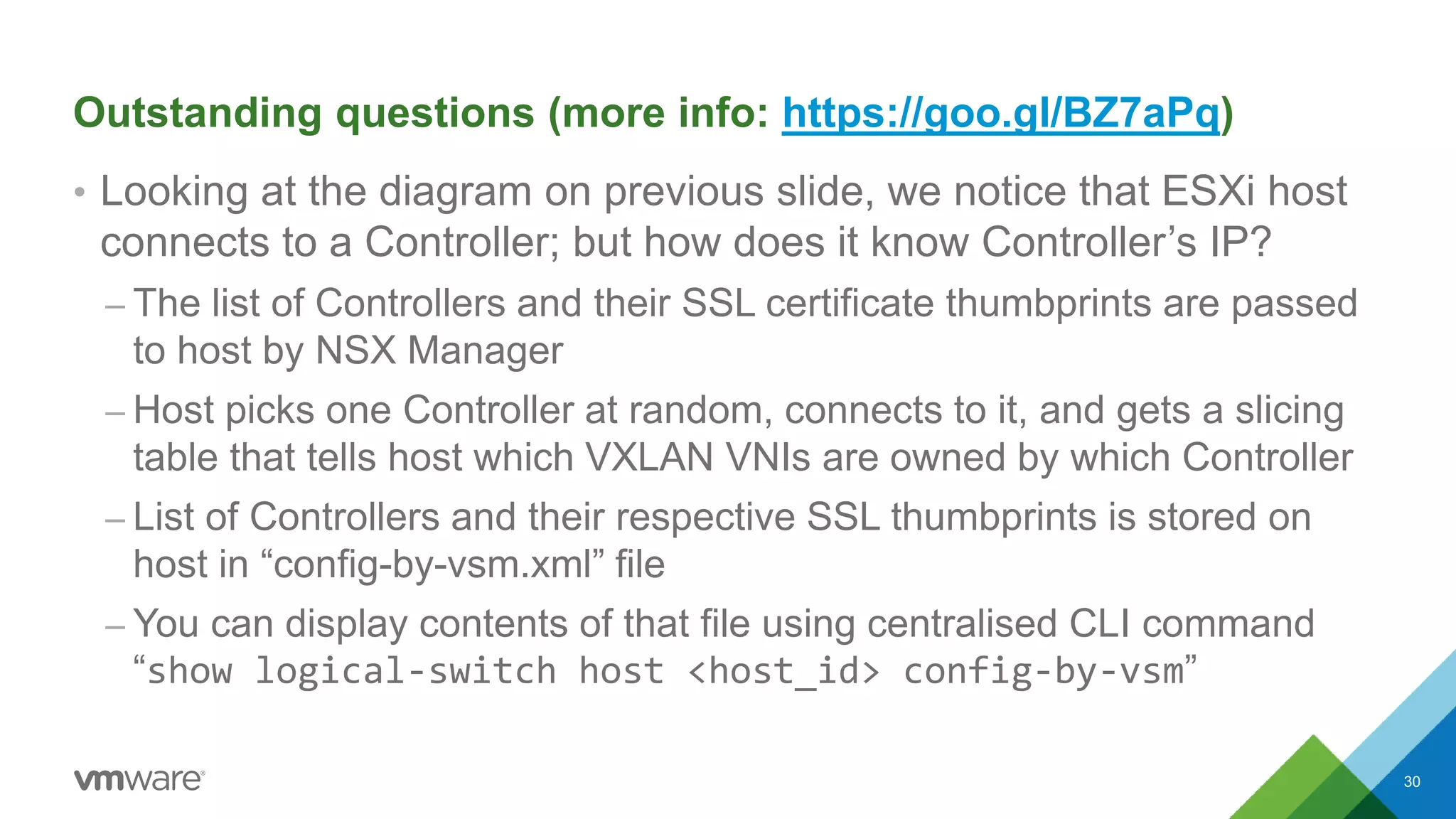
Outstanding questions (more info: https://goo.gl/BZ7aPq)
• Looking at the diagram on previous slide, we notice that ESXi host
connects to a Controller; but how does it know Controller’s IP?
– The list of Controllers and their SSL certificate thumbprints are passed
to host by NSX Manager
– Host picks one Controller at random, connects to it, and gets a slicing
table that tells host which VXLAN VNIs are owned by which Controller
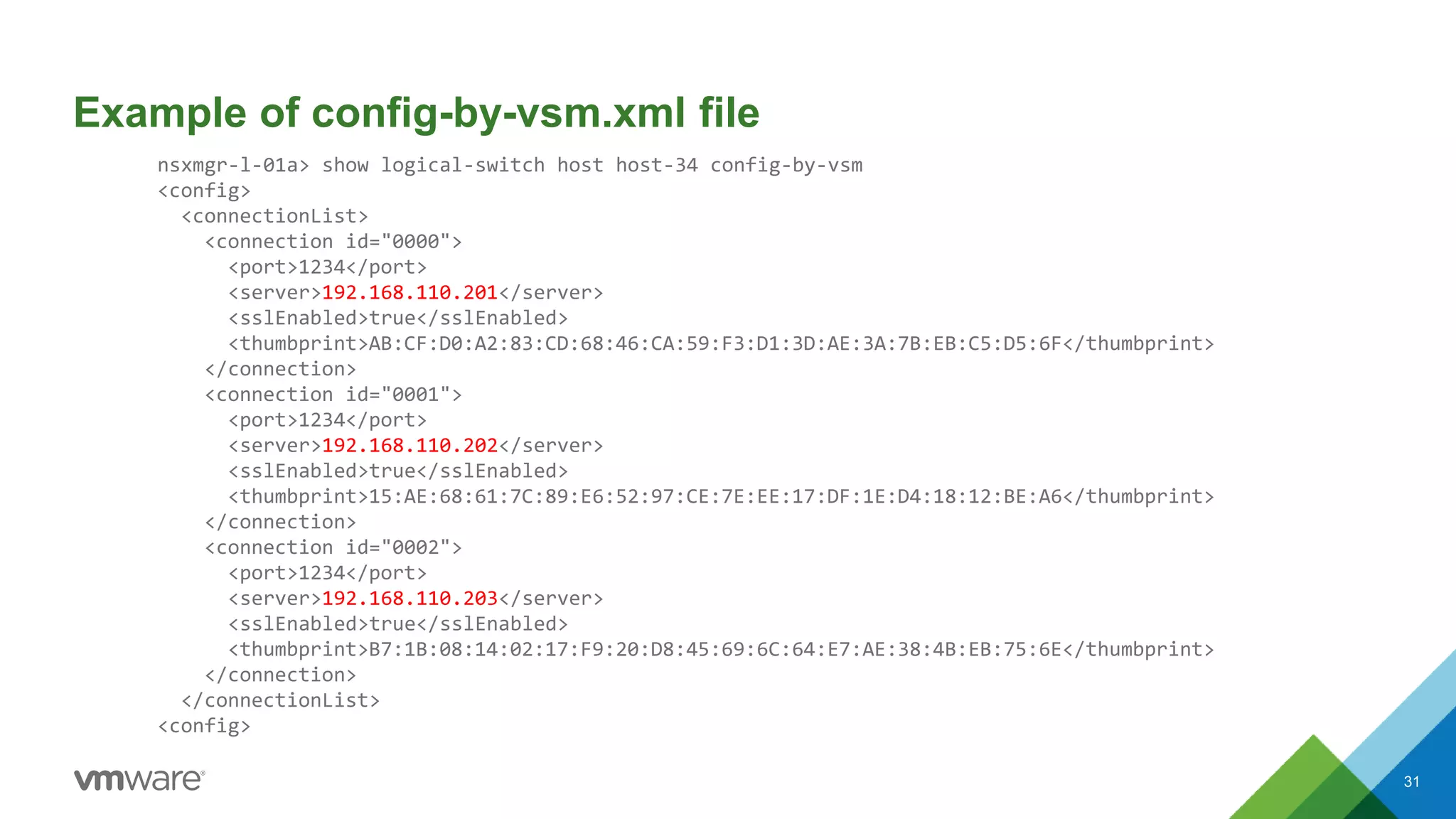
– List of Controllers and their respective SSL thumbprints is stored on
host in “config-by-vsm.xml” file
– You can display contents of that file using centralised CLI command
“show logical-switch host <host_id> config-by-vsm”
30
Example of config-by-vsm.xml file
nsxmgr-l-01a> show logical-switch host host-34 config-by-vsm
<config>
<connectionList>
<connection id="0000">
<port>1234</port>
<server>192.168.110.201</server>
<sslEnabled>true</sslEnabled>
<thumbprint>AB:CF:D0:A2:83:CD:68:46:CA:59:F3:D1:3D:AE:3A:7B:EB:C5:D5:6F</thumbprint>
</connection>
<connection id="0001">
<port>1234</port>
<server>192.168.110.202</server>
<sslEnabled>true</sslEnabled>
<thumbprint>15:AE:68:61:7C:89:E6:52:97:CE:7E:EE:17:DF:1E:D4:18:12:BE:A6</thumbprint>
</connection>
<connection id="0002">
<port>1234</port>
<server>192.168.110.203</server>
<sslEnabled>true</sslEnabled>
<thumbprint>B7:1B:08:14:02:17:F9:20:D8:45:69:6C:64:E7:AE:38:4B:EB:75:6E</thumbprint>
</connection>
</connectionList>
<config>
31
dvPort opaque attributes – can I see them?
• Yes, you can. They are shown in the “net-dvs -l” ESXi CLI output:
[root@esxcomp-01a:~] net-stats -l
PortNum Type SubType SwitchName MACAddress ClientName
[..skip..]
50331657 5 9 DvsPortset-0 00:50:56:b9:eb:14 web-sv01a.eth0
[root@esxcomp-01a:~] net-dvs -l | grep -B 30 50331657 | grep vxlan
com.vmware.net.vxlan.cp = 0x 0. 0. 0. 1 <- control plane (1=Yes)
com.vmware.net.vxlan.id = 0x 0. 0.27.10 <- VNI (in Hex)
com.vmware.net.vxlan.mcastip = 0x 0. 0. 0. 1 <- MC IP (0.0.0.1=Unicast)
[root@esxcomp-01a:~] printf "%dn" 0x2710
10000
32
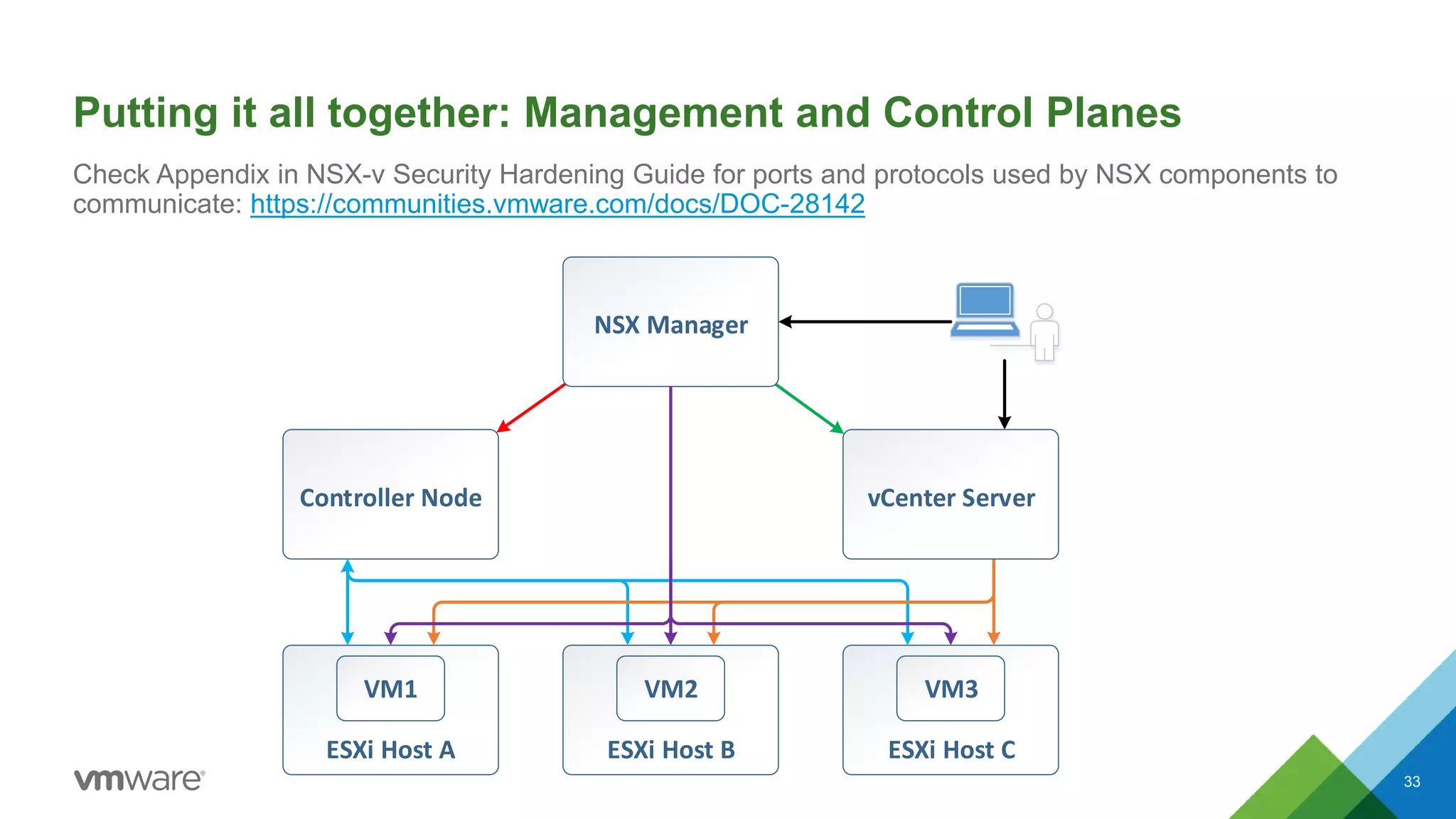
Putting it all together: Management and Control Planes
33
Check Appendix in NSX-v Security Hardening Guide for ports and protocols used by NSX components to
communicate: https://communities.vmware.com/docs/DOC-28142
ESXi Host B
VM2
ESXi Host A
VM1
ESXi Host C
VM3
Controller Node vCenter Server
NSX Manager
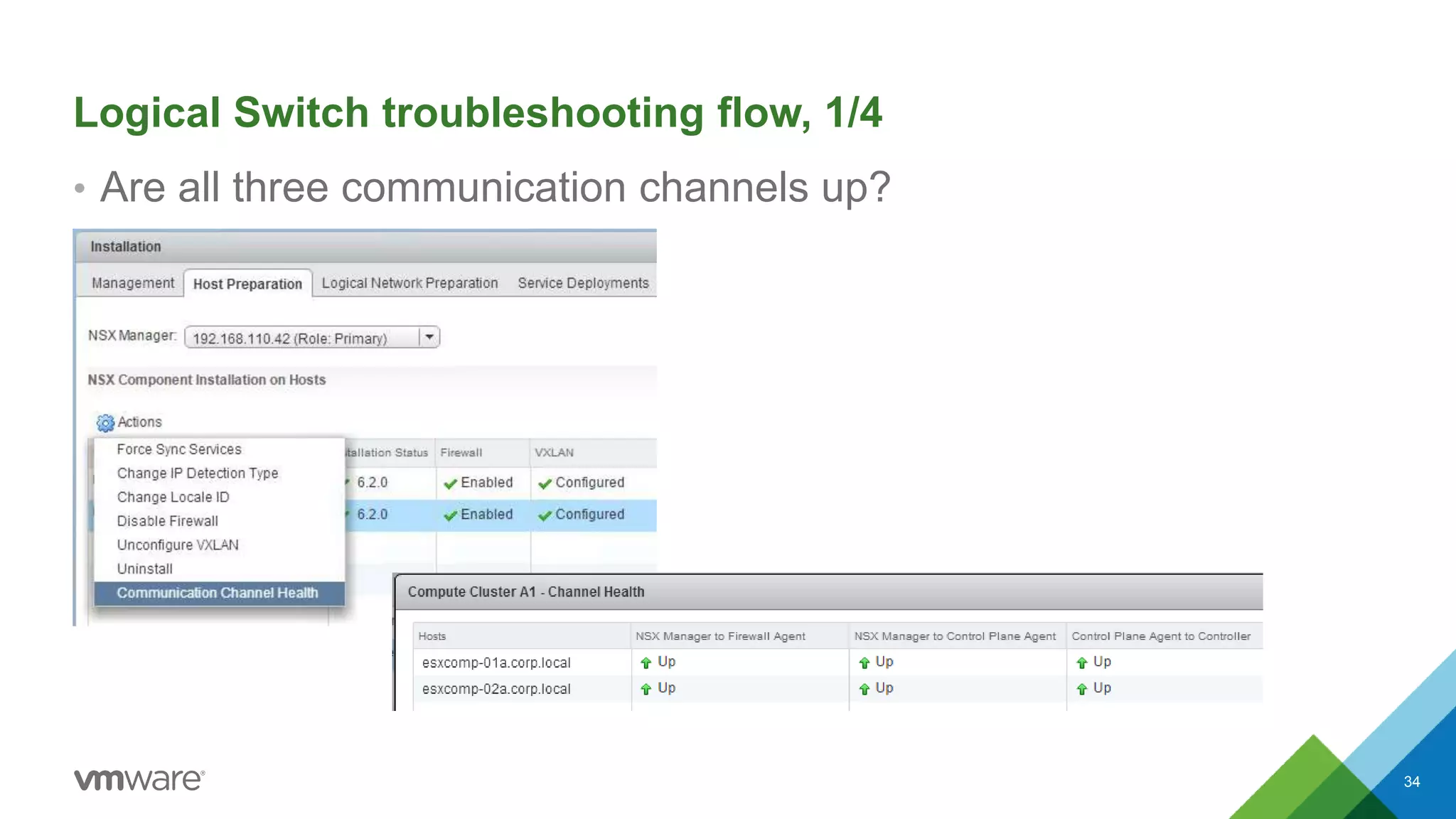
Logical Switch troubleshooting flow, 1/4
• Are all three communication channels up?
34
Logical Switch troubleshooting flow, 2/4
• If “NSX Manager to Firewall / Control Plane Agent” is not “Up”:
– Controllers’ IP addresses on hosts may be missing or incorrect
• Most likely cause – ESXi host’s Management vmk IP can’t reach NSX Manager
– Check if ESXi host’s Management interface and NSX Manager have correct IP config
– Check if firewall isn’t blocking host from reaching TCP/5671 on NSX Manager
• If “Control Plane Agent to Controller” is not “Up”:
– VTEP table on controller or host may not be what we expect:
• Most likely cause – ESXi host’s Management vmk IP can’t reach controller
– Check if ESXi host’s Management interface and Controller have correct IP config
– Check if firewall isn’t blocking host from reaching TCP/1234 on Controller
35
Logical Switch troubleshooting flow, 3/4
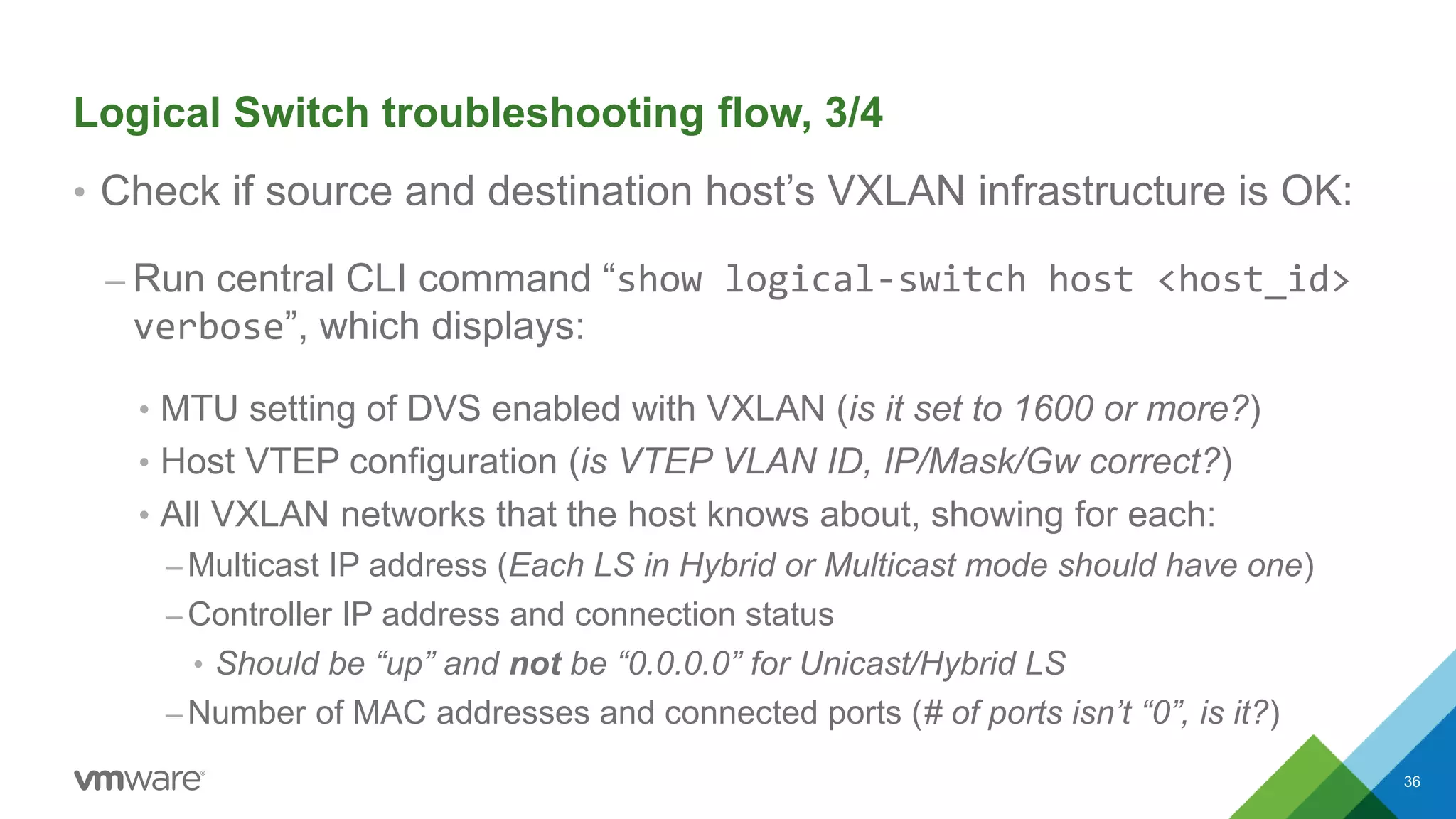
• Check if source and destination host’s VXLAN infrastructure is OK:
– Run central CLI command “show logical-switch host <host_id>
verbose”, which displays:
• MTU setting of DVS enabled with VXLAN (is it set to 1600 or more?)
• Host VTEP configuration (is VTEP VLAN ID, IP/Mask/Gw correct?)
• All VXLAN networks that the host knows about, showing for each:
– Multicast IP address (Each LS in Hybrid or Multicast mode should have one)
– Controller IP address and connection status
• Should be “up” and not be “0.0.0.0” for Unicast/Hybrid LS
– Number of MAC addresses and connected ports (# of ports isn’t “0”, is it?)
36
Logical Switch troubleshooting flow, 4/4
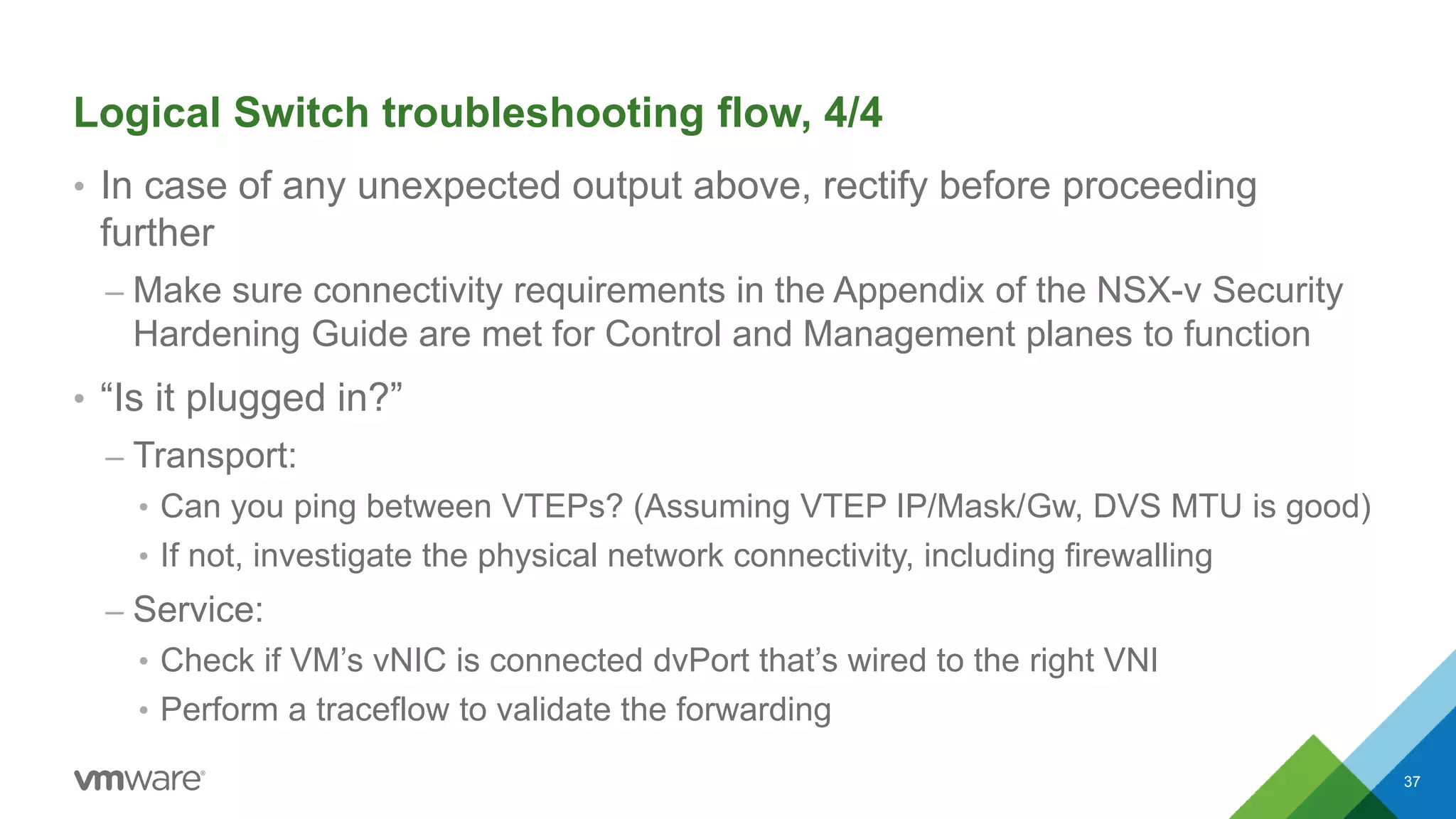
• In case of any unexpected output above, rectify before proceeding
further
– Make sure connectivity requirements in the Appendix of the NSX-v Security
Hardening Guide are met for Control and Management planes to function
• “Is it plugged in?”
– Transport:
• Can you ping between VTEPs? (Assuming VTEP IP/Mask/Gw, DVS MTU is good)
• If not, investigate the physical network connectivity, including firewalling
– Service:
• Check if VM’s vNIC is connected dvPort that’s wired to the right VNI
• Perform a traceflow to validate the forwarding
37
Takeaways
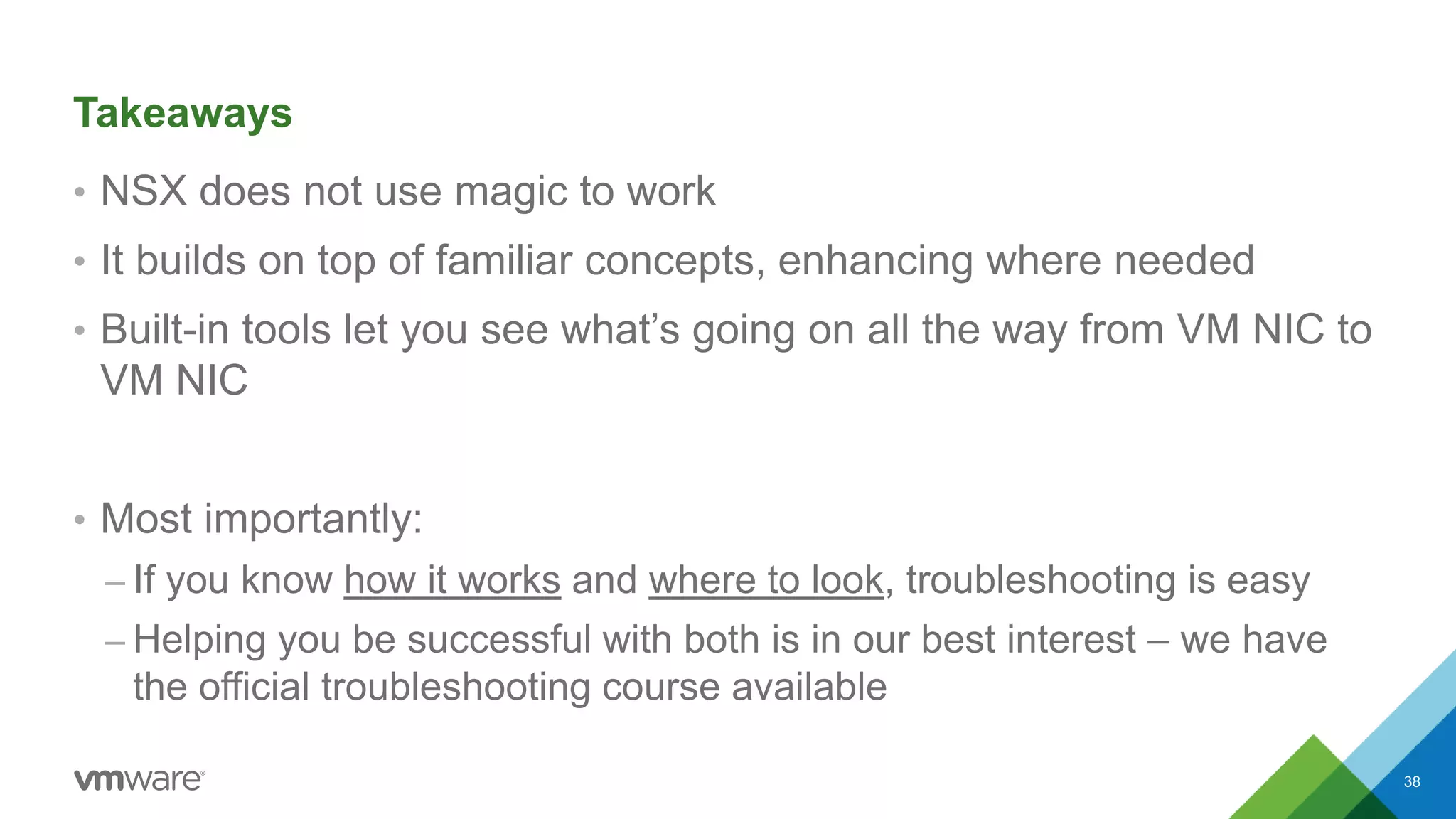
• NSX does not use magic to work
• It builds on top of familiar concepts, enhancing where needed
• Built-in tools let you see what’s going on all the way from VM NIC to
VM NIC
• Most importantly:
– If you know how it works and where to look, troubleshooting is easy
– Helping you be successful with both is in our best interest – we have
the official troubleshooting course available
38
Q&A
•Your questions, please?
39

#NET5488 - Troubleshooting Methodology for VMware NSX - VMworld 2015

  • 1.
    © 2014 VMwareInc. All rights reserved. Troubleshooting Methodology for VMware NSX NET5488 Dmitri Kalintsev @dkalintsev Oct 2015
  • 2.
    Session outline 1. Doesnetwork virtualisation make fault finding harder? 2. What do I need to know to be good at fault finding? 3. Where do I need to look when troubleshooting? 4. Example scenario walk-through 2
  • 3.
    Is network virtualisationthat new? • You’re likely using virtualised networks all the time • But we’re just calling them something else - “VPN”: – MPLS L3 VPNs – Carrier Ethernet – IPSec VPNs 3
  • 4.
    Core principle isthe same • There’s a common “Transport” portion, providing carriage to.. • ..lots of “Services”, implemented in network edge: – MPLS VPN: • MPLS transport network, providing carriage to.. • ..IP VPN or L2 VPN services on the top (may be at the same time) – NSX: • IP transport network, providing carriage to.. • ..Logical Switching, Routing, and Security services on top. 4
  • 5.
    Separation of concernsand troubleshooting • Separation between “Transport” and “Services” is beneficial: – Transport is simple, therefore can be checked quickly – If transport is OK, you can focus on validating the Services • For NSX, “Transport” is IP connectivity between VTEP IPs – Easy to check with existing tools (ping/vmkping) • But what about these “Services”? 5
  • 6.
    NSX Services • NSXincludes both integrated and distributed services – Integrated services provided by NSX Edge (Routing, FW, LB, etc) – Distributed are delivered in kernel on hypervisor • Integrated services work similar to physical appliances under the hood, therefore easy to understand, but.. • Distributed services worth a more detailed look 6
  • 7.
    What do Ineed to know so I can troubleshoot? • To troubleshoot is to find where the “it’s not working” – Need to first understand what “working” is • “Working” is a combination of: – Current state, and – How it is reached • Let’s examine this combination for NSX Logical Switching. 7
  • 8.
    Terminology • VTEP: VXLANTunnel Endpoint – An IP interface on ESXi host that performs VXLAN encap/decap • Logical Switch, also referred to as “VXLAN” – One or more VXLAN-backed dvPortgroups forming a single L2-over-L3 domain • VNI: VXLAN Network Identifier – VXLAN ID; called “VXLAN Segment ID” in the UI – Each LS has a unique VNI associated with it 8
  • 9.
    What is LogicalSwitching? • NSX Logical Switching implements L2 connectivity services on top of L3 (IP) Transport • vCenter sees Logical Switches as slightly “special” dvPortgroups • If an LS spans multiple VDS, NSX Manager creates a dvPortgroup on each VDS in Transport Zone (see https://goo.gl/4OcOM5 for a bit more on Transport Zones) • dvPortgroups making up an LS have opaque attributes to signal them being different from VLAN-backed ones (more on that later) • Only one VDS on a given cluster can have Logical Switches 9
  • 10.
    Logical Switching: howforwarding works (1/2) • Logical Switching operates on per-VNI (VXLAN Network Identifier) basis – One or many – they all work on same principle, therefore we’ll just look at one • Inside each LS/VNI, forwarding process is the same: 1. Look at the destination MAC address of a frame; if it’s not local, then 2. Find VTEP IP of the host that has that MAC 3. Encapsulate original frame in VXLAN and send it to that IP 10
  • 11.
    Logical Switching: howforwarding works (2/2) • Therefore, Logical Switching need answers to either first, or to both questions: 1. “Which VTEP IP do I need to send this frame to?” a) If I can have explicit answer (this MAC goes to that VTEP IP), I’m all good b) If not, I need a way to send frame to all VTEPs, hoping for the best 2. “If 1.b, what are all VTEPs where our destination MAC can possibly be?” • It is the list of VTEP IPs of hosts that have “something” on that LS/VNI; but – How do we find that out? 11
  • 12.
    Logical Switching: VTEPtable • The answer to the second question is in per-LS/VNI VTEP table – First VM on a host connecting to an LS causes that host to join the VNI – Controller updates its VTEP table for that VNI, and tells other hosts on VNI about new VTEP addition • Therefore, we should see: – On controller, VTEPs of all hosts that have something connected to LS/VNI – On these hosts, same list of VTEPs, minus host’s own VTEP IP 12
  • 13.
    VTEP table withtwo hosts on VNI: 13 ESXi Host 3 VTEP 3 DVS ESXi Host 2 VTEP 2 DVS ESXi Host 1 VTEP 1 DVS Controller VNI 5000 VTEP table: - VTEP 1 - VTEP 2 VNI 5000 VNI 5000 VTEP table: - VTEP 2 VNI 5000 VTEP table: - VTEP 1 VNI 5000 VTEP table: VM1 VM3VM2
  • 14.
    ESXi Host 3 VTEP3 DVS ESXi Host 2 VTEP 2 DVS ESXi Host 1 VTEP 1 DVS Controller VNI 5000 VTEP table: - VTEP 1 - VTEP 2 Controller VNI 5000 VTEP table: - VTEP 1 - VTEP 2 - VTEP 3 VNI 5000 VNI 5000 VTEP table: - VTEP 2 - VTEP 3 VNI 5000 VTEP table: - VTEP 1 - VTEP 3 VNI 5000 VTEP table: - VTEP 1 - VTEP 2 VM1 VM3VM2 (1) “I now have something on VNI 5000” (3) “New guy VTEP 3 is now on VNI 5000” (3) “New guy VTEP 3 is now on VNI 5000” (2) Here are other two guys already on VNI 5000” VTEP table once VM3 connects, and third host joins 14
  • 15.
    Logical Switching: VTEPtable Let’s have a look at these tables using new NSX 6.2 Central CLI. 15
  • 16.
    esxcomp-01a DVS (Compute_VDS) esxcomp-02a DVS (Compute_VDS) VXLAN10000 VM web-sv01a dvPort VXLAN dvUplink IOChain vNIC VTEP VLAN VTEP: 192.168.125.51 VXLAN VXLAN 10000 VM web-sv02a dvPort dvUplink IOChain vNIC VTEP VLAN VTEP: 192.168.125.52 pNICpNIC MAC: 00:50:56:b9:eb:14 MAC: 00:50:56:b9:12:ce Encapsulated VXLAN traffic First things first: sample environment 16
  • 17.
    Transport connectivity verification •Let’s verify that Transport connectivity works. To do this, log into one of the ESXi hosts and run a vmkping command against other host’s VTEP IP. Force it to set “do not fragment” flag and size of 1572 to test e2e MTU is correct, too: [root@esxcomp-01a:~] vmkping ++netstack=vxlan -d -s 1572 192.168.125.52 PING 192.168.125.52 (192.168.125.52): 1572 data bytes 1580 bytes from 192.168.125.52: icmp_seq=0 ttl=64 time=0.715 ms 1580 bytes from 192.168.125.52: icmp_seq=1 ttl=64 time=1.094 ms 1580 bytes from 192.168.125.52: icmp_seq=2 ttl=64 time=0.860 ms --- 192.168.125.52 ping statistics --- 3 packets transmitted, 3 packets received, 0% packet loss round-trip min/avg/max = 0.715/0.890/1.094 ms 17
  • 18.
    Transport connectivity verification:notes • The ping test can prove that the required physical network connectivity is configured correctly, covering: – VTEP portgroup VLAN ID, VTEP IP address, mask, and vxlan IP netstack gateway – Routing / switching in physical network • It doesn’t check if your firewall is blocking UDP/8472, or UDP/4789 if you changed NSX configuration to comply with RFC7348 – This can be checked using Traceflow tool that we talk about later • Now let us look at what makes Logical Switching services tick 18
  • 19.
    Logical Switching: VTEPtable CLI commands SSH into NSX Manager, and run command to see which VTEPs does VNI 10000 have. First on Controller Cluster: nsxmgr-l-01a> show logical-switch controller master vni 10000 vtep VNI IP Segment MAC Connection-ID 10000 192.168.125.51 192.168.125.0 00:50:56:64:43:2d 14 10000 192.168.125.52 192.168.125.0 00:50:56:62:5b:91 15 masterControllerIp=192.168.110.203 As expected, there are two VTEPs, since we have two hosts with a VM on each. 19
  • 20.
    Logical Switching: VTEPtable CLI commands ..then on the hosts themselves: nsxmgr-l-01a> show logical-switch list vni 10000 host ID HostName VdsName host-34 esxcomp-01a.corp.local Compute_VDS host-35 esxcomp-02a.corp.local Compute_VDS nsxmgr-l-01a> show logical-switch host host-34 vni 10000 vtep VTEP count: 1 Segment ID: 192.168.125.0 VTEP IP: 192.168.125.52 Flags: 0(None) One VTEP, as expected. 20
  • 21.
    Looks like VTEPsare all good; what about MAC addresses? • We’ve seen that our hosts know IP addresses of other hosts on the VNI 10000, as they have them in local VTEP table. • But what about MAC addresses? How can they find which VTEP to choose to reach a particular MAC? • Let’s have a look at what the controller knows: nsxmgr-l-01a> show logical-switch controller master vni 10000 mac VNI MAC VTEP-IP Connection-ID 10000 00:50:56:b9:eb:14 192.168.125.51 14 10000 00:50:56:b9:12:ce 192.168.125.52 15 21
  • 22.
    MAC addresses onthe hosts • Ok, Controller seems to know about both of our VMs. So what about hosts themselves? nsxmgr-l-01a> show logical-switch host host-34 vni 10000 mac MAC entry count: 0 nsxmgr-l-01a> show logical-switch host host-35 vni 10000 mac MAC entry count: 0 • Looks like hosts don’t. Can this be right? 22
  • 23.
    MAC addresses onthe hosts, continued • Turns out, yes. • MAC table on hosts is kept in cache, which expires periodically. • This is done to ensure that if VM moves, host doesn’t try to reach it at its old location • Since information about MAC addresses’ location and presence is highly dynamic, controllers don’t actively push this info to hosts • When time comes to send something to a MAC, host will query the controller and get the necessary info. 23
  • 24.
    MAC addresses onthe hosts, contd • Let’s make VM web-sv01a ping web-sv-02a, and look at MAC tables then: nsxmgr-l-01a> show logical-switch host host-34 vni 10000 mac <- look on esxcomp-01a MAC entry count: 1 Inner MAC: 00:50:56:b9:12:ce <- web-sv02a Outer MAC: 00:50:56:62:5b:91 Outer IP: 192.168.125.52 <- esxcomp02a’s VTEP Flags: 7 nsxmgr-l-01a> show logical-switch host host-35 vni 10000 mac <- look on esxcomp-02a MAC entry count: 1 Inner MAC: 00:50:56:b9:eb:14 <- web-sv01a Outer MAC: 00:50:56:64:43:2d Outer IP: 192.168.125.51 <- esxcomp01a’s VTEP Flags: 7 Much better now! 24
  • 25.
    What path didthe packets take between these VMs? 25
  • 26.
    What we talkedabout so far: • Per-VNI VTEP table tells ESXi host about other hosts on that VNI • Controller maintains MAC:VTEP table of all VMs connected to an LS/VNI • If a host has no entry in its MAC:VTEP cache, it will ask controller • If controller has no answer (eg, MAC is on a VLAN bridged to VXLAN), it will respond saying so, and host will flood to all VTEPs* * Night time reading for extra curious: http://goo.gl/rKDvLN 26
  • 27.
    But how didall this stuff get there? • When an LS is created, NSX Manager does the following: – Allocates a VNI from the Segment ID pool – Allocates a Multicast IP address, if LS is Hybrid or Multicast – Creates dvPortgroup(s), and sets opaque attributes with that VNI and Multicast IP address – Tells controller cluster about the new Hybrid or Unicast LS/VNI • Now VC knows to set these opaque attributes on any dvPort it creates when it connects a VM to that LS 27
  • 28.
    (1) Create new LS ControllerNode ESXi Host A (3) New LS; VNI = XXX (2) New dvPg; VXLAN VNI = XXX MC IP = x.x.x.x VM1 NSX Manager vCenter Server How did all this stuff get there, 1/2 28
  • 29.
    NSX Manager (1) Attach VM1to LS vCenter Server ESXi Host A (2) New dvPort; VXLAN VNI = XXX MC IP = x.x.x.x VM1 (3) New VTEP y.y.y.y on VNI XXX (5) New MAC xx:xx:xx:xx:xx:xx on VNI XXX, VTEP IP y.y.y.y (4) Here are other VTEPs on VNI XXX Controller Node How did all this stuff get there, 2/2 29
  • 30.
    Outstanding questions (moreinfo: https://goo.gl/BZ7aPq) • Looking at the diagram on previous slide, we notice that ESXi host connects to a Controller; but how does it know Controller’s IP? – The list of Controllers and their SSL certificate thumbprints are passed to host by NSX Manager – Host picks one Controller at random, connects to it, and gets a slicing table that tells host which VXLAN VNIs are owned by which Controller – List of Controllers and their respective SSL thumbprints is stored on host in “config-by-vsm.xml” file – You can display contents of that file using centralised CLI command “show logical-switch host <host_id> config-by-vsm” 30
  • 31.
    Example of config-by-vsm.xmlfile nsxmgr-l-01a> show logical-switch host host-34 config-by-vsm <config> <connectionList> <connection id="0000"> <port>1234</port> <server>192.168.110.201</server> <sslEnabled>true</sslEnabled> <thumbprint>AB:CF:D0:A2:83:CD:68:46:CA:59:F3:D1:3D:AE:3A:7B:EB:C5:D5:6F</thumbprint> </connection> <connection id="0001"> <port>1234</port> <server>192.168.110.202</server> <sslEnabled>true</sslEnabled> <thumbprint>15:AE:68:61:7C:89:E6:52:97:CE:7E:EE:17:DF:1E:D4:18:12:BE:A6</thumbprint> </connection> <connection id="0002"> <port>1234</port> <server>192.168.110.203</server> <sslEnabled>true</sslEnabled> <thumbprint>B7:1B:08:14:02:17:F9:20:D8:45:69:6C:64:E7:AE:38:4B:EB:75:6E</thumbprint> </connection> </connectionList> <config> 31
  • 32.
    dvPort opaque attributes– can I see them? • Yes, you can. They are shown in the “net-dvs -l” ESXi CLI output: [root@esxcomp-01a:~] net-stats -l PortNum Type SubType SwitchName MACAddress ClientName [..skip..] 50331657 5 9 DvsPortset-0 00:50:56:b9:eb:14 web-sv01a.eth0 [root@esxcomp-01a:~] net-dvs -l | grep -B 30 50331657 | grep vxlan com.vmware.net.vxlan.cp = 0x 0. 0. 0. 1 <- control plane (1=Yes) com.vmware.net.vxlan.id = 0x 0. 0.27.10 <- VNI (in Hex) com.vmware.net.vxlan.mcastip = 0x 0. 0. 0. 1 <- MC IP (0.0.0.1=Unicast) [root@esxcomp-01a:~] printf "%dn" 0x2710 10000 32
  • 33.
    Putting it alltogether: Management and Control Planes 33 Check Appendix in NSX-v Security Hardening Guide for ports and protocols used by NSX components to communicate: https://communities.vmware.com/docs/DOC-28142 ESXi Host B VM2 ESXi Host A VM1 ESXi Host C VM3 Controller Node vCenter Server NSX Manager
  • 34.
    Logical Switch troubleshootingflow, 1/4 • Are all three communication channels up? 34
  • 35.
    Logical Switch troubleshootingflow, 2/4 • If “NSX Manager to Firewall / Control Plane Agent” is not “Up”: – Controllers’ IP addresses on hosts may be missing or incorrect • Most likely cause – ESXi host’s Management vmk IP can’t reach NSX Manager – Check if ESXi host’s Management interface and NSX Manager have correct IP config – Check if firewall isn’t blocking host from reaching TCP/5671 on NSX Manager • If “Control Plane Agent to Controller” is not “Up”: – VTEP table on controller or host may not be what we expect: • Most likely cause – ESXi host’s Management vmk IP can’t reach controller – Check if ESXi host’s Management interface and Controller have correct IP config – Check if firewall isn’t blocking host from reaching TCP/1234 on Controller 35
  • 36.
    Logical Switch troubleshootingflow, 3/4 • Check if source and destination host’s VXLAN infrastructure is OK: – Run central CLI command “show logical-switch host <host_id> verbose”, which displays: • MTU setting of DVS enabled with VXLAN (is it set to 1600 or more?) • Host VTEP configuration (is VTEP VLAN ID, IP/Mask/Gw correct?) • All VXLAN networks that the host knows about, showing for each: – Multicast IP address (Each LS in Hybrid or Multicast mode should have one) – Controller IP address and connection status • Should be “up” and not be “0.0.0.0” for Unicast/Hybrid LS – Number of MAC addresses and connected ports (# of ports isn’t “0”, is it?) 36
  • 37.
    Logical Switch troubleshootingflow, 4/4 • In case of any unexpected output above, rectify before proceeding further – Make sure connectivity requirements in the Appendix of the NSX-v Security Hardening Guide are met for Control and Management planes to function • “Is it plugged in?” – Transport: • Can you ping between VTEPs? (Assuming VTEP IP/Mask/Gw, DVS MTU is good) • If not, investigate the physical network connectivity, including firewalling – Service: • Check if VM’s vNIC is connected dvPort that’s wired to the right VNI • Perform a traceflow to validate the forwarding 37
  • 38.
    Takeaways • NSX doesnot use magic to work • It builds on top of familiar concepts, enhancing where needed • Built-in tools let you see what’s going on all the way from VM NIC to VM NIC • Most importantly: – If you know how it works and where to look, troubleshooting is easy – Helping you be successful with both is in our best interest – we have the official troubleshooting course available 38
  • 39.

Editor's Notes

  • #2 Name and role at VMware Background (professional deformation alert)
  • #4 Show of hands: Who’s using VPNs? Who can explain how VPN works to a layman?
  • #5 Transport doesn’t know and does not need to know about the services that are riding on top
  • #6 This is in contrast with a network that directly carries application connectivity services – they need to be visible throughout the network
  • #8 Show of hands: Who can tell a standard vswitch from a distributed vswitch? Who spent more than a day hands-on with NSX? Who spent at least a third of that time with NSX Logical Switches? Who can tell what’s the difference between “VXLAN”, “VNI”, and “Logical Switch”?
  • #9 These terms are useful when looking in the UI and especially CLI output Need to understand them to make sense of what you’re seeing VTEP is a bridge between one Transport on one side, and many services on the other
  • #10 Show of hands: Who can explain how an Ethernet switch forwards frames?
  • #11 “Local” for physical Ethernet switch is a MAC pointing to a port VC explicitly tells vSwitch of VM’s MAC when it connects VM to a switch port Show of hands: - Who can explain where an Ethernet switch will send a BUM frames?
  • #13 VTEP table is similar to list of physical switch’s ports for a given VLAN - it’s how switch knows how to reach other switches on that VLAN
  • #18 20 bytes IP header + 8 bytes ICMP header + 1572 bytes “data” = 1600 bytes of Ethernet payload (Ethernet headers don’t count)
  • #20 First thing to check is whether our vSwitch on ESXi host has “links” to other host(s) for that VNI
  • #26 If there’s any NetX partner solution registered, it will be reflected here as well.
  • #27 MAC table is also populated by datapath learning (incoming VXLAN packets) Show of hands: Who can explain difference between Unicast, Hybrid, and Multicast VXLAN Control Plane modes?
  • #30 Show of hands: We see a controller connection here; who can tell how the host knows Controller’s IP?
  • #31 There are two types of Controller connections: One is used to get slicing info Another is control plane connection to logical switch / router master
  • #38 If traceflow is showing issues, use what we’ve learned to find where exactly it’s breaking.