Security Automation Workflows with NSX
Gargi Keeling, VMware
Don Wood, McKesson
Troy Casey, McKesson
SEC5750
#SEC5750
2
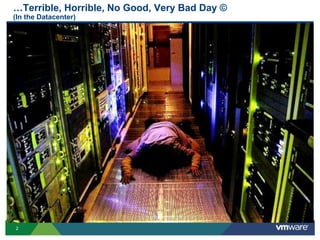
…Terrible, Horrible, No Good, Very Bad Day ©
(In the Datacenter)
3
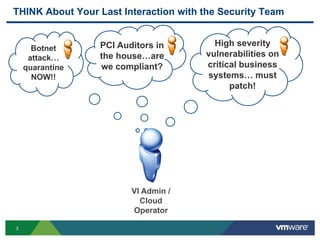
THINK About Your Last Interaction with the Security Team
VI Admin /
Cloud
Operator
Botnet
attack…
quarantine
NOW!!
PCI Auditors in
the house…are
we compliant?
High severity
vulnerabilities on
critical business
systems… must
patch!
4
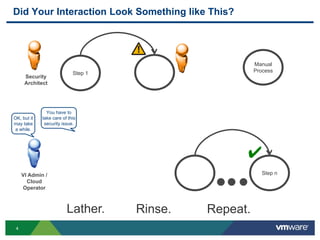
Did Your Interaction Look Something like This?
Step 1
Manual
Process
Security
Architect
Step n
✔
Repeat.
You have to
take care of this
security issue.
VI Admin /
Cloud
Operator
OK, but it
may take
a while.
Lather. Rinse.
5
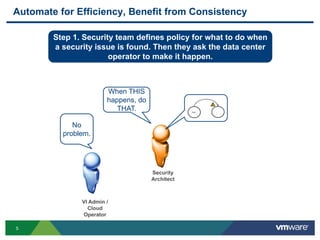
Automate for Efficiency, Benefit from Consistency
VI Admin /
Cloud
Operator
No
problem.
When THIS
happens, do
THAT.
Security
Architect
Step 1. Security team defines policy for what to do when
a security issue is found. Then they ask the data center
operator to make it happen.
6
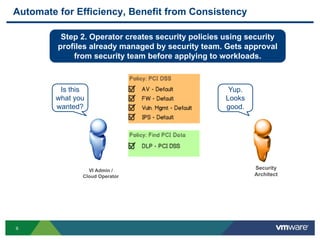
Automate for Efficiency, Benefit from Consistency
Step 2. Operator creates security policies using security
profiles already managed by security team. Gets approval
from security team before applying to workloads.
Is this
what you
wanted?
VI Admin /
Cloud Operator
Yup.
Looks
good.
Security
Architect
7
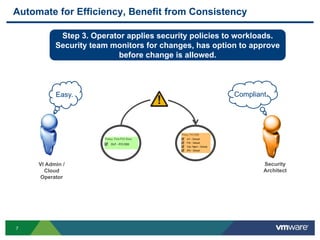
Automate for Efficiency, Benefit from Consistency
VI Admin /
Cloud
Operator
Easy.
Step 3. Operator applies security policies to workloads.
Security team monitors for changes, has option to approve
before change is allowed.
Security
Architect
Compliant.
8
Agenda
 Think About Your Last Interaction with Security Team
 Quarantine Infected Systems (NAC:TNG) + DEMO
 Customer Perspective: McKesson OneCloud
 Summary of Automation Capabilities
 Next Steps
9
production quarantine
✔
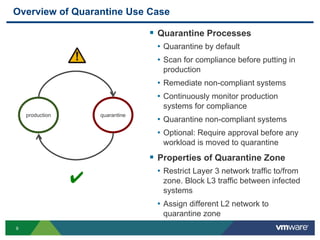
Overview of Quarantine Use Case
 Quarantine Processes
• Quarantine by default
• Scan for compliance before putting in
production
• Remediate non-compliant systems
• Continuously monitor production
systems for compliance
• Quarantine non-compliant systems
• Optional: Require approval before any
workload is moved to quarantine
 Properties of Quarantine Zone
• Restrict Layer 3 network traffic to/from
zone. Block L3 traffic between infected
systems
• Assign different L2 network to
quarantine zone
10
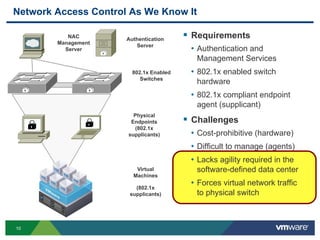
Network Access Control As We Know It
 Requirements
• Authentication and
Management Services
• 802.1x enabled switch
hardware
• 802.1x compliant endpoint
agent (supplicant)
 Challenges
• Cost-prohibitive (hardware)
• Difficult to manage (agents)
• Lacks agility required in the
software-defined data center
• Forces virtual network traffic
to physical switch
Physical
Endpoints
(802.1x
supplicants)
Virtual
Machines
(802.1x
supplicants)
Authentication
Server
NAC
Management
Server
802.1x Enabled
Switches
11
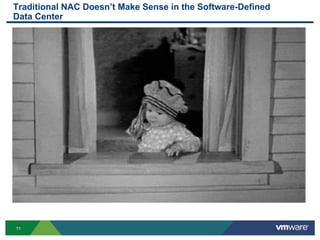
Traditional NAC Doesn’t Make Sense in the Software-Defined
Data Center
12
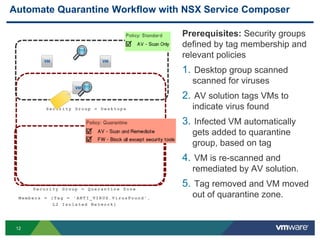
Automate Quarantine Workflow with NSX Service Composer
Prerequisites: Security groups
defined by tag membership and
relevant policies
1. Desktop group scanned
scanned for viruses
2. AV solution tags VMs to
indicate virus found
3. Infected VM automatically
gets added to quarantine
group, based on tag
4. VM is re-scanned and
remediated by AV solution.
5. Tag removed and VM moved
out of quarantine zone.
S e cu r i t y G ro u p = Q ua r a n t i n e Z o n e
M e mb e r s = {T a g = ‘ AN T I _ V I R US . V i r u s Fo u n d ’ ,
L 2 I s o l a t e d N e t w o r k}
S e cu r i t y G ro u p = D es k t o p s
13
Agenda
 Think About Your Last Interaction with Security Team
 Quarantine Infected Systems (NAC:TNG) + DEMO
 NSX Service Composer for Security Automation
 Customer Perspective: McKesson OneCloud
 Summary of Automation Capabilities
 Next Steps
14
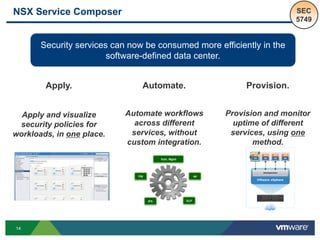
NSX Service Composer
Security services can now be consumed more efficiently in the
software-defined data center.
Automate.
Automate workflows
across different
services, without
custom integration.
Provision.
Provision and monitor
uptime of different
services, using one
method.
Apply.
Apply and visualize
security policies for
workloads, in one place.
SEC
5749
15
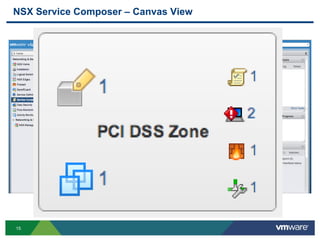
NSX Service Composer – Canvas View
16
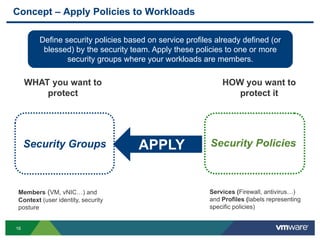
Concept – Apply Policies to Workloads
Security Groups
WHAT you want to
protect
Members (VM, vNIC…) and
Context (user identity, security
posture
HOW you want to
protect it
Services (Firewall, antivirus…)
and Profiles (labels representing
specific policies)
APPLY
Define security policies based on service profiles already defined (or
blessed) by the security team. Apply these policies to one or more
security groups where your workloads are members.
17
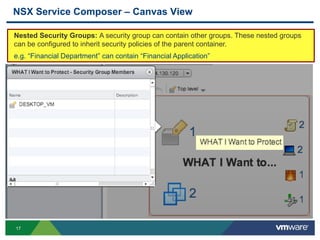
NSX Service Composer – Canvas View
Nested Security Groups: A security group can contain other groups. These nested groups
can be configured to inherit security policies of the parent container.
e.g. “Financial Department” can contain “Financial Application”
18
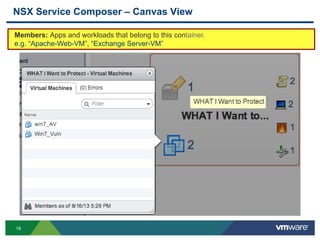
NSX Service Composer – Canvas View
Members: Apps and workloads that belong to this container.
e.g. “Apache-Web-VM”, “Exchange Server-VM”
19
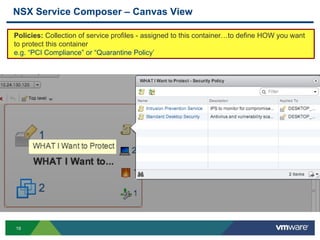
NSX Service Composer – Canvas View
Policies: Collection of service profiles - assigned to this container…to define HOW you want
to protect this container
e.g. “PCI Compliance” or “Quarantine Policy’
20
NSX Service Composer – Canvas View
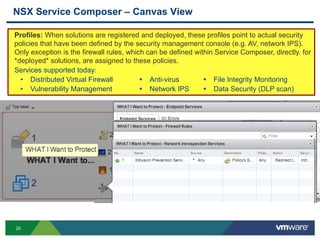
Profiles: When solutions are registered and deployed, these profiles point to actual security
policies that have been defined by the security management console (e.g. AV, network IPS).
Only exception is the firewall rules, which can be defined within Service Composer, directly. for
*deployed* solutions, are assigned to these policies.
Services supported today:
• Distributed Virtual Firewall  Anti-virus  File Integrity Monitoring
• Vulnerability Management  Network IPS  Data Security (DLP scan)
21
Concept – Automate Workflows Across Services
AVFW
IPS DLP
Vuln. Mgmt
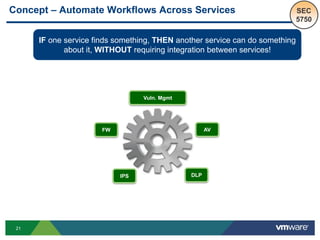
IF one service finds something, THEN another service can do something
about it, WITHOUT requiring integration between services!
SEC
5750
22
Automation Process Using NSX Service Composer
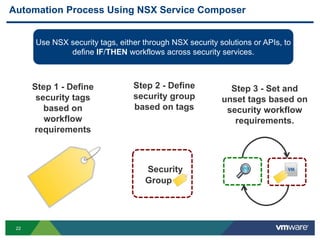
Use NSX security tags, either through NSX security solutions or APIs, to
define IF/THEN workflows across security services.
Step 1 - Define
security tags
based on
workflow
requirements
Security
Group =
Step 2 - Define
security group
based on tags
Step 3 - Set and
unset tags based on
security workflow
requirements.
23
How to Automate a Workflow with NSX Service Composer
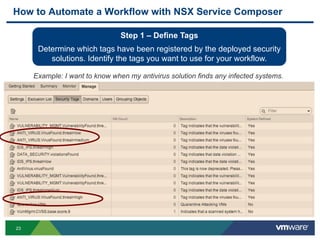
Step 1 – Define Tags
Determine which tags have been registered by the deployed security
solutions. Identify the tags you want to use for your workflow.
Example: I want to know when my antivirus solution finds any infected systems.
24
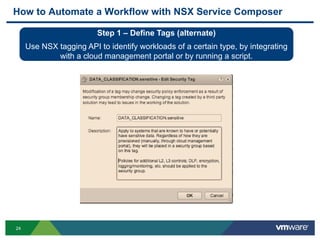
How to Automate a Workflow with NSX Service Composer
Step 1 – Define Tags (alternate)
Use NSX tagging API to identify workloads of a certain type, by integrating
with a cloud management portal or by running a script.
25
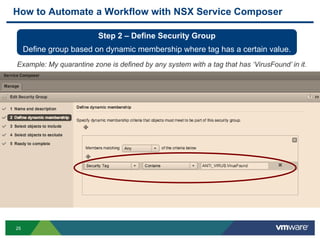
How to Automate a Workflow with NSX Service Composer
Step 2 – Define Security Group
Define group based on dynamic membership where tag has a certain value.
Example: My quarantine zone is defined by any system with a tag that has ‘VirusFound’ in it.
26
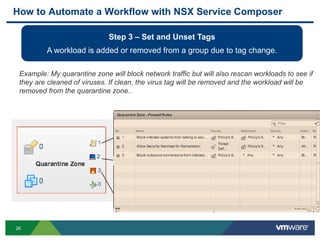
How to Automate a Workflow with NSX Service Composer
Step 3 – Set and Unset Tags
A workload is added or removed from a group due to tag change.
Example: My quarantine zone will block network traffic but will also rescan workloads to see if
they are cleaned of viruses. If clean, the virus tag will be removed and the workload will be
removed from the quarantine zone..
28
Agenda
 Think About Your Last Interaction with Security Team
 Quarantine Infected Systems (NAC:TNG) + DEMO
 Customer Perspective: McKesson OneCloud
 Summary of Automation Capabilities
 Next Steps
29
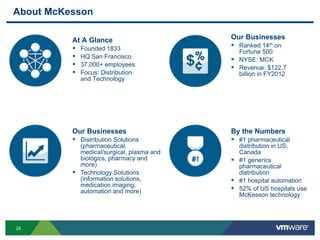
About McKesson
At A Glance
 Founded 1833
 HQ San Francisco
 37,000+ employees
 Focus: Distribution
and Technology
Our Businesses
 Distribution Solutions
(pharmaceutical,
medical/surgical, plasma and
biologics, pharmacy and
more)
 Technology Solutions
(information solutions,
medication imaging,
automation and more)
Our Businesses
 Ranked 14th on
Fortune 500
 NYSE: MCK
 Revenue: $122.7
billion in FY2012
By the Numbers
 #1 pharmaceutical
distribution in US,
Canada
 #1 generics
pharmaceutical
distribution
 #1 hospital automation
 52% of US hospitals use
McKesson technology
30
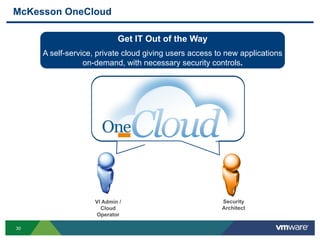
McKesson OneCloud
VI Admin /
Cloud
Operator
Security
Architect
Get IT Out of the Way
A self-service, private cloud giving users access to new applications
on-demand, with necessary security controls.
31
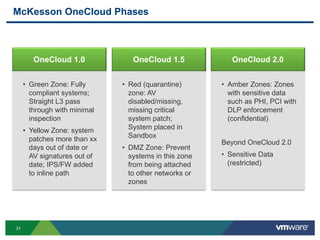
McKesson OneCloud Phases
OneCloud 1.0 OneCloud 1.5 OneCloud 2.0
• Amber Zones: Zones
with sensitive data
such as PHI, PCI with
DLP enforcement
(confidential)
Beyond OneCloud 2.0
• Sensitive Data
(restricted)
• Red (quarantine)
zone: AV
disabled/missing,
missing critical
system patch;
System placed in
Sandbox
• DMZ Zone: Prevent
systems in this zone
from being attached
to other networks or
zones
• Green Zone: Fully
compliant systems;
Straight L3 pass
through with minimal
inspection
• Yellow Zone: system
patches more than xx
days out of date or
AV signatures out of
date; IPS/FW added
to inline path
32
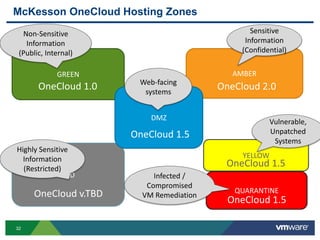
YELLOW
McKesson OneCloud Hosting Zones
GREEN AMBER
TBD
QUARANTINE
DMZ
Web-facing
systems
Non-Sensitive
Information
(Public, Internal)
Sensitive
Information
(Confidential)
Highly Sensitive
Information
(Restricted)
Infected /
Compromised
VM Remediation
OneCloud 1.0
OneCloud 1.5
OneCloud 2.0
OneCloud 1.5
OneCloud v.TBD
OneCloud 1.5
Vulnerable,
Unpatched
Systems
33
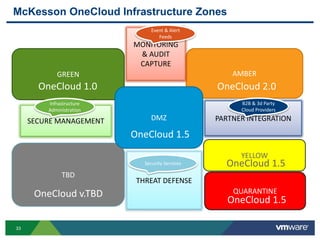
AMBER
MONITORING
& AUDIT
CAPTURE
YELLOW
McKesson OneCloud Infrastructure Zones
GREEN
TBD
QUARANTINE
DMZ
OneCloud 1.0
OneCloud 1.5
OneCloud 2.0
OneCloud 1.5
OneCloud v.TBD
OneCloud 1.5
THREAT DEFENSE
SECURE MANAGEMENT PARTNER INTEGRATION
Security Services
B2B & 3d Party
Cloud Providers
Event & Alert
Feeds
Infrastructure
Administration
34
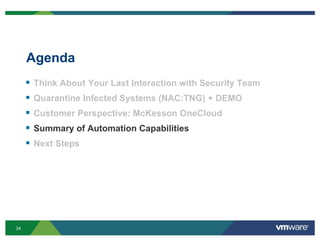
Agenda
 Think About Your Last Interaction with Security Team
 Quarantine Infected Systems (NAC:TNG) + DEMO
 Customer Perspective: McKesson OneCloud
 Summary of Automation Capabilities
 Next Steps
35
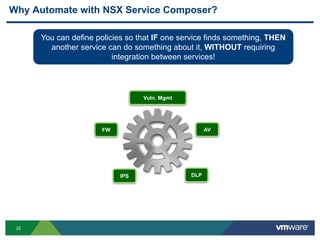
Why Automate with NSX Service Composer?
AVFW
IPS DLP
Vuln. Mgmt
You can define policies so that IF one service finds something, THEN
another service can do something about it, WITHOUT requiring
integration between services!
36
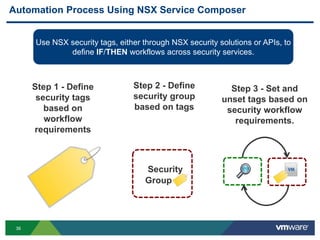
Automation Process Using NSX Service Composer
Use NSX security tags, either through NSX security solutions or APIs, to
define IF/THEN workflows across security services.
Step 1 - Define
security tags
based on
workflow
requirements
Security
Group =
Step 2 - Define
security group
based on tags
Step 3 - Set and
unset tags based on
security workflow
requirements.
37
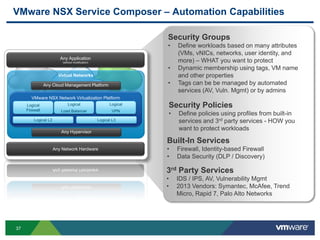
VMware NSX Service Composer – Automation Capabilities
Built-In Services
• Firewall, Identity-based Firewall
• Data Security (DLP / Discovery)
Security Groups
• Define workloads based on many attributes
(VMs, vNICs, networks, user identity, and
more) – WHAT you want to protect
• Dynamic membership using tags, VM name
and other properties
• Tags can be be managed by automated
services (AV, Vuln. Mgmt) or by admins
3rd Party Services
• IDS / IPS, AV, Vulnerability Mgmt
• 2013 Vendors: Symantec, McAfee, Trend
Micro, Rapid 7, Palo Alto Networks
Any Application
(without modification)
Virtual Networks
VMware NSX Network Virtualization Platform
Logical L2
Any Network Hardware
Any Cloud Management Platform
Logical
Firewall
Logical
Load Balancer
Logical L3
Logical
VPN
Any Hypervisor
Security Policies
• Define policies using profiles from built-in
services and 3rd party services - HOW you
want to protect workloads
38
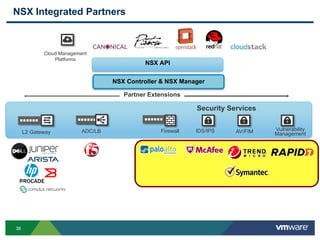
NSX Integrated Partners
NSX Controller & NSX Manager
NSX API
Partner Extensions
L2 Gateway FirewallADC/LB IDS/IPS
+
Cloud Management
Platforms
AV/FIM Vulnerability
Management
Security Services
39
Agenda
 Think About Your Last Interaction with Security Team
 Quarantine Infected Systems (NAC:TNG) + DEMO
 Customer Perspective: McKesson OneCloud
 Enforce Compliance for Sensitive Data
 Summary of Automation Capabilities
 Next Steps
40
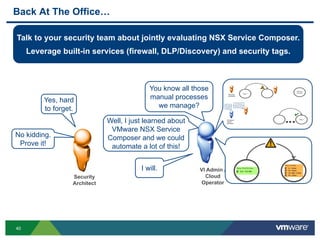
No kidding.
Prove it!
Back At The Office…
VI Admin /
Cloud
Operator
Yes, hard
to forget.
Security
Architect
Talk to your security team about jointly evaluating NSX Service Composer.
Leverage built-in services (firewall, DLP/Discovery) and security tags.
You know all those
manual processes
we manage?
Well, I just learned about
VMware NSX Service
Composer and we could
automate a lot of this!
I will.
41
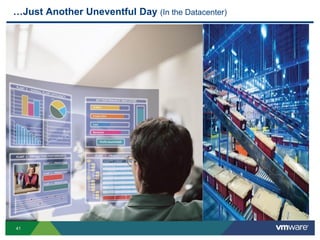
…Just Another Uneventful Day (In the Datacenter)
42
Other VMware Activities Related to This Session
 HOL:
HOL-SDC-1303
VMware NSX Network Virtualization Platform
THANK YOU
Security Automation Workflows with NSX
Gargi Keeling, VMware
Don Wood, McKesson
SEC5750
#SEC5750
46
Background
Additional Material
47
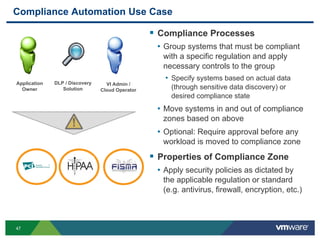
Compliance Automation Use Case
 Compliance Processes
• Group systems that must be compliant
with a specific regulation and apply
necessary controls to the group
• Specify systems based on actual data
(through sensitive data discovery) or
desired compliance state
• Move systems in and out of compliance
zones based on above
• Optional: Require approval before any
workload is moved to compliance zone
 Properties of Compliance Zone
• Apply security policies as dictated by
the applicable regulation or standard
(e.g. antivirus, firewall, encryption, etc.)
Application
Owner
DLP / Discovery
Solution
VI Admin /
Cloud Operator
48
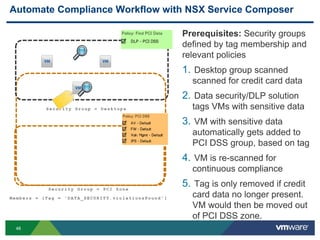
Automate Compliance Workflow with NSX Service Composer
Prerequisites: Security groups
defined by tag membership and
relevant policies
1. Desktop group scanned
scanned for credit card data
2. Data security/DLP solution
tags VMs with sensitive data
3. VM with sensitive data
automatically gets added to
PCI DSS group, based on tag
4. VM is re-scanned for
continuous compliance
5. Tag is only removed if credit
card data no longer present.
VM would then be moved out
of PCI DSS zone.
S e cu r i t y G ro u p = P CI Z o n e
M e mb e r s = {T a g = ‘ DA T A _ S E C UR I T Y . v i ol a t i o n s Fo u n d ’ }
S e cu r i t y G ro u p = D es k t o p s
49
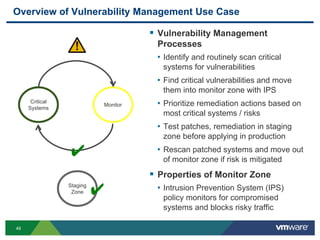
Overview of Vulnerability Management Use Case
 Vulnerability Management
Processes
• Identify and routinely scan critical
systems for vulnerabilities
• Find critical vulnerabilities and move
them into monitor zone with IPS
• Prioritize remediation actions based on
most critical systems / risks
• Test patches, remediation in staging
zone before applying in production
• Rescan patched systems and move out
of monitor zone if risk is mitigated
 Properties of Monitor Zone
• Intrusion Prevention System (IPS)
policy monitors for compromised
systems and blocks risky traffic
Critical
Systems
Monitor
✔
Staging
Zone ✔
50
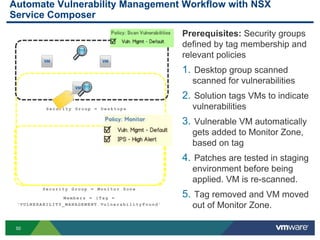
Automate Vulnerability Management Workflow with NSX
Service Composer
Prerequisites: Security groups
defined by tag membership and
relevant policies
1. Desktop group scanned
scanned for vulnerabilities
2. Solution tags VMs to indicate
vulnerabilities
3. Vulnerable VM automatically
gets added to Monitor Zone,
based on tag
4. Patches are tested in staging
environment before being
applied. VM is re-scanned.
5. Tag removed and VM moved
out of Monitor Zone.
S e cu r i t y G ro u p = M on i t o r Z on e
M e mb e r s = {T a g =
‘ V UL N E R A B I LI T Y _ M A N AG E M E N T . Vu l n e r a b il i t y F o u nd ’
S e cu r i t y G ro u p = D es k t o p s
51
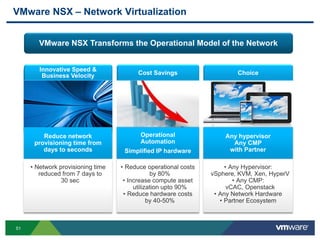
VMware NSX – Network Virtualization
VMware NSX Transforms the Operational Model of the Network
• Network provisioning time
reduced from 7 days to
30 sec
Reduce network
provisioning time from
days to seconds
Cost Savings
• Reduce operational costs
by 80%
• Increase compute asset
utilization upto 90%
• Reduce hardware costs
by 40-50%
Operational
Automation
Simplified IP hardware
Choice
• Any Hypervisor:
vSphere, KVM, Xen, HyperV
• Any CMP:
vCAC, Openstack
• Any Network Hardware
• Partner Ecosystem
Any hypervisor
Any CMP
with Partner
52
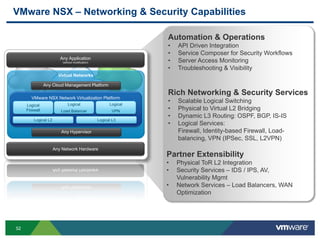
VMware NSX – Networking & Security Capabilities
Rich Networking & Security Services
• Scalable Logical Switching
• Physical to Virtual L2 Bridging
• Dynamic L3 Routing: OSPF, BGP, IS-IS
• Logical Services:
Firewall, Identity-based Firewall, Load-
balancing, VPN (IPSec, SSL, L2VPN)
Automation & Operations
• API Driven Integration
• Service Composer for Security Workflows
• Server Access Monitoring
• Troubleshooting & Visibility
Partner Extensibility
• Physical ToR L2 Integration
• Security Services – IDS / IPS, AV,
Vulnerability Mgmt
• Network Services – Load Balancers, WAN
Optimization
Any Application
(without modification)
Virtual Networks
VMware NSX Network Virtualization Platform
Logical L2
Any Network Hardware
Any Cloud Management Platform
Logical
Firewall
Logical
Load Balancer
Logical L3
Logical
VPN
Any Hypervisor
53
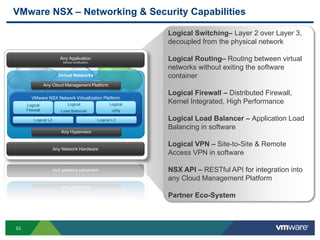
VMware NSX – Networking & Security Capabilities
Any Application
(without modification)
Virtual Networks
VMware NSX Network Virtualization Platform
Logical L2
Any Network Hardware
Any Cloud Management Platform
Logical
Firewall
Logical
Load Balancer
Logical L3
Logical
VPN
Any Hypervisor
Logical Switching– Layer 2 over Layer 3,
decoupled from the physical network
Logical Routing– Routing between virtual
networks without exiting the software
container
Logical Firewall – Distributed Firewall,
Kernel Integrated, High Performance
Logical Load Balancer – Application Load
Balancing in software
Logical VPN – Site-to-Site & Remote
Access VPN in software
NSX API – RESTful API for integration into
any Cloud Management Platform
Partner Eco-System
54
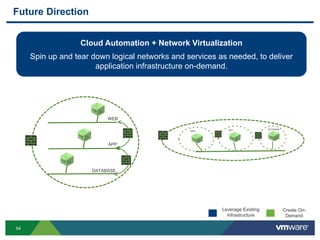
Future Direction
Cloud Automation + Network Virtualization
Spin up and tear down logical networks and services as needed, to deliver
application infrastructure on-demand.
Create On-
Demand
Leverage Existing
Infrastructure
APP
DATABASE
WEB
WEB APP DATABASE
55
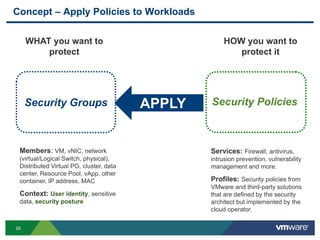
Concept – Apply Policies to Workloads
Security Groups
WHAT you want to
protect
Members: VM, vNIC, network
(virtual/Logical Switch, physical),
Distributed Virtual PG, cluster, data
center, Resource Pool, vApp, other
container, IP address, MAC
Context: User identity, sensitive
data, security posture
HOW you want to
protect it
Services: Firewall, antivirus,
intrusion prevention, vulnerability
management and more.
Profiles: Security policies from
VMware and third-party solutions
that are defined by the security
architect but implemented by the
cloud operator.
APPLY
56
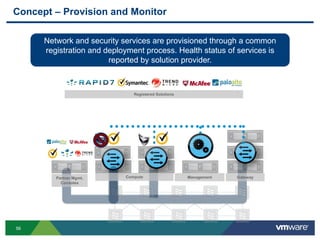
Concept – Provision and Monitor
Network and security services are provisioned through a common
registration and deployment process. Health status of services is
reported by solution provider.
Compute Management GatewayPartner Mgmt.
Consoles
Registered Solutions

VMworld 2013: Security Automation Workflows with NSX

  • 1.
    Security Automation Workflowswith NSX Gargi Keeling, VMware Don Wood, McKesson Troy Casey, McKesson SEC5750 #SEC5750
  • 2.
    2 …Terrible, Horrible, NoGood, Very Bad Day © (In the Datacenter)
  • 3.
    3 THINK About YourLast Interaction with the Security Team VI Admin / Cloud Operator Botnet attack… quarantine NOW!! PCI Auditors in the house…are we compliant? High severity vulnerabilities on critical business systems… must patch!
  • 4.
    4 Did Your InteractionLook Something like This? Step 1 Manual Process Security Architect Step n ✔ Repeat. You have to take care of this security issue. VI Admin / Cloud Operator OK, but it may take a while. Lather. Rinse.
  • 5.
    5 Automate for Efficiency,Benefit from Consistency VI Admin / Cloud Operator No problem. When THIS happens, do THAT. Security Architect Step 1. Security team defines policy for what to do when a security issue is found. Then they ask the data center operator to make it happen.
  • 6.
    6 Automate for Efficiency,Benefit from Consistency Step 2. Operator creates security policies using security profiles already managed by security team. Gets approval from security team before applying to workloads. Is this what you wanted? VI Admin / Cloud Operator Yup. Looks good. Security Architect
  • 7.
    7 Automate for Efficiency,Benefit from Consistency VI Admin / Cloud Operator Easy. Step 3. Operator applies security policies to workloads. Security team monitors for changes, has option to approve before change is allowed. Security Architect Compliant.
  • 8.
    8 Agenda  Think AboutYour Last Interaction with Security Team  Quarantine Infected Systems (NAC:TNG) + DEMO  Customer Perspective: McKesson OneCloud  Summary of Automation Capabilities  Next Steps
  • 9.
    9 production quarantine ✔ Overview ofQuarantine Use Case  Quarantine Processes • Quarantine by default • Scan for compliance before putting in production • Remediate non-compliant systems • Continuously monitor production systems for compliance • Quarantine non-compliant systems • Optional: Require approval before any workload is moved to quarantine  Properties of Quarantine Zone • Restrict Layer 3 network traffic to/from zone. Block L3 traffic between infected systems • Assign different L2 network to quarantine zone
  • 10.
    10 Network Access ControlAs We Know It  Requirements • Authentication and Management Services • 802.1x enabled switch hardware • 802.1x compliant endpoint agent (supplicant)  Challenges • Cost-prohibitive (hardware) • Difficult to manage (agents) • Lacks agility required in the software-defined data center • Forces virtual network traffic to physical switch Physical Endpoints (802.1x supplicants) Virtual Machines (802.1x supplicants) Authentication Server NAC Management Server 802.1x Enabled Switches
  • 11.
    11 Traditional NAC Doesn’tMake Sense in the Software-Defined Data Center
  • 12.
    12 Automate Quarantine Workflowwith NSX Service Composer Prerequisites: Security groups defined by tag membership and relevant policies 1. Desktop group scanned scanned for viruses 2. AV solution tags VMs to indicate virus found 3. Infected VM automatically gets added to quarantine group, based on tag 4. VM is re-scanned and remediated by AV solution. 5. Tag removed and VM moved out of quarantine zone. S e cu r i t y G ro u p = Q ua r a n t i n e Z o n e M e mb e r s = {T a g = ‘ AN T I _ V I R US . V i r u s Fo u n d ’ , L 2 I s o l a t e d N e t w o r k} S e cu r i t y G ro u p = D es k t o p s
  • 13.
    13 Agenda  Think AboutYour Last Interaction with Security Team  Quarantine Infected Systems (NAC:TNG) + DEMO  NSX Service Composer for Security Automation  Customer Perspective: McKesson OneCloud  Summary of Automation Capabilities  Next Steps
  • 14.
    14 NSX Service Composer Securityservices can now be consumed more efficiently in the software-defined data center. Automate. Automate workflows across different services, without custom integration. Provision. Provision and monitor uptime of different services, using one method. Apply. Apply and visualize security policies for workloads, in one place. SEC 5749
  • 15.
    15 NSX Service Composer– Canvas View
  • 16.
    16 Concept – ApplyPolicies to Workloads Security Groups WHAT you want to protect Members (VM, vNIC…) and Context (user identity, security posture HOW you want to protect it Services (Firewall, antivirus…) and Profiles (labels representing specific policies) APPLY Define security policies based on service profiles already defined (or blessed) by the security team. Apply these policies to one or more security groups where your workloads are members.
  • 17.
    17 NSX Service Composer– Canvas View Nested Security Groups: A security group can contain other groups. These nested groups can be configured to inherit security policies of the parent container. e.g. “Financial Department” can contain “Financial Application”
  • 18.
    18 NSX Service Composer– Canvas View Members: Apps and workloads that belong to this container. e.g. “Apache-Web-VM”, “Exchange Server-VM”
  • 19.
    19 NSX Service Composer– Canvas View Policies: Collection of service profiles - assigned to this container…to define HOW you want to protect this container e.g. “PCI Compliance” or “Quarantine Policy’
  • 20.
    20 NSX Service Composer– Canvas View Profiles: When solutions are registered and deployed, these profiles point to actual security policies that have been defined by the security management console (e.g. AV, network IPS). Only exception is the firewall rules, which can be defined within Service Composer, directly. for *deployed* solutions, are assigned to these policies. Services supported today: • Distributed Virtual Firewall  Anti-virus  File Integrity Monitoring • Vulnerability Management  Network IPS  Data Security (DLP scan)
  • 21.
    21 Concept – AutomateWorkflows Across Services AVFW IPS DLP Vuln. Mgmt IF one service finds something, THEN another service can do something about it, WITHOUT requiring integration between services! SEC 5750
  • 22.
    22 Automation Process UsingNSX Service Composer Use NSX security tags, either through NSX security solutions or APIs, to define IF/THEN workflows across security services. Step 1 - Define security tags based on workflow requirements Security Group = Step 2 - Define security group based on tags Step 3 - Set and unset tags based on security workflow requirements.
  • 23.
    23 How to Automatea Workflow with NSX Service Composer Step 1 – Define Tags Determine which tags have been registered by the deployed security solutions. Identify the tags you want to use for your workflow. Example: I want to know when my antivirus solution finds any infected systems.
  • 24.
    24 How to Automatea Workflow with NSX Service Composer Step 1 – Define Tags (alternate) Use NSX tagging API to identify workloads of a certain type, by integrating with a cloud management portal or by running a script.
  • 25.
    25 How to Automatea Workflow with NSX Service Composer Step 2 – Define Security Group Define group based on dynamic membership where tag has a certain value. Example: My quarantine zone is defined by any system with a tag that has ‘VirusFound’ in it.
  • 26.
    26 How to Automatea Workflow with NSX Service Composer Step 3 – Set and Unset Tags A workload is added or removed from a group due to tag change. Example: My quarantine zone will block network traffic but will also rescan workloads to see if they are cleaned of viruses. If clean, the virus tag will be removed and the workload will be removed from the quarantine zone..
  • 28.
    28 Agenda  Think AboutYour Last Interaction with Security Team  Quarantine Infected Systems (NAC:TNG) + DEMO  Customer Perspective: McKesson OneCloud  Summary of Automation Capabilities  Next Steps
  • 29.
    29 About McKesson At AGlance  Founded 1833  HQ San Francisco  37,000+ employees  Focus: Distribution and Technology Our Businesses  Distribution Solutions (pharmaceutical, medical/surgical, plasma and biologics, pharmacy and more)  Technology Solutions (information solutions, medication imaging, automation and more) Our Businesses  Ranked 14th on Fortune 500  NYSE: MCK  Revenue: $122.7 billion in FY2012 By the Numbers  #1 pharmaceutical distribution in US, Canada  #1 generics pharmaceutical distribution  #1 hospital automation  52% of US hospitals use McKesson technology
  • 30.
    30 McKesson OneCloud VI Admin/ Cloud Operator Security Architect Get IT Out of the Way A self-service, private cloud giving users access to new applications on-demand, with necessary security controls.
  • 31.
    31 McKesson OneCloud Phases OneCloud1.0 OneCloud 1.5 OneCloud 2.0 • Amber Zones: Zones with sensitive data such as PHI, PCI with DLP enforcement (confidential) Beyond OneCloud 2.0 • Sensitive Data (restricted) • Red (quarantine) zone: AV disabled/missing, missing critical system patch; System placed in Sandbox • DMZ Zone: Prevent systems in this zone from being attached to other networks or zones • Green Zone: Fully compliant systems; Straight L3 pass through with minimal inspection • Yellow Zone: system patches more than xx days out of date or AV signatures out of date; IPS/FW added to inline path
  • 32.
    32 YELLOW McKesson OneCloud HostingZones GREEN AMBER TBD QUARANTINE DMZ Web-facing systems Non-Sensitive Information (Public, Internal) Sensitive Information (Confidential) Highly Sensitive Information (Restricted) Infected / Compromised VM Remediation OneCloud 1.0 OneCloud 1.5 OneCloud 2.0 OneCloud 1.5 OneCloud v.TBD OneCloud 1.5 Vulnerable, Unpatched Systems
  • 33.
    33 AMBER MONITORING & AUDIT CAPTURE YELLOW McKesson OneCloudInfrastructure Zones GREEN TBD QUARANTINE DMZ OneCloud 1.0 OneCloud 1.5 OneCloud 2.0 OneCloud 1.5 OneCloud v.TBD OneCloud 1.5 THREAT DEFENSE SECURE MANAGEMENT PARTNER INTEGRATION Security Services B2B & 3d Party Cloud Providers Event & Alert Feeds Infrastructure Administration
  • 34.
    34 Agenda  Think AboutYour Last Interaction with Security Team  Quarantine Infected Systems (NAC:TNG) + DEMO  Customer Perspective: McKesson OneCloud  Summary of Automation Capabilities  Next Steps
  • 35.
    35 Why Automate withNSX Service Composer? AVFW IPS DLP Vuln. Mgmt You can define policies so that IF one service finds something, THEN another service can do something about it, WITHOUT requiring integration between services!
  • 36.
    36 Automation Process UsingNSX Service Composer Use NSX security tags, either through NSX security solutions or APIs, to define IF/THEN workflows across security services. Step 1 - Define security tags based on workflow requirements Security Group = Step 2 - Define security group based on tags Step 3 - Set and unset tags based on security workflow requirements.
  • 37.
    37 VMware NSX ServiceComposer – Automation Capabilities Built-In Services • Firewall, Identity-based Firewall • Data Security (DLP / Discovery) Security Groups • Define workloads based on many attributes (VMs, vNICs, networks, user identity, and more) – WHAT you want to protect • Dynamic membership using tags, VM name and other properties • Tags can be be managed by automated services (AV, Vuln. Mgmt) or by admins 3rd Party Services • IDS / IPS, AV, Vulnerability Mgmt • 2013 Vendors: Symantec, McAfee, Trend Micro, Rapid 7, Palo Alto Networks Any Application (without modification) Virtual Networks VMware NSX Network Virtualization Platform Logical L2 Any Network Hardware Any Cloud Management Platform Logical Firewall Logical Load Balancer Logical L3 Logical VPN Any Hypervisor Security Policies • Define policies using profiles from built-in services and 3rd party services - HOW you want to protect workloads
  • 38.
    38 NSX Integrated Partners NSXController & NSX Manager NSX API Partner Extensions L2 Gateway FirewallADC/LB IDS/IPS + Cloud Management Platforms AV/FIM Vulnerability Management Security Services
  • 39.
    39 Agenda  Think AboutYour Last Interaction with Security Team  Quarantine Infected Systems (NAC:TNG) + DEMO  Customer Perspective: McKesson OneCloud  Enforce Compliance for Sensitive Data  Summary of Automation Capabilities  Next Steps
  • 40.
    40 No kidding. Prove it! BackAt The Office… VI Admin / Cloud Operator Yes, hard to forget. Security Architect Talk to your security team about jointly evaluating NSX Service Composer. Leverage built-in services (firewall, DLP/Discovery) and security tags. You know all those manual processes we manage? Well, I just learned about VMware NSX Service Composer and we could automate a lot of this! I will.
  • 41.
    41 …Just Another UneventfulDay (In the Datacenter)
  • 42.
    42 Other VMware ActivitiesRelated to This Session  HOL: HOL-SDC-1303 VMware NSX Network Virtualization Platform
  • 43.
  • 45.
    Security Automation Workflowswith NSX Gargi Keeling, VMware Don Wood, McKesson SEC5750 #SEC5750
  • 46.
  • 47.
    47 Compliance Automation UseCase  Compliance Processes • Group systems that must be compliant with a specific regulation and apply necessary controls to the group • Specify systems based on actual data (through sensitive data discovery) or desired compliance state • Move systems in and out of compliance zones based on above • Optional: Require approval before any workload is moved to compliance zone  Properties of Compliance Zone • Apply security policies as dictated by the applicable regulation or standard (e.g. antivirus, firewall, encryption, etc.) Application Owner DLP / Discovery Solution VI Admin / Cloud Operator
  • 48.
    48 Automate Compliance Workflowwith NSX Service Composer Prerequisites: Security groups defined by tag membership and relevant policies 1. Desktop group scanned scanned for credit card data 2. Data security/DLP solution tags VMs with sensitive data 3. VM with sensitive data automatically gets added to PCI DSS group, based on tag 4. VM is re-scanned for continuous compliance 5. Tag is only removed if credit card data no longer present. VM would then be moved out of PCI DSS zone. S e cu r i t y G ro u p = P CI Z o n e M e mb e r s = {T a g = ‘ DA T A _ S E C UR I T Y . v i ol a t i o n s Fo u n d ’ } S e cu r i t y G ro u p = D es k t o p s
  • 49.
    49 Overview of VulnerabilityManagement Use Case  Vulnerability Management Processes • Identify and routinely scan critical systems for vulnerabilities • Find critical vulnerabilities and move them into monitor zone with IPS • Prioritize remediation actions based on most critical systems / risks • Test patches, remediation in staging zone before applying in production • Rescan patched systems and move out of monitor zone if risk is mitigated  Properties of Monitor Zone • Intrusion Prevention System (IPS) policy monitors for compromised systems and blocks risky traffic Critical Systems Monitor ✔ Staging Zone ✔
  • 50.
    50 Automate Vulnerability ManagementWorkflow with NSX Service Composer Prerequisites: Security groups defined by tag membership and relevant policies 1. Desktop group scanned scanned for vulnerabilities 2. Solution tags VMs to indicate vulnerabilities 3. Vulnerable VM automatically gets added to Monitor Zone, based on tag 4. Patches are tested in staging environment before being applied. VM is re-scanned. 5. Tag removed and VM moved out of Monitor Zone. S e cu r i t y G ro u p = M on i t o r Z on e M e mb e r s = {T a g = ‘ V UL N E R A B I LI T Y _ M A N AG E M E N T . Vu l n e r a b il i t y F o u nd ’ S e cu r i t y G ro u p = D es k t o p s
  • 51.
    51 VMware NSX –Network Virtualization VMware NSX Transforms the Operational Model of the Network • Network provisioning time reduced from 7 days to 30 sec Reduce network provisioning time from days to seconds Cost Savings • Reduce operational costs by 80% • Increase compute asset utilization upto 90% • Reduce hardware costs by 40-50% Operational Automation Simplified IP hardware Choice • Any Hypervisor: vSphere, KVM, Xen, HyperV • Any CMP: vCAC, Openstack • Any Network Hardware • Partner Ecosystem Any hypervisor Any CMP with Partner
  • 52.
    52 VMware NSX –Networking & Security Capabilities Rich Networking & Security Services • Scalable Logical Switching • Physical to Virtual L2 Bridging • Dynamic L3 Routing: OSPF, BGP, IS-IS • Logical Services: Firewall, Identity-based Firewall, Load- balancing, VPN (IPSec, SSL, L2VPN) Automation & Operations • API Driven Integration • Service Composer for Security Workflows • Server Access Monitoring • Troubleshooting & Visibility Partner Extensibility • Physical ToR L2 Integration • Security Services – IDS / IPS, AV, Vulnerability Mgmt • Network Services – Load Balancers, WAN Optimization Any Application (without modification) Virtual Networks VMware NSX Network Virtualization Platform Logical L2 Any Network Hardware Any Cloud Management Platform Logical Firewall Logical Load Balancer Logical L3 Logical VPN Any Hypervisor
  • 53.
    53 VMware NSX –Networking & Security Capabilities Any Application (without modification) Virtual Networks VMware NSX Network Virtualization Platform Logical L2 Any Network Hardware Any Cloud Management Platform Logical Firewall Logical Load Balancer Logical L3 Logical VPN Any Hypervisor Logical Switching– Layer 2 over Layer 3, decoupled from the physical network Logical Routing– Routing between virtual networks without exiting the software container Logical Firewall – Distributed Firewall, Kernel Integrated, High Performance Logical Load Balancer – Application Load Balancing in software Logical VPN – Site-to-Site & Remote Access VPN in software NSX API – RESTful API for integration into any Cloud Management Platform Partner Eco-System
  • 54.
    54 Future Direction Cloud Automation+ Network Virtualization Spin up and tear down logical networks and services as needed, to deliver application infrastructure on-demand. Create On- Demand Leverage Existing Infrastructure APP DATABASE WEB WEB APP DATABASE
  • 55.
    55 Concept – ApplyPolicies to Workloads Security Groups WHAT you want to protect Members: VM, vNIC, network (virtual/Logical Switch, physical), Distributed Virtual PG, cluster, data center, Resource Pool, vApp, other container, IP address, MAC Context: User identity, sensitive data, security posture HOW you want to protect it Services: Firewall, antivirus, intrusion prevention, vulnerability management and more. Profiles: Security policies from VMware and third-party solutions that are defined by the security architect but implemented by the cloud operator. APPLY
  • 56.
    56 Concept – Provisionand Monitor Network and security services are provisioned through a common registration and deployment process. Health status of services is reported by solution provider. Compute Management GatewayPartner Mgmt. Consoles Registered Solutions