© 2015 VMware Inc. All rights reserved.
vRealize Network Insight 3.5
What’s New
VMware Delivers:
Intelligent Operations for Software-Defined Datacenter
2
1 vRealize Suite components
2 Included with vRealize Suite and ships with NSX
vRealize Operations1
Compute Storage
Hybrid Cloud
Network
& Security
vRealize
Network
Insight
vRealize Log Insight2
Physical/ Virtual/ Cloud Environment
Application
vRealize Business for Cloud1
vRealize Network Insight Delivers Intelligent Operations for Software-Defined Networking and Security across
virtual, physical and multi-cloud environments
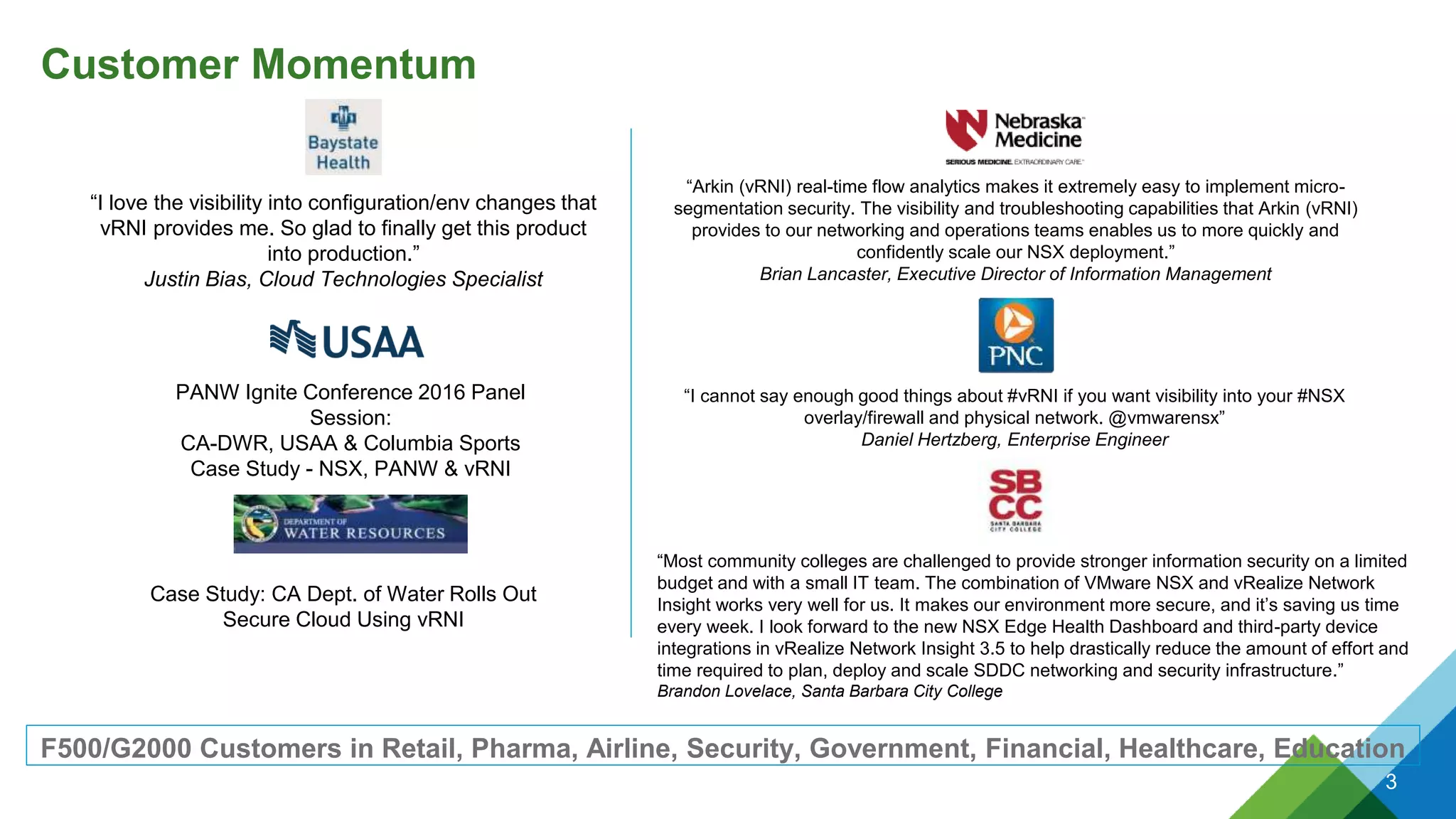
Customer Momentum
F500/G2000 Customers in Retail, Pharma, Airline, Security, Government, Financial, Healthcare, Education
PANW Ignite Conference 2016 Panel
Session:
CA-DWR, USAA & Columbia Sports
Case Study - NSX, PANW & vRNI
Case Study: CA Dept. of Water Rolls Out
Secure Cloud Using vRNI
3
“Arkin (vRNI) real-time flow analytics makes it extremely easy to implement micro-
segmentation security. The visibility and troubleshooting capabilities that Arkin (vRNI)
provides to our networking and operations teams enables us to more quickly and
confidently scale our NSX deployment.”
Brian Lancaster, Executive Director of Information Management
“I cannot say enough good things about #vRNI if you want visibility into your #NSX
overlay/firewall and physical network. @vmwarensx”
Daniel Hertzberg, Enterprise Engineer
“I love the visibility into configuration/env changes that
vRNI provides me. So glad to finally get this product
into production.”
Justin Bias, Cloud Technologies Specialist
“Most community colleges are challenged to provide stronger information security on a limited
budget and with a small IT team. The combination of VMware NSX and vRealize Network
Insight works very well for us. It makes our environment more secure, and it’s saving us time
every week. I look forward to the new NSX Edge Health Dashboard and third-party device
integrations in vRealize Network Insight 3.5 to help drastically reduce the amount of effort and
time required to plan, deploy and scale SDDC networking and security infrastructure.”
Brandon Lovelace, Santa Barbara City College
4
vRealize Network Insight 3.5
Intelligent Operations for Network and Security Across Virtual, Physical and Multiple Clouds
VMware vRealize Network Insight delivers intelligent operations for software-defined networking and security. It helps
customers build an optimized, highly-available and secure network infrastructure across multi-cloud environments. It
accelerates micro-segmentation planning and deployment, enables visibility across virtual and physical networks and
provides operational views to manage and scale VMware NSX deployments.
Micro segmentation Planning,
Deployment and Compliance
• Plan and measure security impact
with micro segmentation
• Accelerate micro-segmentation
deployment with firewall rules
recommendations.
• Continuously monitor and audit
compliance postures over time.
360 Network Visibility and Troubleshooting
• Quickly troubleshoot connectivity issues
between VMs through powerful path
visualization
• Unify troubleshooting experience across the
virtual and physical infrastructure
• Rapidly identify issues through efficient event
and alert management
Manage and Scale NSX Deployments
• Scale across multiple NSX Managers
with powerful visualizations for
topology and health
• Avoid configuration issues through an
in-product best practices checklist
• Pinpoint and triage issues for quick
resolution with intuitive UI and search
Secure Public Cloud Infrastructure
• Extend micro-segmentation planning to
AWS security groups
• Analyze traffic flows in AWS and get visibility
into AWS Virtual Private Cloud (VPC)
• Troubleshoot firewall issues between VMs in
AWS
vRealize Network Insight 3.5 – New Capabilities
Intelligent Operations for SDDC Network and Security Across Virtual, Physical and Hybrid Clouds
CONFIDENTIAL
Manage & Scale NSX Deployments
• See flows blocked by the NSX firewall with NSX IPFIX Integration
• NSX Edge Health Dashboard provides enhanced visibility with a Layer 3 topology view
• Assess PCI compliance for the NSX-V environment with a new PCI Compliance Dashboard
Troubleshoot across the virtual & physical infrastructure
• Comprehensive visibility with added support for new third party
devices:
• Checkpoint firewall
• Brocade MLX
• HP OneView
• VM to VM path now supports ECMP
Enterprise-grade SDDC Networking and Security Platform
• Keep all data intact by migrating data sources between proxies for fast recovery
• Enforce platform resource usage limits to contain footprint
• Supports multiple license types
PCI Compliance Dashboard
• Helps assess the PCI
compliance for the NSX-V
environment
• Provides analysis of data for
specific PCI sections
• New search keyword PCI
compliance of introduced
• Available only in vRNI
enterprise license or NIaaS
CONFIDENTIAL 6
Open from
Security Menu
Also choose scope
using search
Choose the
assessment scope
PCI sections
used for analysis
NSX Edge Dashboard
• Updated dashboard covering Edge technologies
• Better visibility with new layer 3 topology view
• New widgets added showing information such as
key properties of including NAT rules, Networks,
Default gateway and downstream routers
• New information added on Edge device and
router dashboards as well
CONFIDENTIAL 7
New widget
organization
New Topology and
properties widgets
New Topology and
properties widgets
Support for NSX IPFIX
• Rule ID and Action ingested
– Enabled within NSX Manager data source
configuration
– Requires Security Admin and Enterprise
Admin roles
• Deduplication of flow information between VDS
and NSX IPFIX
• Deny action depicted by dropped flows
visualization
• NSX IPFIX records are generated via NSX DFW
and send from each ESXi host
• Protected - associated rule found OR associated
rule is not any-any-allow
• Unprotected - flows where an associated rule is
found AND that rule is any-any-allow
CONFIDENTIAL 8
View dropped,
protected, and
unprotected flows
Select a wedge and
view flow actions
ECMP Support in VM-VM Path
• New layout for Path dashboard
• ECMP Edges in VM to VM path are
supported
• Ability to visualize all potential paths taken in
case of ECMP routing
CONFIDENTIAL 9
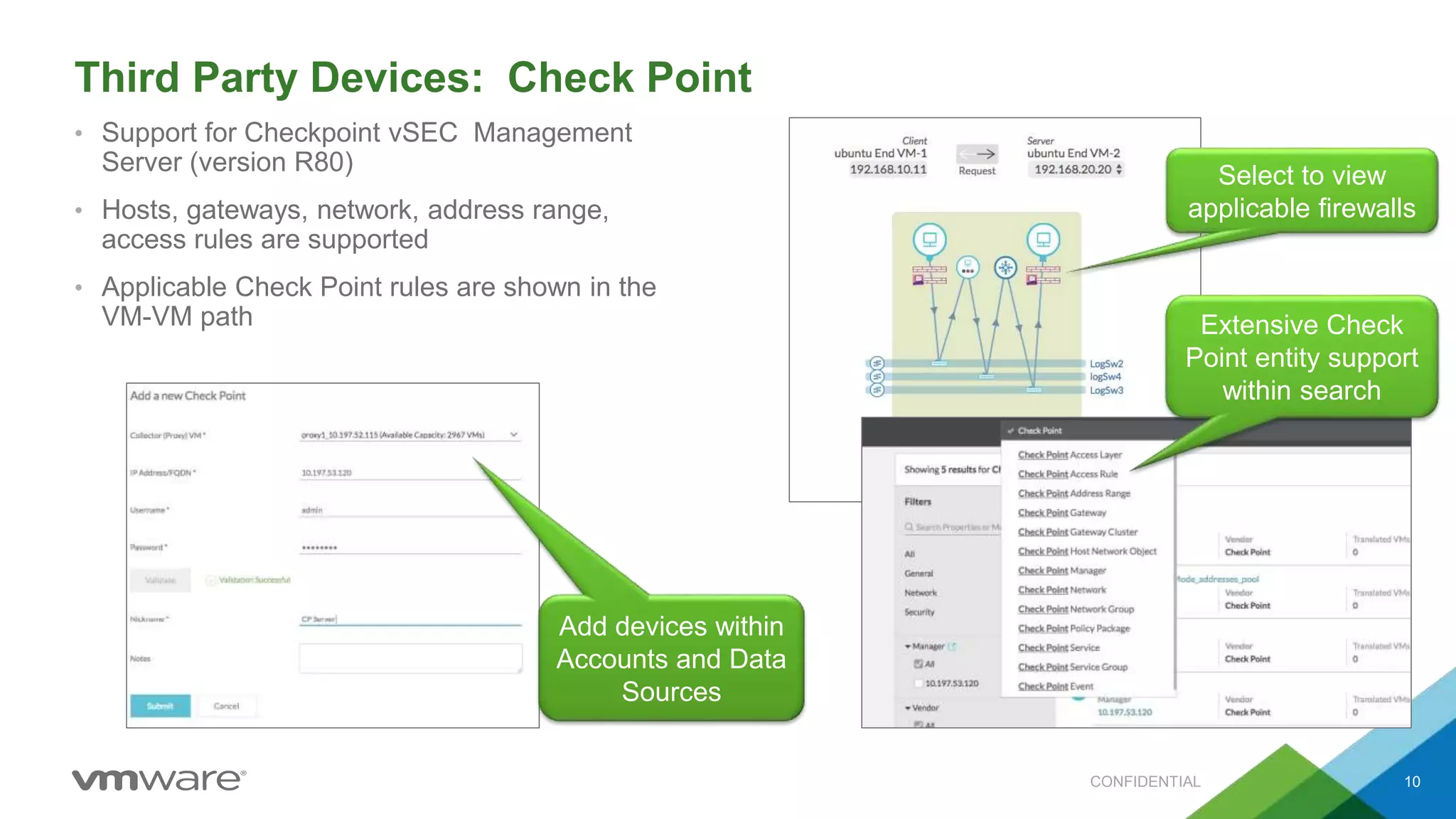
Third Party Devices: Check Point
• Support for Checkpoint vSEC Management
Server (version R80)
• Hosts, gateways, network, address range,
access rules are supported
• Applicable Check Point rules are shown in the
VM-VM path
CONFIDENTIAL 10
Add devices within
Accounts and Data
Sources
Select to view
applicable firewalls
Extensive Check
Point entity support
within search
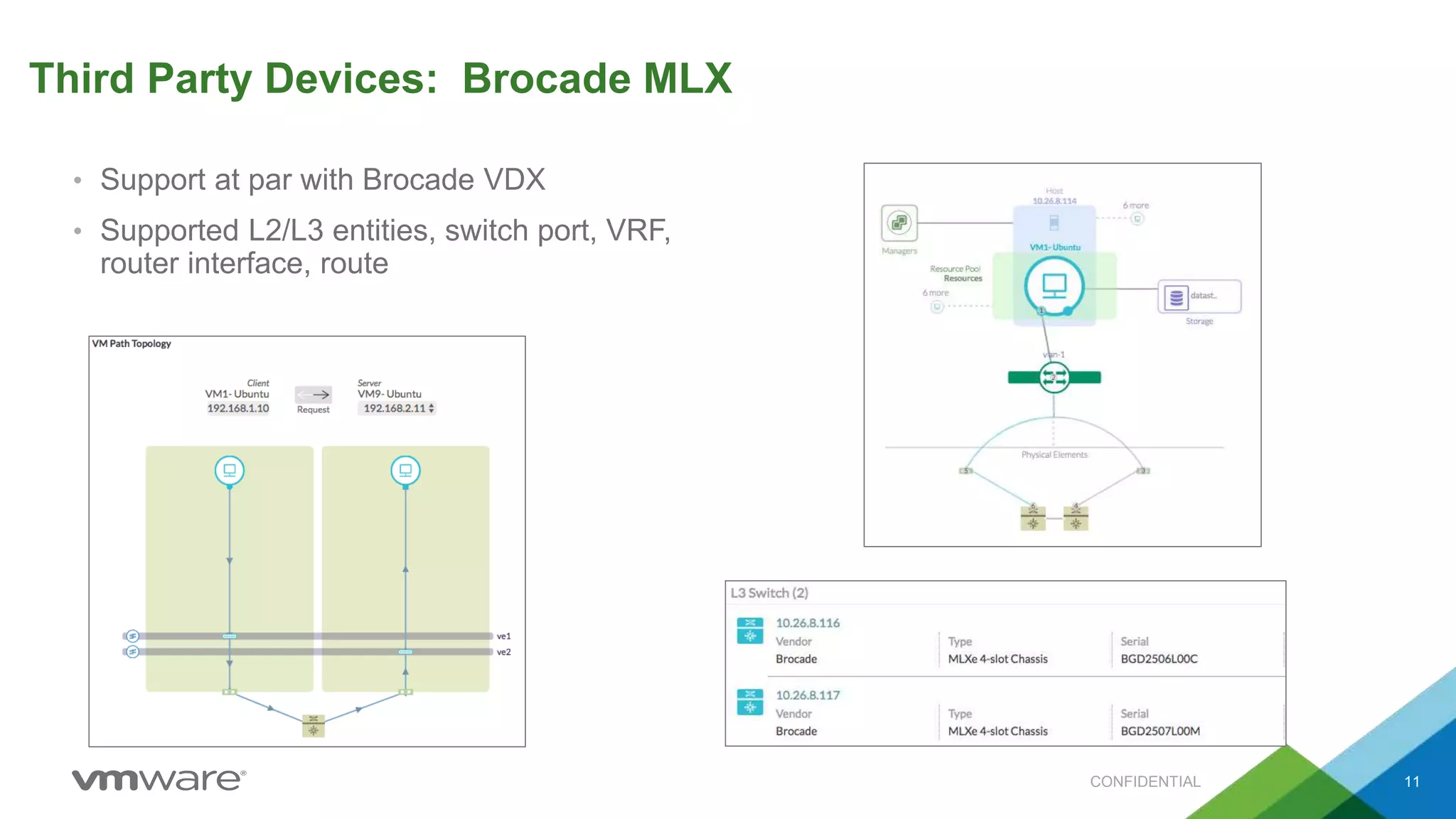
Third Party Devices: Brocade MLX
• Support at par with Brocade VDX
• Supported L2/L3 entities, switch port, VRF,
router interface, route
CONFIDENTIAL 11
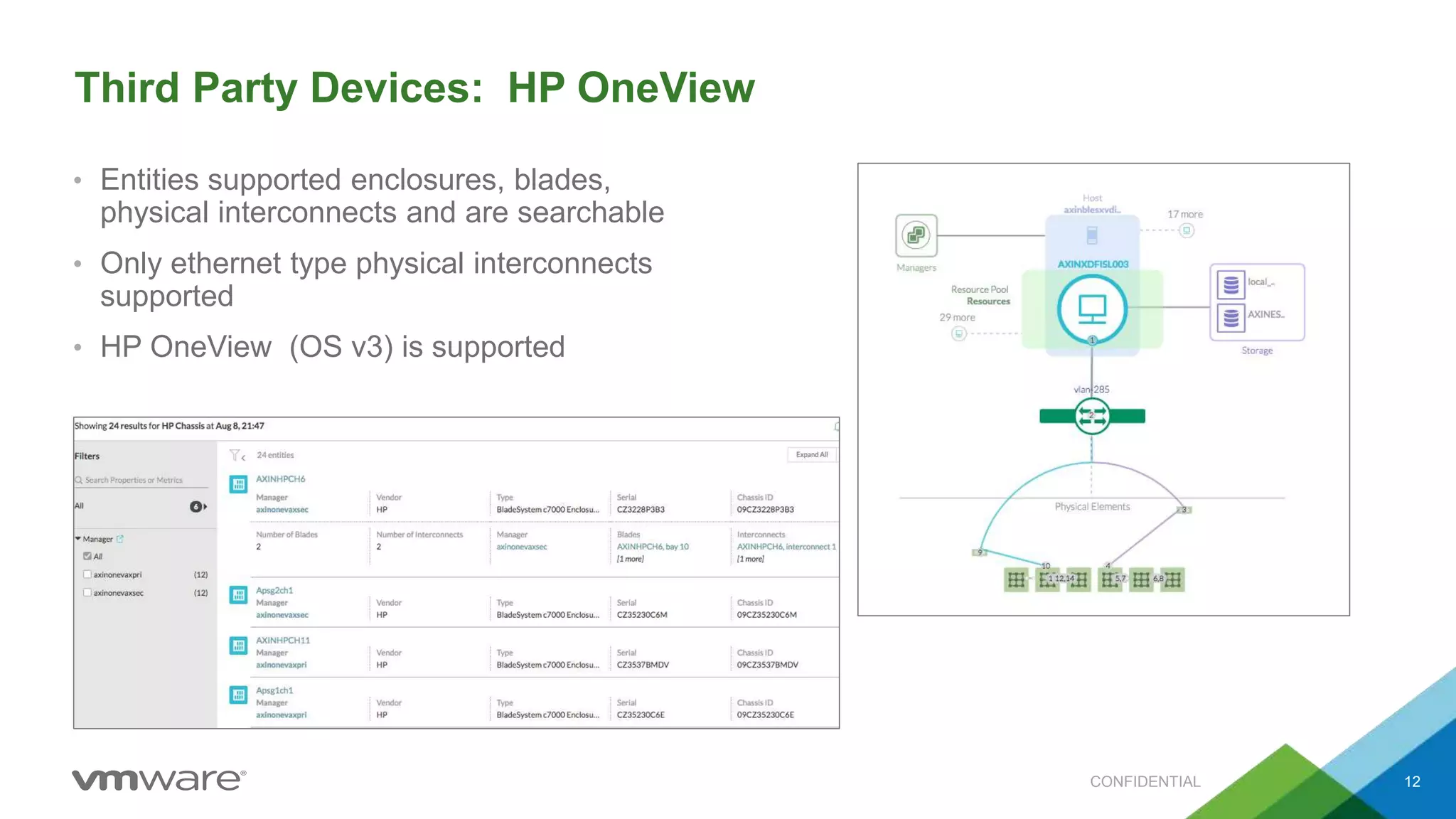
Third Party Devices: HP OneView
• Entities supported enclosures, blades,
physical interconnects and are searchable
• Only ethernet type physical interconnects
supported
• HP OneView (OS v3) is supported
CONFIDENTIAL 12
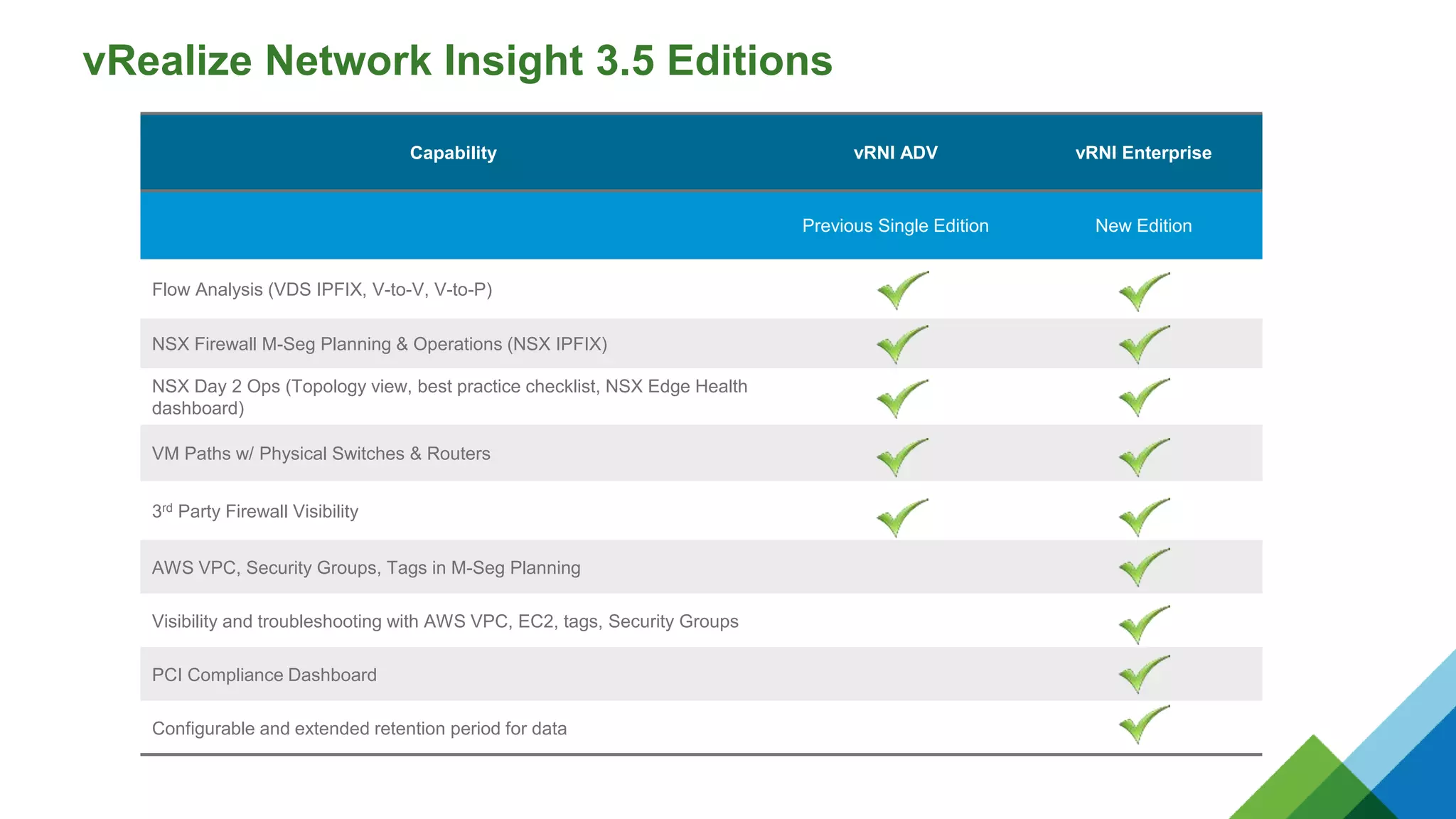
vRealize Network Insight 3.5 Editions
Capability vRNI ADV vRNI Enterprise
Previous Single Edition New Edition
Flow Analysis (VDS IPFIX, V-to-V, V-to-P)
NSX Firewall M-Seg Planning & Operations (NSX IPFIX)
NSX Day 2 Ops (Topology view, best practice checklist, NSX Edge Health
dashboard)
VM Paths w/ Physical Switches & Routers
3rd Party Firewall Visibility
AWS VPC, Security Groups, Tags in M-Seg Planning
Visibility and troubleshooting with AWS VPC, EC2, tags, Security Groups
PCI Compliance Dashboard
Configurable and extended retention period for data
Learn More
Try the Hands-on Lab.
Nothing to download!
14
Visit the website for
resources and purchasing
information.
https://www.vmware.com/products/vrealize-network-insight.html
http://Labs.hol.vmware.com
Website:
Hands-on Lab:
Available for evaluation
as part of VMUG
Advantage.

VMware vRealize Network Insight 3.5 - Whats New

  • 1.
    © 2015 VMwareInc. All rights reserved. vRealize Network Insight 3.5 What’s New
  • 2.
    VMware Delivers: Intelligent Operationsfor Software-Defined Datacenter 2 1 vRealize Suite components 2 Included with vRealize Suite and ships with NSX vRealize Operations1 Compute Storage Hybrid Cloud Network & Security vRealize Network Insight vRealize Log Insight2 Physical/ Virtual/ Cloud Environment Application vRealize Business for Cloud1 vRealize Network Insight Delivers Intelligent Operations for Software-Defined Networking and Security across virtual, physical and multi-cloud environments
  • 3.
    Customer Momentum F500/G2000 Customersin Retail, Pharma, Airline, Security, Government, Financial, Healthcare, Education PANW Ignite Conference 2016 Panel Session: CA-DWR, USAA & Columbia Sports Case Study - NSX, PANW & vRNI Case Study: CA Dept. of Water Rolls Out Secure Cloud Using vRNI 3 “Arkin (vRNI) real-time flow analytics makes it extremely easy to implement micro- segmentation security. The visibility and troubleshooting capabilities that Arkin (vRNI) provides to our networking and operations teams enables us to more quickly and confidently scale our NSX deployment.” Brian Lancaster, Executive Director of Information Management “I cannot say enough good things about #vRNI if you want visibility into your #NSX overlay/firewall and physical network. @vmwarensx” Daniel Hertzberg, Enterprise Engineer “I love the visibility into configuration/env changes that vRNI provides me. So glad to finally get this product into production.” Justin Bias, Cloud Technologies Specialist “Most community colleges are challenged to provide stronger information security on a limited budget and with a small IT team. The combination of VMware NSX and vRealize Network Insight works very well for us. It makes our environment more secure, and it’s saving us time every week. I look forward to the new NSX Edge Health Dashboard and third-party device integrations in vRealize Network Insight 3.5 to help drastically reduce the amount of effort and time required to plan, deploy and scale SDDC networking and security infrastructure.” Brandon Lovelace, Santa Barbara City College
  • 4.
    4 vRealize Network Insight3.5 Intelligent Operations for Network and Security Across Virtual, Physical and Multiple Clouds VMware vRealize Network Insight delivers intelligent operations for software-defined networking and security. It helps customers build an optimized, highly-available and secure network infrastructure across multi-cloud environments. It accelerates micro-segmentation planning and deployment, enables visibility across virtual and physical networks and provides operational views to manage and scale VMware NSX deployments. Micro segmentation Planning, Deployment and Compliance • Plan and measure security impact with micro segmentation • Accelerate micro-segmentation deployment with firewall rules recommendations. • Continuously monitor and audit compliance postures over time. 360 Network Visibility and Troubleshooting • Quickly troubleshoot connectivity issues between VMs through powerful path visualization • Unify troubleshooting experience across the virtual and physical infrastructure • Rapidly identify issues through efficient event and alert management Manage and Scale NSX Deployments • Scale across multiple NSX Managers with powerful visualizations for topology and health • Avoid configuration issues through an in-product best practices checklist • Pinpoint and triage issues for quick resolution with intuitive UI and search Secure Public Cloud Infrastructure • Extend micro-segmentation planning to AWS security groups • Analyze traffic flows in AWS and get visibility into AWS Virtual Private Cloud (VPC) • Troubleshoot firewall issues between VMs in AWS
  • 5.
    vRealize Network Insight3.5 – New Capabilities Intelligent Operations for SDDC Network and Security Across Virtual, Physical and Hybrid Clouds CONFIDENTIAL Manage & Scale NSX Deployments • See flows blocked by the NSX firewall with NSX IPFIX Integration • NSX Edge Health Dashboard provides enhanced visibility with a Layer 3 topology view • Assess PCI compliance for the NSX-V environment with a new PCI Compliance Dashboard Troubleshoot across the virtual & physical infrastructure • Comprehensive visibility with added support for new third party devices: • Checkpoint firewall • Brocade MLX • HP OneView • VM to VM path now supports ECMP Enterprise-grade SDDC Networking and Security Platform • Keep all data intact by migrating data sources between proxies for fast recovery • Enforce platform resource usage limits to contain footprint • Supports multiple license types
  • 6.
    PCI Compliance Dashboard •Helps assess the PCI compliance for the NSX-V environment • Provides analysis of data for specific PCI sections • New search keyword PCI compliance of introduced • Available only in vRNI enterprise license or NIaaS CONFIDENTIAL 6 Open from Security Menu Also choose scope using search Choose the assessment scope PCI sections used for analysis
  • 7.
    NSX Edge Dashboard •Updated dashboard covering Edge technologies • Better visibility with new layer 3 topology view • New widgets added showing information such as key properties of including NAT rules, Networks, Default gateway and downstream routers • New information added on Edge device and router dashboards as well CONFIDENTIAL 7 New widget organization New Topology and properties widgets New Topology and properties widgets
  • 8.
    Support for NSXIPFIX • Rule ID and Action ingested – Enabled within NSX Manager data source configuration – Requires Security Admin and Enterprise Admin roles • Deduplication of flow information between VDS and NSX IPFIX • Deny action depicted by dropped flows visualization • NSX IPFIX records are generated via NSX DFW and send from each ESXi host • Protected - associated rule found OR associated rule is not any-any-allow • Unprotected - flows where an associated rule is found AND that rule is any-any-allow CONFIDENTIAL 8 View dropped, protected, and unprotected flows Select a wedge and view flow actions
  • 9.
    ECMP Support inVM-VM Path • New layout for Path dashboard • ECMP Edges in VM to VM path are supported • Ability to visualize all potential paths taken in case of ECMP routing CONFIDENTIAL 9
  • 10.
    Third Party Devices:Check Point • Support for Checkpoint vSEC Management Server (version R80) • Hosts, gateways, network, address range, access rules are supported • Applicable Check Point rules are shown in the VM-VM path CONFIDENTIAL 10 Add devices within Accounts and Data Sources Select to view applicable firewalls Extensive Check Point entity support within search
  • 11.
    Third Party Devices:Brocade MLX • Support at par with Brocade VDX • Supported L2/L3 entities, switch port, VRF, router interface, route CONFIDENTIAL 11
  • 12.
    Third Party Devices:HP OneView • Entities supported enclosures, blades, physical interconnects and are searchable • Only ethernet type physical interconnects supported • HP OneView (OS v3) is supported CONFIDENTIAL 12
  • 13.
    vRealize Network Insight3.5 Editions Capability vRNI ADV vRNI Enterprise Previous Single Edition New Edition Flow Analysis (VDS IPFIX, V-to-V, V-to-P) NSX Firewall M-Seg Planning & Operations (NSX IPFIX) NSX Day 2 Ops (Topology view, best practice checklist, NSX Edge Health dashboard) VM Paths w/ Physical Switches & Routers 3rd Party Firewall Visibility AWS VPC, Security Groups, Tags in M-Seg Planning Visibility and troubleshooting with AWS VPC, EC2, tags, Security Groups PCI Compliance Dashboard Configurable and extended retention period for data
  • 14.
    Learn More Try theHands-on Lab. Nothing to download! 14 Visit the website for resources and purchasing information. https://www.vmware.com/products/vrealize-network-insight.html http://Labs.hol.vmware.com Website: Hands-on Lab: Available for evaluation as part of VMUG Advantage.

Editor's Notes

  • #3 Networking, both virtual and physical, offers services for intelligently interconnected applications, endpoints and people. It is one of the cornerstones today’s modern day data center. Networking is sophisticated as it has multiple different physical and virtual layers and it serves many different types of endpoints. Networking requires a multi-layer network operations management framework including management, control and data plane intelligence. In this presentation we will review the tools required to intelligently manage the networking portion of SDDC, and show how you can drive agility and ROI benefits. The primary tools that will be reviewed are vRealize Network Insight and Log InsightvRealize Log Insight.