







Visual Studio 2012

        What’s In It for Me?
Jeff Bramwell                        Tulsa TechFest 2012
Director - Enterprise Architecture   Friday, October 12th, 2012
Farm Credit Services of America      1:30 PM
jbramwell@gmail.com|@jbramwell
devmatter.blogspot.com
Please Be Courteous!


Please be courteous to your fellow attendees
                    and
 Set your phones to vibrate or silent mode!
Agenda
• SKUs
• New IDE Features
• .NET Framework
• Testing and Debugging
• Web Development
• Windows 8 Development
• ALM
• Resources & Links
• Questions
Caveat
• Way too many features…
• Not near enough time…
• We can’t cover everything…
• Let’s get going 
SKUs
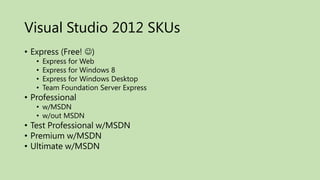
Visual Studio 2012 SKUs
• Express (Free! )
   •   Express for Web
   •   Express for Windows 8
   •   Express for Windows Desktop
   •   Team Foundation Server Express
• Professional
   • w/MSDN
   • w/out MSDN
• Test Professional w/MSDN
• Premium w/MSDN
• Ultimate w/MSDN
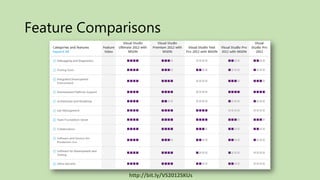
Feature Comparisons


              http://bit.ly/VS2012SKUs
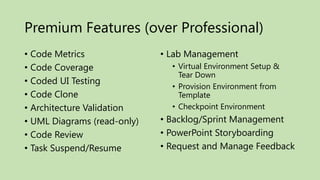
Premium Features (over Professional)
• Code Metrics               • Lab Management
• Code Coverage                • Virtual Environment Setup &
                                 Tear Down
• Coded UI Testing
                               • Provision Environment from
• Code Clone                     Template
• Architecture Validation      • Checkpoint Environment
• UML Diagrams (read-only)   • Backlog/Sprint Management
• Code Review                • PowerPoint Storyboarding
• Task Suspend/Resume        • Request and Manage Feedback
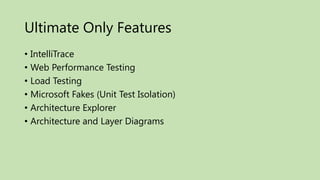
Ultimate Only Features
• IntelliTrace
• Web Performance Testing
• Load Testing
• Microsoft Fakes (Unit Test Isolation)
• Architecture Explorer
• Architecture and Layer Diagrams
New IDE Features
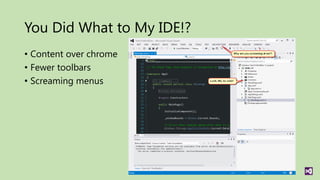
You Did What to My IDE!?
• Content over chrome
• Fewer toolbars
• Screaming menus
Solution Compatibility
• Works between Visual Studio 2010 SP1 and Visual Studio 2012
• Not every project type can “round trip”
  •   MVC 2
  •   MSI setup (.vdproj)
  •   Office 2007 VSTO
  •   SharePoint 2007
  •   Visual Studio Macro
  •   Windows Azure Tools for Visual Studio version 1.6 or earlier
  •   Windows Mobile
  •   Windows Phone
Solution Explorer
• Lots of improvements
  •   Solution items filter
  •   Pending changes filter
  •   Collapse all
  •   Preview selected items
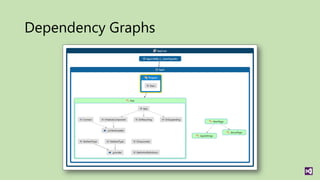
  •   Dependency graphs
  •   Open new (sub) views
  •   Various dependency searches (calls, called by, used by, etc.)
  •   Image preview
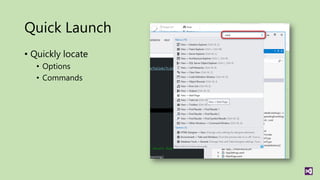
Quick Launch
• Quickly locate
   • Options
   • Commands
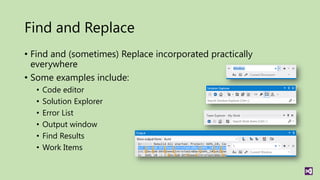
Find and Replace
• Find and (sometimes) Replace incorporated practically
  everywhere
• Some examples include:
  •   Code editor
  •   Solution Explorer
  •   Error List
  •   Output window
  •   Find Results
  •   Work Items
Dependency Graphs
Miscellaneous
• Pin tabs
• Light/Dark color scheme
Visual Studio Update Cadence
• Quarterly Updates1
• Interim Preview Releases2
   • Visual Studio 2012 Update 1 CTP 3 released Oct 8th
• Notified via “toast” notification
.NET Framework
Testing and Debugging
Ultimate


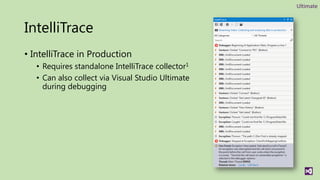
IntelliTrace
• IntelliTrace in Production
   • Requires standalone IntelliTrace collector1
   • Can also collect via Visual Studio Ultimate
     during debugging
Ultimate | Premium


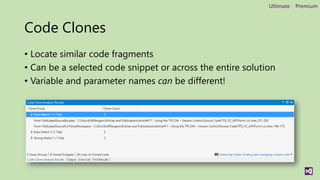
Code Clones
• Locate similar code fragments
• Can be a selected code snippet or across the entire solution
• Variable and parameter names can be different!
Ultimate | Premium


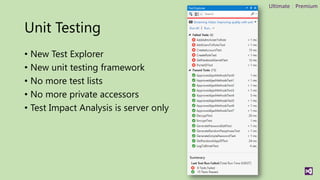
Unit Testing
• New Test Explorer
• New unit testing framework
• No more test lists
• No more private accessors
• Test Impact Analysis is server only
Ultimate


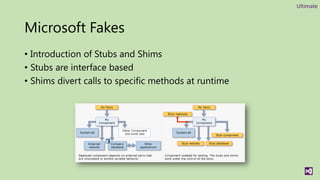
Microsoft Fakes
• Introduction of Stubs and Shims
• Stubs are interface based
• Shims divert calls to specific methods at runtime
Ultimate | Premium


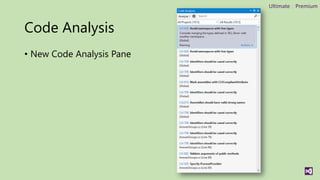
Code Analysis
• New Code Analysis Pane
Web Development
Web Features - CSS
• New CSS Editor
  •   Support for CSS3
  •   Expand/collapse styles
  •   Improved IntelliSense
  •   New color picker
  •   New snippets
  •   More
Web Features - HTML
• New HTML Editor
  •   Support for HTML5
  •   Extract to User Control
  •   Tag completion
  •   Automatic quotes
  •   Comment/uncomment support
  •   Outlining
  •   Smart indent
  •   New snippets
  •   More
Web Features - JavaScript
• New JavaScript Editor
  •   Improved IntelliSense
  •   Go to definition (F12)
  •   Bracket highlighting
  •   XML documentation support
  •   Overloads for methods (using new XML comment <signature>)
  •   More
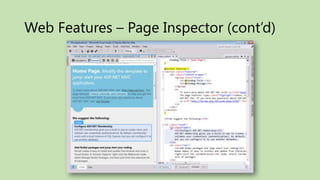
Web Features – Page Inspector
• Page Inspector
  • Source code selection mapping
  • Select CSS rules
  • Requires instrumentation
Web Features – Page Inspector (cont’d)
Windows 8 Development
Windows Store (formerly metro) apps
                 • Metro Apps  Windows Store apps
                 • Metro UI Design Language  Microsoft design style language
                 • Metro UI Style Principles  Microsoft design style principles


• New project templates
• Windows Store Integration
What is “Metro             w”
• A “code” name 
     • Windows Store application
•   Content over chrome
•   Fast and fluid
•   Touch first
•   Snap and scale beautifully
•   Use of contracts
•   Application tile
•   Connected; Roam to the cloud
•   Authentically digital
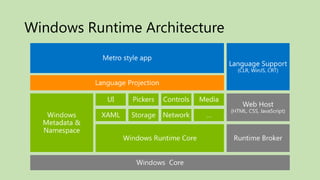
Windows Runtime (WinRT)
• New programming model for Windows 8
• Supports C#, VB.NET, C++, and JavaScript
• Supported on x86 and ARM architectures
• Windows metadata provides cross-language support
  • Complete description of Windows Runtime
  • Allows for multi-language projection
  • Full IntelliSense
• Asynchronous APIs
• Windows.* namespaces include Windows Runtime types
Windows Runtime Architecture
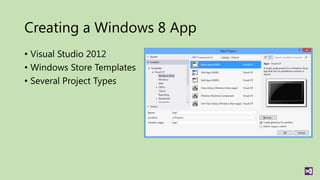
Creating a Windows 8 App
• Visual Studio 2012
• Windows Store Templates
• Several Project Types
Windows Store
• Integrated into Visual Studio 2012
• Open Developer Account
• Reserve App Name
  • Good for 1 year
• Acquire Developer License
  • Tied to Microsoft Account
  • License per machine
  • Free
Windows Store (cont’d)
• Edit App Manifest
• Associate App with Windows Store
  • Based on reserved apps
• Capture Screenshots
• Create/Upload App Packages
ALM
TFS 2012 Features
• Web-based project management tools
• Team Foundation Services (i.e. TFSPreview.com)
• Request Feedback
• Team Explorer
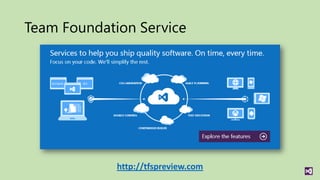
Team Foundation Service


             http://tfspreview.com
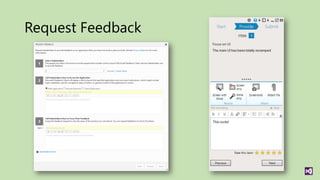
Request Feedback
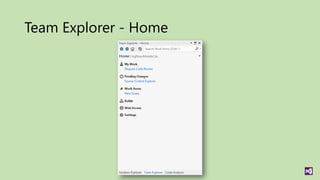
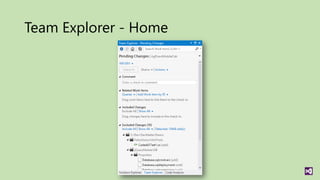
Team Explorer - Home
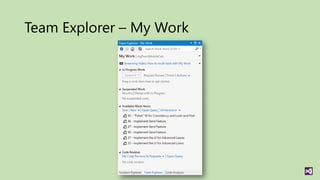
Team Explorer – My Work
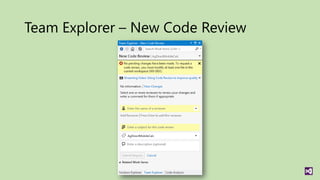
Team Explorer – New Code Review
Team Explorer - Home
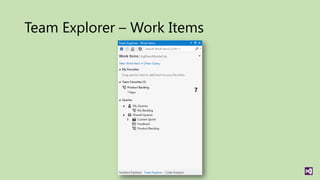
Team Explorer – Work Items
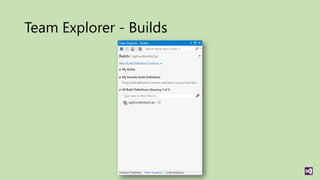
Team Explorer - Builds
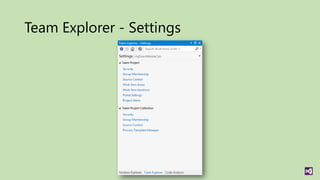
Team Explorer - Settings
Ultimate | Premium


Storyboarding
• Quickly design user interfaces
• Built on PowerPoint
• Lots of pre-built shapes provided out of the box
• Easy to create new shapes
• Can be linked to TFS work items
• Requires only PowerPoint to view
Resources & Links
Please Complete An Evaluation Form
          Your input is important!
       You can access Evaluation Forms at:
          http://TulsaTechFest.com
Questions

Visual studio 2012 - What's in it for me?

  • 1.
    Visual Studio 2012 What’s In It for Me? Jeff Bramwell Tulsa TechFest 2012 Director - Enterprise Architecture Friday, October 12th, 2012 Farm Credit Services of America 1:30 PM jbramwell@gmail.com|@jbramwell devmatter.blogspot.com
  • 2.
    Please Be Courteous! Pleasebe courteous to your fellow attendees and Set your phones to vibrate or silent mode!
  • 3.
    Agenda • SKUs • NewIDE Features • .NET Framework • Testing and Debugging • Web Development • Windows 8 Development • ALM • Resources & Links • Questions
  • 4.
    Caveat • Way toomany features… • Not near enough time… • We can’t cover everything… • Let’s get going 
  • 5.
  • 6.
    Visual Studio 2012SKUs • Express (Free! ) • Express for Web • Express for Windows 8 • Express for Windows Desktop • Team Foundation Server Express • Professional • w/MSDN • w/out MSDN • Test Professional w/MSDN • Premium w/MSDN • Ultimate w/MSDN
  • 7.
    Feature Comparisons http://bit.ly/VS2012SKUs
  • 8.
    Premium Features (overProfessional) • Code Metrics • Lab Management • Code Coverage • Virtual Environment Setup & Tear Down • Coded UI Testing • Provision Environment from • Code Clone Template • Architecture Validation • Checkpoint Environment • UML Diagrams (read-only) • Backlog/Sprint Management • Code Review • PowerPoint Storyboarding • Task Suspend/Resume • Request and Manage Feedback
  • 9.
    Ultimate Only Features •IntelliTrace • Web Performance Testing • Load Testing • Microsoft Fakes (Unit Test Isolation) • Architecture Explorer • Architecture and Layer Diagrams
  • 10.
  • 11.
    You Did Whatto My IDE!? • Content over chrome • Fewer toolbars • Screaming menus
  • 12.
    Solution Compatibility • Worksbetween Visual Studio 2010 SP1 and Visual Studio 2012 • Not every project type can “round trip” • MVC 2 • MSI setup (.vdproj) • Office 2007 VSTO • SharePoint 2007 • Visual Studio Macro • Windows Azure Tools for Visual Studio version 1.6 or earlier • Windows Mobile • Windows Phone
  • 13.
    Solution Explorer • Lotsof improvements • Solution items filter • Pending changes filter • Collapse all • Preview selected items • Dependency graphs • Open new (sub) views • Various dependency searches (calls, called by, used by, etc.) • Image preview
  • 14.
    Quick Launch • Quicklylocate • Options • Commands
  • 15.
    Find and Replace •Find and (sometimes) Replace incorporated practically everywhere • Some examples include: • Code editor • Solution Explorer • Error List • Output window • Find Results • Work Items
  • 16.
  • 17.
    Miscellaneous • Pin tabs •Light/Dark color scheme
  • 18.
    Visual Studio UpdateCadence • Quarterly Updates1 • Interim Preview Releases2 • Visual Studio 2012 Update 1 CTP 3 released Oct 8th • Notified via “toast” notification
  • 19.
  • 21.
  • 22.
    Ultimate IntelliTrace • IntelliTrace inProduction • Requires standalone IntelliTrace collector1 • Can also collect via Visual Studio Ultimate during debugging
  • 23.
    Ultimate | Premium CodeClones • Locate similar code fragments • Can be a selected code snippet or across the entire solution • Variable and parameter names can be different!
  • 24.
    Ultimate | Premium UnitTesting • New Test Explorer • New unit testing framework • No more test lists • No more private accessors • Test Impact Analysis is server only
  • 25.
    Ultimate Microsoft Fakes • Introductionof Stubs and Shims • Stubs are interface based • Shims divert calls to specific methods at runtime
  • 26.
    Ultimate | Premium CodeAnalysis • New Code Analysis Pane
  • 27.
  • 28.
    Web Features -CSS • New CSS Editor • Support for CSS3 • Expand/collapse styles • Improved IntelliSense • New color picker • New snippets • More
  • 29.
    Web Features -HTML • New HTML Editor • Support for HTML5 • Extract to User Control • Tag completion • Automatic quotes • Comment/uncomment support • Outlining • Smart indent • New snippets • More
  • 30.
    Web Features -JavaScript • New JavaScript Editor • Improved IntelliSense • Go to definition (F12) • Bracket highlighting • XML documentation support • Overloads for methods (using new XML comment <signature>) • More
  • 31.
    Web Features –Page Inspector • Page Inspector • Source code selection mapping • Select CSS rules • Requires instrumentation
  • 32.
    Web Features –Page Inspector (cont’d)
  • 33.
  • 34.
    Windows Store (formerlymetro) apps • Metro Apps  Windows Store apps • Metro UI Design Language  Microsoft design style language • Metro UI Style Principles  Microsoft design style principles • New project templates • Windows Store Integration
  • 35.
    What is “Metro w” • A “code” name  • Windows Store application • Content over chrome • Fast and fluid • Touch first • Snap and scale beautifully • Use of contracts • Application tile • Connected; Roam to the cloud • Authentically digital
  • 36.
    Windows Runtime (WinRT) •New programming model for Windows 8 • Supports C#, VB.NET, C++, and JavaScript • Supported on x86 and ARM architectures • Windows metadata provides cross-language support • Complete description of Windows Runtime • Allows for multi-language projection • Full IntelliSense • Asynchronous APIs • Windows.* namespaces include Windows Runtime types
  • 37.
  • 38.
    Creating a Windows8 App • Visual Studio 2012 • Windows Store Templates • Several Project Types
  • 39.
    Windows Store • Integratedinto Visual Studio 2012 • Open Developer Account • Reserve App Name • Good for 1 year • Acquire Developer License • Tied to Microsoft Account • License per machine • Free
  • 40.
    Windows Store (cont’d) •Edit App Manifest • Associate App with Windows Store • Based on reserved apps • Capture Screenshots • Create/Upload App Packages
  • 41.
  • 42.
    TFS 2012 Features •Web-based project management tools • Team Foundation Services (i.e. TFSPreview.com) • Request Feedback • Team Explorer
  • 43.
    Team Foundation Service http://tfspreview.com
  • 44.
  • 45.
  • 46.
  • 47.
    Team Explorer –New Code Review
  • 48.
  • 49.
  • 50.
  • 51.
  • 52.
    Ultimate | Premium Storyboarding •Quickly design user interfaces • Built on PowerPoint • Lots of pre-built shapes provided out of the box • Easy to create new shapes • Can be linked to TFS work items • Requires only PowerPoint to view
  • 53.
  • 54.
    Please Complete AnEvaluation Form Your input is important! You can access Evaluation Forms at: http://TulsaTechFest.com
  • 56.