











Performance Testing with VSTS
On- and Off-premises
Jeff Bramwell
VP – Enterprise Architecture
MVP – Visual Studio & Development Technologies
jeff@moonspace.net | @jbramwell
Logistics
Please Be Courteous!
Please be courteous to your fellow attendees and
set your phone to vibrate or silent mode
Stuff to Cover ( i.e. Why am I here? )
• VSTS in a nutshell
• Load test vs. Stress test – are they different?
• Load test options in VSTS
• Running load tests on-premises
• Summary – go forth and break stuff!
• And, along the way, lots of demos!
VSTS in a Nutshell
Visual Studio Team Services (VSTS) is…
• Microsoft’s web-based ALM offering (i.e. TFS in the cloud)
• Agile planning tools (work items, kanban boards, etc.)
• Source code repository (Git or TFVC)
• Package management (NuGet & NPM)
• CI/CD through automated builds and deployments
• Test automation
• Dashboards and widgets
• Etc…
Load & Stress Tests
• The terms Load Test and Stress Test are commonly interchanged
• There is a difference:
• Stress testing is intended to push a system to its breaking point
• Load testing is used to determine how a system behaves under a specific load
• Load tests can generally be configured as a stress tests
• Load tests are commonly used to determine if a system can meet an SLA
Why Load/Stress Test?
To determine:
• How many users a system can support
• If you can meet your SLA
• The appropriate amount of (virtual) hardware resources needed for a system
• How a system performs under normal usage as well as peek usage
• Bottlenecks
• Other performance issues such as memory leaks, race conditions, etc.
Load Test Options in VSTS
• URL-based Test
• HTTP Archive-based Test
• Visual Studio Test
• JMeter Test
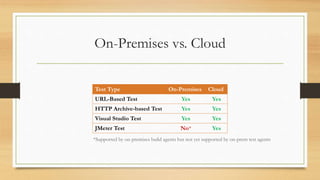
On-Premises vs. Cloud
Test Type On-Premises Cloud
URL-Based Test Yes Yes
HTTP Archive-based Test Yes Yes
Visual Studio Test Yes Yes
JMeter Test No* Yes
*Supported by on-premises build agents but not yet supported by on-prem test agents
Deciding: On-Premises vs. Cloud
Considerations:
• Number of cores required to support testing needs
• Geographic area(s) to be covered
• Can cloud resources be utilized?
• Sensitivity of data and/or regulatory concerns
• Existing on-premises infrastructure
• Frequency of test runs
• Ramp-up requirements
Let’s Dig In!
URL-Based Tests
• Easily and quickly setup load tests for a web site using VSTS
• Requires Visual Studio Enterprise subscription (monthly, annual or MSDN)
• As easy as:
• Entering one or more URLs
• Configuring a handful of run settings
• Running the test
Demo
URL-Based Tests
-- In the Cloud --
On-Premises Test Agents
• Can be installed and configured quickly via a single PowerShell command
• Setup is fast
• No need to open up non-standard (i.e. non-SSL/443) ports in firewall
• Can configure as many on-premises test agents as needed (one per machine)
• Test agents auto update (much like build agents)
• PowerShell script available here: http://bit.ly/InstallVSTSTestAgent
Demo
Test Agent PowerShell Script
Demo
URL-Based Tests, cont’d
-- On-Premises --
HTTP Archive-based Test
• Similar to URL-based tests
• Currently in preview (available to everyone except Stakeholders)
• Can easily export .HAR files from popular browsers (e.g. via “F12 Tools”)
• Fiddler can also export .HAR files
• Includes URLs, headers, etc.
• Allows you to create some basic web test scenarios very quickly
Demo
HAR-Based Tests
Visual Studio Test
• Can be based on:
• UI recording
• Unit Tests (MSTest only; NUnit not supported)
• Not limited to just web scenarios
• Much more configurable with lots more options
• Highly customizable via code
Demo
Visual Studio Tests
JMeter Tests
• Can build on existing JMeter knowledge
• Can make use of existing test suites
• Lots of community expertise around JMeter
• Very easy to integrate!
Demo
JMeter Tests
Summary
• Load/Stress testing: It’s not only good, it’s necessary
• Lots of options!
• Can be executed on-premises or in the cloud
• Can setup load tests very quickly!
Additional Information
• My Blog  - http://blog.devmatter.com
• Visual Studio Team Services - https://www.visualstudio.com/team-services/
• VSTS Load Tests - https://www.visualstudio.com/en-
us/docs/test/performance-testing/getting-started/get-started-simple-cloud-
load-test
• Test Agent Install Script:
https://blogs.msdn.microsoft.com/devops/2016/08/22/use-cloud-load-
agents-on-your-infrastructure/
Burning Questions
Complete An Evaluation Form & Win!
Your input is important!
You can access Evaluation Forms at:
http://TulsaTechFest.com
Fill them out!
You can win additional prizes!
Like a $50 Best Buy Gift Card!!
Winner drawn – Midnight, Sun Jul 23rd!

Performance testing with VSTs on- and off-premises

  • 1.
    Performance Testing withVSTS On- and Off-premises Jeff Bramwell VP – Enterprise Architecture MVP – Visual Studio & Development Technologies jeff@moonspace.net | @jbramwell
  • 2.
  • 3.
    Please Be Courteous! Pleasebe courteous to your fellow attendees and set your phone to vibrate or silent mode
  • 5.
    Stuff to Cover( i.e. Why am I here? ) • VSTS in a nutshell • Load test vs. Stress test – are they different? • Load test options in VSTS • Running load tests on-premises • Summary – go forth and break stuff! • And, along the way, lots of demos!
  • 6.
    VSTS in aNutshell Visual Studio Team Services (VSTS) is… • Microsoft’s web-based ALM offering (i.e. TFS in the cloud) • Agile planning tools (work items, kanban boards, etc.) • Source code repository (Git or TFVC) • Package management (NuGet & NPM) • CI/CD through automated builds and deployments • Test automation • Dashboards and widgets • Etc…
  • 7.
    Load & StressTests • The terms Load Test and Stress Test are commonly interchanged • There is a difference: • Stress testing is intended to push a system to its breaking point • Load testing is used to determine how a system behaves under a specific load • Load tests can generally be configured as a stress tests • Load tests are commonly used to determine if a system can meet an SLA
  • 8.
    Why Load/Stress Test? Todetermine: • How many users a system can support • If you can meet your SLA • The appropriate amount of (virtual) hardware resources needed for a system • How a system performs under normal usage as well as peek usage • Bottlenecks • Other performance issues such as memory leaks, race conditions, etc.
  • 9.
    Load Test Optionsin VSTS • URL-based Test • HTTP Archive-based Test • Visual Studio Test • JMeter Test
  • 10.
    On-Premises vs. Cloud TestType On-Premises Cloud URL-Based Test Yes Yes HTTP Archive-based Test Yes Yes Visual Studio Test Yes Yes JMeter Test No* Yes *Supported by on-premises build agents but not yet supported by on-prem test agents
  • 11.
    Deciding: On-Premises vs.Cloud Considerations: • Number of cores required to support testing needs • Geographic area(s) to be covered • Can cloud resources be utilized? • Sensitivity of data and/or regulatory concerns • Existing on-premises infrastructure • Frequency of test runs • Ramp-up requirements
  • 12.
  • 13.
    URL-Based Tests • Easilyand quickly setup load tests for a web site using VSTS • Requires Visual Studio Enterprise subscription (monthly, annual or MSDN) • As easy as: • Entering one or more URLs • Configuring a handful of run settings • Running the test
  • 14.
  • 15.
    On-Premises Test Agents •Can be installed and configured quickly via a single PowerShell command • Setup is fast • No need to open up non-standard (i.e. non-SSL/443) ports in firewall • Can configure as many on-premises test agents as needed (one per machine) • Test agents auto update (much like build agents) • PowerShell script available here: http://bit.ly/InstallVSTSTestAgent
  • 16.
  • 17.
  • 18.
    HTTP Archive-based Test •Similar to URL-based tests • Currently in preview (available to everyone except Stakeholders) • Can easily export .HAR files from popular browsers (e.g. via “F12 Tools”) • Fiddler can also export .HAR files • Includes URLs, headers, etc. • Allows you to create some basic web test scenarios very quickly
  • 19.
  • 20.
    Visual Studio Test •Can be based on: • UI recording • Unit Tests (MSTest only; NUnit not supported) • Not limited to just web scenarios • Much more configurable with lots more options • Highly customizable via code
  • 21.
  • 22.
    JMeter Tests • Canbuild on existing JMeter knowledge • Can make use of existing test suites • Lots of community expertise around JMeter • Very easy to integrate!
  • 23.
  • 24.
    Summary • Load/Stress testing:It’s not only good, it’s necessary • Lots of options! • Can be executed on-premises or in the cloud • Can setup load tests very quickly!
  • 25.
    Additional Information • MyBlog  - http://blog.devmatter.com • Visual Studio Team Services - https://www.visualstudio.com/team-services/ • VSTS Load Tests - https://www.visualstudio.com/en- us/docs/test/performance-testing/getting-started/get-started-simple-cloud- load-test • Test Agent Install Script: https://blogs.msdn.microsoft.com/devops/2016/08/22/use-cloud-load- agents-on-your-infrastructure/
  • 26.
  • 27.
    Complete An EvaluationForm & Win! Your input is important! You can access Evaluation Forms at: http://TulsaTechFest.com Fill them out! You can win additional prizes! Like a $50 Best Buy Gift Card!! Winner drawn – Midnight, Sun Jul 23rd!