


Building
WITH VISUAL STUDIO ONLINE & TEAM FOUNDATION SERVER
Jeff Bramwell
Director – Enterprise Architecture, Farm Credit Services of America
Visual Studio ALM MVP
@jbramwell :::: blog.devmatter.com
Agenda
What’s New?
Web-based UI
Mind Your P’s and Q’s
Build Agents
Build Definitions
Build Tasks
Cross Platform Support
Summary
But First, Let’s Clear Things Up…
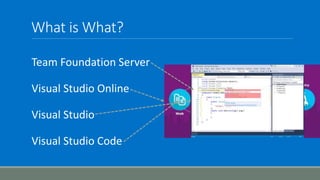
What is What?
Team Foundation Server
Visual Studio Online
Visual Studio
Visual Studio Code
What’s New?
No more XAML/Workflow!
Web-based UI
Cross Platform
Task-Based
◦ Extensible
◦ Open Source
Version History
Not tied to TFS/VSO
What’s Missing?
Create work item on build failure
Create label on build success
Update work item(s) with build number
Count-based retention policies (works different than before)
To XAML or not to XAML?
For new projects (or projects without build definitions), use the new builds
For cross-platform builds, use the new builds
If migrating an existing project (e.g. from TFVC to Git) consider updating to the new builds
If heavily invested in custom XAML builds/activities, continue with XAML builds until existing
custom logic can be ported to the new builds
But, in general… XAML
Web UI
Build definitions now created in browser – not Visual Studio
Build definitions can be created from anywhere!
If you’re used to TeamCity/Jenkins, then you’ll feel at home 
Builds can be queued and monitored in real time
DEMO
OUR FIRST LOOK AT THE WEB UI
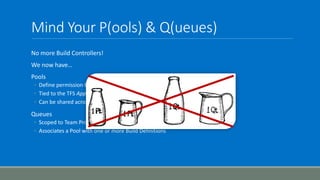
Mind Your P(ools) & Q(ueues)
No more Build Controllers!
We now have…
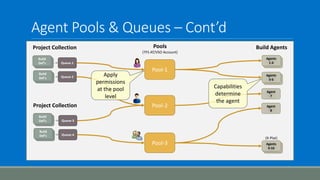
Pools
◦ Define permission boundaries around build agents
◦ Tied to the TFS App Tier Instance – or – the VSO Account
◦ Can be shared across Team Project Collections
Queues
◦ Scoped to Team Project Collection
◦ Associates a Pool with one or more Build Definitions
Agent Pools & Queues – Cont’d
Pools
(TFS AT/VSO Account)
Queue-1
Queue-2
Build
Def’s
Build
Def’s
Queue-3
Queue-4
Build
Def’s
Build
Def’s
Agents
1-4
Agents
5-6
Agents
9-10
Pool-2
Pool-1
Pool-3
Project Collection
Project Collection
Build Agents
(X-Plat)
Agent
8
Agent
7
Apply
permissions
at the pool
level
Capabilities
determine
the agent
Build Agents
Brand new architecture
Open Source!
◦ https://github.com/Microsoft/vso-agent/
“xcopy” deployable
Cross platform
Easy to install and configure
Self-updating!
No build controller required
Can run as Windows service or interactive (e.g. command line)
DEMO
P’S & Q’S
Build Tasks
Cross-platform
Open source
◦ https://github.com/Microsoft/vso-agent-tasks
Currently 37 tasks available out of the “box”
Currently 45 in GitHub (so, more to come!)
Ability to create/upload custom tasks coming
◦ Written in JavaScript/TypeScript/PowerShell
◦ Configured via JSON (task.json)
DEMO
A LOOK AT A TASK’S INTERNALS
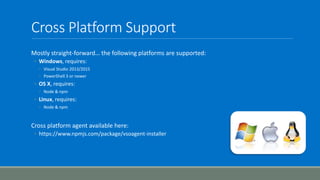
Cross Platform Support
Mostly straight-forward… the following platforms are supported:
◦ Windows, requires:
◦ Visual Studio 2013/2015
◦ PowerShell 3 or newer
◦ OS X, requires:
◦ Node & npm
◦ Linux, requires:
◦ Node & npm
Cross platform agent available here:
◦ https://www.npmjs.com/package/vsoagent-installer
In Summary
The new build architecture is:
◦ Much simpler!
◦ Web based
◦ Community-oriented (i.e. open source)
◦ Better/easier extensibility
◦ Cross platform
◦ And, most of all, NO XAML!
References
VSO Build Agent
◦ https://github.com/Microsoft/vso-agent
VSO Build Agent Tasks
◦ https://github.com/Microsoft/vso-agent-tasks
VSO/TFS Features Timeline
◦ https://www.visualstudio.com/en-us/news/release-archive-vso
Team Foundation Build Reference on MSDN
◦ https://msdn.microsoft.com/en-us/Library/vs/alm/Build/overview
Brian Harry’s Blog
◦ http://blogs.msdn.com/b/bharry/
My Blog 
◦ http://blog.devmatter.com
Questions?

Building with Visual Studio Online

  • 1.
    Building WITH VISUAL STUDIOONLINE & TEAM FOUNDATION SERVER Jeff Bramwell Director – Enterprise Architecture, Farm Credit Services of America Visual Studio ALM MVP @jbramwell :::: blog.devmatter.com
  • 2.
    Agenda What’s New? Web-based UI MindYour P’s and Q’s Build Agents Build Definitions Build Tasks Cross Platform Support Summary
  • 3.
    But First, Let’sClear Things Up…
  • 4.
    What is What? TeamFoundation Server Visual Studio Online Visual Studio Visual Studio Code
  • 5.
    What’s New? No moreXAML/Workflow! Web-based UI Cross Platform Task-Based ◦ Extensible ◦ Open Source Version History Not tied to TFS/VSO
  • 6.
    What’s Missing? Create workitem on build failure Create label on build success Update work item(s) with build number Count-based retention policies (works different than before)
  • 7.
    To XAML ornot to XAML? For new projects (or projects without build definitions), use the new builds For cross-platform builds, use the new builds If migrating an existing project (e.g. from TFVC to Git) consider updating to the new builds If heavily invested in custom XAML builds/activities, continue with XAML builds until existing custom logic can be ported to the new builds But, in general… XAML
  • 8.
    Web UI Build definitionsnow created in browser – not Visual Studio Build definitions can be created from anywhere! If you’re used to TeamCity/Jenkins, then you’ll feel at home  Builds can be queued and monitored in real time
  • 9.
    DEMO OUR FIRST LOOKAT THE WEB UI
  • 10.
    Mind Your P(ools)& Q(ueues) No more Build Controllers! We now have… Pools ◦ Define permission boundaries around build agents ◦ Tied to the TFS App Tier Instance – or – the VSO Account ◦ Can be shared across Team Project Collections Queues ◦ Scoped to Team Project Collection ◦ Associates a Pool with one or more Build Definitions
  • 11.
    Agent Pools &Queues – Cont’d Pools (TFS AT/VSO Account) Queue-1 Queue-2 Build Def’s Build Def’s Queue-3 Queue-4 Build Def’s Build Def’s Agents 1-4 Agents 5-6 Agents 9-10 Pool-2 Pool-1 Pool-3 Project Collection Project Collection Build Agents (X-Plat) Agent 8 Agent 7 Apply permissions at the pool level Capabilities determine the agent
  • 12.
    Build Agents Brand newarchitecture Open Source! ◦ https://github.com/Microsoft/vso-agent/ “xcopy” deployable Cross platform Easy to install and configure Self-updating! No build controller required Can run as Windows service or interactive (e.g. command line)
  • 13.
  • 14.
    Build Tasks Cross-platform Open source ◦https://github.com/Microsoft/vso-agent-tasks Currently 37 tasks available out of the “box” Currently 45 in GitHub (so, more to come!) Ability to create/upload custom tasks coming ◦ Written in JavaScript/TypeScript/PowerShell ◦ Configured via JSON (task.json)
  • 15.
    DEMO A LOOK ATA TASK’S INTERNALS
  • 16.
    Cross Platform Support Mostlystraight-forward… the following platforms are supported: ◦ Windows, requires: ◦ Visual Studio 2013/2015 ◦ PowerShell 3 or newer ◦ OS X, requires: ◦ Node & npm ◦ Linux, requires: ◦ Node & npm Cross platform agent available here: ◦ https://www.npmjs.com/package/vsoagent-installer
  • 17.
    In Summary The newbuild architecture is: ◦ Much simpler! ◦ Web based ◦ Community-oriented (i.e. open source) ◦ Better/easier extensibility ◦ Cross platform ◦ And, most of all, NO XAML!
  • 18.
    References VSO Build Agent ◦https://github.com/Microsoft/vso-agent VSO Build Agent Tasks ◦ https://github.com/Microsoft/vso-agent-tasks VSO/TFS Features Timeline ◦ https://www.visualstudio.com/en-us/news/release-archive-vso Team Foundation Build Reference on MSDN ◦ https://msdn.microsoft.com/en-us/Library/vs/alm/Build/overview Brian Harry’s Blog ◦ http://blogs.msdn.com/b/bharry/ My Blog  ◦ http://blog.devmatter.com
  • 19.