Theme Customization
Worldwide Business Partner Technical Enablement 2016
Van Staub – North America Embedded Solution Partners
1
Agenda
review in a practical format Digital Experience’s:
• theme tooling
• theme capabilities
• experience converting WordPress themes
• available lab
• resources
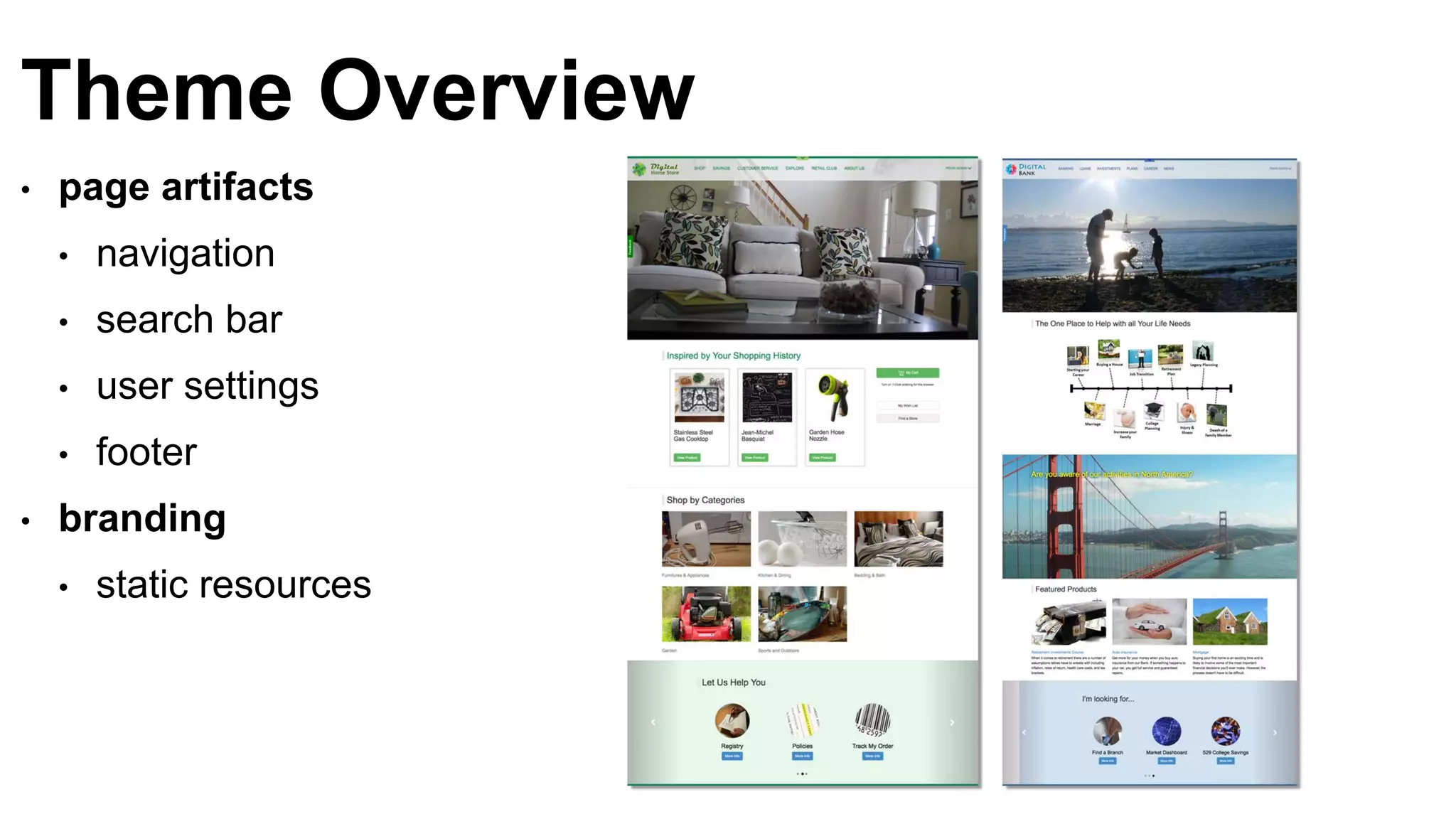
Theme Overview
• page artifacts
• navigation
• search bar
• user settings
• footer
• branding
• static resources
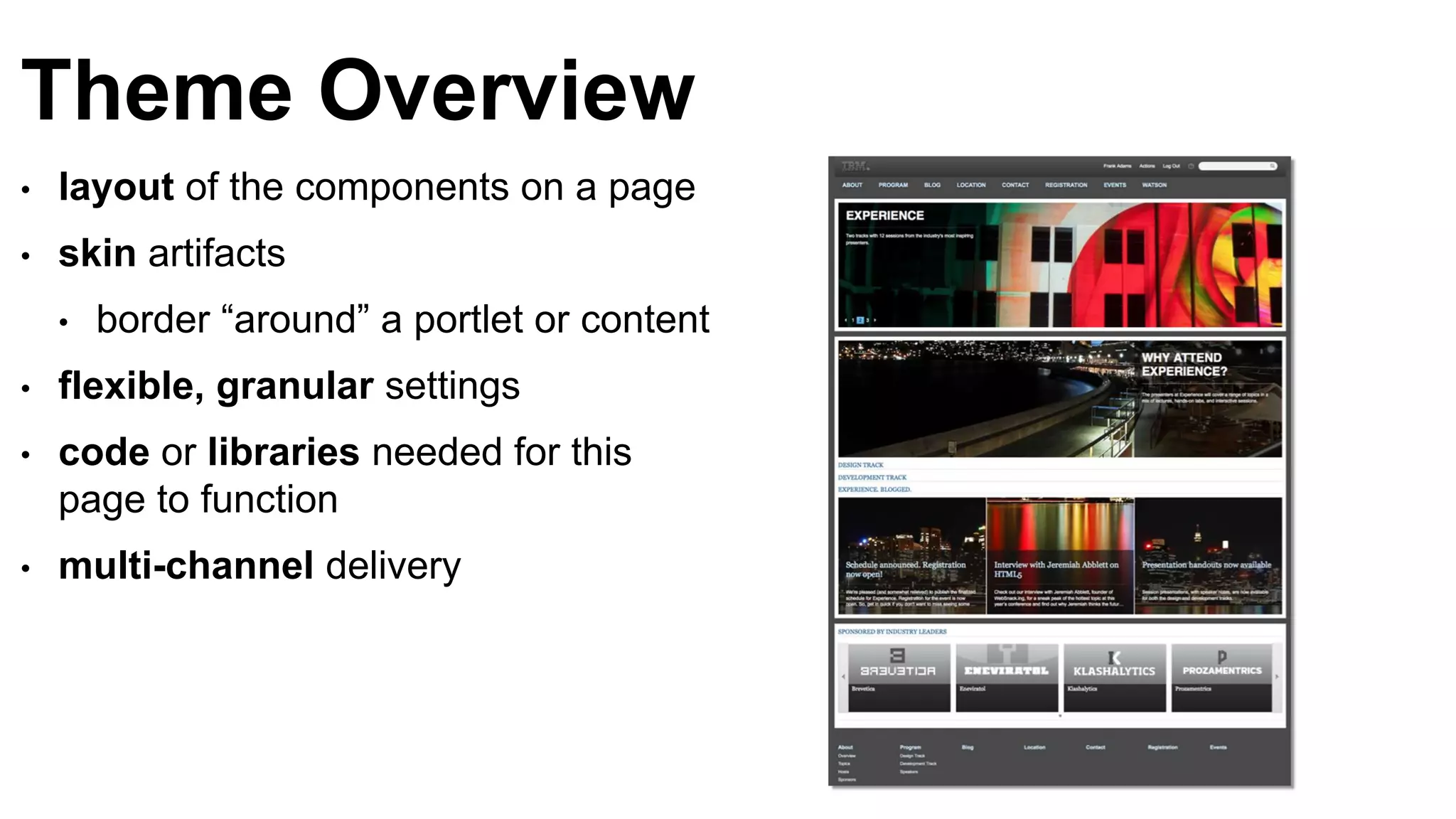
Theme Overview
• layout of the components on a page
• skin artifacts
• border “around” a portlet or content
• flexible, granular settings
• code or libraries needed for this
page to function
• multi-channel delivery
Portal 8.5 Theme
• ships with one theme - called Portal
8.5
• same theme architecture since
7.0.0.2
• dynamic and static files
• toolbar isolation / authoring
experience
• theme optimization
(modularization)
• theme analyzing capabilities
• Dojo 1.9.x in the box, allowing
arbitrary frameworks, such as
Angular
• JQuery 1.10.x in the box
Customizing Themes:
Tooling
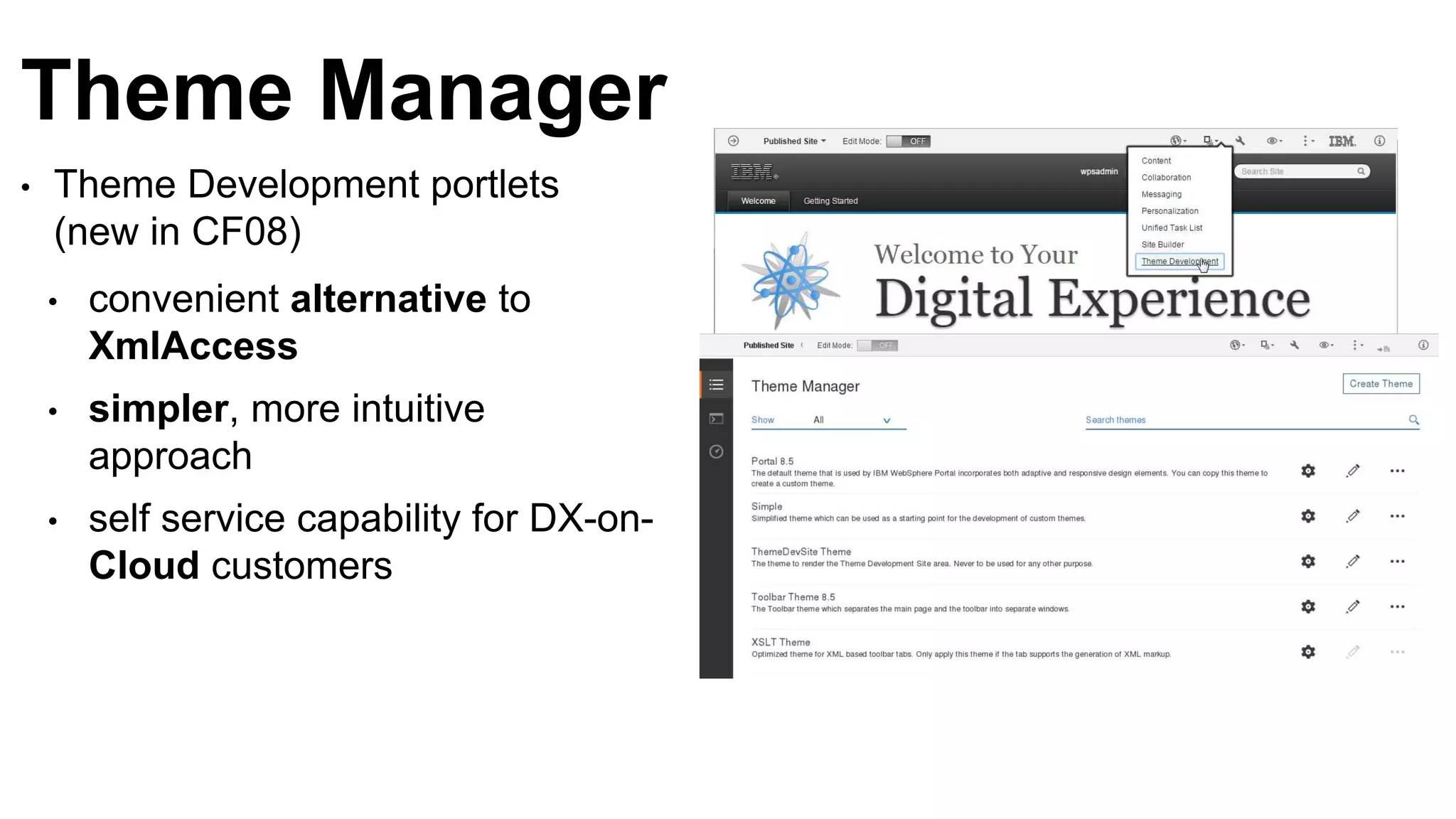
Theme Manager
• Theme Development portlets
(new in CF08)
• convenient alternative to
XmlAccess
• simpler, more intuitive
approach
• self service capability for DX-on-
Cloud customers
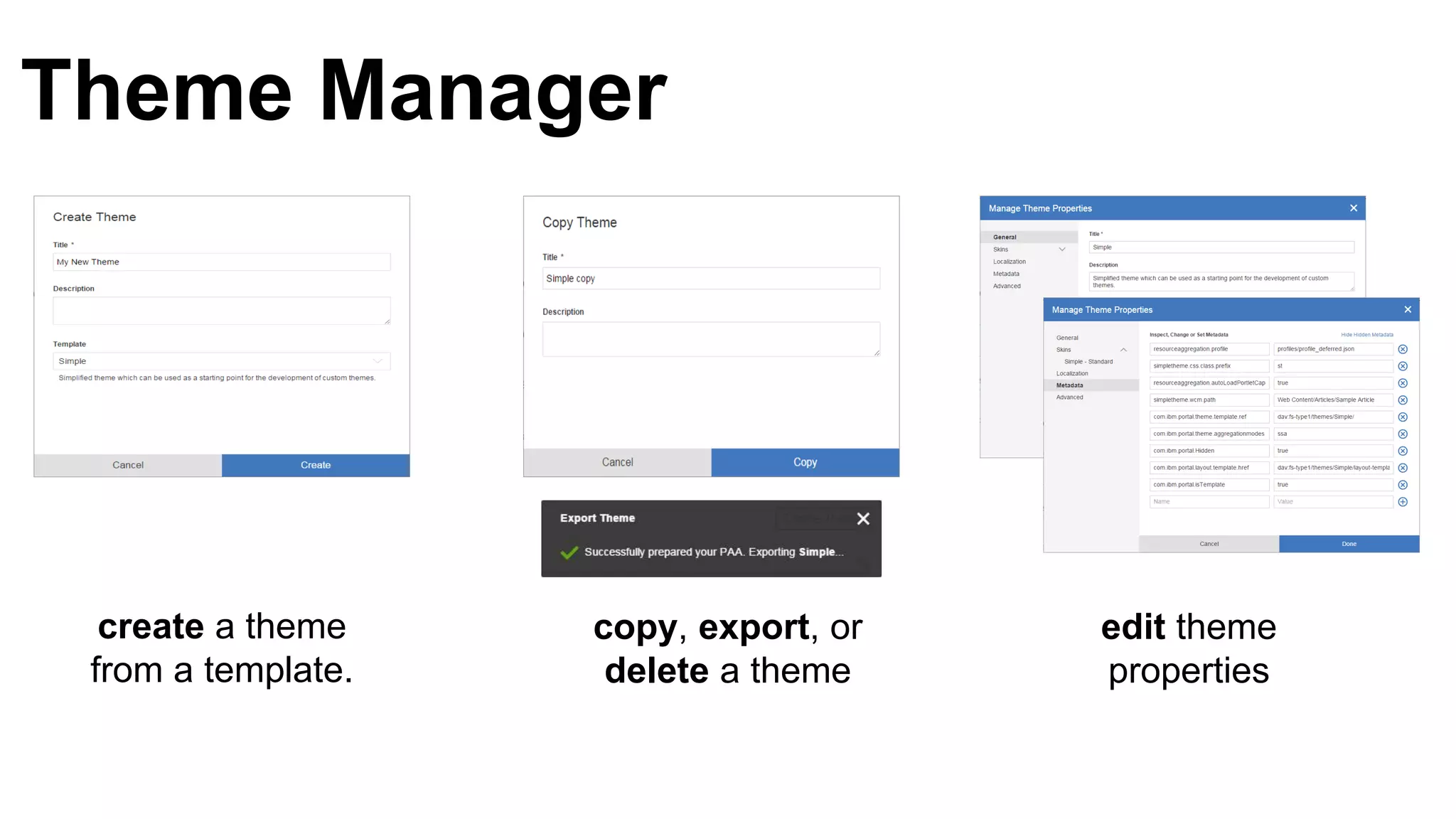
Theme Manager
create a theme
from a template.
copy, export, or
delete a theme
edit theme
properties
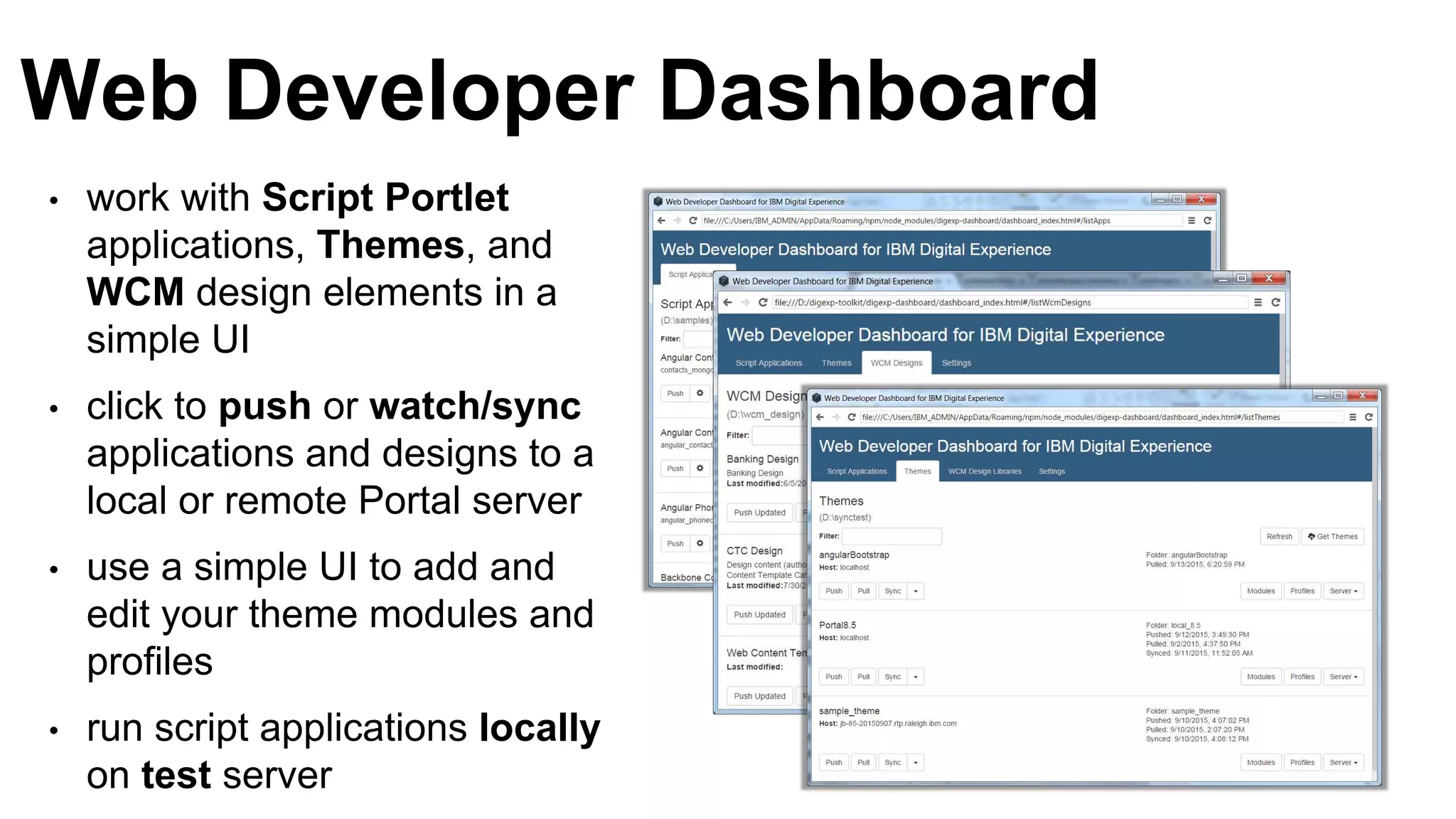
Web Developer Dashboard
• work with Script Portlet
applications, Themes, and
WCM design elements in a
simple UI
• click to push or watch/sync
applications and designs to a
local or remote Portal server
• use a simple UI to add and
edit your theme modules and
profiles
• run script applications locally
on test server
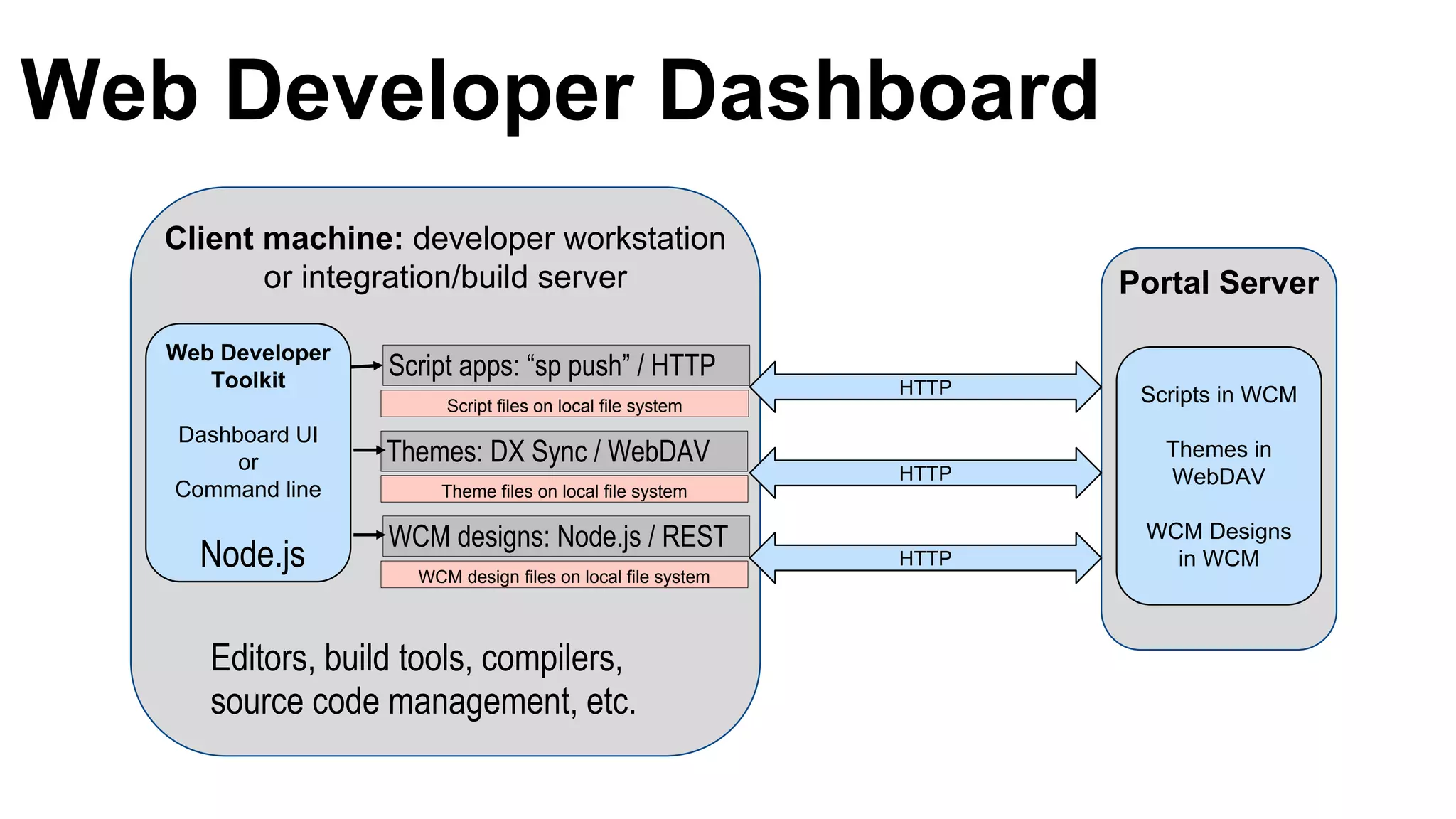
Web Developer Dashboard
Client machine: developer workstation
or integration/build server Portal Server
HTTP
Script apps: “sp push” / HTTP
Themes: DX Sync / WebDAV
WCM designs: Node.js / REST
HTTP
HTTP
Web Developer
Toolkit
Dashboard UI
or
Command line
Scripts in WCM
Themes in
WebDAV
WCM Designs
in WCM
Script files on local file system
Theme files on local file system
WCM design files on local file system
Node.js
Editors, build tools, compilers,
source code management, etc.
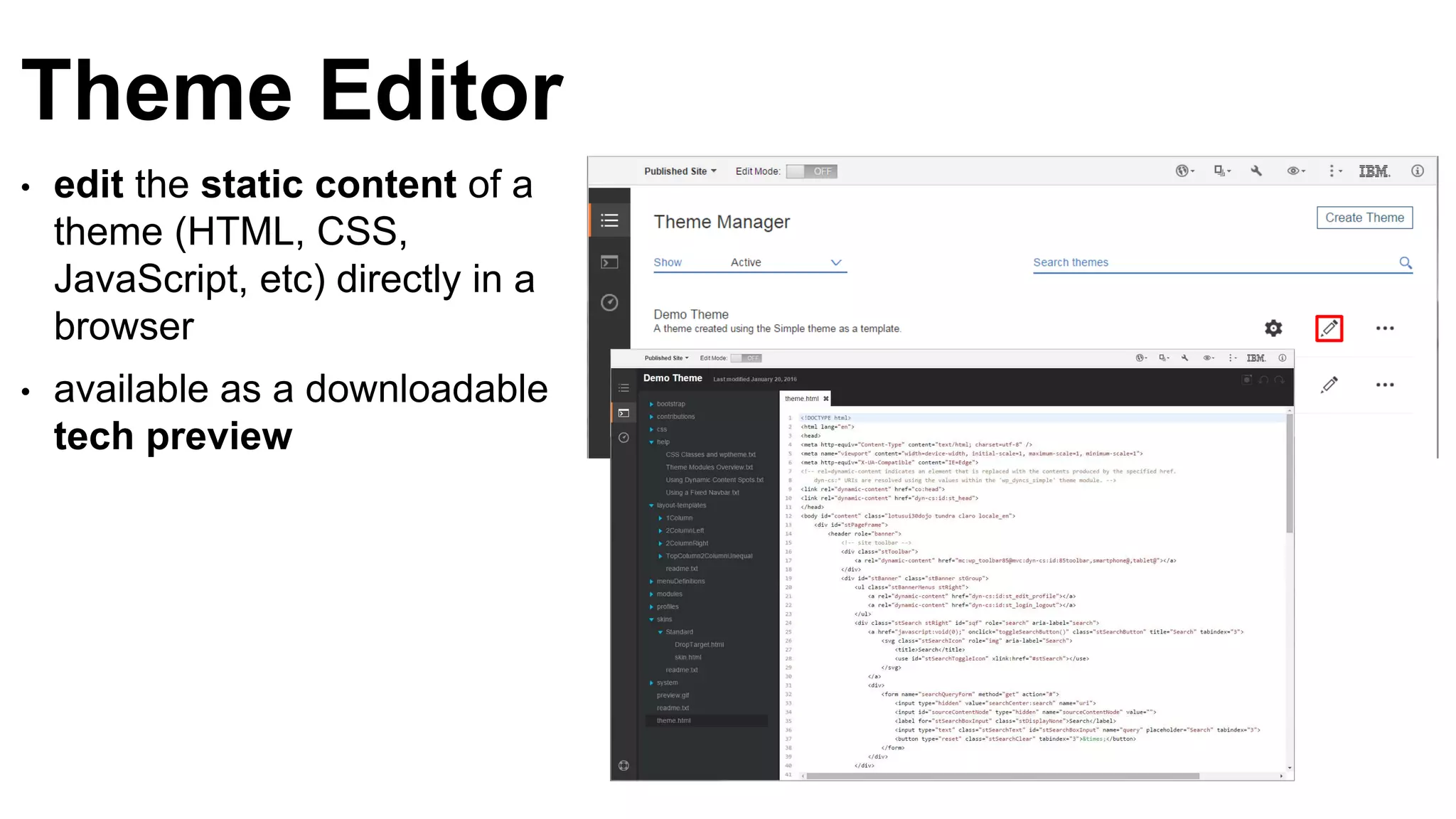
Theme Editor
• edit the static content of a
theme (HTML, CSS,
JavaScript, etc) directly in a
browser
• available as a downloadable
tech preview
Simple Theme
• minimal set of artifacts for an easy starting point and quick learning curve
• responsive design supports all mobile devices
• easily branded and customized using CSS/JS/HTML and editable via WebDAV
• several of generic dynamic content spots are available
• top navigation, mega menu, etc.
Theme Analyzer
• analysis and debugging tools available on Theme Development page
Customizing Themes:
Capabilities
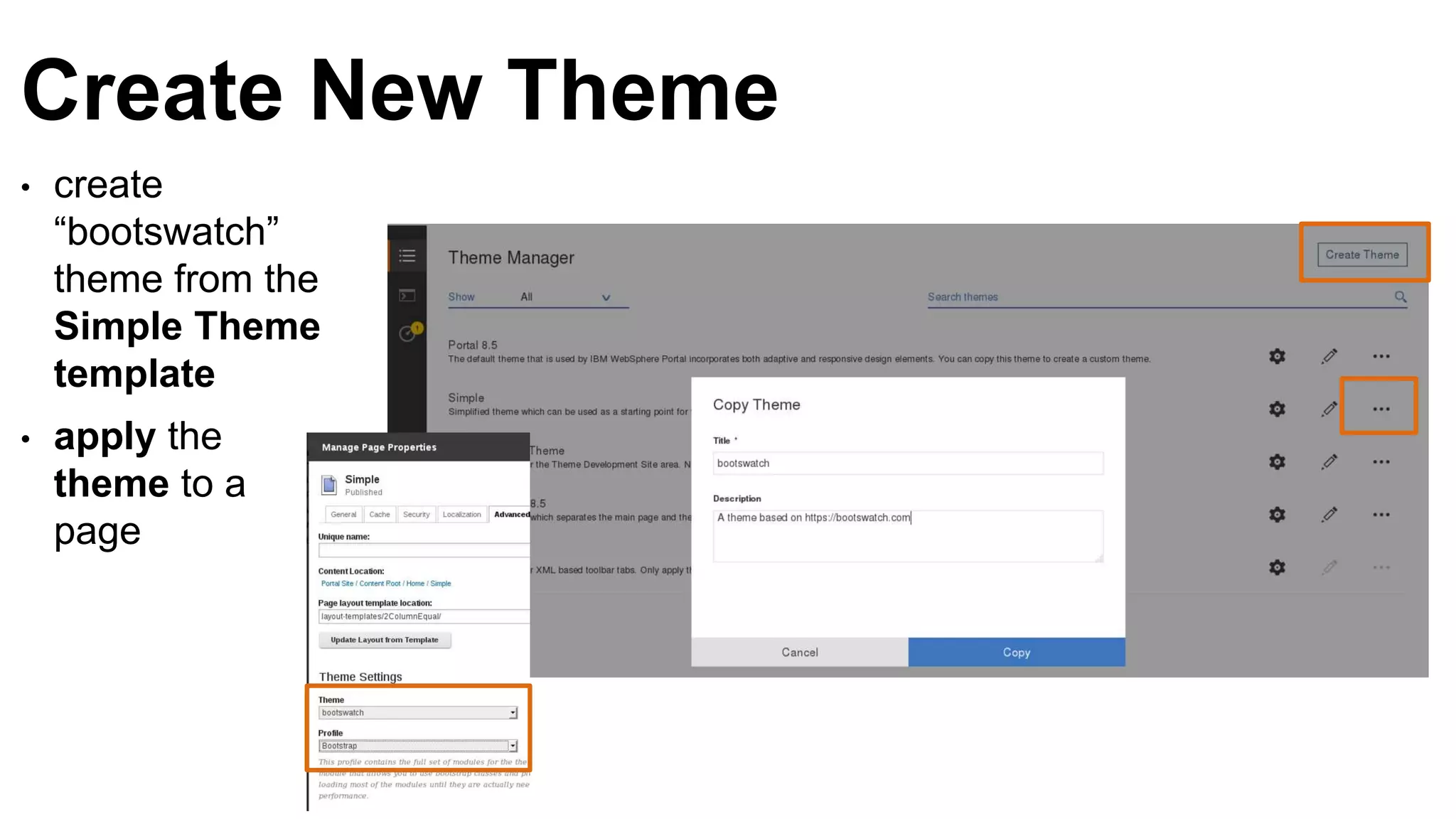
Create New Theme
• create
“bootswatch”
theme from the
Simple Theme
template
• apply the
theme to a
page
update
branding
add padding
add a few
layout
templates
Styles
• styles define the aesthetics of the
page – essentially a cascading style
sheet
• applied dynamically using page
properties
• let’s re-use bootswatch Bootstrap
styles to provide options for users
no other styles
available in Simple
Theme
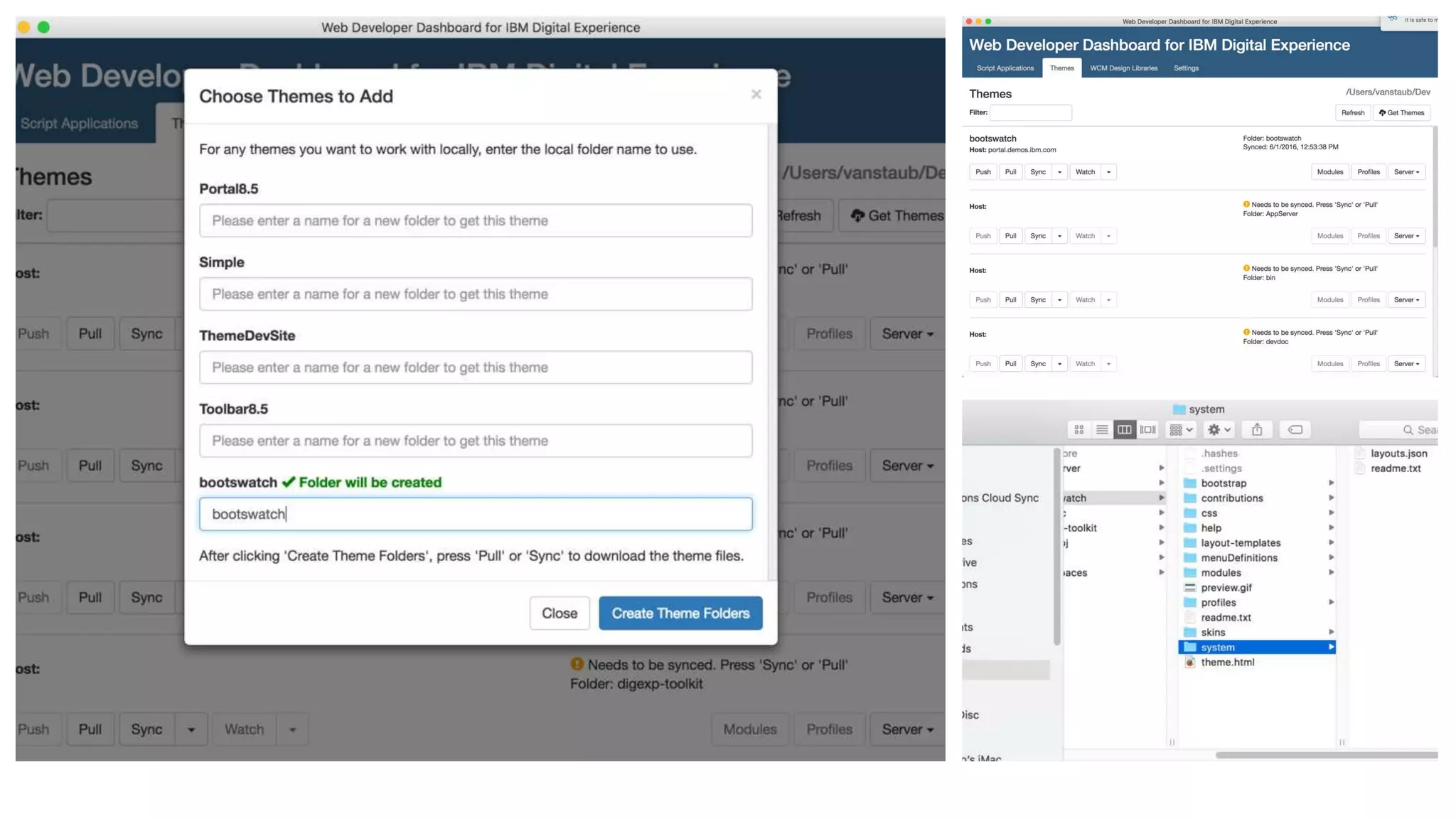
Styles
• download the Cerulean Bootstrap style
• create a styles.json file (because Simple doesn’t have one) using the DX
toolkit
Styles
• /Dev/bootswatch/system/styles.json
• /Dev/bootswatch/css
• /cerulean
• /bootstrap.min.css
• /thumbnail.png
• /cosmo
• /bootstrap.min.css
• /thumbnail.png
• /slate
• /bootstrap.min.css
• /thumbnail.png
{
localizationPackageName:'com.ibm.bundl
es', localizationBundleName:'Shelf',
identifier:'label', items: [
{'label':'Cerulean','id':'cerulean.css','url':'c
ss/cerulean/bootstrap.min.css','thumbna
il':ibmCfg.themeConfig.themeRootURI+'/c
ss/cerulean/thumbnail.png','help':''},
{'label':'Cosmo','id':'cosmo.css','url':'css/co
smo/bootstrap.min.css’,’thumbnail':ibmCfg
.themeConfig.themeRootURI+'/css/cosmo/
thumbnail.png','help':''},
{'label':'Slate','id':'slate.css','url':'css/slate/b
ootstrap.min.css','thumbnail':ibmCfg.them
eConfig.themeRootURI+'/css/slate/thumbn
ail.png','help':'’
}] }
this changed 
this did not 
Theme Templates
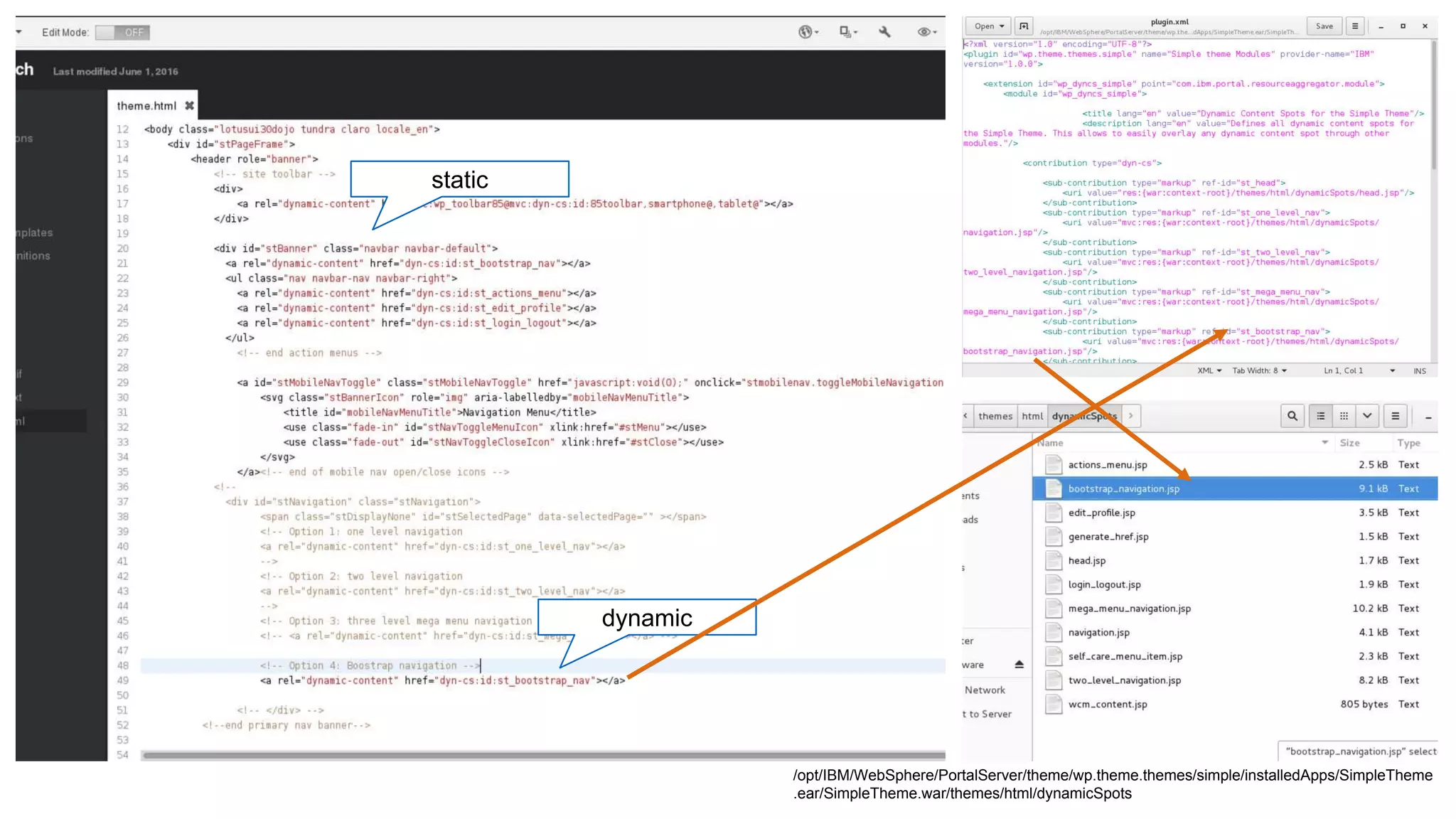
• a theme template (e.g. theme.html) defines the structure of the site
• contains both static and dynamic markup
• static reference example
• war: used to load static resources from a WAR file
• dynamic markup <a rel='dynamic-content' href='dyn-cs:id:…'/>
• modules are able to contribute dynamic content spots with the contribution
type dyn-cs from a plugin.xml
• beware localized templates; edit the NLS template inside
/<theme>/nls/theme_en.html
static
dynamic
/opt/IBM/WebSphere/PortalServer/theme/wp.theme.themes/simple/installedApps/SimpleTheme
.ear/SimpleTheme.war/themes/html/dynamicSpots
Theme Expression Logic
• simple access to:
• Portal models, meta data, resource
environment providers (REP), etc
• http://www-
01.ibm.com/support/knowledgecenter/SSH
RKX_8.5.0/mp/dev-
theme/themeopt_el_bean.dita
${wp.selectionModel.selected} = selected node
${wp.metadata[wp.selectionModel.selected]['someKey']}
= access page meta data
${wp.rep['WP GlobalThemeConfig']} = REP access
${wp.identification[node]} = retrieve node object id
${wp.themeList.current.metadata['someKey']} = access
theme meta data
${wp.ac[node].hasPermission[someRole]} = access
permissions
Skins
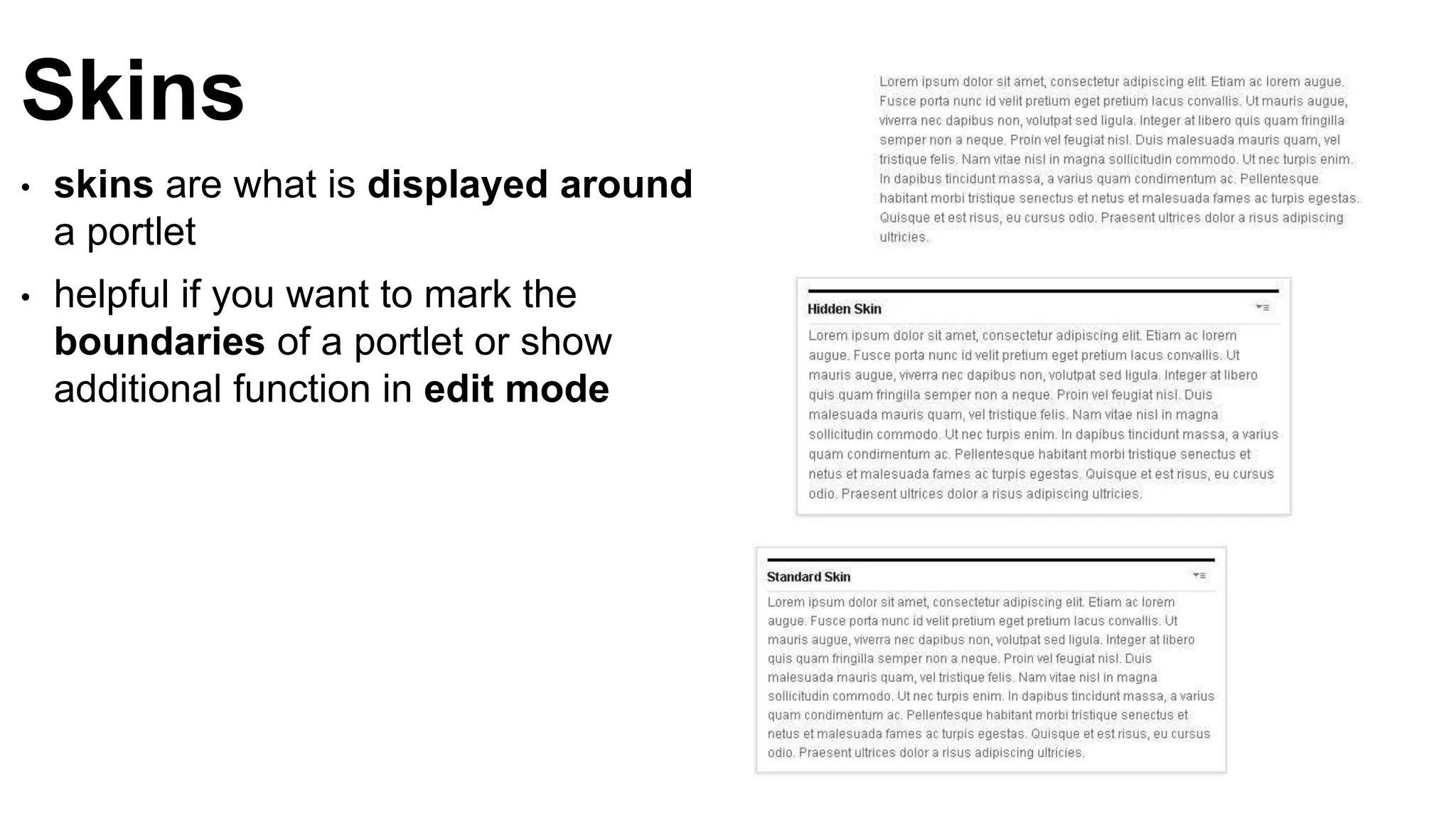
• skins are what is displayed around
a portlet
• helpful if you want to mark the
boundaries of a portlet or show
additional function in edit mode
Skins
just a bit more
padding
manually adding the style
to the skin html
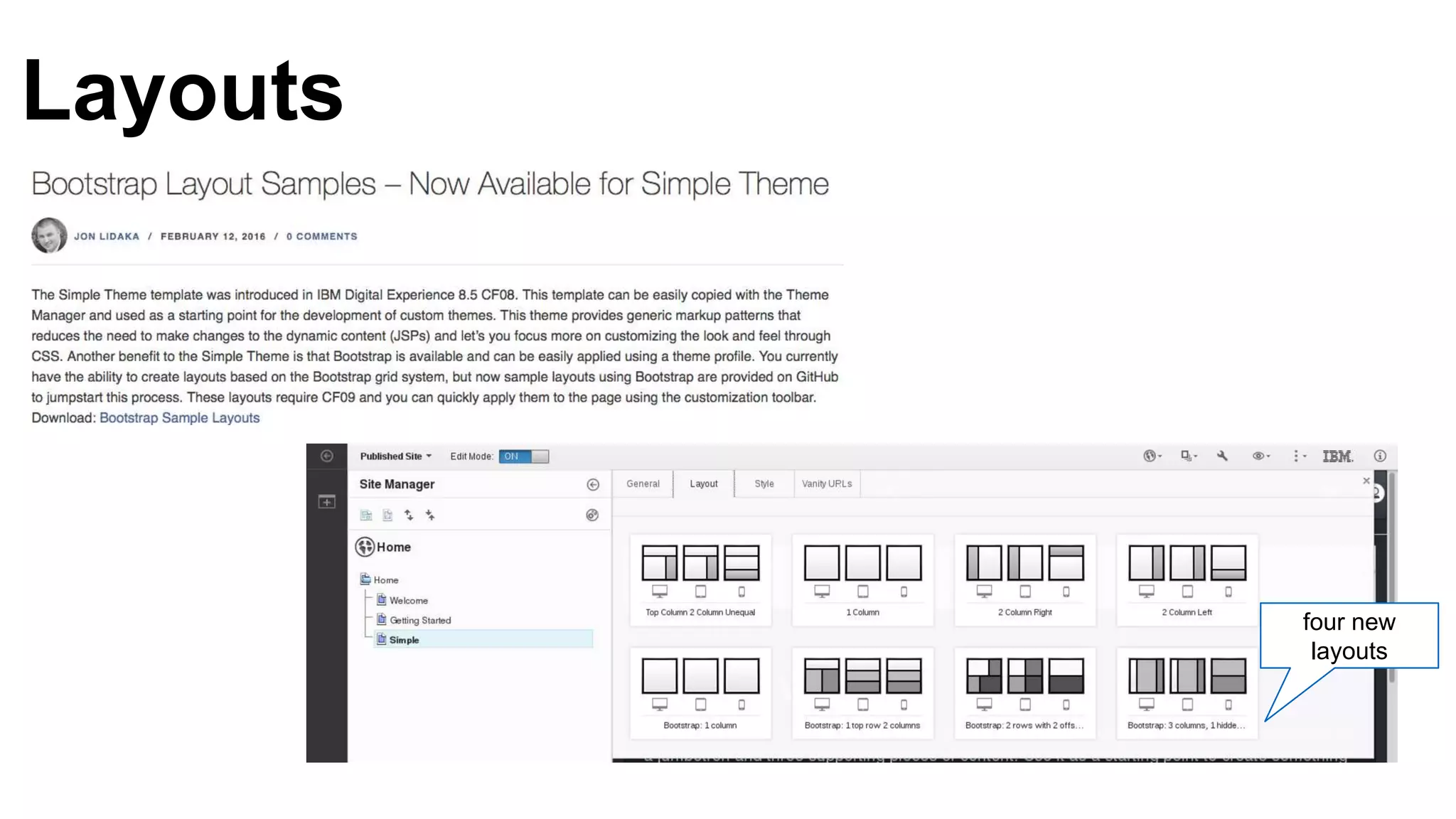
Layouts
four new
layouts
Layouts
{'url':ibmCfg.themeConfig.themeWebDAVBaseURI+'layout-
templates/Bootstrap_1Column/','id':'Bootstrap_1Column','thu
mbnail':ibmCfg.themeConfig.themeRootURI+'/layout-
templates/Bootstrap_1Column/icon.png','titles':
[{'value':'Bootstrap: 1 column','lang':'en'}]},
Modules
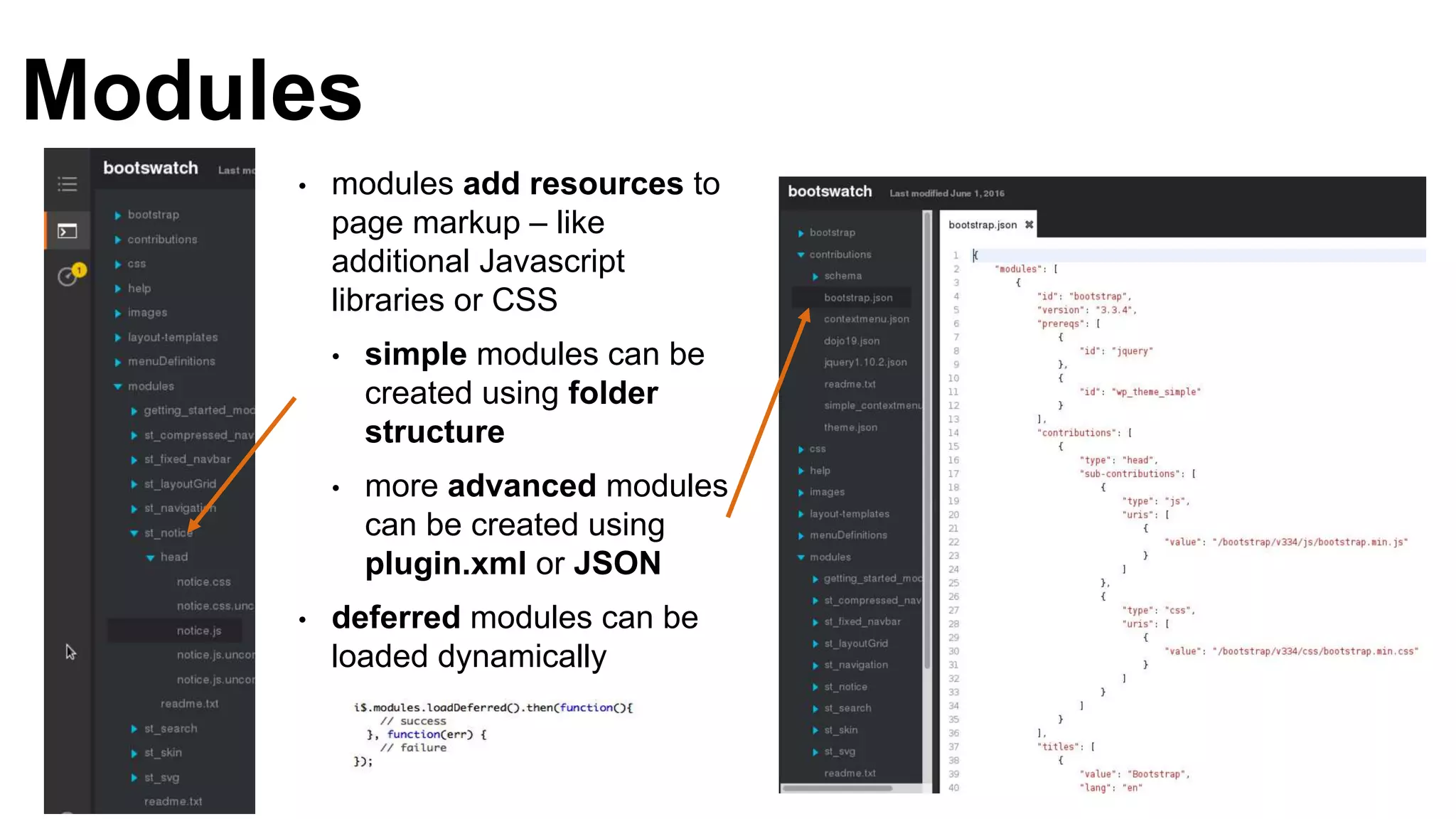
• modules add resources to
page markup – like
additional Javascript
libraries or CSS
• simple modules can be
created using folder
structure
• more advanced modules
can be created using
plugin.xml or JSON
• deferred modules can be
loaded dynamically
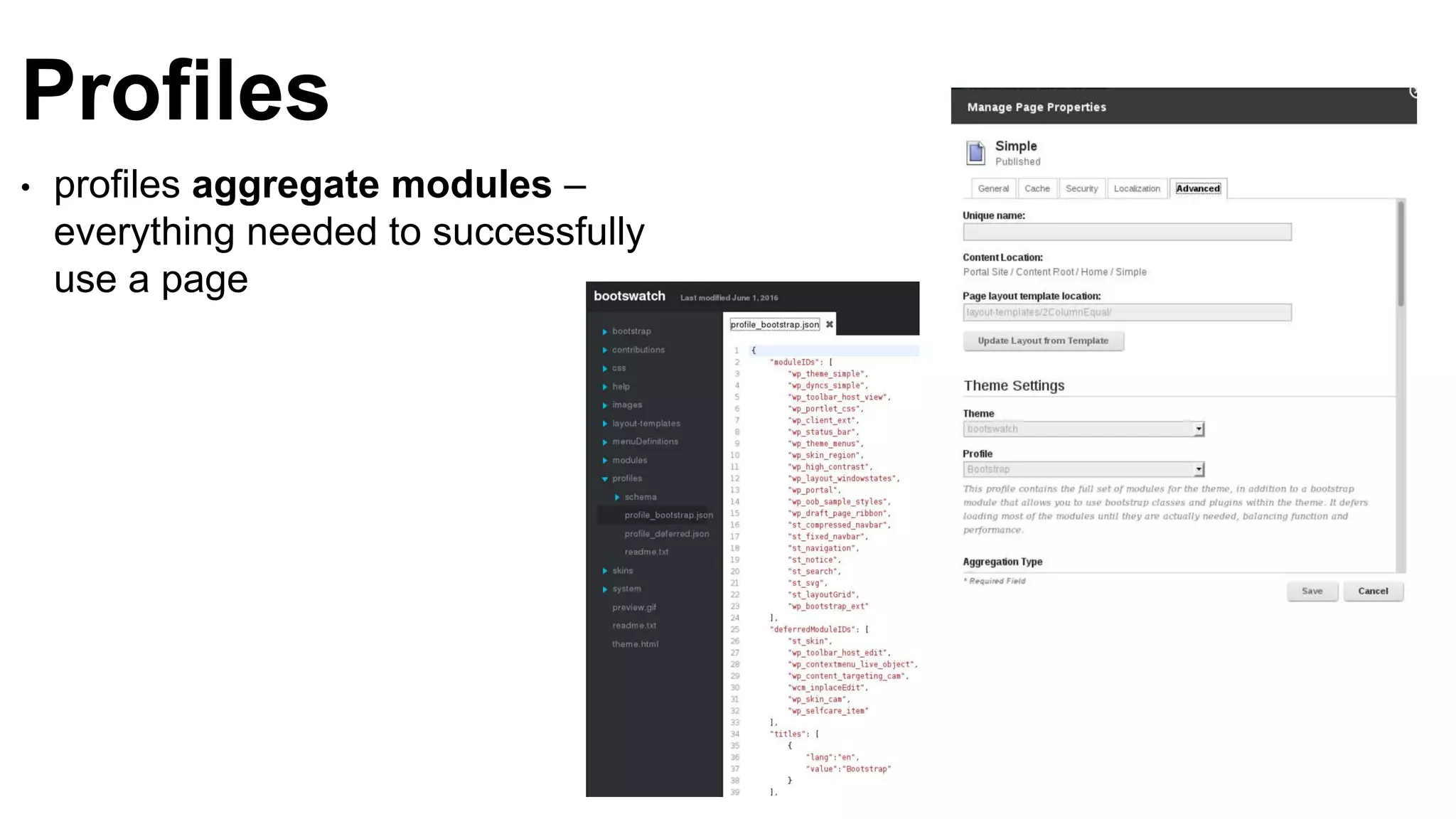
Profiles
• profiles aggregate modules –
everything needed to successfully
use a page
Resources
digitalExperience
Developer Downloads
https://developer.ibm.com/digexp/downloads/
Web Toolkit for IBM
Digital Experience
https://github.com/OpenNTF/WebDevToolkitForDx
IBM Theme Editor for
IBM WebSphere
Portal
https://greenhouse.lotus.com/plugins/plugincatalog.nsf/assetDetails.xsp?action=editDocument&documentId=4E6461C014E
DEAC785257F20002B035F&cm_mc_uid=64973263975314642744284&cm_mc_sid_50200000=1464712288&Login
Developing Themes
for WebSphere Portal
8.5
https://www-10.lotus.com/ldd/portalwiki.nsf/xpViewCategories.xsp?lookupName=Developing Themes for WebSphere Portal
8.5
Bootstrap http://getbootstrap.com/
Bootswatch https://bootswatch.com/
Lab
• WP8.5_Lab_Theme_Customization
• Located in community
• Creating a custom theme and
changing the page logo
• Creating customized page styles
• Creating customized page layouts
• Understanding the new theme
optimization framework. This
includes the creation of custom
profiles and modules.
Thank You
37

IBM Digital Experience Theme Customization

  • 1.
    Theme Customization Worldwide BusinessPartner Technical Enablement 2016 Van Staub – North America Embedded Solution Partners 1
  • 2.
    Agenda review in apractical format Digital Experience’s: • theme tooling • theme capabilities • experience converting WordPress themes • available lab • resources
  • 3.
    Theme Overview • pageartifacts • navigation • search bar • user settings • footer • branding • static resources
  • 4.
    Theme Overview • layoutof the components on a page • skin artifacts • border “around” a portlet or content • flexible, granular settings • code or libraries needed for this page to function • multi-channel delivery
  • 7.
    Portal 8.5 Theme •ships with one theme - called Portal 8.5 • same theme architecture since 7.0.0.2 • dynamic and static files • toolbar isolation / authoring experience • theme optimization (modularization) • theme analyzing capabilities • Dojo 1.9.x in the box, allowing arbitrary frameworks, such as Angular • JQuery 1.10.x in the box
  • 8.
  • 9.
    Theme Manager • ThemeDevelopment portlets (new in CF08) • convenient alternative to XmlAccess • simpler, more intuitive approach • self service capability for DX-on- Cloud customers
  • 10.
    Theme Manager create atheme from a template. copy, export, or delete a theme edit theme properties
  • 11.
    Web Developer Dashboard •work with Script Portlet applications, Themes, and WCM design elements in a simple UI • click to push or watch/sync applications and designs to a local or remote Portal server • use a simple UI to add and edit your theme modules and profiles • run script applications locally on test server
  • 12.
    Web Developer Dashboard Clientmachine: developer workstation or integration/build server Portal Server HTTP Script apps: “sp push” / HTTP Themes: DX Sync / WebDAV WCM designs: Node.js / REST HTTP HTTP Web Developer Toolkit Dashboard UI or Command line Scripts in WCM Themes in WebDAV WCM Designs in WCM Script files on local file system Theme files on local file system WCM design files on local file system Node.js Editors, build tools, compilers, source code management, etc.
  • 13.
    Theme Editor • editthe static content of a theme (HTML, CSS, JavaScript, etc) directly in a browser • available as a downloadable tech preview
  • 14.
    Simple Theme • minimalset of artifacts for an easy starting point and quick learning curve • responsive design supports all mobile devices • easily branded and customized using CSS/JS/HTML and editable via WebDAV • several of generic dynamic content spots are available • top navigation, mega menu, etc.
  • 15.
    Theme Analyzer • analysisand debugging tools available on Theme Development page
  • 16.
  • 17.
    Create New Theme •create “bootswatch” theme from the Simple Theme template • apply the theme to a page
  • 18.
  • 19.
    Styles • styles definethe aesthetics of the page – essentially a cascading style sheet • applied dynamically using page properties • let’s re-use bootswatch Bootstrap styles to provide options for users no other styles available in Simple Theme
  • 20.
    Styles • download theCerulean Bootstrap style • create a styles.json file (because Simple doesn’t have one) using the DX toolkit
  • 22.
    Styles • /Dev/bootswatch/system/styles.json • /Dev/bootswatch/css •/cerulean • /bootstrap.min.css • /thumbnail.png • /cosmo • /bootstrap.min.css • /thumbnail.png • /slate • /bootstrap.min.css • /thumbnail.png { localizationPackageName:'com.ibm.bundl es', localizationBundleName:'Shelf', identifier:'label', items: [ {'label':'Cerulean','id':'cerulean.css','url':'c ss/cerulean/bootstrap.min.css','thumbna il':ibmCfg.themeConfig.themeRootURI+'/c ss/cerulean/thumbnail.png','help':''}, {'label':'Cosmo','id':'cosmo.css','url':'css/co smo/bootstrap.min.css’,’thumbnail':ibmCfg .themeConfig.themeRootURI+'/css/cosmo/ thumbnail.png','help':''}, {'label':'Slate','id':'slate.css','url':'css/slate/b ootstrap.min.css','thumbnail':ibmCfg.them eConfig.themeRootURI+'/css/slate/thumbn ail.png','help':'’ }] }
  • 23.
  • 24.
    Theme Templates • atheme template (e.g. theme.html) defines the structure of the site • contains both static and dynamic markup • static reference example • war: used to load static resources from a WAR file • dynamic markup <a rel='dynamic-content' href='dyn-cs:id:…'/> • modules are able to contribute dynamic content spots with the contribution type dyn-cs from a plugin.xml • beware localized templates; edit the NLS template inside /<theme>/nls/theme_en.html
  • 25.
  • 26.
    Theme Expression Logic •simple access to: • Portal models, meta data, resource environment providers (REP), etc • http://www- 01.ibm.com/support/knowledgecenter/SSH RKX_8.5.0/mp/dev- theme/themeopt_el_bean.dita ${wp.selectionModel.selected} = selected node ${wp.metadata[wp.selectionModel.selected]['someKey']} = access page meta data ${wp.rep['WP GlobalThemeConfig']} = REP access ${wp.identification[node]} = retrieve node object id ${wp.themeList.current.metadata['someKey']} = access theme meta data ${wp.ac[node].hasPermission[someRole]} = access permissions
  • 28.
    Skins • skins arewhat is displayed around a portlet • helpful if you want to mark the boundaries of a portlet or show additional function in edit mode
  • 29.
  • 30.
    just a bitmore padding manually adding the style to the skin html
  • 31.
  • 32.
  • 33.
    Modules • modules addresources to page markup – like additional Javascript libraries or CSS • simple modules can be created using folder structure • more advanced modules can be created using plugin.xml or JSON • deferred modules can be loaded dynamically
  • 34.
    Profiles • profiles aggregatemodules – everything needed to successfully use a page
  • 35.
    Resources digitalExperience Developer Downloads https://developer.ibm.com/digexp/downloads/ Web Toolkitfor IBM Digital Experience https://github.com/OpenNTF/WebDevToolkitForDx IBM Theme Editor for IBM WebSphere Portal https://greenhouse.lotus.com/plugins/plugincatalog.nsf/assetDetails.xsp?action=editDocument&documentId=4E6461C014E DEAC785257F20002B035F&cm_mc_uid=64973263975314642744284&cm_mc_sid_50200000=1464712288&Login Developing Themes for WebSphere Portal 8.5 https://www-10.lotus.com/ldd/portalwiki.nsf/xpViewCategories.xsp?lookupName=Developing Themes for WebSphere Portal 8.5 Bootstrap http://getbootstrap.com/ Bootswatch https://bootswatch.com/
  • 36.
    Lab • WP8.5_Lab_Theme_Customization • Locatedin community • Creating a custom theme and changing the page logo • Creating customized page styles • Creating customized page layouts • Understanding the new theme optimization framework. This includes the creation of custom profiles and modules.
  • 37.