MVC 5
Haitham Shaddad
Technical Architect
haithamshaddad.com
Course outline
• Introduction
• Models
• Controllers
• Views
• Integrate JavaScript with MVC
• OWIIN & Katana
• Identity & Security
• Web API
• SignalR
Introduction
• Introduction to Asp.Net 4.5
• What is NuGet
• Understand MVC architecture
• The MVC request processing cycle
• When to use MVC
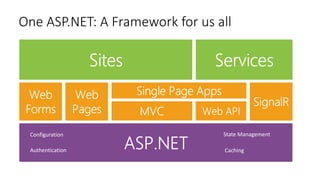
One ASP.NET: A Framework for us all
Configuration
Authentication
State Management
Caching
NuGet
• Shared Packages/Libraries Repository
• Install-Package PackageName
• UnInstall-Package
• Update-Package
NuGet Demo
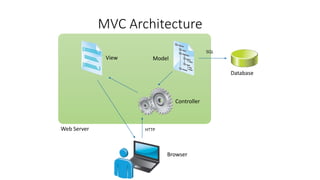
MVC Architecture
Browser
Controller
View Model
Database
Web Server HTTP
SQL
Demo, Hello MVC
1. Create a new project
2. Discuss the basics of the moving parts
3. Introduce MVC conventions
When to use MVC
• The MVC framework does not replace the Web Forms model
• Advantages of MVC
• Advantages of a Web Forms
Models
• Developing Models
• Using Display and Edit Data Annotations on Properties
• Validating User Input with Data Annotations
• What Are Model Binders?
• Entity Framework 6
Developing Models
public class Photo
{
public int PhotoID { get; set; }
public string Title { get; set; }
public byte[] PhotoFile { get; set; }
public string Description { get; set; }
public DateTime CreatedDate { get; set; }
public string Owner { get; set; }
public virtual List<Comment> Comments { get; set; }
}
-PhotoID : int
-Title : string
-PhotoFile : byte
-Description : string
-CreatedDate : object
-Owner : string
Photo
-CommentID : int
-User : string
-Subject : string
-Body : string
-PhotoID : int
Comment
1 0..*
Display and Edit Data Annotations
public class Photo
{
// other properties excluded
[DisplayName("Picture")]
public byte[] PhotoFile { get; set; }
[DataType(DataType.MultilineText)]
public string Description { get; set; }
[DataType(DataType.DateTime)]
[DisplayName("Created Date")]
[DisplayFormat(DataFormatString = "{0:dd/MM/yy}"]
public DateTime CreatedDate { get; set; }
}
Validating User Input with Data Annotations
public class Person
{
public int PersonID { get; set; }
[Required(ErrorMessage="Please enter a name.")]
public string Name { get; set; }
[Range(0, 400)]
public int Height { get; set; }
[Required]
[DataType(DataType.EmailAddress)]
public string EmailAddress { get; set; }
}
What Are Model Binders?
• The Default Controller Action Invoker uses model binders to determine
how parameters are passed to actions
• The Default Model Binder passes parameters by using the following
logic:
• The binder examines the definition of the action that it must pass parameters to
• The binder searches for values in the request that can be passed as parameters
The Entity Framework
Types of Entity Framework Workflows
• Database First
• Model First
• Code First
Demo
• How to Install Entity Framework 6
• DB First Model
• Code First Model
• Code Migration
• Code first from existing DB
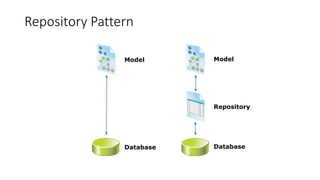
Repository Pattern
Model
Database
Model
Database
Repository
Demo
• Create a repository
• Use a repository
• Create a generic repository
• Dependency Injection
Controllers and Actions
• Responding to User Requests
• Writing Controller Actions
• Using Parameters
• Passing Information to Views
• Routing
• Filters
• Areas
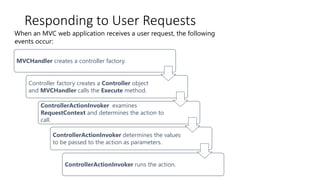
Responding to User Requests
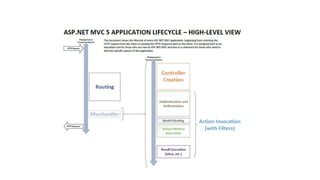
When an MVC web application receives a user request, the following
events occur:
MVCHandler creates a controller factory.
Controller factory creates a Controller object
and MVCHandler calls the Execute method.
ControllerActionInvoker examines
RequestContext and determines the action to
call.
ControllerActionInvoker determines the values
to be passed to the action as parameters.
ControllerActionInvoker runs the action.
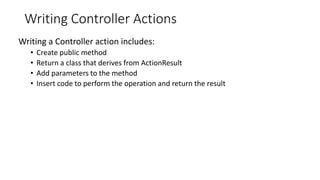
Writing Controller Actions
Writing a Controller action includes:
• Create public method
• Return a class that derives from ActionResult
• Add parameters to the method
• Insert code to perform the operation and return the result
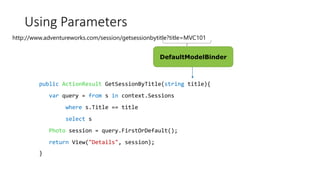
Using Parameters
public ActionResult GetSessionByTitle(string title){
var query = from s in context.Sessions
where s.Title == title
select s
Photo session = query.FirstOrDefault();
return View("Details", session);
}
http://www.adventureworks.com/session/getsessionbytitle?title=MVC101
DefaultModelBinder
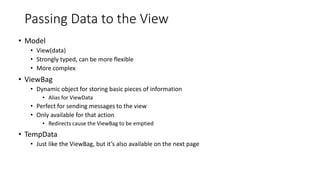
Passing Data to the View
• Model
• View(data)
• Strongly typed, can be more flexible
• More complex
• ViewBag
• Dynamic object for storing basic pieces of information
• Alias for ViewData
• Perfect for sending messages to the view
• Only available for that action
• Redirects cause the ViewBag to be emptied
• TempData
• Just like the ViewBag, but it’s also available on the next page
Routing
• Understanding the routing mechanism
• Adding custom entries to a route table
• Defining defaults, parameters, and validation
• Custom route constraints
• Attribute routing
What are Filters?
Some requirements cut across logical boundaries are called cross-cutting
concerns. Examples include:
• Authorization
• Logging
• Caching
There are four different types of filters:
• Authorization filters run before any other filter and before the code in the action
method
• Action filters run before and after the code in the action method
• Result filters run before and after a result is returned from an action method.
• Exception filters run only if the action method or another filter throws an
exception.
Areas
• Separate a large MVC Web application into smaller functional groupings
• An application can have more than one area
• Example: An E-Commerce MVC Application can have the following
areas:
• Shopping Cart
• Order Fulfillment
• Inventory Management
• Demo
Views
• Creating Views with Razor Syntax
• Master Page and Layout
• Using HTML Helpers
• Reusing Code in Views
1- Creating Views with Razor Syntax
• Adding Views
• Features of Razor Syntax
• Binding Views to Model Classes and Displaying Properties
• Demo
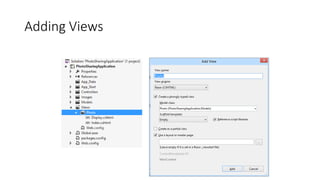
Adding Views
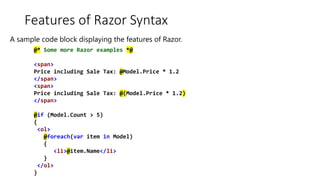
Features of Razor Syntax
@* Some more Razor examples *@
<span>
Price including Sale Tax: @Model.Price * 1.2
</span>
<span>
Price including Sale Tax: @(Model.Price * 1.2)
</span>
@if (Model.Count > 5)
{
<ol>
@foreach(var item in Model)
{
<li>@item.Name</li>
}
</ol>
}
A sample code block displaying the features of Razor.
Binding Views to Model Classes and
Displaying Properties
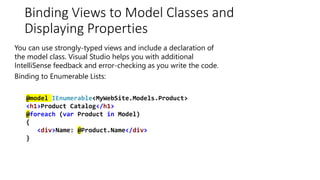
You can use strongly-typed views and include a declaration of
the model class. Visual Studio helps you with additional
IntelliSense feedback and error-checking as you write the code.
Binding to Enumerable Lists:
@model IEnumerable<MyWebSite.Models.Product>
<h1>Product Catalog</h1>
@foreach (var Product in Model)
{
<div>Name: @Product.Name</div>
}
Differentiating Server Side Code from HTML
• Razor identifies server-side code by looking for the @ symbol.
• In Razor syntax, the @ symbol has various uses. You can:
• Use @ to identify server-side C# code
• Use @@ to render an @ symbol in an HTML page.
• Use <text>to explicitly declare several lines of text as content and not
code.
• Use @: to add normal text
• To render text without HTML encoding, you can use the Html.Raw()
helper.
Demo: Creating views
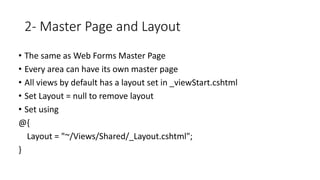
2- Master Page and Layout
• The same as Web Forms Master Page
• Every area can have its own master page
• All views by default has a layout set in _viewStart.cshtml
• Set Layout = null to remove layout
• Set using
@{
Layout = "~/Views/Shared/_Layout.cshtml";
}
Demo: Layouts and Master Page
• Create view with layout
• Create view without layout
• Create a custom layout
3- Using HTML Helpers
• Using Action Helpers
• Using Display Helpers
• The Begin Form Helper
• Using Editor Helpers
• Using Validation Helpers
• Creating Custom Helpers
Using Action Helpers
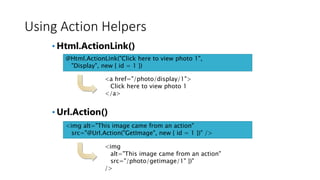
• Html.ActionLink()
• Url.Action()
@Html.ActionLink("Click here to view photo 1",
"Display", new { id = 1 })
<a href="/photo/display/1">
Click here to view photo 1
</a>
<img alt="This image came from an action"
src="@Url.Action("GetImage", new { id = 1 })" />
<img
alt="This image came from an action"
src="/photo/getimage/1" })"
/>
Using Display Helpers
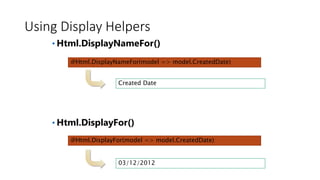
• Html.DisplayNameFor()
• Html.DisplayFor()
@Html.DisplayNameFor(model => model.CreatedDate)
@Html.DisplayFor(model => model.CreatedDate)
Created Date
03/12/2012
The Begin Form Helper
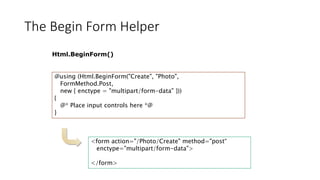
Html.BeginForm()
@using (Html.BeginForm("Create", "Photo",
FormMethod.Post,
new { enctype = "multipart/form-data" }))
{
@* Place input controls here *@
}
<form action="/Photo/Create" method="post“
enctype="multipart/form-data">
</form>
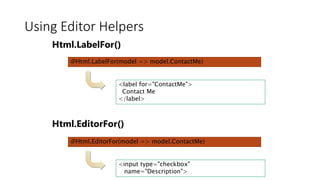
Using Editor Helpers
Html.LabelFor()
Html.EditorFor()
@Html.LabelFor(model => model.ContactMe)
@Html.EditorFor(model => model.ContactMe)
<label for="ContactMe">
Contact Me
</label>
<input type="checkbox"
name="Description">
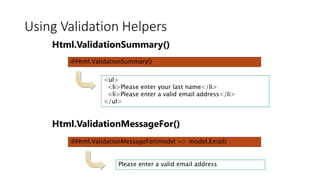
Using Validation Helpers
Html.ValidationSummary()
Html.ValidationMessageFor()
@Html.ValidationSummary()
@Html.ValidationMessageFor(model => model.Email)
<ul>
<li>Please enter your last name</li>
<li>Please enter a valid email address</li>
</ul>
Please enter a valid email address
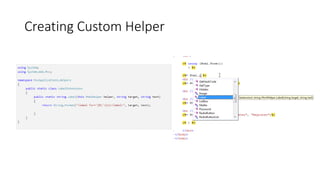
Creating Custom Helper
Demo: Creating Create Page
4- Reusing Code in Views
• Creating Partial Views
• Using Partial Views
• Demo
Creating Partial Views
You can use partial views to render the same HTML content in different
locations in your web application
• Creating and Naming Partial Views:
• Create a partial view by using the Add View dialog
• Name partial views with an underscore prefix to keep to convention
• Strongly-typed and dynamic partial views:
• Create strongly-typed partial views if you are certain that the partial view will
always display the same model class.
• Create dynamic partial views if you are not sure if the partial view will always
display the same model class.
Using Partial Views
Using HTML helpers, you can use partial views within other views in a
web application:
• To pass the same model object to a partial view from the parent view, use
Html.Partial()
• To pass a model object to a partial view, which is different from the parent view
or of a different model class, use Html.Action()
Use the ViewBag and ViewData collections to share data between the
controller action, parent view, and partial view
Demo
• Create Partial view
• Use Partial view
Integrate JavaScript with MVC
• Using Ajax and Partial Page Updates
• Rendering and Executing JavaScript Code
1: Using AJAX and Partial Page Updates
• Why Use Partial Page Updates?
• Using AJAX in an MVC Web Application
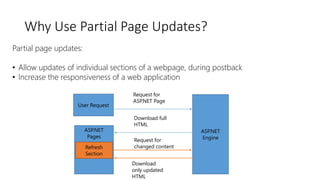
Why Use Partial Page Updates?
Partial page updates:
• Allow updates of individual sections of a webpage, during postback
• Increase the responsiveness of a web application
User Request
ASP.NET
Engine
ASP.NET
Pages
Refresh
Section
Request for
ASP.NET Page
Download full
HTML
Request for
changed content
Download
only updated
HTML
Using AJAX in an MVC Web Application
To implement AJAX in your web application:
1. Create your web application without AJAX
2. Add or modify views, to render only the specific sections that you want
to update on the webpage
3. Update the Controller class to return the PartialView class
Demo: Create List Page with Partial Update
2: Rendering and Executing JavaScript Code
• Adding JavaScript Files
• Using Content Delivery Networks for JavaScript Libraries
• Introduction to jQueryUI
• Bundling and Minification
Adding JavaScript Files
• Add the JavaScript code to HTML
• Defining the JavaScript code in JavaScript files:
• You can define JavaScript code in a JavaScript file
• Reference the JavaScript file in multiple HTML files
Using Content Delivery Networks for
JavaScript Libraries
Content Delivery Network (CDN):
• Is a group of geographically distributed servers
• Helps host contents for web applications
Microsoft Ajax CDN hosts popular libraries such as:
• jQuery
• jQuery UI
• jQuery Mobile
• jQuery Validation
• jQuery Cycle
• jQuery DataTables
• Ajax Control Toolkit
• ASP.NET Ajax
• ASP.NET MVC JavaScript Files
Introduction to jQueryUI
• jQuery UI is a library that contains widgets, effects, and utilities:
• jQueryUI Widgets:
• Using jQueryUI functions, you can add widgets such as auto-complete boxes,
buttons, date-pickers, dialog boxes, and menus to your webpage
• jQueryUI Effects:
• Using jQueryUI functions, you can add effects such as color animations, class
animations, appear, slide down, toggle, and hide and show
• jQueryUI Utilities:
• Using the Position jQueryUI functions, you align your webpage content
Bundling and Minification
• Group a set of JavaScript or CSS in a single bundle
• Reference only the name of the bundle in HTML
• During runtime, the bundle is replaced with the actual files
• In release build, all the files are grouped into a single JavaScript or Css
file and also minified
Demo
• Create JavaScript code
• Install JQuery using NuGet
• JQuery UI Sample
• CDN
• Bundling and Minification
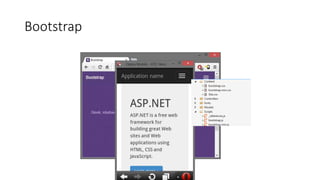
Bootstrap
Why Bootstrap?
• Save time
• Consistency
• Responsiveness
• Customization
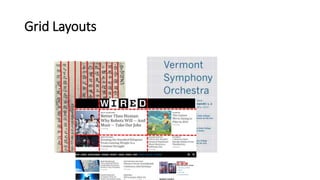
Grid Layouts
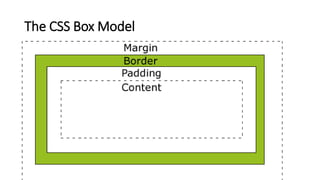
The CSS Box Model
Demo
• Install Bootstrap
• Create grid
• Controls
• Responsive tables
OWIN & Katana
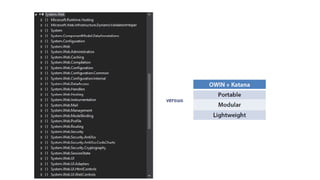
• OWIN is a specification
• Katana is the implementation
• Remove the dependency on IIS and System.Web
• Abstract the Framework from the Hosting server
• Has 2 goals
• New components can be added easily
• Can move the application from one host to another in an easy way
• Has 2 elements
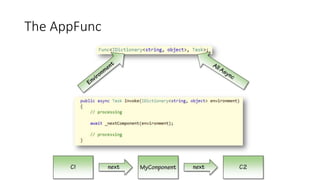
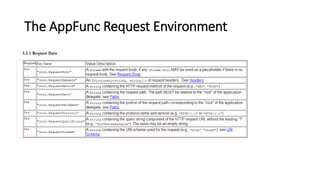
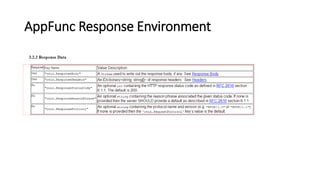
• Environment dictionary
IDictionary<string, object>
• AppFunc delegate
Func<IOwinContext, Task>;
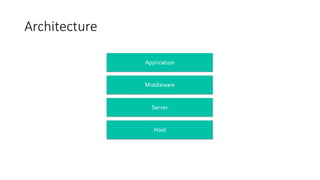
Architecture
AppFunc
• Minimum dependencies to build a new component
• Async design make it efficient
• Can be chained together just like Filters
The AppFunc
The AppFunc Request Environment
AppFunc Response Environment
Identity & Security
• Introduction
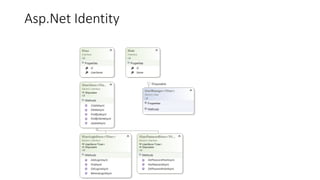
• The old Membership Provider
• Asp.Net Identity
• Authentication & Authorization
• External Login
Introduction
• Authentication Type
• Direct
• Brokered
• Authentication Factors
• Knowledge
• Ownership
• Inherence
The old Membership Provider
• Membership Provider
• Role Provider
• Configuration in web.config
• Extra profile properties not strongly typed
• Need to rewrite the whole logic if simple customization or store needed
Asp.Net Identity
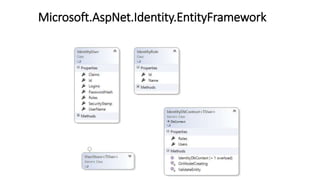
Microsoft.AspNet.Identity.EntityFramework
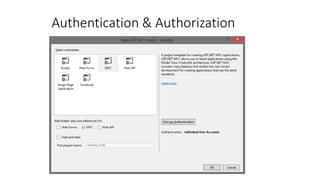
Authentication & Authorization
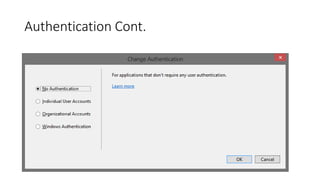
Authentication Cont.
Demo: Authentication
• No Authentication
• Individual User Accounts
• Windows Authentication (Asp.Net Security Part 4 - NTLM
Authentication (Arabic) )
• Organizational Accounts
• Support Twitter, Google, Microsoft and Facebook
Exploring generated code for AspNet Identity
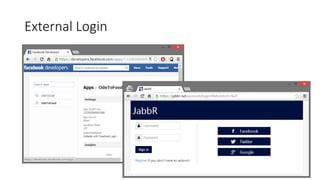
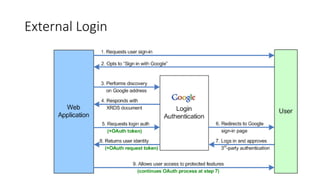
External Login
External Login
Demo: External Login
Web API
• RESTful Services
• What Is a Web API?
• What about WCF?
• Routing in Web API
• Creating a Web API for an MVC Web Application
• Data Return Formats
• Using Routes and Controllers in Web APIs
RESTful Services
Characteristics of a RESTful Service:
• Client-server
• Stateless
• Cache
• Uniform interface
What Is a Web API?
• Helps create REST-style APIs
• Enables external systems to use the business logics implemented in
your application
• Uses URLs in requests and helps obtain results in the JSON format
• Is ideal for mobile application integration
What about WCF?
• WCF is transport independent
• WCF REST Starter Kit
Routing in Web API
Characteristics of routing in Web API:
• You can use API controller names and a naming convention for actions
to route Web API requests
• Alternatively you can use the following attributes to control the
mapping of HTTP requests (HTTP Verb+URL) to actions in the controller:
• The HttpGet, HttpPut, HttpPost, or HttpDelete attributes
• The AcceptVerbs attribute
• The ActionName attribute
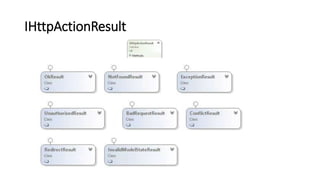
IHttpActionResult
Demo: Creating a Web API Controller
Demo: Use Fiddler to access Web API
Data Return Formats
• Web API can return data in JSON, BSON or XML formats
• to:
• Format or serialize tWeb API uses the media formatter he information that a
Web API REST service returns
• Control the media type in the HTTP header
• Format all content that the server renders to client systems
• Media formatter classes inherit from the MediaTypeFormatter class
and the BufferedMediaTypeFormatter class
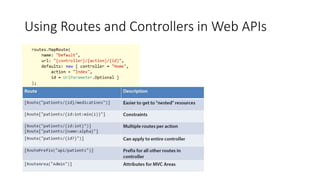
Using Routes and Controllers in Web APIs
Consume a Web API
• Consume API from Web
• Consume API from Backend
SignalR
What does SignalR do?
• Client to Server persistent connection over HTTP
• Easily build multi-user, real-time web applications
• Abstraction over transports
• Auto-negotiates transport
• Broadcast or target specific client
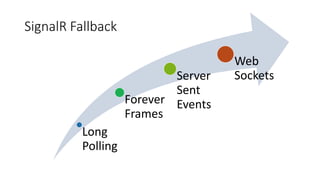
SignalR Fallback
Long
Polling
Forever
Frames
Server
Sent
Events
Web
Sockets
SignalR Features?
• Allows server-to-client push and RPC
• Built async to scale to 1000’s of connections
• Scale out with Service Bus,
SQL Server & Redis
• Open Source on GitHub
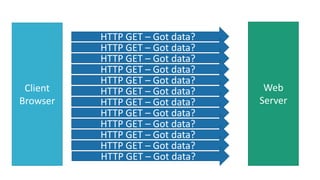
Client
Browser
Web
Server
HTTP GET – Got data?
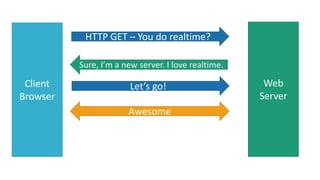
Client
Browser
Web
Server
HTTP GET – You do realtime?
Sure, I’m a new server. I love realtime.
Let’s go!
Awesome
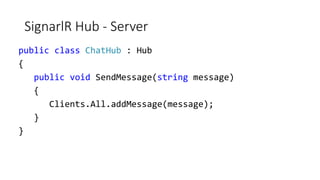
SignarlR Hub - Server
public class ChatHub : Hub
{
public void SendMessage(string message)
{
Clients.All.addMessage(message);
}
}
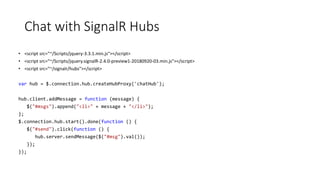
Chat with SignalR Hubs
• <script src="~/Scripts/jquery-3.3.1.min.js"></script>
• <script src="~/Scripts/jquery.signalR-2.4.0-preview1-20180920-03.min.js"></script>
• <script src="~/signalr/hubs"></script>
var hub = $.connection.hub.createHubProxy('chatHub');
hub.client.addMessage = function (message) {
$("#msgs").append("<li>" + message + "</li>");
};
$.connection.hub.start().done(function () {
$("#send").click(function () {
hub.server.sendMessage($("#msg").val());
});
});
Demo
• Install SignalR
• Create Hub
• Create Client
• Build Chat App
Visual Studio Tools
• Windows Azure
• Scafolding
• Sidewaffle
• Web Essentials
• Browser Link
Thank you

Asp.Net MVC 5 in Arabic

  • 1.
    MVC 5 Haitham Shaddad TechnicalArchitect haithamshaddad.com
  • 2.
    Course outline • Introduction •Models • Controllers • Views • Integrate JavaScript with MVC • OWIIN & Katana • Identity & Security • Web API • SignalR
  • 3.
    Introduction • Introduction toAsp.Net 4.5 • What is NuGet • Understand MVC architecture • The MVC request processing cycle • When to use MVC
  • 4.
    One ASP.NET: AFramework for us all Configuration Authentication State Management Caching
  • 5.
    NuGet • Shared Packages/LibrariesRepository • Install-Package PackageName • UnInstall-Package • Update-Package
  • 6.
  • 7.
  • 8.
    Demo, Hello MVC 1.Create a new project 2. Discuss the basics of the moving parts 3. Introduce MVC conventions
  • 10.
    When to useMVC • The MVC framework does not replace the Web Forms model • Advantages of MVC • Advantages of a Web Forms
  • 11.
    Models • Developing Models •Using Display and Edit Data Annotations on Properties • Validating User Input with Data Annotations • What Are Model Binders? • Entity Framework 6
  • 12.
    Developing Models public classPhoto { public int PhotoID { get; set; } public string Title { get; set; } public byte[] PhotoFile { get; set; } public string Description { get; set; } public DateTime CreatedDate { get; set; } public string Owner { get; set; } public virtual List<Comment> Comments { get; set; } } -PhotoID : int -Title : string -PhotoFile : byte -Description : string -CreatedDate : object -Owner : string Photo -CommentID : int -User : string -Subject : string -Body : string -PhotoID : int Comment 1 0..*
  • 13.
    Display and EditData Annotations public class Photo { // other properties excluded [DisplayName("Picture")] public byte[] PhotoFile { get; set; } [DataType(DataType.MultilineText)] public string Description { get; set; } [DataType(DataType.DateTime)] [DisplayName("Created Date")] [DisplayFormat(DataFormatString = "{0:dd/MM/yy}"] public DateTime CreatedDate { get; set; } }
  • 14.
    Validating User Inputwith Data Annotations public class Person { public int PersonID { get; set; } [Required(ErrorMessage="Please enter a name.")] public string Name { get; set; } [Range(0, 400)] public int Height { get; set; } [Required] [DataType(DataType.EmailAddress)] public string EmailAddress { get; set; } }
  • 15.
    What Are ModelBinders? • The Default Controller Action Invoker uses model binders to determine how parameters are passed to actions • The Default Model Binder passes parameters by using the following logic: • The binder examines the definition of the action that it must pass parameters to • The binder searches for values in the request that can be passed as parameters
  • 16.
    The Entity Framework Typesof Entity Framework Workflows • Database First • Model First • Code First
  • 17.
    Demo • How toInstall Entity Framework 6 • DB First Model • Code First Model • Code Migration • Code first from existing DB
  • 18.
  • 19.
    Demo • Create arepository • Use a repository • Create a generic repository • Dependency Injection
  • 20.
    Controllers and Actions •Responding to User Requests • Writing Controller Actions • Using Parameters • Passing Information to Views • Routing • Filters • Areas
  • 21.
    Responding to UserRequests When an MVC web application receives a user request, the following events occur: MVCHandler creates a controller factory. Controller factory creates a Controller object and MVCHandler calls the Execute method. ControllerActionInvoker examines RequestContext and determines the action to call. ControllerActionInvoker determines the values to be passed to the action as parameters. ControllerActionInvoker runs the action.
  • 22.
    Writing Controller Actions Writinga Controller action includes: • Create public method • Return a class that derives from ActionResult • Add parameters to the method • Insert code to perform the operation and return the result
  • 23.
    Using Parameters public ActionResultGetSessionByTitle(string title){ var query = from s in context.Sessions where s.Title == title select s Photo session = query.FirstOrDefault(); return View("Details", session); } http://www.adventureworks.com/session/getsessionbytitle?title=MVC101 DefaultModelBinder
  • 24.
    Passing Data tothe View • Model • View(data) • Strongly typed, can be more flexible • More complex • ViewBag • Dynamic object for storing basic pieces of information • Alias for ViewData • Perfect for sending messages to the view • Only available for that action • Redirects cause the ViewBag to be emptied • TempData • Just like the ViewBag, but it’s also available on the next page
  • 25.
    Routing • Understanding therouting mechanism • Adding custom entries to a route table • Defining defaults, parameters, and validation • Custom route constraints • Attribute routing
  • 26.
    What are Filters? Somerequirements cut across logical boundaries are called cross-cutting concerns. Examples include: • Authorization • Logging • Caching There are four different types of filters: • Authorization filters run before any other filter and before the code in the action method • Action filters run before and after the code in the action method • Result filters run before and after a result is returned from an action method. • Exception filters run only if the action method or another filter throws an exception.
  • 27.
    Areas • Separate alarge MVC Web application into smaller functional groupings • An application can have more than one area • Example: An E-Commerce MVC Application can have the following areas: • Shopping Cart • Order Fulfillment • Inventory Management • Demo
  • 28.
    Views • Creating Viewswith Razor Syntax • Master Page and Layout • Using HTML Helpers • Reusing Code in Views
  • 29.
    1- Creating Viewswith Razor Syntax • Adding Views • Features of Razor Syntax • Binding Views to Model Classes and Displaying Properties • Demo
  • 30.
  • 31.
    Features of RazorSyntax @* Some more Razor examples *@ <span> Price including Sale Tax: @Model.Price * 1.2 </span> <span> Price including Sale Tax: @(Model.Price * 1.2) </span> @if (Model.Count > 5) { <ol> @foreach(var item in Model) { <li>@item.Name</li> } </ol> } A sample code block displaying the features of Razor.
  • 32.
    Binding Views toModel Classes and Displaying Properties You can use strongly-typed views and include a declaration of the model class. Visual Studio helps you with additional IntelliSense feedback and error-checking as you write the code. Binding to Enumerable Lists: @model IEnumerable<MyWebSite.Models.Product> <h1>Product Catalog</h1> @foreach (var Product in Model) { <div>Name: @Product.Name</div> }
  • 33.
    Differentiating Server SideCode from HTML • Razor identifies server-side code by looking for the @ symbol. • In Razor syntax, the @ symbol has various uses. You can: • Use @ to identify server-side C# code • Use @@ to render an @ symbol in an HTML page. • Use <text>to explicitly declare several lines of text as content and not code. • Use @: to add normal text • To render text without HTML encoding, you can use the Html.Raw() helper.
  • 34.
  • 35.
    2- Master Pageand Layout • The same as Web Forms Master Page • Every area can have its own master page • All views by default has a layout set in _viewStart.cshtml • Set Layout = null to remove layout • Set using @{ Layout = "~/Views/Shared/_Layout.cshtml"; }
  • 36.
    Demo: Layouts andMaster Page • Create view with layout • Create view without layout • Create a custom layout
  • 37.
    3- Using HTMLHelpers • Using Action Helpers • Using Display Helpers • The Begin Form Helper • Using Editor Helpers • Using Validation Helpers • Creating Custom Helpers
  • 38.
    Using Action Helpers •Html.ActionLink() • Url.Action() @Html.ActionLink("Click here to view photo 1", "Display", new { id = 1 }) <a href="/photo/display/1"> Click here to view photo 1 </a> <img alt="This image came from an action" src="@Url.Action("GetImage", new { id = 1 })" /> <img alt="This image came from an action" src="/photo/getimage/1" })" />
  • 39.
    Using Display Helpers •Html.DisplayNameFor() • Html.DisplayFor() @Html.DisplayNameFor(model => model.CreatedDate) @Html.DisplayFor(model => model.CreatedDate) Created Date 03/12/2012
  • 40.
    The Begin FormHelper Html.BeginForm() @using (Html.BeginForm("Create", "Photo", FormMethod.Post, new { enctype = "multipart/form-data" })) { @* Place input controls here *@ } <form action="/Photo/Create" method="post“ enctype="multipart/form-data"> </form>
  • 41.
    Using Editor Helpers Html.LabelFor() Html.EditorFor() @Html.LabelFor(model=> model.ContactMe) @Html.EditorFor(model => model.ContactMe) <label for="ContactMe"> Contact Me </label> <input type="checkbox" name="Description">
  • 42.
    Using Validation Helpers Html.ValidationSummary() Html.ValidationMessageFor() @Html.ValidationSummary() @Html.ValidationMessageFor(model=> model.Email) <ul> <li>Please enter your last name</li> <li>Please enter a valid email address</li> </ul> Please enter a valid email address
  • 43.
  • 44.
  • 45.
    4- Reusing Codein Views • Creating Partial Views • Using Partial Views • Demo
  • 46.
    Creating Partial Views Youcan use partial views to render the same HTML content in different locations in your web application • Creating and Naming Partial Views: • Create a partial view by using the Add View dialog • Name partial views with an underscore prefix to keep to convention • Strongly-typed and dynamic partial views: • Create strongly-typed partial views if you are certain that the partial view will always display the same model class. • Create dynamic partial views if you are not sure if the partial view will always display the same model class.
  • 47.
    Using Partial Views UsingHTML helpers, you can use partial views within other views in a web application: • To pass the same model object to a partial view from the parent view, use Html.Partial() • To pass a model object to a partial view, which is different from the parent view or of a different model class, use Html.Action() Use the ViewBag and ViewData collections to share data between the controller action, parent view, and partial view
  • 48.
    Demo • Create Partialview • Use Partial view
  • 49.
    Integrate JavaScript withMVC • Using Ajax and Partial Page Updates • Rendering and Executing JavaScript Code
  • 50.
    1: Using AJAXand Partial Page Updates • Why Use Partial Page Updates? • Using AJAX in an MVC Web Application
  • 51.
    Why Use PartialPage Updates? Partial page updates: • Allow updates of individual sections of a webpage, during postback • Increase the responsiveness of a web application User Request ASP.NET Engine ASP.NET Pages Refresh Section Request for ASP.NET Page Download full HTML Request for changed content Download only updated HTML
  • 52.
    Using AJAX inan MVC Web Application To implement AJAX in your web application: 1. Create your web application without AJAX 2. Add or modify views, to render only the specific sections that you want to update on the webpage 3. Update the Controller class to return the PartialView class
  • 53.
    Demo: Create ListPage with Partial Update
  • 54.
    2: Rendering andExecuting JavaScript Code • Adding JavaScript Files • Using Content Delivery Networks for JavaScript Libraries • Introduction to jQueryUI • Bundling and Minification
  • 55.
    Adding JavaScript Files •Add the JavaScript code to HTML • Defining the JavaScript code in JavaScript files: • You can define JavaScript code in a JavaScript file • Reference the JavaScript file in multiple HTML files
  • 56.
    Using Content DeliveryNetworks for JavaScript Libraries Content Delivery Network (CDN): • Is a group of geographically distributed servers • Helps host contents for web applications Microsoft Ajax CDN hosts popular libraries such as: • jQuery • jQuery UI • jQuery Mobile • jQuery Validation • jQuery Cycle • jQuery DataTables • Ajax Control Toolkit • ASP.NET Ajax • ASP.NET MVC JavaScript Files
  • 57.
    Introduction to jQueryUI •jQuery UI is a library that contains widgets, effects, and utilities: • jQueryUI Widgets: • Using jQueryUI functions, you can add widgets such as auto-complete boxes, buttons, date-pickers, dialog boxes, and menus to your webpage • jQueryUI Effects: • Using jQueryUI functions, you can add effects such as color animations, class animations, appear, slide down, toggle, and hide and show • jQueryUI Utilities: • Using the Position jQueryUI functions, you align your webpage content
  • 58.
    Bundling and Minification •Group a set of JavaScript or CSS in a single bundle • Reference only the name of the bundle in HTML • During runtime, the bundle is replaced with the actual files • In release build, all the files are grouped into a single JavaScript or Css file and also minified
  • 59.
    Demo • Create JavaScriptcode • Install JQuery using NuGet • JQuery UI Sample • CDN • Bundling and Minification
  • 60.
  • 61.
    Why Bootstrap? • Savetime • Consistency • Responsiveness • Customization
  • 62.
  • 63.
  • 64.
    Demo • Install Bootstrap •Create grid • Controls • Responsive tables
  • 65.
    OWIN & Katana •OWIN is a specification • Katana is the implementation • Remove the dependency on IIS and System.Web • Abstract the Framework from the Hosting server • Has 2 goals • New components can be added easily • Can move the application from one host to another in an easy way • Has 2 elements • Environment dictionary IDictionary<string, object> • AppFunc delegate Func<IOwinContext, Task>;
  • 66.
  • 68.
    AppFunc • Minimum dependenciesto build a new component • Async design make it efficient • Can be chained together just like Filters
  • 69.
  • 70.
  • 71.
  • 72.
    Identity & Security •Introduction • The old Membership Provider • Asp.Net Identity • Authentication & Authorization • External Login
  • 73.
    Introduction • Authentication Type •Direct • Brokered • Authentication Factors • Knowledge • Ownership • Inherence
  • 74.
    The old MembershipProvider • Membership Provider • Role Provider • Configuration in web.config • Extra profile properties not strongly typed • Need to rewrite the whole logic if simple customization or store needed
  • 75.
  • 76.
  • 77.
  • 78.
  • 79.
    Demo: Authentication • NoAuthentication • Individual User Accounts • Windows Authentication (Asp.Net Security Part 4 - NTLM Authentication (Arabic) ) • Organizational Accounts • Support Twitter, Google, Microsoft and Facebook
  • 80.
    Exploring generated codefor AspNet Identity
  • 81.
  • 82.
  • 83.
  • 84.
    Web API • RESTfulServices • What Is a Web API? • What about WCF? • Routing in Web API • Creating a Web API for an MVC Web Application • Data Return Formats • Using Routes and Controllers in Web APIs
  • 85.
    RESTful Services Characteristics ofa RESTful Service: • Client-server • Stateless • Cache • Uniform interface
  • 86.
    What Is aWeb API? • Helps create REST-style APIs • Enables external systems to use the business logics implemented in your application • Uses URLs in requests and helps obtain results in the JSON format • Is ideal for mobile application integration
  • 87.
    What about WCF? •WCF is transport independent • WCF REST Starter Kit
  • 88.
    Routing in WebAPI Characteristics of routing in Web API: • You can use API controller names and a naming convention for actions to route Web API requests • Alternatively you can use the following attributes to control the mapping of HTTP requests (HTTP Verb+URL) to actions in the controller: • The HttpGet, HttpPut, HttpPost, or HttpDelete attributes • The AcceptVerbs attribute • The ActionName attribute
  • 89.
  • 90.
    Demo: Creating aWeb API Controller
  • 91.
    Demo: Use Fiddlerto access Web API
  • 92.
    Data Return Formats •Web API can return data in JSON, BSON or XML formats • to: • Format or serialize tWeb API uses the media formatter he information that a Web API REST service returns • Control the media type in the HTTP header • Format all content that the server renders to client systems • Media formatter classes inherit from the MediaTypeFormatter class and the BufferedMediaTypeFormatter class
  • 93.
    Using Routes andControllers in Web APIs
  • 94.
    Consume a WebAPI • Consume API from Web • Consume API from Backend
  • 95.
  • 96.
    What does SignalRdo? • Client to Server persistent connection over HTTP • Easily build multi-user, real-time web applications • Abstraction over transports • Auto-negotiates transport • Broadcast or target specific client
  • 97.
  • 98.
    SignalR Features? • Allowsserver-to-client push and RPC • Built async to scale to 1000’s of connections • Scale out with Service Bus, SQL Server & Redis • Open Source on GitHub
  • 99.
    Client Browser Web Server HTTP GET –Got data? HTTP GET – Got data? HTTP GET – Got data? HTTP GET – Got data? HTTP GET – Got data? HTTP GET – Got data? HTTP GET – Got data? HTTP GET – Got data? HTTP GET – Got data? HTTP GET – Got data? HTTP GET – Got data? HTTP GET – Got data?
  • 100.
    Client Browser Web Server HTTP GET –You do realtime? Sure, I’m a new server. I love realtime. Let’s go! Awesome
  • 101.
    SignarlR Hub -Server public class ChatHub : Hub { public void SendMessage(string message) { Clients.All.addMessage(message); } }
  • 102.
    Chat with SignalRHubs • <script src="~/Scripts/jquery-3.3.1.min.js"></script> • <script src="~/Scripts/jquery.signalR-2.4.0-preview1-20180920-03.min.js"></script> • <script src="~/signalr/hubs"></script> var hub = $.connection.hub.createHubProxy('chatHub'); hub.client.addMessage = function (message) { $("#msgs").append("<li>" + message + "</li>"); }; $.connection.hub.start().done(function () { $("#send").click(function () { hub.server.sendMessage($("#msg").val()); }); });
  • 103.
    Demo • Install SignalR •Create Hub • Create Client • Build Chat App
  • 104.
    Visual Studio Tools •Windows Azure • Scafolding • Sidewaffle • Web Essentials • Browser Link
  • 105.

Editor's Notes

  • #5 Web Pages Applications Web Matrix or Visual Studio Code in .CSHTML files Precise Control of HTML Web Forms Applications Visual Studio only Code in .aspx files and code-behind files Create a UI by dragging controls onto a page Controls provide rich properties and events Bind controls to data MVC Applications Models encapsulate objects and data Views generate the user interface Controllers interact with user actions Visual Studio only Code in .cshtml and .cs files Precise control of HTML and URLs Shared ASP.NET Features Configuration Authentication Membership and Roles State Management Caching
  • #11  The MVC framework does not replace the Web Forms model; you can use either framework for Web applications Advantages of an MVC-Based Web Application It makes it easier to manage complexity by dividing an application into the model, the view, and the controller. It does not use view state or server-based forms. This makes the MVC framework ideal for developers who want full control over the behavior of an application. It uses a Front Controller pattern that processes Web application requests through a single controller. This enables you to design an application that supports a rich routing infrastructure. For more information, see Front Controller on the MSDN Web site. It provides better support for test-driven development (TDD). It works well for Web applications that are supported by large teams of developers and Web designers who need a high degree of control over the application behavior. Separation of application tasks  and DI An extensible and pluggable framework, plug view engine, URL routing, DI policy Advantages of a Web Forms-Based Web Application It supports an event model that preserves state over HTTP, which benefits line-of-business Web application development. The Web Forms-based application provides dozens of events that are supported in hundreds of server controls. It uses a Page Controller pattern that adds functionality to individual pages. For more information, see Page Controller on the MSDN Web site. It uses view state or server-based forms, which can make managing state information easier. It works well for small teams of Web developers and designers who want to take advantage of the large number of components available for rapid application development. In general, it is less complex for application development, because the components (the Page class, controls, and so on) are tightly integrated and usually require less code than the MVC model.
  • #13 The slide shows a simple LDM diagram with two model classes: Photo and Comment. Each class has a simple set of properties and there is a one-to-many relationship between the classes; that is each photo can have zero or more comments. The UML diagram on the slide shows both the Photo and Comment model classes and the relationship between them. The code on the slide shows only the Photo class. Point out to the students that the Photo class includes a collection of Comment objects – this implements the one-to-many relationship between Photos and Comments.
  • #14 The display and edit data annotations in the slide are enclosed in square brackets. Highlight these annotations to the students and ensure that they can distinguish them from properties and other code. You will learn about other data annotations, such as validation annotations, later in the course. Question: In the code on the slide, how can you recognize the display and edit annotations and distinguish them from property code? Answer: The display and edit annotations are enclosed in square brackets.
  • #15 Question: You want to make sure that users enter a password that is longer than 6 characters. How could you do this by using a validation data annotation? Answer: You can use the StringLength validation data annotation to specify this minimum length.
  • #16 This topic explains how model binding and action invocation works in the default configuration for MVC 4 web applications. Later in the course, you will show students how to alter this arrangement by creating custom model binders and custom action invokers. You will also explain why web application architects may want to modify the default behavior. However, at this stage, concentrate on a clear explanation of the default classes.
  • #17 Create a Person class with Id, Name, Email and Age Properties inside the Models Folder Create an Action named AddPerson and add a view to it, watch the generated HTML Add Data Annotations attributes View the generated HTML again Validate using ModelState.IsValid Split Name to First and Last Name in model Create a custom model binder to get the value from HTML and bind the properties Use ModelState.Clear(); and TryValidateModel(person); Set the model binder on Person, Action and App_Start ModelBinders.Binders.Add(typeof(Person), new PersonModelBinder());
  • #18 Question: You have a Visio diagram, which a business analyst created that shows all the model classes for your web application and their relationships. You want to recreate this diagram in Visual Studio. Which Entity Framework workflow would you use? Answer: The model-first workflow is most appropriate because the designer in Visual Studio enables developers to create the model by drawing it. Note: The Photo Sharing application that you create in the labs uses Entity Framework with the code-first workflow.
  • #19 Create a new project Install EntityFramework using nugget. Create a new DB First Model for Northwind DB and choose Product table Create a controller using EntityFramework Create a new ModelFirst Model for Photo, User and Comment Create a controller using EntityFramework Create a new class Survey, SurveyContext enable migrations Add migration Update-database Add PublishDate field Add migration Update-database Revert database using update-database -targermigration
  • #23 Question: What is the condition that you must follow while creating controllers? Answer: You should ensure that controller names end with “Controller”. Otherwise, you will receive unexpected 404 errors and controllers will not work as intended. If you create a custom controller factory, you can define your own naming convention for controller classes. You can discuss controller factories in this module because students should know how to create controller classes. However they will be discussed in full later in this lesson, in the final topic. The code example on the slide includes a simple action called Index. When you create a controller in Microsoft Visual Studio, this action method is included automatically, even when you choose the Empty controller template. In this topic, make no mention of routing because it may confuse students. Routing is covered in Module 7.
  • #25 Question: How does DefaultModelBinder pass parameters? Answer: The DefaultModelBinder locates parameters in a posted form, the routing values, the query string, or in the posted files. When it finds a parameter in the action method that matches the name and type of a parameter from the request, the action method is called and the parameter is passed from the request. Remind the students that the DefaultModelBinder class was discussed in the last module along with the controller action invoker. It provides a very flexible and easy-to-use method of binding parameters to the right action method, and this method should be used whenever possible.
  • #32 Inform the students that they will learn more about layouts and master pages in Module 8 - Applying Styles to ASP.NET MVC 4 Web Applications. Question: You are using the Razor view engine and Visual Basic to create views. You right-click the Delete action in the CustomerController.vb file. What is the name of the view file that Visual Studio will create by default? Answer: The file name will be Delete.vbhtml unless you specify another name. It will be created in the Views/Customer folder.
  • #33 Point out to the students that Razor easily differentiates content from code. For example, even within a Razor code block, when you add an HTML element such as <div>, Razor interprets the text as content. You do not usually need to use the @: delimiter to make this explicit. Discuss the example code on the slide. Ensure that students understand the HTML that Razor will render. Question: You want to describe a code block to developers in your view file. You do not want your description to be passed to the browser. What syntax should you use? Answer: Declare the description as a Razor comment by enclosing it in @* *@ delimiters.
  • #34 The code example in the slide shows how to use a strongly-typed view when the action controller passes a list of objects of a specific model class. Question: You want to write a view that displays ten objects of the Photo model class. What model declaration should you use? Answer: Use a declaration in the following form: @model IEnumerable<projectname/Models/Photo>
  • #39  If you have students who are familiar with Web Forms, you might like to contrast MVC HTML helpers with Web Forms server controls. Helpers perform an analogous role in MVC to the role that server controls play in Web Forms. However, helpers are simpler and lighter-weight. They do not render large blocks of HTML and JavaScript code or ViewState data. Also, they do not support event handlers.
  • #40 The action helpers described in this topic examine the routes defined in your web application to render the correct URLs. Students have not yet learned about the routing engine or how to modify routes. They will learn about routing in Module 7. Question: You want to render an HTML5 <audio> tag to play a sound file from an action. Would you use the Html.ActionLink() helper or the Url.Action() helper? Answer: You would use the Url.Action() helper because you are rendering an attribute within the <audio> tag, and not a complete <a> element.
  • #41 Question: You want to ensure that a view displays “This product was last changed on” before the ModifiedDate property. This text is declared in the class with the DisplayName annotation. What code would you write in the view? Answer: @Html.DisplayNameFor(model => model.ModifiedDate)
  • #42 Question: You have created a form with a file selector control that uses the GET method. You have set the enctype attribute to multipart/form-data but when you try to access the file in the action method, an exception is thrown. What have you possibly done incorrectly? Answer: You must use the POST method to upload files.
  • #43 Question: You have a property in the Product model class named ProductID. You want to include this in the HTML page so that client-side script can use the ProductID value. However, you do not want the value to be displayed to users. In the model class, you have annotated the ProductID property with the [HiddenInput(DisplayValue=false)] attribute. How will the Html.EditorFor() helper render this property? Answer: The Html.EditorFor() helper renders the following HTML: <input name="ProductID" type="hidden" value="id">
  • #44 Remind the students that they learned how to set validation requirements in model classes by using validation data annotations such as [Required] in Module 3. They have also learned how to check the validity of user data in a controller action by testing the ModelState.IsValid property in Module 4.
  • #45 To change the default editor and display templates, create a folder called DisplayTemplates and EditorTemplates under the Views\Shared Make the cshtml file with the type name, and use UIHint in the model property
  • #53 Question: How do partial page updates help in improving the responsiveness of a web application? Answer: Partial page updates send only the updated section of a webpage to the client application, instead of the entire page. With partial page updates, only the most recent data, which is less in size, is sent to the client application. Therefore, the webpage updates fast, thereby improving the responsiveness of the web application.
  • #55 1- Use Partial view 2- Use AjaxForm 3- Use AjaxLinks
  • #61 http://ajax.aspnetcdn.com/ajax/jQuery/jquery-1.7.1.min.js
  • #67 Classic Asp had code and markup combined, so this was not manageable Asp.Net and web forms was great, but was coupled to .Net framework and dependent on System.Web Separating MVC from .net made it faster to ship and update Removing dependency from System.Web made it easier to host it on other hosting servers We need a way to abstract the hosting from the framework OWIN has 2 goals  New components could be more easily developed and consumed. Applications could be more easily ported between hosts and potentially entire platforms/operating systems. The resulting abstraction consists of two core elements. The first is the environment dictionary. This data structure is responsible for storing all of the state necessary for processing an HTTP request and response, as well as any relevant server state. The environment dictionary is defined as follows: IDictionary<string, object> An OWIN-compatible Web server is responsible for populating the environment dictionary with data such as the body streams and header collections for an HTTP request and response The second key element of OWIN is the application delegate Func<IDictionary<string, object>, Task>;
  • #70 install-package Microsoft.Owin.Host.SystemWeb
  • #77 Membership and role provider is old now It didn’t support custom profile properties
  • #87 Client-server constraint, which is based on the separation of concerns, is about separating user interface concerns from data storage concerns. Clients are not concerned with data storage, which is a concern of servers, and servers are not concerned with the user interface or user state, which are concerns of clients. 2. Stateless constraint is about each request being an independent self-contained unit with all the necessary information for the server to service the request without looking at anything else for the context Cache constraint is about the server being able to label a response as cacheable or not, so that the client handles the response appropriately from the point of view of later use. 4. Layered constraint is about composing the system into layers, with each layer being able to see and interact with only its immediate neighbor. A layer cannot see through its neighbor. Between the client and server, there could be any number of intermediaries—caches, tunnels, proxies, and so on. 5. Uniform interface constraint is about providing a uniform interface for identification of resources, manipulation of resources through representations, self-descriptive messages, and hypermedia as the engine of application state.
  • #88 Question: What is the key benefit of using REST with Web APIs? Answer: REST helps minimize data transfers between the client system and the server, thereby making it ideal for mobile applications. Web API provides the framework for developers to build API access with a lot less effort Developers can use REST for interactions between server and mobile applications. For applications that require complex interactions, developers can use Windows Communication Foundation (WCF), instead of REST, because WCF supports additional functionalities such as sending attachments.
  • #90 Question: What is the purpose of using the HTTP attributes? Answer: The attributes help control the routing and mapping between HTTP requests and action functions in the MVC controller. You can describe how you can combine the attributes together. For example, you can use HttpGet together with ActionName to map the action to the GET method by using the specified action name.
  • #99 WebSocket (if the both the server and browser indicate they can support Websocket). WebSocket is the only transport that establishes a true persistent, two-way connection between client and server. However, WebSocket also has the most stringent requirements; it is fully supported only in the latest versions of Microsoft Internet Explorer, Google Chrome, and Mozilla Firefox, and only has a partial implementation in other browsers such as Opera and Safari. Server Sent Events, also known as EventSource (if the browser supports Server Sent Events, which is basically all browsers except Internet Explorer.) Forever Frame (for Internet Explorer only). Forever Frame creates a hidden IFrame which makes a request to an endpoint on the server that does not complete. The server then continually sends script to the client which is immediately executed, providing a one-way realtime connection from server to client. The connection from client to server uses a separate connection from the server to client connection, and like a standard HTML request, a new connection is created for each piece of data that needs to be sent. Ajax long polling. Long polling does not create a persistent connection, but instead polls the server with a request that stays open until the server responds, at which point the connection closes, and a new connection is requested immediately. This may introduce some latency while the connection resets.
  • #106 C:\Program Files (x86)\Microsoft Visual Studio 12.0\Common7\IDE\Extensions\Microsoft\Web\Mvc\Scaffolding\Templates Create a folder called CodeTemplates in the project directory Copy the template you want into this folder and customize it http://blog.stevensanderson.com/2011/01/13/scaffold-your-aspnet-mvc-3-project-with-the-mvcscaffolding-package/ Install-Package MvcScaffolding Scaffold Controller Team