

Visual Studio Targets Many… Audience Feature Set Minimal Complete Hobbyist Enterprise Professional Team System Express
The Four Pillars of VS2010 ‘Pro’ Audience Understanding  The Code Building Web Applications Creating Office Business Applications Using The Power of C#, VB, F#, etc.
Huge List of New Features! Breakpoint Labeling Breakpoint Searching Breakpoint Import/Export Dynamic Data Tooling WPF Tree Visualizer Call Hierarchy Improved WPF Tooling Historical Debugging Mini-Dump Debugging Quick Search Better Multi-Monitor  Support Highlight References Parallel Stacks Window Parallel Tasks Window Document Map Margin Generate From Usage Concurrency Profiler Inline Call Tree Extensible Test Runner MVC Tooling Web Deploy JQuery Intellisense SharePoint Tooling HTML Snippets Web.config Transformation Click-Once Enhancements for Microsoft Office
Two Faces of Visual Studio 2010 Visual Studio as  An Editor Visual Studio as  A Platform
…  As An Editor An  improved focus  on…  Writing  code, Understanding  code, Navigating  code, Publishing  code
…  As A Platform New Extensible Editor allows editor to  be  easily extended  to provide a rich  and robust editing experience Online Visual Studio Gallery  integrated directly  into Visual Studio
 
3 Key Things… How Visual Studio 2010 enables a powerful development experience through its many new features and improvements for developers  How improvements coming to the way developers can configure and deploy web applications.  What new features are coming to Visual Studio 2010
 
Pin Your Project/s Pin a project in Recent Projects on Start Page
Docking Windows New Guide Diamond Windows can be docked anywhere Can now pull document windows outside the IDE
Zoom CTRL + Mouse Wheel New feature that enhances the size of your code Very useful for pair programming (or similar scenarios)
Improved Toolbox Search for controls while typing Tab to navigate to next search result Filtered toolbox would be nice
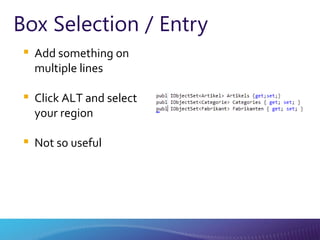
Box Selection / Entry Add something on multiple lines Click ALT and select your region Not so useful
Quicker Add Reference Add project by default Other thread loads .NET and COM libraries
Highlighting References CTRL+SHIFT+ DOWN ARROW (forward)    CTRL+SHIFT+ UP ARROW  (reverse)  Automatic highlighting of a symbol Can be used with declarations, references, and many other symbols
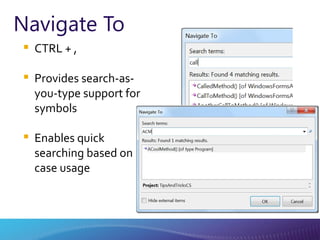
Navigate To CTRL + , Provides search-as-you-type support for symbols Enables quick searching based on case usage
Call Hierarchy* CTRL + K, T Used to see calls to and from a method Great way to see calls at design time
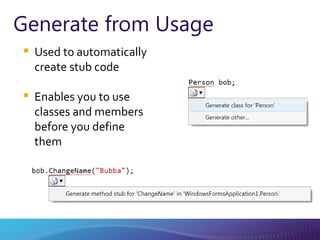
Generate from Usage Used to automatically create stub code Enables you to use classes and members before you define them
Improved Intellisense Partial string matching Build locates StringBuilder class Pascal case searching SB locates StringBuilder class 2 to 5 times faster
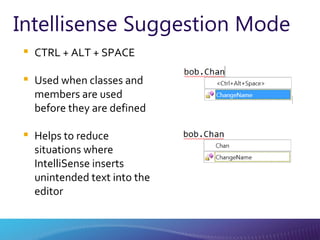
Intellisense Suggestion Mode CTRL + ALT + SPACE Used when classes and members are used before they are defined Helps to reduce situations where IntelliSense inserts unintended text into the editor
More Code Generation VS2008: Generate methods VS2010: Generate more (classes, structs, interfaces, enums, methods) Great for Test-Driven Development
SSMS Inside VS 2010 SQL Management studio inside VS2010 Run T-SQL straight from VS2010 Including Intellisense
New Diagrams Class diagram Sequence diagram Use case diagram Activity diagram Component diagram Layer diagram Direct Graph Document
 
 
Breakpoints Can add labels to breakpoints All breakpoints are now searchable Import / Export now available
Floating Data Tips
Threading Completely redesigned threading window Now provides filtering, call-stack searching and expansion, and grouping New columns added: Affinity masks Process names Managed IDs
Dumps You can save a dump file and debug it later, either on the build computer or on another computer that has the source files and debugging symbols Can read dump files that contain information about managed code, unmanaged code, or a mixture of both
Parallel Tasks and Stacks Used to visualize and debug parallel code that is written in C++, C#, or Visual Basic Using the Parallel Stacks window, you can view multiple call stacks at the same time in a single view Parallel Tasks allow you to see multiple tasks and the corresponding status of those tasks
 
Code Snippets Snippets are now available in web applications Two major contextual areas: JavaScript HTML
Code Snippets
Dynamic Intellisense for JavaScript
Web.config Transforms You can create configuration file transforms to modify your project's Web.config file to work with various deployment environments http:// blogs.msdn.com/webdevtools
One-Click Web Deployment With Visual Studio 2010, MSDeploy is integrated directly into Visual Studio Once you have your profiles configured, you can easily deploy to a given environment with a single click
 
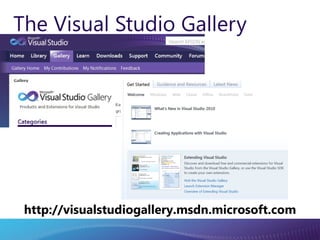
The Visual Studio Gallery http://visualstudiogallery.msdn.microsoft.com
New Extension Manager Supports MEF components, VSPackages, project templates and item template Download extensions from Visual Studio Gallery
Customizing the Start Page Add custom WPF user controls to the start page Integrate Company design guidelines, RSS, branding, etc..
Customizing the Start Page
Tips and Tricks* Incremental search (Ctrl + I) Line numbers Full screen mode (Shift + Alt + Enter) Customize startup Ad-Hoc regions (Ctrl + M, H / U) IDE Navigator (Ctrl + Tab) Comment, Uncomment (Ctrl + K, C/U) Opening old version of Visual Studio solution file No Splash screen
Resources What’s New in Visual Studio 2010 http://msdn.microsoft.com/en-us/library/bb386063(VS.100).aspx Visual Studio on MSDN http://msdn.microsoft.com/vstudio
 
 
From There to Here… .NET 1.0 .NET 1.1 .NET 2.0 3.0 3.5 .NET 4 2002 2003 2008 CTP 2005-08 CLR 1.0 CLR 1.1 CLR 2.0 CLR 4 SP1
.NET Framework Architecture WPF Win Forms DLR ASP.NET WCF And more! LINQ Base Class Libraries Common Language Runtime JIT & NGEN Garbage Collector Security Model Exception Handling Loader & Binder
 
Client Profile Subset of the full .NET Framework  Leveraged for faster deployments Two Sections Client Profile Extended Streamlined pieces of  Windows Presentation Foundation (WPF) Windows Forms Windows Communication Foundation (WCF) ClickOnce
 
Windows Presentation Foundation (WPF) New Controls DataGrid Calendar DatePicker Visual State Manager Touch and Manipulation Text
 
Pluralization & Foreign Keys
Model-First Existing Database Generated Entity Data Model Database First (v1) Entity Data Model Generated Database Model First (v2)
 
Visual Basic Auto-Implemented Properties Shortened syntax that enables you to quickly specify a property of a class without having to write code Collection Initializer Shortened syntax that enables you to create a collection and populate it with an initial set of values Implicit Line Continuation Enables you to continue a statement on the next consecutive line without using the underscore character  Public Property  Owner  As String  =  "DefaultName"   Function  AddStuff( ByVal  first  As Integer , ByVal  second  As Integer )  As Integer Return  first + second End Function Public Property  Items  As New List(Of String)  = { “M“ ,  “T“ ,  “W“ }
C# Dynamic Type Operations that contain expressions of type dynamic are not resolved or type checked by the compiler. The compiler packages together information about the operation, and that information is later used to evaluate the operation at run time Optional and Named Parameters Named  arguments enable you to specify an argument for a particular parameter by associating the argument with the parameter's name rather than with the parameter's position in the parameter list.   Optional   arguments enable you to omit arguments for some parameters. Both techniques can be used with methods, indexers, constructors, and delegates.
F# IDE support for F# Interactive F# for prototyping code Asynchronous constructs Parallel constructs Immutable data types
 
Model-View-Controller (MVC) Huge investment from Microsoft Alternative to WebForms Modular Architecture MVC 2.0 Integrated in  .NET Framework 4.0
ASP.NET Webforms Ability to set meta tags More control over view state Added and Updated browser definition files ASP.NET Routing The ability to persist selected rows in data controls More control over rendered HTML in the FormView and ListView controls Filtering support for data source controls
Dynamic Data A RAD experience for quickly building a data-driven Web site Automatic validation that is based on constraints defined in the data model The ability to easily change the markup that is generated for fields in the GridView and DetailsView controls by using field templates
Resources www.microsoft.com/teched http://microsoft.com/technet
Resources www.microsoft.com/learning   http://microsoft.com/msdn
Resources .NET Developer Center http://msdn.microsoft.com/net Data Developer Center http://msdn.microsoft.com/data ASP.NET MVC http://asp.net/mvc WPF and Windows Forms http://windowsclient.net
 
Visual Studio 2010 Editions
 
Software Requirements Windows XP (x86) with Service Pack 3 - all editions except Starter Edition Windows Vista (x86 & x64) with Service Pack 2 - all editions except Starter Edition Windows 7 (x86 & x64) Windows Server 2003 (x86 & x64) with Service Pack 2 Windows Server 2003 R2 (x86 & x64) Windows Server 2008 (x86 & x64) with Service Pack 2 Windows Server 2008 R2 (x64) Supported Architectures: 32-Bit (x86) 64-Bit (x64)
Hardware Requirements Computer that has a 1.6GHz or faster processor 1 GB (32 Bit) or 2 GB (64 Bit) RAM (Add 512 MB if running in a virtual machine) 3GB of available hard disk space 5400 RPM hard disk drive DirectX 9 capable video card running at 1024 x 768 or higher-resolution display DVD-ROM Drive
 
Getting in Touch Abram Blog:  http://abramlimpin.com Twitter:  http://twitter.com/eibhrum Email:  [email_address]


A Lap Around Visual Studio 2010

  • 1.
  • 2.
  • 3.
  • 4.
  • 5.
    Visual Studio TargetsMany… Audience Feature Set Minimal Complete Hobbyist Enterprise Professional Team System Express
  • 6.
    Visual Studio TargetsMany… Audience Feature Set Minimal Complete Hobbyist Enterprise Professional Team System Express
  • 7.
    The Four Pillarsof VS2010 ‘Pro’ Audience Understanding The Code Building Web Applications Creating Office Business Applications Using The Power of C#, VB, F#, etc.
  • 8.
    Huge List ofNew Features! Breakpoint Labeling Breakpoint Searching Breakpoint Import/Export Dynamic Data Tooling WPF Tree Visualizer Call Hierarchy Improved WPF Tooling Historical Debugging Mini-Dump Debugging Quick Search Better Multi-Monitor Support Highlight References Parallel Stacks Window Parallel Tasks Window Document Map Margin Generate From Usage Concurrency Profiler Inline Call Tree Extensible Test Runner MVC Tooling Web Deploy JQuery Intellisense SharePoint Tooling HTML Snippets Web.config Transformation Click-Once Enhancements for Microsoft Office
  • 9.
    Two Faces ofVisual Studio 2010 Visual Studio as An Editor Visual Studio as A Platform
  • 10.
    … AsAn Editor An improved focus on… Writing code, Understanding code, Navigating code, Publishing code
  • 11.
    … AsA Platform New Extensible Editor allows editor to be easily extended to provide a rich and robust editing experience Online Visual Studio Gallery integrated directly into Visual Studio
  • 12.
  • 13.
    3 Key Things…How Visual Studio 2010 enables a powerful development experience through its many new features and improvements for developers How improvements coming to the way developers can configure and deploy web applications. What new features are coming to Visual Studio 2010
  • 14.
  • 15.
    Pin Your Project/sPin a project in Recent Projects on Start Page
  • 16.
    Docking Windows NewGuide Diamond Windows can be docked anywhere Can now pull document windows outside the IDE
  • 17.
    Zoom CTRL +Mouse Wheel New feature that enhances the size of your code Very useful for pair programming (or similar scenarios)
  • 18.
    Improved Toolbox Searchfor controls while typing Tab to navigate to next search result Filtered toolbox would be nice
  • 19.
    Box Selection /Entry Add something on multiple lines Click ALT and select your region Not so useful
  • 20.
    Quicker Add ReferenceAdd project by default Other thread loads .NET and COM libraries
  • 21.
    Highlighting References CTRL+SHIFT+DOWN ARROW (forward) CTRL+SHIFT+ UP ARROW (reverse) Automatic highlighting of a symbol Can be used with declarations, references, and many other symbols
  • 22.
    Navigate To CTRL+ , Provides search-as-you-type support for symbols Enables quick searching based on case usage
  • 23.
    Call Hierarchy* CTRL+ K, T Used to see calls to and from a method Great way to see calls at design time
  • 24.
    Generate from UsageUsed to automatically create stub code Enables you to use classes and members before you define them
  • 25.
    Improved Intellisense Partialstring matching Build locates StringBuilder class Pascal case searching SB locates StringBuilder class 2 to 5 times faster
  • 26.
    Intellisense Suggestion ModeCTRL + ALT + SPACE Used when classes and members are used before they are defined Helps to reduce situations where IntelliSense inserts unintended text into the editor
  • 27.
    More Code GenerationVS2008: Generate methods VS2010: Generate more (classes, structs, interfaces, enums, methods) Great for Test-Driven Development
  • 28.
    SSMS Inside VS2010 SQL Management studio inside VS2010 Run T-SQL straight from VS2010 Including Intellisense
  • 29.
    New Diagrams Classdiagram Sequence diagram Use case diagram Activity diagram Component diagram Layer diagram Direct Graph Document
  • 30.
  • 31.
  • 32.
    Breakpoints Can addlabels to breakpoints All breakpoints are now searchable Import / Export now available
  • 33.
  • 34.
    Threading Completely redesignedthreading window Now provides filtering, call-stack searching and expansion, and grouping New columns added: Affinity masks Process names Managed IDs
  • 35.
    Dumps You cansave a dump file and debug it later, either on the build computer or on another computer that has the source files and debugging symbols Can read dump files that contain information about managed code, unmanaged code, or a mixture of both
  • 36.
    Parallel Tasks andStacks Used to visualize and debug parallel code that is written in C++, C#, or Visual Basic Using the Parallel Stacks window, you can view multiple call stacks at the same time in a single view Parallel Tasks allow you to see multiple tasks and the corresponding status of those tasks
  • 37.
  • 38.
    Code Snippets Snippetsare now available in web applications Two major contextual areas: JavaScript HTML
  • 39.
  • 40.
  • 41.
    Web.config Transforms Youcan create configuration file transforms to modify your project's Web.config file to work with various deployment environments http:// blogs.msdn.com/webdevtools
  • 42.
    One-Click Web DeploymentWith Visual Studio 2010, MSDeploy is integrated directly into Visual Studio Once you have your profiles configured, you can easily deploy to a given environment with a single click
  • 43.
  • 44.
    The Visual StudioGallery http://visualstudiogallery.msdn.microsoft.com
  • 45.
    New Extension ManagerSupports MEF components, VSPackages, project templates and item template Download extensions from Visual Studio Gallery
  • 46.
    Customizing the StartPage Add custom WPF user controls to the start page Integrate Company design guidelines, RSS, branding, etc..
  • 47.
  • 48.
    Tips and Tricks*Incremental search (Ctrl + I) Line numbers Full screen mode (Shift + Alt + Enter) Customize startup Ad-Hoc regions (Ctrl + M, H / U) IDE Navigator (Ctrl + Tab) Comment, Uncomment (Ctrl + K, C/U) Opening old version of Visual Studio solution file No Splash screen
  • 49.
    Resources What’s Newin Visual Studio 2010 http://msdn.microsoft.com/en-us/library/bb386063(VS.100).aspx Visual Studio on MSDN http://msdn.microsoft.com/vstudio
  • 50.
  • 51.
  • 52.
    From There toHere… .NET 1.0 .NET 1.1 .NET 2.0 3.0 3.5 .NET 4 2002 2003 2008 CTP 2005-08 CLR 1.0 CLR 1.1 CLR 2.0 CLR 4 SP1
  • 53.
    .NET Framework ArchitectureWPF Win Forms DLR ASP.NET WCF And more! LINQ Base Class Libraries Common Language Runtime JIT & NGEN Garbage Collector Security Model Exception Handling Loader & Binder
  • 54.
  • 55.
    Client Profile Subsetof the full .NET Framework  Leveraged for faster deployments Two Sections Client Profile Extended Streamlined pieces of Windows Presentation Foundation (WPF) Windows Forms Windows Communication Foundation (WCF) ClickOnce
  • 56.
  • 57.
    Windows Presentation Foundation(WPF) New Controls DataGrid Calendar DatePicker Visual State Manager Touch and Manipulation Text
  • 58.
  • 59.
  • 60.
    Model-First Existing DatabaseGenerated Entity Data Model Database First (v1) Entity Data Model Generated Database Model First (v2)
  • 61.
  • 62.
    Visual Basic Auto-ImplementedProperties Shortened syntax that enables you to quickly specify a property of a class without having to write code Collection Initializer Shortened syntax that enables you to create a collection and populate it with an initial set of values Implicit Line Continuation Enables you to continue a statement on the next consecutive line without using the underscore character Public Property Owner As String = "DefaultName" Function AddStuff( ByVal first As Integer , ByVal second As Integer ) As Integer Return first + second End Function Public Property Items As New List(Of String) = { “M“ , “T“ , “W“ }
  • 63.
    C# Dynamic TypeOperations that contain expressions of type dynamic are not resolved or type checked by the compiler. The compiler packages together information about the operation, and that information is later used to evaluate the operation at run time Optional and Named Parameters Named arguments enable you to specify an argument for a particular parameter by associating the argument with the parameter's name rather than with the parameter's position in the parameter list. Optional arguments enable you to omit arguments for some parameters. Both techniques can be used with methods, indexers, constructors, and delegates.
  • 64.
    F# IDE supportfor F# Interactive F# for prototyping code Asynchronous constructs Parallel constructs Immutable data types
  • 65.
  • 66.
    Model-View-Controller (MVC) Hugeinvestment from Microsoft Alternative to WebForms Modular Architecture MVC 2.0 Integrated in .NET Framework 4.0
  • 67.
    ASP.NET Webforms Abilityto set meta tags More control over view state Added and Updated browser definition files ASP.NET Routing The ability to persist selected rows in data controls More control over rendered HTML in the FormView and ListView controls Filtering support for data source controls
  • 68.
    Dynamic Data ARAD experience for quickly building a data-driven Web site Automatic validation that is based on constraints defined in the data model The ability to easily change the markup that is generated for fields in the GridView and DetailsView controls by using field templates
  • 69.
  • 70.
    Resources www.microsoft.com/learning http://microsoft.com/msdn
  • 71.
    Resources .NET DeveloperCenter http://msdn.microsoft.com/net Data Developer Center http://msdn.microsoft.com/data ASP.NET MVC http://asp.net/mvc WPF and Windows Forms http://windowsclient.net
  • 72.
  • 73.
  • 74.
  • 75.
    Software Requirements WindowsXP (x86) with Service Pack 3 - all editions except Starter Edition Windows Vista (x86 & x64) with Service Pack 2 - all editions except Starter Edition Windows 7 (x86 & x64) Windows Server 2003 (x86 & x64) with Service Pack 2 Windows Server 2003 R2 (x86 & x64) Windows Server 2008 (x86 & x64) with Service Pack 2 Windows Server 2008 R2 (x64) Supported Architectures: 32-Bit (x86) 64-Bit (x64)
  • 76.
    Hardware Requirements Computerthat has a 1.6GHz or faster processor 1 GB (32 Bit) or 2 GB (64 Bit) RAM (Add 512 MB if running in a virtual machine) 3GB of available hard disk space 5400 RPM hard disk drive DirectX 9 capable video card running at 1024 x 768 or higher-resolution display DVD-ROM Drive
  • 77.
  • 78.
    Getting in TouchAbram Blog: http://abramlimpin.com Twitter: http://twitter.com/eibhrum Email: [email_address]
  • 79.
  • 80.