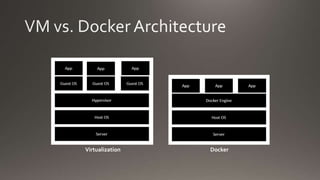
Virtualization Docker
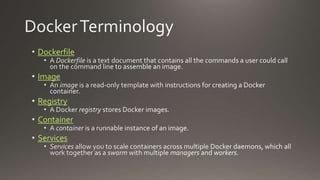
Dockerfile
Image
Registry
Container
Services
RegistryVSTS
Dev. Laptop
Octopus
DeployBuildAgents
Reverse
Proxy
Web Browser
Server-1
Server-2
Server-3
Docker in
Swarm Mode
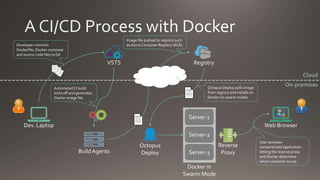
Developer commits
Dockerfile, Docker-compose
and source code files toGit
AutomatedCI build
kicks off and generates
Docker image file
Image file pushed to registry such
as Azure Container Registry (ACR)
Octopus Deploy pulls image
from registry and installs on
Docker (in swarm mode)
User accesses
containerized application
letting the reverse proxy
and Docker determine
which container to use
Cloud
On-premises
Evaluating Docker in the Enterprise - Getting Started

Evaluating Docker in the Enterprise - Getting Started

Editor's Notes

  • #3 In some cases a host OS is not required – e.g. when running a type-1 hypervisor such as VMWare ESXi.
  • #5 Currently, Windows Server 2016 does not support Linux containers – only Windows containers. The Windows Subsystem for Linux (WSL) has been enabled starting with Windows Server Insider Build 16257 for Windows Server 2016. (http://www.zdnet.com/article/microsofts-second-windows-server-2016-test-build-runs-linux-distributions/) Microsoft/nanoserver is a Windows Server 2016 Nano Server base OS image for Windows containers. There is no cost to use this OS for containers so long as the underlying host operating system is licensed.
  • #6 * This diagram depicts the registry being in the cloud (e.g. ACR) but it’s entirely possible to have the registry on-premises as well depending on your needs and/or constraints.