Continuously Delivering
APEX Applications
APEX World 2018 Rotterdam
Agenda
• Introduction
• Managing source code
• Flyway
• APEX
• Jenkins
Partner SMART4Solutions
smartens@smart4solutions.nl
Sergei MartensFrans Jacobs
Software Architect VTTI
fja@vtti.com
Customer requirements
1. Every forth night a deployment of the software to production
2. Shared development database
3. Multiple teams working on the same application(s)
4. Be able to bring a specific features to test as soon as possible
Challenges
• APEX application exports insufficient (includes work in progress from other developers)
• DEV instable due to working drafts from other developers
• Many iterations of deployments
• Deal with failing deployments
• Deployment should be in a transaction (rollback when failing)
Managing the source code
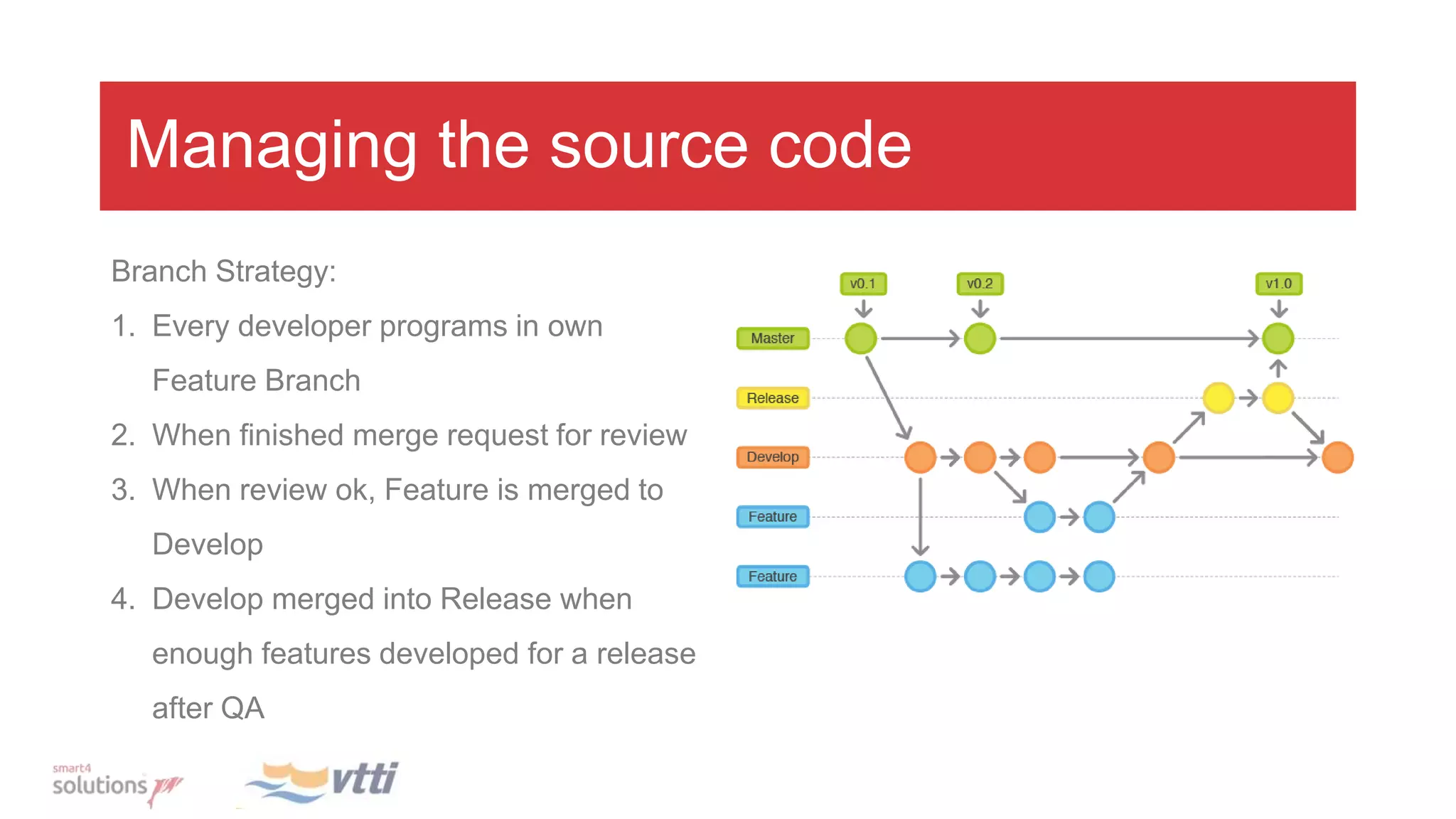
Branch Strategy:
1. Every developer programs in own
Feature Branch
2. When finished merge request for review
3. When review ok, Feature is merged to
Develop
4. Develop merged into Release when
enough features developed for a release
after QA
Demo Feature request
Branch strategy
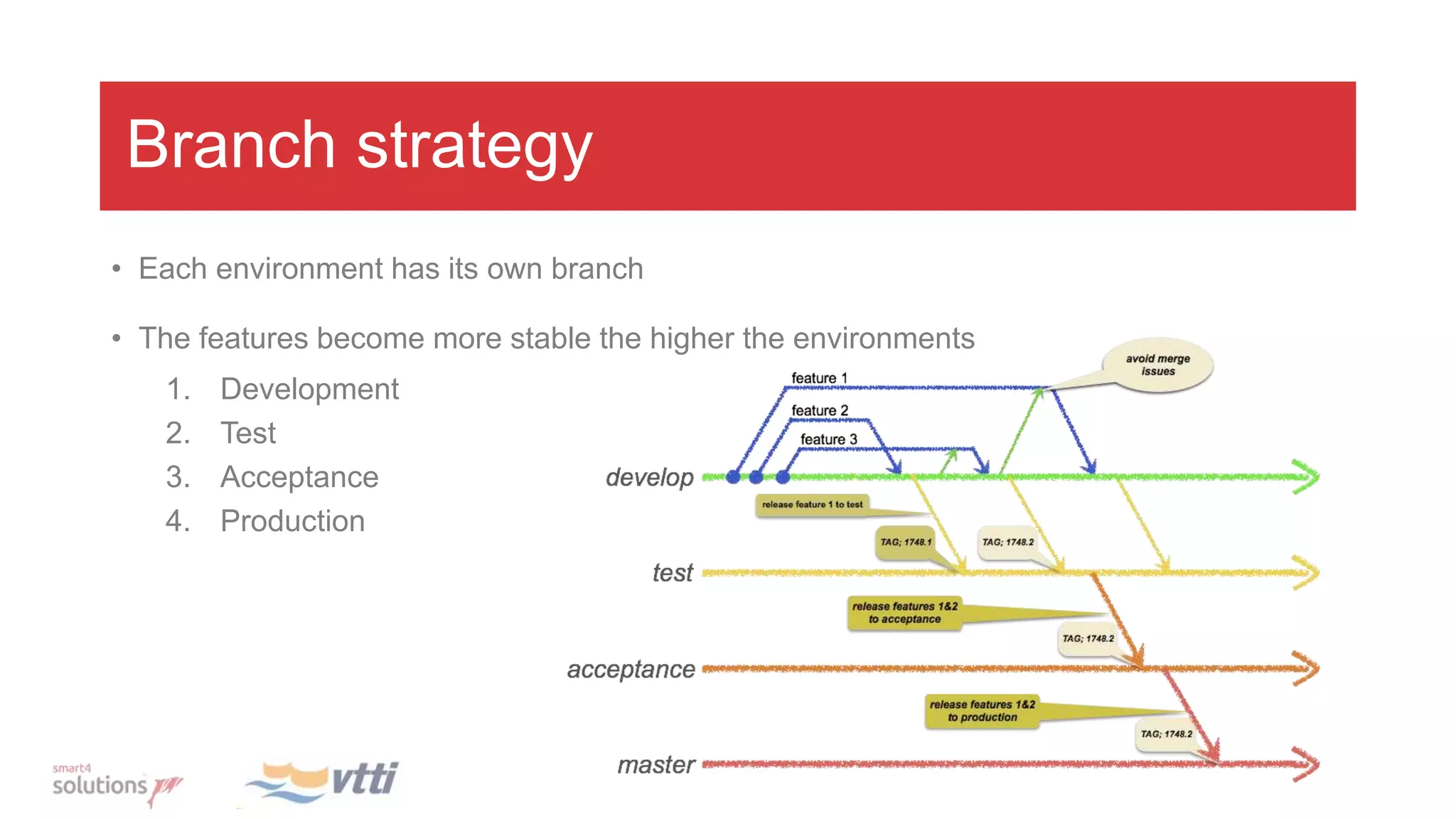
• Each environment has its own branch
• The features become more stable the higher the environments
1. Development
2. Test
3. Acceptance
4. Production
Deployment street
Team 1
Team 2
Integration
Deploy
(dev)
TEST
deploy
ACC
deploy
PROD
deploy
1. Feature branch merged into DEV branch
2. DEV branch merged into TEST branch
3. TEST branch merged into ACC branch
4. ACC branch merged into master
1. 2. 3. 4.
Database version management
• To know what has been deployed on the database
• To know what will be deployed, before actually doing it
• Track changes in the database after deployment
Introducing Flyway
• Open source project for migrating databases
• Flyway keeps track of what has been
installed
• Light weight
• URL: https://flywaydb.org/
Flyway – versioned scripts
Used for:
• Structural changes
• i.e. “create”, “alter”, “drop” …
• Insert of reference data
• User data corrections
Prerequisites:
• Must have a unique version.
• Is executed only once
• Script filename should be like:
V<version>__<name>.sql
• Applied in order of version
CREATE TABLE employee (
id NUMBER NOT NULL PRIMARY KEY,
name VARCHAR2(255) NOT NULL,
salary NUMBER NOT NULL
);
V1_Employees.sql
Flyway – repeatable scripts
Used for:
• Everything with “create or replace”, like
packages, views, triggers, etc.
Prerequisites:
• Does not have a version.
• Is executed when checksum changes
• Script filename should be like:
R__<name>.sql
• Applied alphabetical order
• Are applied after the versioned migrations
CREATE OR REPLACE view employees_v
AS
SELECT * FROM employees
R_Employees_v.sql
Flyway – metadata
Demo
DemoDemo
CD with APEX - Setup
• Every developer is a Workspace developer.
Used for page locking
• Workspace export to each environment
All workspaces need to have the same ID in all environment so deployment
does not break
• Start with empty application
Deleted pages are removed automatically during installation
Project setup
• Divide into folders based on technology
• Sub divide based on functionality
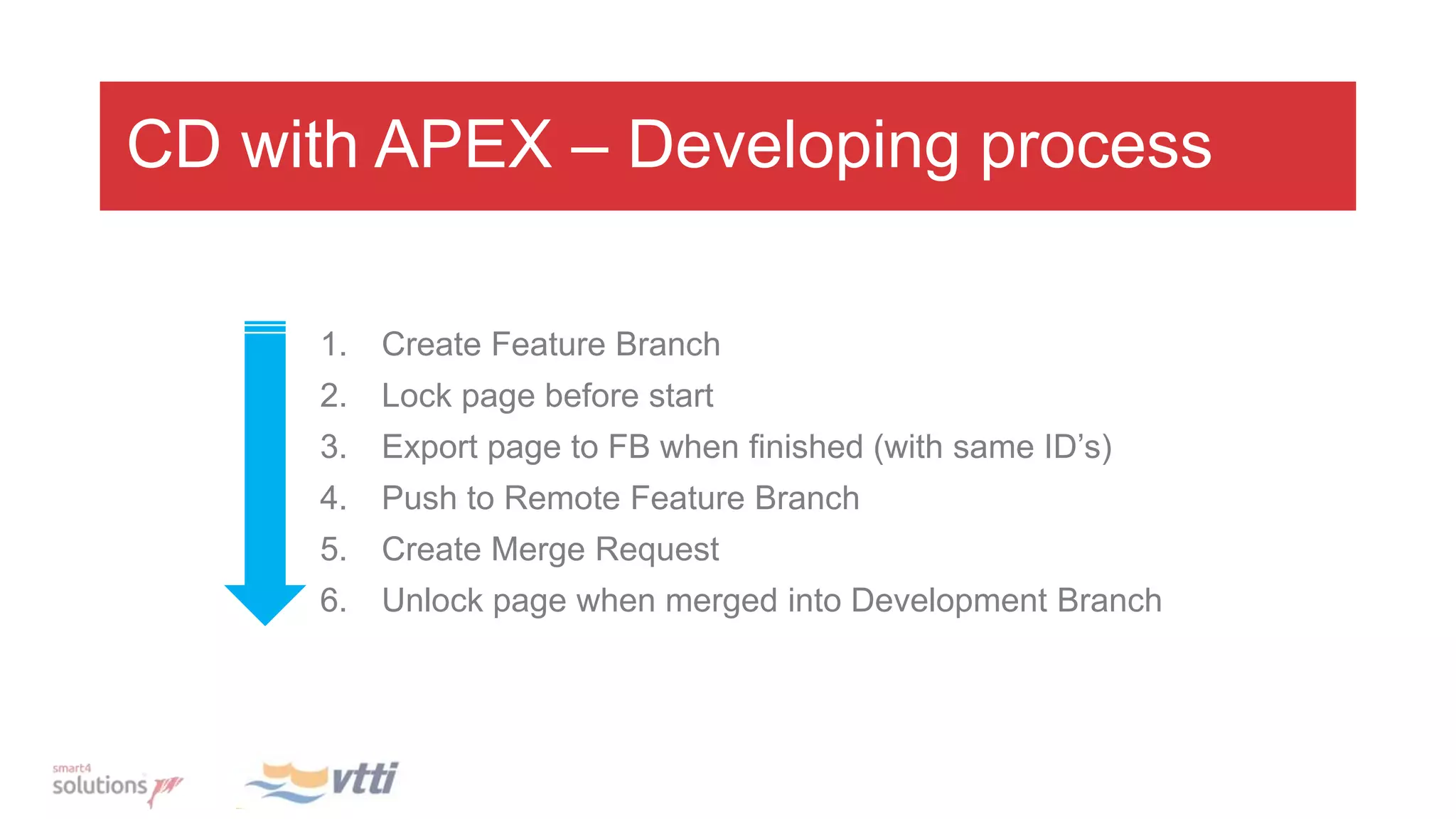
CD with APEX – Developing process
1. Create Feature Branch
2. Lock page before start
3. Export page to FB when finished (with same ID’s)
4. Push to Remote Feature Branch
5. Create Merge Request
6. Unlock page when merged into Development Branch
Demo APEX
Demo APEX
Rule #1
If you can do it in the database, do it in
the database!
-Use database package for List of Values
-Navigation in separate table
-…
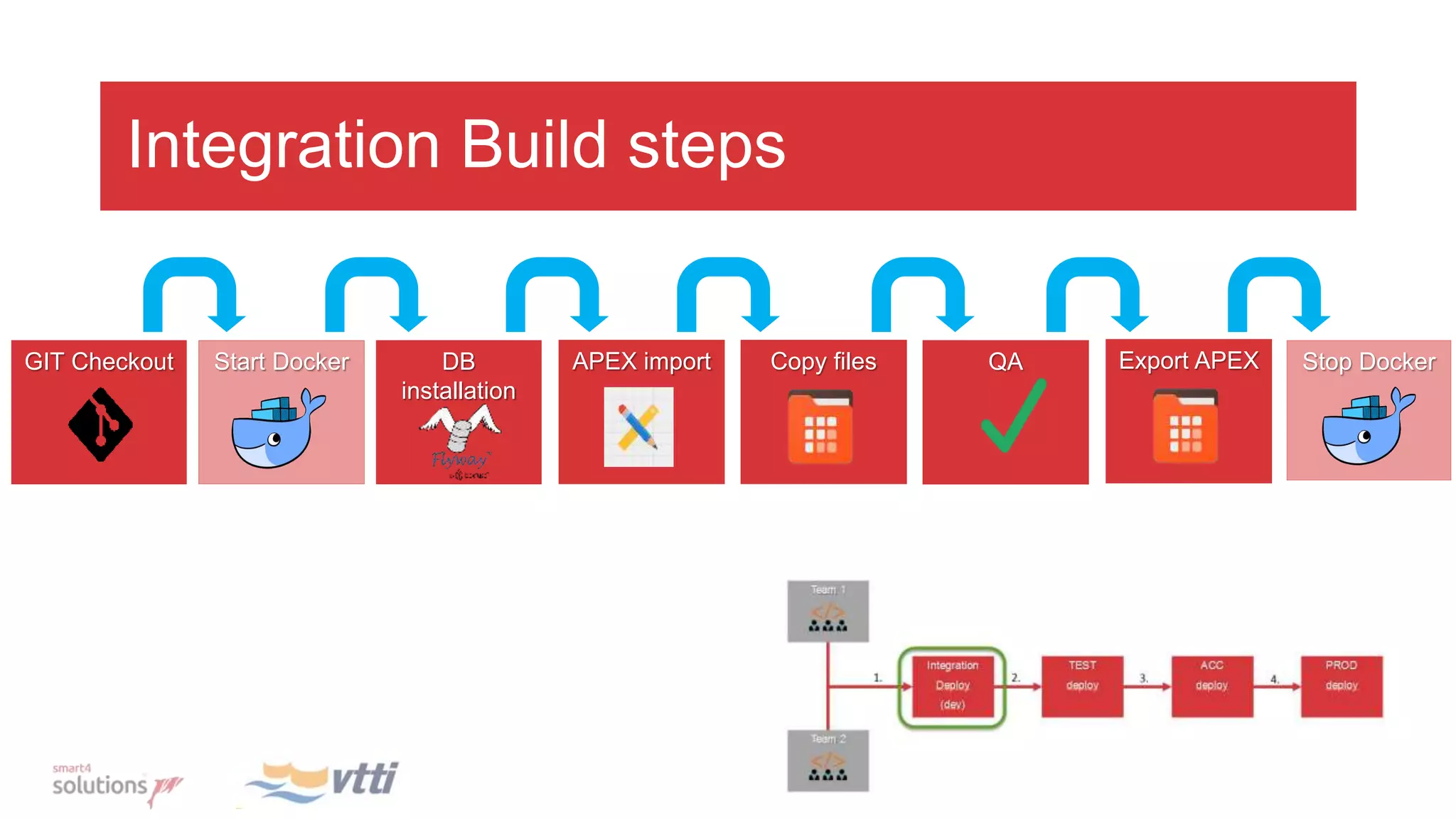
Integration Build steps
Start Docker Stop DockerGIT Checkout DB
installation
Copy filesAPEX import QA Export APEX
Why Docker?
• Easy rollback of failing deployment and/or automated tests
• Docker is a application “virtualizer” (mini vm with one application)
• Each time a new container is started, the database is in the “initial” state
• You want to test the “real” migration as it should happen on the target environment
Jenkins
• Open Source automation server
• Plugin architecture:
• GIT
• Docker (start/stop containers)
• Flyway
• ssh (static files)
• Shell script (sqlcl APEX import/export)
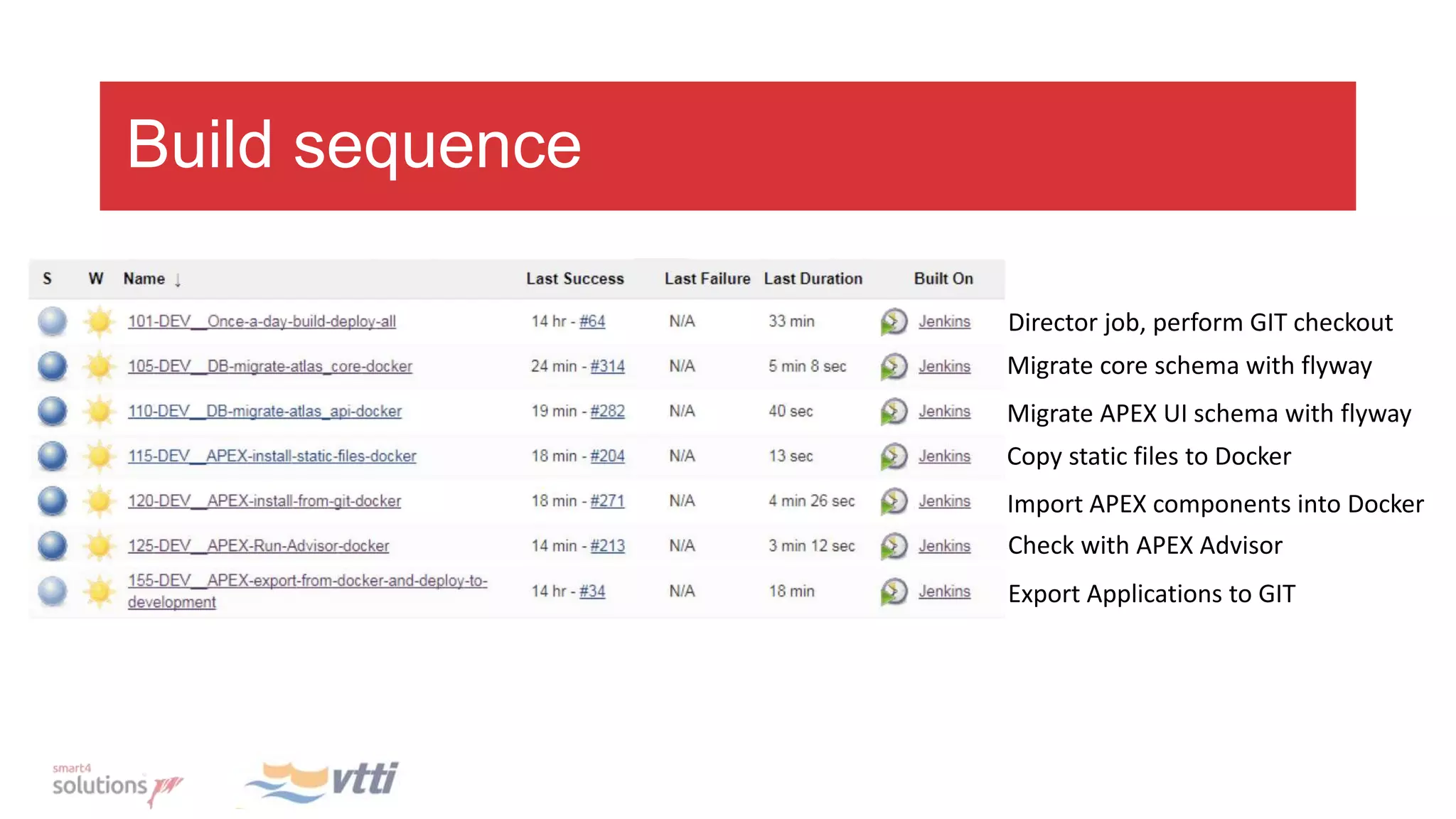
Build sequence
Director job, perform GIT checkout
Migrate core schema with flyway
Migrate APEX UI schema with flyway
Copy static files to Docker
Import APEX components into Docker
Check with APEX Advisor
Export Applications to GIT
Demo
Demo
Thank You!

Apex world 2018 continuously delivering APEX

  • 1.
  • 2.
    Agenda • Introduction • Managingsource code • Flyway • APEX • Jenkins
  • 3.
  • 5.
    Customer requirements 1. Everyforth night a deployment of the software to production 2. Shared development database 3. Multiple teams working on the same application(s) 4. Be able to bring a specific features to test as soon as possible
  • 6.
    Challenges • APEX applicationexports insufficient (includes work in progress from other developers) • DEV instable due to working drafts from other developers • Many iterations of deployments • Deal with failing deployments • Deployment should be in a transaction (rollback when failing)
  • 7.
    Managing the sourcecode Branch Strategy: 1. Every developer programs in own Feature Branch 2. When finished merge request for review 3. When review ok, Feature is merged to Develop 4. Develop merged into Release when enough features developed for a release after QA
  • 8.
  • 9.
  • 10.
    Branch strategy • Eachenvironment has its own branch • The features become more stable the higher the environments 1. Development 2. Test 3. Acceptance 4. Production
  • 11.
    Deployment street Team 1 Team2 Integration Deploy (dev) TEST deploy ACC deploy PROD deploy 1. Feature branch merged into DEV branch 2. DEV branch merged into TEST branch 3. TEST branch merged into ACC branch 4. ACC branch merged into master 1. 2. 3. 4.
  • 12.
    Database version management •To know what has been deployed on the database • To know what will be deployed, before actually doing it • Track changes in the database after deployment
  • 13.
    Introducing Flyway • Opensource project for migrating databases • Flyway keeps track of what has been installed • Light weight • URL: https://flywaydb.org/
  • 14.
    Flyway – versionedscripts Used for: • Structural changes • i.e. “create”, “alter”, “drop” … • Insert of reference data • User data corrections Prerequisites: • Must have a unique version. • Is executed only once • Script filename should be like: V<version>__<name>.sql • Applied in order of version CREATE TABLE employee ( id NUMBER NOT NULL PRIMARY KEY, name VARCHAR2(255) NOT NULL, salary NUMBER NOT NULL ); V1_Employees.sql
  • 15.
    Flyway – repeatablescripts Used for: • Everything with “create or replace”, like packages, views, triggers, etc. Prerequisites: • Does not have a version. • Is executed when checksum changes • Script filename should be like: R__<name>.sql • Applied alphabetical order • Are applied after the versioned migrations CREATE OR REPLACE view employees_v AS SELECT * FROM employees R_Employees_v.sql
  • 16.
  • 17.
  • 18.
  • 19.
    CD with APEX- Setup • Every developer is a Workspace developer. Used for page locking • Workspace export to each environment All workspaces need to have the same ID in all environment so deployment does not break • Start with empty application Deleted pages are removed automatically during installation
  • 20.
    Project setup • Divideinto folders based on technology • Sub divide based on functionality
  • 21.
    CD with APEX– Developing process 1. Create Feature Branch 2. Lock page before start 3. Export page to FB when finished (with same ID’s) 4. Push to Remote Feature Branch 5. Create Merge Request 6. Unlock page when merged into Development Branch
  • 22.
  • 23.
  • 24.
    Rule #1 If youcan do it in the database, do it in the database! -Use database package for List of Values -Navigation in separate table -…
  • 25.
    Integration Build steps StartDocker Stop DockerGIT Checkout DB installation Copy filesAPEX import QA Export APEX
  • 26.
    Why Docker? • Easyrollback of failing deployment and/or automated tests • Docker is a application “virtualizer” (mini vm with one application) • Each time a new container is started, the database is in the “initial” state • You want to test the “real” migration as it should happen on the target environment
  • 27.
    Jenkins • Open Sourceautomation server • Plugin architecture: • GIT • Docker (start/stop containers) • Flyway • ssh (static files) • Shell script (sqlcl APEX import/export)
  • 28.
    Build sequence Director job,perform GIT checkout Migrate core schema with flyway Migrate APEX UI schema with flyway Copy static files to Docker Import APEX components into Docker Check with APEX Advisor Export Applications to GIT
  • 29.
  • 30.
  • 32.

Editor's Notes

  • #3 9:06
  • #4 9:02 F & S
  • #5 9:04 F
  • #6 9:06 S
  • #7 9:08 S
  • #8 9:10 S
  • #9 9:12 Demo movie create feature branche with one or two objects, a change and a commit push pull request from feature to dev 90 S
  • #10 Demo movie create feature branche with one or two objects, a change and a commit push pull request from feature to dev 90 s
  • #11 9:14 Branch strategy work towards deployment to other environments S
  • #12 15 m (09:15) S
  • #13 (09:16) You also need to manage the database version. Do you know what has been installed? Do you know in which status your database is? F
  • #14 09:18 Why should we use Flyway? Flyway only executes scrips that are new or has been changed. Flyway keeps track of what has been installed. It uses a metadata table to store which migrations are executed. Flyway can execute scripts directly from the GIT folder structure There no need to create artifacts or copy scripts to release folders etc… Use the Tagging/Branching facilities which are provided by GIT to mark milestones. F
  • #15 09:14 Flyway basically knows 2 types of migrations The first one is the Versioned migration. Versioned migrations are used for structural changes like create, alter or drop. But you can also use this for inserts of reference data or to perform user data corrections. A versioned migration script will be executed only once! F
  • #16 09:18 The second migration type is the repeatable migration. A repeatable migration is typically used for code in the database; like functions, procedures, packages and views. Repeatable migrations are only executed when it is new or when the checksum of the script file differs with the one stored in the metadata table. F
  • #17 09:20 How does this than look First migration will install the metadata table. Each migration is registered in the metadata table. Flyway has a mechanism to start using it on legacy database. F
  • #18  In the demo I would like you to show what basically happens when you create a few objects in the database. Than I will change the objects to demonstrate a change. F
  • #19 (09:25) Flyway info command shows what will be migrated (pending migations) then migrate Show versioned plus repeatavle migation in metadata table. F
  • #20 S
  • #21 S
  • #22 S
  • #23 S
  • #24 S
  • #25 S
  • #26 F This is the (simplified) flow schema of the build street. Step 1: get the source code from GIT Step 2: start a Docker container which contains a Oracle database with APEX. The reason for Docker will come the next slide. Step 3: migrate the database Step 4: perform the APEX component import (the component files are imported into the Docker APEX workspace) the application(s) are assembled… Step 5: copy the static file to the Docker APEX webserver. Static files are icons, java script libraries etc… Step 6: run the APEX Advisor to check application completeness Step 7: export the APEX Application(s) as full application export, put them in GIT. These application files are used for deployment in the target environments… Step 8: stop and remove the Docker container
  • #27 Why Docker? During the integration phase of the development cycle the source code is usually instable. As we try to integrate the code (from multiple developers) as often as possible the build fails a lot of times. You want to spent time to repair the mess. First to enable easy rollback when migrations fail. Provide stable test data. The database structure and data are in a known state when the container is started. You can test a migration path as the database state mimics the state of the production database Other benefits Docker is light weight compared with other solutions like a VM F
  • #28 To automate the deployment process we use Jenkins. Jenkins is the build server. Jenkins is basically an automated script runner which performs automatically the full software roll-out. Jenkins has a plugin structure to execute dedicated tasks There are plugins for: Running shell scripts Windows bath scripts Flyway Docker sFTP/ssh No plugin yet for APEX this is solved with shell scripts and sqlcl F Jenkins has an active community
  • #29 In the next demo you will see Jenkins building the software. Here you see the steps which are executed. We configured jobs for each task F
  • #30 In this demo I would like to show you what actually happens when the Jobs are executed by Jenkins F
  • #31 Show the job (101) which sceen parts of flyway, apex import and rollout F
  • #32 F