Virtual Reality
A presentation by
NAVEEN KUMAR BISAI
14A51A05A1
Outline
Introduction
The history of VR
Types of VR
Technologies of VR
Architecture of VR system
Applications of VR
Current problems &
Futurework
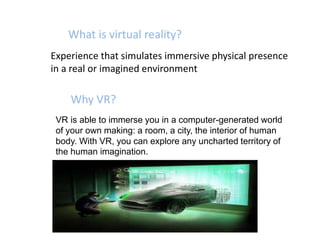
What is virtual reality?
Experience that simulates immersive physical presence
in a real or imagined environment
Why VR?
VR is able to immerse you in a computer-generated world
of your own making: a room, a city, the interior of human
body. With VR, you can explore any uncharted territory of
the human imagination.
Brief History
In 1950s, flight simulators were built by US Air Force to
train student pilots.
In 1965, a research program for computer graphics called
“The Ultimate Display” was laid out.
In 1988, commercial development of VR began.
In 1991, first commercial entertainment VR system
"Virtuality" was released.
Types of VR System
Windows on World(WoW)
Also called Desktop VR.
Using a conventional computer monitor to display the 3D virtual
world.
Immersive VR
Completely immerse the user's personal viewpoint inside the
virtual 3D world.
The user has no visual contact with the physical word.
Often equipped with a Head Mounted Display (HMD).
Tele presence
A variation of visualizing complete computer generated worlds.
Mixed Reality(Augmented Reality)
The seamless merging of real space and virtual space.
Integrate the computer-generated virtual objects into the
physical world which become in a sense an equal part of our
natural environment.
Distributed VR
A simulated world runs on several computers which are
connected over network and the people are able to interact in
real time, sharing the same virtual world.
Types of vr
Technologies of VR(Hardware)
Head-Mounted Display (HMD)
A Helmet or a face mask providing the visual and auditory
displays.
Binocular Omni-Orientation Monitor (BOOM)
Head-coupled stereoscopic display device.
Uses CRT to provide high-resolution display..
Cave Automatic Virtual Environment (CAVE)
Provides the illusion of immersion by projecting stereo
images on the walls and floor of a room-sized cube.
A head tracking system continuously adjust the stereo
projection to the current position of the leading viewer.
Technologies of VR(Software)
•Toolkits
Programming libraries.
Provide function libraries (C & C++).
•Authoring systems
Complete programs with graphical interfaces for creating worlds
without resorting to detailed programming.
VRML(Virtual Reality Modeling Language)
 Standard language for interactive simulation within the
World Wide Web.
 Allows to create "virtual worlds" networked via the Internet
and hyperlinked with the World Wide Web.
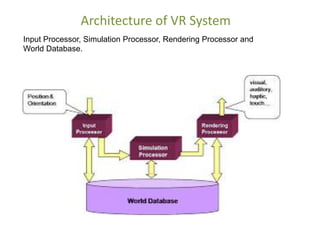
Architecture of VR System
Input Processor, Simulation Processor, Rendering Processor and
World Database.
Components of VR System
Input Processor
Control the devices used to input information to the computer
Simulation Processor
– Core of a VR system.
– Takes the user inputs along with any tasks programmed into
the world and determine the actions that will take place in
the virtual world.
Rendering Processor
– Create the sensations that are output to the user.
.
World Database (World Description Files)
– Store the objects that inhabit the world, scripts that
describe actions of those objects.
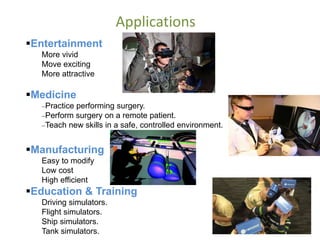
Applications
Entertainment
More vivid
Move exciting
More attractive
Medicine
Practice performing surgery.
Perform surgery on a remote patient.
Teach new skills in a safe, controlled environment.
Manufacturing
Easy to modify
Low cost
High efficient
Education & Training
Driving simulators.
Flight simulators.
Ship simulators.
Tank simulators.
Current problems & Future work
 Cybersickness / simulator sickness
 Low-fidelity
 Expensive
 Lack of integration between application
packages
 High-fidelity system
 Cost-saving
 collaborative
 High-level contact between participants in
distributed VR
Current problems
Future work
Any queries

Virtual reality The Future

  • 1.
    Virtual Reality A presentationby NAVEEN KUMAR BISAI 14A51A05A1
  • 2.
    Outline Introduction The history ofVR Types of VR Technologies of VR Architecture of VR system Applications of VR Current problems & Futurework
  • 3.
    What is virtualreality? Experience that simulates immersive physical presence in a real or imagined environment Why VR? VR is able to immerse you in a computer-generated world of your own making: a room, a city, the interior of human body. With VR, you can explore any uncharted territory of the human imagination.
  • 4.
    Brief History In 1950s,flight simulators were built by US Air Force to train student pilots. In 1965, a research program for computer graphics called “The Ultimate Display” was laid out. In 1988, commercial development of VR began. In 1991, first commercial entertainment VR system "Virtuality" was released.
  • 5.
    Types of VRSystem Windows on World(WoW) Also called Desktop VR. Using a conventional computer monitor to display the 3D virtual world. Immersive VR Completely immerse the user's personal viewpoint inside the virtual 3D world. The user has no visual contact with the physical word. Often equipped with a Head Mounted Display (HMD).
  • 6.
    Tele presence A variationof visualizing complete computer generated worlds. Mixed Reality(Augmented Reality) The seamless merging of real space and virtual space. Integrate the computer-generated virtual objects into the physical world which become in a sense an equal part of our natural environment. Distributed VR A simulated world runs on several computers which are connected over network and the people are able to interact in real time, sharing the same virtual world. Types of vr
  • 7.
    Technologies of VR(Hardware) Head-MountedDisplay (HMD) A Helmet or a face mask providing the visual and auditory displays. Binocular Omni-Orientation Monitor (BOOM) Head-coupled stereoscopic display device. Uses CRT to provide high-resolution display.. Cave Automatic Virtual Environment (CAVE) Provides the illusion of immersion by projecting stereo images on the walls and floor of a room-sized cube. A head tracking system continuously adjust the stereo projection to the current position of the leading viewer.
  • 8.
    Technologies of VR(Software) •Toolkits Programminglibraries. Provide function libraries (C & C++). •Authoring systems Complete programs with graphical interfaces for creating worlds without resorting to detailed programming. VRML(Virtual Reality Modeling Language)  Standard language for interactive simulation within the World Wide Web.  Allows to create "virtual worlds" networked via the Internet and hyperlinked with the World Wide Web.
  • 9.
    Architecture of VRSystem Input Processor, Simulation Processor, Rendering Processor and World Database.
  • 10.
    Components of VRSystem Input Processor Control the devices used to input information to the computer Simulation Processor – Core of a VR system. – Takes the user inputs along with any tasks programmed into the world and determine the actions that will take place in the virtual world. Rendering Processor – Create the sensations that are output to the user. . World Database (World Description Files) – Store the objects that inhabit the world, scripts that describe actions of those objects.
  • 11.
    Applications Entertainment More vivid Move exciting Moreattractive Medicine Practice performing surgery. Perform surgery on a remote patient. Teach new skills in a safe, controlled environment. Manufacturing Easy to modify Low cost High efficient Education & Training Driving simulators. Flight simulators. Ship simulators. Tank simulators.
  • 12.
    Current problems &Future work  Cybersickness / simulator sickness  Low-fidelity  Expensive  Lack of integration between application packages  High-fidelity system  Cost-saving  collaborative  High-level contact between participants in distributed VR Current problems Future work
  • 14.