1
 Introduction
 History
 Types of VIRTUAL REALITY
 Technologies of VIRTUAL REALITY
 Architecture
 Applications
 Current Problems and Future Work
 Conclusion
 References
2
Contents
3
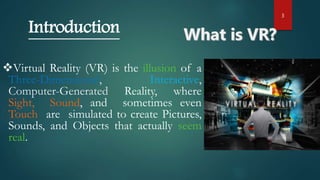
Virtual Reality (VR) is the illusion of a
Three-Dimensional, Interactive,
Computer-Generated Reality, where
Sight, Sound, and sometimes even
Touch are simulated to create Pictures,
Sounds, and Objects that actually seem
real.
Introduction
4
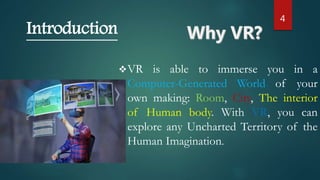
VR is able to immerse you in a
Computer-Generated World of your
own making: Room, City, The interior
of Human body. With VR, you can
explore any Uncharted Territory of the
Human Imagination.
Introduction
5
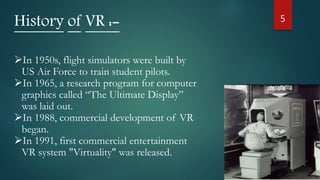
History of VR :-
In 1950s, flight simulators were built by
US Air Force to train student pilots.
In 1965, a research program for computer
graphics called “The Ultimate Display”
was laid out.
In 1988, commercial development of VR
began.
In 1991, first commercial entertainment
VR system "Virtuality" was released.
6
Types of Virtual Reality
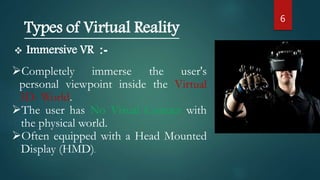
 Immersive VR :-
Completely immerse the user's
personal viewpoint inside the Virtual
3D- World.
The user has No Visual Contact with
the physical world.
Often equipped with a Head Mounted
Display (HMD).
7
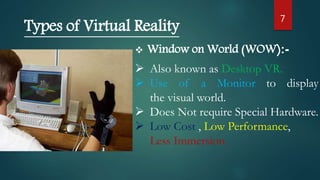
 Window on World (WOW):-
 Also known as Desktop VR.
 Use of a Monitor to display
the visual world.
 Does Not require Special Hardware.
 Low Cost , Low Performance,
Less Immersion.
Types of Virtual Reality
8
Types of Virtual Reality
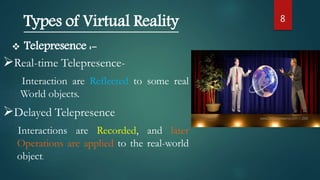
 Telepresence :-
Real-time Telepresence-
Interaction are Reflected to some real
World objects.
Delayed Telepresence
Interactions are Recorded, and later
Operations are applied to the real-world
object.
9
Types of Virtual Reality
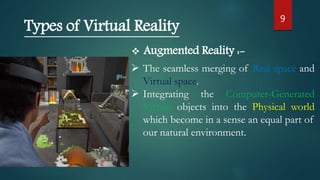
 Augmented Reality :-
 The seamless merging of Real space and
Virtual space.
 Integrating the Computer-Generated
Virtual objects into the Physical world
which become in a sense an equal part of
our natural environment.
10
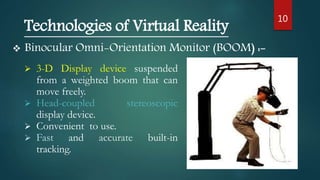
 Binocular Omni-Orientation Monitor (BOOM) :-
Technologies of Virtual Reality
 3-D Display device suspended
from a weighted boom that can
move freely.
 Head-coupled stereoscopic
display device.
 Convenient to use.
 Fast and accurate built-in
tracking.
11
Technologies of Virtual Reality
 Head Mounted Display(HMD) :-
 A Helmet or a Face mask
providing the visual and auditory
displays.
 Use LCD to display stereo images.
 May include built-in Head-tracker
and Stereo headphones.
12
Technologies of Virtual Reality
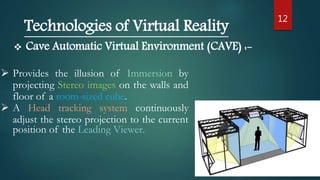
 Cave Automatic Virtual Environment (CAVE) :-
 Provides the illusion of Immersion by
projecting Stereo images on the walls and
floor of a room-sized cube.
 A Head tracking system continuously
adjust the stereo projection to the current
position of the Leading Viewer.
13
Technologies of Virtual Reality
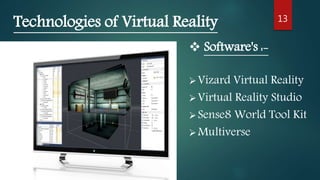
Vizard Virtual Reality
Virtual Reality Studio
Sense8 World Tool Kit
Multiverse
 Software's :-
14
Input
Processor
Rendering
Processor
Simulation
Processor
visual,
auditory,
haptic,
touch…
Position &
Orientation
Architecture of Virtual Reality
Position and angle is
Integrated with Virtual
world by
Computer Software
15Applications :-
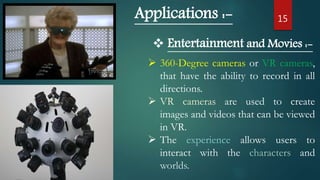
 Entertainment and Movies :-
 360-Degree cameras or VR cameras,
that have the ability to record in all
directions.
 VR cameras are used to create
images and videos that can be viewed
in VR.
 The experience allows users to
interact with the characters and
worlds.
16
Applications :-
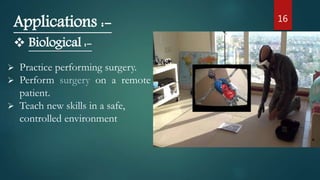
 Biological :-
 Practice performing surgery.
 Perform surgery on a remote
patient.
 Teach new skills in a safe,
controlled environment
17Applications :-
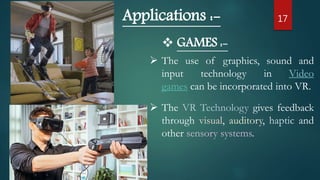
 GAMES :-
 The use of graphics, sound and
input technology in Video
games can be incorporated into VR.
 The VR Technology gives feedback
through visual, auditory, haptic and
other sensory systems.
18
Applications :-
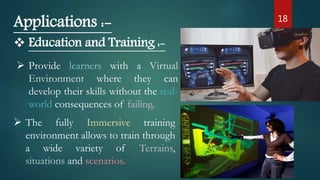
 Education and Training :-
 Provide learners with a Virtual
Environment where they can
develop their skills without the real-
world consequences of failing.
 The fully Immersive training
environment allows to train through
a wide variety of Terrains,
situations and scenarios..
19
Current Problems and Future Work :-
 Motion sickness / Simulator sickness
 Low-Accuracy
 Expensive
 Bit lack of integration between application packages.
 Cost-saving
 High-level contact between participants in VR.
 High-Accuracy system
20
Conclusion :-
 Visualization of complicated, large data is
helpful for understanding and analysis.
 VR offers us a new way to interact with
computer and real life.
 VR enables us to experience the virtual world
that is impossible in real world.
 VR is changing our life, eventually VR will
increasingly become a part of our life.
 The Best of VR is Yet to Come . . .
21
References :-
 What is VR? -
( https://en.wikipedia.org/wiki/Virtual_reality )
 Virtual Reality GIF’s -
( http://giphy.com/search/virtual-reality )
 VR News -
( http://www.roadtovr.com/ )
 Type of VR -
( https://en.wikipedia.org/wiki/Types_of_VR )
22

VIRTUAL REALITY SEMINAR PPT WITH AWESOME AUTOMATIC ANIMATIONS

  • 1.
  • 2.
     Introduction  History Types of VIRTUAL REALITY  Technologies of VIRTUAL REALITY  Architecture  Applications  Current Problems and Future Work  Conclusion  References 2 Contents
  • 3.
    3 Virtual Reality (VR)is the illusion of a Three-Dimensional, Interactive, Computer-Generated Reality, where Sight, Sound, and sometimes even Touch are simulated to create Pictures, Sounds, and Objects that actually seem real. Introduction
  • 4.
    4 VR is ableto immerse you in a Computer-Generated World of your own making: Room, City, The interior of Human body. With VR, you can explore any Uncharted Territory of the Human Imagination. Introduction
  • 5.
    5 History of VR:- In 1950s, flight simulators were built by US Air Force to train student pilots. In 1965, a research program for computer graphics called “The Ultimate Display” was laid out. In 1988, commercial development of VR began. In 1991, first commercial entertainment VR system "Virtuality" was released.
  • 6.
    6 Types of VirtualReality  Immersive VR :- Completely immerse the user's personal viewpoint inside the Virtual 3D- World. The user has No Visual Contact with the physical world. Often equipped with a Head Mounted Display (HMD).
  • 7.
    7  Window onWorld (WOW):-  Also known as Desktop VR.  Use of a Monitor to display the visual world.  Does Not require Special Hardware.  Low Cost , Low Performance, Less Immersion. Types of Virtual Reality
  • 8.
    8 Types of VirtualReality  Telepresence :- Real-time Telepresence- Interaction are Reflected to some real World objects. Delayed Telepresence Interactions are Recorded, and later Operations are applied to the real-world object.
  • 9.
    9 Types of VirtualReality  Augmented Reality :-  The seamless merging of Real space and Virtual space.  Integrating the Computer-Generated Virtual objects into the Physical world which become in a sense an equal part of our natural environment.
  • 10.
    10  Binocular Omni-OrientationMonitor (BOOM) :- Technologies of Virtual Reality  3-D Display device suspended from a weighted boom that can move freely.  Head-coupled stereoscopic display device.  Convenient to use.  Fast and accurate built-in tracking.
  • 11.
    11 Technologies of VirtualReality  Head Mounted Display(HMD) :-  A Helmet or a Face mask providing the visual and auditory displays.  Use LCD to display stereo images.  May include built-in Head-tracker and Stereo headphones.
  • 12.
    12 Technologies of VirtualReality  Cave Automatic Virtual Environment (CAVE) :-  Provides the illusion of Immersion by projecting Stereo images on the walls and floor of a room-sized cube.  A Head tracking system continuously adjust the stereo projection to the current position of the Leading Viewer.
  • 13.
    13 Technologies of VirtualReality Vizard Virtual Reality Virtual Reality Studio Sense8 World Tool Kit Multiverse  Software's :-
  • 14.
    14 Input Processor Rendering Processor Simulation Processor visual, auditory, haptic, touch… Position & Orientation Architecture ofVirtual Reality Position and angle is Integrated with Virtual world by Computer Software
  • 15.
    15Applications :-  Entertainmentand Movies :-  360-Degree cameras or VR cameras, that have the ability to record in all directions.  VR cameras are used to create images and videos that can be viewed in VR.  The experience allows users to interact with the characters and worlds.
  • 16.
    16 Applications :-  Biological:-  Practice performing surgery.  Perform surgery on a remote patient.  Teach new skills in a safe, controlled environment
  • 17.
    17Applications :-  GAMES:-  The use of graphics, sound and input technology in Video games can be incorporated into VR.  The VR Technology gives feedback through visual, auditory, haptic and other sensory systems.
  • 18.
    18 Applications :-  Educationand Training :-  Provide learners with a Virtual Environment where they can develop their skills without the real- world consequences of failing.  The fully Immersive training environment allows to train through a wide variety of Terrains, situations and scenarios..
  • 19.
    19 Current Problems andFuture Work :-  Motion sickness / Simulator sickness  Low-Accuracy  Expensive  Bit lack of integration between application packages.  Cost-saving  High-level contact between participants in VR.  High-Accuracy system
  • 20.
    20 Conclusion :-  Visualizationof complicated, large data is helpful for understanding and analysis.  VR offers us a new way to interact with computer and real life.  VR enables us to experience the virtual world that is impossible in real world.  VR is changing our life, eventually VR will increasingly become a part of our life.  The Best of VR is Yet to Come . . .
  • 21.
    21 References :-  Whatis VR? - ( https://en.wikipedia.org/wiki/Virtual_reality )  Virtual Reality GIF’s - ( http://giphy.com/search/virtual-reality )  VR News - ( http://www.roadtovr.com/ )  Type of VR - ( https://en.wikipedia.org/wiki/Types_of_VR )
  • 22.