Virtual Reality
Presented by:
Sajid Ali F22BScMET 006
Siddique ur Rehman F22BScMET 009
M. Zeeshan F22BScMET 014
Imdadullah F22BScMET 019
M. Asad Farhan F22BScMET 032
1
2
Outline
 Introduction
 The history of VR
 Types of VR
 Technologies of VR
 Architecture of VR system
 Applications of VR
 Current problems & Future work
 Summary
3
Introduction
 What is Virtual Reality(VR)?
Virtual Reality refers to a high-end user
interface that involves real-time
simulation and interactions through
multiple sensorial channels.
.
4
Introduction (Cont’d)
 Why VR?
VR is able to immerse you in a
computer-generated world of your own
making: a room, a city, the interior of
human body. With VR, you can explore
any uncharted territory of the human
imagination.
5
Brief History
 In 1950s, flight simulators were built by US Air
Force to train student pilots.
 In 1965, a research program for computer
graphics called “The Ultimate Display” was
laid out.
 In 1988, commercial development of VR
began.
 In 1991, first commercial entertainment VR
system "Virtuality" was released.
6
Types of VR System
 Immersive VR
– Completely immerse the user's personal viewpoint inside
the virtual 3D world.
– The user has no visual contact with the physical word.
– Often equipped with a Head Mounted Display (HMD).
7
Types of VR System(Cont’d)
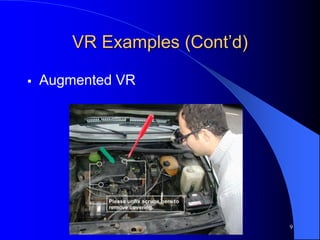
 Mixed Reality(Augmented Reality)
– The seamless merging of real space and virtual space.
– Integrate the computer-generated virtual objects into the
physical world which become in a sense an equal part of
our natural environment.
Types of VR System(Cont’d)
 Non Immersive VR
8
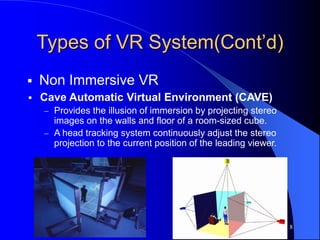
 Cave Automatic Virtual Environment (CAVE)
 Provides the illusion of immersion by projecting stereo
images on the walls and floor of a room-sized cube.
 A head tracking system continuously adjust the stereo
projection to the current position of the leading viewer.
9
VR Examples (Cont’d)
 Augmented VR
10
Technologies of VR--Hardware
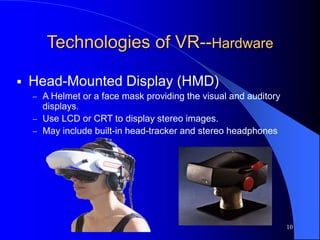
 Head-Mounted Display (HMD)
 A Helmet or a face mask providing the visual and auditory
displays.
 Use LCD or CRT to display stereo images.
 May include built-in head-tracker and stereo headphones
11
Technologies of VR--Hardware
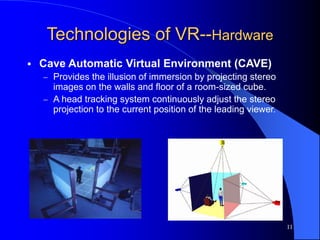
 Cave Automatic Virtual Environment (CAVE)
 Provides the illusion of immersion by projecting stereo
images on the walls and floor of a room-sized cube.
 A head tracking system continuously adjust the stereo
projection to the current position of the leading viewer.
12
Technologies of VR--Hardware
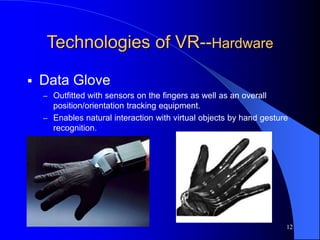
 Data Glove
– Outfitted with sensors on the fingers as well as an overall
position/orientation tracking equipment.
– Enables natural interaction with virtual objects by hand gesture
recognition.
13
Technologies of VR--Hardware
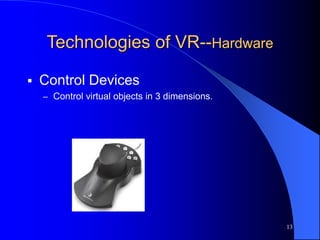
 Control Devices
– Control virtual objects in 3 dimensions.
14
Technologies of VR--Software
 VRML(Virtual Reality Modeling Language)
 Standard language for interactive simulation
within the World Wide Web.
 Allows to create "virtual worlds" networked via
the Internet and hyperlinked with the World
Wide Web.
 Aspects of virtual world display, interaction and
internetworking can be specified using VRML
without being dependent on special gear like
HMD.
– VR models can be viewed by Netscape or IE with a
browser plug-in.
15
Architecture of VR System
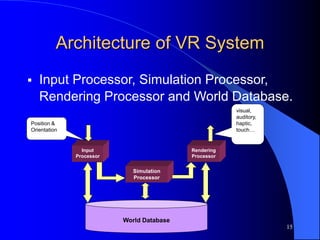
 Input Processor, Simulation Processor,
Rendering Processor and World Database.
Input
Processor
Rendering
Processor
World Database
Simulation
Processor
visual,
auditory,
haptic,
touch…
Position &
Orientation
16
Components of VR System (Cont’d)
 Input Processor
– Control the devices used to input
information to the computer. The object is
to get the coordinate data to the rest of the
system with minimal lag time.
– Keyboard, mouse, 3D position trackers, a
voice recognition system, etc.
17
Components of VR System (Cont’d)
 Simulation Processor
– Core of a VR system.
– Takes the user inputs along with any tasks
programmed into the world and determine
the actions that will take place in the virtual
world.
18
Components of VR System (Cont’d)
 Rendering Processor
– Create the sensations that are output to
the user.
– Separate rendering processes are used for
visual, auditory, haptic and other sensory
systems. Each renderer take a description
of the world stat from the simulation
process or derive it directly from the World
Database for each time step.
19
Components of VR System (Cont’d)
 World Database (World Description
Files)
– Store the objects that inhabit the world,
scripts that describe actions of those
objects.
20
Applications
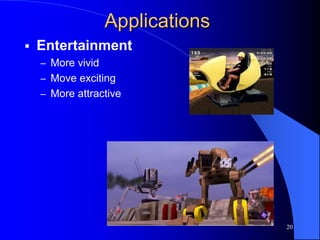
 Entertainment
– More vivid
– Move exciting
– More attractive
21
Applications (Cont’d)
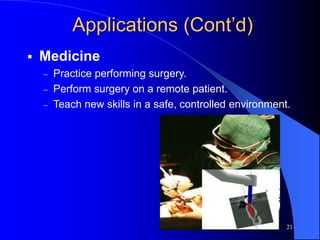
 Medicine
 Practice performing surgery.
 Perform surgery on a remote patient.
 Teach new skills in a safe, controlled environment.
22
Applications (Cont’d)
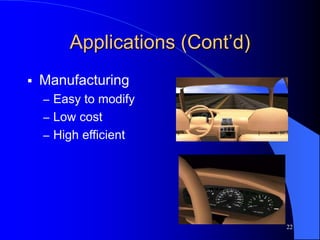
 Manufacturing
– Easy to modify
– Low cost
– High efficient
23
Applications (Cont’d)
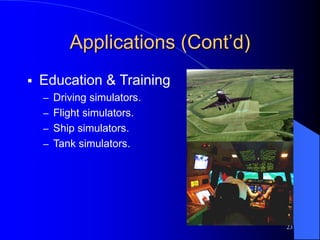
 Education & Training
– Driving simulators.
– Flight simulators.
– Ship simulators.
– Tank simulators.
24
issues
 Cybersickness / simulator sickness
 Low-fidelity
 Expensive
 Lack of integration between application packages
 High-fidelity system
 Cost-saving
 Collaborative
 High-level contact between participants in distributed
VR
25
Summary
 Visualization of complicated, large data is
helpful for understanding and analysis.
 VR offers us a new way to interact with
computer.
 VR enables us to experience the virtual world
that is impossible in real world.
 VR is changing our life, eventually VR will
increasingly become a part of our life.
THANK YOU
26

Computer insights.pptx

  • 1.
    Virtual Reality Presented by: SajidAli F22BScMET 006 Siddique ur Rehman F22BScMET 009 M. Zeeshan F22BScMET 014 Imdadullah F22BScMET 019 M. Asad Farhan F22BScMET 032 1
  • 2.
    2 Outline  Introduction  Thehistory of VR  Types of VR  Technologies of VR  Architecture of VR system  Applications of VR  Current problems & Future work  Summary
  • 3.
    3 Introduction  What isVirtual Reality(VR)? Virtual Reality refers to a high-end user interface that involves real-time simulation and interactions through multiple sensorial channels. .
  • 4.
    4 Introduction (Cont’d)  WhyVR? VR is able to immerse you in a computer-generated world of your own making: a room, a city, the interior of human body. With VR, you can explore any uncharted territory of the human imagination.
  • 5.
    5 Brief History  In1950s, flight simulators were built by US Air Force to train student pilots.  In 1965, a research program for computer graphics called “The Ultimate Display” was laid out.  In 1988, commercial development of VR began.  In 1991, first commercial entertainment VR system "Virtuality" was released.
  • 6.
    6 Types of VRSystem  Immersive VR – Completely immerse the user's personal viewpoint inside the virtual 3D world. – The user has no visual contact with the physical word. – Often equipped with a Head Mounted Display (HMD).
  • 7.
    7 Types of VRSystem(Cont’d)  Mixed Reality(Augmented Reality) – The seamless merging of real space and virtual space. – Integrate the computer-generated virtual objects into the physical world which become in a sense an equal part of our natural environment.
  • 8.
    Types of VRSystem(Cont’d)  Non Immersive VR 8  Cave Automatic Virtual Environment (CAVE)  Provides the illusion of immersion by projecting stereo images on the walls and floor of a room-sized cube.  A head tracking system continuously adjust the stereo projection to the current position of the leading viewer.
  • 9.
  • 10.
    10 Technologies of VR--Hardware Head-Mounted Display (HMD)  A Helmet or a face mask providing the visual and auditory displays.  Use LCD or CRT to display stereo images.  May include built-in head-tracker and stereo headphones
  • 11.
    11 Technologies of VR--Hardware Cave Automatic Virtual Environment (CAVE)  Provides the illusion of immersion by projecting stereo images on the walls and floor of a room-sized cube.  A head tracking system continuously adjust the stereo projection to the current position of the leading viewer.
  • 12.
    12 Technologies of VR--Hardware Data Glove – Outfitted with sensors on the fingers as well as an overall position/orientation tracking equipment. – Enables natural interaction with virtual objects by hand gesture recognition.
  • 13.
    13 Technologies of VR--Hardware Control Devices – Control virtual objects in 3 dimensions.
  • 14.
    14 Technologies of VR--Software VRML(Virtual Reality Modeling Language)  Standard language for interactive simulation within the World Wide Web.  Allows to create "virtual worlds" networked via the Internet and hyperlinked with the World Wide Web.  Aspects of virtual world display, interaction and internetworking can be specified using VRML without being dependent on special gear like HMD. – VR models can be viewed by Netscape or IE with a browser plug-in.
  • 15.
    15 Architecture of VRSystem  Input Processor, Simulation Processor, Rendering Processor and World Database. Input Processor Rendering Processor World Database Simulation Processor visual, auditory, haptic, touch… Position & Orientation
  • 16.
    16 Components of VRSystem (Cont’d)  Input Processor – Control the devices used to input information to the computer. The object is to get the coordinate data to the rest of the system with minimal lag time. – Keyboard, mouse, 3D position trackers, a voice recognition system, etc.
  • 17.
    17 Components of VRSystem (Cont’d)  Simulation Processor – Core of a VR system. – Takes the user inputs along with any tasks programmed into the world and determine the actions that will take place in the virtual world.
  • 18.
    18 Components of VRSystem (Cont’d)  Rendering Processor – Create the sensations that are output to the user. – Separate rendering processes are used for visual, auditory, haptic and other sensory systems. Each renderer take a description of the world stat from the simulation process or derive it directly from the World Database for each time step.
  • 19.
    19 Components of VRSystem (Cont’d)  World Database (World Description Files) – Store the objects that inhabit the world, scripts that describe actions of those objects.
  • 20.
    20 Applications  Entertainment – Morevivid – Move exciting – More attractive
  • 21.
    21 Applications (Cont’d)  Medicine Practice performing surgery.  Perform surgery on a remote patient.  Teach new skills in a safe, controlled environment.
  • 22.
    22 Applications (Cont’d)  Manufacturing –Easy to modify – Low cost – High efficient
  • 23.
    23 Applications (Cont’d)  Education& Training – Driving simulators. – Flight simulators. – Ship simulators. – Tank simulators.
  • 24.
    24 issues  Cybersickness /simulator sickness  Low-fidelity  Expensive  Lack of integration between application packages  High-fidelity system  Cost-saving  Collaborative  High-level contact between participants in distributed VR
  • 25.
    25 Summary  Visualization ofcomplicated, large data is helpful for understanding and analysis.  VR offers us a new way to interact with computer.  VR enables us to experience the virtual world that is impossible in real world.  VR is changing our life, eventually VR will increasingly become a part of our life.
  • 26.