CONTENTS
 Definition and Need for Virtual Reality
 History
 Taxonomy
 Basic Virtual Reality
 Advanced Virtual Reality
 Applications
 Conclusion
 Definition and Need for Virtual Reality
 Virtual Reality is the use of computer modeling and simulation that enables a
person to interact with an artificial three-dimensional (3-D) visual or other
sensory environment.
Via seeing, hearing, smelling and feeling.
Common Features in todays world.
 Virtual Reality will have some impact in almost every field in the near future.
DEFINITION
WHY VIRTUAL REALITY
 Virtual reality is adopted by military, aviation, sports like golf etc. as training
ground in highly realistic manner.
 In military, soldiers can diffuse a bomb without any real world risks.
 In Medicine;
Earlier: Dissection and study using plastic models; Now: Virtual Patients and
Virtual Histology
 They have lower operating costs and are safer to use than real experiences.
HISTORY
 Traditional square or rectangular screens
 Pin cushion Distortion
 Top and Bottom center of a projected
image appear to droop inward creating
corners of squares form elongated
points, as in a cushion.
VITARAMA AND CINERAMA
 VITARAMA: 11 Projectors and
dome shaped screen.
 CINERMA: Simplified version of
Vitarama. Used as wide-
screen film format in 1939. It used three
projectors onto a deeply
curved screen, subtending 146°
of arc.
SENSORAMA
SENSORAMA: Built in 1962 and was
aimed at 4 senses. [See, Hear, Feel &
Smell] .But the machinery ended up
being too complex.
THE ULTIMATE DISPLAY: For the first
time, Virtual reality was experienced
via a Head-Mounted Display which
was created by Ivan Sutherland in
1965. It was the biggest break
through.
Degree of Freedom: Optimal results in 5 DoFs such as
update rate, latency, accuracy, resolution and range
Input Devices: Trackers,
Joysticks, Mice, Data Glove.
Data Glove:
 Outfitted with sensors on the fingers.
 Enables natural interaction by hand gesture recognition.
HARDWARE USED
Output Devices: CRT monitor and LCD screens.
 VR expanded from Basic to Immersive.
 New devices like Power Wall, Head-
Mounted Display (HMD), Binocular Omni
Oriented Monitors (BOOM)
TECHNOLOGIES USED [SOFTWARE]
Virtual Reality Modeling Language(VRML):
 It is a standard language to represent 3D graphics within the World
Wide Web.
 Allows the creator to specify images and the rules for their display.
 Aspects of virtual world display, interaction and internetworking
can be specified using VRML without being dependent on special
gear like HMD.
Software packages:
 Multiverse – Platform for Massively Multiplayer Online Games.
 Virtual Reality Studio – Creates virtual world in Freespace.
 Sense8 World Tool Kit (WTK)
 Autodesk Cyberspace Development kit – Runs VR programming
from keystroke commands to glove-helmet interaction.
KEY ELEMENTS OF A VR SYSTEM
Key elements of a Virtual Reality System are
 Immersion: Active and Passive Immersion
 Interactivity: Interact with a virtual object while navigating through the
environment.
 Participants: New user and Experienced user; One-to-one relationship
and One-to-many relationship.
 Feedback: Gives ability to observe the results. Very useful in aviation and
medicine.
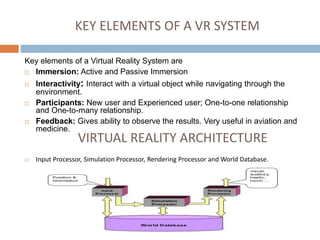
VIRTUAL REALITY ARCHITECTURE
 Input Processor, Simulation Processor, Rendering Processor and World Database.
VIRTUAL REALITY ARCHITECTURE
INPUT PROCESSOR:
 They’re responsible for the control of the input devices. The object
is to deliver the coordinate data to the rest of the system with
minimal time lag.
SIMULATION PROCESSOR:
 Core of a VR system.
 Takes the user inputs along with any tasks programmed and
determines whether the actions that will take place in the virtual
world.
RENDERING PROCESSOR:
 Accepts the results from the simulation processor and creates the
sensations that act as output to the user.
World Database (World Description Files):
 Stores the objects that inhabit the world, scripts that describe
actions of those objects.
CLASSIFICATION
The classification is
based on two factors:
 Type of technology
used.
 Level of mental
immersion.
Type of Technology:
 BASIC: Do not require special
input or output
 ENHANCED: Require additional
input or output devices to
experience virtual reality.
Level of Mental Immersion:
 BASIC: Lower lever of immersion
 ENHANCED: Higher level of
Immersion.
BASIC VR SYSTEMS
BASIC VR SYSTEMS:
 The basic Virtual Reality systems have the least level of immersion
when compared to enhanced systems.
 They are screen-based and pointer-driven which are presented by
three-dimensional graphics.
 These systems can be divided into subcategories, such as the hand-
based and the monitor-based virtual reality systems.
HAND BASED VR SYSTEMS
HAND BASED VR SYSTEMS:
 Hand-held devices, such as cell phones, ultra mobile computers are
used for VR experience.
 Ex: Wikitude World Browser
 Using a Digital Compass and a Camera on a smart phone,
recognizes points of interests,landmarks and surroundings.
MONITOR BASED VR SYSTEMS
 Basically, desktop based computers displaying three-
dimensional graphics on monitors.
 Ex: Fish Tank Display
 This display provides projected stereo images from users
point of view enabling the user to see in three dimension on
two dimensional monitors.
HP ZVR:
 Allows the user to contact with content on screen.
 Uses four cameras to track the head and a stylus to play with
the content on
the screen.
 The Z-view allows a user to broadcast what a person is
looking at, on a larger screen.
ENHANCED VR SYSTEMS
 Enhanced VR systems are again divided into two sub categories.
 Partially Immersive : Wall projectors, Immersa Desk and Monocular Head
Based
 Fully Immersive:
(a) Room based - Vehicle Simulation, CAVE
(b) Binocular head based
What is Hologram?
 Hologram: Typically, a hologram is a photographic recording of a light
field, rather than of an image formed by a lens, and it is used to display
a fully three-dimensional image of the holographed subject, which is
seen without the aid of special glasses or other intermediate optics.
(From wiki)
 Easier version (my opinion): a technique that can display three
dimensional images and users do not need to use any other devices to
view the outputs.
Why is it amazing?
Users do not to need wear any devices.
It looks real! Most of other virtual reality devices--
connect to computer and 3D models generated by
computer.
Interactive
We do have nice prototypes...
 2:16 Life Sized Hologram
 3:41 Hologram Presentation
 3:46 3D earth
 Presenter used a controler
About the prototype
 A brand new way to present.
 An awesome way to tele-
communicate (skype, video chat)
 Possible better interactive
methods--hologram+kinect
(hand pattern, Angela Chan)
Is it just for rich people?
Future hologram
Long way to go…
 Multi-angle to view
 inside 3D images
 Merchandise
 standard interfaces
http://www.christiedigital.com/en-us/3d/sales-
process/request-pricing/pages/default.aspx
Virtual Fitting Room
 Sometimes, we work hard to
make lazy life possible.
--Rui
 Have you go shopping with your
girlfriend or wife?
 My girlfriend can keep shopping
for 10 hours.
Virtual Fitting Room
En… Maybe this will work.
But not 100% fit.
Feeling of the materials.
How does it work?
Key: Kinect, powerful device. Skeleton Detection + 3D
models
Video Games - Early (continued)
Nintendo Power Glove
Hand motion detection
Duck Hunt
Light sensing guns
Sega ActivatorFull body motion detection
Sega VR and Nintendo Virtual Boy
3D headsets
Video Games - Return of VR
Motion Detection
Nintendo Wiimote
PS Move
Microsoft Kinect
Nintendo 3DS
3D and AR
Other
Wii Fit pad
Rock Band and
Guitar Hero
Video Games - Near Future
Augmented Reality
3DS, Hololens
VR Headsets
Oculus Rift, Project Morpheus
http://www.wareable.com/headg
ear/the-best-ar-and-vr-headsets
Motion Detection
Virtuix Omni
https://youtu.be/aTtfAQEeAJI?t=
11
Augmented Reality Applications
https://www.youtube.com/watch?v=QRQv74J7oSk
Games
Design
Training
Visualization
CAVE VR Applications
http://news.ucsc.edu/2015/05/cave-lab.html
"This has applications for faculty in computing, game
design, psychology, the arts, and a wide range of
other fields.”
Can study cognitive processing, assess phobias,
visualize large data sets, etc,
Forest fire simulation presented by Dr. Harris
Military Applications
http://www.vrs.org.uk/virtual-reality-
military/index.html
Flight Simulation
Battlefield Simulation
Medic Training
Vehicle Simulation
Virtual Boot Camp
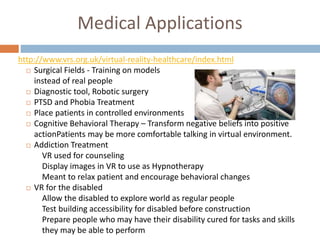
Medical Applications
http://www.vrs.org.uk/virtual-reality-healthcare/index.html
 Surgical Fields - Training on models
instead of real people
 Diagnostic tool, Robotic surgery
 PTSD and Phobia Treatment
 Place patients in controlled environments
 Cognitive Behavioral Therapy – Transform negative beliefs into positive
actionPatients may be more comfortable talking in virtual environment.
 Addiction Treatment
VR used for counseling
Display images in VR to use as Hypnotherapy
Meant to relax patient and encourage behavioral changes
 VR for the disabled
Allow the disabled to explore world as regular people
Test building accessibility for disabled before construction
Prepare people who may have their disability cured for tasks and skills
they may be able to perform
Virtual Reality and Education
http://www.vrs.org.uk/virtual-reality-
education/index.html
Able to present large amounts of potentially
complex data.
Especially useful for scenarios
and places students cannot
experience or see immediately
(astronomy, surgery)
Can tailor to specific learning styles

Virtual_Reality_New.pptx

  • 1.
    CONTENTS  Definition andNeed for Virtual Reality  History  Taxonomy  Basic Virtual Reality  Advanced Virtual Reality  Applications  Conclusion  Definition and Need for Virtual Reality  Virtual Reality is the use of computer modeling and simulation that enables a person to interact with an artificial three-dimensional (3-D) visual or other sensory environment. Via seeing, hearing, smelling and feeling. Common Features in todays world.  Virtual Reality will have some impact in almost every field in the near future. DEFINITION
  • 2.
    WHY VIRTUAL REALITY Virtual reality is adopted by military, aviation, sports like golf etc. as training ground in highly realistic manner.  In military, soldiers can diffuse a bomb without any real world risks.  In Medicine; Earlier: Dissection and study using plastic models; Now: Virtual Patients and Virtual Histology  They have lower operating costs and are safer to use than real experiences. HISTORY  Traditional square or rectangular screens  Pin cushion Distortion  Top and Bottom center of a projected image appear to droop inward creating corners of squares form elongated points, as in a cushion.
  • 3.
    VITARAMA AND CINERAMA VITARAMA: 11 Projectors and dome shaped screen.  CINERMA: Simplified version of Vitarama. Used as wide- screen film format in 1939. It used three projectors onto a deeply curved screen, subtending 146° of arc. SENSORAMA SENSORAMA: Built in 1962 and was aimed at 4 senses. [See, Hear, Feel & Smell] .But the machinery ended up being too complex. THE ULTIMATE DISPLAY: For the first time, Virtual reality was experienced via a Head-Mounted Display which was created by Ivan Sutherland in 1965. It was the biggest break through.
  • 4.
    Degree of Freedom:Optimal results in 5 DoFs such as update rate, latency, accuracy, resolution and range Input Devices: Trackers, Joysticks, Mice, Data Glove. Data Glove:  Outfitted with sensors on the fingers.  Enables natural interaction by hand gesture recognition. HARDWARE USED Output Devices: CRT monitor and LCD screens.  VR expanded from Basic to Immersive.  New devices like Power Wall, Head- Mounted Display (HMD), Binocular Omni Oriented Monitors (BOOM)
  • 5.
    TECHNOLOGIES USED [SOFTWARE] VirtualReality Modeling Language(VRML):  It is a standard language to represent 3D graphics within the World Wide Web.  Allows the creator to specify images and the rules for their display.  Aspects of virtual world display, interaction and internetworking can be specified using VRML without being dependent on special gear like HMD. Software packages:  Multiverse – Platform for Massively Multiplayer Online Games.  Virtual Reality Studio – Creates virtual world in Freespace.  Sense8 World Tool Kit (WTK)  Autodesk Cyberspace Development kit – Runs VR programming from keystroke commands to glove-helmet interaction.
  • 6.
    KEY ELEMENTS OFA VR SYSTEM Key elements of a Virtual Reality System are  Immersion: Active and Passive Immersion  Interactivity: Interact with a virtual object while navigating through the environment.  Participants: New user and Experienced user; One-to-one relationship and One-to-many relationship.  Feedback: Gives ability to observe the results. Very useful in aviation and medicine. VIRTUAL REALITY ARCHITECTURE  Input Processor, Simulation Processor, Rendering Processor and World Database.
  • 7.
    VIRTUAL REALITY ARCHITECTURE INPUTPROCESSOR:  They’re responsible for the control of the input devices. The object is to deliver the coordinate data to the rest of the system with minimal time lag. SIMULATION PROCESSOR:  Core of a VR system.  Takes the user inputs along with any tasks programmed and determines whether the actions that will take place in the virtual world. RENDERING PROCESSOR:  Accepts the results from the simulation processor and creates the sensations that act as output to the user. World Database (World Description Files):  Stores the objects that inhabit the world, scripts that describe actions of those objects.
  • 8.
    CLASSIFICATION The classification is basedon two factors:  Type of technology used.  Level of mental immersion. Type of Technology:  BASIC: Do not require special input or output  ENHANCED: Require additional input or output devices to experience virtual reality. Level of Mental Immersion:  BASIC: Lower lever of immersion  ENHANCED: Higher level of Immersion.
  • 9.
    BASIC VR SYSTEMS BASICVR SYSTEMS:  The basic Virtual Reality systems have the least level of immersion when compared to enhanced systems.  They are screen-based and pointer-driven which are presented by three-dimensional graphics.  These systems can be divided into subcategories, such as the hand- based and the monitor-based virtual reality systems. HAND BASED VR SYSTEMS HAND BASED VR SYSTEMS:  Hand-held devices, such as cell phones, ultra mobile computers are used for VR experience.  Ex: Wikitude World Browser  Using a Digital Compass and a Camera on a smart phone, recognizes points of interests,landmarks and surroundings.
  • 10.
    MONITOR BASED VRSYSTEMS  Basically, desktop based computers displaying three- dimensional graphics on monitors.  Ex: Fish Tank Display  This display provides projected stereo images from users point of view enabling the user to see in three dimension on two dimensional monitors. HP ZVR:  Allows the user to contact with content on screen.  Uses four cameras to track the head and a stylus to play with the content on the screen.  The Z-view allows a user to broadcast what a person is looking at, on a larger screen.
  • 11.
    ENHANCED VR SYSTEMS Enhanced VR systems are again divided into two sub categories.  Partially Immersive : Wall projectors, Immersa Desk and Monocular Head Based  Fully Immersive: (a) Room based - Vehicle Simulation, CAVE (b) Binocular head based What is Hologram?  Hologram: Typically, a hologram is a photographic recording of a light field, rather than of an image formed by a lens, and it is used to display a fully three-dimensional image of the holographed subject, which is seen without the aid of special glasses or other intermediate optics. (From wiki)  Easier version (my opinion): a technique that can display three dimensional images and users do not need to use any other devices to view the outputs.
  • 12.
    Why is itamazing? Users do not to need wear any devices. It looks real! Most of other virtual reality devices-- connect to computer and 3D models generated by computer. Interactive
  • 13.
    We do havenice prototypes...  2:16 Life Sized Hologram  3:41 Hologram Presentation  3:46 3D earth  Presenter used a controler About the prototype  A brand new way to present.  An awesome way to tele- communicate (skype, video chat)  Possible better interactive methods--hologram+kinect (hand pattern, Angela Chan)
  • 14.
    Is it justfor rich people?
  • 15.
    Future hologram Long wayto go…  Multi-angle to view  inside 3D images  Merchandise  standard interfaces http://www.christiedigital.com/en-us/3d/sales- process/request-pricing/pages/default.aspx
  • 16.
    Virtual Fitting Room Sometimes, we work hard to make lazy life possible. --Rui  Have you go shopping with your girlfriend or wife?  My girlfriend can keep shopping for 10 hours.
  • 17.
    Virtual Fitting Room En…Maybe this will work. But not 100% fit. Feeling of the materials. How does it work? Key: Kinect, powerful device. Skeleton Detection + 3D models
  • 18.
    Video Games -Early (continued) Nintendo Power Glove Hand motion detection Duck Hunt Light sensing guns Sega ActivatorFull body motion detection Sega VR and Nintendo Virtual Boy 3D headsets
  • 19.
    Video Games -Return of VR Motion Detection Nintendo Wiimote PS Move Microsoft Kinect Nintendo 3DS 3D and AR Other Wii Fit pad Rock Band and Guitar Hero
  • 20.
    Video Games -Near Future Augmented Reality 3DS, Hololens VR Headsets Oculus Rift, Project Morpheus http://www.wareable.com/headg ear/the-best-ar-and-vr-headsets Motion Detection Virtuix Omni https://youtu.be/aTtfAQEeAJI?t= 11
  • 21.
  • 22.
    CAVE VR Applications http://news.ucsc.edu/2015/05/cave-lab.html "Thishas applications for faculty in computing, game design, psychology, the arts, and a wide range of other fields.” Can study cognitive processing, assess phobias, visualize large data sets, etc, Forest fire simulation presented by Dr. Harris
  • 23.
  • 24.
    Medical Applications http://www.vrs.org.uk/virtual-reality-healthcare/index.html  SurgicalFields - Training on models instead of real people  Diagnostic tool, Robotic surgery  PTSD and Phobia Treatment  Place patients in controlled environments  Cognitive Behavioral Therapy – Transform negative beliefs into positive actionPatients may be more comfortable talking in virtual environment.  Addiction Treatment VR used for counseling Display images in VR to use as Hypnotherapy Meant to relax patient and encourage behavioral changes  VR for the disabled Allow the disabled to explore world as regular people Test building accessibility for disabled before construction Prepare people who may have their disability cured for tasks and skills they may be able to perform
  • 25.
    Virtual Reality andEducation http://www.vrs.org.uk/virtual-reality- education/index.html Able to present large amounts of potentially complex data. Especially useful for scenarios and places students cannot experience or see immediately (astronomy, surgery) Can tailor to specific learning styles