

SARABHAI INSTITUTE OF SCIENCE AND
TECHNOLOGY
A U G M E N T E D
R E A L I T Y
Presented By :
AKASH.J.NAIR
Reg.No-13143402
S7 ECE
Seminar Coordinator :
Ms.ANUPAMA.A.S
Asso.Professor
Dept. of ECE
1
Index
 Introduction
 What is AR?
 Milgram’s Reality Virtuality Continuum
 History
 How does it work?
 Augmented Reality vs. Virtual Reality
 Implementation Framework
 This is how AR works
 Display
 Display Technologies
 Advantages
 Disadvantages
 Applications
 Issues in Augmented Reality
 Challenges
 Why continue research in AR ?
 Conclusion
 References
2
“Reality is merely an illusion, albeit a very persistent one.”
– Albert Einstein
Introduction
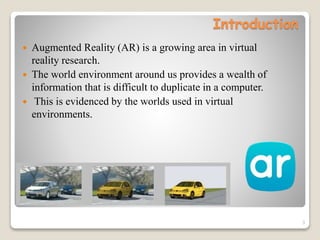
 Augmented Reality (AR) is a growing area in virtual
reality research.
 The world environment around us provides a wealth of
information that is difficult to duplicate in a computer.
 This is evidenced by the worlds used in virtual
environments.
3
What is AR?
 The process of superimposing digitally rendered images onto
our real-world surroundings, giving a sense of an illusion or
virtual reality. Recent developments have made this
technology accessible using a Smartphone.
 Ronald Azuma defines an augmented reality system as one
that:
◦ Combines real and virtual world aspects
◦ Is interactive in real-time
◦ Is registered in three dimensions
4
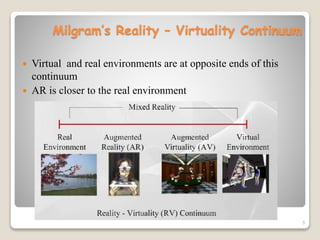
Milgram’s Reality – Virtuality Continuum
 Virtual and real environments are at opposite ends of this
continuum
 AR is closer to the real environment
5
History
 The beginnings of AR, as we define it, date back to
Sutherland’s work in the 1960s, which used a see-through
HMD to present 3D graphics. However, only over the past
decade has there been enough work to refer to AR as a
research field.
 In 1997, Azuma published a survey that defined the field,
described many problems, and summarized the
developments up to that point.
 Since then, AR’s growth and progress have been
remarkable.
6
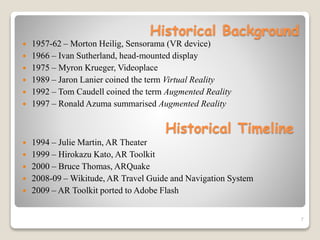
Historical Background
 1957-62 – Morton Heilig, Sensorama (VR device)
 1966 – Ivan Sutherland, head-mounted display
 1975 – Myron Krueger, Videoplace
 1989 – Jaron Lanier coined the term Virtual Reality
 1992 – Tom Caudell coined the term Augmented Reality
 1997 – Ronald Azuma summarised Augmented Reality
7
Historical Timeline
 1994 – Julie Martin, AR Theater
 1999 – Hirokazu Kato, AR Toolkit
 2000 – Bruce Thomas, ARQuake
 2008-09 – Wikitude, AR Travel Guide and Navigation System
 2009 – AR Toolkit ported to Adobe Flash
Augmented Reality vs. Virtual Reality
Augmented Reality
 System augments the real
world scene
 User maintains a sense of
presence in real world
 Needs a mechanism to
combine virtual and real
worlds
 Hard to register real and
virtual
Virtual Reality
 Totally immersive
environment
 Senses are under control of
system
 Need a mechanism to feed
virtual world to user
 Hard to make VR world
interesting
8
How does it work?
 Using a mobile application, a mobile phone's camera
identifies and interprets a marker, often a black and white
barcode image.
 The software analyses the marker and creates a virtual
image overlay on the mobile phone's screen, tied to the
position of the camera.
 This means the app works with the camera to interpret the
angles and distance the mobile phone is away from the
marker.
9
Implementation Framework
Software
Software infrastructure Coterie, a prototyping environment
that provided language-level support for distributed virtual
environments.
Hardware
To make the system to be as lightweight and comfortable as
possible, off-the-shelf hardware can be used to avoid the
expense, effort, and time involved in building our own.
10
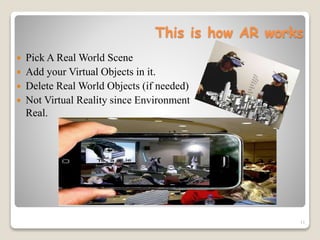
This is how AR works
 Pick A Real World Scene
 Add your Virtual Objects in it.
 Delete Real World Objects (if needed)
 Not Virtual Reality since Environment
Real.
11
Display
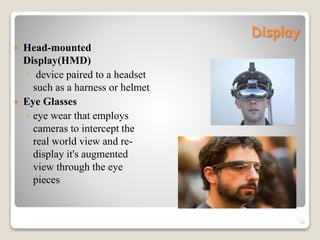
 Head-mounted
Display(HMD)
◦ device paired to a headset
such as a harness or helmet
 Eye Glasses
◦ eye wear that employs
cameras to intercept the
real world view and re-
display it's augmented
view through the eye
pieces
12
Display(cont..)
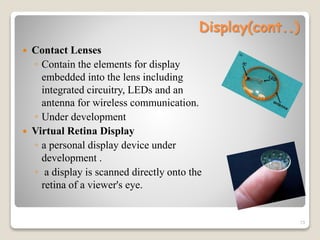
 Contact Lenses
◦ Contain the elements for display
embedded into the lens including
integrated circuitry, LEDs and an
antenna for wireless communication.
◦ Under development
 Virtual Retina Display
◦ a personal display device under
development .
◦ a display is scanned directly onto the
retina of a viewer's eye.
13
Display(cont..)
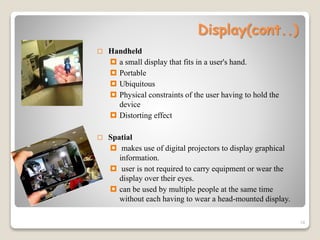
 Handheld
 a small display that fits in a user's hand.
 Portable
 Ubiquitous
 Physical constraints of the user having to hold the
device
 Distorting effect
 Spatial
 makes use of digital projectors to display graphical
information.
 user is not required to carry equipment or wear the
display over their eyes.
 can be used by multiple people at the same time
without each having to wear a head-mounted display.
14
15
Display Technologies
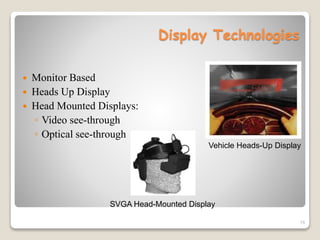
 Monitor Based
 Heads Up Display
 Head Mounted Displays:
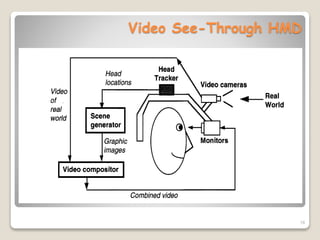
◦ Video see-through
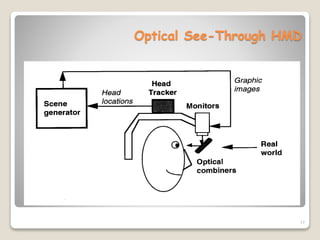
◦ Optical see-through
SVGA Head-Mounted Display
Vehicle Heads-Up Display
16
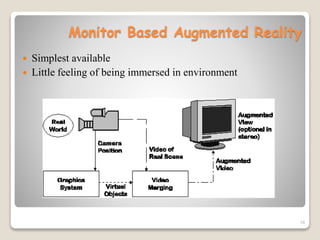
Monitor Based Augmented Reality
 Simplest available
 Little feeling of being immersed in environment
17
Optical See-Through HMD
18
Video See-Through HMD
19
Video Composition for Video See-
Through HMD
 Chroma-keying
◦ Used for special effects
◦ Background of computer graphics images is set to a specific
color
◦ Combining step replaces all colored areas with
corresponding parts from video
 Depth Information
◦ Combine real and virtual images by a pixel-by-pixel depth
comparison
Advantages of AR
 Can increase the interest to attain knowledge and information
 People can share experiences with each other in real time over
long distances
 Games that provide an even more "real" experience
 Things come to life on people's mobile
 Form of escapism
20
Disadvantages of AR
 Spam and Security
 Social and Real-Time vs. Solitary and Cached
 UX (User Experience): Using AR can be inappropriate in
social situations.
 Openness: Other people can develop their own layers of
content to display
21
Applications
 Medical
 Manufacturing and repair
 Annotation and visualization
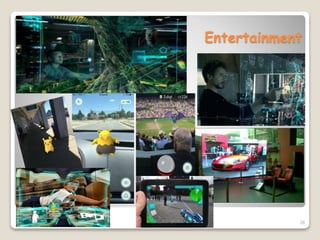
 Entertainment
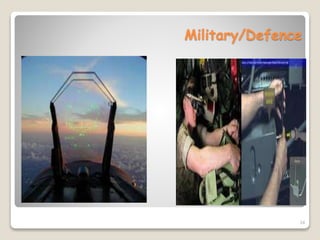
 Military aircraft
 Military Training
 Engineering Design
 Robotics and Telerobotics
 Manufacturing, Maintenance, and Repair
 Consumer Design
 Hazard Detection
 Audio
22
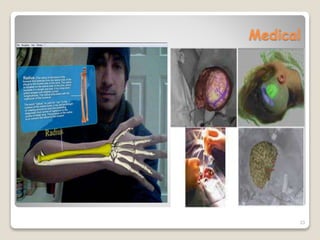
Medical
23
Military/Defence
24
Education
25
Entertainment
26
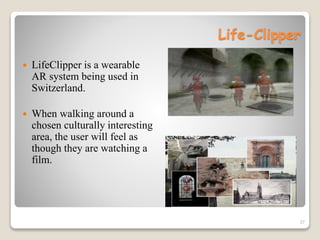
Life-Clipper
 LifeClipper is a wearable
AR system being used in
Switzerland.
 When walking around a
chosen culturally interesting
area, the user will feel as
though they are watching a
film.
27
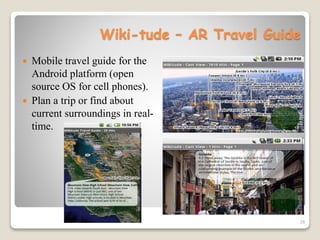
Wiki-tude – AR Travel Guide
 Mobile travel guide for the
Android platform (open
source OS for cell phones).
 Plan a trip or find about
current surroundings in real-
time.
28
29
Issues in Augmented Reality
 Performance Issues
Real time processing of images can be a challenge and often
can slow down augmented reality systems.
 Interaction Issues
Users within a mixed environment because of augmented
reality have difficulties interacting with the environment as
normal.
 Alignment Issues
People working in an augmented reality are more sensitive to
alignment errors. Proper calibration and alignment with the
reference frame of the world is crucial.
30
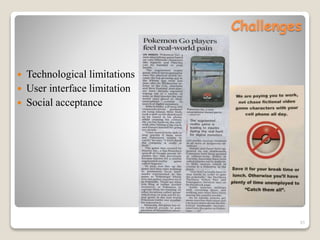
Challenges
 Technological limitations
 User interface limitation
 Social acceptance
31
32
Why continue research in AR?
 AR systems will instantly recognize what someone is looking
at, and retrieve and display the data related to that view.
 There are hundreds of potential applications for such a
technology, gaming and entertainment being the most obvious
ones.
 Any system that gives people instant information, requiring no
research on their part, is bound to be valuable to anyone in any
field.
Conclusion
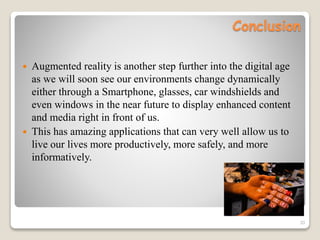
 Augmented reality is another step further into the digital age
as we will soon see our environments change dynamically
either through a Smartphone, glasses, car windshields and
even windows in the near future to display enhanced content
and media right in front of us.
 This has amazing applications that can very well allow us to
live our lives more productively, more safely, and more
informatively.
33
References
 Zooburst by Karen -
http://alpha.zooburst.com/index.php?viewbook=210
 www.studymafia.com/augmented -reality.htm
 www.wikipedia.org/wiki/Augmented_reality.htm
 http://www.quora.com/topic/Augmented-Reality/faq
 www.howstuffworks.com/augmented-reality.htm
 www.seminarsonly.com
 www.slideshare.net/ kehamilt/augmented-reality-in-education
 http://whatis.techtarget.com/definition/augmented-reality-AR
 The Future is Wild - http://www.youtube.com/watch?vGjqpPWja-PY
 http://ieeexplore.ieee.org/xpl/articleDetails.jsp?arnumber=6893423&que
ryText=Augmented%20Reality&newsearch=true
34
35

Augmented Reality

  • 1.
    SARABHAI INSTITUTE OFSCIENCE AND TECHNOLOGY A U G M E N T E D R E A L I T Y Presented By : AKASH.J.NAIR Reg.No-13143402 S7 ECE Seminar Coordinator : Ms.ANUPAMA.A.S Asso.Professor Dept. of ECE 1
  • 2.
    Index  Introduction  Whatis AR?  Milgram’s Reality Virtuality Continuum  History  How does it work?  Augmented Reality vs. Virtual Reality  Implementation Framework  This is how AR works  Display  Display Technologies  Advantages  Disadvantages  Applications  Issues in Augmented Reality  Challenges  Why continue research in AR ?  Conclusion  References 2 “Reality is merely an illusion, albeit a very persistent one.” – Albert Einstein
  • 3.
    Introduction  Augmented Reality(AR) is a growing area in virtual reality research.  The world environment around us provides a wealth of information that is difficult to duplicate in a computer.  This is evidenced by the worlds used in virtual environments. 3
  • 4.
    What is AR? The process of superimposing digitally rendered images onto our real-world surroundings, giving a sense of an illusion or virtual reality. Recent developments have made this technology accessible using a Smartphone.  Ronald Azuma defines an augmented reality system as one that: ◦ Combines real and virtual world aspects ◦ Is interactive in real-time ◦ Is registered in three dimensions 4
  • 5.
    Milgram’s Reality –Virtuality Continuum  Virtual and real environments are at opposite ends of this continuum  AR is closer to the real environment 5
  • 6.
    History  The beginningsof AR, as we define it, date back to Sutherland’s work in the 1960s, which used a see-through HMD to present 3D graphics. However, only over the past decade has there been enough work to refer to AR as a research field.  In 1997, Azuma published a survey that defined the field, described many problems, and summarized the developments up to that point.  Since then, AR’s growth and progress have been remarkable. 6
  • 7.
    Historical Background  1957-62– Morton Heilig, Sensorama (VR device)  1966 – Ivan Sutherland, head-mounted display  1975 – Myron Krueger, Videoplace  1989 – Jaron Lanier coined the term Virtual Reality  1992 – Tom Caudell coined the term Augmented Reality  1997 – Ronald Azuma summarised Augmented Reality 7 Historical Timeline  1994 – Julie Martin, AR Theater  1999 – Hirokazu Kato, AR Toolkit  2000 – Bruce Thomas, ARQuake  2008-09 – Wikitude, AR Travel Guide and Navigation System  2009 – AR Toolkit ported to Adobe Flash
  • 8.
    Augmented Reality vs.Virtual Reality Augmented Reality  System augments the real world scene  User maintains a sense of presence in real world  Needs a mechanism to combine virtual and real worlds  Hard to register real and virtual Virtual Reality  Totally immersive environment  Senses are under control of system  Need a mechanism to feed virtual world to user  Hard to make VR world interesting 8
  • 9.
    How does itwork?  Using a mobile application, a mobile phone's camera identifies and interprets a marker, often a black and white barcode image.  The software analyses the marker and creates a virtual image overlay on the mobile phone's screen, tied to the position of the camera.  This means the app works with the camera to interpret the angles and distance the mobile phone is away from the marker. 9
  • 10.
    Implementation Framework Software Software infrastructureCoterie, a prototyping environment that provided language-level support for distributed virtual environments. Hardware To make the system to be as lightweight and comfortable as possible, off-the-shelf hardware can be used to avoid the expense, effort, and time involved in building our own. 10
  • 11.
    This is howAR works  Pick A Real World Scene  Add your Virtual Objects in it.  Delete Real World Objects (if needed)  Not Virtual Reality since Environment Real. 11
  • 12.
    Display  Head-mounted Display(HMD) ◦ devicepaired to a headset such as a harness or helmet  Eye Glasses ◦ eye wear that employs cameras to intercept the real world view and re- display it's augmented view through the eye pieces 12
  • 13.
    Display(cont..)  Contact Lenses ◦Contain the elements for display embedded into the lens including integrated circuitry, LEDs and an antenna for wireless communication. ◦ Under development  Virtual Retina Display ◦ a personal display device under development . ◦ a display is scanned directly onto the retina of a viewer's eye. 13
  • 14.
    Display(cont..)  Handheld  asmall display that fits in a user's hand.  Portable  Ubiquitous  Physical constraints of the user having to hold the device  Distorting effect  Spatial  makes use of digital projectors to display graphical information.  user is not required to carry equipment or wear the display over their eyes.  can be used by multiple people at the same time without each having to wear a head-mounted display. 14
  • 15.
    15 Display Technologies  MonitorBased  Heads Up Display  Head Mounted Displays: ◦ Video see-through ◦ Optical see-through SVGA Head-Mounted Display Vehicle Heads-Up Display
  • 16.
    16 Monitor Based AugmentedReality  Simplest available  Little feeling of being immersed in environment
  • 17.
  • 18.
  • 19.
    19 Video Composition forVideo See- Through HMD  Chroma-keying ◦ Used for special effects ◦ Background of computer graphics images is set to a specific color ◦ Combining step replaces all colored areas with corresponding parts from video  Depth Information ◦ Combine real and virtual images by a pixel-by-pixel depth comparison
  • 20.
    Advantages of AR Can increase the interest to attain knowledge and information  People can share experiences with each other in real time over long distances  Games that provide an even more "real" experience  Things come to life on people's mobile  Form of escapism 20
  • 21.
    Disadvantages of AR Spam and Security  Social and Real-Time vs. Solitary and Cached  UX (User Experience): Using AR can be inappropriate in social situations.  Openness: Other people can develop their own layers of content to display 21
  • 22.
    Applications  Medical  Manufacturingand repair  Annotation and visualization  Entertainment  Military aircraft  Military Training  Engineering Design  Robotics and Telerobotics  Manufacturing, Maintenance, and Repair  Consumer Design  Hazard Detection  Audio 22
  • 23.
  • 24.
  • 25.
  • 26.
  • 27.
    Life-Clipper  LifeClipper isa wearable AR system being used in Switzerland.  When walking around a chosen culturally interesting area, the user will feel as though they are watching a film. 27
  • 28.
    Wiki-tude – ARTravel Guide  Mobile travel guide for the Android platform (open source OS for cell phones).  Plan a trip or find about current surroundings in real- time. 28
  • 29.
  • 30.
    Issues in AugmentedReality  Performance Issues Real time processing of images can be a challenge and often can slow down augmented reality systems.  Interaction Issues Users within a mixed environment because of augmented reality have difficulties interacting with the environment as normal.  Alignment Issues People working in an augmented reality are more sensitive to alignment errors. Proper calibration and alignment with the reference frame of the world is crucial. 30
  • 31.
    Challenges  Technological limitations User interface limitation  Social acceptance 31
  • 32.
    32 Why continue researchin AR?  AR systems will instantly recognize what someone is looking at, and retrieve and display the data related to that view.  There are hundreds of potential applications for such a technology, gaming and entertainment being the most obvious ones.  Any system that gives people instant information, requiring no research on their part, is bound to be valuable to anyone in any field.
  • 33.
    Conclusion  Augmented realityis another step further into the digital age as we will soon see our environments change dynamically either through a Smartphone, glasses, car windshields and even windows in the near future to display enhanced content and media right in front of us.  This has amazing applications that can very well allow us to live our lives more productively, more safely, and more informatively. 33
  • 34.
    References  Zooburst byKaren - http://alpha.zooburst.com/index.php?viewbook=210  www.studymafia.com/augmented -reality.htm  www.wikipedia.org/wiki/Augmented_reality.htm  http://www.quora.com/topic/Augmented-Reality/faq  www.howstuffworks.com/augmented-reality.htm  www.seminarsonly.com  www.slideshare.net/ kehamilt/augmented-reality-in-education  http://whatis.techtarget.com/definition/augmented-reality-AR  The Future is Wild - http://www.youtube.com/watch?vGjqpPWja-PY  http://ieeexplore.ieee.org/xpl/articleDetails.jsp?arnumber=6893423&que ryText=Augmented%20Reality&newsearch=true 34
  • 35.