Using Ansible for Deploying
to Cloud Environments
Andrew Hamilton
Who am I?
● Engineering Operations Lead for Prevoty
● Mentor META Lab at CSU, Northridge
● Formerly SRE @Twitter Search and Sys
Admin for Eucalyptus (now HP)
What will we discuss?
● What was the problem to solve?
● Why we chose Ansible
● Tips for using Ansible for deploys
● Working in the cloud and beyond
What was the problem to solve?
We needed a simple and repeatable way to
build services and push them out to properly
configured environments.
Previously used tools wouldn’t cut it
● Puppet
● Capistrano
● Fabric
Multiple languages
● We use:
○ Go
○ Java
○ PHP
● Needed a way to easily build and package
any of these
Moved from EC2 Classic to VPC
Image from: http://docs.aws.amazon.
com/opsworks/latest/userguide/workingstacks-
vpc.html
Moved from EC2 Classic to VPC
● Moved majority of services into private
subnets
● Direct access to instances now limited
○ ELBs are the default access method for pub traffic
○ Bastion host setup in each VPC for SSH access
○ SSH config used for “routing” access to bastions
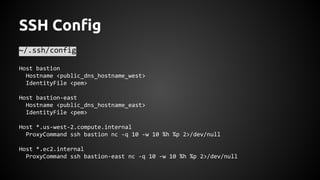
SSH Config
~/.ssh/config
Host bastion
Hostname <public_dns_hostname_west>
IdentityFile <pem>
Host bastion-east
Hostname <public_dns_hostname_east>
IdentityFile <pem>
Host *.us-west-2.compute.internal
ProxyCommand ssh bastion nc -q 10 -w 10 %h %p 2>/dev/null
Host *.ec2.internal
ProxyCommand ssh bastion-east nc -q 10 -w 10 %h %p 2>/dev/null
Moved towards ephemeral instances
● Nodes are usually rolled between releases
● Use a blue-green deployment process
Why we chose Ansible
We had a developer working on a tool but this
isn’t our core competency so it was better to
move away from the responsibility of building
our own.
Focus on our core competencies
● We’re not in the deployment automation
business
● No need to build a tool if a sufficient one
already exists
Ansible has a simple execution model
● It is easier to understand than the
declarative model used by Puppet
● Execution happens in order
Open source core written in Python
● Easy to extend and update when needed
● Easy to run from HEAD or a branch
YaML is a simple language
● Easy for devs to also add and fix playbooks
SSH based communication
● Don’t need to install anything on new
instances
● Great for the cloud where instances are
created and destroyed often
● No changes needed to security groups
● Respects SSH configs
Simple secret storage
● ansible-vault command
● Integrates automatically with playbooks
● AES encrypted text can sit in version
control
Modules for almost everything
● Makes it super easy to get things done
● From file creation to working with load
balancers and beyond
● Majority are idempotent
Modules can be in any language
● Take in JSON and produce JSON
Ansible is well suited for the cloud
● Dynamic inventories
● Both configuration management and
remote command execution
● Run it when you need it
Use a dynamic inventory
● The cloud is ephemeral
● Standardize on a way to find instances
● ec2.py
○ Uses format tag_<tag_name>_<tag_value>
○ For new hosts: tag_<tag_name>_<tag_value>_new
Configure a dynamic inventory
● Configure it to work for you
● ec2.py and ec2.ini
○ Configured to provide the private DNS even if
public DNS does exist
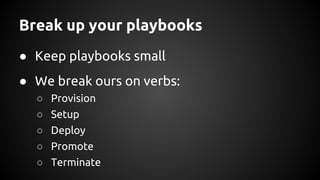
Break up your playbooks
● Keep playbooks small
● We break ours on verbs:
○ Provision
○ Setup
○ Deploy
○ Promote
○ Terminate
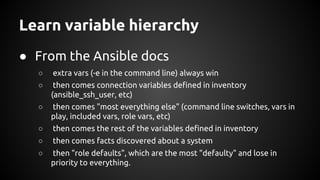
Learn variable hierarchy
● From the Ansible docs
○ extra vars (-e in the command line) always win
○ then comes connection variables defined in inventory
(ansible_ssh_user, etc)
○ then comes "most everything else" (command line switches, vars in
play, included vars, role vars, etc)
○ then comes the rest of the variables defined in inventory
○ then comes facts discovered about a system
○ then "role defaults", which are the most "defaulty" and lose in
priority to everything.
Use common variables when possible
● group_vars/all
● Standardize as much as you can
Examples of what we put in there
group_vars/all
ansible_ssh_private_key_file: ~/.ssh/{{ key_name | default(service_name) }}.pem
ansible_ssh_user: "{{ remote_user }}"
remote_user:"{{aws_config[my_ec2_region]['remote_user'] | default('ec2-user')}}"
my_ec2_region: "{{ lookup('env', 'EC2_REGION') }}"
default_service_dir: /usr/local/prevoty
java_version: 1.8.0_25
java_home: /opt/jre{{ java_version }}
go_version: go1.4.1
Separate specific vars by service
● group_vars/<service_name>
● These will be vars specific to this service
○ ELB
○ VPC Subnet(s)
○ Configuration
Combine secrets by environment
● group_vars/all_<service_env>
● We’ve found that placing all secrets
together to be easier to deal with
● Single simple import
● Decryption happens automatically
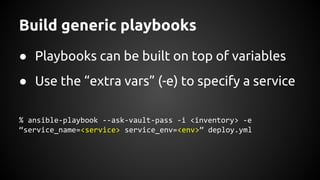
Build generic playbooks
● Playbooks can be built on top of variables
● Use the “extra vars” (-e) to specify a service
% ansible-playbook --ask-vault-pass -i <inventory> -e
“service_name=<service> service_env=<env>” deploy.yml
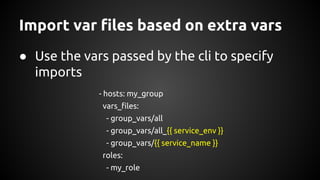
Import var files based on extra vars
● Use the vars passed by the cli to specify
imports
- hosts: my_group
vars_files:
- group_vars/all
- group_vars/all_{{ service_env }}
- group_vars/{{ service_name }}
roles:
- my_role
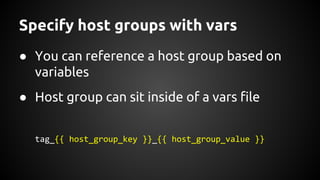
Specify host groups with vars
● You can reference a host group based on
variables
● Host group can sit inside of a vars file
tag_{{ host_group_key }}_{{ host_group_value }}
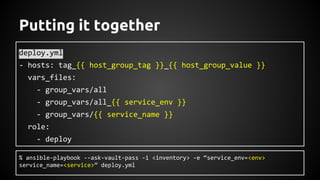
Putting it together
deploy.yml
- hosts: tag_{{ host_group_tag }}_{{ host_group_value }}
vars_files:
- group_vars/all
- group_vars/all_{{ service_env }}
- group_vars/{{ service_name }}
role:
- deploy
% ansible-playbook --ask-vault-pass -i <inventory> -e “service_env=<env>
service_name=<service>” deploy.yml
Wrap it up with an old friend
● We use bash to wrap playbooks together
● Easily run a full deploy
● Restart at intermediate steps if needed
Allow hash merging
● Makes it so much easier for cloud
deployments
● Allows you to have one data structure
across files in group_vars that become
more easily accessible at runtime
● Enabled in ansible.cfg
Hash merging example
group_vars/all
aws_config : {
“us-west-1” : {
“ami_id” : “ami-00112233”,
“rds_url” : <west_url>,
},
“us-east-1” : {
“ami_id” : “ami-44556677”,
“rds_url” : <west_url>,
}
}
group_vars/<service_name>
aws_config : {
“us-west-1” : {
“elb_name” : <west_elb>,
“vpc_subnet” : [<west_subnet>],
},
“us-east-1” : {
“elb_name” : <east_elb>,
“vpc_subnet” : [<east_subnet>],
}
}
Hash merging example cont’d
result
aws_config : {
“us-west-1” : {
“ami_id” : “ami-00112233”,
“rds_url” : <west_url>,
“elb_name” : <west_elb>,
“vpc_subnet” : [<west_subnet>],
},
“us-east-1” : {
“ami_id” : “ami-44556677”,
result cont’d
“rds_url” : <west_url>,
“elb_name” : <east_elb>,
“vpc_subnet” : [<east_subnet>],
}
}
Hash merging example cont’d
● Easy access in playbooks based on region
ec2_region: {{ lookup(‘ENV’, ‘EC2_REGION’) }}
- or -
-e “ec2_region=<region>”
● Accessed by:
{{ aws_config[ec2_region][‘elb_name’] }}
Make sure it fails…
● It shouldn’t just fail when there’s an error!
● Don’t run other plays in a playbook if a
prerequisite isn’t met
● Ex: No hosts found in a host group
Test changes from start to finish
● Don’t consider a fix complete until you’ve
run the entire deploy from start to finish
● Commands issued while debugging an issue
can fix that issue without persistence
Working in the cloud and beyond
Our focus is in the cloud but it doesn’t always
work for customers when it comes to their
view of security
A VM is a VM
● We can automatically build a VM with tools
such as Cobbler or packer on VMWare, KVM
or XenServer
● Automated builds of the base OS that is the
same as we run on AWS
Only the endpoints changed
● IP of the VM added to a static inventory
● Same playbooks and roles used for setup of
the OS and build/deploy of the service
An example inventory
/tmp/inventory
[tag_<host_group_name>_<service_a>_new]
<service_a> ansible_ssh_host=10.0.xxx.yyy
[tag_<host_group_name>_<service_b>_new]
<service_b> ansible_ssh_host=10.0.xxx.yyy
[tag_<host_group_name>_<service_c>_new]
<service_c> ansible_ssh_host=10.0.xxx.yyy
Questions?

Using Ansible for Deploying to Cloud Environments

  • 1.
    Using Ansible forDeploying to Cloud Environments Andrew Hamilton
  • 2.
    Who am I? ●Engineering Operations Lead for Prevoty ● Mentor META Lab at CSU, Northridge ● Formerly SRE @Twitter Search and Sys Admin for Eucalyptus (now HP)
  • 3.
    What will wediscuss? ● What was the problem to solve? ● Why we chose Ansible ● Tips for using Ansible for deploys ● Working in the cloud and beyond
  • 4.
    What was theproblem to solve? We needed a simple and repeatable way to build services and push them out to properly configured environments.
  • 5.
    Previously used toolswouldn’t cut it ● Puppet ● Capistrano ● Fabric
  • 6.
    Multiple languages ● Weuse: ○ Go ○ Java ○ PHP ● Needed a way to easily build and package any of these
  • 7.
    Moved from EC2Classic to VPC Image from: http://docs.aws.amazon. com/opsworks/latest/userguide/workingstacks- vpc.html
  • 8.
    Moved from EC2Classic to VPC ● Moved majority of services into private subnets ● Direct access to instances now limited ○ ELBs are the default access method for pub traffic ○ Bastion host setup in each VPC for SSH access ○ SSH config used for “routing” access to bastions
  • 9.
    SSH Config ~/.ssh/config Host bastion Hostname<public_dns_hostname_west> IdentityFile <pem> Host bastion-east Hostname <public_dns_hostname_east> IdentityFile <pem> Host *.us-west-2.compute.internal ProxyCommand ssh bastion nc -q 10 -w 10 %h %p 2>/dev/null Host *.ec2.internal ProxyCommand ssh bastion-east nc -q 10 -w 10 %h %p 2>/dev/null
  • 10.
    Moved towards ephemeralinstances ● Nodes are usually rolled between releases ● Use a blue-green deployment process
  • 11.
    Why we choseAnsible We had a developer working on a tool but this isn’t our core competency so it was better to move away from the responsibility of building our own.
  • 12.
    Focus on ourcore competencies ● We’re not in the deployment automation business ● No need to build a tool if a sufficient one already exists
  • 13.
    Ansible has asimple execution model ● It is easier to understand than the declarative model used by Puppet ● Execution happens in order
  • 14.
    Open source corewritten in Python ● Easy to extend and update when needed ● Easy to run from HEAD or a branch
  • 15.
    YaML is asimple language ● Easy for devs to also add and fix playbooks
  • 16.
    SSH based communication ●Don’t need to install anything on new instances ● Great for the cloud where instances are created and destroyed often ● No changes needed to security groups ● Respects SSH configs
  • 17.
    Simple secret storage ●ansible-vault command ● Integrates automatically with playbooks ● AES encrypted text can sit in version control
  • 18.
    Modules for almosteverything ● Makes it super easy to get things done ● From file creation to working with load balancers and beyond ● Majority are idempotent
  • 19.
    Modules can bein any language ● Take in JSON and produce JSON
  • 20.
    Ansible is wellsuited for the cloud ● Dynamic inventories ● Both configuration management and remote command execution ● Run it when you need it
  • 21.
    Use a dynamicinventory ● The cloud is ephemeral ● Standardize on a way to find instances ● ec2.py ○ Uses format tag_<tag_name>_<tag_value> ○ For new hosts: tag_<tag_name>_<tag_value>_new
  • 22.
    Configure a dynamicinventory ● Configure it to work for you ● ec2.py and ec2.ini ○ Configured to provide the private DNS even if public DNS does exist
  • 23.
    Break up yourplaybooks ● Keep playbooks small ● We break ours on verbs: ○ Provision ○ Setup ○ Deploy ○ Promote ○ Terminate
  • 24.
    Learn variable hierarchy ●From the Ansible docs ○ extra vars (-e in the command line) always win ○ then comes connection variables defined in inventory (ansible_ssh_user, etc) ○ then comes "most everything else" (command line switches, vars in play, included vars, role vars, etc) ○ then comes the rest of the variables defined in inventory ○ then comes facts discovered about a system ○ then "role defaults", which are the most "defaulty" and lose in priority to everything.
  • 25.
    Use common variableswhen possible ● group_vars/all ● Standardize as much as you can
  • 26.
    Examples of whatwe put in there group_vars/all ansible_ssh_private_key_file: ~/.ssh/{{ key_name | default(service_name) }}.pem ansible_ssh_user: "{{ remote_user }}" remote_user:"{{aws_config[my_ec2_region]['remote_user'] | default('ec2-user')}}" my_ec2_region: "{{ lookup('env', 'EC2_REGION') }}" default_service_dir: /usr/local/prevoty java_version: 1.8.0_25 java_home: /opt/jre{{ java_version }} go_version: go1.4.1
  • 27.
    Separate specific varsby service ● group_vars/<service_name> ● These will be vars specific to this service ○ ELB ○ VPC Subnet(s) ○ Configuration
  • 28.
    Combine secrets byenvironment ● group_vars/all_<service_env> ● We’ve found that placing all secrets together to be easier to deal with ● Single simple import ● Decryption happens automatically
  • 29.
    Build generic playbooks ●Playbooks can be built on top of variables ● Use the “extra vars” (-e) to specify a service % ansible-playbook --ask-vault-pass -i <inventory> -e “service_name=<service> service_env=<env>” deploy.yml
  • 30.
    Import var filesbased on extra vars ● Use the vars passed by the cli to specify imports - hosts: my_group vars_files: - group_vars/all - group_vars/all_{{ service_env }} - group_vars/{{ service_name }} roles: - my_role
  • 31.
    Specify host groupswith vars ● You can reference a host group based on variables ● Host group can sit inside of a vars file tag_{{ host_group_key }}_{{ host_group_value }}
  • 32.
    Putting it together deploy.yml -hosts: tag_{{ host_group_tag }}_{{ host_group_value }} vars_files: - group_vars/all - group_vars/all_{{ service_env }} - group_vars/{{ service_name }} role: - deploy % ansible-playbook --ask-vault-pass -i <inventory> -e “service_env=<env> service_name=<service>” deploy.yml
  • 33.
    Wrap it upwith an old friend ● We use bash to wrap playbooks together ● Easily run a full deploy ● Restart at intermediate steps if needed
  • 34.
    Allow hash merging ●Makes it so much easier for cloud deployments ● Allows you to have one data structure across files in group_vars that become more easily accessible at runtime ● Enabled in ansible.cfg
  • 35.
    Hash merging example group_vars/all aws_config: { “us-west-1” : { “ami_id” : “ami-00112233”, “rds_url” : <west_url>, }, “us-east-1” : { “ami_id” : “ami-44556677”, “rds_url” : <west_url>, } } group_vars/<service_name> aws_config : { “us-west-1” : { “elb_name” : <west_elb>, “vpc_subnet” : [<west_subnet>], }, “us-east-1” : { “elb_name” : <east_elb>, “vpc_subnet” : [<east_subnet>], } }
  • 36.
    Hash merging examplecont’d result aws_config : { “us-west-1” : { “ami_id” : “ami-00112233”, “rds_url” : <west_url>, “elb_name” : <west_elb>, “vpc_subnet” : [<west_subnet>], }, “us-east-1” : { “ami_id” : “ami-44556677”, result cont’d “rds_url” : <west_url>, “elb_name” : <east_elb>, “vpc_subnet” : [<east_subnet>], } }
  • 37.
    Hash merging examplecont’d ● Easy access in playbooks based on region ec2_region: {{ lookup(‘ENV’, ‘EC2_REGION’) }} - or - -e “ec2_region=<region>” ● Accessed by: {{ aws_config[ec2_region][‘elb_name’] }}
  • 38.
    Make sure itfails… ● It shouldn’t just fail when there’s an error! ● Don’t run other plays in a playbook if a prerequisite isn’t met ● Ex: No hosts found in a host group
  • 39.
    Test changes fromstart to finish ● Don’t consider a fix complete until you’ve run the entire deploy from start to finish ● Commands issued while debugging an issue can fix that issue without persistence
  • 40.
    Working in thecloud and beyond Our focus is in the cloud but it doesn’t always work for customers when it comes to their view of security
  • 41.
    A VM isa VM ● We can automatically build a VM with tools such as Cobbler or packer on VMWare, KVM or XenServer ● Automated builds of the base OS that is the same as we run on AWS
  • 42.
    Only the endpointschanged ● IP of the VM added to a static inventory ● Same playbooks and roles used for setup of the OS and build/deploy of the service
  • 43.
    An example inventory /tmp/inventory [tag_<host_group_name>_<service_a>_new] <service_a>ansible_ssh_host=10.0.xxx.yyy [tag_<host_group_name>_<service_b>_new] <service_b> ansible_ssh_host=10.0.xxx.yyy [tag_<host_group_name>_<service_c>_new] <service_c> ansible_ssh_host=10.0.xxx.yyy
  • 44.