(R)?ex
Deployment & Configuration
Management
Andy Beverley
andy@andybev.com
Contents
● Introduction
– Why this talk
– What is Rex
● General features
● Why I use Rex
● Installation
● General examples
● How I use Rex
Why this talk?
● Rex not as well known as other orchestration
tools
● I'm a recent convert - spread the word!
What is Rex?
● "Remote Execution"
● Easily run batched commands remotely
● Similar in concept to Ansible (push not pull)
● Start with Rexfile (Makefile)
● A Rexfile contains tasks
General features
● Group by server type
● Very flexible scripting (Perl)
– Minimal Perl knowledge required
– Strength and a weakness?
● Many modules, or add your own (to core?)
● Augeas interface
● Transactions and rollback
● Store config in database
Why I use Rex
● Community not commercial
● Very helpful maintainers and mailing list
● Fast merges for PRs
● Very active project
● Flexible
Installation
● Packages available for most distributions
● Or:
– cpan Rex
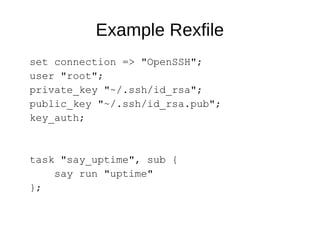
Example Rexfile
set connection => "OpenSSH";
user "root";
private_key "~/.ssh/id_rsa";
public_key "~/.ssh/id_rsa.pub";
key_auth;
task "say_uptime", sub {
say run "uptime"
};
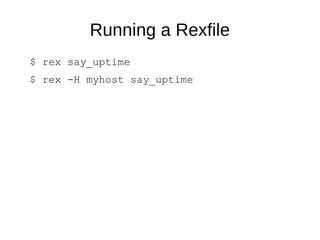
Running a Rexfile
$ rex say_uptime
$ rex -H myhost say_uptime
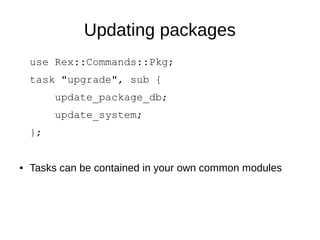
Updating packages
use Rex::Commands::Pkg;
task "upgrade", sub {
update_package_db;
update_system;
};
● Tasks can be contained in your own common modules
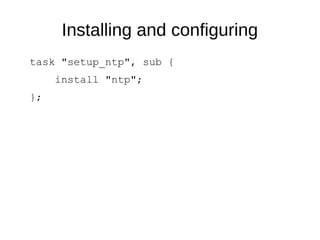
Installing and configuring
task "setup_ntp", sub {
install "ntp";
};
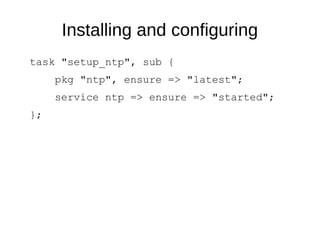
Installing and configuring
task "setup_ntp", sub {
pkg "ntp", ensure => "latest";
service ntp => ensure => "started";
};
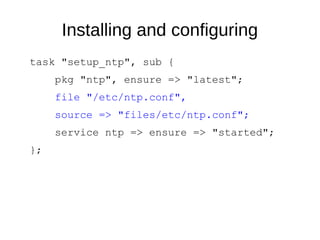
Installing and configuring
task "setup_ntp", sub {
pkg "ntp", ensure => "latest";
file "/etc/ntp.conf",
source => "files/etc/ntp.conf";
service ntp => ensure => "started";
};
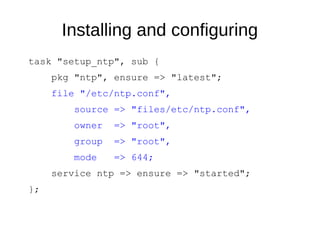
Installing and configuring
task "setup_ntp", sub {
pkg "ntp", ensure => "latest";
file "/etc/ntp.conf",
source => "files/etc/ntp.conf",
owner => "root",
group => "root",
mode => 644;
service ntp => ensure => "started";
};
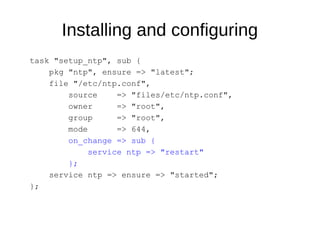
Installing and configuring
task "setup_ntp", sub {
pkg "ntp", ensure => "latest";
file "/etc/ntp.conf",
source => "files/etc/ntp.conf",
owner => "root",
group => "root",
mode => 644,
on_change => sub {
service ntp => "restart"
};
service ntp => ensure => "started";
};
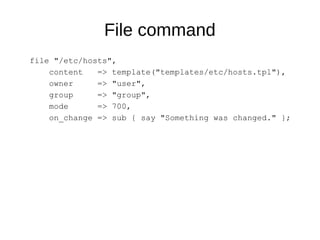
File command
file "/etc/hosts",
content => template("templates/etc/hosts.tpl"),
owner => "user",
group => "group",
mode => 700,
on_change => sub { say "Something was changed." };
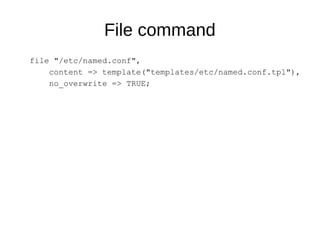
File command
file "/etc/named.conf",
content => template("templates/etc/named.conf.tpl"),
no_overwrite => TRUE;
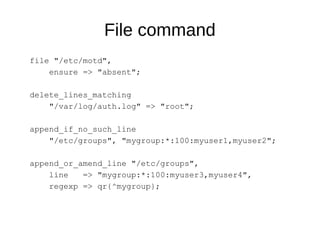
File command
file "/etc/motd",
ensure => "absent";
delete_lines_matching
"/var/log/auth.log" => "root";
append_if_no_such_line
"/etc/groups", "mygroup:*:100:myuser1,myuser2";
append_or_amend_line "/etc/groups",
line => "mygroup:*:100:myuser3,myuser4",
regexp => qr{^mygroup};
Server groups
group web_servers =>
"web1", "web2", "web3";
group web_servers => "web[1..3]";
group servers =>
"web[1..3]", "db[01..02]", "mail";
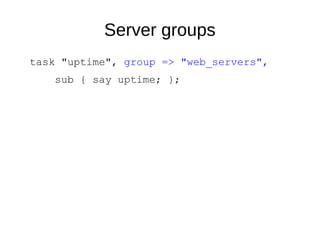
Server groups
task "uptime", group => "web_servers",
sub { say uptime; };
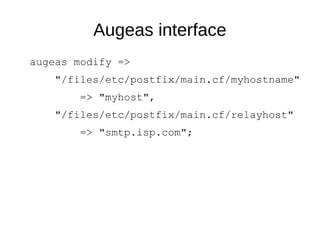
Augeas interface
augeas modify =>
"/files/etc/postfix/main.cf/myhostname"
=> "myhost",
"/files/etc/postfix/main.cf/relayhost"
=> "smtp.isp.com";
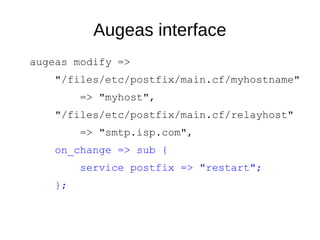
Augeas interface
augeas modify =>
"/files/etc/postfix/main.cf/myhostname"
=> "myhost",
"/files/etc/postfix/main.cf/relayhost"
=> "smtp.isp.com",
on_change => sub {
service postfix => "restart";
};
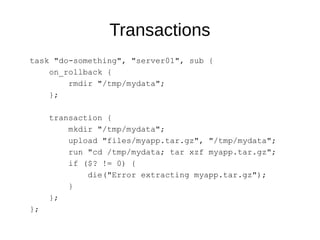
Transactions
task "do-something", "server01", sub {
on_rollback {
rmdir "/tmp/mydata";
};
transaction {
mkdir "/tmp/mydata";
upload "files/myapp.tar.gz", "/tmp/mydata";
run "cd /tmp/mydata; tar xzf myapp.tar.gz";
if ($? != 0) {
die("Error extracting myapp.tar.gz");
}
};
};
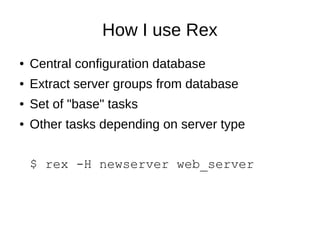
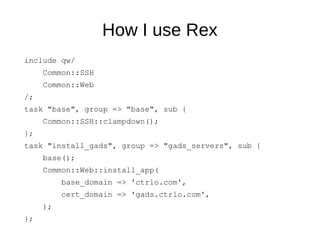
How I use Rex
● Central configuration database
● Extract server groups from database
● Set of "base" tasks
● Other tasks depending on server type
$ rex -H newserver web_server
How I use Rex
include qw/
Common::SSH
Common::Web
/;
task "base", group => "base", sub {
Common::SSH::clampdown();
};
task "install_gads", group => "gads_servers", sub {
base();
Common::Web::install_app(
base_domain => 'ctrlo.com',
cert_domain => 'gads.ctrlo.com',
);
};
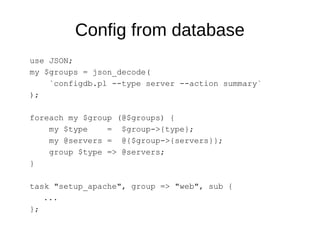
Config from database
use JSON;
my $groups = json_decode(
`configdb.pl --type server --action summary`
);
foreach my $group (@$groups) {
my $type = $group->{type};
my @servers = @{$group->{servers}};
group $type => @servers;
}
task "setup_apache", group => "web", sub {
...
};
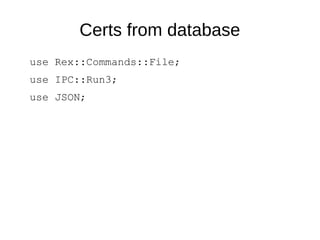
Certs from database
use Rex::Commands::File;
use IPC::Run3;
use JSON;
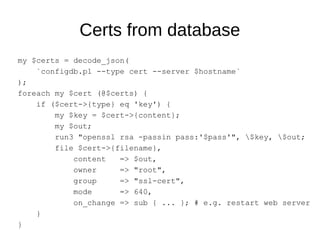
Certs from database
my $certs = decode_json(
`configdb.pl --type cert --server $hostname`
);
foreach my $cert (@$certs) {
if ($cert->{type} eq 'key') {
my $key = $cert->{content};
my $out;
run3 "openssl rsa -passin pass:'$pass'", $key, $out;
file $cert->{filename},
content => $out,
owner => "root",
group => "ssl-cert",
mode => 640,
on_change => sub { ... }; # e.g. restart web server
}
}
www.rexify.org
Andy Beverley
andy@andybev.com

An introduction to Rex - FLOSS UK DevOps York 2015

  • 1.
  • 2.
    Contents ● Introduction – Whythis talk – What is Rex ● General features ● Why I use Rex ● Installation ● General examples ● How I use Rex
  • 3.
    Why this talk? ●Rex not as well known as other orchestration tools ● I'm a recent convert - spread the word!
  • 4.
    What is Rex? ●"Remote Execution" ● Easily run batched commands remotely ● Similar in concept to Ansible (push not pull) ● Start with Rexfile (Makefile) ● A Rexfile contains tasks
  • 5.
    General features ● Groupby server type ● Very flexible scripting (Perl) – Minimal Perl knowledge required – Strength and a weakness? ● Many modules, or add your own (to core?) ● Augeas interface ● Transactions and rollback ● Store config in database
  • 6.
    Why I useRex ● Community not commercial ● Very helpful maintainers and mailing list ● Fast merges for PRs ● Very active project ● Flexible
  • 7.
    Installation ● Packages availablefor most distributions ● Or: – cpan Rex
  • 8.
    Example Rexfile set connection=> "OpenSSH"; user "root"; private_key "~/.ssh/id_rsa"; public_key "~/.ssh/id_rsa.pub"; key_auth; task "say_uptime", sub { say run "uptime" };
  • 9.
    Running a Rexfile $rex say_uptime $ rex -H myhost say_uptime
  • 10.
    Updating packages use Rex::Commands::Pkg; task"upgrade", sub { update_package_db; update_system; }; ● Tasks can be contained in your own common modules
  • 11.
    Installing and configuring task"setup_ntp", sub { install "ntp"; };
  • 12.
    Installing and configuring task"setup_ntp", sub { pkg "ntp", ensure => "latest"; service ntp => ensure => "started"; };
  • 13.
    Installing and configuring task"setup_ntp", sub { pkg "ntp", ensure => "latest"; file "/etc/ntp.conf", source => "files/etc/ntp.conf"; service ntp => ensure => "started"; };
  • 14.
    Installing and configuring task"setup_ntp", sub { pkg "ntp", ensure => "latest"; file "/etc/ntp.conf", source => "files/etc/ntp.conf", owner => "root", group => "root", mode => 644; service ntp => ensure => "started"; };
  • 15.
    Installing and configuring task"setup_ntp", sub { pkg "ntp", ensure => "latest"; file "/etc/ntp.conf", source => "files/etc/ntp.conf", owner => "root", group => "root", mode => 644, on_change => sub { service ntp => "restart" }; service ntp => ensure => "started"; };
  • 16.
    File command file "/etc/hosts", content=> template("templates/etc/hosts.tpl"), owner => "user", group => "group", mode => 700, on_change => sub { say "Something was changed." };
  • 17.
    File command file "/etc/named.conf", content=> template("templates/etc/named.conf.tpl"), no_overwrite => TRUE;
  • 18.
    File command file "/etc/motd", ensure=> "absent"; delete_lines_matching "/var/log/auth.log" => "root"; append_if_no_such_line "/etc/groups", "mygroup:*:100:myuser1,myuser2"; append_or_amend_line "/etc/groups", line => "mygroup:*:100:myuser3,myuser4", regexp => qr{^mygroup};
  • 19.
    Server groups group web_servers=> "web1", "web2", "web3"; group web_servers => "web[1..3]"; group servers => "web[1..3]", "db[01..02]", "mail";
  • 20.
    Server groups task "uptime",group => "web_servers", sub { say uptime; };
  • 21.
    Augeas interface augeas modify=> "/files/etc/postfix/main.cf/myhostname" => "myhost", "/files/etc/postfix/main.cf/relayhost" => "smtp.isp.com";
  • 22.
    Augeas interface augeas modify=> "/files/etc/postfix/main.cf/myhostname" => "myhost", "/files/etc/postfix/main.cf/relayhost" => "smtp.isp.com", on_change => sub { service postfix => "restart"; };
  • 23.
    Transactions task "do-something", "server01",sub { on_rollback { rmdir "/tmp/mydata"; }; transaction { mkdir "/tmp/mydata"; upload "files/myapp.tar.gz", "/tmp/mydata"; run "cd /tmp/mydata; tar xzf myapp.tar.gz"; if ($? != 0) { die("Error extracting myapp.tar.gz"); } }; };
  • 24.
    How I useRex ● Central configuration database ● Extract server groups from database ● Set of "base" tasks ● Other tasks depending on server type $ rex -H newserver web_server
  • 25.
    How I useRex include qw/ Common::SSH Common::Web /; task "base", group => "base", sub { Common::SSH::clampdown(); }; task "install_gads", group => "gads_servers", sub { base(); Common::Web::install_app( base_domain => 'ctrlo.com', cert_domain => 'gads.ctrlo.com', ); };
  • 26.
    Config from database useJSON; my $groups = json_decode( `configdb.pl --type server --action summary` ); foreach my $group (@$groups) { my $type = $group->{type}; my @servers = @{$group->{servers}}; group $type => @servers; } task "setup_apache", group => "web", sub { ... };
  • 27.
    Certs from database useRex::Commands::File; use IPC::Run3; use JSON;
  • 28.
    Certs from database my$certs = decode_json( `configdb.pl --type cert --server $hostname` ); foreach my $cert (@$certs) { if ($cert->{type} eq 'key') { my $key = $cert->{content}; my $out; run3 "openssl rsa -passin pass:'$pass'", $key, $out; file $cert->{filename}, content => $out, owner => "root", group => "ssl-cert", mode => 640, on_change => sub { ... }; # e.g. restart web server } }
  • 29.