Declarative
Infrastructure
Tools
Alex Conway
Release Automation Engineer,
DataRobot
alex@datarobot.com
Who Am I?
● Former particle physics guy
● Release Automation Engineer
● Boston
● AWS, Linux, Python, Ansible, Docker
DISCLAIMER:
What’s This All About?
● Some tools I like.
● Some fun projects I’ve worked on.
● Declarative Tools.
● Creating simple interfaces to powerful
tools.
● Maybe change the way you think about
your next project.
What’s It All For?
● Need to create many independent test
environments.
● Different sizes and configurations.
● Give devs power to make their own.
About DataRobot
https://www.datarobot.com/
The Company
Our Vision:
● To become the world’s go-to resource for data science
and machine learning tools
Our Product:
● Automates the processes of data science
● Creates highly accurate predictive models
● Runs on open-source machine learning libraries
● Allows data scientists to work faster and smarter
● Both cloud and enterprise/on-prem
DataRobot Application Stack
● Application
○ Python
○ Node.js
● Database
○ MongoDB
○ Redis
● Storage
○ S3/Gluster/HDFS
Docker!
Imperative
vs
Declarative
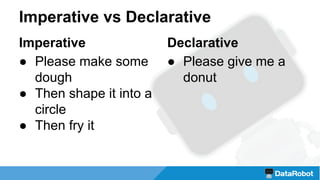
Imperative vs Declarative
Declarative
● Please give me a
donut
Imperative
● Please make some
dough
● Then shape it into a
circle
● Then fry it
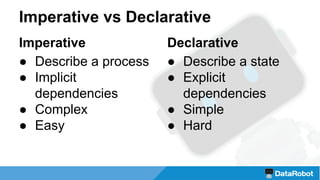
Imperative vs Declarative
Declarative
● Describe a state
● Explicit
dependencies
● Simple
● Hard
Imperative
● Describe a process
● Implicit
dependencies
● Complex
● Easy
Make
by GNU
https://www.gnu.org/software/make/
WTF is… Make?
● Build tool with
declarative syntax
● Dependency graph
● Idempotent
● Do any step out of order
# File: Makefile
raw.dough:
./make_dough.sh
circle.dough: raw.dough
./make_circle.sh raw.dough
donut: circle.dough
./fry.sh circle.dough
$ make donut
./make_dough.sh
./make_circle.sh raw.dough
./fry.sh circle.dough
make: execvp: ./fry.sh: Permission denied
make: *** [donut] Error 127
$ sudo make donut
./fry.sh circle.dough
Okay.
_.-------._
.' ___ '.
/ (___) 
|'._ _.'|
| `'-----'` |
 /
'-.______..-'
Terraform
by Hashicorp
https://www.terraform.io/
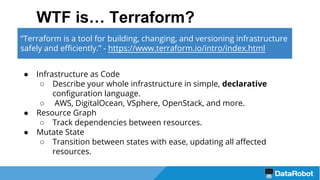
WTF is… Terraform?
● Infrastructure as Code
○ Describe your whole infrastructure in simple, declarative
configuration language.
○ AWS, DigitalOcean, VSphere, OpenStack, and more.
● Resource Graph
○ Track dependencies between resources.
● Mutate State
○ Transition between states with ease, updating all affected
resources.
“Terraform is a tool for building, changing, and versioning infrastructure
safely and efficiently.” - https://www.terraform.io/intro/index.html
# File: test/terraform-test.tf
provider "aws" {
region = "us-east-1"
}
resource "aws_instance" "hello_world" {
ami = "ami-deadbeef"
availability_zone = "us-east-1a"
instance_type = "t2.micro"
key_name = "my_key"
subnet_id = "subnet-deadbeef"
tags = {
name = "tf-test"
}
vpc_security_group_ids = ["sg-deadbeef"]
}
Basic Usage With AWS
$ cd test
$ ls
terraform-test.tf
$ terraform plan
...
Plan: 1 to add, 0 to change, 0 to destroy.
$ terraform apply
...
Apply complete! Resources: 1 added, 0 changed, 0
destroyed.
$
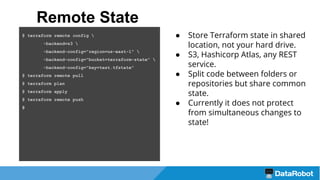
● Store Terraform state in shared
location, not your hard drive.
● S3, Hashicorp Atlas, any REST
service.
● Split code between folders or
repositories but share common
state.
● Currently it does not protect
from simultaneous changes to
state!
Remote State
$ terraform remote config 
-backend=s3 
-backend-config="region=us-east-1" 
-backend-config="bucket=terraform-state" 
-backend-config="key=test.tfstate"
$ terraform remote pull
$ terraform plan
$ terraform apply
$ terraform remote push
$
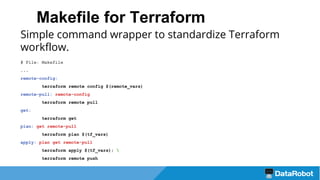
Makefile for Terraform
Simple command wrapper to standardize Terraform
workflow.
# File: Makefile
...
remote-config:
terraform remote config $(remote_vars)
remote-pull: remote-config
terraform remote pull
get:
terraform get
plan: get remote-pull
terraform plan $(tf_vars)
apply: plan get remote-pull
terraform apply $(tf_vars); 
terraform remote push
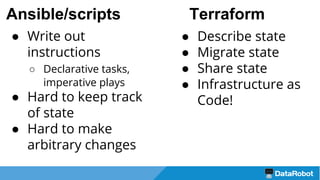
Terraform
● Describe state
● Migrate state
● Share state
● Infrastructure as
Code!
● Write out
instructions
○ Declarative tasks,
imperative plays
● Hard to keep track
of state
● Hard to make
arbitrary changes
Ansible/scripts
Docker
Compose
by Docker
https://docs.docker.com/compose/
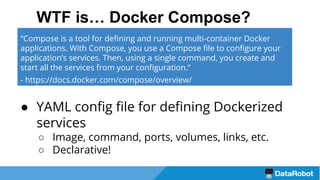
WTF is… Docker Compose?
● YAML config file for defining Dockerized
services
○ Image, command, ports, volumes, links, etc.
○ Declarative!
“Compose is a tool for defining and running multi-container Docker
applications. With Compose, you use a Compose file to configure your
application’s services. Then, using a single command, you create and
start all the services from your configuration.”
- https://docs.docker.com/compose/overview/
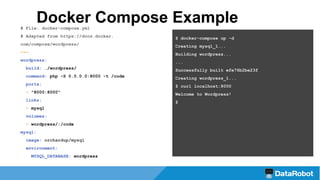
# File: docker-compose.yml
# Adapted from https://docs.docker.
com/compose/wordpress/
---
wordpress:
build: ./wordpress/
command: php -S 0.0.0.0:8000 -t /code
ports:
- "8000:8000"
links:
- mysql
volumes:
- wordpress/:/code
mysql:
image: orchardup/mysql
environment:
MYSQL_DATABASE: wordpress
$ docker-compose up -d
Creating mysql_1...
Building wordpress...
...
Successfully built efe76b2be23f
Creating wordpress_1...
$ curl localhost:8000
Welcome to Wordpress!
$
Docker Compose Example
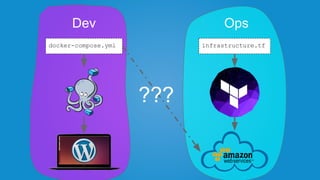
infrastructure.tfdocker-compose.yml
Dev Ops
???
Common Solutions
● Config Management
○ Chef, Ansible, Puppet
● Networking
○ libnetwork, libkv
● Service discovery
○ Consul, Zookeeper, Etcd
● Scheduling
○ Mesos, Kubernetes
Common Problems
● Dev != Prod
● Prod is very complex
○ Devs don’t know it
● Infrastructure tied to services
● Services tied to infrastructure
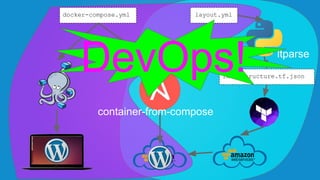
infrastructure.tfinfrastructure.tf.json
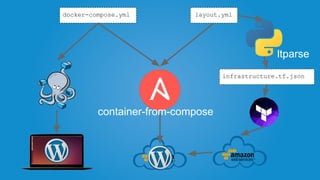
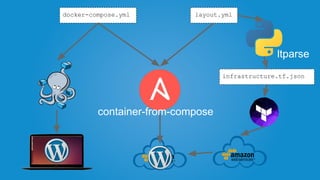
docker-compose.yml layout.yml
ltparse
container-from-compose
DevOps!
ltparse
by DataRobot
https://github.com/datarobot/ltparse
ltparse: ‘Flexible’ Terraform
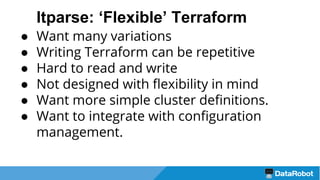
● Want many variations
● Writing Terraform can be repetitive
● Hard to read and write
● Not designed with flexibility in mind
● Want more simple cluster definitions.
● Want to integrate with configuration
management.
ltparse: ‘Flexible’ Terraform
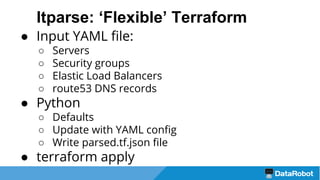
● Input YAML file:
○ Servers
○ Security groups
○ Elastic Load Balancers
○ route53 DNS records
● Python
○ Defaults
○ Update with YAML config
○ Write parsed.tf.json file
● terraform apply
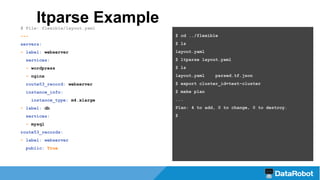
ltparse Example# File: flexible/layout.yaml
---
servers:
- label: webserver
services:
- wordpress
- nginx
route53_record: webserver
instance_info:
instance_type: m4.xlarge
- label: db
services:
- mysql
route53_records:
- label: webserver
public: True
$ cd ../flexible
$ ls
layout.yaml
$ ltparse layout.yaml
$ ls
layout.yaml parsed.tf.json
$ export cluster_id=test-cluster
$ make plan
...
Plan: 4 to add, 0 to change, 0 to destroy.
$
ltparse Output
"resource": {
"aws_instance": {
"db": {
"ami": "${var.ami_ids.hvm}",
"associate_public_ip_address": true,
"availability_zone": "us-east-1a",
"count": 1,
"instance_type": "m4.large",
"key_name": "${var.aws.key_name}",
"subnet_id": "${terraform_remote_state.subnets.output.us-east-1a}",
"tags": {
"id": "db_${var.run_id}",
"label": "db",
"owner": "test_${var.run_id}",
"user": "${var.build_user}"
},
"vpc_security_group_ids": [
"${module.default_security_group.id}"
]
... etc
ltparse
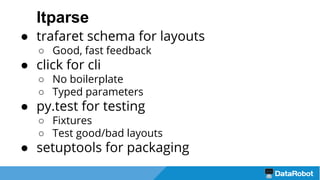
● trafaret schema for layouts
○ Good, fast feedback
● click for cli
○ No boilerplate
○ Typed parameters
● py.test for testing
○ Fixtures
○ Test good/bad layouts
● setuptools for packaging
ltparse Bonus
py.test fixtures for testing layout parser
# File: tests/layouts/bad/no_target.yaml
---
route53_records:
- label: bad
domain: domain
servers:
- label: server
expects: !!python/object/apply:ltparse.
parser.ConfigurationError [route53 record
label `bad` not applied to any instances or
elbs]
def test_full_layouts_bad(test_bad_layout):
"""
For each layout in tests/layouts/bad, assert that running
format_data fails with the exception and message defined in
the layout.
"""
expected_exception = test_bad_layout['expects']
with pytest.raises(type(expected_exception)) as excinfo:
format_data(test_bad_layout)
assert expected_exception.message == str(excinfo.value)
infrastructure.tf.json
docker-compose.yml layout.yml
ltparse
container-from-compose
Container
From
Compose
by DataRobot
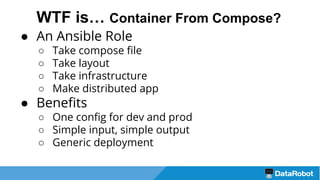
● An Ansible Role
○ Take compose file
○ Take layout
○ Take infrastructure
○ Make distributed app
● Benefits
○ One config for dev and prod
○ Simple input, simple output
○ Generic deployment
WTF is… Container From Compose?
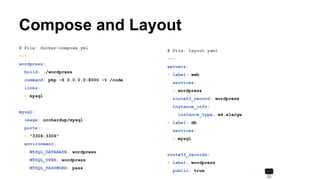
Compose and Layout
# File: layout.yaml
---
servers:
- label: web
services:
- wordpress
route53_record: wordpress
instance_info:
instance_type: m4.xlarge
- label: db
services:
- mysql
route53_records:
- label: wordpress
public: true
# File: docker-compose.yml
---
wordpress:
build: ./wordpress
command: php -S 0.0.0.0:8000 -t /code
links:
- mysql
mysql:
image: orchardup/mysql
ports:
- "3306:3306"
environment:
MYSQL_DATABASE: wordpress
MYSQL_USER: wordpress
MYSQL_PASSWORD: pass
Ansible Playbook
● Traditionally:
○ Very imperative
○ Do this, do that, then you
have a site
○ Application-specific
○ Config is distributed; hard to
understand final state
● Now:
○ Very declarative
○ Config is centralized
○ Very generic
# File: inventory/site.inventory
[mysql:children]
tag_id_db_talk_test
[wordpress:children]
tag_id_web_talk_test
# File: site.yml
---
- hosts: mysql:wordpress
vars_files:
- docker-compose.yml
- services.yml
roles:
- container-from-compose
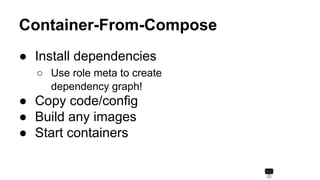
Container-From-Compose
● Install dependencies
○ Use role meta to create
dependency graph!
● Copy code/config
● Build any images
● Start containers
1 ---
2 - name: Example services list
3 set_fact:
4 services_list: "{{group_names | intersect(defined_services )}}"
5
6 - name: Start docker containers (simplified)
7 docker:
8 name: "{{item}}"
9 image: "{{compose_vars[item]['image']}}"
10 command: "{{compose_vars[item]['command'] | default(omit)}}"
11 env: "{{drenv}}"
12 volumes: "{{compose_vars[item]['volumes'] | default(omit)}}"
13 with_items: services_list
container-from-compose example
Caveats
● Very dense Ansible code
● Some rough edges and limitations
○ Links
○ --net=host, /etc/hosts networking
● Doesn’t currently handle state changes
○ eg. can’t move service between hosts.
infrastructure.tf.json
docker-compose.yml layout.yml
ltparse
container-from-compose
Thanks!
Bonus: why not Docker Swarm?
● I’d love to try it
● Active development
○ Swarm was experimental when we started
○ Compose + Swarm is still experimental
● Swarm filters not yet supported
○ Can’t loc service to node (like NGINX to instances
with ELB)

Declarative Infrastructure Tools

  • 1.
  • 2.
    Who Am I? ●Former particle physics guy ● Release Automation Engineer ● Boston ● AWS, Linux, Python, Ansible, Docker
  • 3.
  • 4.
    What’s This AllAbout? ● Some tools I like. ● Some fun projects I’ve worked on. ● Declarative Tools. ● Creating simple interfaces to powerful tools. ● Maybe change the way you think about your next project.
  • 5.
    What’s It AllFor? ● Need to create many independent test environments. ● Different sizes and configurations. ● Give devs power to make their own.
  • 6.
  • 7.
    The Company Our Vision: ●To become the world’s go-to resource for data science and machine learning tools Our Product: ● Automates the processes of data science ● Creates highly accurate predictive models ● Runs on open-source machine learning libraries ● Allows data scientists to work faster and smarter ● Both cloud and enterprise/on-prem
  • 8.
    DataRobot Application Stack ●Application ○ Python ○ Node.js ● Database ○ MongoDB ○ Redis ● Storage ○ S3/Gluster/HDFS Docker!
  • 9.
  • 10.
    Imperative vs Declarative Declarative ●Please give me a donut Imperative ● Please make some dough ● Then shape it into a circle ● Then fry it
  • 11.
    Imperative vs Declarative Declarative ●Describe a state ● Explicit dependencies ● Simple ● Hard Imperative ● Describe a process ● Implicit dependencies ● Complex ● Easy
  • 12.
  • 13.
    WTF is… Make? ●Build tool with declarative syntax ● Dependency graph ● Idempotent ● Do any step out of order # File: Makefile raw.dough: ./make_dough.sh circle.dough: raw.dough ./make_circle.sh raw.dough donut: circle.dough ./fry.sh circle.dough $ make donut ./make_dough.sh ./make_circle.sh raw.dough ./fry.sh circle.dough make: execvp: ./fry.sh: Permission denied make: *** [donut] Error 127 $ sudo make donut ./fry.sh circle.dough Okay. _.-------._ .' ___ '. / (___) |'._ _.'| | `'-----'` | / '-.______..-'
  • 14.
  • 15.
    WTF is… Terraform? ●Infrastructure as Code ○ Describe your whole infrastructure in simple, declarative configuration language. ○ AWS, DigitalOcean, VSphere, OpenStack, and more. ● Resource Graph ○ Track dependencies between resources. ● Mutate State ○ Transition between states with ease, updating all affected resources. “Terraform is a tool for building, changing, and versioning infrastructure safely and efficiently.” - https://www.terraform.io/intro/index.html
  • 16.
    # File: test/terraform-test.tf provider"aws" { region = "us-east-1" } resource "aws_instance" "hello_world" { ami = "ami-deadbeef" availability_zone = "us-east-1a" instance_type = "t2.micro" key_name = "my_key" subnet_id = "subnet-deadbeef" tags = { name = "tf-test" } vpc_security_group_ids = ["sg-deadbeef"] } Basic Usage With AWS $ cd test $ ls terraform-test.tf $ terraform plan ... Plan: 1 to add, 0 to change, 0 to destroy. $ terraform apply ... Apply complete! Resources: 1 added, 0 changed, 0 destroyed. $
  • 17.
    ● Store Terraformstate in shared location, not your hard drive. ● S3, Hashicorp Atlas, any REST service. ● Split code between folders or repositories but share common state. ● Currently it does not protect from simultaneous changes to state! Remote State $ terraform remote config -backend=s3 -backend-config="region=us-east-1" -backend-config="bucket=terraform-state" -backend-config="key=test.tfstate" $ terraform remote pull $ terraform plan $ terraform apply $ terraform remote push $
  • 18.
    Makefile for Terraform Simplecommand wrapper to standardize Terraform workflow. # File: Makefile ... remote-config: terraform remote config $(remote_vars) remote-pull: remote-config terraform remote pull get: terraform get plan: get remote-pull terraform plan $(tf_vars) apply: plan get remote-pull terraform apply $(tf_vars); terraform remote push
  • 19.
    Terraform ● Describe state ●Migrate state ● Share state ● Infrastructure as Code! ● Write out instructions ○ Declarative tasks, imperative plays ● Hard to keep track of state ● Hard to make arbitrary changes Ansible/scripts
  • 20.
  • 21.
    WTF is… DockerCompose? ● YAML config file for defining Dockerized services ○ Image, command, ports, volumes, links, etc. ○ Declarative! “Compose is a tool for defining and running multi-container Docker applications. With Compose, you use a Compose file to configure your application’s services. Then, using a single command, you create and start all the services from your configuration.” - https://docs.docker.com/compose/overview/
  • 22.
    # File: docker-compose.yml #Adapted from https://docs.docker. com/compose/wordpress/ --- wordpress: build: ./wordpress/ command: php -S 0.0.0.0:8000 -t /code ports: - "8000:8000" links: - mysql volumes: - wordpress/:/code mysql: image: orchardup/mysql environment: MYSQL_DATABASE: wordpress $ docker-compose up -d Creating mysql_1... Building wordpress... ... Successfully built efe76b2be23f Creating wordpress_1... $ curl localhost:8000 Welcome to Wordpress! $ Docker Compose Example
  • 23.
  • 24.
    Common Solutions ● ConfigManagement ○ Chef, Ansible, Puppet ● Networking ○ libnetwork, libkv ● Service discovery ○ Consul, Zookeeper, Etcd ● Scheduling ○ Mesos, Kubernetes
  • 25.
    Common Problems ● Dev!= Prod ● Prod is very complex ○ Devs don’t know it ● Infrastructure tied to services ● Services tied to infrastructure
  • 26.
  • 27.
  • 28.
    ltparse: ‘Flexible’ Terraform ●Want many variations ● Writing Terraform can be repetitive ● Hard to read and write ● Not designed with flexibility in mind ● Want more simple cluster definitions. ● Want to integrate with configuration management.
  • 29.
    ltparse: ‘Flexible’ Terraform ●Input YAML file: ○ Servers ○ Security groups ○ Elastic Load Balancers ○ route53 DNS records ● Python ○ Defaults ○ Update with YAML config ○ Write parsed.tf.json file ● terraform apply
  • 30.
    ltparse Example# File:flexible/layout.yaml --- servers: - label: webserver services: - wordpress - nginx route53_record: webserver instance_info: instance_type: m4.xlarge - label: db services: - mysql route53_records: - label: webserver public: True $ cd ../flexible $ ls layout.yaml $ ltparse layout.yaml $ ls layout.yaml parsed.tf.json $ export cluster_id=test-cluster $ make plan ... Plan: 4 to add, 0 to change, 0 to destroy. $
  • 31.
    ltparse Output "resource": { "aws_instance":{ "db": { "ami": "${var.ami_ids.hvm}", "associate_public_ip_address": true, "availability_zone": "us-east-1a", "count": 1, "instance_type": "m4.large", "key_name": "${var.aws.key_name}", "subnet_id": "${terraform_remote_state.subnets.output.us-east-1a}", "tags": { "id": "db_${var.run_id}", "label": "db", "owner": "test_${var.run_id}", "user": "${var.build_user}" }, "vpc_security_group_ids": [ "${module.default_security_group.id}" ] ... etc
  • 32.
    ltparse ● trafaret schemafor layouts ○ Good, fast feedback ● click for cli ○ No boilerplate ○ Typed parameters ● py.test for testing ○ Fixtures ○ Test good/bad layouts ● setuptools for packaging
  • 33.
    ltparse Bonus py.test fixturesfor testing layout parser # File: tests/layouts/bad/no_target.yaml --- route53_records: - label: bad domain: domain servers: - label: server expects: !!python/object/apply:ltparse. parser.ConfigurationError [route53 record label `bad` not applied to any instances or elbs] def test_full_layouts_bad(test_bad_layout): """ For each layout in tests/layouts/bad, assert that running format_data fails with the exception and message defined in the layout. """ expected_exception = test_bad_layout['expects'] with pytest.raises(type(expected_exception)) as excinfo: format_data(test_bad_layout) assert expected_exception.message == str(excinfo.value)
  • 34.
  • 35.
  • 36.
    ● An AnsibleRole ○ Take compose file ○ Take layout ○ Take infrastructure ○ Make distributed app ● Benefits ○ One config for dev and prod ○ Simple input, simple output ○ Generic deployment WTF is… Container From Compose?
  • 37.
    Compose and Layout #File: layout.yaml --- servers: - label: web services: - wordpress route53_record: wordpress instance_info: instance_type: m4.xlarge - label: db services: - mysql route53_records: - label: wordpress public: true # File: docker-compose.yml --- wordpress: build: ./wordpress command: php -S 0.0.0.0:8000 -t /code links: - mysql mysql: image: orchardup/mysql ports: - "3306:3306" environment: MYSQL_DATABASE: wordpress MYSQL_USER: wordpress MYSQL_PASSWORD: pass
  • 38.
    Ansible Playbook ● Traditionally: ○Very imperative ○ Do this, do that, then you have a site ○ Application-specific ○ Config is distributed; hard to understand final state ● Now: ○ Very declarative ○ Config is centralized ○ Very generic # File: inventory/site.inventory [mysql:children] tag_id_db_talk_test [wordpress:children] tag_id_web_talk_test # File: site.yml --- - hosts: mysql:wordpress vars_files: - docker-compose.yml - services.yml roles: - container-from-compose
  • 39.
    Container-From-Compose ● Install dependencies ○Use role meta to create dependency graph! ● Copy code/config ● Build any images ● Start containers
  • 40.
    1 --- 2 -name: Example services list 3 set_fact: 4 services_list: "{{group_names | intersect(defined_services )}}" 5 6 - name: Start docker containers (simplified) 7 docker: 8 name: "{{item}}" 9 image: "{{compose_vars[item]['image']}}" 10 command: "{{compose_vars[item]['command'] | default(omit)}}" 11 env: "{{drenv}}" 12 volumes: "{{compose_vars[item]['volumes'] | default(omit)}}" 13 with_items: services_list container-from-compose example
  • 41.
    Caveats ● Very denseAnsible code ● Some rough edges and limitations ○ Links ○ --net=host, /etc/hosts networking ● Doesn’t currently handle state changes ○ eg. can’t move service between hosts.
  • 42.
  • 43.
  • 44.
    Bonus: why notDocker Swarm? ● I’d love to try it ● Active development ○ Swarm was experimental when we started ○ Compose + Swarm is still experimental ● Swarm filters not yet supported ○ Can’t loc service to node (like NGINX to instances with ELB)