Hong Kong Open Source
Conference 2018
Containerized High Availability
Virtual Hosting Deployment
with Kubernetes, Docker and Ansible
Edison Wong
2018-06-16
Wong Hoi Sing, Edison
●
2005 - Drupal Developer & Contributor
– https://drupal.org/user/33940
●
2008 - HKDUG Co-founder
– https://groups.drupal.org/drupalhk
●
2010 - CEO, PantaRei Design
– hswong3i@pantarei-design.com
PantaRei Design
●
Everything Changes and Nothing Remains Still
●
Reinvent Enterprise with Open Source Software and Cloud Computing
●
Hong Kong based FOSS service provider
– Content Management System (CMS) with Drupal
– Cloud Hosting Solution with Amazon Web Services (AWS)
– Team collaborate solution with Atlassian
●
Business Partner with industry leaders
– 2012, AWS Consulting Partner
– 2013, Acquia Partner
– 2013, Atlassian Experts
– 2014, Rackspace Hosting Partner
●
http://pantarei-design.com
Outline
●
Virtual Hosting for Dummy
●
Let’s Demo with Drupal 8.5
●
Tips & Tricks
●
Roadmap
●
Q&A
Virtual Hosting for Dummy
●
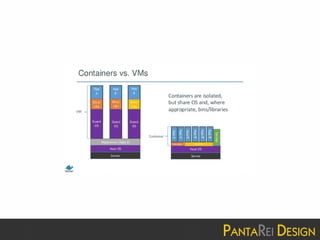
What is Virtual Hosting?
●
How Virtual Hosting Works?
●
How to Improve it?
●
Overall Design
What is Virtual Hosting?
●
Virtual hosting is a method for
hosting multiple domain names
(with separate handling of each
name) on a single server (or pool
of servers)
How Virtual Hosting Works?
●
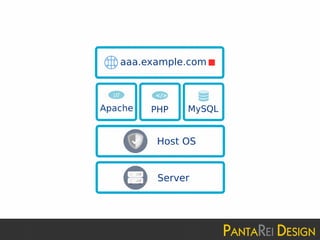
Single Server, Single Cluster, Single Domain
– tasksel install lamp-server
– No redundant, no scale out, no per talent security
required (well…)
– From KISS principle (Keep it simple, stupid) point of
view, it is good enough that not easy to fail
– BTW, from hosting service vendor point of view,
resource could not be fully utilized (or, overselling...)
How Virtual Hosting Works?
(cont.)
●
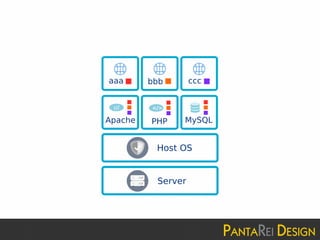
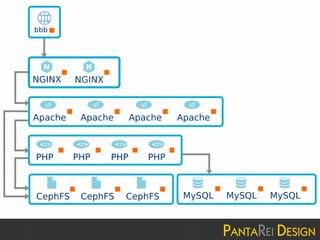
Single Server, Single Cluster, Multiple Domain
– Cpanel, Plesk, Virtualmin, etc
– No redundant, no scale out
– Shared resource, e.g. disk, database, service
– Resouce could now be utilize and overselling, but
security between each talent MUST BE very careful
How Virtual Hosting Works?
(cont.)
●
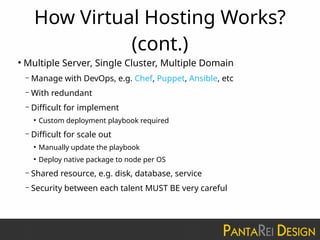
Multiple Server, Single Cluster, Multiple Domain
– Manage with DevOps, e.g. Chef, Puppet, Ansible, etc
– With redundant
– Difficult for implement
●
Custom deployment playbook required
– Difficult for scale out
●
Manually update the playbook
●
Deploy native package to node per OS
– Shared resource, e.g. disk, database, service
– Security between each talent MUST BE very careful
How Virtual Hosting Works?
(cont.)
●
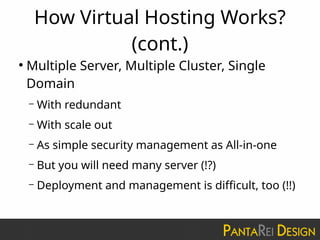
Multiple Server, Multiple Cluster, Single
Domain
– With redundant
– With scale out
– As simple security management as All-in-one
– But you will need many server (!?)
– Deployment and management is difficult, too (!!)
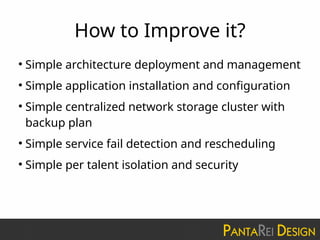
How to Improve it?
●
Simple architecture deployment and management
●
Simple application installation and configuration
●
Simple centralized network storage cluster with
backup plan
●
Simple service fail detection and rescheduling
●
Simple per talent isolation and security
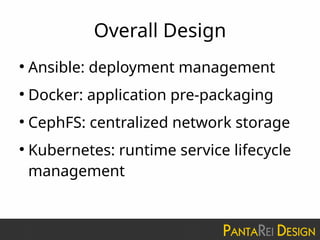
Overall Design
●
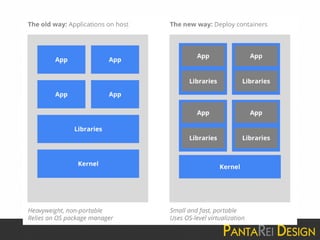
Ansible: deployment management
●
Docker: application pre-packaging
●
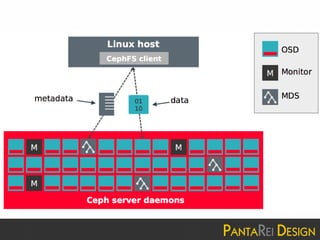
CephFS: centralized network storage
●
Kubernetes: runtime service lifecycle
management
Overall Design (cont.)
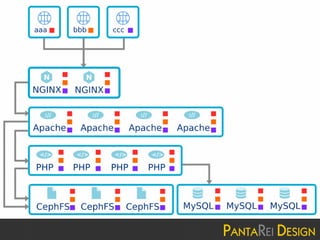
●
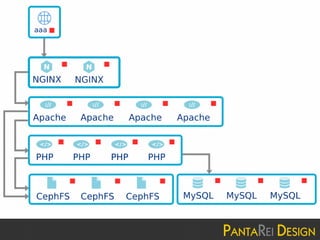
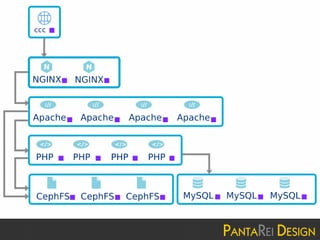
Each talent (i.e. domain) goes into
individual Kubernetes namespace
●
Each namespace have its own Apache,
PHP, MySQL, SSHD, etc
●
All dynamic data store outside
Kubernetes, goes into CephFS
Let’s Demo with Drupal 8.5
●
Create Kubernetes Namespace
●
Deploy Application Stack
●
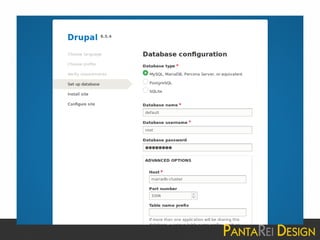
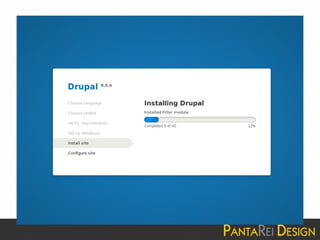
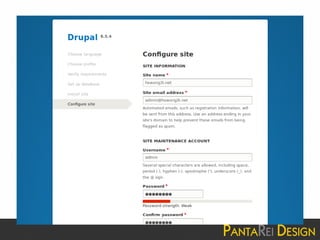
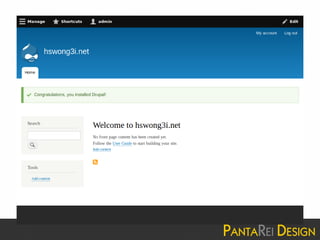
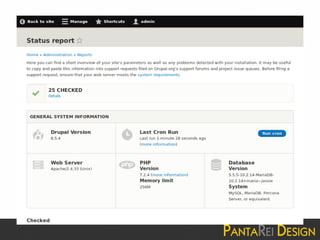
Install Drupal 8.5
●
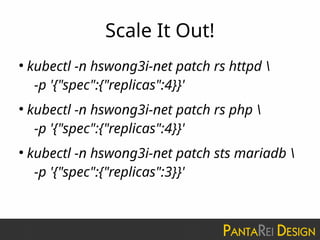
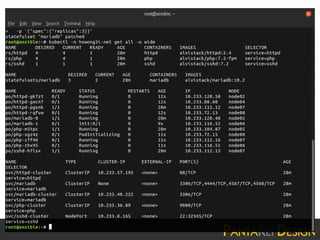
Scale It Out!
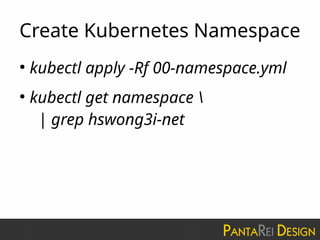
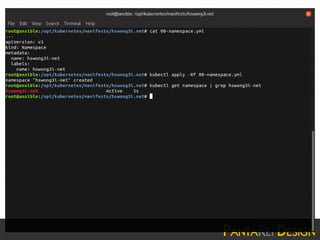
Create Kubernetes Namespace
●
kubectl apply -Rf 00-namespace.yml
●
kubectl get namespace 
| grep hswong3i-net
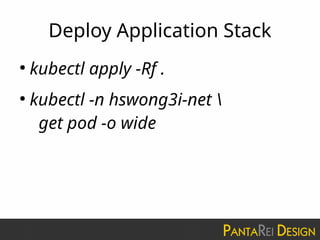
Deploy Application Stack
●
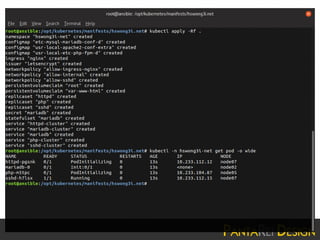
kubectl apply -Rf .
●
kubectl -n hswong3i-net 
get pod -o wide
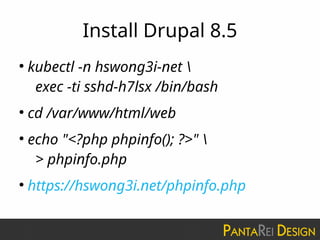
Install Drupal 8.5
●
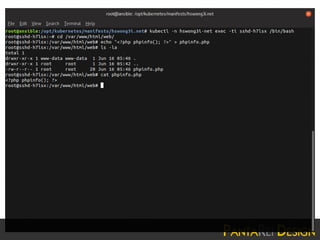
kubectl -n hswong3i-net 
exec -ti sshd-h7lsx /bin/bash
●
cd /var/www/html/web
●
echo "<?php phpinfo(); ?>" 
> phpinfo.php
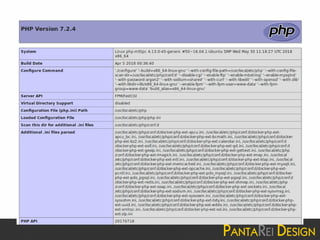
●
https://hswong3i.net/phpinfo.php
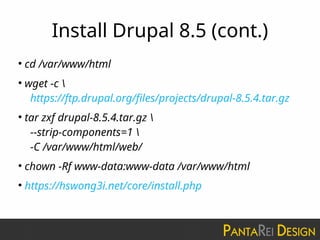
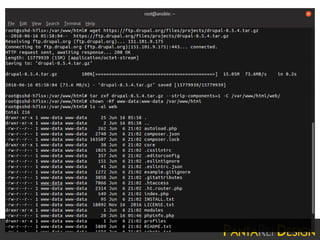
Install Drupal 8.5 (cont.)
●
cd /var/www/html
●
wget -c 
https://ftp.drupal.org/files/projects/drupal-8.5.4.tar.gz
●
tar zxf drupal-8.5.4.tar.gz 
--strip-components=1 
-C /var/www/html/web/
●
chown -Rf www-data:www-data /var/www/html
●
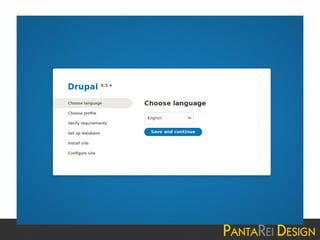
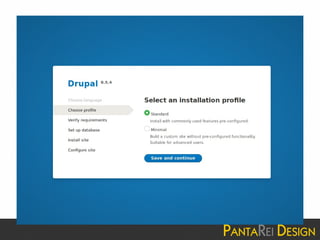
https://hswong3i.net/core/install.php
Scale It Out!
●
kubectl -n hswong3i-net patch rs httpd 
-p '{"spec":{"replicas":4}}'
●
kubectl -n hswong3i-net patch rs php 
-p '{"spec":{"replicas":4}}'
●
kubectl -n hswong3i-net patch sts mariadb 
-p '{"spec":{"replicas":3}}'
Tips & Tricks
●
Ansible
●
Ceph
●
Kubernetes
●
Application Stack
Ansible
●
Installing Ansible is simple
– pip install ansible
●
Managing access to remote guest is simple
– Password-less SSH login by public-private key pair
●
Running command on remote guest is simple
– ansible -i guest1,guest2, -m ping
– ansible -i guest1,guest2, -m apt -a ‘name=vim state=present’
– ansible -i guest1,guest2, -m shell -a ‘uname -a’
Ansible (cont.)
●
Made complicated application
deployment manageable
– ceph-ansible
– kubespray
– openstack-ansible
Ceph
●
DON’T deploy Ceph with Kubernetes + Helm!!
– By our design Kubernetes consume Ceph as
Persistent Volumes (PV) provider
– Deploying Ceph on top of Kubernetes become a “
Chicken or the Egg” paradox
●
TRUST ME!! You will absolutely get mad when your Ceph
crashed and recovery is required :-P
– Simply deploy with ceph-ansible
Ceph (cont.)
●
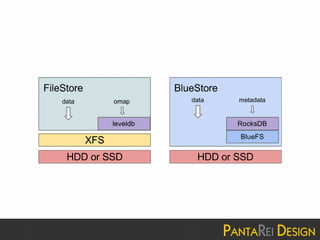
Collocated + Bluestore
– Collocated simplify your disk partition
table
– Bluestore scale much better than
traditional XFS-based filestore
●
E.g. Backed with Aliyun EBS (max ~110MB/s), a
3 OSD CephFS could provide ~60MB/s
Ceph (cont.)
●
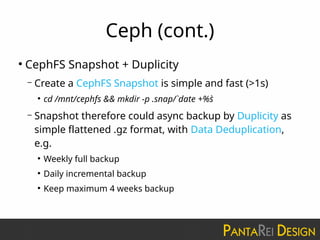
CephFS Snapshot + Duplicity
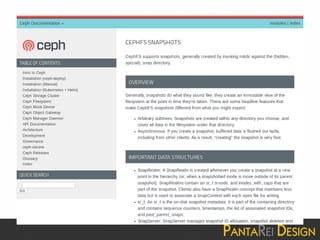
– Create a CephFS Snapshot is simple and fast (>1s)
●
cd /mnt/cephfs && mkdir -p .snap/`date +%s`
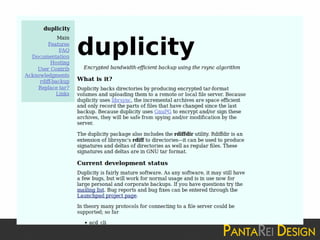
– Snapshot therefore could async backup by Duplicity as
simple flattened .gz format, with Data Deduplication,
e.g.
●
Weekly full backup
●
Daily incremental backup
●
Keep maximum 4 weeks backup
Kubernetes
●
PVC with cephfs-provisioner (or ceph-csi)
– With cephfs-provisioner we could simply integrate with Kubernets
PersistentVolumeClaims
– kubespray ready for this deployment
– Everything from Application Stack could go into CephFS, with
ReadWriteMany, e.g.
●
/root (for sshd pod, for remote management)
●
/var/www/html (for httpd/php pods, for document root)
●
/var/lib/mysql (for mysql/mariadb pods, for data store)
– Backup made simple with CephFS Snapshot + Duplicity
Kubernetes (cont.)
●
Network Policy with Weave
– Weave is a simple and lightweight vxlan-based CNI Network
Provider, supporting Kubernete’s Network Policy
– kubespray ready for this deployment
– We could isolate network traffic between each namespace, e.g.
●
DENY all traffic from other namespaces (i.e. default allow traffic inside
namespace)
●
ALLOW all traffic from a namespace (e.g. allow traffic from ingress-nginx
namespace)
●
ALLOW all traffic to an application (e.g. allow external access to sshd pod for
remote management)
Kubernetes (cont.)
●
Ingress with ingress-nginx
– ingress-nginx use Nginx as Controller for Kubernetes
Ingress Resource, supporting HTTPS /TLS with SNI (i.e.
multiple HTTPS virtual hosting with single public IP)
– kubespray ready for this deployment
– Proxy Protocol support is required when working with
AWS L4 ELB, for fetching client’s source IP address
Kubernetes (cont.)
●
Let’s Encrypt with cert-manager
– With cert-manager we could request TLS
certificate from Let’s Encrypt for free, with
auto renewal and ingress-nginx integration
– kubespray ready for this deployment
– Simply use http01 for varification
Application Stack
●
MariaDB Multi-master cluster with Kubernetes peer-
finder
– When starting a new MariaDB multi-master cluster, we
need to know if “this” node should bootstrap a new
cluster, or join existing cluster
– Kubernetes peer-finder could give a hand for discovering
if any existing peers
– We build a Docker image which simplify such integration
with StatefulSet deployment
Application Stack (cont.)
●
MariaDB innodb_buffer_pool_size
– Simply give large enough
innodb_buffer_pool_size, so let MariaDB try
to cache all warmup-ed data from disk to
memory/swap, and async write-back to disk
– This could greatly reduce the disk I/O
bottleneck
Application Stack (cont.)
●
PHP cache with opcache + apcu
– With opcache enabled PHP will cache the
precomplied script bytecode in shared memory,
which greatly improve the overall performance
– With apcu enable legacy application could also
benefit with their existing cache
implementation
Application Stack (cont.)
●
Drupal need a lots of PHP extensions
– Official PHP Docker image comes with
almost none of Drupal required extensions
– By the way, installing those extensions
manually is VERY TIME CONSUMING!!
– We build a Docker Image which simplify such
integration...
Application Stack (cont.)
●
Apache cache with mod_cache_disk
– With mod_cache_disk enable Apache will try to cache any
static assets (e.g. css/js/jpg/gif/png/etc) as much as
possible
– Don’t worry to much about the disk I/O performance,
Linux kernel will automatically cache it for you into
memory/swap, if required
– We build a Docker Image which simplify such integration
Roadmap
●
CephFS with Kubernetes CSI
●
Logging with Fluentd, ElasticSearch, and
Kibana
●
Monitoring and Alert with Prometheus and
Grafana
●
Manage Application Stack with Helm and
Chart
Q&A
Contact Us
●
Address: Unit 326, 3/F, Building 16W, No.16
Science Park West Avenue, Hong Kong Science
Park, Shatin, N.T.
●
Phone: +852 3576 3812
●
Fax: +852 3753 3663
●
Email: sales@pantarei-design.com
●
Web: http://pantarei-design.com

[HKOSCON][20180616][Containerized High Availability Virtual Hosting Deployment with Kubernetes, Docker and Ansible]

  • 1.
    Hong Kong OpenSource Conference 2018 Containerized High Availability Virtual Hosting Deployment with Kubernetes, Docker and Ansible Edison Wong 2018-06-16
  • 2.
    Wong Hoi Sing,Edison ● 2005 - Drupal Developer & Contributor – https://drupal.org/user/33940 ● 2008 - HKDUG Co-founder – https://groups.drupal.org/drupalhk ● 2010 - CEO, PantaRei Design – hswong3i@pantarei-design.com
  • 7.
    PantaRei Design ● Everything Changesand Nothing Remains Still ● Reinvent Enterprise with Open Source Software and Cloud Computing ● Hong Kong based FOSS service provider – Content Management System (CMS) with Drupal – Cloud Hosting Solution with Amazon Web Services (AWS) – Team collaborate solution with Atlassian ● Business Partner with industry leaders – 2012, AWS Consulting Partner – 2013, Acquia Partner – 2013, Atlassian Experts – 2014, Rackspace Hosting Partner ● http://pantarei-design.com
  • 9.
    Outline ● Virtual Hosting forDummy ● Let’s Demo with Drupal 8.5 ● Tips & Tricks ● Roadmap ● Q&A
  • 10.
    Virtual Hosting forDummy ● What is Virtual Hosting? ● How Virtual Hosting Works? ● How to Improve it? ● Overall Design
  • 11.
    What is VirtualHosting? ● Virtual hosting is a method for hosting multiple domain names (with separate handling of each name) on a single server (or pool of servers)
  • 12.
    How Virtual HostingWorks? ● Single Server, Single Cluster, Single Domain – tasksel install lamp-server – No redundant, no scale out, no per talent security required (well…) – From KISS principle (Keep it simple, stupid) point of view, it is good enough that not easy to fail – BTW, from hosting service vendor point of view, resource could not be fully utilized (or, overselling...)
  • 14.
    How Virtual HostingWorks? (cont.) ● Single Server, Single Cluster, Multiple Domain – Cpanel, Plesk, Virtualmin, etc – No redundant, no scale out – Shared resource, e.g. disk, database, service – Resouce could now be utilize and overselling, but security between each talent MUST BE very careful
  • 19.
    How Virtual HostingWorks? (cont.) ● Multiple Server, Single Cluster, Multiple Domain – Manage with DevOps, e.g. Chef, Puppet, Ansible, etc – With redundant – Difficult for implement ● Custom deployment playbook required – Difficult for scale out ● Manually update the playbook ● Deploy native package to node per OS – Shared resource, e.g. disk, database, service – Security between each talent MUST BE very careful
  • 24.
    How Virtual HostingWorks? (cont.) ● Multiple Server, Multiple Cluster, Single Domain – With redundant – With scale out – As simple security management as All-in-one – But you will need many server (!?) – Deployment and management is difficult, too (!!)
  • 28.
    How to Improveit? ● Simple architecture deployment and management ● Simple application installation and configuration ● Simple centralized network storage cluster with backup plan ● Simple service fail detection and rescheduling ● Simple per talent isolation and security
  • 29.
    Overall Design ● Ansible: deploymentmanagement ● Docker: application pre-packaging ● CephFS: centralized network storage ● Kubernetes: runtime service lifecycle management
  • 33.
    Overall Design (cont.) ● Eachtalent (i.e. domain) goes into individual Kubernetes namespace ● Each namespace have its own Apache, PHP, MySQL, SSHD, etc ● All dynamic data store outside Kubernetes, goes into CephFS
  • 34.
    Let’s Demo withDrupal 8.5 ● Create Kubernetes Namespace ● Deploy Application Stack ● Install Drupal 8.5 ● Scale It Out!
  • 35.
    Create Kubernetes Namespace ● kubectlapply -Rf 00-namespace.yml ● kubectl get namespace | grep hswong3i-net
  • 37.
    Deploy Application Stack ● kubectlapply -Rf . ● kubectl -n hswong3i-net get pod -o wide
  • 39.
    Install Drupal 8.5 ● kubectl-n hswong3i-net exec -ti sshd-h7lsx /bin/bash ● cd /var/www/html/web ● echo "<?php phpinfo(); ?>" > phpinfo.php ● https://hswong3i.net/phpinfo.php
  • 42.
    Install Drupal 8.5(cont.) ● cd /var/www/html ● wget -c https://ftp.drupal.org/files/projects/drupal-8.5.4.tar.gz ● tar zxf drupal-8.5.4.tar.gz --strip-components=1 -C /var/www/html/web/ ● chown -Rf www-data:www-data /var/www/html ● https://hswong3i.net/core/install.php
  • 51.
    Scale It Out! ● kubectl-n hswong3i-net patch rs httpd -p '{"spec":{"replicas":4}}' ● kubectl -n hswong3i-net patch rs php -p '{"spec":{"replicas":4}}' ● kubectl -n hswong3i-net patch sts mariadb -p '{"spec":{"replicas":3}}'
  • 53.
  • 54.
    Ansible ● Installing Ansible issimple – pip install ansible ● Managing access to remote guest is simple – Password-less SSH login by public-private key pair ● Running command on remote guest is simple – ansible -i guest1,guest2, -m ping – ansible -i guest1,guest2, -m apt -a ‘name=vim state=present’ – ansible -i guest1,guest2, -m shell -a ‘uname -a’
  • 55.
    Ansible (cont.) ● Made complicatedapplication deployment manageable – ceph-ansible – kubespray – openstack-ansible
  • 56.
    Ceph ● DON’T deploy Cephwith Kubernetes + Helm!! – By our design Kubernetes consume Ceph as Persistent Volumes (PV) provider – Deploying Ceph on top of Kubernetes become a “ Chicken or the Egg” paradox ● TRUST ME!! You will absolutely get mad when your Ceph crashed and recovery is required :-P – Simply deploy with ceph-ansible
  • 57.
    Ceph (cont.) ● Collocated +Bluestore – Collocated simplify your disk partition table – Bluestore scale much better than traditional XFS-based filestore ● E.g. Backed with Aliyun EBS (max ~110MB/s), a 3 OSD CephFS could provide ~60MB/s
  • 59.
    Ceph (cont.) ● CephFS Snapshot+ Duplicity – Create a CephFS Snapshot is simple and fast (>1s) ● cd /mnt/cephfs && mkdir -p .snap/`date +%s` – Snapshot therefore could async backup by Duplicity as simple flattened .gz format, with Data Deduplication, e.g. ● Weekly full backup ● Daily incremental backup ● Keep maximum 4 weeks backup
  • 62.
    Kubernetes ● PVC with cephfs-provisioner(or ceph-csi) – With cephfs-provisioner we could simply integrate with Kubernets PersistentVolumeClaims – kubespray ready for this deployment – Everything from Application Stack could go into CephFS, with ReadWriteMany, e.g. ● /root (for sshd pod, for remote management) ● /var/www/html (for httpd/php pods, for document root) ● /var/lib/mysql (for mysql/mariadb pods, for data store) – Backup made simple with CephFS Snapshot + Duplicity
  • 63.
    Kubernetes (cont.) ● Network Policywith Weave – Weave is a simple and lightweight vxlan-based CNI Network Provider, supporting Kubernete’s Network Policy – kubespray ready for this deployment – We could isolate network traffic between each namespace, e.g. ● DENY all traffic from other namespaces (i.e. default allow traffic inside namespace) ● ALLOW all traffic from a namespace (e.g. allow traffic from ingress-nginx namespace) ● ALLOW all traffic to an application (e.g. allow external access to sshd pod for remote management)
  • 65.
    Kubernetes (cont.) ● Ingress withingress-nginx – ingress-nginx use Nginx as Controller for Kubernetes Ingress Resource, supporting HTTPS /TLS with SNI (i.e. multiple HTTPS virtual hosting with single public IP) – kubespray ready for this deployment – Proxy Protocol support is required when working with AWS L4 ELB, for fetching client’s source IP address
  • 66.
    Kubernetes (cont.) ● Let’s Encryptwith cert-manager – With cert-manager we could request TLS certificate from Let’s Encrypt for free, with auto renewal and ingress-nginx integration – kubespray ready for this deployment – Simply use http01 for varification
  • 67.
    Application Stack ● MariaDB Multi-mastercluster with Kubernetes peer- finder – When starting a new MariaDB multi-master cluster, we need to know if “this” node should bootstrap a new cluster, or join existing cluster – Kubernetes peer-finder could give a hand for discovering if any existing peers – We build a Docker image which simplify such integration with StatefulSet deployment
  • 68.
    Application Stack (cont.) ● MariaDBinnodb_buffer_pool_size – Simply give large enough innodb_buffer_pool_size, so let MariaDB try to cache all warmup-ed data from disk to memory/swap, and async write-back to disk – This could greatly reduce the disk I/O bottleneck
  • 69.
    Application Stack (cont.) ● PHPcache with opcache + apcu – With opcache enabled PHP will cache the precomplied script bytecode in shared memory, which greatly improve the overall performance – With apcu enable legacy application could also benefit with their existing cache implementation
  • 70.
    Application Stack (cont.) ● Drupalneed a lots of PHP extensions – Official PHP Docker image comes with almost none of Drupal required extensions – By the way, installing those extensions manually is VERY TIME CONSUMING!! – We build a Docker Image which simplify such integration...
  • 71.
    Application Stack (cont.) ● Apachecache with mod_cache_disk – With mod_cache_disk enable Apache will try to cache any static assets (e.g. css/js/jpg/gif/png/etc) as much as possible – Don’t worry to much about the disk I/O performance, Linux kernel will automatically cache it for you into memory/swap, if required – We build a Docker Image which simplify such integration
  • 72.
    Roadmap ● CephFS with KubernetesCSI ● Logging with Fluentd, ElasticSearch, and Kibana ● Monitoring and Alert with Prometheus and Grafana ● Manage Application Stack with Helm and Chart
  • 73.
  • 74.
    Contact Us ● Address: Unit326, 3/F, Building 16W, No.16 Science Park West Avenue, Hong Kong Science Park, Shatin, N.T. ● Phone: +852 3576 3812 ● Fax: +852 3753 3663 ● Email: sales@pantarei-design.com ● Web: http://pantarei-design.com