Usable Security:
When Security Meets Usability
Shujun LI (李树钧)
Senior Lecturer (Associate Professor)
Department of Computing
University of Surrey
http://www.hooklee.com
2
Outline
- Where is University of Surrey? 
- Humans = The Weakest Link?
- Security vs. Usability
- Example 1: Passwords
- Usability-security dilemma: textual passwords
- Graphical passwords: a better solution?
- Example 2: CAPTCHAs
- A brief introduction to the term
- Usability-security dilemma
- Some Selected Topics for Research
3
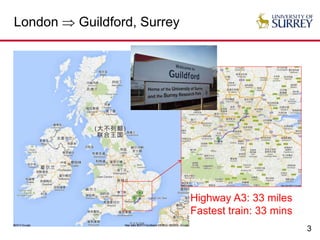
London  Guildford, Surrey
Highway A3: 33 miles
Fastest train: 33 mins
4
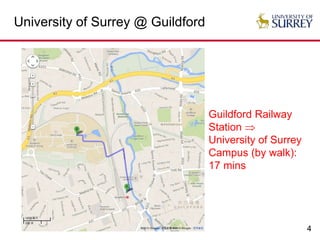
University of Surrey @ Guildford
Guildford Railway
Station 
University of Surrey
Campus (by walk):
17 mins
5
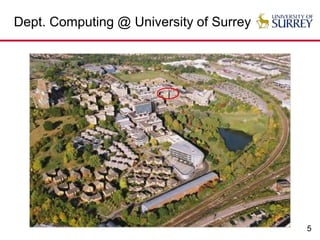
Dept. Computing @ University of Surrey
Usable Security
Humans = The Weakest Link?
7
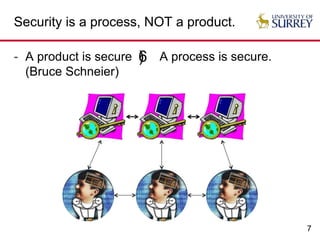
Security is a process, NOT a product.
- A product is secure A process is secure.
(Bruce Schneier)
6)
8
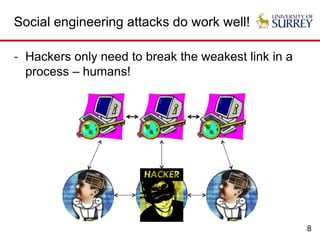
Social engineering attacks do work well!
- Hackers only need to break the weakest link in a
process – humans!
9
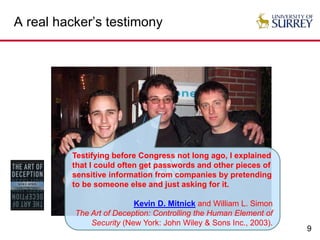
A real hacker’s testimony
Testifying before Congress not long ago, I explained
that I could often get passwords and other pieces of
sensitive information from companies by pretending
to be someone else and just asking for it.
Kevin D. Mitnick and William L. Simon
The Art of Deception: Controlling the Human Element of
Security (New York: John Wiley & Sons Inc., 2003).
10
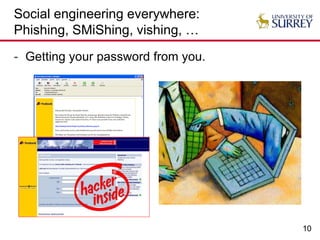
Social engineering everywhere:
Phishing, SMiShing, vishing, …
- Getting your password from you.
11
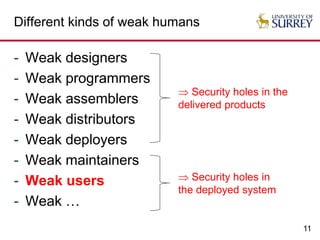
Different kinds of weak humans
- Weak designers
- Weak programmers
- Weak assemblers
- Weak distributors
- Weak deployers
- Weak maintainers
- Weak users
- Weak …
 Security holes in the
delivered products
 Security holes in
the deployed system
12
Are you a weak link of your system?
- Have you installed PGP or any other encryption software
for your email client?
- How often do you use the above encryption software to
protect your personal emails?
- Have you ever written some of your passwords down (on
paper, on mobile phone, …) to avoid forgetting them?
- Are you sharing the same passwords over multiple web
sites?
- How often do you click the detail of a digital certificate
shown in your web browser and check its content?
- Have you changed the default password of your home
router?
Usable Security
Security vs. Usability
14
What does security mean?
- Confidentiality
- Information/Systems should be protected from unauthorized
access.
- Tools: Data encryption, user authentication, privacy enhancing
tools, …
- Integrity
- Information/Systems should be protected from unauthorized
manipulation.
- Tools: Cryptographic hashing, digital signature, …
- Availability
- Information should be protected from attacks making it unavailable
to legitimate users (e.g. DoS attacks).
- Tools: intrusion detection, distributed service, …
15
What does usability mean?
- There is no widely accepted explanation. My personal
summary is the following.
- Psychological Acceptability
- A computer system (its functionalities and especially its computer-
human interface) should be designed for easy and correct use
without error by any human user.
- Economic Acceptability
- A computer system should be acceptable to the target human users
with reasonable costs.
- Reconfigurability/Scalability/Sustainability/Manageability
- A computer system should be easily
reconfigured/maintained/managed to adapt to different/new
requirements of end users.
16
Security-usability dilemma
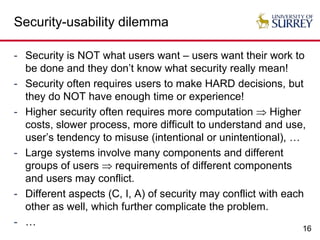
- Security is NOT what users want – users want their work to
be done and they don’t know what security really mean!
- Security often requires users to make HARD decisions, but
they do NOT have enough time or experience!
- Higher security often requires more computation  Higher
costs, slower process, more difficult to understand and use,
user’s tendency to misuse (intentional or unintentional), …
- Large systems involve many components and different
groups of users  requirements of different components
and users may conflict.
- Different aspects (C, I, A) of security may conflict with each
other as well, which further complicate the problem.
- …
17
Security-usability dilemma: examples!
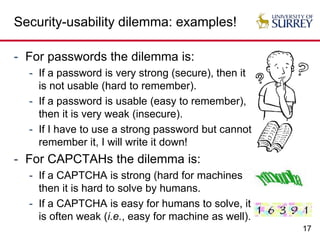
- For passwords the dilemma is:
- If a password is very strong (secure), then it
is not usable (hard to remember).
- If a password is usable (easy to remember),
then it is very weak (insecure).
- If I have to use a strong password but cannot
remember it, I will write it down!
- For CAPCTAHs the dilemma is:
- If a CAPTCHA is strong (hard for machines),
then it is hard to solve by humans.
- If a CAPTCHA is easy for humans to solve, it
is often weak (i.e., easy for machine as well).
Usable Security
Example 1:
Passwords (for User Authentication)
19
How many passwords are there?
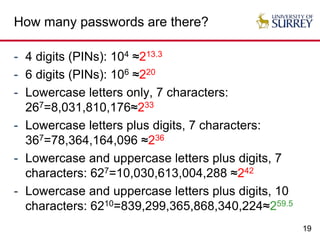
- 4 digits (PINs): 104 ≈213.3
- 6 digits (PINs): 106 ≈220
- Lowercase letters only, 7 characters:
267=8,031,810,176≈233
- Lowercase letters plus digits, 7 characters:
367=78,364,164,096 ≈236
- Lowercase and uppercase letters plus digits, 7
characters: 627=10,030,613,004,288 ≈242
- Lowercase and uppercase letters plus digits, 10
characters: 6210=839,299,365,868,340,224≈259.5
20
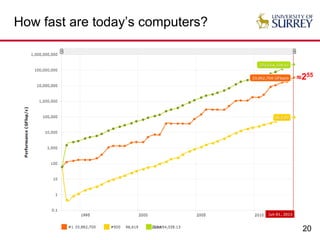
How fast are today’s computers?
255
21
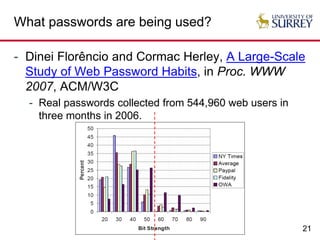
What passwords are being used?
- Dinei Florêncio and Cormac Herley, A Large-Scale
Study of Web Password Habits, in Proc. WWW
2007, ACM/W3C
- Real passwords collected from 544,960 web users in
three months in 2006.
22
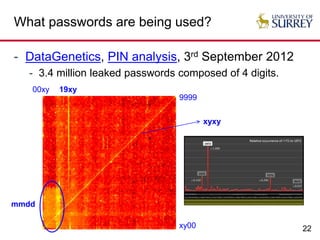
What passwords are being used?
- DataGenetics, PIN analysis, 3rd September 2012
- 3.4 million leaked passwords composed of 4 digits.
xy00
9999
00xy 19xy
mmdd
xyxy
23
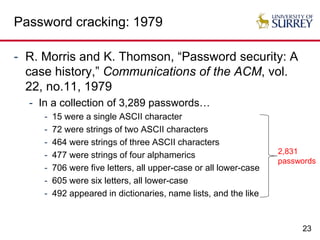
Password cracking: 1979
- R. Morris and K. Thomson, “Password security: A
case history,” Communications of the ACM, vol.
22, no.11, 1979
- In a collection of 3,289 passwords…
- 15 were a single ASCII character
- 72 were strings of two ASCII characters
- 464 were strings of three ASCII characters
- 477 were strings of four alphamerics
- 706 were five letters, all upper-case or all lower-case
- 605 were six letters, all lower-case
- 492 appeared in dictionaries, name lists, and the like
2,831
passwords
24
Password cracking: 1990
- Daniel V. Klein, “Foiling the Cracker: A Survey
of, and Improvements to, Password Security,” in
Proc. USENIX Workshop on Security, 1990
- In a set of 15,000 passwords
- 25% were cracked within 12 CPU months
- 21% were cracked in the first week
- 2.7% were cracked within the first 15 minutes
25
Password cracking: 2005
- Arvind Narayanan and Vitaly Shmatikov, “Fast
dictionary attacks on passwords using time-
space tradeoff,” in Proc. CCS’2005, ACM
- In a collection of 142 real user passwords
- 67.6% (96) were cracked with a searching complexity
2.17×10⁹≈231
25
26
Password cracking: 2013
- Dan Goodin, “Anatomy of a hack: How crackers
ransack passwords like ‘qeadzcwrsfxv1331’,” ars
technica, 28 May 2013
- Three crackers were given 16,449 hashed passwords
and the best of them was able to crack 90% of the
passwords.
- Remark 1: All the passwords are considered harder
ones because they are what remained uncracked in a
much larger database of leaked passwords.
- Remark 2: Nate Anderson, Ars deputy editor and a self-
admitted newbie to password cracking, was able to
crack around 50% of the passwords within a few hours.
Usable Security
Password Security-Usability
Dilemma: Solutions?
28
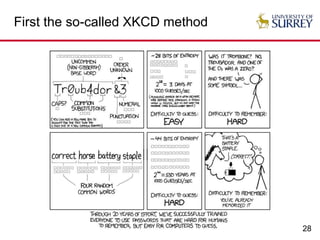
First the so-called XKCD method
29
More solutions?
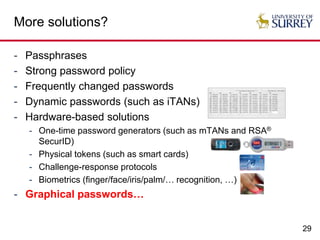
- Passphrases
- Strong password policy
- Frequently changed passwords
- Dynamic passwords (such as iTANs)
- Hardware-based solutions
- One-time password generators (such as mTANs and RSA®
SecurID)
- Physical tokens (such as smart cards)
- Challenge-response protocols
- Biometrics (finger/face/iris/palm/… recognition, …)
- Graphical passwords…
30
Why may graphical passwords help?
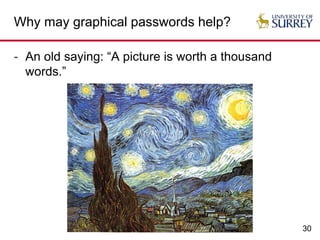
- An old saying: “A picture is worth a thousand
words.”
31
Why may graphical passwords help?
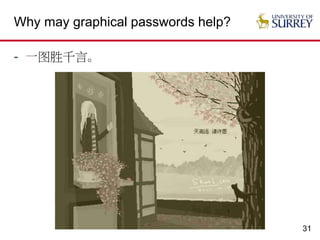
- 一图胜千言。
32
Why may graphical passwords help?
- Graphics and images contain richer information
than texts, and harder to be exactly described by
both humans and computers.
-  Larger password space
-  Less weak passwords
-  More difficult to construct dictionary
-  Easier to remember and harder to forget
-  Harder to tell them to others (at least via phone )
-  A better balance between usability and security?
33
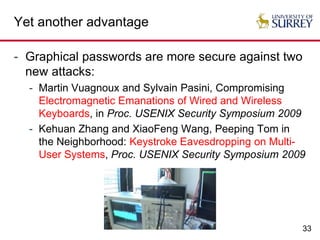
Yet another advantage
- Graphical passwords are more secure against two
new attacks:
- Martin Vuagnoux and Sylvain Pasini, Compromising
Electromagnetic Emanations of Wired and Wireless
Keyboards, in Proc. USENIX Security Symposium 2009
- Kehuan Zhang and XiaoFeng Wang, Peeping Tom in
the Neighborhood: Keystroke Eavesdropping on Multi-
User Systems, Proc. USENIX Security Symposium 2009
34
A classification of graphical passwords
- Class 1: Drawing-based passwords
- Class 2: Location-based graphical passwords
- Class 3: Recognition-based graphical passwords
- Class X: Hybrid graphical passwords?
35
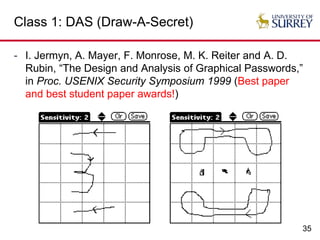
Class 1: DAS (Draw-A-Secret)
- I. Jermyn, A. Mayer, F. Monrose, M. K. Reiter and A. D.
Rubin, “The Design and Analysis of Graphical Passwords,”
in Proc. USENIX Security Symposium 1999 (Best paper
and best student paper awards!)
36
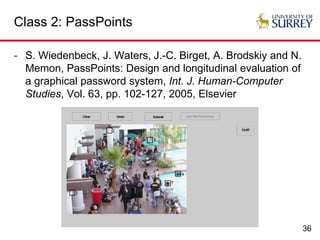
Class 2: PassPoints
- S. Wiedenbeck, J. Waters, J.-C. Birget, A. Brodskiy and N.
Memon, PassPoints: Design and longitudinal evaluation of
a graphical password system, Int. J. Human-Computer
Studies, Vol. 63, pp. 102-127, 2005, Elsevier
37
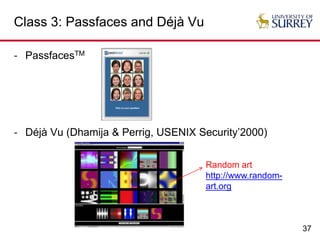
Class 3: Passfaces and Déjà Vu
- PassfacesTM
- Déjà Vu (Dhamija & Perrig, USENIX Security’2000)
Random art
http://www.random-
art.org
38
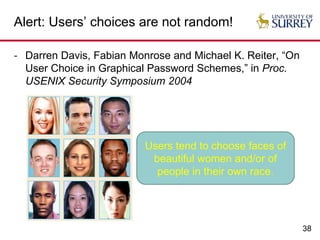
Alert: Users’ choices are not random!
- Darren Davis, Fabian Monrose and Michael K. Reiter, “On
User Choice in Graphical Password Schemes,” in Proc.
USENIX Security Symposium 2004
Users tend to choose faces of
beautiful women and/or of
people in their own race.
39
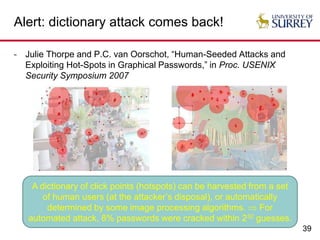
Alert: dictionary attack comes back!
- Julie Thorpe and P.C. van Oorschot, “Human-Seeded Attacks and
Exploiting Hot-Spots in Graphical Passwords,” in Proc. USENIX
Security Symposium 2007
A dictionary of click points (hotspots) can be harvested from a set
of human users (at the attacker’s disposal), or automatically
determined by some image processing algorithms.  For
automated attack, 8% passwords were cracked within 232 guesses.
40
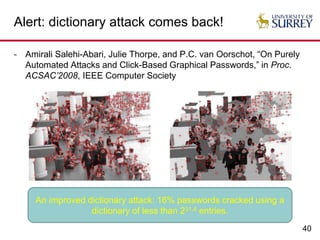
Alert: dictionary attack comes back!
- Amirali Salehi-Abari, Julie Thorpe, and P.C. van Oorschot, “On Purely
Automated Attacks and Click-Based Graphical Passwords,” in Proc.
ACSAC’2008, IEEE Computer Society
An improved dictionary attack: 16% passwords cracked using a
dictionary of less than 231.4 entries.
41
Alert: dictionary attack comes back!
- P.C. van Oorschot, Amirali Salehi-Abari and Julie Thorpe, “Purely
Automated Attacks on PassPoints-Style Graphical Passwords,” IEEE
Trans. Information Forensics and Security, 5(3), 2010
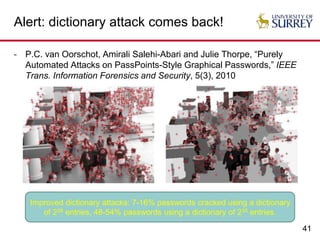
Improved dictionary attacks: 7-16% passwords cracked using a dictionary
of 226 entries, 48-54% passwords using a dictionary of 235 entries.
42
Alert: dictionary attack comes back!
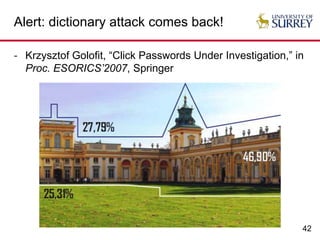
- Krzysztof Golofit, “Click Passwords Under Investigation,” in
Proc. ESORICS’2007, Springer
43
Alert: dictionary attack comes back!
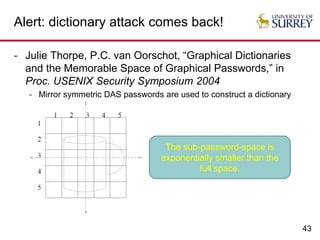
- Julie Thorpe, P.C. van Oorschot, “Graphical Dictionaries
and the Memorable Space of Graphical Passwords,” in
Proc. USENIX Security Symposium 2004
- Mirror symmetric DAS passwords are used to construct a dictionary
The sub-password-space is
exponentially smaller than the
full space.
44
Alert: dictionary attack comes back!
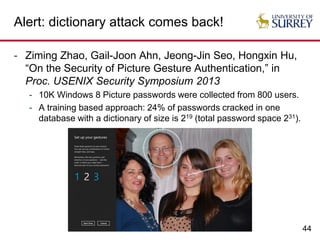
- Ziming Zhao, Gail-Joon Ahn, Jeong-Jin Seo, Hongxin Hu,
“On the Security of Picture Gesture Authentication,” in
Proc. USENIX Security Symposium 2013
- 10K Windows 8 Picture passwords were collected from 800 users.
- A training based approach: 24% of passwords cracked in one
database with a dictionary of size is 219 (total password space 231).
45
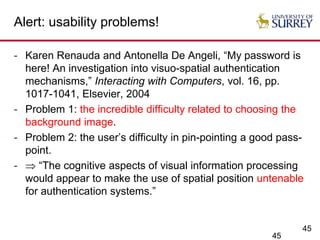
Alert: usability problems!
- Karen Renauda and Antonella De Angeli, “My password is
here! An investigation into visuo-spatial authentication
mechanisms,” Interacting with Computers, vol. 16, pp.
1017-1041, Elsevier, 2004
- Problem 1: the incredible difficulty related to choosing the
background image.
- Problem 2: the user’s difficulty in pin-pointing a good pass-
point.
-  “The cognitive aspects of visual information processing
would appear to make the use of spatial position untenable
for authentication systems.”
45
46
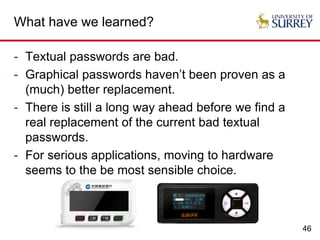
What have we learned?
- Textual passwords are bad.
- Graphical passwords haven’t been proven as a
(much) better replacement.
- There is still a long way ahead before we find a
real replacement of the current bad textual
passwords.
- For serious applications, moving to hardware
seems to the be most sensible choice.
Usable Security
Example 2: CAPTCHAs
48
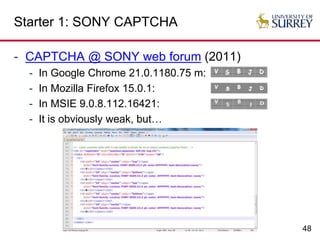
Starter 1: SONY CAPTCHA
- CAPTCHA @ SONY web forum (2011)
- In Google Chrome 21.0.1180.75 m:
- In Mozilla Firefox 15.0.1:
- In MSIE 9.0.8.112.16421:
- It is obviously weak, but…
49
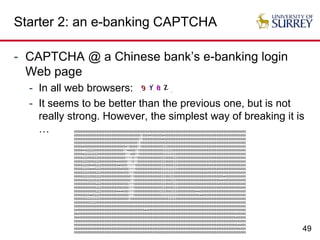
Starter 2: an e-banking CAPTCHA
- CAPTCHA @ a Chinese bank’s e-banking login
Web page
- In all web browsers:
- It seems to be better than the previous one, but is not
really strong. However, the simplest way of breaking it is
… 5555555555555555555555555555555555555555555455555555555555555555555555555555555555555555555555555555
5555555555555555555555555555555555555551555545555555455555555555555555555555555555555555555555555555
5555555555555555555555555555555555555511555555555554555555555555555555555555555555555555555555555555
5555555555555555555555555555555555555115555555555555555555555555555555555000000005555555555555555555
5555545555555555555555555555554155555115555555555555333555555555555555500000000005555555555555555555
5555544222225555555555555555511445551155555555555555333333555555555555505555550005555555555555555555
5555542222222255555555555555551114551155555555555555333333335555555555555555500055555555555555555555
5555522255552255555555555555551111511555555555555553335555333555555555555555500055555555555555555555
5555522255552225555555555455555111511555555555555553335555333555555555555555000555555555555555555555
5555522255455222555555555545555111115555555555555553335555333555555555555555000455555555555555555555
5555522254445222555555555554555511115555555555555553333333333555555555555550005555555555555555555555
5555552225555222555555555555455511155555555555555553333333355555555555555550005555555555555555555555
5555552222552222555555555555555551155555555555555553335533355555555555555500005555555554555555555555
5555555522222222555555555555555551155555555555555553335553335555555555555500055555555445555555555555
5555555555555222555555555555555511155555555555555553335555333555555555555000055555554555555555555555
5555555555555222555555555555555511155555555555555553335555333555555555555000555500055555555555555555
5555555555555222555555555444455511155555555555555533335553333555555555544000000000055555555555555555
5555555254452225555555555555555511155555555555555553333333333555555555555440005555555555555555555555
5555555222222225555555555555555515555555555555555555555333335555555555555555555555555555555555555555
5555555552222555555555555555555555555555555555555555555555555555555555555555555555555555555555555555
5555555555555555555555555555555555555555555555555555555555555555555555555555555555555555555555555555
5455555555555555555555555555555555555555544455555555555555555555555555555555555555555555555555555555
5545555555555555555555555555555555555555555555555555555555555555555555555555555555555555555555455555
5545555555555555555555555555555555555555555555555555555555555555555555555555555555555555555555455555
5555555555555555555555555555555555555555555555555555555555555555555555555555555555555555555555545555
5555555555555555555555555555555555555555555555555555555555555555555555555555555555555555555555545555
5555555555555555555555555555555555555555555555555555555555555555555555555555555555555555555555554555
5555555555555555555555555555555555555555555555555555555555555555555555555555555555555555555555555555
50
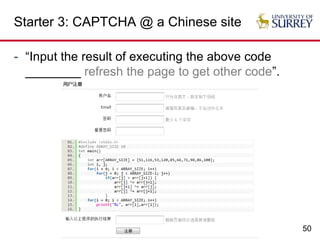
Starter 3: CAPTCHA @ a Chinese site
- “Input the result of executing the above code
________ refresh the page to get other code”.
51
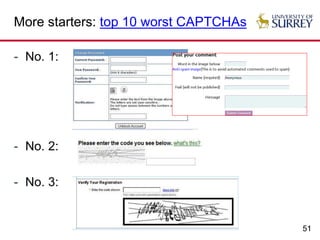
More starters: top 10 worst CAPTCHAs
- No. 1:
- No. 2:
- No. 3:
Usable Security
Captchas (or CAPTCHAs):
A Brief Introduction
53
What are Captchas (or CAPTCHAs)?
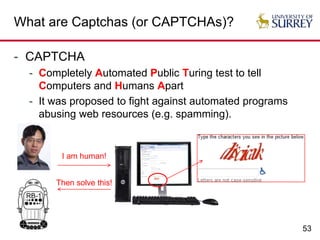
- CAPTCHA
- Completely Automated Public Turing test to tell
Computers and Humans Apart
- It was proposed to fight against automated programs
abusing web resources (e.g. spamming).
I am human!
Then solve this!
54
CAPTCHA has many names!
- CAPTCHA: A Turing test?
- Automated Turing Test? – The human interrogator in a
Turing test is automated by a computer.
- Reversed Turing Test? – The role of something (human
interrogator) is reversed in a Turing test.
- CAPTCHA = HIP (Human Interactive Proof)?
- Historically, Blum et al. coined the term HIP to cover
many human-involved security systems including
CAPTCHA and HumanOID.
- So, CAPTCHA  HIP.
- CAPTCHA = Authentication code?
- …
55
CAPTCHA: before the term was coined
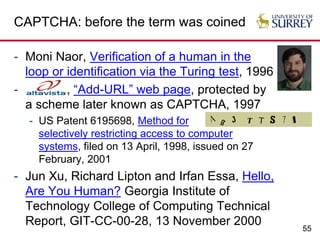
- Moni Naor, Verification of a human in the
loop or identification via the Turing test, 1996
- , “Add-URL” web page, protected by
a scheme later known as CAPTCHA, 1997
- US Patent 6195698, Method for
selectively restricting access to computer
systems, filed on 13 April, 1998, issued on 27
February, 2001
- Jun Xu, Richard Lipton and Irfan Essa, Hello,
Are You Human? Georgia Institute of
Technology College of Computing Technical
Report, GIT-CC-00-28, 13 November 2000
56
CAPTCHA: after the term was coined
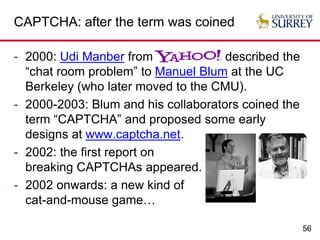
- 2000: Udi Manber from described the
“chat room problem” to Manuel Blum at the UC
Berkeley (who later moved to the CMU).
- 2000-2003: Blum and his collaborators coined the
term “CAPTCHA” and proposed some early
designs at www.captcha.net.
- 2002: the first report on
breaking CAPTCHAs appeared.
- 2002 onwards: a new kind of
cat-and-mouse game…
57
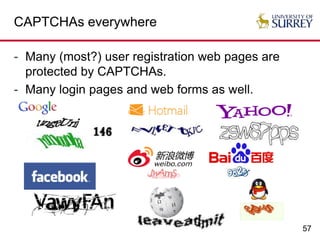
CAPTCHAs everywhere
- Many (most?) user registration web pages are
protected by CAPTCHAs.
- Many login pages and web forms as well.
58
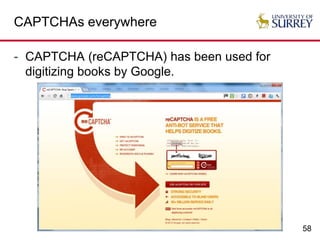
CAPTCHAs everywhere
- CAPTCHA (reCAPTCHA) has been used for
digitizing books by Google.
59
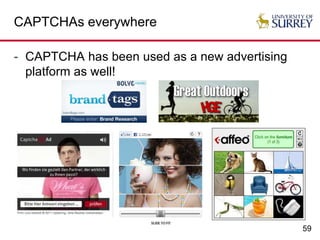
CAPTCHAs everywhere
- CAPTCHA has been used as a new advertising
platform as well!
60
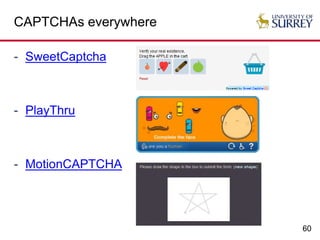
CAPTCHAs everywhere
- SweetCaptcha
- PlayThru
- MotionCAPTCHA
61
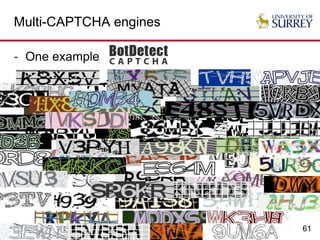
Multi-CAPTCHA engines
- One example
Usable Security
CAPTCHA:
Security-Usability Dilemma
63
Insecure but usable CAPTCHAs
- Almost all (if not all) e-banking CAPTCHAs [S. Li
et al. ACSAC 2010]
64
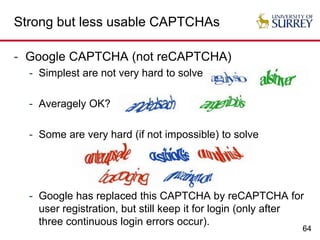
Strong but less usable CAPTCHAs
- Google CAPTCHA (not reCAPTCHA)
- Simplest are not very hard to solve
- Averagely OK?
- Some are very hard (if not impossible) to solve
- Google has replaced this CAPTCHA by reCAPTCHA for
user registration, but still keep it for login (only after
three continuous login errors occur).
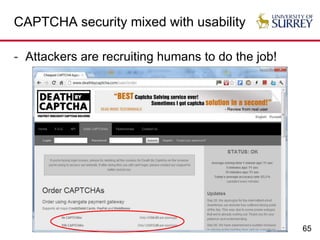
65
CAPTCHA security mixed with usability
- Attackers are recruiting humans to do the job!
66
CAPTCHA security mixed with usability
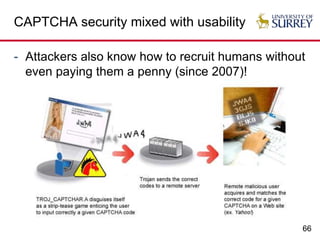
- Attackers also know how to recruit humans without
even paying them a penny (since 2007)!
67
Questions about CAPTCHAs
- Can we finally find a CAPTCHA scheme with a
better balance between security and usability?
- Can security and usability be measured
automatically?
- Do we have any alternative solutions to the
problem?
- Cost-based proof-of-work (PoW) protocols?
- CAPTCHA + (Behavioural) Biometrics?
- CAPTCHA + BMI (brain-machine interface)?
- …
Usable Security
Selected Topics for Research
69
Usable security research
- New forms of graphical passwords
- Pass-Maps: passwords on world maps
- New hardware based user authentication schemes
- Lower costs, simpler HCI, less system requirements, …
- New user authentication scheme secure against
observers
- Observers = shoulder-surfers, hidden cameras,
keyloggers, screen scrapers, malware, …
- Automated security and usability evaluation
- Human simulators, crowdsourcing, formal methods, …
70
Usable security research
- New password management frameworks
- Password policies: Organization vs. Individual
- Human factor vs. Trust management
- Why should users trust a piece of software?
- Password cracking
- Discovery of new rules
- Modeling of human behaviour
- Password strength measurement
- Security visualization
- Better visualization of passwords?
71
Usable security research
- Privacy management
- Privacy vs. Security
- User privacy vs. Digital forensics
- Economic modeling of computer security systems
and related human behaviour
- Business model vs. Mental model
- End users vs. Cyber criminals
- Underground economy
- Human factors and their impact on security of e-
payment systems
- Does NFC based banking bring new security problems?
72
Usable security research
- Impact of mobile computing on usable security
- Enhanced mobility = Better usability = Worse security?
- Usability and security of mobile banking systems
- Usability and security issues in smart homes
- Smart grid and meters
- Smart TV (e.g. TV banking)
- Usability and security of physical-cyber systems
- Internet of Things
- Car security
- Medical and health devices
- …
Usable Security
Thanks for your attention!
Questions + Answers 
Collaborations?

Usable Security: When Security Meets Usability

  • 1.
    Usable Security: When SecurityMeets Usability Shujun LI (李树钧) Senior Lecturer (Associate Professor) Department of Computing University of Surrey http://www.hooklee.com
  • 2.
    2 Outline - Where isUniversity of Surrey?  - Humans = The Weakest Link? - Security vs. Usability - Example 1: Passwords - Usability-security dilemma: textual passwords - Graphical passwords: a better solution? - Example 2: CAPTCHAs - A brief introduction to the term - Usability-security dilemma - Some Selected Topics for Research
  • 3.
    3 London  Guildford,Surrey Highway A3: 33 miles Fastest train: 33 mins
  • 4.
    4 University of Surrey@ Guildford Guildford Railway Station  University of Surrey Campus (by walk): 17 mins
  • 5.
    5 Dept. Computing @University of Surrey
  • 6.
    Usable Security Humans =The Weakest Link?
  • 7.
    7 Security is aprocess, NOT a product. - A product is secure A process is secure. (Bruce Schneier) 6)
  • 8.
    8 Social engineering attacksdo work well! - Hackers only need to break the weakest link in a process – humans!
  • 9.
    9 A real hacker’stestimony Testifying before Congress not long ago, I explained that I could often get passwords and other pieces of sensitive information from companies by pretending to be someone else and just asking for it. Kevin D. Mitnick and William L. Simon The Art of Deception: Controlling the Human Element of Security (New York: John Wiley & Sons Inc., 2003).
  • 10.
    10 Social engineering everywhere: Phishing,SMiShing, vishing, … - Getting your password from you.
  • 11.
    11 Different kinds ofweak humans - Weak designers - Weak programmers - Weak assemblers - Weak distributors - Weak deployers - Weak maintainers - Weak users - Weak …  Security holes in the delivered products  Security holes in the deployed system
  • 12.
    12 Are you aweak link of your system? - Have you installed PGP or any other encryption software for your email client? - How often do you use the above encryption software to protect your personal emails? - Have you ever written some of your passwords down (on paper, on mobile phone, …) to avoid forgetting them? - Are you sharing the same passwords over multiple web sites? - How often do you click the detail of a digital certificate shown in your web browser and check its content? - Have you changed the default password of your home router?
  • 13.
  • 14.
    14 What does securitymean? - Confidentiality - Information/Systems should be protected from unauthorized access. - Tools: Data encryption, user authentication, privacy enhancing tools, … - Integrity - Information/Systems should be protected from unauthorized manipulation. - Tools: Cryptographic hashing, digital signature, … - Availability - Information should be protected from attacks making it unavailable to legitimate users (e.g. DoS attacks). - Tools: intrusion detection, distributed service, …
  • 15.
    15 What does usabilitymean? - There is no widely accepted explanation. My personal summary is the following. - Psychological Acceptability - A computer system (its functionalities and especially its computer- human interface) should be designed for easy and correct use without error by any human user. - Economic Acceptability - A computer system should be acceptable to the target human users with reasonable costs. - Reconfigurability/Scalability/Sustainability/Manageability - A computer system should be easily reconfigured/maintained/managed to adapt to different/new requirements of end users.
  • 16.
    16 Security-usability dilemma - Securityis NOT what users want – users want their work to be done and they don’t know what security really mean! - Security often requires users to make HARD decisions, but they do NOT have enough time or experience! - Higher security often requires more computation  Higher costs, slower process, more difficult to understand and use, user’s tendency to misuse (intentional or unintentional), … - Large systems involve many components and different groups of users  requirements of different components and users may conflict. - Different aspects (C, I, A) of security may conflict with each other as well, which further complicate the problem. - …
  • 17.
    17 Security-usability dilemma: examples! -For passwords the dilemma is: - If a password is very strong (secure), then it is not usable (hard to remember). - If a password is usable (easy to remember), then it is very weak (insecure). - If I have to use a strong password but cannot remember it, I will write it down! - For CAPCTAHs the dilemma is: - If a CAPTCHA is strong (hard for machines), then it is hard to solve by humans. - If a CAPTCHA is easy for humans to solve, it is often weak (i.e., easy for machine as well).
  • 18.
    Usable Security Example 1: Passwords(for User Authentication)
  • 19.
    19 How many passwordsare there? - 4 digits (PINs): 104 ≈213.3 - 6 digits (PINs): 106 ≈220 - Lowercase letters only, 7 characters: 267=8,031,810,176≈233 - Lowercase letters plus digits, 7 characters: 367=78,364,164,096 ≈236 - Lowercase and uppercase letters plus digits, 7 characters: 627=10,030,613,004,288 ≈242 - Lowercase and uppercase letters plus digits, 10 characters: 6210=839,299,365,868,340,224≈259.5
  • 20.
    20 How fast aretoday’s computers? 255
  • 21.
    21 What passwords arebeing used? - Dinei Florêncio and Cormac Herley, A Large-Scale Study of Web Password Habits, in Proc. WWW 2007, ACM/W3C - Real passwords collected from 544,960 web users in three months in 2006.
  • 22.
    22 What passwords arebeing used? - DataGenetics, PIN analysis, 3rd September 2012 - 3.4 million leaked passwords composed of 4 digits. xy00 9999 00xy 19xy mmdd xyxy
  • 23.
    23 Password cracking: 1979 -R. Morris and K. Thomson, “Password security: A case history,” Communications of the ACM, vol. 22, no.11, 1979 - In a collection of 3,289 passwords… - 15 were a single ASCII character - 72 were strings of two ASCII characters - 464 were strings of three ASCII characters - 477 were strings of four alphamerics - 706 were five letters, all upper-case or all lower-case - 605 were six letters, all lower-case - 492 appeared in dictionaries, name lists, and the like 2,831 passwords
  • 24.
    24 Password cracking: 1990 -Daniel V. Klein, “Foiling the Cracker: A Survey of, and Improvements to, Password Security,” in Proc. USENIX Workshop on Security, 1990 - In a set of 15,000 passwords - 25% were cracked within 12 CPU months - 21% were cracked in the first week - 2.7% were cracked within the first 15 minutes
  • 25.
    25 Password cracking: 2005 -Arvind Narayanan and Vitaly Shmatikov, “Fast dictionary attacks on passwords using time- space tradeoff,” in Proc. CCS’2005, ACM - In a collection of 142 real user passwords - 67.6% (96) were cracked with a searching complexity 2.17×10⁹≈231 25
  • 26.
    26 Password cracking: 2013 -Dan Goodin, “Anatomy of a hack: How crackers ransack passwords like ‘qeadzcwrsfxv1331’,” ars technica, 28 May 2013 - Three crackers were given 16,449 hashed passwords and the best of them was able to crack 90% of the passwords. - Remark 1: All the passwords are considered harder ones because they are what remained uncracked in a much larger database of leaked passwords. - Remark 2: Nate Anderson, Ars deputy editor and a self- admitted newbie to password cracking, was able to crack around 50% of the passwords within a few hours.
  • 27.
  • 28.
  • 29.
    29 More solutions? - Passphrases -Strong password policy - Frequently changed passwords - Dynamic passwords (such as iTANs) - Hardware-based solutions - One-time password generators (such as mTANs and RSA® SecurID) - Physical tokens (such as smart cards) - Challenge-response protocols - Biometrics (finger/face/iris/palm/… recognition, …) - Graphical passwords…
  • 30.
    30 Why may graphicalpasswords help? - An old saying: “A picture is worth a thousand words.”
  • 31.
    31 Why may graphicalpasswords help? - 一图胜千言。
  • 32.
    32 Why may graphicalpasswords help? - Graphics and images contain richer information than texts, and harder to be exactly described by both humans and computers. -  Larger password space -  Less weak passwords -  More difficult to construct dictionary -  Easier to remember and harder to forget -  Harder to tell them to others (at least via phone ) -  A better balance between usability and security?
  • 33.
    33 Yet another advantage -Graphical passwords are more secure against two new attacks: - Martin Vuagnoux and Sylvain Pasini, Compromising Electromagnetic Emanations of Wired and Wireless Keyboards, in Proc. USENIX Security Symposium 2009 - Kehuan Zhang and XiaoFeng Wang, Peeping Tom in the Neighborhood: Keystroke Eavesdropping on Multi- User Systems, Proc. USENIX Security Symposium 2009
  • 34.
    34 A classification ofgraphical passwords - Class 1: Drawing-based passwords - Class 2: Location-based graphical passwords - Class 3: Recognition-based graphical passwords - Class X: Hybrid graphical passwords?
  • 35.
    35 Class 1: DAS(Draw-A-Secret) - I. Jermyn, A. Mayer, F. Monrose, M. K. Reiter and A. D. Rubin, “The Design and Analysis of Graphical Passwords,” in Proc. USENIX Security Symposium 1999 (Best paper and best student paper awards!)
  • 36.
    36 Class 2: PassPoints -S. Wiedenbeck, J. Waters, J.-C. Birget, A. Brodskiy and N. Memon, PassPoints: Design and longitudinal evaluation of a graphical password system, Int. J. Human-Computer Studies, Vol. 63, pp. 102-127, 2005, Elsevier
  • 37.
    37 Class 3: Passfacesand Déjà Vu - PassfacesTM - Déjà Vu (Dhamija & Perrig, USENIX Security’2000) Random art http://www.random- art.org
  • 38.
    38 Alert: Users’ choicesare not random! - Darren Davis, Fabian Monrose and Michael K. Reiter, “On User Choice in Graphical Password Schemes,” in Proc. USENIX Security Symposium 2004 Users tend to choose faces of beautiful women and/or of people in their own race.
  • 39.
    39 Alert: dictionary attackcomes back! - Julie Thorpe and P.C. van Oorschot, “Human-Seeded Attacks and Exploiting Hot-Spots in Graphical Passwords,” in Proc. USENIX Security Symposium 2007 A dictionary of click points (hotspots) can be harvested from a set of human users (at the attacker’s disposal), or automatically determined by some image processing algorithms.  For automated attack, 8% passwords were cracked within 232 guesses.
  • 40.
    40 Alert: dictionary attackcomes back! - Amirali Salehi-Abari, Julie Thorpe, and P.C. van Oorschot, “On Purely Automated Attacks and Click-Based Graphical Passwords,” in Proc. ACSAC’2008, IEEE Computer Society An improved dictionary attack: 16% passwords cracked using a dictionary of less than 231.4 entries.
  • 41.
    41 Alert: dictionary attackcomes back! - P.C. van Oorschot, Amirali Salehi-Abari and Julie Thorpe, “Purely Automated Attacks on PassPoints-Style Graphical Passwords,” IEEE Trans. Information Forensics and Security, 5(3), 2010 Improved dictionary attacks: 7-16% passwords cracked using a dictionary of 226 entries, 48-54% passwords using a dictionary of 235 entries.
  • 42.
    42 Alert: dictionary attackcomes back! - Krzysztof Golofit, “Click Passwords Under Investigation,” in Proc. ESORICS’2007, Springer
  • 43.
    43 Alert: dictionary attackcomes back! - Julie Thorpe, P.C. van Oorschot, “Graphical Dictionaries and the Memorable Space of Graphical Passwords,” in Proc. USENIX Security Symposium 2004 - Mirror symmetric DAS passwords are used to construct a dictionary The sub-password-space is exponentially smaller than the full space.
  • 44.
    44 Alert: dictionary attackcomes back! - Ziming Zhao, Gail-Joon Ahn, Jeong-Jin Seo, Hongxin Hu, “On the Security of Picture Gesture Authentication,” in Proc. USENIX Security Symposium 2013 - 10K Windows 8 Picture passwords were collected from 800 users. - A training based approach: 24% of passwords cracked in one database with a dictionary of size is 219 (total password space 231).
  • 45.
    45 Alert: usability problems! -Karen Renauda and Antonella De Angeli, “My password is here! An investigation into visuo-spatial authentication mechanisms,” Interacting with Computers, vol. 16, pp. 1017-1041, Elsevier, 2004 - Problem 1: the incredible difficulty related to choosing the background image. - Problem 2: the user’s difficulty in pin-pointing a good pass- point. -  “The cognitive aspects of visual information processing would appear to make the use of spatial position untenable for authentication systems.” 45
  • 46.
    46 What have welearned? - Textual passwords are bad. - Graphical passwords haven’t been proven as a (much) better replacement. - There is still a long way ahead before we find a real replacement of the current bad textual passwords. - For serious applications, moving to hardware seems to the be most sensible choice.
  • 47.
  • 48.
    48 Starter 1: SONYCAPTCHA - CAPTCHA @ SONY web forum (2011) - In Google Chrome 21.0.1180.75 m: - In Mozilla Firefox 15.0.1: - In MSIE 9.0.8.112.16421: - It is obviously weak, but…
  • 49.
    49 Starter 2: ane-banking CAPTCHA - CAPTCHA @ a Chinese bank’s e-banking login Web page - In all web browsers: - It seems to be better than the previous one, but is not really strong. However, the simplest way of breaking it is … 5555555555555555555555555555555555555555555455555555555555555555555555555555555555555555555555555555 5555555555555555555555555555555555555551555545555555455555555555555555555555555555555555555555555555 5555555555555555555555555555555555555511555555555554555555555555555555555555555555555555555555555555 5555555555555555555555555555555555555115555555555555555555555555555555555000000005555555555555555555 5555545555555555555555555555554155555115555555555555333555555555555555500000000005555555555555555555 5555544222225555555555555555511445551155555555555555333333555555555555505555550005555555555555555555 5555542222222255555555555555551114551155555555555555333333335555555555555555500055555555555555555555 5555522255552255555555555555551111511555555555555553335555333555555555555555500055555555555555555555 5555522255552225555555555455555111511555555555555553335555333555555555555555000555555555555555555555 5555522255455222555555555545555111115555555555555553335555333555555555555555000455555555555555555555 5555522254445222555555555554555511115555555555555553333333333555555555555550005555555555555555555555 5555552225555222555555555555455511155555555555555553333333355555555555555550005555555555555555555555 5555552222552222555555555555555551155555555555555553335533355555555555555500005555555554555555555555 5555555522222222555555555555555551155555555555555553335553335555555555555500055555555445555555555555 5555555555555222555555555555555511155555555555555553335555333555555555555000055555554555555555555555 5555555555555222555555555555555511155555555555555553335555333555555555555000555500055555555555555555 5555555555555222555555555444455511155555555555555533335553333555555555544000000000055555555555555555 5555555254452225555555555555555511155555555555555553333333333555555555555440005555555555555555555555 5555555222222225555555555555555515555555555555555555555333335555555555555555555555555555555555555555 5555555552222555555555555555555555555555555555555555555555555555555555555555555555555555555555555555 5555555555555555555555555555555555555555555555555555555555555555555555555555555555555555555555555555 5455555555555555555555555555555555555555544455555555555555555555555555555555555555555555555555555555 5545555555555555555555555555555555555555555555555555555555555555555555555555555555555555555555455555 5545555555555555555555555555555555555555555555555555555555555555555555555555555555555555555555455555 5555555555555555555555555555555555555555555555555555555555555555555555555555555555555555555555545555 5555555555555555555555555555555555555555555555555555555555555555555555555555555555555555555555545555 5555555555555555555555555555555555555555555555555555555555555555555555555555555555555555555555554555 5555555555555555555555555555555555555555555555555555555555555555555555555555555555555555555555555555
  • 50.
    50 Starter 3: CAPTCHA@ a Chinese site - “Input the result of executing the above code ________ refresh the page to get other code”.
  • 51.
    51 More starters: top10 worst CAPTCHAs - No. 1: - No. 2: - No. 3:
  • 52.
    Usable Security Captchas (orCAPTCHAs): A Brief Introduction
  • 53.
    53 What are Captchas(or CAPTCHAs)? - CAPTCHA - Completely Automated Public Turing test to tell Computers and Humans Apart - It was proposed to fight against automated programs abusing web resources (e.g. spamming). I am human! Then solve this!
  • 54.
    54 CAPTCHA has manynames! - CAPTCHA: A Turing test? - Automated Turing Test? – The human interrogator in a Turing test is automated by a computer. - Reversed Turing Test? – The role of something (human interrogator) is reversed in a Turing test. - CAPTCHA = HIP (Human Interactive Proof)? - Historically, Blum et al. coined the term HIP to cover many human-involved security systems including CAPTCHA and HumanOID. - So, CAPTCHA  HIP. - CAPTCHA = Authentication code? - …
  • 55.
    55 CAPTCHA: before theterm was coined - Moni Naor, Verification of a human in the loop or identification via the Turing test, 1996 - , “Add-URL” web page, protected by a scheme later known as CAPTCHA, 1997 - US Patent 6195698, Method for selectively restricting access to computer systems, filed on 13 April, 1998, issued on 27 February, 2001 - Jun Xu, Richard Lipton and Irfan Essa, Hello, Are You Human? Georgia Institute of Technology College of Computing Technical Report, GIT-CC-00-28, 13 November 2000
  • 56.
    56 CAPTCHA: after theterm was coined - 2000: Udi Manber from described the “chat room problem” to Manuel Blum at the UC Berkeley (who later moved to the CMU). - 2000-2003: Blum and his collaborators coined the term “CAPTCHA” and proposed some early designs at www.captcha.net. - 2002: the first report on breaking CAPTCHAs appeared. - 2002 onwards: a new kind of cat-and-mouse game…
  • 57.
    57 CAPTCHAs everywhere - Many(most?) user registration web pages are protected by CAPTCHAs. - Many login pages and web forms as well.
  • 58.
    58 CAPTCHAs everywhere - CAPTCHA(reCAPTCHA) has been used for digitizing books by Google.
  • 59.
    59 CAPTCHAs everywhere - CAPTCHAhas been used as a new advertising platform as well!
  • 60.
  • 61.
  • 62.
  • 63.
    63 Insecure but usableCAPTCHAs - Almost all (if not all) e-banking CAPTCHAs [S. Li et al. ACSAC 2010]
  • 64.
    64 Strong but lessusable CAPTCHAs - Google CAPTCHA (not reCAPTCHA) - Simplest are not very hard to solve - Averagely OK? - Some are very hard (if not impossible) to solve - Google has replaced this CAPTCHA by reCAPTCHA for user registration, but still keep it for login (only after three continuous login errors occur).
  • 65.
    65 CAPTCHA security mixedwith usability - Attackers are recruiting humans to do the job!
  • 66.
    66 CAPTCHA security mixedwith usability - Attackers also know how to recruit humans without even paying them a penny (since 2007)!
  • 67.
    67 Questions about CAPTCHAs -Can we finally find a CAPTCHA scheme with a better balance between security and usability? - Can security and usability be measured automatically? - Do we have any alternative solutions to the problem? - Cost-based proof-of-work (PoW) protocols? - CAPTCHA + (Behavioural) Biometrics? - CAPTCHA + BMI (brain-machine interface)? - …
  • 68.
  • 69.
    69 Usable security research -New forms of graphical passwords - Pass-Maps: passwords on world maps - New hardware based user authentication schemes - Lower costs, simpler HCI, less system requirements, … - New user authentication scheme secure against observers - Observers = shoulder-surfers, hidden cameras, keyloggers, screen scrapers, malware, … - Automated security and usability evaluation - Human simulators, crowdsourcing, formal methods, …
  • 70.
    70 Usable security research -New password management frameworks - Password policies: Organization vs. Individual - Human factor vs. Trust management - Why should users trust a piece of software? - Password cracking - Discovery of new rules - Modeling of human behaviour - Password strength measurement - Security visualization - Better visualization of passwords?
  • 71.
    71 Usable security research -Privacy management - Privacy vs. Security - User privacy vs. Digital forensics - Economic modeling of computer security systems and related human behaviour - Business model vs. Mental model - End users vs. Cyber criminals - Underground economy - Human factors and their impact on security of e- payment systems - Does NFC based banking bring new security problems?
  • 72.
    72 Usable security research -Impact of mobile computing on usable security - Enhanced mobility = Better usability = Worse security? - Usability and security of mobile banking systems - Usability and security issues in smart homes - Smart grid and meters - Smart TV (e.g. TV banking) - Usability and security of physical-cyber systems - Internet of Things - Car security - Medical and health devices - …
  • 73.
    Usable Security Thanks foryour attention! Questions + Answers  Collaborations?

Editor's Notes

  • #6 So from the center of London, you need only less than a hour to the Department of Computing, University of Surrey!
  • #10 In the late 20th century, he was convicted of various computer and communications-related crimes. At the time of his arrest, he was the most-wanted computer criminal in the United States. At age 12, Mitnick used social engineering to bypass the punchcard system used in the Los Angeles bus system. After a friendly bus driver told him where he could buy his own ticket punch, he could ride any bus in the greater LA area using unused transfer slips he found in the trash. Social engineering became his primary method of obtaining information, including user-names and passwords and modem phone numbers.[3] Mitnick first gained unauthorized access to a computer network in 1979, at 16, when a friend gave him the phone number for the Ark, the computer system Digital Equipment Corporation (DEC) used for developing their RSTS/E operating system software. He broke into DEC's computer network and copied their software, a crime he was charged with and convicted of in 1988. He was sentenced to 12 months in prison followed by three years of supervised release. Near the end of his supervised release, Mitnick hacked into Pacific Bell voice mail computers. After a warrant was issued for his arrest, Mitnick fled, becoming a fugitive for two and a half years. Mitnick served five years in prison — four and a half years pre-trial and eight months in solitary confinement — because, according to Mitnick, law enforcement officials convinced a judge that he had the ability to "start a nuclear war by whistling into a pay phone"[7] meaning that law enforcement told the judge that he could somehow dial into the NORAD modem via a payphone from prison and communicate with the modem by whistling to launch nuclear missiles.[8] He was released on January 21, 2000. During his supervised release, which ended on January 21, 2003, he was initially forbidden to use any communications technology other than a landline telephone. Mitnick fought this decision in court, eventually winning a ruling in his favor, allowing him to access the Internet. Under the plea deal, Mitnick was also prohibited from profiting from films or books based on his criminal activity for seven years. Mitnick now runs Mitnick Security Consulting LLC, a computer security consultancy. According to the U.S. Department of Justice, Mitnick gained unauthorized access to dozens of computer networks while he was a fugitive. He used cloned cellular phones to hide his location and, among other things, copied valuable proprietary software from some of the country's largest cellular telephone and computer companies. Mitnick also intercepted and stole computer passwords, altered computer networks, and broke into and read private e-mail. Mitnick was apprehended on February 15, 1995 in Raleigh, North Carolina.[4] He was found with cloned cellular phones, more than 100 clone cellular phone codes, and multiple pieces of false identification.[5]
  • #11 Vishing = voice phishing (phishing over voice)
  • #12 Weak distributors may choose to exclude one security-oriented component to make their distributions more competitive in the market in term of price.
  • #15 Privacy may be covered by confidentiality.
  • #16 Costs include but not limited to: hardware costs, software costs, management and maintenance costs, training costs, personnel costs (e.g. a technician may be needed), time consumed by users on the systems to do a particular task.
  • #18 Let’s look at some examples.
  • #24 Exactly 30 years ago…
  • #25 Around 20 years ago…
  • #26 Four years ago…
  • #27 Rule based approach, hybrid approach, …
  • #30 All of them have some usability problems. We will focus on graphical passwords to show it’s not trivial to have a better solution.
  • #31 Vicent William van Gogh (1853-1890): Starry, Starry Night
  • #32 Actually, as you have already seen, Chinese characters are also pictures 
  • #40 Observed click points.
  • #41 Observed click points.
  • #46 Are they (partially) solved by pass-fractals?
  • #49 Weak developer.
  • #50 Weak developer.
  • #51 Weak developer.
  • #55 HumanOID = Human user authentication when the human is naked in a glass house 
  • #57 Moni Naor is a former PhD student of Manuel Blum. The cat-and-mouse game is expected as CAPTCHA was the lazy way of how cryptographers do AI.
  • #58 Can’t find where they use CAPTCHAs? You need a second thought 
  • #66 The boundary between security and usability is mixed. To prevent human solver based attacks, we would like CAPTCHAs to be not very easy, so ideally be moderate hard. This is another balance!
  • #67 It is also possible to recruit users if the attacker is the owner of a legitimate web site with a large volume of visits.