Access Control
1
Access Control
 Two parts to access control
 Authentication: Who goes there?
o Determine whether access is allowed
o Authenticate human to machine
o Authenticate machine to machine
 Authorization: Are you allowed to do that?
o Once you have access, what can you do?
o Enforces limits on actions
 Note: Access control often used as synonym for
authorization
2
Authentication
3
Who Goes There?
 How to authenticate a human to a machine?
 Can be based on…
o Something you know
 For example, a password
o Something you have
 For example, a smartcard
o Something you are
 For example, your fingerprint
4
Something You Know
 Passwords
 Lots of things act as passwords!
o PIN
o Social security number
o Date of birth
o Name of your pet, etc.
5
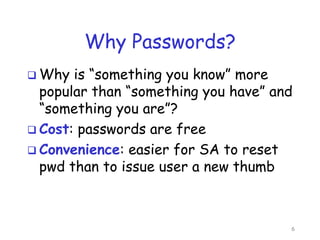
Why Passwords?
 Why is “something you know” more
popular than “something you have” and
“something you are”?
 Cost: passwords are free
 Convenience: easier for SA to reset
pwd than to issue user a new thumb
6
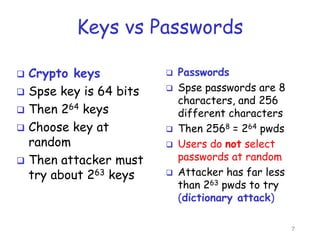
Keys vs Passwords
 Crypto keys
 Spse key is 64 bits
 Then 264 keys
 Choose key at
random
 Then attacker must
try about 263 keys
 Passwords
 Spse passwords are 8
characters, and 256
different characters
 Then 2568 = 264 pwds
 Users do not select
passwords at random
 Attacker has far less
than 263 pwds to try
(dictionary attack)
7
Good and Bad Passwords
 Bad passwords
o frank
o Fido
o password
o 4444
o Pikachu
o 102560
o AustinStamp
 Good Passwords?
o jfIej,43j-EmmL+y
o 09864376537263
o P0kem0N
o FSa7Yago
o 0nceuP0nAt1m8
o PokeGCTall150
8
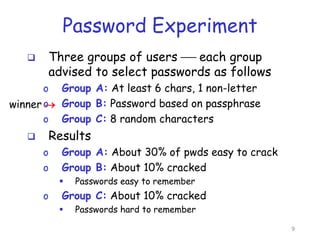
Password Experiment
 Three groups of users  each group
advised to select passwords as follows
o Group A: At least 6 chars, 1 non-letter
o Group B: Password based on passphrase
o Group C: 8 random characters
 Results
o Group A: About 30% of pwds easy to crack
o Group B: About 10% cracked
 Passwords easy to remember
o Group C: About 10% cracked
 Passwords hard to remember
winner 
9
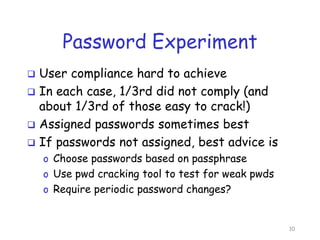
Password Experiment
 User compliance hard to achieve
 In each case, 1/3rd did not comply (and
about 1/3rd of those easy to crack!)
 Assigned passwords sometimes best
 If passwords not assigned, best advice is
o Choose passwords based on passphrase
o Use pwd cracking tool to test for weak pwds
o Require periodic password changes?
10
Attacks on Passwords
 Attacker could…
o Target one particular account
o Target any account on system
o Target any account on any system
o Attempt denial of service (DoS) attack
 Common attack path
o Outsider  normal user  administrator
o May only require one weak password!
11
Password Retry
 Suppose system locks after 3 bad
passwords. How long should it lock?
o 5 seconds
o 5 minutes
o Until SA restores service
 What are +’s and -’s of each?
12
Dictionary Attack
 Attacker pre-computes h(x) for all x in a
dictionary of common passwords
 Suppose attacker gets access to password
file containing hashed passwords
o Attacker only needs to compare hashes to his
pre-computed dictionary
o Same attack will work each time
 Can we prevent this attack? Or at least
make attacker’s job more difficult?
13
Other Password Issues
 Too many passwords to remember
o Results in password reuse
o Why is this a problem?
 Who suffers from bad password?
o Login password vs ATM PIN
 Failure to change default passwords
 Social engineering
 Error logs may contain “almost” passwords
 Bugs, keystroke logging, spyware, etc.
14
Passwords
 The bottom line
 Password cracking is too easy!
o One weak password may break security
o Users choose bad passwords
o Social engineering attacks, etc.
 The bad guy has all of the advantages
 All of the math favors bad guys
 Passwords are a big security problem
15
Password Cracking Tools
 Popular password cracking tools
o Password Crackers
o Password Portal
o L0phtCrack and LC4 (Windows)
o John the Ripper (Unix)
 Admins should use these tools to test for
weak passwords since attackers will!
 Good article on password cracking
o Passwords - Conerstone of Computer Security
16
Biometrics
17
Something You Are
 Biometric
o “You are your key”  Schneier
Are
Know Have
 Examples
o Fingerprint
o Handwritten signature
o Facial recognition
o Speech recognition
o Gait (walking) recognition
o “Digital doggie” (odor recognition)
o Many more!
18
Why Biometrics?
 Biometrics seen as desirable replacement
for passwords
 Cheap and reliable biometrics needed
 Today, a very active area of research
 Biometrics are used in security today
o Thumbprint mouse
o Palm print for secure entry
o Fingerprint to unlock car door, etc.
 But biometrics not too popular
o Has not lived up to its promise (yet)
19
Ideal Biometric
 Universal  applies to (almost) everyone
o In reality, no biometric applies to everyone
 Distinguishing  distinguish with certainty
o In reality, cannot hope for 100% certainty
 Permanent  physical characteristic being
measured never changes
o In reality, want it to remain valid for a long time
 Collectable  easy to collect required data
o Depends on whether subjects are cooperative
 Safe, easy to use, etc., etc.
20
Biometric Modes
 Identification  Who goes there?
o Compare one to many
o Example: The FBI fingerprint database
 Authentication  Is that really you?
o Compare one to one
o Example: Thumbprint mouse
 Identification problem more difficult
o More “random” matches since more comparisons
 We are interested in authentication
21
Hand Geometry
 Popular form of biometric
 Measures shape of hand
o Width of hand, fingers
o Length of fingers, etc.
 Human hands not unique
 Hand geometry sufficient
for many situations
 Suitable for authentication
 Not useful for ID problem
22
Hand Geometry
 Advantages
o Quick
o 1 minute for enrollment
o 5 seconds for recognition
o Hands symmetric (use other hand backwards)
 Disadvantages
o Cannot use on very young or very old
o Relatively high equal error rate
23
Iris Patterns
 Iris pattern development is “chaotic”
 Little or no genetic influence
 Different even for identical twins
 Pattern is stable through lifetime
24
Attack on Iris Scan
 Good photo of eye can be scanned
o Attacker could use photo of eye
 Afghan woman was authenticated by
iris scan of old photo
 To prevent photo attack, scanner could
use light to be sure it is a “live” iris
25
Biometrics: The Bottom Line
 Biometrics are hard to forge
 But attacker could
o Steal Alice’s thumb
o Photocopy Bob’s fingerprint, eye, etc.
o Subvert software, database, “trusted path”, …
 Also, how to revoke a “broken” biometric?
 Biometrics are not foolproof!
 Biometric use is limited today
 That should change in the future…
26
Something You Have
 Something in your possession
 Examples include
o Car key
o Laptop computer
 Or specific MAC address
o ATM card, smartcard, etc.
27
2-factor Authentication
 Requires 2 out of 3 of
1. Something you know
2. Something you have
3. Something you are
 Examples
o ATM: Card and PIN
o Credit card: Card and signature
o Smartcard with password/PIN
28
Authorization
29
Authentication vs
Authorization
 Authentication  Who goes there?
o Restrictions on who (or what) can access system
 Authorization  Are you allowed to do that?
o Restrictions on actions of authenticated users
 Authorization is a form of access control
 Authorization enforced by
o Access Control Lists
o Capabilities
30
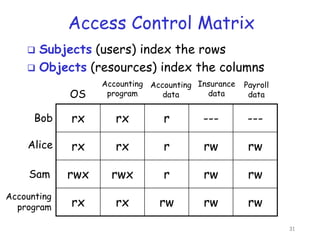
Access Control Matrix
rx rx r --- ---
rx rx r rw rw
rwx rwx r rw rw
rx rx rw rw rw
OS
Accounting
program
Accounting
data
Insurance
data
Payroll
data
Bob
Alice
Sam
Accounting
program
 Subjects (users) index the rows
 Objects (resources) index the columns
31
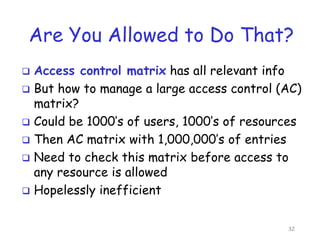
Are You Allowed to Do That?
 Access control matrix has all relevant info
 But how to manage a large access control (AC)
matrix?
 Could be 1000’s of users, 1000’s of resources
 Then AC matrix with 1,000,000’s of entries
 Need to check this matrix before access to
any resource is allowed
 Hopelessly inefficient
32
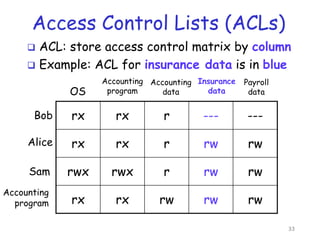
Access Control Lists (ACLs)
 ACL: store access control matrix by column
 Example: ACL for insurance data is in blue
rx rx r --- ---
rx rx r rw rw
rwx rwx r rw rw
rx rx rw rw rw
OS
Accounting
program
Accounting
data
Insurance
data
Payroll
data
Bob
Alice
Sam
Accounting
program
33
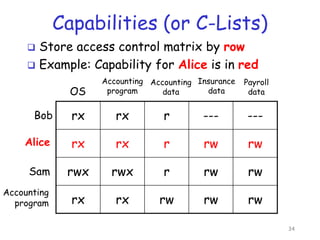
Capabilities (or C-Lists)
 Store access control matrix by row
 Example: Capability for Alice is in red
rx rx r --- ---
rx rx r rw rw
rwx rwx r rw rw
rx rx rw rw rw
OS
Accounting
program
Accounting
data
Insurance
data
Payroll
data
Bob
Alice
Sam
Accounting
program
34
CAPTCHA
35
Turing Test
 Proposed by Alan Turing in 1950
 Human asks questions to one other human
and one computer (without seeing either)
 If human questioner cannot distinguish the
human from the computer responder, the
computer passes the test
 The gold standard in artificial intelligence
 No computer can pass this today
36
CAPTCHA
 CAPTCHA  Completely Automated Public
Turing test to tell Computers and Humans
Apart
 Automated  test is generated and scored
by a computer program
 Public  program and data are public
 Turing test to tell…  humans can pass the
test, but machines cannot pass the test
 Like an inverse Turing test (sort of…)
37
CAPTCHA Paradox
 “…CAPTCHA is a program that can
generate and grade tests that it itself
cannot pass…”
 Paradox  computer creates and scores
test that it cannot pass!
 CAPTCHA used to restrict access to
resources to humans (no computers)
 CAPTCHA useful for access control
38
CAPTCHA Uses?
 Original motivation: automated “bots”
stuffed ballot box in vote for best CS school
 Free email services  spammers used bots
sign up for 1000’s of email accounts
o CAPTCHA employed so only humans can get accts
 Sites that do not want to be automatically
indexed by search engines
o HTML tag only says “please do not index me”
o CAPTCHA would force human intervention
39
CAPTCHA: Rules of the Game
 Must be easy for most humans to pass
 Must be difficult or impossible for
machines to pass
o Even with access to CAPTCHA software
 The only unknown is some random number
 Desirable to have different CAPTCHAs in
case some person cannot pass one type
o Blind person could not pass visual test, etc.
40
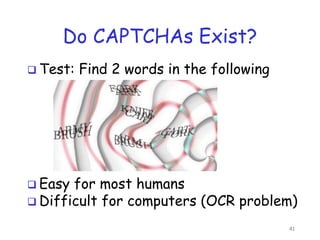
Do CAPTCHAs Exist?
 Test: Find 2 words in the following
 Easy for most humans
 Difficult for computers (OCR problem)
41
CAPTCHA’s and AI
 Computer recognition of distorted text is a
challenging AI problem
o But humans can solve this problem
 Same is true of distorted sound
o Humans also good at solving this
 Hackers who break such a CAPTCHA have
solved a hard AI problem
 Putting hacker’s effort to good use!
 May be other ways to defeat CAPTCHAs…
42
Questions?

Access Control authentication and authorization .pptx

  • 1.
  • 2.
    Access Control  Twoparts to access control  Authentication: Who goes there? o Determine whether access is allowed o Authenticate human to machine o Authenticate machine to machine  Authorization: Are you allowed to do that? o Once you have access, what can you do? o Enforces limits on actions  Note: Access control often used as synonym for authorization 2
  • 3.
  • 4.
    Who Goes There? How to authenticate a human to a machine?  Can be based on… o Something you know  For example, a password o Something you have  For example, a smartcard o Something you are  For example, your fingerprint 4
  • 5.
    Something You Know Passwords  Lots of things act as passwords! o PIN o Social security number o Date of birth o Name of your pet, etc. 5
  • 6.
    Why Passwords?  Whyis “something you know” more popular than “something you have” and “something you are”?  Cost: passwords are free  Convenience: easier for SA to reset pwd than to issue user a new thumb 6
  • 7.
    Keys vs Passwords Crypto keys  Spse key is 64 bits  Then 264 keys  Choose key at random  Then attacker must try about 263 keys  Passwords  Spse passwords are 8 characters, and 256 different characters  Then 2568 = 264 pwds  Users do not select passwords at random  Attacker has far less than 263 pwds to try (dictionary attack) 7
  • 8.
    Good and BadPasswords  Bad passwords o frank o Fido o password o 4444 o Pikachu o 102560 o AustinStamp  Good Passwords? o jfIej,43j-EmmL+y o 09864376537263 o P0kem0N o FSa7Yago o 0nceuP0nAt1m8 o PokeGCTall150 8
  • 9.
    Password Experiment  Threegroups of users  each group advised to select passwords as follows o Group A: At least 6 chars, 1 non-letter o Group B: Password based on passphrase o Group C: 8 random characters  Results o Group A: About 30% of pwds easy to crack o Group B: About 10% cracked  Passwords easy to remember o Group C: About 10% cracked  Passwords hard to remember winner  9
  • 10.
    Password Experiment  Usercompliance hard to achieve  In each case, 1/3rd did not comply (and about 1/3rd of those easy to crack!)  Assigned passwords sometimes best  If passwords not assigned, best advice is o Choose passwords based on passphrase o Use pwd cracking tool to test for weak pwds o Require periodic password changes? 10
  • 11.
    Attacks on Passwords Attacker could… o Target one particular account o Target any account on system o Target any account on any system o Attempt denial of service (DoS) attack  Common attack path o Outsider  normal user  administrator o May only require one weak password! 11
  • 12.
    Password Retry  Supposesystem locks after 3 bad passwords. How long should it lock? o 5 seconds o 5 minutes o Until SA restores service  What are +’s and -’s of each? 12
  • 13.
    Dictionary Attack  Attackerpre-computes h(x) for all x in a dictionary of common passwords  Suppose attacker gets access to password file containing hashed passwords o Attacker only needs to compare hashes to his pre-computed dictionary o Same attack will work each time  Can we prevent this attack? Or at least make attacker’s job more difficult? 13
  • 14.
    Other Password Issues Too many passwords to remember o Results in password reuse o Why is this a problem?  Who suffers from bad password? o Login password vs ATM PIN  Failure to change default passwords  Social engineering  Error logs may contain “almost” passwords  Bugs, keystroke logging, spyware, etc. 14
  • 15.
    Passwords  The bottomline  Password cracking is too easy! o One weak password may break security o Users choose bad passwords o Social engineering attacks, etc.  The bad guy has all of the advantages  All of the math favors bad guys  Passwords are a big security problem 15
  • 16.
    Password Cracking Tools Popular password cracking tools o Password Crackers o Password Portal o L0phtCrack and LC4 (Windows) o John the Ripper (Unix)  Admins should use these tools to test for weak passwords since attackers will!  Good article on password cracking o Passwords - Conerstone of Computer Security 16
  • 17.
  • 18.
    Something You Are Biometric o “You are your key”  Schneier Are Know Have  Examples o Fingerprint o Handwritten signature o Facial recognition o Speech recognition o Gait (walking) recognition o “Digital doggie” (odor recognition) o Many more! 18
  • 19.
    Why Biometrics?  Biometricsseen as desirable replacement for passwords  Cheap and reliable biometrics needed  Today, a very active area of research  Biometrics are used in security today o Thumbprint mouse o Palm print for secure entry o Fingerprint to unlock car door, etc.  But biometrics not too popular o Has not lived up to its promise (yet) 19
  • 20.
    Ideal Biometric  Universal applies to (almost) everyone o In reality, no biometric applies to everyone  Distinguishing  distinguish with certainty o In reality, cannot hope for 100% certainty  Permanent  physical characteristic being measured never changes o In reality, want it to remain valid for a long time  Collectable  easy to collect required data o Depends on whether subjects are cooperative  Safe, easy to use, etc., etc. 20
  • 21.
    Biometric Modes  Identification Who goes there? o Compare one to many o Example: The FBI fingerprint database  Authentication  Is that really you? o Compare one to one o Example: Thumbprint mouse  Identification problem more difficult o More “random” matches since more comparisons  We are interested in authentication 21
  • 22.
    Hand Geometry  Popularform of biometric  Measures shape of hand o Width of hand, fingers o Length of fingers, etc.  Human hands not unique  Hand geometry sufficient for many situations  Suitable for authentication  Not useful for ID problem 22
  • 23.
    Hand Geometry  Advantages oQuick o 1 minute for enrollment o 5 seconds for recognition o Hands symmetric (use other hand backwards)  Disadvantages o Cannot use on very young or very old o Relatively high equal error rate 23
  • 24.
    Iris Patterns  Irispattern development is “chaotic”  Little or no genetic influence  Different even for identical twins  Pattern is stable through lifetime 24
  • 25.
    Attack on IrisScan  Good photo of eye can be scanned o Attacker could use photo of eye  Afghan woman was authenticated by iris scan of old photo  To prevent photo attack, scanner could use light to be sure it is a “live” iris 25
  • 26.
    Biometrics: The BottomLine  Biometrics are hard to forge  But attacker could o Steal Alice’s thumb o Photocopy Bob’s fingerprint, eye, etc. o Subvert software, database, “trusted path”, …  Also, how to revoke a “broken” biometric?  Biometrics are not foolproof!  Biometric use is limited today  That should change in the future… 26
  • 27.
    Something You Have Something in your possession  Examples include o Car key o Laptop computer  Or specific MAC address o ATM card, smartcard, etc. 27
  • 28.
    2-factor Authentication  Requires2 out of 3 of 1. Something you know 2. Something you have 3. Something you are  Examples o ATM: Card and PIN o Credit card: Card and signature o Smartcard with password/PIN 28
  • 29.
  • 30.
    Authentication vs Authorization  Authentication Who goes there? o Restrictions on who (or what) can access system  Authorization  Are you allowed to do that? o Restrictions on actions of authenticated users  Authorization is a form of access control  Authorization enforced by o Access Control Lists o Capabilities 30
  • 31.
    Access Control Matrix rxrx r --- --- rx rx r rw rw rwx rwx r rw rw rx rx rw rw rw OS Accounting program Accounting data Insurance data Payroll data Bob Alice Sam Accounting program  Subjects (users) index the rows  Objects (resources) index the columns 31
  • 32.
    Are You Allowedto Do That?  Access control matrix has all relevant info  But how to manage a large access control (AC) matrix?  Could be 1000’s of users, 1000’s of resources  Then AC matrix with 1,000,000’s of entries  Need to check this matrix before access to any resource is allowed  Hopelessly inefficient 32
  • 33.
    Access Control Lists(ACLs)  ACL: store access control matrix by column  Example: ACL for insurance data is in blue rx rx r --- --- rx rx r rw rw rwx rwx r rw rw rx rx rw rw rw OS Accounting program Accounting data Insurance data Payroll data Bob Alice Sam Accounting program 33
  • 34.
    Capabilities (or C-Lists) Store access control matrix by row  Example: Capability for Alice is in red rx rx r --- --- rx rx r rw rw rwx rwx r rw rw rx rx rw rw rw OS Accounting program Accounting data Insurance data Payroll data Bob Alice Sam Accounting program 34
  • 35.
  • 36.
    Turing Test  Proposedby Alan Turing in 1950  Human asks questions to one other human and one computer (without seeing either)  If human questioner cannot distinguish the human from the computer responder, the computer passes the test  The gold standard in artificial intelligence  No computer can pass this today 36
  • 37.
    CAPTCHA  CAPTCHA Completely Automated Public Turing test to tell Computers and Humans Apart  Automated  test is generated and scored by a computer program  Public  program and data are public  Turing test to tell…  humans can pass the test, but machines cannot pass the test  Like an inverse Turing test (sort of…) 37
  • 38.
    CAPTCHA Paradox  “…CAPTCHAis a program that can generate and grade tests that it itself cannot pass…”  Paradox  computer creates and scores test that it cannot pass!  CAPTCHA used to restrict access to resources to humans (no computers)  CAPTCHA useful for access control 38
  • 39.
    CAPTCHA Uses?  Originalmotivation: automated “bots” stuffed ballot box in vote for best CS school  Free email services  spammers used bots sign up for 1000’s of email accounts o CAPTCHA employed so only humans can get accts  Sites that do not want to be automatically indexed by search engines o HTML tag only says “please do not index me” o CAPTCHA would force human intervention 39
  • 40.
    CAPTCHA: Rules ofthe Game  Must be easy for most humans to pass  Must be difficult or impossible for machines to pass o Even with access to CAPTCHA software  The only unknown is some random number  Desirable to have different CAPTCHAs in case some person cannot pass one type o Blind person could not pass visual test, etc. 40
  • 41.
    Do CAPTCHAs Exist? Test: Find 2 words in the following  Easy for most humans  Difficult for computers (OCR problem) 41
  • 42.
    CAPTCHA’s and AI Computer recognition of distorted text is a challenging AI problem o But humans can solve this problem  Same is true of distorted sound o Humans also good at solving this  Hackers who break such a CAPTCHA have solved a hard AI problem  Putting hacker’s effort to good use!  May be other ways to defeat CAPTCHAs… 42
  • 43.