


Usability Essentials
Sid B. Dane, CUA
Online / Front End Development
November 29, 2010
Usability Essentials


Who am I?


•   1990: Application Developer
•   1994: Network Engineer
•   1997: Internet and Multi Media Developer
•   2006: Rich Internet Developer
•   2008: Certified Usability Analyst
•   2012: Scrum Master / Agile Project Lead / Coach


                                                                                               To: appendix


                           Usability Essentials, Sid B. Dane, November 29, 2010                               2
Usability Essentials


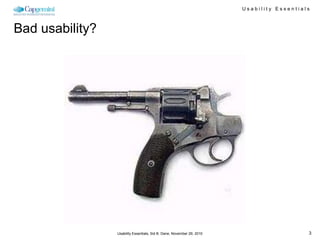
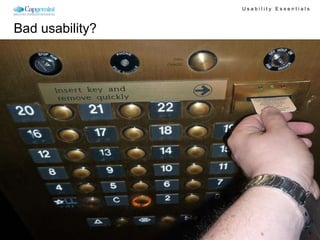
Bad usability?


                 Usability Essentials, Sid B. Dane, November 29, 2010                      3
Usability Essentials


Bad usability?


                 Usability Essentials, Sid B. Dane, November 29, 2010                      4
Usability Essentials


Bad usability?


                 Usability Essentials, Sid B. Dane, November 29, 2010                      5
Usability Essentials


Why is usability important?


      You are not
       your user
          (No matter how good you think you are)


                                                                                       To: appendix


                   Usability Essentials, Sid B. Dane, November 29, 2010                               6
Usability Essentials


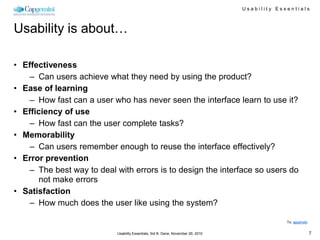
Usability is about…

• Effectiveness
    – Can users achieve what they need by using the product?
• Ease of learning
    – How fast can a user who has never seen the interface learn to use it?
• Efficiency of use
    – How fast can the user complete tasks?
• Memorability
    – Can users remember enough to reuse the interface effectively?
• Error prevention
    – The best way to deal with errors is to design the interface so users do
       not make errors
• Satisfaction
    – How much does the user like using the system?

                                                                                                To: appendix


                            Usability Essentials, Sid B. Dane, November 29, 2010                               7
Usability Essentials


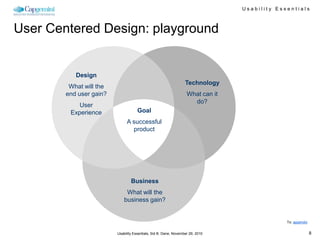
User Centered Design: playground


           Design
                                                                  Technology
         What will the
        end user gain?                                             What can it
                                                                     do?
            User
         Experience                  Goal
                              A successful
                                product


                                 Business
                              What will the
                             business gain?


                                                                                              To: appendix


                         Usability Essentials, Sid B. Dane, November 29, 2010                                8
Usability Essentials


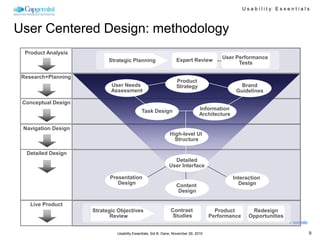
User Centered Design: methodology
  Product Analysis
                                                                                         User Performance
                           Strategic Planning                     Expert Review
                                                                                               Tests

 Research+Planning
                                                                  Product
                            User Needs                            Strategy                       Brand
                            Assessment                                                         Guidelines

 Conceptual Design
                                            Task Design                        Information
                                                                               Architecture

 Navigation Design
                                                              High-level UI
                                                                Structure

  Detailed Design
                                                               Detailed
                                                             User Interface

                           Presentation                                                       Interaction
                              Design                              Content                       Design
                                                                  Design

    Live Product
                     Strategic Objectives                     Contrast                 Product       Redesign
                            Review                             Studies               Performance    Opportunities
                                                                                                                    To: appendix


                              Usability Essentials, Sid B. Dane, November 29, 2010                                                 9
Usability Essentials


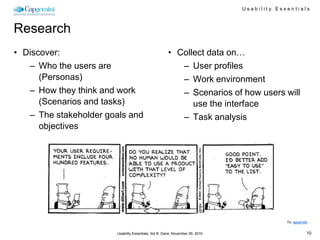
Research
• Discover:                                           • Collect data on…
   – Who the users are                                   – User profiles
      (Personas)                                         – Work environment
   – How they think and work                             – Scenarios of how users will
      (Scenarios and tasks)                                 use the interface
   – The stakeholder goals and                           – Task analysis
      objectives


                                                                                           To: appendix


                       Usability Essentials, Sid B. Dane, November 29, 2010                           10
Usability Essentials


Mental models

•   People come with mental models
•   Usually come from past experience
•   Mental models don’t always match reality
•   Mental models set expectations, which drive and shape behavior

People are “very active problem solvers who always have a current general model in mind
  that drives their behavior in a very systematic way, but who are also constantly refining
  and revising this model in response to feedback.” - Deborah Mayhew


                                                                                                     To: appendix


                                 Usability Essentials, Sid B. Dane, November 29, 2010                           11
Usability Essentials


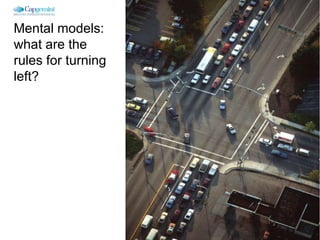
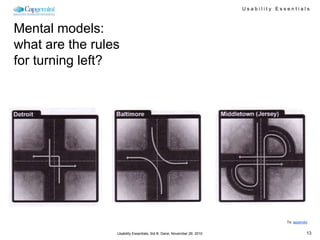
Mental models:
what are the
rules for turning
left?


                                                                                        To: appendix


                    Usability Essentials, Sid B. Dane, November 29, 2010                           12
Usability Essentials


Mental models:
what are the rules
for turning left?


                                                                                     To: appendix


                 Usability Essentials, Sid B. Dane, November 29, 2010                           13
Usability Essentials


It’s easy to miss something you’re not looking for


    http://www.youtube.com/watch?v=Ahg6qcgoay4&feature=player_embedded

                                                                                             To: appendix


                         Usability Essentials, Sid B. Dane, November 29, 2010                           14
Usability Essentials


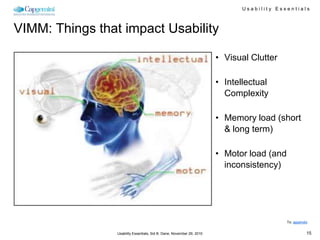
VIMM: Things that impact Usability

                                                                        • Visual Clutter

                                                                        • Intellectual
                                                                          Complexity

                                                                        • Memory load (short
                                                                          & long term)

                                                                        • Motor load (and
                                                                          inconsistency)


                                                                                            To: appendix


                 Usability Essentials, Sid B. Dane, November 29, 2010                                  15
Usability Essentials


 80%
of Usability is
  determined
        by the
     interface
  structure or
 navigational
    container
                                                                                      To: appendix


                  Usability Essentials, Sid B. Dane, November 29, 2010                           16
Usability Essentials


Usability guidelines


         A bit more practical…


                  Usability Essentials, Sid B. Dane, November 29, 2010                      17
Usability Essentials


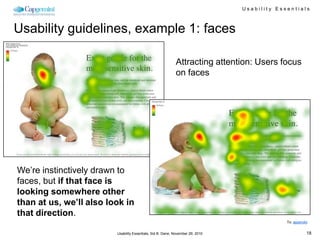
Usability guidelines, example 1: faces

                                                            Attracting attention: Users focus
                                                            on faces


We’re instinctively drawn to
faces, but if that face is
looking somewhere other
than at us, we’ll also look in
that direction.
                                                                                             To: appendix


                         Usability Essentials, Sid B. Dane, November 29, 2010                           18
Usability Essentials


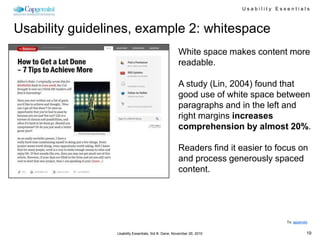
Usability guidelines, example 2: whitespace
                                                      White space makes content more
                                                      readable.

                                                      A study (Lin, 2004) found that
                                                      good use of white space between
                                                      paragraphs and in the left and
                                                      right margins increases
                                                      comprehension by almost 20%.

                                                      Readers find it easier to focus on
                                                      and process generously spaced
                                                      content.


                                                                                     To: appendix


                 Usability Essentials, Sid B. Dane, November 29, 2010                           19
Usability Essentials


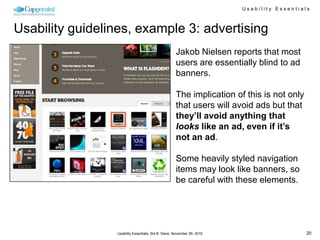
Usability guidelines, example 3: advertising
                                                    Jakob Nielsen reports that most
                                                    users are essentially blind to ad
                                                    banners.

                                                    The implication of this is not only
                                                    that users will avoid ads but that
                                                    they’ll avoid anything that
                                                    looks like an ad, even if it’s
                                                    not an ad.

                                                    Some heavily styled navigation
                                                    items may look like banners, so
                                                    be careful with these elements.


                 Usability Essentials, Sid B. Dane, November 29, 2010                      20
Usability Essentials


Usability guidelines, example 4: text

• According to classic typographic books, the optimal number of
  characters per line is between 55 and 75, but between 75 and 85
  characters per line is more popular in practice.

• Twenty college-age students read news articles displayed in 35, 55, 75,
  or 95 characters per line (cpl) from a computer monitor. Results showed
  that passages formatted with 95 cpl resulted in faster reading speed.

• People with a higher education prefer more characters per line. Thos
  with lower education prefer columns and less characters per line.


                                                                                              To: appendix


                          Usability Essentials, Sid B. Dane, November 29, 2010                           21
Usability Essentials


Usability guidelines, example 4: text

• According to           • Twenty college-age                                   • People with a
  classic typographic      students read news                                     higher education
  books, the optimal       articles displayed in                                  prefer more
  number of                35, 55, 75, or 95                                      characters per line.
  characters per line      characters per line                                    Thos with lower
  is between 55 and        (cpl) from a                                           education prefer
  75, but between 75       computer monitor.                                      columns and less
  and 85 characters        Results showed                                         characters per line.
  per line is more         that passages
  popular in practice.     formatted with 95
                           cpl resulted in
                           faster reading
                           speed.

                                                                                                  To: appendix


                         Usability Essentials, Sid B. Dane, November 29, 2010                                22
Usability Essentials


Usability principles change: “above the fold”
• Jakob Nielsen’s study on how much                            • However, users’ habits have
  users scroll revealed that only 23% of                         significantly changed since then.
  visitors scroll on their first visit to a                      Recent studies prove that users are
  website.                                                       quite comfortable with scrolling and in
                                                                 some situations they are willing to
• This means that 77% of visitors                                scroll to the bottom of the page. Many
  won’t scroll; they’ll just view the                            users are more comfortable with
  content above the fold (i.e. the area                          scrolling than with a pagination, and
  of the page that is visible on the                             for many users the most important
  screen without scrolling down).                                information of the page isn’t
                                                                 necessarily placed “above the fold”
• This data highlights just how important                        (which is because of the variety of
  it is to place your key content on a                           available display resolutions a quite
  prominent position, especially on                              outdated, deprecated term). So it is a
  landing pages                                                  good idea to divide your layout into
                                                                 sections for easy scanning, separating
                                                                 them with a lot of white space.

                                                               • See: unfolding the fold

                                                                                                     To: appendix


                                 Usability Essentials, Sid B. Dane, November 29, 2010                           23
Usability Essentials


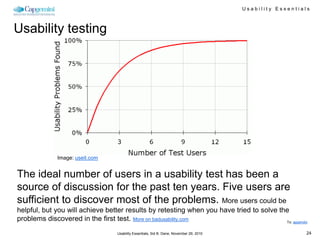
Usability testing


              Image: useit.com


The ideal number of users in a usability test has been a
source of discussion for the past ten years. Five users are
sufficient to discover most of the problems. More users could be
helpful, but you will achieve better results by retesting when you have tried to solve the
problems discovered in the first test. More on badusability.com                          To: appendix


                                  Usability Essentials, Sid B. Dane, November 29, 2010                      24
Usability Essentials


More information
• HFI courses:
   – User Centered Analysis and Conceptual Design
   – The Science and Art of Effective Web and Application Design
   – Practical Usability Testing
   – Putting Research into Practice
   – Courses in NL: http://academy.capgemini.nl/clusters/website-
      usability.aspx

• Online:
   – Jakob Nielsen’s Alertbox: www.useit.com
   – Usability.gov (U.S. Department of Health and Human Services):
      www.usability.gov
   – What makes them click: www.whatmakesthemclick.net
   – UX magazine: uxmag.com
   – UX matters: www.uxmatters.com
   – How to experience the internet: www.siddane.com
   – Bad usability: badusability.com/
                                                                                              To: appendix


                          Usability Essentials, Sid B. Dane, November 29, 2010                           25
Usability Essentials


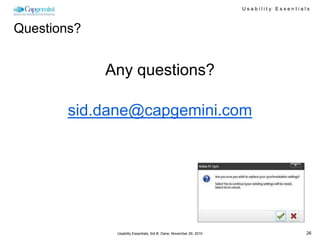
Questions?


             Any questions?

        sid.dane@capgemini.com


              Usability Essentials, Sid B. Dane, November 29, 2010                      26
Usability Essentials


Appendix

• Persona example


                                                                                        To: appendix


                    Usability Essentials, Sid B. Dane, November 29, 2010                           27
Usability Essentials


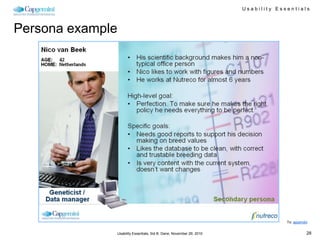
Persona example


                                                                                      To: appendix


                  Usability Essentials, Sid B. Dane, November 29, 2010                           28

Usability essentials

  • 1.
    Usability Essentials Sid B.Dane, CUA Online / Front End Development November 29, 2010
  • 2.
    Usability Essentials Who amI? • 1990: Application Developer • 1994: Network Engineer • 1997: Internet and Multi Media Developer • 2006: Rich Internet Developer • 2008: Certified Usability Analyst • 2012: Scrum Master / Agile Project Lead / Coach To: appendix Usability Essentials, Sid B. Dane, November 29, 2010 2
  • 3.
    Usability Essentials Bad usability? Usability Essentials, Sid B. Dane, November 29, 2010 3
  • 4.
    Usability Essentials Bad usability? Usability Essentials, Sid B. Dane, November 29, 2010 4
  • 5.
    Usability Essentials Bad usability? Usability Essentials, Sid B. Dane, November 29, 2010 5
  • 6.
    Usability Essentials Why isusability important? You are not your user (No matter how good you think you are) To: appendix Usability Essentials, Sid B. Dane, November 29, 2010 6
  • 7.
    Usability Essentials Usability isabout… • Effectiveness – Can users achieve what they need by using the product? • Ease of learning – How fast can a user who has never seen the interface learn to use it? • Efficiency of use – How fast can the user complete tasks? • Memorability – Can users remember enough to reuse the interface effectively? • Error prevention – The best way to deal with errors is to design the interface so users do not make errors • Satisfaction – How much does the user like using the system? To: appendix Usability Essentials, Sid B. Dane, November 29, 2010 7
  • 8.
    Usability Essentials User CenteredDesign: playground Design Technology What will the end user gain? What can it do? User Experience Goal A successful product Business What will the business gain? To: appendix Usability Essentials, Sid B. Dane, November 29, 2010 8
  • 9.
    Usability Essentials User CenteredDesign: methodology Product Analysis User Performance Strategic Planning Expert Review Tests Research+Planning Product User Needs Strategy Brand Assessment Guidelines Conceptual Design Task Design Information Architecture Navigation Design High-level UI Structure Detailed Design Detailed User Interface Presentation Interaction Design Content Design Design Live Product Strategic Objectives Contrast Product Redesign Review Studies Performance Opportunities To: appendix Usability Essentials, Sid B. Dane, November 29, 2010 9
  • 10.
    Usability Essentials Research • Discover: • Collect data on… – Who the users are – User profiles (Personas) – Work environment – How they think and work – Scenarios of how users will (Scenarios and tasks) use the interface – The stakeholder goals and – Task analysis objectives To: appendix Usability Essentials, Sid B. Dane, November 29, 2010 10
  • 11.
    Usability Essentials Mental models • People come with mental models • Usually come from past experience • Mental models don’t always match reality • Mental models set expectations, which drive and shape behavior People are “very active problem solvers who always have a current general model in mind that drives their behavior in a very systematic way, but who are also constantly refining and revising this model in response to feedback.” - Deborah Mayhew To: appendix Usability Essentials, Sid B. Dane, November 29, 2010 11
  • 12.
    Usability Essentials Mental models: whatare the rules for turning left? To: appendix Usability Essentials, Sid B. Dane, November 29, 2010 12
  • 13.
    Usability Essentials Mental models: whatare the rules for turning left? To: appendix Usability Essentials, Sid B. Dane, November 29, 2010 13
  • 14.
    Usability Essentials It’s easyto miss something you’re not looking for http://www.youtube.com/watch?v=Ahg6qcgoay4&feature=player_embedded To: appendix Usability Essentials, Sid B. Dane, November 29, 2010 14
  • 15.
    Usability Essentials VIMM: Thingsthat impact Usability • Visual Clutter • Intellectual Complexity • Memory load (short & long term) • Motor load (and inconsistency) To: appendix Usability Essentials, Sid B. Dane, November 29, 2010 15
  • 16.
    Usability Essentials 80% ofUsability is determined by the interface structure or navigational container To: appendix Usability Essentials, Sid B. Dane, November 29, 2010 16
  • 17.
    Usability Essentials Usability guidelines A bit more practical… Usability Essentials, Sid B. Dane, November 29, 2010 17
  • 18.
    Usability Essentials Usability guidelines,example 1: faces Attracting attention: Users focus on faces We’re instinctively drawn to faces, but if that face is looking somewhere other than at us, we’ll also look in that direction. To: appendix Usability Essentials, Sid B. Dane, November 29, 2010 18
  • 19.
    Usability Essentials Usability guidelines,example 2: whitespace White space makes content more readable. A study (Lin, 2004) found that good use of white space between paragraphs and in the left and right margins increases comprehension by almost 20%. Readers find it easier to focus on and process generously spaced content. To: appendix Usability Essentials, Sid B. Dane, November 29, 2010 19
  • 20.
    Usability Essentials Usability guidelines,example 3: advertising Jakob Nielsen reports that most users are essentially blind to ad banners. The implication of this is not only that users will avoid ads but that they’ll avoid anything that looks like an ad, even if it’s not an ad. Some heavily styled navigation items may look like banners, so be careful with these elements. Usability Essentials, Sid B. Dane, November 29, 2010 20
  • 21.
    Usability Essentials Usability guidelines,example 4: text • According to classic typographic books, the optimal number of characters per line is between 55 and 75, but between 75 and 85 characters per line is more popular in practice. • Twenty college-age students read news articles displayed in 35, 55, 75, or 95 characters per line (cpl) from a computer monitor. Results showed that passages formatted with 95 cpl resulted in faster reading speed. • People with a higher education prefer more characters per line. Thos with lower education prefer columns and less characters per line. To: appendix Usability Essentials, Sid B. Dane, November 29, 2010 21
  • 22.
    Usability Essentials Usability guidelines,example 4: text • According to • Twenty college-age • People with a classic typographic students read news higher education books, the optimal articles displayed in prefer more number of 35, 55, 75, or 95 characters per line. characters per line characters per line Thos with lower is between 55 and (cpl) from a education prefer 75, but between 75 computer monitor. columns and less and 85 characters Results showed characters per line. per line is more that passages popular in practice. formatted with 95 cpl resulted in faster reading speed. To: appendix Usability Essentials, Sid B. Dane, November 29, 2010 22
  • 23.
    Usability Essentials Usability principleschange: “above the fold” • Jakob Nielsen’s study on how much • However, users’ habits have users scroll revealed that only 23% of significantly changed since then. visitors scroll on their first visit to a Recent studies prove that users are website. quite comfortable with scrolling and in some situations they are willing to • This means that 77% of visitors scroll to the bottom of the page. Many won’t scroll; they’ll just view the users are more comfortable with content above the fold (i.e. the area scrolling than with a pagination, and of the page that is visible on the for many users the most important screen without scrolling down). information of the page isn’t necessarily placed “above the fold” • This data highlights just how important (which is because of the variety of it is to place your key content on a available display resolutions a quite prominent position, especially on outdated, deprecated term). So it is a landing pages good idea to divide your layout into sections for easy scanning, separating them with a lot of white space. • See: unfolding the fold To: appendix Usability Essentials, Sid B. Dane, November 29, 2010 23
  • 24.
    Usability Essentials Usability testing Image: useit.com The ideal number of users in a usability test has been a source of discussion for the past ten years. Five users are sufficient to discover most of the problems. More users could be helpful, but you will achieve better results by retesting when you have tried to solve the problems discovered in the first test. More on badusability.com To: appendix Usability Essentials, Sid B. Dane, November 29, 2010 24
  • 25.
    Usability Essentials More information •HFI courses: – User Centered Analysis and Conceptual Design – The Science and Art of Effective Web and Application Design – Practical Usability Testing – Putting Research into Practice – Courses in NL: http://academy.capgemini.nl/clusters/website- usability.aspx • Online: – Jakob Nielsen’s Alertbox: www.useit.com – Usability.gov (U.S. Department of Health and Human Services): www.usability.gov – What makes them click: www.whatmakesthemclick.net – UX magazine: uxmag.com – UX matters: www.uxmatters.com – How to experience the internet: www.siddane.com – Bad usability: badusability.com/ To: appendix Usability Essentials, Sid B. Dane, November 29, 2010 25
  • 26.
    Usability Essentials Questions? Any questions? sid.dane@capgemini.com Usability Essentials, Sid B. Dane, November 29, 2010 26
  • 27.
    Usability Essentials Appendix • Personaexample To: appendix Usability Essentials, Sid B. Dane, November 29, 2010 27
  • 28.
    Usability Essentials Persona example To: appendix Usability Essentials, Sid B. Dane, November 29, 2010 28

Editor's Notes

  • #21 The square banners on the left sidebar of FlashDen28 are actually not ads: they’re content links. They do look uncomfortably close to ad banners and so may be overlooked by some users.