Computer Number Systems
 and Data Representation.
Lecture Outline
   Number Systems
    – Binary, Octal, Hexadecimal
 Representation of characters using codes
 Representation of Numbers
    – Integer, Floating Point, Binary Coded Decimal
   Program Language and Data Types


12/5/2012                                2
Data Representation?
• Representation = Measurement
 Most things in the “Real World” actually exist as
  a single, continuously varying quantity Mass,
    Volume, Speed, Pressure, Temperature
   Easy to measure by “representing” it using a
    different thing that varies in the same way Eg.
    Pressure as the height of column of mercury or as voltage
    produced by a pressure transducer
   These are ANALOG measurements


12/5/2012                                       3
Digital Representation
 Convert ANALOG to DIGITAL measurement by
  using a scale of units
 DIGITAL measurements
    – In units – a set of symbolic values - digits
    – Values larger than any symbol in the set use sequence
      of digits – Units, Tens, Hundreds…
    – Measured in discrete or whole units
    – Difficult to measure something that is not a multiple
      of units in size. Eg Fractions


12/5/2012                                    4
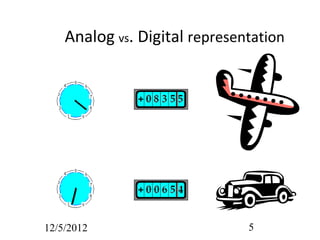
Analog vs. Digital representation


12/5/2012                      5
Data Representation
 Computers use digital representation
 Based on a binary system
    (uses on/off states to represent 2 digits).
   Many different types of data.
    – Examples?
   ALL data (no matter how complex)
    must be represented in memory as binary
    digits (bits).

12/5/2012                                   6
Number systems and computers
   Computers store all data as binary digits, but we
    may need to convert this to a number system we
    are familiar with.

   Computer programs and data are often
    represented (outside the computer) using octal
    and hexadecimal number systems because they
    are a short hand way of representing binary
    numbers.


12/5/2012                                 7
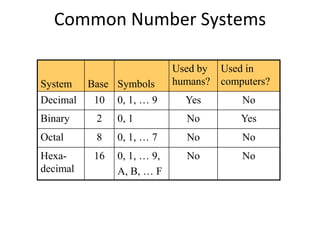
Common Number Systems

                             Used by   Used in
System    Base Symbols       humans?   computers?
Decimal    10   0, 1, … 9      Yes         No
Binary     2    0, 1           No          Yes
Octal      8    0, 1, … 7      No          No
Hexa-      16   0, 1, … 9,     No          No
decimal         A, B, … F
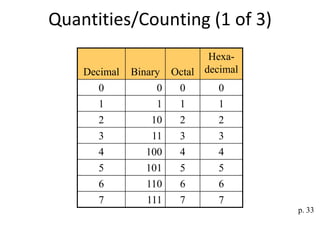
Quantities/Counting (1 of 3)
                              Hexa-
    Decimal   Binary   Octal decimal
      0            0    0       0
      1            1    1       1
      2           10    2       2
      3           11    3       3
      4          100    4       4
      5          101    5       5
      6          110    6       6
      7          111    7       7
                                       p. 33
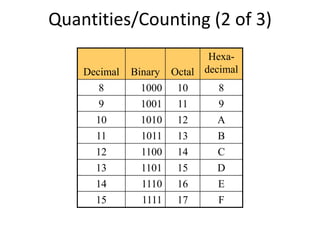
Quantities/Counting (2 of 3)
                              Hexa-
    Decimal   Binary   Octal decimal
       8        1000    10     8
       9        1001    11     9
      10        1010    12     A
      11        1011    13     B
      12        1100    14     C
      13        1101    15     D
      14        1110    16     E
      15        1111    17     F
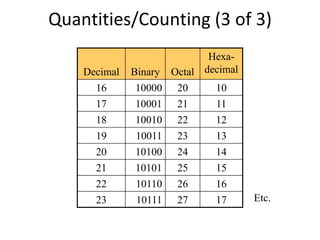
Quantities/Counting (3 of 3)
                              Hexa-
    Decimal   Binary   Octal decimal
      16      10000     20     10
      17      10001     21     11
      18      10010     22     12
      19      10011     23     13
      20      10100     24     14
      21      10101     25     15
      22      10110     26     16
      23      10111     27     17      Etc.
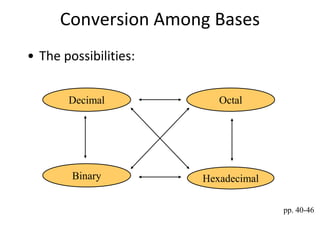
Conversion Among Bases
• The possibilities:


       Decimal            Octal


        Binary         Hexadecimal

                                     pp. 40-46
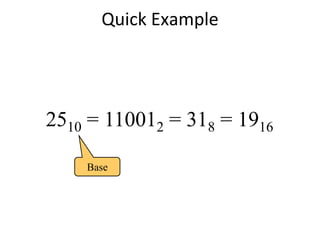
Quick Example


2510 = 110012 = 318 = 1916

    Base
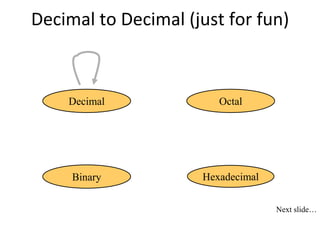
Decimal to Decimal (just for fun)


    Decimal             Octal


     Binary          Hexadecimal

                                   Next slide…
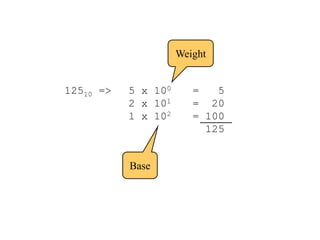
Weight


12510 =>   5 x 100      =   5
           2 x 101      = 20
           1 x 102      = 100
                          125


           Base
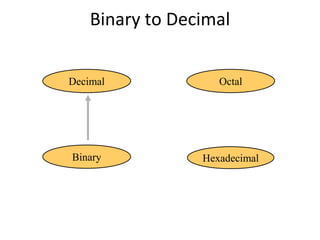
Binary to Decimal


Decimal             Octal


Binary           Hexadecimal
Binary to Decimal
• Technique
  – Multiply each bit by 2n, where n is the “weight”
    of the bit
  – The weight is the position of the bit, starting
    from 0 on the right
  – Add the results
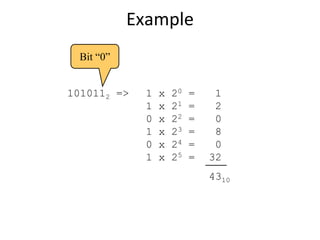
Example
  Bit “0”


1010112 =>    1   x   20   =    1
              1   x   21   =    2
              0   x   22   =    0
              1   x   23   =    8
              0   x   24   =    0
              1   x   25   =   32
                               4310
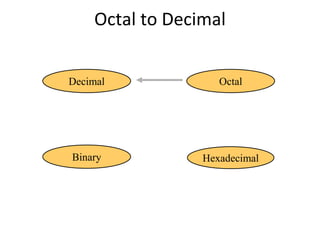
Octal to Decimal


Decimal             Octal


Binary           Hexadecimal
Octal to Decimal
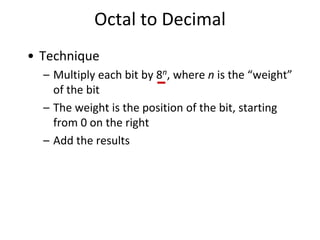
• Technique
  – Multiply each bit by 8n, where n is the “weight”
    of the bit
  – The weight is the position of the bit, starting
    from 0 on the right
  – Add the results
Example


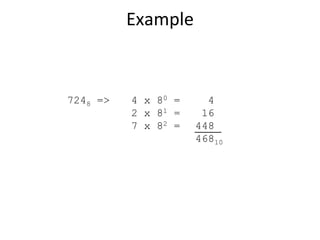
7248 =>   4 x 80 =     4
          2 x 81 =    16
          7 x 82 =   448
                     46810
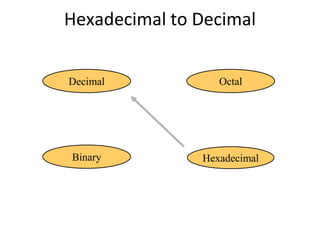
Hexadecimal to Decimal


Decimal           Octal


Binary         Hexadecimal
Hexadecimal to Decimal
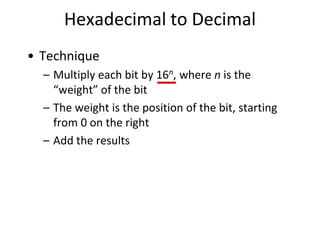
• Technique
  – Multiply each bit by 16n, where n is the
    “weight” of the bit
  – The weight is the position of the bit, starting
    from 0 on the right
  – Add the results
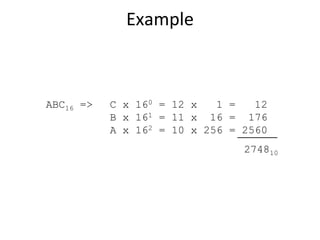
Example


ABC16 =>   C x 160 = 12 x   1 =   12
           B x 161 = 11 x 16 = 176
           A x 162 = 10 x 256 = 2560
                                274810
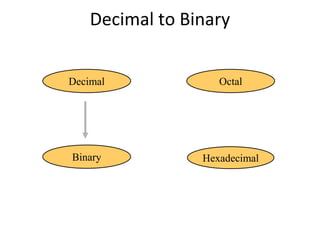
Decimal to Binary


Decimal             Octal


Binary           Hexadecimal
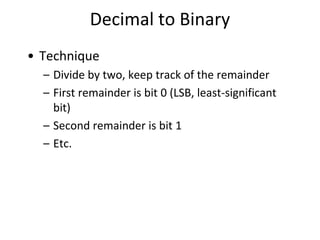
Decimal to Binary
• Technique
  – Divide by two, keep track of the remainder
  – First remainder is bit 0 (LSB, least-significant
    bit)
  – Second remainder is bit 1
  – Etc.
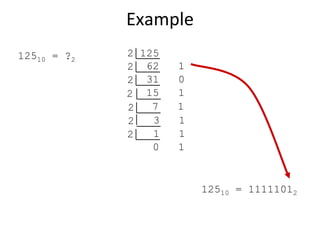
Example
12510 = ?2   2 125
             2 62    1
             2 31    0
             2 15    1
             2   7   1
             2   3   1
             2   1   1
                 0   1


                         12510 = 11111012
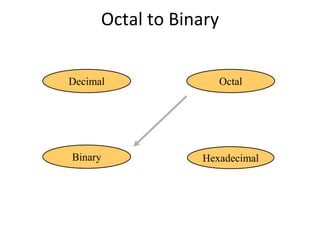
Octal to Binary


Decimal                 Octal


Binary            Hexadecimal
Octal to Binary
• Technique
  – Convert each octal digit to a 3-bit equivalent
    binary representation
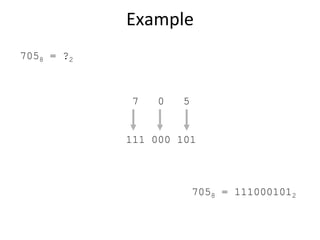
Example
7058 = ?2


            7   0   5


            111 000 101


                        7058 = 1110001012
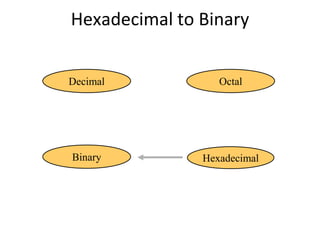
Hexadecimal to Binary


Decimal           Octal


Binary         Hexadecimal
Hexadecimal to Binary
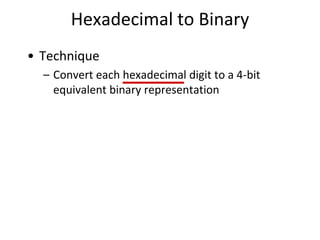
• Technique
  – Convert each hexadecimal digit to a 4-bit
    equivalent binary representation
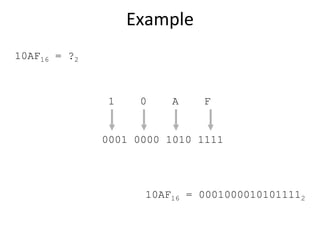
Example
10AF16 = ?2


              1    0    A    F


              0001 0000 1010 1111


                    10AF16 = 00010000101011112
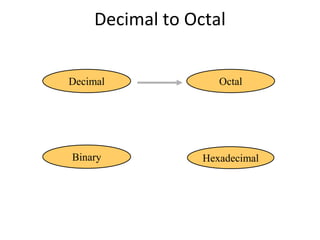
Decimal to Octal


Decimal             Octal


Binary           Hexadecimal
Decimal to Octal
• Technique
  – Divide by 8
  – Keep track of the remainder
Example
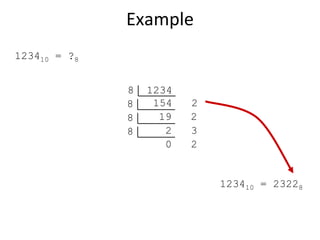
123410 = ?8


              8   1234
              8    154   2
              8     19   2
              8      2   3
                     0   2


                             123410 = 23228
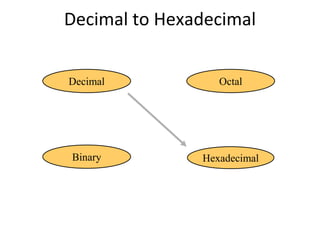
Decimal to Hexadecimal


Decimal           Octal


Binary         Hexadecimal
Decimal to Hexadecimal
• Technique
  – Divide by 16
  – Keep track of the remainder
Example
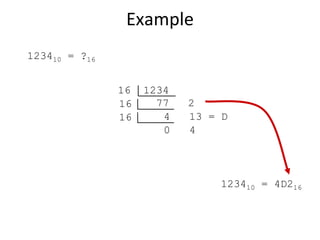
123410 = ?16


               16   1234
               16     77   2
               16      4   13 = D
                       0   4


                               123410 = 4D216
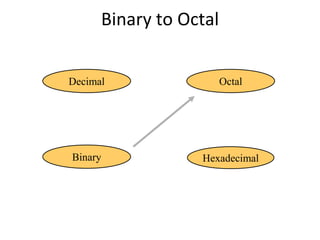
Binary to Octal


Decimal                 Octal


Binary            Hexadecimal
Binary to Octal
• Technique
  – Group bits in threes, starting on right
  – Convert to octal digits
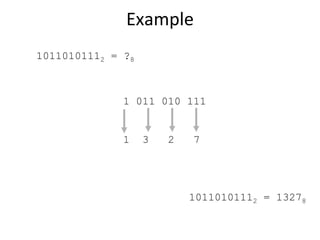
Example
10110101112 = ?8


              1 011 010 111


              1    3   2   7


                           10110101112 = 13278
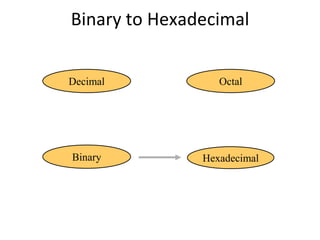
Binary to Hexadecimal


Decimal           Octal


Binary         Hexadecimal
Binary to Hexadecimal
• Technique
  – Group bits in fours, starting on right
  – Convert to hexadecimal digits
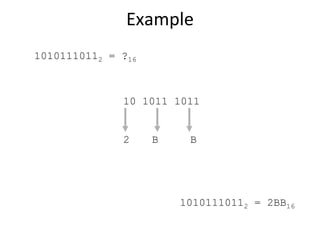
Example
10101110112 = ?16


              10 1011 1011


              2     B    B


                        10101110112 = 2BB16
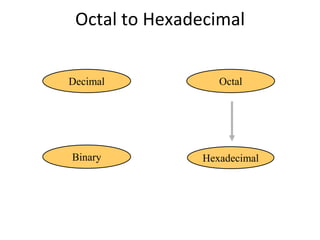
Octal to Hexadecimal


Decimal            Octal


Binary          Hexadecimal
Octal to Hexadecimal
• Technique
  – Use binary as an intermediary
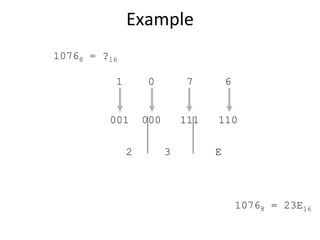
Example
10768 = ?16

          1        0         7        6


         001      000       111   110

              2         3         E


                                          10768 = 23E16
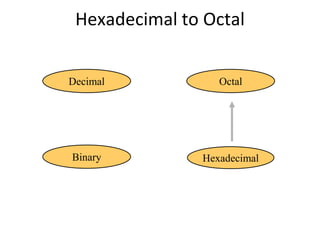
Hexadecimal to Octal


Decimal            Octal


Binary          Hexadecimal
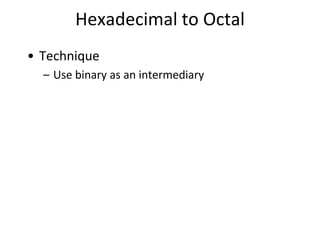
Hexadecimal to Octal
• Technique
  – Use binary as an intermediary
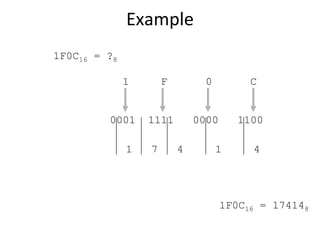
Example
1F0C16 = ?8

              1       F         0         C


         0001     1111        0000      1100

              1   7       4         1     4


                                     1F0C16 = 174148
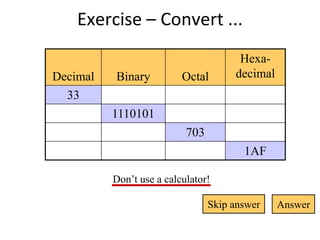
Exercise – Convert ...
                                       Hexa-
Decimal   Binary          Octal       decimal
  33
          1110101
                           703
                                        1AF

          Don’t use a calculator!

                                 Skip answer    Answer
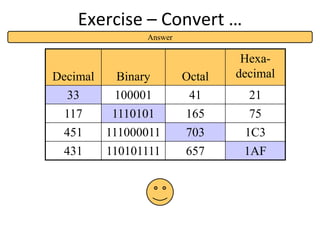
Exercise – Convert …
                Answer

                                  Hexa-
Decimal    Binary        Octal   decimal
  33       100001         41       21
 117      1110101        165       75
 451      111000011      703      1C3
 431      110101111      657      1AF
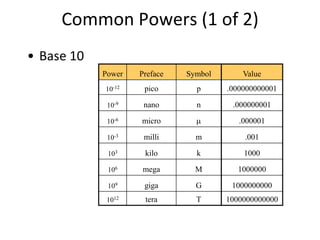
Common Powers (1 of 2)
• Base 10
            Power   Preface   Symbol       Value
            10-12    pico       p      .000000000001

             10-9    nano       n       .000000001

             10-6   micro                 .000001

             10-3    milli      m          .001

             103     kilo       k          1000

             106    mega        M        1000000

             109     giga       G       1000000000
             1012    tera       T      1000000000000
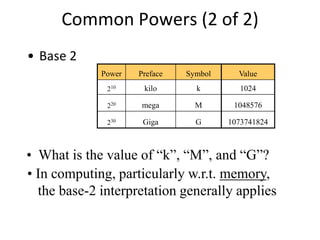
Common Powers (2 of 2)
• Base 2
             Power   Preface   Symbol     Value
              210     kilo       k         1024

              220    mega        M       1048576

              230     Giga       G      1073741824


• What is the value of “k”, “M”, and “G”?
• In computing, particularly w.r.t. memory,
  the base-2 interpretation generally applies
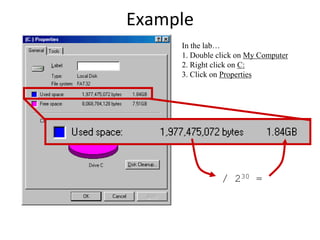
Example
     In the lab…
     1. Double click on My Computer
     2. Right click on C:
     3. Click on Properties


                / 230 =
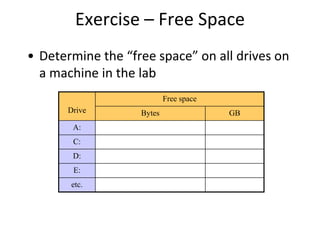
Exercise – Free Space
• Determine the “free space” on all drives on
  a machine in the lab
                           Free space
      Drive        Bytes                GB
       A:
       C:
       D:
       E:
       etc.
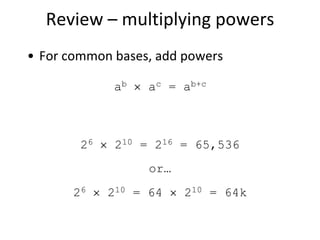
Review – multiplying powers
• For common bases, add powers

             ab   ac = ab+c


        26    210 = 216 = 65,536
                  or…
       26    210 = 64   210 = 64k
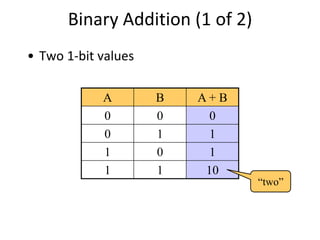
Binary Addition (1 of 2)
• Two 1-bit values

            A        B   A+B
            0        0     0
            0        1     1
            1        0     1
            1        1    10
                                 “two”
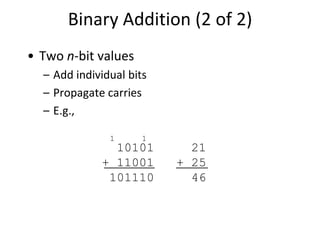
Binary Addition (2 of 2)
• Two n-bit values
  – Add individual bits
  – Propagate carries
  – E.g.,

               1      1
               10101        21
             + 11001      + 25
              101110        46
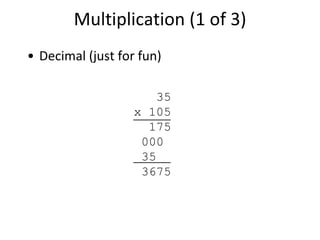
Multiplication (1 of 3)
• Decimal (just for fun)

                      35
                   x 105
                     175
                    000
                    35
                    3675
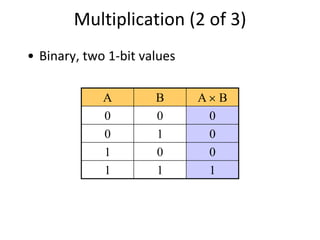
Multiplication (2 of 3)
• Binary, two 1-bit values

             A        B      A B
             0        0       0
             0        1       0
             1        0       0
             1        1       1
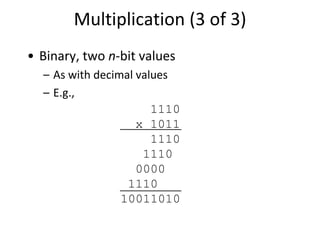
Multiplication (3 of 3)
• Binary, two n-bit values
  – As with decimal values
  – E.g.,
                       1110
                    x 1011
                       1110
                     1110
                    0000
                  1110
                 10011010
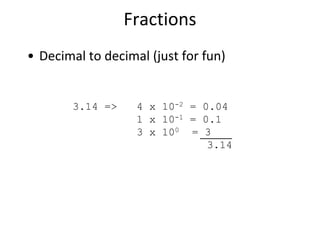
Fractions
• Decimal to decimal (just for fun)


        3.14 =>    4 x 10-2 = 0.04
                   1 x 10-1 = 0.1
                   3 x 100 = 3
                               3.14
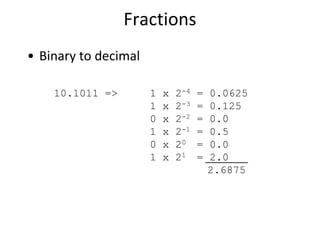
Fractions
• Binary to decimal

    10.1011 =>        1   x   2-4   =   0.0625
                      1   x   2-3   =   0.125
                      0   x   2-2   =   0.0
                      1   x   2-1   =   0.5
                      0   x   20    =   0.0
                      1   x   21    =   2.0
                                        2.6875
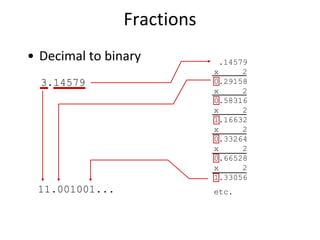
Fractions
• Decimal to binary          .14579
                            x     2
  3.14579                   0.29158
                            x     2
                            0.58316
                            x     2
                            1.16632
                            x     2
                            0.33264
                            x     2
                            0.66528
                            x     2
                            1.33056
 11.001001...               etc.
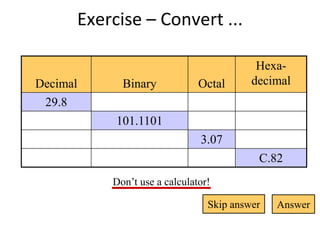
Exercise – Convert ...

                                          Hexa-
Decimal     Binary            Octal      decimal
 29.8
           101.1101
                              3.07
                                          C.82
          Don’t use a calculator!

                                Skip answer   Answer
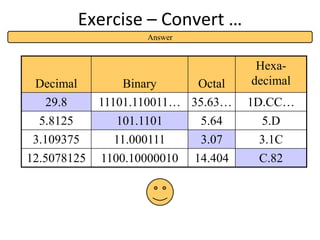
Exercise – Convert …
                    Answer


                                       Hexa-
 Decimal         Binary     Octal     decimal
  29.8       11101.110011… 35.63…     1D.CC…
  5.8125       101.1101       5.64     5.D
 3.109375      11.000111      3.07     3.1C
12.5078125   1100.10000010   14.404    C.82
Thank you


            Next topic

Computer number systems

  • 1.
    Computer Number Systems and Data Representation.
  • 2.
    Lecture Outline  Number Systems – Binary, Octal, Hexadecimal  Representation of characters using codes  Representation of Numbers – Integer, Floating Point, Binary Coded Decimal  Program Language and Data Types 12/5/2012 2
  • 3.
    Data Representation? • Representation= Measurement  Most things in the “Real World” actually exist as a single, continuously varying quantity Mass, Volume, Speed, Pressure, Temperature  Easy to measure by “representing” it using a different thing that varies in the same way Eg. Pressure as the height of column of mercury or as voltage produced by a pressure transducer  These are ANALOG measurements 12/5/2012 3
  • 4.
    Digital Representation  ConvertANALOG to DIGITAL measurement by using a scale of units  DIGITAL measurements – In units – a set of symbolic values - digits – Values larger than any symbol in the set use sequence of digits – Units, Tens, Hundreds… – Measured in discrete or whole units – Difficult to measure something that is not a multiple of units in size. Eg Fractions 12/5/2012 4
  • 5.
    Analog vs. Digitalrepresentation 12/5/2012 5
  • 6.
    Data Representation  Computersuse digital representation  Based on a binary system (uses on/off states to represent 2 digits).  Many different types of data. – Examples?  ALL data (no matter how complex) must be represented in memory as binary digits (bits). 12/5/2012 6
  • 7.
    Number systems andcomputers  Computers store all data as binary digits, but we may need to convert this to a number system we are familiar with.  Computer programs and data are often represented (outside the computer) using octal and hexadecimal number systems because they are a short hand way of representing binary numbers. 12/5/2012 7
  • 8.
    Common Number Systems Used by Used in System Base Symbols humans? computers? Decimal 10 0, 1, … 9 Yes No Binary 2 0, 1 No Yes Octal 8 0, 1, … 7 No No Hexa- 16 0, 1, … 9, No No decimal A, B, … F
  • 9.
    Quantities/Counting (1 of3) Hexa- Decimal Binary Octal decimal 0 0 0 0 1 1 1 1 2 10 2 2 3 11 3 3 4 100 4 4 5 101 5 5 6 110 6 6 7 111 7 7 p. 33
  • 10.
    Quantities/Counting (2 of3) Hexa- Decimal Binary Octal decimal 8 1000 10 8 9 1001 11 9 10 1010 12 A 11 1011 13 B 12 1100 14 C 13 1101 15 D 14 1110 16 E 15 1111 17 F
  • 11.
    Quantities/Counting (3 of3) Hexa- Decimal Binary Octal decimal 16 10000 20 10 17 10001 21 11 18 10010 22 12 19 10011 23 13 20 10100 24 14 21 10101 25 15 22 10110 26 16 23 10111 27 17 Etc.
  • 12.
    Conversion Among Bases •The possibilities: Decimal Octal Binary Hexadecimal pp. 40-46
  • 13.
    Quick Example 2510 =110012 = 318 = 1916 Base
  • 14.
    Decimal to Decimal(just for fun) Decimal Octal Binary Hexadecimal Next slide…
  • 15.
    Weight 12510 => 5 x 100 = 5 2 x 101 = 20 1 x 102 = 100 125 Base
  • 16.
    Binary to Decimal Decimal Octal Binary Hexadecimal
  • 17.
    Binary to Decimal •Technique – Multiply each bit by 2n, where n is the “weight” of the bit – The weight is the position of the bit, starting from 0 on the right – Add the results
  • 18.
    Example Bit“0” 1010112 => 1 x 20 = 1 1 x 21 = 2 0 x 22 = 0 1 x 23 = 8 0 x 24 = 0 1 x 25 = 32 4310
  • 19.
    Octal to Decimal Decimal Octal Binary Hexadecimal
  • 20.
    Octal to Decimal •Technique – Multiply each bit by 8n, where n is the “weight” of the bit – The weight is the position of the bit, starting from 0 on the right – Add the results
  • 21.
    Example 7248 => 4 x 80 = 4 2 x 81 = 16 7 x 82 = 448 46810
  • 22.
    Hexadecimal to Decimal Decimal Octal Binary Hexadecimal
  • 23.
    Hexadecimal to Decimal •Technique – Multiply each bit by 16n, where n is the “weight” of the bit – The weight is the position of the bit, starting from 0 on the right – Add the results
  • 24.
    Example ABC16 => C x 160 = 12 x 1 = 12 B x 161 = 11 x 16 = 176 A x 162 = 10 x 256 = 2560 274810
  • 25.
    Decimal to Binary Decimal Octal Binary Hexadecimal
  • 26.
    Decimal to Binary •Technique – Divide by two, keep track of the remainder – First remainder is bit 0 (LSB, least-significant bit) – Second remainder is bit 1 – Etc.
  • 27.
    Example 12510 = ?2 2 125 2 62 1 2 31 0 2 15 1 2 7 1 2 3 1 2 1 1 0 1 12510 = 11111012
  • 28.
    Octal to Binary Decimal Octal Binary Hexadecimal
  • 29.
    Octal to Binary •Technique – Convert each octal digit to a 3-bit equivalent binary representation
  • 30.
    Example 7058 = ?2 7 0 5 111 000 101 7058 = 1110001012
  • 31.
    Hexadecimal to Binary Decimal Octal Binary Hexadecimal
  • 32.
    Hexadecimal to Binary •Technique – Convert each hexadecimal digit to a 4-bit equivalent binary representation
  • 33.
    Example 10AF16 = ?2 1 0 A F 0001 0000 1010 1111 10AF16 = 00010000101011112
  • 34.
    Decimal to Octal Decimal Octal Binary Hexadecimal
  • 35.
    Decimal to Octal •Technique – Divide by 8 – Keep track of the remainder
  • 36.
    Example 123410 = ?8 8 1234 8 154 2 8 19 2 8 2 3 0 2 123410 = 23228
  • 37.
    Decimal to Hexadecimal Decimal Octal Binary Hexadecimal
  • 38.
    Decimal to Hexadecimal •Technique – Divide by 16 – Keep track of the remainder
  • 39.
    Example 123410 = ?16 16 1234 16 77 2 16 4 13 = D 0 4 123410 = 4D216
  • 40.
    Binary to Octal Decimal Octal Binary Hexadecimal
  • 41.
    Binary to Octal •Technique – Group bits in threes, starting on right – Convert to octal digits
  • 42.
    Example 10110101112 = ?8 1 011 010 111 1 3 2 7 10110101112 = 13278
  • 43.
    Binary to Hexadecimal Decimal Octal Binary Hexadecimal
  • 44.
    Binary to Hexadecimal •Technique – Group bits in fours, starting on right – Convert to hexadecimal digits
  • 45.
    Example 10101110112 = ?16 10 1011 1011 2 B B 10101110112 = 2BB16
  • 46.
    Octal to Hexadecimal Decimal Octal Binary Hexadecimal
  • 47.
    Octal to Hexadecimal •Technique – Use binary as an intermediary
  • 48.
    Example 10768 = ?16 1 0 7 6 001 000 111 110 2 3 E 10768 = 23E16
  • 49.
    Hexadecimal to Octal Decimal Octal Binary Hexadecimal
  • 50.
    Hexadecimal to Octal •Technique – Use binary as an intermediary
  • 51.
    Example 1F0C16 = ?8 1 F 0 C 0001 1111 0000 1100 1 7 4 1 4 1F0C16 = 174148
  • 52.
    Exercise – Convert... Hexa- Decimal Binary Octal decimal 33 1110101 703 1AF Don’t use a calculator! Skip answer Answer
  • 53.
    Exercise – Convert… Answer Hexa- Decimal Binary Octal decimal 33 100001 41 21 117 1110101 165 75 451 111000011 703 1C3 431 110101111 657 1AF
  • 54.
    Common Powers (1of 2) • Base 10 Power Preface Symbol Value 10-12 pico p .000000000001 10-9 nano n .000000001 10-6 micro .000001 10-3 milli m .001 103 kilo k 1000 106 mega M 1000000 109 giga G 1000000000 1012 tera T 1000000000000
  • 55.
    Common Powers (2of 2) • Base 2 Power Preface Symbol Value 210 kilo k 1024 220 mega M 1048576 230 Giga G 1073741824 • What is the value of “k”, “M”, and “G”? • In computing, particularly w.r.t. memory, the base-2 interpretation generally applies
  • 56.
    Example In the lab… 1. Double click on My Computer 2. Right click on C: 3. Click on Properties / 230 =
  • 57.
    Exercise – FreeSpace • Determine the “free space” on all drives on a machine in the lab Free space Drive Bytes GB A: C: D: E: etc.
  • 58.
    Review – multiplyingpowers • For common bases, add powers ab ac = ab+c 26 210 = 216 = 65,536 or… 26 210 = 64 210 = 64k
  • 59.
    Binary Addition (1of 2) • Two 1-bit values A B A+B 0 0 0 0 1 1 1 0 1 1 1 10 “two”
  • 60.
    Binary Addition (2of 2) • Two n-bit values – Add individual bits – Propagate carries – E.g., 1 1 10101 21 + 11001 + 25 101110 46
  • 61.
    Multiplication (1 of3) • Decimal (just for fun) 35 x 105 175 000 35 3675
  • 62.
    Multiplication (2 of3) • Binary, two 1-bit values A B A B 0 0 0 0 1 0 1 0 0 1 1 1
  • 63.
    Multiplication (3 of3) • Binary, two n-bit values – As with decimal values – E.g., 1110 x 1011 1110 1110 0000 1110 10011010
  • 64.
    Fractions • Decimal todecimal (just for fun) 3.14 => 4 x 10-2 = 0.04 1 x 10-1 = 0.1 3 x 100 = 3 3.14
  • 65.
    Fractions • Binary todecimal 10.1011 => 1 x 2-4 = 0.0625 1 x 2-3 = 0.125 0 x 2-2 = 0.0 1 x 2-1 = 0.5 0 x 20 = 0.0 1 x 21 = 2.0 2.6875
  • 66.
    Fractions • Decimal tobinary .14579 x 2 3.14579 0.29158 x 2 0.58316 x 2 1.16632 x 2 0.33264 x 2 0.66528 x 2 1.33056 11.001001... etc.
  • 67.
    Exercise – Convert... Hexa- Decimal Binary Octal decimal 29.8 101.1101 3.07 C.82 Don’t use a calculator! Skip answer Answer
  • 68.
    Exercise – Convert… Answer Hexa- Decimal Binary Octal decimal 29.8 11101.110011… 35.63… 1D.CC… 5.8125 101.1101 5.64 5.D 3.109375 11.000111 3.07 3.1C 12.5078125 1100.10000010 14.404 C.82
  • 69.
    Thank you Next topic