Chapter 4
Components of the
System
Data Representation
How do computers represent data?
 Recognize only two
discrete states: on or off
 Use a binary system to
recognize two states
 Use number system with
two unique digits: 0 and 1,
called bits (short for
binary digits)
 Smallest unit of data
computer can process
 Most computers are digital
Data Representation
What is a byte?
 Eight bits grouped together as a unit
 Provides enough different combinations of 0s and 1s
to represent 256 individual characters
 Numbers
 Uppercase
and lowercase
letters
 Punctuation
marks
Converting Binary to Decimal
Decimal number system is base 10
 0, 1, 2, 3, 4, 5, 6, 7, 8, 9
 Uses 10 numbers
23,625
Power of 10
representation 104
103
102
101
100
Decimal
representation 10000 1000 100 10 1
Base 10
representation
20,000 3,000 600 20 5
Converting Binary to Decimal
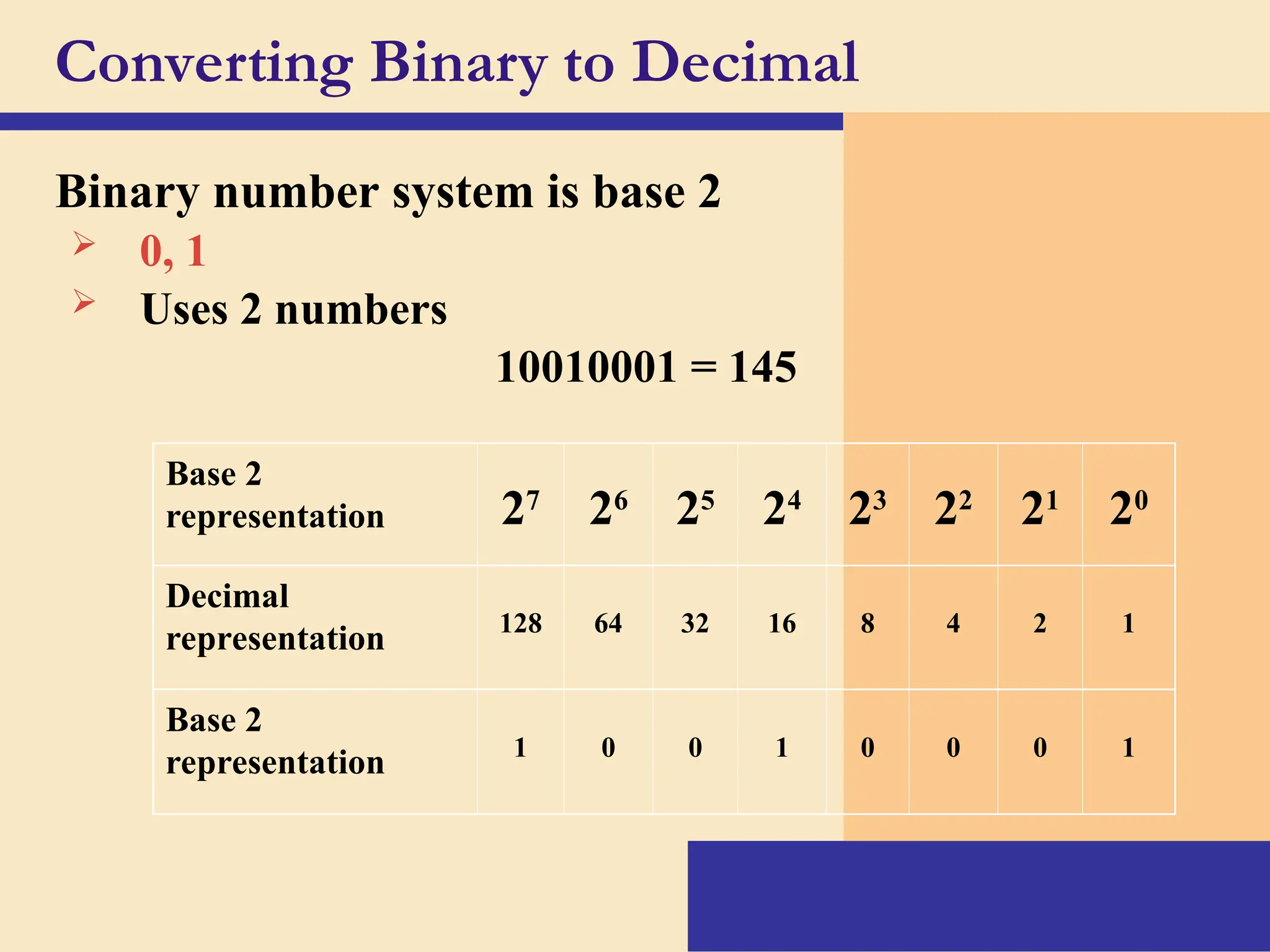
Binary number system is base 2
 0, 1
 Uses 2 numbers
10010001 = 145
Base 2
representation 27
26
25
24
23
22
21
20
Decimal
representation 128 64 32 16 8 4 2 1
Base 2
representation 1 0 0 1 0 0 0 1
Converting Decimal to Binary
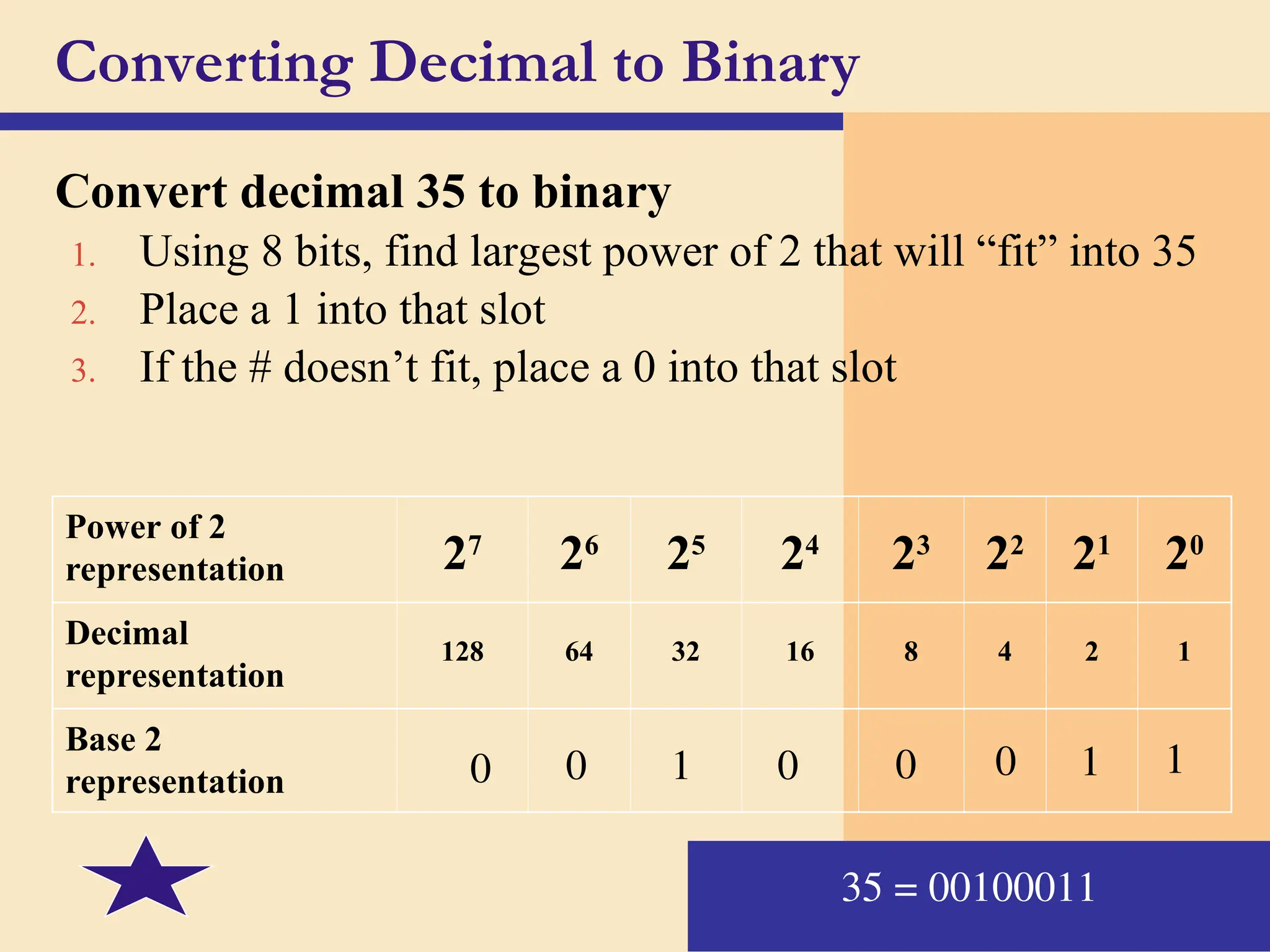
Convert decimal 35 to binary
1. Using 8 bits, find largest power of 2 that will “fit” into 35
2. Place a 1 into that slot
3. If the # doesn’t fit, place a 0 into that slot
Power of 2
representation 27
26
25
24
23
22
21
20
Decimal
representation
128 64 32 16 8 4 2 1
Base 2
representation 0 0 1 0 0 0 1 1
35 = 00100011
Convert Binary to Decimal
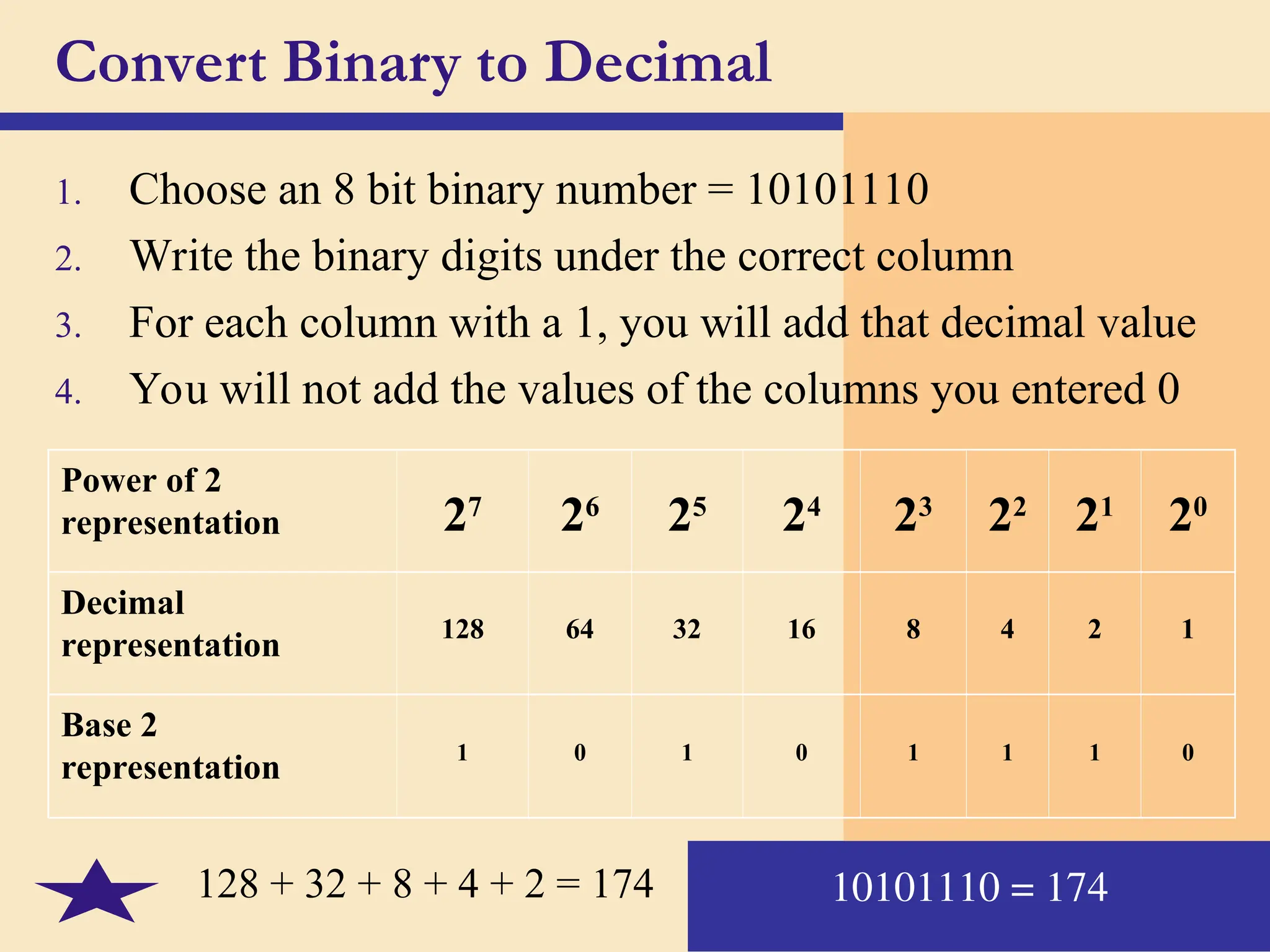
1. Choose an 8 bit binary number = 10101110
2. Write the binary digits under the correct column
3. For each column with a 1, you will add that decimal value
4. You will not add the values of the columns you entered 0
Power of 2
representation 27
26
25
24
23
22
21
20
Decimal
representation
128 64 32 16 8 4 2 1
Base 2
representation
1 0 1 0 1 1 1 0
10101110 = 174
128 + 32 + 8 + 4 + 2 = 174
Data Representation
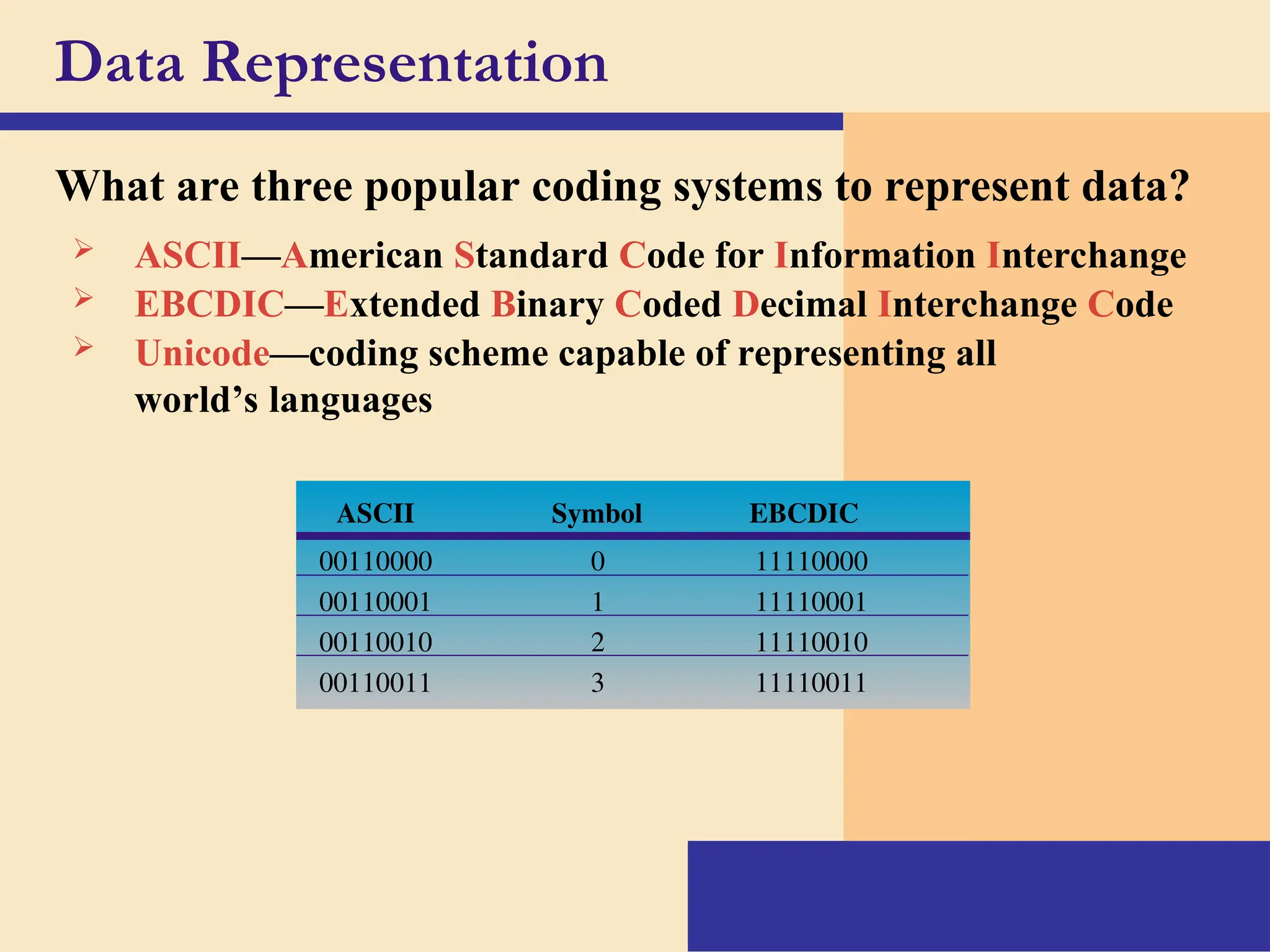
What are three popular coding systems to represent data?
 ASCII—American Standard Code for Information Interchange
 EBCDIC—Extended Binary Coded Decimal Interchange Code
 Unicode—coding scheme capable of representing all
world’s languages
ASCII Symbol EBCDIC
00110000 0 11110000
00110001 1 11110001
00110010 2 11110010
00110011 3 11110011
Data Representation
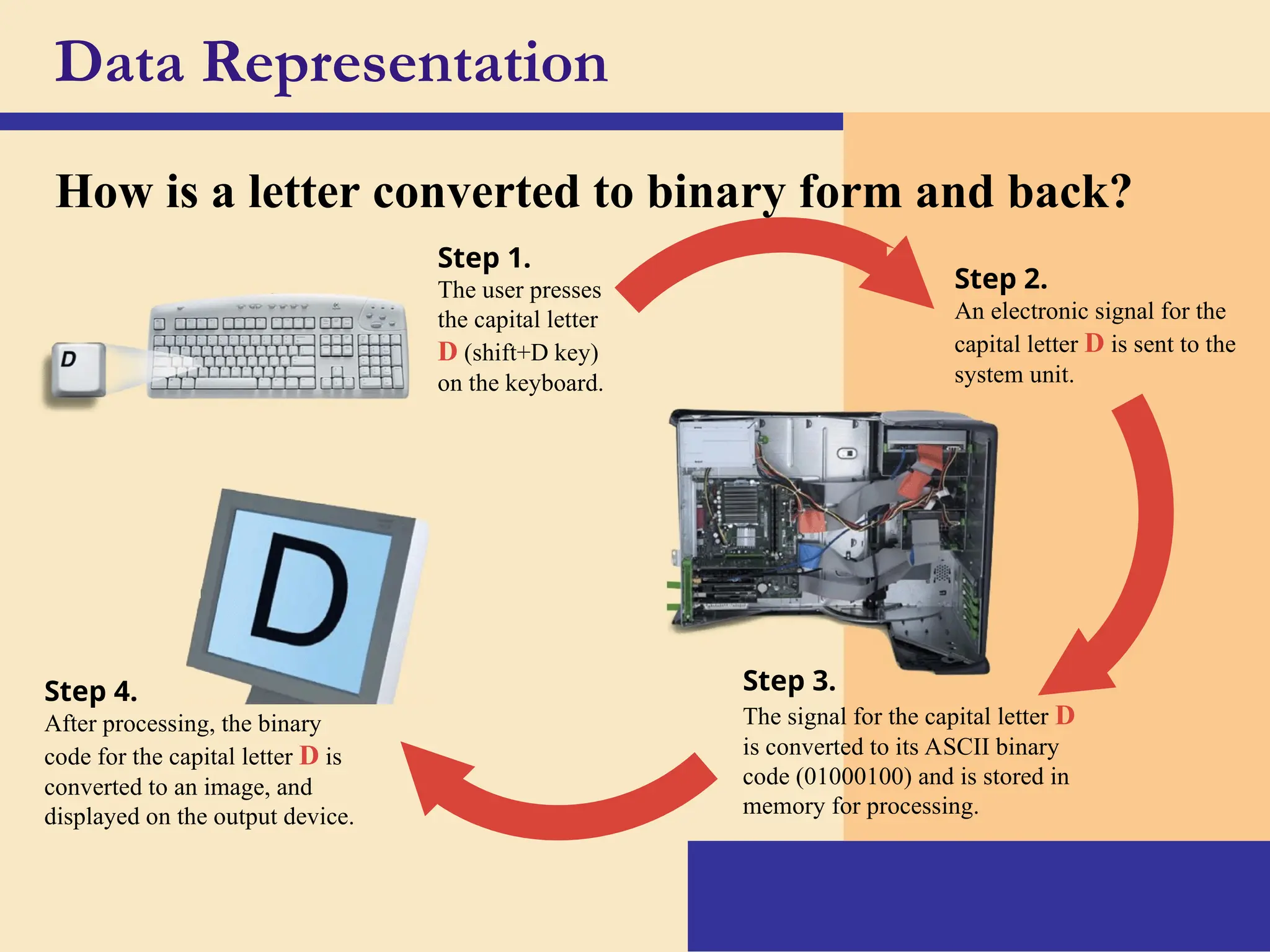
How is a letter converted to binary form and back?
Step 1.
The user presses
the capital letter
D (shift+D key)
on the keyboard.
Step 2.
An electronic signal for the
capital letter D is sent to the
system unit.
Step 3.
The signal for the capital letter D
is converted to its ASCII binary
code (01000100) and is stored in
memory for processing.
Step 4.
After processing, the binary
code for the capital letter D is
converted to an image, and
displayed on the output device.
Memory
What is memory?
 Electronic components that
store instructions, data, and
results
 Consists of one or
more chips on
motherboard or
other circuit board
 Each byte stored
in unique location
called an address,
similar to addresses
on a passenger train
Seat #2B4 Seat #2B3
Memory
 Stores three basic categories of items:
1. OS and system software
2. Application programs
3. Data and information
 Byte is basic storage unit in memory
 To access data or instructions in memory,
computer references the address that contain the
bytes of data
 Manufacturers state the size of memory and
storage devices in terms of number of bytes
available
Memory
How is memory measured?
Term Abbreviation Approximate Size
Kilobyte KB or K 1 thousand bytes
Megabyte MB 1 million bytes
Gigabyte GB 1 billion bytes
Terabyte TB 1 trillion bytes
 By number of bytes available for storage
 KB = 1024 bytes
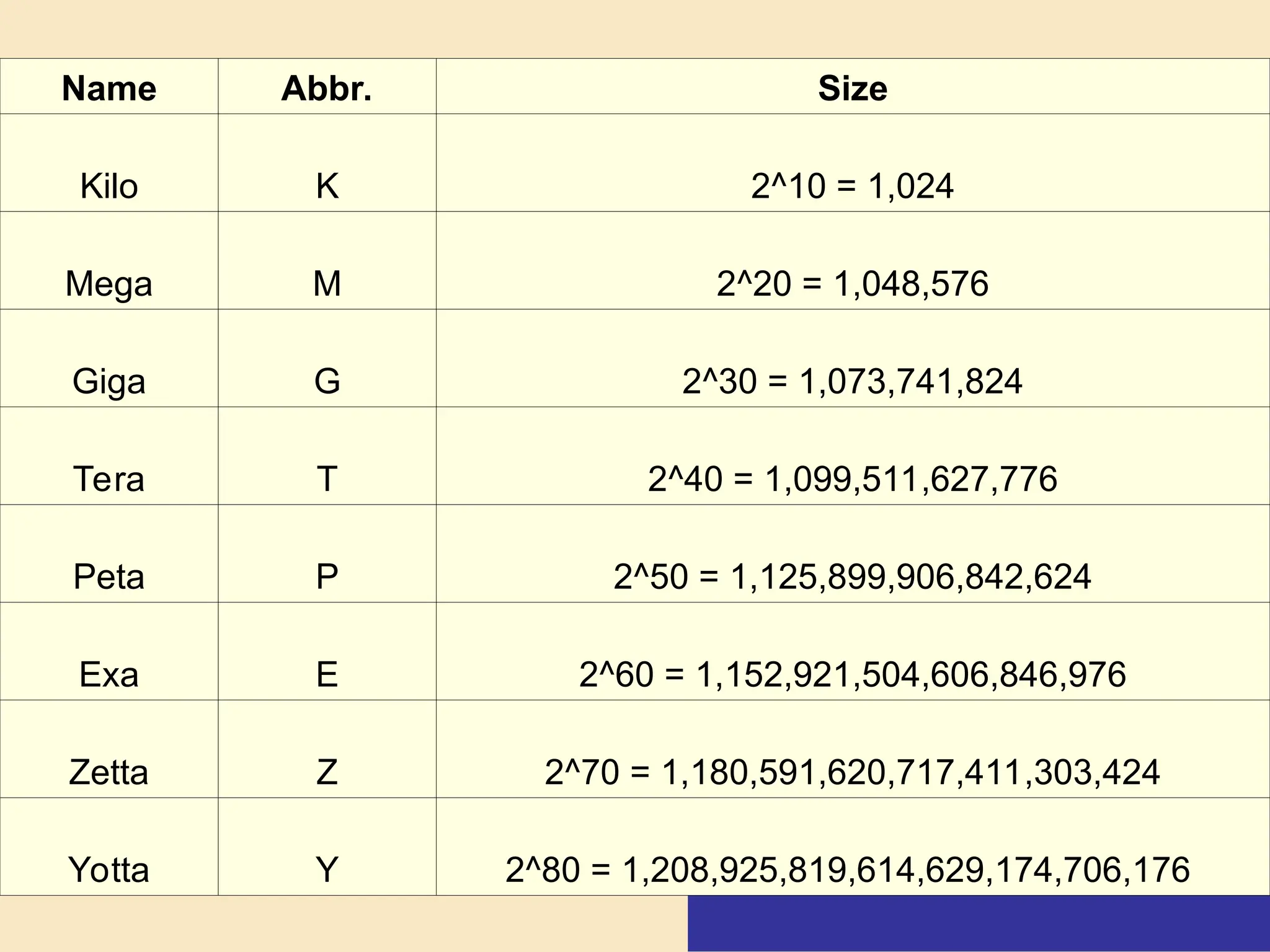
Name Abbr. Size
Kilo K 2^10 = 1,024
Mega M 2^20 = 1,048,576
Giga G 2^30 = 1,073,741,824
Tera T 2^40 = 1,099,511,627,776
Peta P 2^50 = 1,125,899,906,842,624
Exa E 2^60 = 1,152,921,504,606,846,976
Zetta Z 2^70 = 1,180,591,620,717,411,303,424
Yotta Y 2^80 = 1,208,925,819,614,629,174,706,176
Slides 1, 2, 4, 9, 10, 11 from Chapter 4 The Components of
the System Unit; “Discovering Computers 2004: A
Gateway to Information” by Shelly, Cashman, Vermaat; ©
2003; Course Technology Publishing
Slides 3, 5-8, 12-15 added by Mickie Mueller with graphics
from “Discovering Computers 2004: A Gateway to
Information”
Credits

MathinaDigitalAgePowerPoint slideshare.ppt

  • 1.
  • 2.
    Data Representation How docomputers represent data?  Recognize only two discrete states: on or off  Use a binary system to recognize two states  Use number system with two unique digits: 0 and 1, called bits (short for binary digits)  Smallest unit of data computer can process  Most computers are digital
  • 4.
    Data Representation What isa byte?  Eight bits grouped together as a unit  Provides enough different combinations of 0s and 1s to represent 256 individual characters  Numbers  Uppercase and lowercase letters  Punctuation marks
  • 5.
    Converting Binary toDecimal Decimal number system is base 10  0, 1, 2, 3, 4, 5, 6, 7, 8, 9  Uses 10 numbers 23,625 Power of 10 representation 104 103 102 101 100 Decimal representation 10000 1000 100 10 1 Base 10 representation 20,000 3,000 600 20 5
  • 6.
    Converting Binary toDecimal Binary number system is base 2  0, 1  Uses 2 numbers 10010001 = 145 Base 2 representation 27 26 25 24 23 22 21 20 Decimal representation 128 64 32 16 8 4 2 1 Base 2 representation 1 0 0 1 0 0 0 1
  • 7.
    Converting Decimal toBinary Convert decimal 35 to binary 1. Using 8 bits, find largest power of 2 that will “fit” into 35 2. Place a 1 into that slot 3. If the # doesn’t fit, place a 0 into that slot Power of 2 representation 27 26 25 24 23 22 21 20 Decimal representation 128 64 32 16 8 4 2 1 Base 2 representation 0 0 1 0 0 0 1 1 35 = 00100011
  • 8.
    Convert Binary toDecimal 1. Choose an 8 bit binary number = 10101110 2. Write the binary digits under the correct column 3. For each column with a 1, you will add that decimal value 4. You will not add the values of the columns you entered 0 Power of 2 representation 27 26 25 24 23 22 21 20 Decimal representation 128 64 32 16 8 4 2 1 Base 2 representation 1 0 1 0 1 1 1 0 10101110 = 174 128 + 32 + 8 + 4 + 2 = 174
  • 9.
    Data Representation What arethree popular coding systems to represent data?  ASCII—American Standard Code for Information Interchange  EBCDIC—Extended Binary Coded Decimal Interchange Code  Unicode—coding scheme capable of representing all world’s languages ASCII Symbol EBCDIC 00110000 0 11110000 00110001 1 11110001 00110010 2 11110010 00110011 3 11110011
  • 10.
    Data Representation How isa letter converted to binary form and back? Step 1. The user presses the capital letter D (shift+D key) on the keyboard. Step 2. An electronic signal for the capital letter D is sent to the system unit. Step 3. The signal for the capital letter D is converted to its ASCII binary code (01000100) and is stored in memory for processing. Step 4. After processing, the binary code for the capital letter D is converted to an image, and displayed on the output device.
  • 11.
    Memory What is memory? Electronic components that store instructions, data, and results  Consists of one or more chips on motherboard or other circuit board  Each byte stored in unique location called an address, similar to addresses on a passenger train Seat #2B4 Seat #2B3
  • 12.
    Memory  Stores threebasic categories of items: 1. OS and system software 2. Application programs 3. Data and information  Byte is basic storage unit in memory  To access data or instructions in memory, computer references the address that contain the bytes of data  Manufacturers state the size of memory and storage devices in terms of number of bytes available
  • 13.
    Memory How is memorymeasured? Term Abbreviation Approximate Size Kilobyte KB or K 1 thousand bytes Megabyte MB 1 million bytes Gigabyte GB 1 billion bytes Terabyte TB 1 trillion bytes  By number of bytes available for storage  KB = 1024 bytes
  • 14.
    Name Abbr. Size KiloK 2^10 = 1,024 Mega M 2^20 = 1,048,576 Giga G 2^30 = 1,073,741,824 Tera T 2^40 = 1,099,511,627,776 Peta P 2^50 = 1,125,899,906,842,624 Exa E 2^60 = 1,152,921,504,606,846,976 Zetta Z 2^70 = 1,180,591,620,717,411,303,424 Yotta Y 2^80 = 1,208,925,819,614,629,174,706,176
  • 16.
    Slides 1, 2,4, 9, 10, 11 from Chapter 4 The Components of the System Unit; “Discovering Computers 2004: A Gateway to Information” by Shelly, Cashman, Vermaat; © 2003; Course Technology Publishing Slides 3, 5-8, 12-15 added by Mickie Mueller with graphics from “Discovering Computers 2004: A Gateway to Information” Credits