

Microsoft Confidential
Understanding the Office 365 Collaboration Toolkit
Chris Bortlik
MicrosoftTechnology Center– ModernWorkplaceTechnicalArchitect
@cbortlik
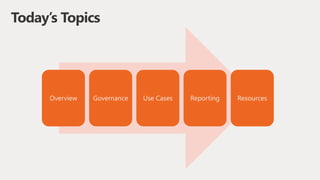
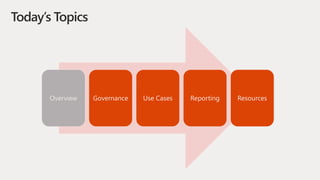
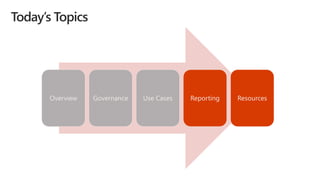
Today’s Topics
Overview Governance Use Cases Reporting Resources
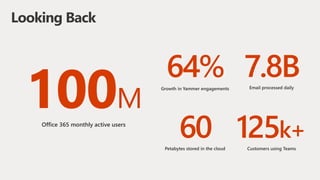
M
Looking Back
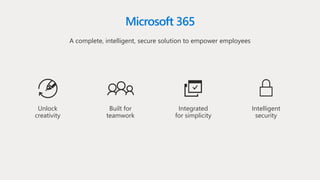
Microsoft 365
A complete, intelligent, secure solution to empower employees
Intelligent
security
Unlock
creativity
Built for
teamwork
Integrated
for simplicity
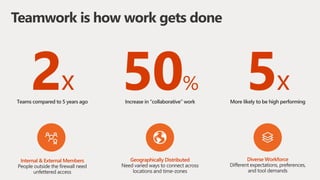
Teamwork is how work gets done
2x 5x50%
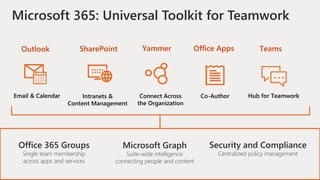
Microsoft 365: Universal Toolkit for Teamwork
Hub for TeamworkCo-AuthorConnect Across
the Organization
Intranets &
Content Management
Email & Calendar
TeamsOffice AppsYammerSharePointOutlook
Office 365 Groups
Single team membership
across apps and services
Microsoft Graph
Suite-wide intelligence
connecting people and content
Security and Compliance
Centralized policy management
Today’s Topics
Overview Governance Use Cases Reporting Resources
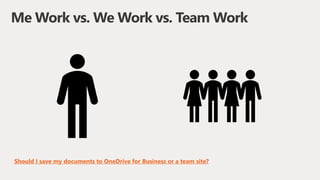
Me Work vs. We Work vs. Team Work
Should I save my documents to OneDrive for Business or a team site?
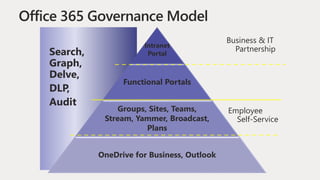
Intranet
Portal
Functional Portals
Groups, Sites, Teams,
Stream, Yammer, Broadcast,
Plans
OneDrive for Business, Outlook
Business & IT
Partnership
Employee
Self-Service
Search,
Graph,
Delve,
DLP,
Audit
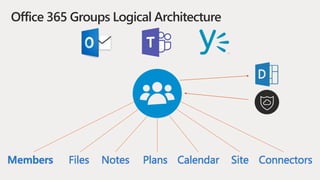
Members Files Notes Plans Calendar Site Connectors
Office 365 Groups Logical Architecture
Today’s Topics
Overview Governance Use Cases Reporting Resources
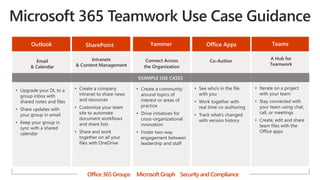
A Hub for
Teamwork
• Iterate on a project
with your team
• Stay connected with
your team using chat,
call, or meetings
• Create, edit and share
team files with the
Office apps
Connect Across
the Organization
• Create a community
around topics of
interest or areas of
practice
• Drive initiatives for
cross-organizational
innovation
• Foster two-way
engagement between
leadership and staff
Email
& Calendar
• Upgrade your DL to a
group inbox with
shared notes and files
• Share updates with
your group in email
• Keep your group in
sync with a shared
calendar
Intranets
& Content Management
• Create a company
intranet to share news
and resources
• Customize your team
site to automate
document workflows
and share lists
• Share and work
together on all your
files with OneDrive
Co-Author
TeamsYammerOutlook SharePoint Office Apps
• See who’s in the file
with you
• Work together with
real time co-authoring
• Track what’s changed
with version history
EXAMPLE USE CASES
Office 365 Groups MicrosoftGraph Security and Compliance
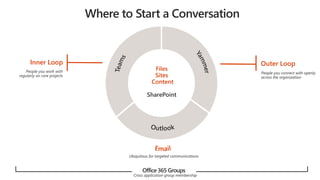
Office 365 Groups
Outer LoopInner Loop
Files
Sites
Content
SharePoint
Today’s Topics
Overview Governance Use Cases Reporting Resources
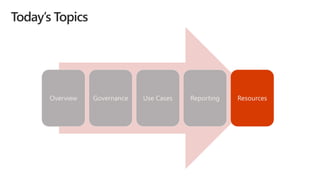
Today’s Topics
Overview Governance Use Cases Reporting Resources
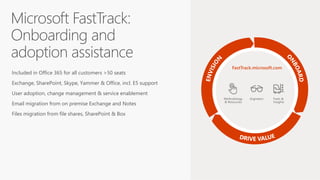
Included in Office 365 for all customers >50 seats
Exchange, SharePoint, Skype, Yammer & Office, incl. E5 support
User adoption, change management & service enablement
Email migration from on premise Exchange and Notes
Files migration from file shares, SharePoint & Box
EngineersMethodology
& Resources
Tools &
Insights
FastTrack.microsoft.com
Understanding Office 365 Collaboration Toolkit

Understanding Office 365 Collaboration Toolkit

  • 1.
    Microsoft Confidential Understanding theOffice 365 Collaboration Toolkit Chris Bortlik MicrosoftTechnology Center– ModernWorkplaceTechnicalArchitect @cbortlik
  • 2.
    Today’s Topics Overview GovernanceUse Cases Reporting Resources
  • 3.
  • 5.
    Microsoft 365 A complete,intelligent, secure solution to empower employees Intelligent security Unlock creativity Built for teamwork Integrated for simplicity
  • 6.
    Teamwork is howwork gets done 2x 5x50%
  • 9.
    Microsoft 365: UniversalToolkit for Teamwork Hub for TeamworkCo-AuthorConnect Across the Organization Intranets & Content Management Email & Calendar TeamsOffice AppsYammerSharePointOutlook Office 365 Groups Single team membership across apps and services Microsoft Graph Suite-wide intelligence connecting people and content Security and Compliance Centralized policy management
  • 10.
    Today’s Topics Overview GovernanceUse Cases Reporting Resources
  • 11.
    Me Work vs.We Work vs. Team Work Should I save my documents to OneDrive for Business or a team site?
  • 12.
    Intranet Portal Functional Portals Groups, Sites,Teams, Stream, Yammer, Broadcast, Plans OneDrive for Business, Outlook Business & IT Partnership Employee Self-Service Search, Graph, Delve, DLP, Audit
  • 13.
    Members Files NotesPlans Calendar Site Connectors Office 365 Groups Logical Architecture
  • 14.
    Today’s Topics Overview GovernanceUse Cases Reporting Resources
  • 15.
    A Hub for Teamwork •Iterate on a project with your team • Stay connected with your team using chat, call, or meetings • Create, edit and share team files with the Office apps Connect Across the Organization • Create a community around topics of interest or areas of practice • Drive initiatives for cross-organizational innovation • Foster two-way engagement between leadership and staff Email & Calendar • Upgrade your DL to a group inbox with shared notes and files • Share updates with your group in email • Keep your group in sync with a shared calendar Intranets & Content Management • Create a company intranet to share news and resources • Customize your team site to automate document workflows and share lists • Share and work together on all your files with OneDrive Co-Author TeamsYammerOutlook SharePoint Office Apps • See who’s in the file with you • Work together with real time co-authoring • Track what’s changed with version history EXAMPLE USE CASES Office 365 Groups MicrosoftGraph Security and Compliance
  • 16.
    Office 365 Groups OuterLoopInner Loop Files Sites Content SharePoint
  • 17.
    Today’s Topics Overview GovernanceUse Cases Reporting Resources
  • 19.
    Today’s Topics Overview GovernanceUse Cases Reporting Resources
  • 20.
    Included in Office365 for all customers >50 seats Exchange, SharePoint, Skype, Yammer & Office, incl. E5 support User adoption, change management & service enablement Email migration from on premise Exchange and Notes Files migration from file shares, SharePoint & Box EngineersMethodology & Resources Tools & Insights FastTrack.microsoft.com