RAY	
  GALLON	
  
C U L T U R E C O M
Presentation	
  ©	
  2013	
  Ray	
  Gallon	
  all	
  rights	
  reserved	
  
Applying Cognitive Science
to User Assistance	

Member, Board of Directors
Presentation	
  ©	
  2013	
  Ray	
  Gallon	
  all	
  rights	
  reserved	
  
About Me - Ray Gallon	

The Humanist Nerd!
Owner/Consultant,	
  Culturecom	
  –	
  specialist	
  in	
  	
  	
  usability,	
  content	
  
strategy,	
  and	
  user	
  assistance	
  for	
  software!
Research	
  collaborator	
  and	
  principal,	
  The	
  Transformation	
  Society,	
  
a	
  new	
  research	
  and	
  training	
  institute	
  in	
  Barcelona,	
  Spain!
■  20	
  years	
  in	
  technical	
  communication	
  with	
  major	
  companies	
  such	
  as	
  G.E.	
  
Healthcare,	
  Alcatel,	
  IBM,	
  etc.	
  
■  Member,	
  board	
  of	
  directors,	
  Society	
  for	
  Technical	
  Communication	
  (STC)	
  
■  Past	
  president,	
  STC	
  France	
  
■  Award-­‐winning	
  radio	
  producer	
  and	
  journalist	
  –	
  CBC,	
  NPR,	
  France	
  Culture,	
  
etc.	
  and	
  former	
  programme	
  manager,	
  WNYC-­‐FM,	
  New	
  York	
  Public	
  Radio!
RAY	
  GALLON	
  
C U L T U R E C O M
Presentation	
  ©	
  2013	
  Ray	
  Gallon	
  all	
  rights	
  reserved	
  
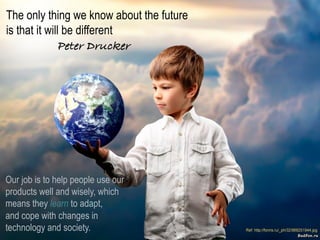
The only thing we know about the future
is that it will be different " " "!
Peter Drucker!
Our job is to help people use our
products well and wisely, which
means they learn to adapt,
and cope with changes in
technology and society.
Presentation	
  ©	
  2013	
  Ray	
  Gallon	
  all	
  rights	
  reserved	
  
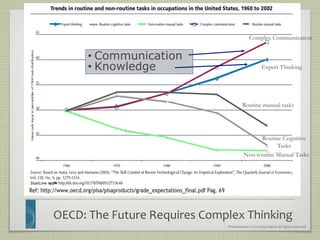
OECD:	
  The	
  Future	
  Requires	
  Complex	
  Thinking	
  
Expert Thinking
Complex Communication
Non-routine Manual Tasks
Routine Cognitive
Tasks
Routine manual tasks
• Communication
• Knowledge
Presentation	
  ©	
  2013	
  Ray	
  Gallon	
  all	
  rights	
  reserved	
  
Before Proceeding, Decide	

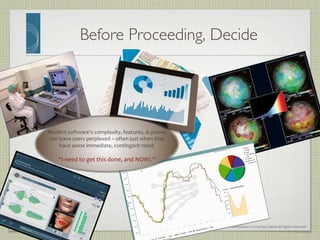
Modern	
  software’s	
  complexity,	
  features,	
  &	
  power	
  
can	
  leave	
  users	
  perplexed	
  –	
  often	
  just	
  when	
  they	
  
have	
  some	
  immediate,	
  contingent	
  need:	


“I	
  need	
  to	
  get	
  this	
  done,	
  and	
  NOW!.”	


Presentation	
  ©	
  2013	
  Ray	
  Gallon	
  all	
  rights	
  reserved	
  
Before Proceeding, Decide	

•  User	
  assistance	
  that	
  is	
  limited	
  to	
  procedures	
  cannot	
  help	
  
people	
  with	
  contingent	
  needs.	
  	
  
•  They	
  need	
  to	
  decide	
  which,	
  if	
  any,	
  procedures	
  they	
  need	
  
to	
  use.	
  	
  
•  Long	
  conceptual	
  topics	
  might	
  provide	
  insight.	
  
•  But	
  people	
  with	
  contingent	
  needs	
  are	
  not	
  going	
  to	
  wade	
  
through	
  long	
  texts.	
  
•  We	
  can	
  help	
  users	
  get	
  real	
  work	
  done	
  more	
  quickly	
  with	
  
a	
  bit	
  of	
  decision	
  support.	
  
Presentation	
  ©	
  2013	
  Ray	
  Gallon	
  all	
  rights	
  reserved	
  
Designing User Assistance - Experience is More
Important than Taxonomy	

"   Problem	
  #1:	
  with	
  traditional	
  “static” documentation,	
  the	
  product	
  gives	
  
meaning	
  to	
  the	
  docs.	
  
"   Users’ experience	
  with	
  the	
  product	
  takes	
  them	
  from	
  the	
  abstract	
  realm	
  of	
  
reading	
  about	
  the	
  product...	
  	
  
Presentation	
  ©	
  2013	
  Ray	
  Gallon	
  all	
  rights	
  reserved	
  
Designing User Assistance - Experience is More
Important than Taxonomy	

"   Problem	
  #1:	
  with	
  traditional	
  “static” documentation,	
  the	
  product	
  gives	
  
meaning	
  to	
  the	
  docs.	
  
"   Users’ experience	
  with	
  the	
  product	
  takes	
  them	
  from	
  the	
  abstract	
  realm	
  of	
  
reading	
  about	
  the	
  product...	
  	
  
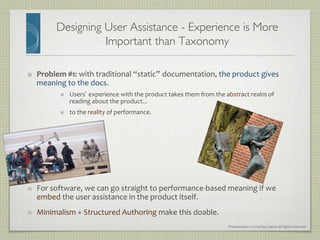
"   to	
  the	
  reality	
  of	
  performance.	


"   For	
  software,	
  we	
  can	
  go	
  straight	
  to	
  performance-­‐based	
  meaning	
  if	
  we	
  
embed	
  the	
  user	
  assistance	
  in	
  the	
  product	
  itself.	
  	
  
"   Minimalism	
  +	
  Structured	
  Authoring	
  make	
  this	
  doable.	
  
Presentation	
  ©	
  2013	
  Ray	
  Gallon	
  all	
  rights	
  reserved	
  
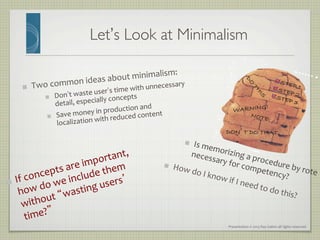
Let’s Look at Minimalism	

"   Two	
  common	
  ideas	
  about	
  minimalism:	
  
"   Don’t	
  waste	
  user’s	
  time	
  with	
  unnecessary	
  
detail,	
  especially	
  concepts	
  
"   Save	
  money	
  in	
  production	
  and	
  
localization	
  with	
  reduced	
  content	
  
"  STEP 1!"  STEP 2!"  STEP 3!
DON’T DO THAT!
NOTE:!
WARNING!!
"   Is	
  memorizing	
  a	
  procedure	
  by	
  rote	
  
necessary	
  for	
  competency?	
  
"   If	
  concepts	
  are	
  important,	
  
how	
  do	
  we	
  include	
  them	
  
without	
  “wasting	
  users’	
  
time?”	
  
"   How	
  do	
  I	
  know	
  if	
  I	
  need	
  to	
  do	
  this?	
  
Presentation	
  ©	
  2013	
  Ray	
  Gallon	
  all	
  rights	
  reserved	
  
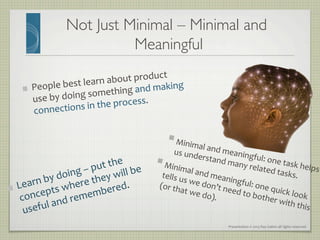
Not Just Minimal – Minimal and
Meaningful	

§ Minimal	
  and	
  meaningful:	
  one	
  task	
  helps	
  
us	
  understand	
  many	
  related	
  tasks.	
  
§ Minimal	
  and	
  meaningful:	
  one	
  quick	
  look	
  
tells	
  us	
  we	
  don’t	
  need	
  to	
  bother	
  with	
  this	
  
(or	
  that	
  we	
  do).	
  
"   People	
  best	
  learn	
  about	
  product	
  
use	
  by	
  doing	
  something	
  and	
  making	
  
connections	
  in	
  the	
  process.	
  	
  
"   Learn	
  by	
  doing	
  –	
  put	
  the	
  
concepts	
  where	
  they	
  will	
  be	
  
useful	
  and	
  remembered.	
  
Presentation	
  ©	
  2013	
  Ray	
  Gallon	
  all	
  rights	
  reserved	
  
Everything We Know…	

"   Get	
  straight	
  to	
  procedures	
  
"   Don’t	
  waste	
  user’s	
  time	
  with	
  unnecessary	
  
detail,	
  especially	
  concepts	
  
"   Procedural	
  information	
  must	
  be	
  
separated	
  from	
  conceptual	
  information.	


Presentation	
  ©	
  2013	
  Ray	
  Gallon	
  all	
  rights	
  reserved	
  
Double Embeddedness	

Embed simple
concepts directly
into the 

User Assistance	
Cognitive Science 	(and John Carroll)	backs this up
Presentation	
  ©	
  2013	
  Ray	
  Gallon	
  all	
  rights	
  reserved	
  
Cognitive Bases: Gestalt Psychology	

Source: http://en.wikipedia.org/wiki/Gestalt_psychology
•  Gestalt	
  psychology	
  tries	
  to	
  understand	
  
the	
  laws	
  of	
  our	
  ability	
  to	
  acquire	
  and	
  
maintain	
  stable	
  percepts	
  in	
  a	
  noisy	
  
world.	
  	
  
•  The	
  brain	
  is	
  holistic,	
  parallel,	
  and	
  
analog,	
  with	
  self-­‐organizing	
  
tendencies.	
  	
  
•  The	
  human	
  eye	
  sees	
  objects	
  in	
  their	
  
entirety	
  before	
  perceiving	
  their	
  
individual	
  parts,	
  suggesting	
  the	
  whole	
  
is	
  “other”	
  than	
  the	
  sum	
  of	
  its	
  parts.	


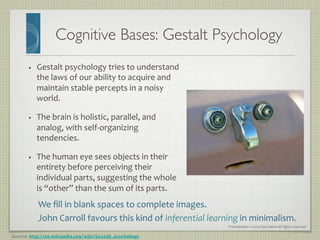
   We	
  fill	
  in	
  blank	
  spaces	
  to	
  complete	
  images.	
  
John	
  Carroll	
  favours	
  this	
  kind	
  of	
  inferential	
  learning	
  in	
  minimalism.	
  
Presentation	
  ©	
  2013	
  Ray	
  Gallon	
  all	
  rights	
  reserved	
  
Cognitive Bases: Constructivism	

•  Allows	
  the	
  learner	
  to	
  experience	
  an	
  environment	
  
first-­‐hand,	
  thereby	
  giving	
  the	
  student	
  reliable,	
  trust-­‐
worthy	
  knowledge.	
  	
  
•  The	
  learner	
  is	
  required	
  to	
  act	
  upon	
  the	
  environment	
  
to	
  both	
  acquire	
  and	
  test	
  new	
  knowledge.	
  
•  Learners	
  are	
  self-­‐directed,	
  creative,	
  and	
  innovative.	
  
•  Instructors	
  are	
  facilitators,	
  not	
  teachers.	
  
•  The	
  context	
  in	
  which	
  the	
  learning	
  occurs	
  is	
  central	
  to	
  
the	
  learning	
  itself	
  	
  
•  Learning	
  is	
  an	
  active,	
  social	
  process.	
  
•  Learners	
  should	
  collaborate	
  to	
  arrive	
  at	
  shared	
  
understanding.	
  
•  This	
  social	
  approach	
  has	
  developed	
  into…	
  
Source: http://en.wikipedia.org/wiki/Constructivism_(learning_theory)
Presentation	
  ©	
  2013	
  Ray	
  Gallon	
  all	
  rights	
  reserved	
  
•  Knowledge	
  is	
  activated	
  in	
  the	
  world	
  as	
  much	
  as	
  in	
  the	
  head	
  of	
  an	
  individual.	
  
•  It	
  exists	
  within	
  systems	
  which	
  are	
  accessed	
  through	
  people	
  participating	
  in	
  activities.	
  
Cognitive Bases: Connectivism	

•  Learning	
  is	
  the	
  process	
  of	
  creating	
  connections	
  and	
  elaborating	
  a	
  
network.	
  In	
  this	
  metaphor,	
  a	
  node	
  is	
  anything	
  that	
  can	
  be	
  connected	
  to	
  
another	
  node	
  such	
  as	
  an	
  organisation,	
  information,	
  data,	
  feelings	
  and	
  
images.	
  	
  
•  Learning	
  may	
  reside	
  in	
  non-­‐human	
  appliances.	
  
•  Learning	
  is	
  more	
  critical	
  than	
  knowing.	
  
•  Maintaining	
  and	
  nurturing	
  connections	
  is	
  needed	
  to	
  facilitate	
  continual	
  
learning.	
  
•  Perceiving	
  connections	
  between	
  fields,	
  ideas	
  and	
  concepts	
  is	
  a	
  core	
  skill.	
  
•  Currency	
  (accurate,	
  up-­‐to-­‐date	
  knowledge)	
  is	
  the	
  intent	
  of	
  learning	
  
activities.	
  
Source: http://en.wikipedia.org/wiki/Connectivism
Presentation	
  ©	
  2013	
  Ray	
  Gallon	
  all	
  rights	
  reserved	
  
•  Knowledge	
  is	
  activated	
  in	
  the	
  world	
  as	
  much	
  as	
  in	
  the	
  head	
  of	
  an	
  individual.	
  
•  It	
  exists	
  within	
  systems	
  which	
  are	
  accessed	
  through	
  people	
  participating	
  in	
  activities.	
  
Cognitive Bases: Connectivism	

•  Learning	
  is	
  the	
  process	
  of	
  creating	
  connections	
  and	
  elaborating	
  a	
  
network.	
  In	
  this	
  metaphor,	
  a	
  node	
  is	
  anything	
  that	
  can	
  be	
  connected	
  to	
  
another	
  node	
  such	
  as	
  an	
  organisation,	
  information,	
  data,	
  feelings	
  and	
  
images.	
  	
  
•  Learning	
  may	
  reside	
  in	
  non-­‐human	
  appliances.	
  
•  Learning	
  is	
  more	
  critical	
  than	
  knowing.	
  
•  Maintaining	
  and	
  nurturing	
  connections	
  is	
  needed	
  to	
  facilitate	
  continual	
  
learning.	
  
•  Perceiving	
  connections	
  between	
  fields,	
  ideas	
  and	
  concepts	
  is	
  a	
  core	
  skill.	
  
•  Currency	
  (accurate,	
  up-­‐to-­‐date	
  knowledge)	
  is	
  the	
  intent	
  of	
  learning	
  
activities.	
  
Source: http://en.wikipedia.org/wiki/Connectivism
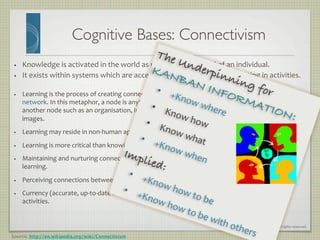
The Underpinning for
KANBAN INFORMATION:	
  
•  +Know	
  where	
  
•  Know	
  how	
  •  Know	
  what	
  •  +Know	
  when	
  
Implied:!
•  +Know	
  how	
  to	
  be	
  
•  +Know	
  how	
  to	
  be	
  with	
  others	
  
Presentation	
  ©	
  2013	
  Ray	
  Gallon	
  all	
  rights	
  reserved	
  
Kanban Information: 
Help Users Learn Your Software Fast	

   We	
  want	
  to	
  give	
  the	
  user	
  all	
  the	
  information	
  s/he	
  needs	
  and	
  only	
  the	
  
information	
  s/he	
  needs.	
  
   We	
  want	
  to	
  deliver	
  that	
  information	
  when	
  s/he	
  needs	
  it	
  –	
  which	
  
implies,	
  at	
  the	
  moment	
  s/he	
  has	
  real	
  work	
  to	
  do.	
  
   The	
  logical	
  conclusion	
  is	
  that	
  user	
  assistance	
  needs	
  to	
  be	
  embedded	
  
in	
  the	
  software	
  itself,	
  in	
  such	
  a	
  way	
  that:	
  
   The	
  user	
  can	
  find	
  it	
  immediately,	
  without	
  excessive	
  searching,	
  if	
  	
  
s/he	
  needs	
  it.	
  
   If	
  s/he	
  doesn’t	
  need	
  it,	
  it	
  stays	
  out	
  of	
  the	
  way.	
  
Presentation	
  ©	
  2013	
  Ray	
  Gallon	
  all	
  rights	
  reserved	
  
...AND WHEN????!
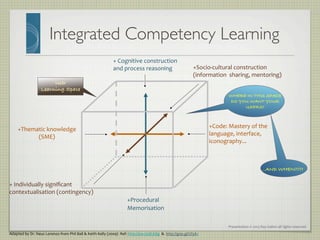
Integrated Competency Learning	

Adapted	
  by	
  Dr.	
  Neus	
  Lorenzo	
  from	
  Phil	
  Ball	
  	
  Keith	
  Kelly	
  (2009)	
  	
  Ref:	
  http://ow.ly/dLK8g	


  http://goo.gl/Ul3A2	
  
+	
  Individually	
  significant	
  
contextualisation	
  (contingency)	
  
+Socio-­‐cultural	
  construction	
  
(information	
  	
  sharing,	
  mentoring)	
  
+Procedural	
  
Memorisation	
  
+	
  Cognitive	
  construction	
  
and	
  process	
  reasoning	
  
+Code:	
  Mastery	
  of	
  the	
  	
  
language,	
  interface,	
  
iconography...	
  
+Thematic	
  knowledge	
  
(SME)	
  
User !
Learning Space!
!
WHERE IN THIS SPACE
DO YOU WANT YOUR
USERS?!
Presentation	
  ©	
  2013	
  Ray	
  Gallon	
  all	
  rights	
  reserved	
  
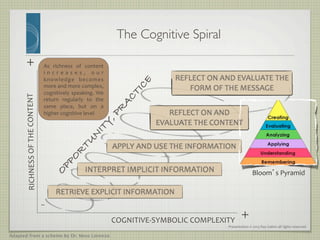
As	
   richness	
   of	
   content	
  
i n c r e a s e s , 	
   o u r	
  
knowledge	
   becomes	
  
more	
  and	
  more	
  complex,	
  
cognitively	
  speaking.	
  We	
  
return	
   regularly	
   to	
   the	
  
same	
   place,	
   but	
   on	
   a	
  
higher	
  cognitive	
  level	
  
COGNITIVE-­‐SYMBOLIC	
  COMPLEXITY	
  
RICHNESS	
  OF	
  THE	
  CONTENT	
  
+!
+!
-!
The Cognitive Spiral	

Bloom’s	
  Pyramid	
  
Adapted from a scheme by Dr. Neus Lorenzo
Presentation	
  ©	
  2013	
  Ray	
  Gallon	
  all	
  rights	
  reserved	
  
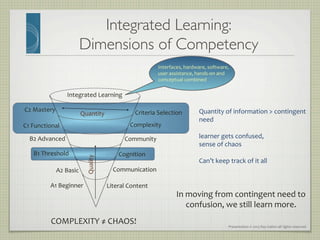
Integrated Learning: 
Dimensions of Competency	

Integrated	
  Learning	
  
Literal	
  Content	
  
Communication	
  
Cognition	
  
Community	
  
Complexity	
  
Criteria	
  Selection	
  
A1	
  Beginner	
  
A2	
  Basic	
  
B1	
  Threshold	
  
C1	
  Functional	
  
B2	
  Advanced	
  
C2	
  Mastery	
  
Quantity	
  
Quality	
  
In	
  moving	
  from	
  contingent	
  need	
  to	
  
confusion,	
  we	
  still	
  learn	
  more.	
  
Interfaces,	
  hardware,	
  software,	
  
user	
  assistance,	
  hands-­‐on	
  and	
  
conceptual	
  combined	
  
COMPLEXITY	
  ≠	
  CHAOS!	
  
Quantity	
  of	
  information	
  	
  contingent	
  
need	


learner	
  gets	
  confused,	
  	
  
sense	
  of	
  chaos	


Can’t	
  keep	
  track	
  of	
  it	
  all	
  
Presentation	
  ©	
  2013	
  Ray	
  Gallon	
  all	
  rights	
  reserved	
  
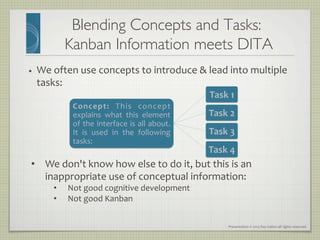
Blending Concepts and Tasks: 
Kanban Information meets DITA	

•  We	
  often	
  use	
  concepts	
  to	
  introduce	
  	
  lead	
  into	
  multiple	
  
tasks:	
  
Concept:	
   This	
   concept	
  
explains	
   what	
   this	
   element	
  
of	
  the	
  interface	
  is	
  all	
  about.	
  
It	
   is	
   used	
   in	
   the	
   following	
  
tasks:	
  
Task	
  1	
  
Task	
  2	
  
Task	
  3	
  
Task	
  4	
  
•  We	
  don't	
  know	
  how	
  else	
  to	
  do	
  it,	
  but	
  this	
  is	
  an	
  
inappropriate	
  use	
  of	
  conceptual	
  information:	
  
•  Not	
  good	
  cognitive	
  development	
  
•  Not	
  good	
  Kanban	
  
Presentation	
  ©	
  2013	
  Ray	
  Gallon	
  all	
  rights	
  reserved	
  
Blending Concepts and Tasks: 
Kanban Information meets DITA	

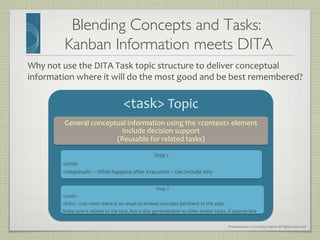
Why	
  not	
  use	
  the	
  DITA	
  Task	
  topic	
  structure	
  to	
  deliver	
  conceptual	
  
information	
  where	
  it	
  will	
  do	
  the	
  most	
  good	
  and	
  be	
  best	
  remembered?	
  
task	
  Topic	
  
General	
  conceptual	
  information	
  using	
  the	
  context	
  element	
  	
  
Include	
  decision	
  support	
  
(Reusable	
  for	
  related	
  tasks)	
  
Step	
  1	
  
cmd	
  
stepresult	
  –	
  What	
  happens	
  after	
  execution	
  –	
  can	
  include	
  why	
  
Step	
  2	
  
cmd	
  
info	
  -­‐	
  Use	
  when	
  there	
  is	
  no	
  result	
  to	
  embed	
  concepts	
  pertinent	
  to	
  the	
  step.	
  
Make	
  sure	
  it	
  relates	
  to	
  the	
  task,	
  but	
  is	
  also	
  generalisable	
  to	
  other	
  similar	
  tasks,	
  if	
  appropriate	
  
Presentation	
  ©	
  2013	
  Ray	
  Gallon	
  all	
  rights	
  reserved	
  
!
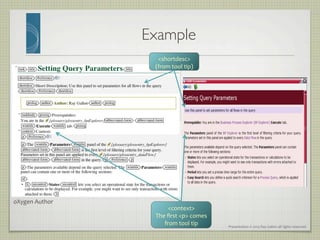
Example	

shortdesc	
  
(from	
  tool	
  tip)	
  
context	
  
The	
  first	
  p	
  comes	
  
from	
  tool	
  tip	
  
oXygen	
  Author	
  
Presentation	
  ©	
  2013	
  Ray	
  Gallon	
  all	
  rights	
  reserved	
  
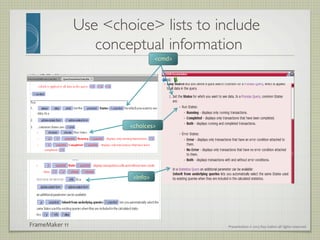
Use choice lists to include
conceptual information	

cmd	
  
choices	
  
info	
  
FrameMaker	
  11	
  
Presentation	
  ©	
  2013	
  Ray	
  Gallon	
  all	
  rights	
  reserved	
  
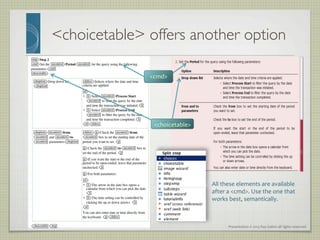
choicetable offers another option	

cmd	
  
choicetable	
  
All	
  these	
  elements	
  are	
  available	
  
after	
  a	
  cmd.	
  Use	
  the	
  one	
  that	
  
works	
  best,	
  semantically.	
  
Presentation	
  ©	
  2013	
  Ray	
  Gallon	
  all	
  rights	
  reserved	
  
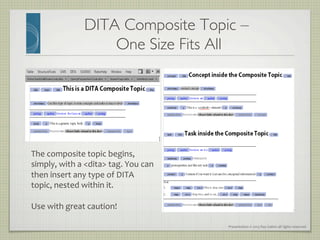
DITA Composite Topic – 
One Size Fits All	

The	
  composite	
  topic	
  begins,	
  
simply,	
  with	
  a	
  dita	
  tag.	
  You	
  can	
  
then	
  insert	
  any	
  type	
  of	
  DITA	
  
topic,	
  nested	
  within	
  it.	


Use	
  with	
  great	
  caution!	
  
Presentation	
  ©	
  2013	
  Ray	
  Gallon	
  all	
  rights	
  reserved	
  
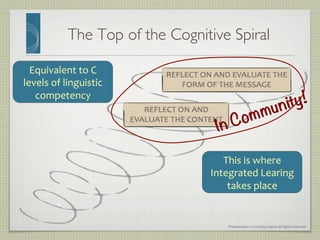
The Top of the Cognitive Spiral	

This	
  is	
  where	
  
Integrated	
  Learing	
  
takes	
  place	
  
Equivalent	
  to	
  C	
  
levels	
  of	
  linguistic	
  
competency	
  
In Community!
Presentation	
  ©	
  2013	
  Ray	
  Gallon	
  all	
  rights	
  reserved	
  
Software Integrated 
Learning Communities	

•  Not	
  user	
  groups	
  or	
  user	
  forums,	
  but	
  integrated	
  communities:	
  
•  Information	
  developers,	
  and	
  preferably	
  coders	
  and	
  interface	
  
designers,	
  too	
  
•  Marketing,	
  pre-­‐sales,	
  administration,	
  anyone	
  in	
  the	
  company	
  
you	
  can	
  get	
  interested	
  
•  Expert	
  users	
  
•  Beginners	
  
•  The	
  curious	
  
•  Primary	
  objective:	
  creating	
  an	
  integrated,	
  collaborative	
  
community	
  that	
  creates	
  value	
  that	
  is	
  re-­‐injected	
  into	
  the	
  
system	
  
Presentation	
  ©	
  2013	
  Ray	
  Gallon	
  all	
  rights	
  reserved	
  
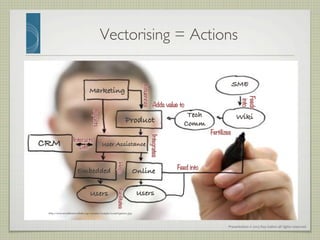
Vectorising = Actions	

http://www.acreditacionfada.org/uploads/images/investigacion.jpg!
Product!
SME!
Wiki!
Online!Embedded!
User Assistance!CRM!
Marketing!
Tech
Comm!
Users! Users!
Impacts
Influences
Interacts
with
 Integrates
Helps
Feed into
Facilitates
Feeds
into
Fertilizes
Adds value to
Presentation	
  ©	
  2013	
  Ray	
  Gallon	
  all	
  rights	
  reserved	
  
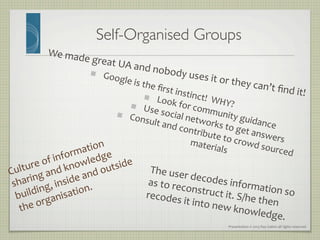
Self-Organised Groups	

We	
  made	
  great	
  UA	
  and	
  nobody	
  uses	
  it	
  or	
  they	
  can’t	
  find	
  it!	
  
   Google	
  is	
  the	
  first	
  instinct!	
  	
  WHY?	
  
   Look	
  for	
  community	
  guidance	
  
   Use	
  social	
  networks	
  to	
  get	
  answers	
  
   Consult	
  and	
  contribute	
  to	
  crowd	
  sourced	
  
materials	
  
Culture	
  of	
  information	
  
sharing	
  and	
  knowledge	
  
building,	
  inside	
  and	
  outside	
  
the	
  organisation.	
  
The	
  user	
  decodes	
  information	
  so	
  
as	
  to	
  reconstruct	
  it.	
  S/he	
  then	
  
recodes	
  it	
  into	
  new	
  knowledge.	
  
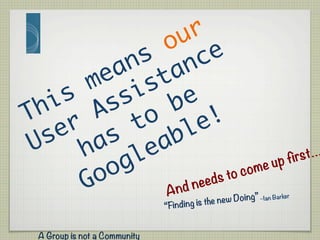
And needs to come up first…
A Group is not a Community
“Finding is the new Doing” –Ian Barker
Presentation	
  ©	
  2013	
  Ray	
  Gallon	
  all	
  rights	
  reserved	
  
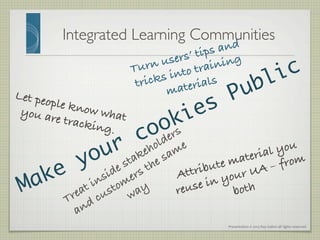
Integrated Learning Communities	

Let people know whatyou are tracking.!
Attribute material you
reuse in your UA – from
both!
Turn users’ tips and
tricks into training
materials!
Presentation	
  ©	
  2013	
  Ray	
  Gallon	
  all	
  rights	
  reserved	
  
RAY	
  GALLON	
  
C U L T U R E C O M
Email:	
  	
   infodesign@culturecom.net	
  
Thank	
  You!	
  
Google	
  Plus:	
  +Ray	
  Gallon	
  
Twitter:	
  @RayGallon	
  
LinkedIn:	
  Ray	
  Gallon	
  
Check	
  out	
  my	
  blog,	
  Rant	
  of	
  a	
  Humanist	
  Nerd:	
  
http://humanistnerd.culturecom.net	


Portions	
  of	
  this	
  presentation	
  based	
  on	
  research	
  
by	
  the	
  Transformation	
  Society	
  Research	
  group.	
  
Link	
  to	
  the	
  Adobe	
  webinars	
  here:	
  	
  
http://blogs.adobe.com/techcomm/2013/02/cognitive_design_user_assistance.html	
  
Two	
  new	
  white	
  papers	
  published	
  on	
  Adobe	
  site:	
  
• Changing Paradigms in Technology and Communication
• Crossing Boundaries: Implications for the Content Industries
Link:
http://www.adobe.com/cfusion/entitlement/index.cfm?event=customsku=FS0003673e=tcs_whitepaper
!

Applying Cognitive Science to User Assistance

  • 1.
    RAY  GALLON   CU L T U R E C O M Presentation  ©  2013  Ray  Gallon  all  rights  reserved   Applying Cognitive Science to User Assistance Member, Board of Directors
  • 2.
    Presentation  ©  2013  Ray  Gallon  all  rights  reserved   About Me - Ray Gallon The Humanist Nerd! Owner/Consultant,  Culturecom  –  specialist  in      usability,  content   strategy,  and  user  assistance  for  software! Research  collaborator  and  principal,  The  Transformation  Society,   a  new  research  and  training  institute  in  Barcelona,  Spain! ■  20  years  in  technical  communication  with  major  companies  such  as  G.E.   Healthcare,  Alcatel,  IBM,  etc.   ■  Member,  board  of  directors,  Society  for  Technical  Communication  (STC)   ■  Past  president,  STC  France   ■  Award-­‐winning  radio  producer  and  journalist  –  CBC,  NPR,  France  Culture,   etc.  and  former  programme  manager,  WNYC-­‐FM,  New  York  Public  Radio!
  • 3.
    RAY  GALLON   CU L T U R E C O M Presentation  ©  2013  Ray  Gallon  all  rights  reserved   The only thing we know about the future is that it will be different " " "! Peter Drucker! Our job is to help people use our products well and wisely, which means they learn to adapt, and cope with changes in technology and society.
  • 4.
    Presentation  ©  2013  Ray  Gallon  all  rights  reserved   OECD:  The  Future  Requires  Complex  Thinking   Expert Thinking Complex Communication Non-routine Manual Tasks Routine Cognitive Tasks Routine manual tasks • Communication • Knowledge
  • 5.
    Presentation  ©  2013  Ray  Gallon  all  rights  reserved   Before Proceeding, Decide Modern  software’s  complexity,  features,  &  power   can  leave  users  perplexed  –  often  just  when  they   have  some  immediate,  contingent  need:       “I  need  to  get  this  done,  and  NOW!.”    
  • 6.
    Presentation  ©  2013  Ray  Gallon  all  rights  reserved   Before Proceeding, Decide •  User  assistance  that  is  limited  to  procedures  cannot  help   people  with  contingent  needs.     •  They  need  to  decide  which,  if  any,  procedures  they  need   to  use.     •  Long  conceptual  topics  might  provide  insight.   •  But  people  with  contingent  needs  are  not  going  to  wade   through  long  texts.   •  We  can  help  users  get  real  work  done  more  quickly  with   a  bit  of  decision  support.  
  • 7.
    Presentation  ©  2013  Ray  Gallon  all  rights  reserved   Designing User Assistance - Experience is More Important than Taxonomy "   Problem  #1:  with  traditional  “static” documentation,  the  product  gives   meaning  to  the  docs.   "   Users’ experience  with  the  product  takes  them  from  the  abstract  realm  of   reading  about  the  product...    
  • 8.
    Presentation  ©  2013  Ray  Gallon  all  rights  reserved   Designing User Assistance - Experience is More Important than Taxonomy "   Problem  #1:  with  traditional  “static” documentation,  the  product  gives   meaning  to  the  docs.   "   Users’ experience  with  the  product  takes  them  from  the  abstract  realm  of   reading  about  the  product...     "   to  the  reality  of  performance.       "   For  software,  we  can  go  straight  to  performance-­‐based  meaning  if  we   embed  the  user  assistance  in  the  product  itself.     "   Minimalism  +  Structured  Authoring  make  this  doable.  
  • 9.
    Presentation  ©  2013  Ray  Gallon  all  rights  reserved   Let’s Look at Minimalism "   Two  common  ideas  about  minimalism:   "   Don’t  waste  user’s  time  with  unnecessary   detail,  especially  concepts   "   Save  money  in  production  and   localization  with  reduced  content   "  STEP 1!"  STEP 2!"  STEP 3! DON’T DO THAT! NOTE:! WARNING!! "   Is  memorizing  a  procedure  by  rote   necessary  for  competency?   "   If  concepts  are  important,   how  do  we  include  them   without  “wasting  users’   time?”   "   How  do  I  know  if  I  need  to  do  this?  
  • 10.
    Presentation  ©  2013  Ray  Gallon  all  rights  reserved   Not Just Minimal – Minimal and Meaningful § Minimal  and  meaningful:  one  task  helps   us  understand  many  related  tasks.   § Minimal  and  meaningful:  one  quick  look   tells  us  we  don’t  need  to  bother  with  this   (or  that  we  do).   "   People  best  learn  about  product   use  by  doing  something  and  making   connections  in  the  process.     "   Learn  by  doing  –  put  the   concepts  where  they  will  be   useful  and  remembered.  
  • 11.
    Presentation  ©  2013  Ray  Gallon  all  rights  reserved   Everything We Know… "   Get  straight  to  procedures   "   Don’t  waste  user’s  time  with  unnecessary   detail,  especially  concepts   "   Procedural  information  must  be   separated  from  conceptual  information.    
  • 12.
    Presentation  ©  2013  Ray  Gallon  all  rights  reserved   Double Embeddedness Embed simple concepts directly into the 
 User Assistance Cognitive Science (and John Carroll) backs this up
  • 13.
    Presentation  ©  2013  Ray  Gallon  all  rights  reserved   Cognitive Bases: Gestalt Psychology Source: http://en.wikipedia.org/wiki/Gestalt_psychology •  Gestalt  psychology  tries  to  understand   the  laws  of  our  ability  to  acquire  and   maintain  stable  percepts  in  a  noisy   world.     •  The  brain  is  holistic,  parallel,  and   analog,  with  self-­‐organizing   tendencies.     •  The  human  eye  sees  objects  in  their   entirety  before  perceiving  their   individual  parts,  suggesting  the  whole   is  “other”  than  the  sum  of  its  parts.       We  fill  in  blank  spaces  to  complete  images.   John  Carroll  favours  this  kind  of  inferential  learning  in  minimalism.  
  • 14.
    Presentation  ©  2013  Ray  Gallon  all  rights  reserved   Cognitive Bases: Constructivism •  Allows  the  learner  to  experience  an  environment   first-­‐hand,  thereby  giving  the  student  reliable,  trust-­‐ worthy  knowledge.     •  The  learner  is  required  to  act  upon  the  environment   to  both  acquire  and  test  new  knowledge.   •  Learners  are  self-­‐directed,  creative,  and  innovative.   •  Instructors  are  facilitators,  not  teachers.   •  The  context  in  which  the  learning  occurs  is  central  to   the  learning  itself     •  Learning  is  an  active,  social  process.   •  Learners  should  collaborate  to  arrive  at  shared   understanding.   •  This  social  approach  has  developed  into…   Source: http://en.wikipedia.org/wiki/Constructivism_(learning_theory)
  • 15.
    Presentation  ©  2013  Ray  Gallon  all  rights  reserved   •  Knowledge  is  activated  in  the  world  as  much  as  in  the  head  of  an  individual.   •  It  exists  within  systems  which  are  accessed  through  people  participating  in  activities.   Cognitive Bases: Connectivism •  Learning  is  the  process  of  creating  connections  and  elaborating  a   network.  In  this  metaphor,  a  node  is  anything  that  can  be  connected  to   another  node  such  as  an  organisation,  information,  data,  feelings  and   images.     •  Learning  may  reside  in  non-­‐human  appliances.   •  Learning  is  more  critical  than  knowing.   •  Maintaining  and  nurturing  connections  is  needed  to  facilitate  continual   learning.   •  Perceiving  connections  between  fields,  ideas  and  concepts  is  a  core  skill.   •  Currency  (accurate,  up-­‐to-­‐date  knowledge)  is  the  intent  of  learning   activities.   Source: http://en.wikipedia.org/wiki/Connectivism
  • 16.
    Presentation  ©  2013  Ray  Gallon  all  rights  reserved   •  Knowledge  is  activated  in  the  world  as  much  as  in  the  head  of  an  individual.   •  It  exists  within  systems  which  are  accessed  through  people  participating  in  activities.   Cognitive Bases: Connectivism •  Learning  is  the  process  of  creating  connections  and  elaborating  a   network.  In  this  metaphor,  a  node  is  anything  that  can  be  connected  to   another  node  such  as  an  organisation,  information,  data,  feelings  and   images.     •  Learning  may  reside  in  non-­‐human  appliances.   •  Learning  is  more  critical  than  knowing.   •  Maintaining  and  nurturing  connections  is  needed  to  facilitate  continual   learning.   •  Perceiving  connections  between  fields,  ideas  and  concepts  is  a  core  skill.   •  Currency  (accurate,  up-­‐to-­‐date  knowledge)  is  the  intent  of  learning   activities.   Source: http://en.wikipedia.org/wiki/Connectivism The Underpinning for KANBAN INFORMATION:   •  +Know  where   •  Know  how  •  Know  what  •  +Know  when   Implied:! •  +Know  how  to  be   •  +Know  how  to  be  with  others  
  • 17.
    Presentation  ©  2013  Ray  Gallon  all  rights  reserved   Kanban Information: Help Users Learn Your Software Fast   We  want  to  give  the  user  all  the  information  s/he  needs  and  only  the   information  s/he  needs.     We  want  to  deliver  that  information  when  s/he  needs  it  –  which   implies,  at  the  moment  s/he  has  real  work  to  do.     The  logical  conclusion  is  that  user  assistance  needs  to  be  embedded   in  the  software  itself,  in  such  a  way  that:     The  user  can  find  it  immediately,  without  excessive  searching,  if     s/he  needs  it.     If  s/he  doesn’t  need  it,  it  stays  out  of  the  way.  
  • 18.
    Presentation  ©  2013  Ray  Gallon  all  rights  reserved   ...AND WHEN????! Integrated Competency Learning Adapted  by  Dr.  Neus  Lorenzo  from  Phil  Ball    Keith  Kelly  (2009)    Ref:  http://ow.ly/dLK8g        http://goo.gl/Ul3A2   +  Individually  significant   contextualisation  (contingency)   +Socio-­‐cultural  construction   (information    sharing,  mentoring)   +Procedural   Memorisation   +  Cognitive  construction   and  process  reasoning   +Code:  Mastery  of  the     language,  interface,   iconography...   +Thematic  knowledge   (SME)   User ! Learning Space! ! WHERE IN THIS SPACE DO YOU WANT YOUR USERS?!
  • 19.
    Presentation  ©  2013  Ray  Gallon  all  rights  reserved   As   richness   of   content   i n c r e a s e s ,   o u r   knowledge   becomes   more  and  more  complex,   cognitively  speaking.  We   return   regularly   to   the   same   place,   but   on   a   higher  cognitive  level   COGNITIVE-­‐SYMBOLIC  COMPLEXITY   RICHNESS  OF  THE  CONTENT   +! +! -! The Cognitive Spiral Bloom’s  Pyramid   Adapted from a scheme by Dr. Neus Lorenzo
  • 20.
    Presentation  ©  2013  Ray  Gallon  all  rights  reserved   Integrated Learning: Dimensions of Competency Integrated  Learning   Literal  Content   Communication   Cognition   Community   Complexity   Criteria  Selection   A1  Beginner   A2  Basic   B1  Threshold   C1  Functional   B2  Advanced   C2  Mastery   Quantity   Quality   In  moving  from  contingent  need  to   confusion,  we  still  learn  more.   Interfaces,  hardware,  software,   user  assistance,  hands-­‐on  and   conceptual  combined   COMPLEXITY  ≠  CHAOS!   Quantity  of  information    contingent   need     learner  gets  confused,     sense  of  chaos     Can’t  keep  track  of  it  all  
  • 21.
    Presentation  ©  2013  Ray  Gallon  all  rights  reserved   Blending Concepts and Tasks: Kanban Information meets DITA •  We  often  use  concepts  to  introduce    lead  into  multiple   tasks:   Concept:   This   concept   explains   what   this   element   of  the  interface  is  all  about.   It   is   used   in   the   following   tasks:   Task  1   Task  2   Task  3   Task  4   •  We  don't  know  how  else  to  do  it,  but  this  is  an   inappropriate  use  of  conceptual  information:   •  Not  good  cognitive  development   •  Not  good  Kanban  
  • 22.
    Presentation  ©  2013  Ray  Gallon  all  rights  reserved   Blending Concepts and Tasks: Kanban Information meets DITA Why  not  use  the  DITA  Task  topic  structure  to  deliver  conceptual   information  where  it  will  do  the  most  good  and  be  best  remembered?   task  Topic   General  conceptual  information  using  the  context  element     Include  decision  support   (Reusable  for  related  tasks)   Step  1   cmd   stepresult  –  What  happens  after  execution  –  can  include  why   Step  2   cmd   info  -­‐  Use  when  there  is  no  result  to  embed  concepts  pertinent  to  the  step.   Make  sure  it  relates  to  the  task,  but  is  also  generalisable  to  other  similar  tasks,  if  appropriate  
  • 23.
    Presentation  ©  2013  Ray  Gallon  all  rights  reserved   ! Example shortdesc   (from  tool  tip)   context   The  first  p  comes   from  tool  tip   oXygen  Author  
  • 24.
    Presentation  ©  2013  Ray  Gallon  all  rights  reserved   Use choice lists to include conceptual information cmd   choices   info   FrameMaker  11  
  • 25.
    Presentation  ©  2013  Ray  Gallon  all  rights  reserved   choicetable offers another option cmd   choicetable   All  these  elements  are  available   after  a  cmd.  Use  the  one  that   works  best,  semantically.  
  • 26.
    Presentation  ©  2013  Ray  Gallon  all  rights  reserved   DITA Composite Topic – One Size Fits All The  composite  topic  begins,   simply,  with  a  dita  tag.  You  can   then  insert  any  type  of  DITA   topic,  nested  within  it.     Use  with  great  caution!  
  • 27.
    Presentation  ©  2013  Ray  Gallon  all  rights  reserved   The Top of the Cognitive Spiral This  is  where   Integrated  Learing   takes  place   Equivalent  to  C   levels  of  linguistic   competency   In Community!
  • 28.
    Presentation  ©  2013  Ray  Gallon  all  rights  reserved   Software Integrated Learning Communities •  Not  user  groups  or  user  forums,  but  integrated  communities:   •  Information  developers,  and  preferably  coders  and  interface   designers,  too   •  Marketing,  pre-­‐sales,  administration,  anyone  in  the  company   you  can  get  interested   •  Expert  users   •  Beginners   •  The  curious   •  Primary  objective:  creating  an  integrated,  collaborative   community  that  creates  value  that  is  re-­‐injected  into  the   system  
  • 29.
    Presentation  ©  2013  Ray  Gallon  all  rights  reserved   Vectorising = Actions http://www.acreditacionfada.org/uploads/images/investigacion.jpg! Product! SME! Wiki! Online!Embedded! User Assistance!CRM! Marketing! Tech Comm! Users! Users! Impacts Influences Interacts with Integrates Helps Feed into Facilitates Feeds into Fertilizes Adds value to
  • 30.
    Presentation  ©  2013  Ray  Gallon  all  rights  reserved   Self-Organised Groups We  made  great  UA  and  nobody  uses  it  or  they  can’t  find  it!     Google  is  the  first  instinct!    WHY?     Look  for  community  guidance     Use  social  networks  to  get  answers     Consult  and  contribute  to  crowd  sourced   materials   Culture  of  information   sharing  and  knowledge   building,  inside  and  outside   the  organisation.   The  user  decodes  information  so   as  to  reconstruct  it.  S/he  then   recodes  it  into  new  knowledge.  
  • 31.
    And needs tocome up first… A Group is not a Community “Finding is the new Doing” –Ian Barker
  • 32.
    Presentation  ©  2013  Ray  Gallon  all  rights  reserved   Integrated Learning Communities Let people know whatyou are tracking.! Attribute material you reuse in your UA – from both! Turn users’ tips and tricks into training materials!
  • 33.
    Presentation  ©  2013  Ray  Gallon  all  rights  reserved   RAY  GALLON   C U L T U R E C O M Email:     infodesign@culturecom.net   Thank  You!   Google  Plus:  +Ray  Gallon   Twitter:  @RayGallon   LinkedIn:  Ray  Gallon   Check  out  my  blog,  Rant  of  a  Humanist  Nerd:   http://humanistnerd.culturecom.net     Portions  of  this  presentation  based  on  research   by  the  Transformation  Society  Research  group.   Link  to  the  Adobe  webinars  here:     http://blogs.adobe.com/techcomm/2013/02/cognitive_design_user_assistance.html   Two  new  white  papers  published  on  Adobe  site:   • Changing Paradigms in Technology and Communication • Crossing Boundaries: Implications for the Content Industries Link: http://www.adobe.com/cfusion/entitlement/index.cfm?event=customsku=FS0003673e=tcs_whitepaper !