






UX BOOTCAMP
DESIGNING FOR USER EXPERIENCE
CHARLIE MULHOLLAND AND FRANK KLOOS
SCHOOL OF DESIGN AND COMMUNICATION
COMMUNICATION AND MULTIMEDIA DESIGN
JANUARY 7, 2013


                                      1
DESIGN FOR USER EXPERIENCE
•   WHAT IS USER CENTERED DESIGN (UCD)?
•   WHY UCD?
•   GOALS, CONTEXTS & MENTAL MODELS
•   USER RESEARCH

• BASIC ELEMENTS OF HCI

• PROTOTYPING
• USABILITY TESTING

• Q&A

                                          2
WHAT IS USER CENTRED DESIGN
(UCD)?


                              3
WHAT IS UCD?
• UCD IS A DESIGN PHILOSOPHY THAT PUTS THE THE NEEDS
  OF ACTUAL USERS OF A PRODUCT / SERVICE AT THE
  CENTRE OF ALL DECISIONS ABOUT THE PRODUCT:

• HOW IT SHOULD WORK; HOW IT SHOULD LOOK; HOW
  INFORMATION SHOULD BE ORGANIZED; AND HOW
  TECHNOLOGY SHOULD SUPPORT IT

• UCD IS „USER-CENTRIC‟ AND AIMS TO PROVIDE POSITIVE
  USER EXPERIENCES
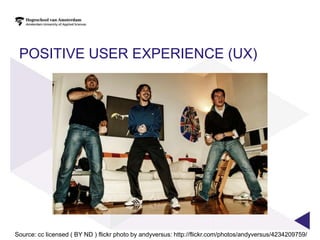
POSITIVE USER EXPERIENCE (UX)


Source: cc licensed ( BY ND ) flickr photo by andyversus: http://flickr.com/photos/andyversus/4234209759/
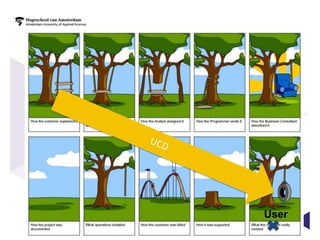
WHY UCD?


           6
User
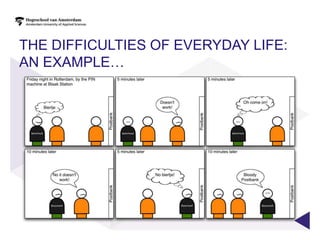
THE DIFFICULTIES OF EVERYDAY LIFE:
AN EXAMPLE…
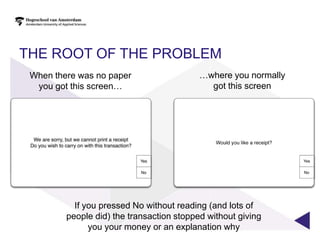
THE ROOT OF THE PROBLEM
 When there was no paper                   …where you normally
  you got this screen…                       got this screen


           If you pressed No without reading (and lots of
         people did) the transaction stopped without giving
               you your money or an explanation why
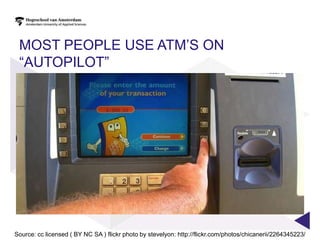
MOST PEOPLE USE ATM‟S ON
 “AUTOPILOT”


Source: cc licensed ( BY NC SA ) flickr photo by stevelyon: http://flickr.com/photos/chicanerii/2264345223/
THEY AREN‟T THINKING ABOUT RECEIPT
PAPER…
UCD IS NECESSARY BECAUSE…
• USERS LOOK AT THE WORLD AND OUR PRODUCTS FROM
  THEIR PERSPECTIVE
• AND THEIR BEHAVIOUR AS USERS IS DEFINED BY THEIR:

  GOALS
  MENTAL MODELS
  CONTEXT

• UCD HELPS US UNDERSTAND THESE THINGS


                                                      12
GOALS, CONTEXTS & MENTAL
MODELS


                           13
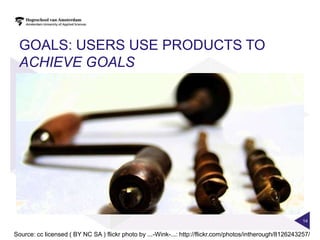
GOALS: USERS USE PRODUCTS TO
 ACHIEVE GOALS


                                                                                                           14


Source: cc licensed ( BY NC SA ) flickr photo by ...-Wink-...: http://flickr.com/photos/intherough/8126243257/
TYPES OF GOAL
• END GOALS
  • Holes in walls
  • Getting from A to B
• EXPERIENCE GOALS
  • Feeling in control
  • Understanding things
  • Not feeling stupid
• LIFE GOALS
  • Being happy
  • Being successful


                                                   15
          UCD aims to help understand user goals
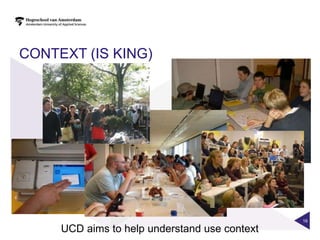
CONTEXT (IS KING)


                                               16

     UCD aims to help understand use context
MENTAL MODELS
• A MENTAL MODEL IS A DEVICE WE USE TO HELP US MAKE
  SENSE OF SITUATIONS AND ARTEFACTS
• WE APPLY THEM TO HELP US UNDERSTAND AND ACT IN THE
  WORLD


                                                       17
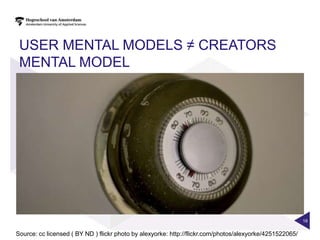
USER MENTAL MODELS ≠ CREATORS
 MENTAL MODEL


                                                                                                          18


Source: cc licensed ( BY ND ) flickr photo by alexyorke: http://flickr.com/photos/alexyorke/4251522065/
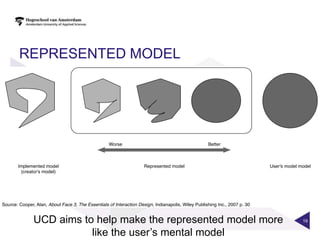
REPRESENTED MODEL


 UCD aims to help make the represented model more   19


            like the user‟s mental model
USER RESEARCH


                20
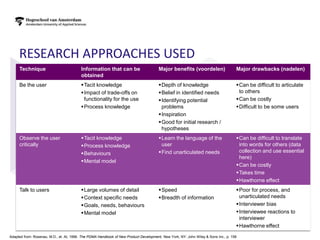
RESEARCH APPROACHES USED
     Technique                           Information that can be                       Major benefits (voordelen)                   Major drawbacks (nadelen)
                                         obtained
     Be the user                         Tacit knowledge                              Depth of knowledge                          Can be difficult to articulate
                                         Impact of trade-offs on                      Belief in identified needs                   to others
                                          functionality for the use                    Identifying potential                       Can be costly
                                         Process knowledge                             problems                                    Difficult to be some users
                                                                                       Inspiration
                                                                                       Good for initial research /
                                                                                        hypotheses
     Observe the user                    Tacit knowledge                              Learn the language of the                   Can be difficult to translate
     critically                          Process knowledge                             user                                         into words for others (data
                                         Behaviours                                   Find unarticulated needs                     collection and use essential
                                                                                                                                     here)
                                         Mental model
                                                                                                                                    Can be costly
                                                                                                                                    Takes time
                                                                                                                                    Hawthorne effect
     Talk to users                       Large volumes of detail                      Speed                                       Poor for process, and
                                         Context specific needs                       Breadth of information                       unarticulated needs
                                         Goals, needs, behaviours                                                                  Interviewer bias
                                         Mental model                                                                              Interviewee reactions to
                                                                                                                                     interviewer
                                                                                                                                    Hawthorne effect
Adapted from: Rosenau, M.D., et. At, 1996. The PDMA Handbook of New Product Development, New York, NY: John Wiley & Sons Inc., p. 158
BEING THE USER IS ABOUT
• OBSERVING YOURSELF AS YOU ASSUME THE ROLE OF THE
  USER
  • Having a „child‟s mind‟
  • Delaying judgement
  • Thinking aloud and recording your thoughts
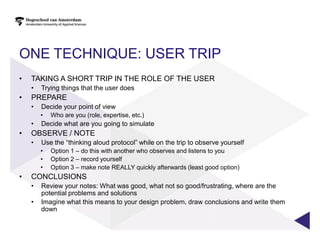
ONE TECHNIQUE: USER TRIP
•   TAKING A SHORT TRIP IN THE ROLE OF THE USER
    •   Trying things that the user does
•   PREPARE
    •   Decide your point of view
        •   Who are you (role, expertise, etc.)
    •   Decide what are you going to simulate
•   OBSERVE / NOTE
    •   Use the “thinking aloud protocol” while on the trip to observe yourself
        •   Option 1 – do this with another who observes and listens to you
        •   Option 2 – record yourself
        •   Option 3 – make note REALLY quickly afterwards (least good option)
•   CONCLUSIONS
    •   Review your notes: What was good, what not so good/frustrating, where are the
        potential problems and solutions
    •   Imagine what this means to your design problem, draw conclusions and write them
        down
OBSERVING THE USER IS ABOUT
• UNDERSTANDING THE EFFECT OF CONTEXT
  •   Environment
  •   Others involved
  •   Goals
  •   Problems


                                        24
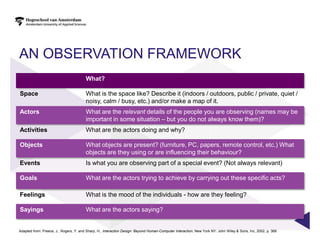
AN OBSERVATION FRAMEWORK
                                        What?

Space                                   What is the space like? Describe it (indoors / outdoors, public / private, quiet /
                                        noisy, calm / busy, etc.) and/or make a map of it.
Actors                                  What are the relevant details of the people you are observing (names may be
                                        important in some situation – but you do not always know them)?
Activities                              What are the actors doing and why?

Objects                                 What objects are present? (furniture, PC, papers, remote control, etc.) What
                                        objects are they using or are influencing their behaviour?
Events                                  Is what you are observing part of a special event? (Not always relevant)

Goals                                   What are the actors trying to achieve by carrying out these specific acts?

Feelings                                What is the mood of the individuals - how are they feeling?

Sayings                                 What are the actors saying?


Adapted from: Preece, J., Rogers, Y. and Sharp, H., Interaction Design: Beyond Human-Computer Interaction, New York NY: John Wiley & Sons, Inc, 2002, p. 368
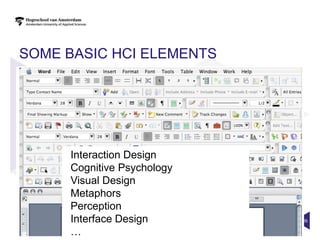
SOME BASIC HCI ELEMENTS


     Interaction Design
     Cognitive Psychology
     Visual Design
     Metaphors
     Perception
     Interface Design       26

     …
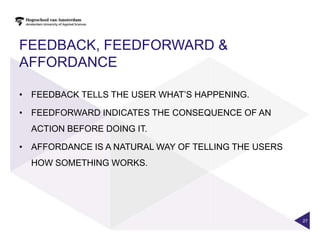
FEEDBACK, FEEDFORWARD &
AFFORDANCE

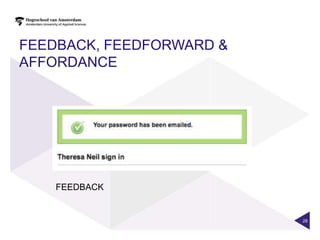
• FEEDBACK TELLS THE USER WHAT‟S HAPPENING.

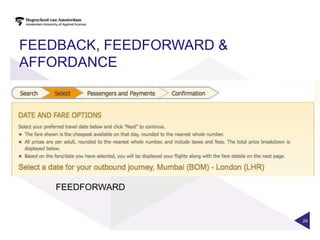
• FEEDFORWARD INDICATES THE CONSEQUENCE OF AN
  ACTION BEFORE DOING IT.

• AFFORDANCE IS A NATURAL WAY OF TELLING THE USERS
  HOW SOMETHING WORKS.


                                                     27
FEEDBACK, FEEDFORWARD &
AFFORDANCE


    FEEDBACK


                          28
FEEDBACK, FEEDFORWARD &
AFFORDANCE


    FEEDFORWARD


                          29
FEEDBACK, FEEDFORWARD &
AFFORDANCE


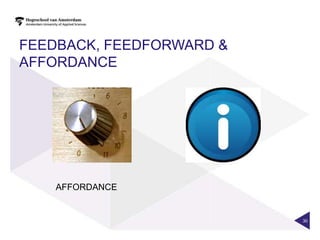
    AFFORDANCE


                          30
FEEDBACK, FEEDFORWARD &
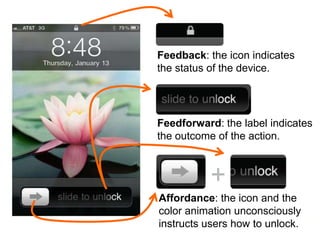
                Feedback: the icon indicates
AFFORDANCE      the status of the device.


                      Feedforward: the label indicates
                      the outcome of the action.


                      Affordance: the icon and the
                      color animation unconsciously
                      instructs users how to unlock. 31
PROTOTYPING
COMMON PRINCIPLES

• TESTING ON TARGET AUDIENCE
• TEST INTERACTION, VISUALS AND TONE OF VOICE.
• GET A FEELING FOR YOUR DESIGN
• FINDING MISTAKES, BEFORE SPENDING TIME AND MONEY (IN
  PRODUCING CODE)
• CONVINCING STAKEHOLDERS
• SOME PEOPLE WILL ONLY SEE “IT” WHEN IT‟S VISUAL AND
  INTERACTIVE


                                                         32
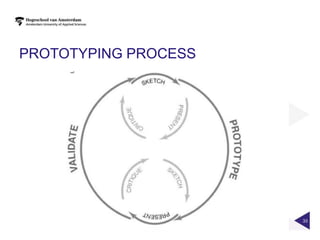
PROTOTYPING PROCESS


                      33
PROTOTYPING
WHERE TO START

•   FORMULATE QUESTIONS BEFOREHAND
•   DETERMINE WHAT TO TEST
•   DO IT QUICK & DIRTY
•   FAKE IT „TILL YOU MAKE IT


                                     34
PROTOTYPING
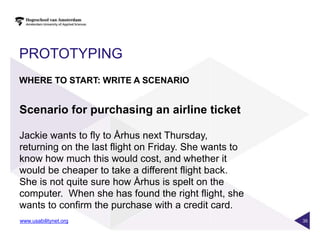
WHERE TO START: WRITE A SCENARIO


www.usabilitynet.org               35
PROTOTYPING
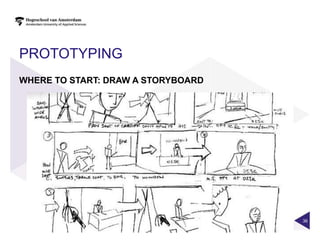
WHERE TO START: DRAW A STORYBOARD


                                    36
PROTOTYPING
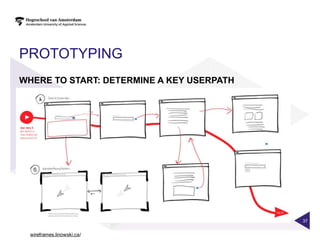
WHERE TO START: DETERMINE A KEY USERPATH


                                           37


  wireframes.linowski.ca/
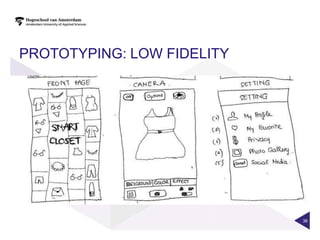
PROTOTYPING: LOW FIDELITY
WHERE TO START: DETERMINE A KEY USERPATH


                                           38
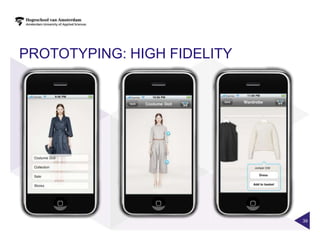
PROTOTYPING: HIGH FIDELITY


                             39
PAPER PROTOTYPING

•   FEEDBACK, EARLY IN DESIGN PHASE
•   QUICK, ITERATIVE EXPERIMENTS
•   FOCUS ON CONCEPT AND INTERACTION
•   DRIVES COMMUNICATION
•   NO CODE DEMANDED
•   BEING CREATIVE WITH YOUR HANDS:
 IS GOOOOD FOR
    YOUR BRAINS :-)


                                                     40
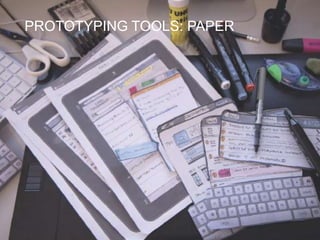
PROTOTYPING TOOLS: PAPER
PROTOTYPING


                           41
PROTOTYPING TOOLS: PAPER
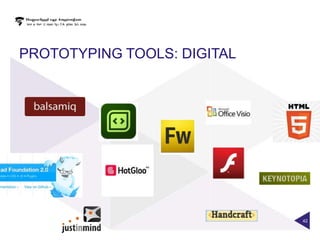
PROTOTYPING TOOLS: DIGITAL


                             42
PROTOTYPING TOOLS: PAPER
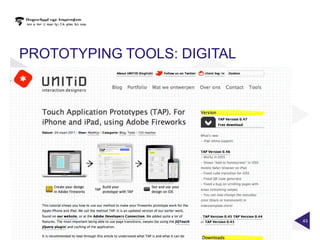
PROTOTYPING TOOLS: DIGITAL


                             43
PROTOTYPING TOOLS: PAPER
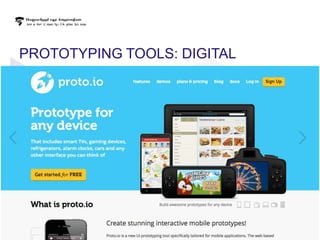
PROTOTYPING TOOLS: DIGITAL


                             44
PROTOTYPING TOOLS: PAPER
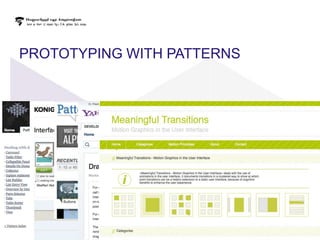
PROTOTYPING WITH PATTERNS
USABILITY TESTING
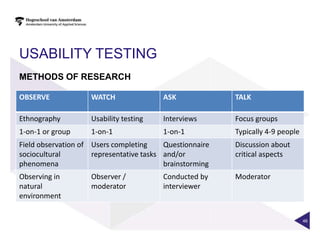
METHODS OF RESEARCH

OBSERVE             WATCH                ASK              TALK

Ethnography         Usability testing    Interviews       Focus groups
1-on-1 or group     1-on-1               1-on-1           Typically 4-9 people
Field observation of Users completing     Questionnaire   Discussion about
sociocultural        representative tasks and/or          critical aspects
phenomena                                 brainstorming
Observing in        Observer /           Conducted by     Moderator
natural             moderator            interviewer
environment


                                                                                 46
http://www.youtube.com/watch?v=9wQkLthhHKA


                                             47
USABILITY TESTING

Usability testing is finding out how an individual
user navigates, finds information, has interaction
and performs tasks with a product or service.


It is a one-on-one „watch and learn‟ approach


                                                     48
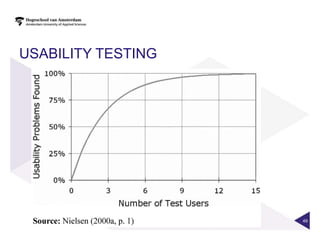
USABILITY TESTING


                    49
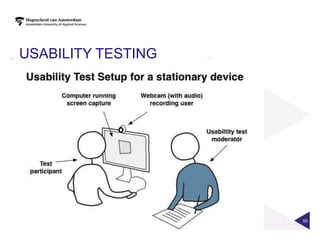
USABILITY TESTING
SETUP


                    50
USABILITY TESTING
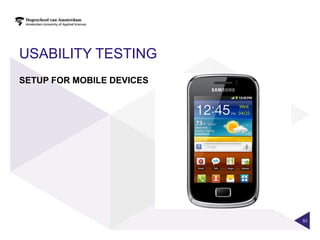
SETUP FOR MOBILE DEVICES


                           51
USABILITY TESTING
GUIDELINES WHILE TESTING

• COMPENSATE YOUR PARTICIPANTS (E.G. CANDY)
• GATHER PARTICIPANT‟S INFORMATION ON:
  - BACKGROUND AND FRAME OF REFERENCE
  - TRIGGERS AND CONDITIONS TO THE ACTIVITY
• AVOID OPINION-BASED QUESTIONS
• ASK OPEN QUESTIONS, DIG DEEPER IF THE USER IS BRIEF
• GIVE OPEN TASKS, INSTEAD OF GUIDING THE USER
• STIMULATE THINKING ALOUD
• ASK THE USER ABOUT EXPECTATIONS WHILE TESTING
                                                        52
RECOMMENDED READING

JESSE JAMES GARRETT: THE ELEMENTS OF USER EXPERIENCE (UCD)
DAN SAFFER: DESIGNING FOR INTERACTION (IXD)
STEVE KRUG: DON'T MAKE ME THINK (USABILITY)
STEVE KRUG: IT'S NOT ROCKET SURGERY (USABILITY TESTING)
SUSAN WEINSCHENK: 100 THINGS EVERY DESIGNER NEEDS TO KNOW
ABOUT PEOPLE (COGNITIVE PSYCHOLOGY)
MARK BOULTON: A PRACTICLE GUIDE TO DESIGNING FOR THE WEB
(VISUAL DESIGN)
TODD ZAKI WARFELL: PROTOTYPING: A PRACTITIONER'S GUIDE
(PROTOTYPING)


                                                             53
Q&A


      54
THANK YOU FOR YOUR ATTENTION!


          Frank Kloos
             @boven_water


          Charlie Mulholland
             @charliem5

                                55

Ux bootcamp small

  • 1.
    UX BOOTCAMP DESIGNING FORUSER EXPERIENCE CHARLIE MULHOLLAND AND FRANK KLOOS SCHOOL OF DESIGN AND COMMUNICATION COMMUNICATION AND MULTIMEDIA DESIGN JANUARY 7, 2013 1
  • 2.
    DESIGN FOR USEREXPERIENCE • WHAT IS USER CENTERED DESIGN (UCD)? • WHY UCD? • GOALS, CONTEXTS & MENTAL MODELS • USER RESEARCH • BASIC ELEMENTS OF HCI • PROTOTYPING • USABILITY TESTING • Q&A 2
  • 3.
    WHAT IS USERCENTRED DESIGN (UCD)? 3
  • 4.
    WHAT IS UCD? •UCD IS A DESIGN PHILOSOPHY THAT PUTS THE THE NEEDS OF ACTUAL USERS OF A PRODUCT / SERVICE AT THE CENTRE OF ALL DECISIONS ABOUT THE PRODUCT: • HOW IT SHOULD WORK; HOW IT SHOULD LOOK; HOW INFORMATION SHOULD BE ORGANIZED; AND HOW TECHNOLOGY SHOULD SUPPORT IT • UCD IS „USER-CENTRIC‟ AND AIMS TO PROVIDE POSITIVE USER EXPERIENCES
  • 5.
    POSITIVE USER EXPERIENCE(UX) Source: cc licensed ( BY ND ) flickr photo by andyversus: http://flickr.com/photos/andyversus/4234209759/
  • 6.
  • 7.
  • 8.
    THE DIFFICULTIES OFEVERYDAY LIFE: AN EXAMPLE…
  • 9.
    THE ROOT OFTHE PROBLEM When there was no paper …where you normally you got this screen… got this screen If you pressed No without reading (and lots of people did) the transaction stopped without giving you your money or an explanation why
  • 10.
    MOST PEOPLE USEATM‟S ON “AUTOPILOT” Source: cc licensed ( BY NC SA ) flickr photo by stevelyon: http://flickr.com/photos/chicanerii/2264345223/
  • 11.
    THEY AREN‟T THINKINGABOUT RECEIPT PAPER…
  • 12.
    UCD IS NECESSARYBECAUSE… • USERS LOOK AT THE WORLD AND OUR PRODUCTS FROM THEIR PERSPECTIVE • AND THEIR BEHAVIOUR AS USERS IS DEFINED BY THEIR: GOALS MENTAL MODELS CONTEXT • UCD HELPS US UNDERSTAND THESE THINGS 12
  • 13.
    GOALS, CONTEXTS &MENTAL MODELS 13
  • 14.
    GOALS: USERS USEPRODUCTS TO ACHIEVE GOALS 14 Source: cc licensed ( BY NC SA ) flickr photo by ...-Wink-...: http://flickr.com/photos/intherough/8126243257/
  • 15.
    TYPES OF GOAL •END GOALS • Holes in walls • Getting from A to B • EXPERIENCE GOALS • Feeling in control • Understanding things • Not feeling stupid • LIFE GOALS • Being happy • Being successful 15 UCD aims to help understand user goals
  • 16.
    CONTEXT (IS KING) 16 UCD aims to help understand use context
  • 17.
    MENTAL MODELS • AMENTAL MODEL IS A DEVICE WE USE TO HELP US MAKE SENSE OF SITUATIONS AND ARTEFACTS • WE APPLY THEM TO HELP US UNDERSTAND AND ACT IN THE WORLD 17
  • 18.
    USER MENTAL MODELS≠ CREATORS MENTAL MODEL 18 Source: cc licensed ( BY ND ) flickr photo by alexyorke: http://flickr.com/photos/alexyorke/4251522065/
  • 19.
    REPRESENTED MODEL UCDaims to help make the represented model more 19 like the user‟s mental model
  • 20.
  • 21.
    RESEARCH APPROACHES USED Technique Information that can be Major benefits (voordelen) Major drawbacks (nadelen) obtained Be the user Tacit knowledge Depth of knowledge Can be difficult to articulate Impact of trade-offs on Belief in identified needs to others functionality for the use Identifying potential Can be costly Process knowledge problems Difficult to be some users Inspiration Good for initial research / hypotheses Observe the user Tacit knowledge Learn the language of the Can be difficult to translate critically Process knowledge user into words for others (data Behaviours Find unarticulated needs collection and use essential here) Mental model Can be costly Takes time Hawthorne effect Talk to users Large volumes of detail Speed Poor for process, and Context specific needs Breadth of information unarticulated needs Goals, needs, behaviours Interviewer bias Mental model Interviewee reactions to interviewer Hawthorne effect Adapted from: Rosenau, M.D., et. At, 1996. The PDMA Handbook of New Product Development, New York, NY: John Wiley & Sons Inc., p. 158
  • 22.
    BEING THE USERIS ABOUT • OBSERVING YOURSELF AS YOU ASSUME THE ROLE OF THE USER • Having a „child‟s mind‟ • Delaying judgement • Thinking aloud and recording your thoughts
  • 23.
    ONE TECHNIQUE: USERTRIP • TAKING A SHORT TRIP IN THE ROLE OF THE USER • Trying things that the user does • PREPARE • Decide your point of view • Who are you (role, expertise, etc.) • Decide what are you going to simulate • OBSERVE / NOTE • Use the “thinking aloud protocol” while on the trip to observe yourself • Option 1 – do this with another who observes and listens to you • Option 2 – record yourself • Option 3 – make note REALLY quickly afterwards (least good option) • CONCLUSIONS • Review your notes: What was good, what not so good/frustrating, where are the potential problems and solutions • Imagine what this means to your design problem, draw conclusions and write them down
  • 24.
    OBSERVING THE USERIS ABOUT • UNDERSTANDING THE EFFECT OF CONTEXT • Environment • Others involved • Goals • Problems 24
  • 25.
    AN OBSERVATION FRAMEWORK What? Space What is the space like? Describe it (indoors / outdoors, public / private, quiet / noisy, calm / busy, etc.) and/or make a map of it. Actors What are the relevant details of the people you are observing (names may be important in some situation – but you do not always know them)? Activities What are the actors doing and why? Objects What objects are present? (furniture, PC, papers, remote control, etc.) What objects are they using or are influencing their behaviour? Events Is what you are observing part of a special event? (Not always relevant) Goals What are the actors trying to achieve by carrying out these specific acts? Feelings What is the mood of the individuals - how are they feeling? Sayings What are the actors saying? Adapted from: Preece, J., Rogers, Y. and Sharp, H., Interaction Design: Beyond Human-Computer Interaction, New York NY: John Wiley & Sons, Inc, 2002, p. 368
  • 26.
    SOME BASIC HCIELEMENTS Interaction Design Cognitive Psychology Visual Design Metaphors Perception Interface Design 26 …
  • 27.
    FEEDBACK, FEEDFORWARD & AFFORDANCE •FEEDBACK TELLS THE USER WHAT‟S HAPPENING. • FEEDFORWARD INDICATES THE CONSEQUENCE OF AN ACTION BEFORE DOING IT. • AFFORDANCE IS A NATURAL WAY OF TELLING THE USERS HOW SOMETHING WORKS. 27
  • 28.
  • 29.
  • 30.
  • 31.
    FEEDBACK, FEEDFORWARD & Feedback: the icon indicates AFFORDANCE the status of the device. Feedforward: the label indicates the outcome of the action. Affordance: the icon and the color animation unconsciously instructs users how to unlock. 31
  • 32.
    PROTOTYPING COMMON PRINCIPLES • TESTINGON TARGET AUDIENCE • TEST INTERACTION, VISUALS AND TONE OF VOICE. • GET A FEELING FOR YOUR DESIGN • FINDING MISTAKES, BEFORE SPENDING TIME AND MONEY (IN PRODUCING CODE) • CONVINCING STAKEHOLDERS • SOME PEOPLE WILL ONLY SEE “IT” WHEN IT‟S VISUAL AND INTERACTIVE 32
  • 33.
  • 34.
    PROTOTYPING WHERE TO START • FORMULATE QUESTIONS BEFOREHAND • DETERMINE WHAT TO TEST • DO IT QUICK & DIRTY • FAKE IT „TILL YOU MAKE IT 34
  • 35.
    PROTOTYPING WHERE TO START:WRITE A SCENARIO www.usabilitynet.org 35
  • 36.
    PROTOTYPING WHERE TO START:DRAW A STORYBOARD 36
  • 37.
    PROTOTYPING WHERE TO START:DETERMINE A KEY USERPATH 37 wireframes.linowski.ca/
  • 38.
    PROTOTYPING: LOW FIDELITY WHERETO START: DETERMINE A KEY USERPATH 38
  • 39.
  • 40.
    PAPER PROTOTYPING • FEEDBACK, EARLY IN DESIGN PHASE • QUICK, ITERATIVE EXPERIMENTS • FOCUS ON CONCEPT AND INTERACTION • DRIVES COMMUNICATION • NO CODE DEMANDED • BEING CREATIVE WITH YOUR HANDS:
 IS GOOOOD FOR YOUR BRAINS :-) 40
  • 41.
  • 42.
  • 43.
  • 44.
  • 45.
  • 46.
    USABILITY TESTING METHODS OFRESEARCH OBSERVE WATCH ASK TALK Ethnography Usability testing Interviews Focus groups 1-on-1 or group 1-on-1 1-on-1 Typically 4-9 people Field observation of Users completing Questionnaire Discussion about sociocultural representative tasks and/or critical aspects phenomena brainstorming Observing in Observer / Conducted by Moderator natural moderator interviewer environment 46
  • 47.
  • 48.
    USABILITY TESTING Usability testingis finding out how an individual user navigates, finds information, has interaction and performs tasks with a product or service. It is a one-on-one „watch and learn‟ approach 48
  • 49.
  • 50.
  • 51.
    USABILITY TESTING SETUP FORMOBILE DEVICES 51
  • 52.
    USABILITY TESTING GUIDELINES WHILETESTING • COMPENSATE YOUR PARTICIPANTS (E.G. CANDY) • GATHER PARTICIPANT‟S INFORMATION ON: - BACKGROUND AND FRAME OF REFERENCE - TRIGGERS AND CONDITIONS TO THE ACTIVITY • AVOID OPINION-BASED QUESTIONS • ASK OPEN QUESTIONS, DIG DEEPER IF THE USER IS BRIEF • GIVE OPEN TASKS, INSTEAD OF GUIDING THE USER • STIMULATE THINKING ALOUD • ASK THE USER ABOUT EXPECTATIONS WHILE TESTING 52
  • 53.
    RECOMMENDED READING JESSE JAMESGARRETT: THE ELEMENTS OF USER EXPERIENCE (UCD) DAN SAFFER: DESIGNING FOR INTERACTION (IXD) STEVE KRUG: DON'T MAKE ME THINK (USABILITY) STEVE KRUG: IT'S NOT ROCKET SURGERY (USABILITY TESTING) SUSAN WEINSCHENK: 100 THINGS EVERY DESIGNER NEEDS TO KNOW ABOUT PEOPLE (COGNITIVE PSYCHOLOGY) MARK BOULTON: A PRACTICLE GUIDE TO DESIGNING FOR THE WEB (VISUAL DESIGN) TODD ZAKI WARFELL: PROTOTYPING: A PRACTITIONER'S GUIDE (PROTOTYPING) 53
  • 54.
    Q&A 54
  • 55.
    THANK YOU FORYOUR ATTENTION! Frank Kloos @boven_water Charlie Mulholland @charliem5 55

Editor's Notes

  • #6 The idea of user experience is important to UCDThe aim of UCD is to deliver positive user experiences and to prevent or reduce the effect of negative user experiencesThere are many ways the this can be achieved
  • #11 ▼This can be seen in the Postbank example•Postbank rightly worked out that there are (at least) two types of customer that use the PIN automaats: ones that want a receipt and ones who do not.•They also noted that they had to customers who wanted a receipt need to know if they cannot have one due to lack of paper•What they forgot was how people actually use PIN automaats - they function on autopilot, they are worried about other things (their security, the people behind them, what they're doing next, the state of their finances etc., etc.)
  • #12 ▼This can be seen in the Postbank example•Postbank rightly worked out that there are (at least) two types of customer that use the PIN automaats: ones that want a receipt and ones who do not.•They also noted that they had to customers who wanted a receipt need to know if they cannot have one due to lack of paper•What they forgot was how people actually use PIN automaats - they function on autopilot, they are worried about other things (their security, the people behind them, what they're doing next, the state of their finances etc., etc.)
  • #15 People don’t buy drills they buy holes in walls!
  • #17 Context affects the way you think, the way you act, the way you use AND what is possible!
  • #18 A mental model is some-one’s understanding of how something works – we apply it to situations and artefacts we encounter to help us understand and act
  • #19 The user’s mental model is rarely the same as the creators mental model – this is especially so with interactive media products. The creator understands how the thing really works. The goal of the designer is to ensure the represented model (the interface) is as close to the user’s mental model
  • #28 When telling the user what he’s doing or what’s the system status, we’re giving him control. When in control people decide better and feel happier. By using feedforward and affordances we can implicitly say to the user how to use an application. This requires no explanation or training. Affordances tell the user how to interact with something while feedforward explains what are the outcomes of that interaction. This results in something considered intuitive and easy to use.
  • #29 When telling the user what he’s doing or what’s the system status, we’re giving him control. When in control people decide better and feel happier. By using feedforward and affordances we can implicitly say to the user how to use an application. This requires no explanation or training. Affordances tell the user how to interact with something while feedforward explains what are the outcomes of that interaction. This results in something considered intuitive and easy to use.
  • #30 When telling the user what he’s doing or what’s the system status, we’re giving him control. When in control people decide better and feel happier. By using feedforward and affordances we can implicitly say to the user how to use an application. This requires no explanation or training. Affordances tell the user how to interact with something while feedforward explains what are the outcomes of that interaction. This results in something considered intuitive and easy to use.
  • #31 When telling the user what he’s doing or what’s the system status, we’re giving him control. When in control people decide better and feel happier. By using feedforward and affordances we can implicitly say to the user how to use an application. This requires no explanation or training. Affordances tell the user how to interact with something while feedforward explains what are the outcomes of that interaction. This results in something considered intuitive and easy to use.
  • #32 When telling the user what he’s doing or what’s the system status, we’re giving him control. When in control people decide better and feel happier. By using feedforward and affordances we can implicitly say to the user how to use an application. This requires no explanation or training. Affordances tell the user how to interact with something while feedforward explains what are the outcomes of that interaction. This results in something considered intuitive and easy to use.
  • #52 Sanne mobile testkitlatenzien