COMM 202
TUTORIAL #1 – T26 + T35
Name Tents UP! Goodbye Laptops and Phones!
Agenda
New term, who dis?
Professionalism and Expectations
LinkedIn
Action Items
Who am I?
Strengths + Saboteurs
Pleaser
Restless
Stickler
Controller
Hyper-Achiever
WOO
Includer
Positivity
Learner
Individualization
Who am I?
Let’s talk about…
• Dance
• Field hockey
• Travelling
• Grey’s Anatomy
• Internships
• SCMP
• Big families
• Abraham Lincoln
• Vegetarianism
• Doctor Who
• Piano + violin
• JDC West
• Entrepreneurship
• Boarding School
• Horses
• Musicals!!!
• BTM
• Running
• Golf
• Mascot dancing
And of course, 202!
Why am I here?
One on Ones with Sarah!
10 minutes
Sauder Caf
What do you want out of the course?
Sign up on Google Doc!
Student Advisory Committee
Email comm202@sauder.ubc.ca by Friday, January 20th
@11:59pm with a brief intro of yourself and an explanation of
why you would be an excellent SAC member including your
tutorial section, TA Name, and the subject line: 202 SAC
Application.
Contact
Sarah Moug: comm202.9@sauder.ubc.ca
Admin: comm202@sauder.ubc.ca
Office Hours – sign up on COOL
Course Expectations
Thoughts on being professional…
Professionalism – 10%
Email etiquette
Be punctual, prepared, and present
Spark conversation and contribute
No technology
…and you too can be a rock star!
Class Prep Assignments
 Each tutorial you will be expected to hand in a prepared assignment
 Each assignment is worth 2% for a total of 15% over the term
 Assignments will be collected in the first 5 minutes of class. All
assignments handed in late will receive a zero!
LinkedIn
Strut. Your. Stuff.
• LinkedIn is social!
o Be personable, speak in first person, show your personality (conversational)
o More flexibility & creativity
• LinkedIn is all about you!
o Your profile is tailored to your professional brand more so than to a company
o Include broader experiences, projects, skills, and interests in a variety of formats
o Written documents are formal, company-specific, direct ask and intention
LinkedIn vs. Resume
turn off “Notify your network” when making many small changes
don’t mark a connection request as “I Don’t Know” unless they are
negatively impacting you
• after too many IDK’s, LinkedIn will ban them from the network
found on the right side of your
profile under “Who’s Viewed your
Profile?”
Before we start…
Professional Headshot
Attention-Grabbing
Headline
Complete Experiences
Connections, Contact
Info, Customized URL
Interesting summary
showcasing personality!
1
2
3
4
5
1
2
3
4
5
All-Star Status
1. Professional Headshot
 Reasonably close up–
shoulders up
 Professional background
 Smiling and looks like you!
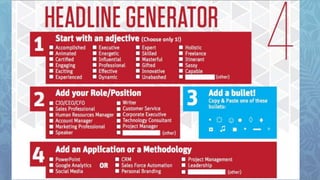
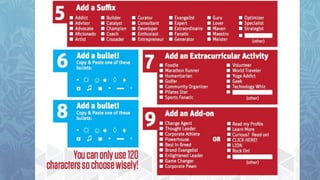
2. Catchy Headline
 This is your personal brand - your hook!
 Short + sweet (max. 120 characters)
 About what you do and/or who you are!
3. Professional Experience
Include all roles in reverse chronological order
Use Accomplishment Statements
Show examples of your work i.e. videos, awards, presentations
Be concise – get to the point!
4. Connections
Recommendations > Endorsements
5. Summary Elements
Showcase
personality +
brand
Think cover
email… make it
conversational
Leverage your
hook – grab their
attention!
Background =
Skills +
Accomplishments
Short, easy to
read sentences
Expand on your
headline
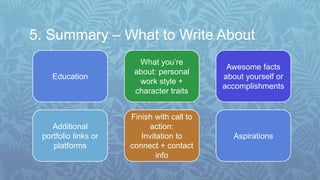
5. Summary – What to Write About
Education
Additional
portfolio links or
platforms
What you’re
about: personal
work style +
character traits
Finish with call to
action:
Invitation to
connect + contact
info
Aspirations
Awesome facts
about yourself or
accomplishments
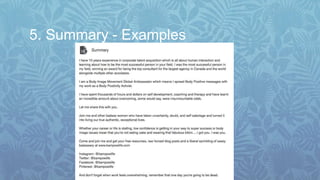
5. Summary - Examples
Connecting on LinkedIn
Adding a contact
1. Send request AFTER meeting
them in person
2. Personalize your contact
request
3. Be brief and memorable
Too
generic
Too
casual
Personal
and
professional
Action Items
Lecture next week!
Interview Stream due Sunday, Jan. 22nd
Save Sarah from sadness: don’t forget to sign up for one-on-ones here!

Tutorial 1

  • 1.
    COMM 202 TUTORIAL #1– T26 + T35 Name Tents UP! Goodbye Laptops and Phones!
  • 2.
    Agenda New term, whodis? Professionalism and Expectations LinkedIn Action Items
  • 3.
  • 4.
  • 5.
  • 8.
    Let’s talk about… •Dance • Field hockey • Travelling • Grey’s Anatomy • Internships • SCMP • Big families • Abraham Lincoln • Vegetarianism • Doctor Who • Piano + violin • JDC West • Entrepreneurship • Boarding School • Horses • Musicals!!! • BTM • Running • Golf • Mascot dancing And of course, 202!
  • 9.
    Why am Ihere?
  • 10.
    One on Oneswith Sarah! 10 minutes Sauder Caf What do you want out of the course? Sign up on Google Doc!
  • 11.
    Student Advisory Committee Emailcomm202@sauder.ubc.ca by Friday, January 20th @11:59pm with a brief intro of yourself and an explanation of why you would be an excellent SAC member including your tutorial section, TA Name, and the subject line: 202 SAC Application.
  • 12.
    Contact Sarah Moug: comm202.9@sauder.ubc.ca Admin:comm202@sauder.ubc.ca Office Hours – sign up on COOL
  • 13.
  • 14.
    Thoughts on beingprofessional…
  • 15.
    Professionalism – 10% Emailetiquette Be punctual, prepared, and present Spark conversation and contribute No technology …and you too can be a rock star!
  • 16.
    Class Prep Assignments Each tutorial you will be expected to hand in a prepared assignment  Each assignment is worth 2% for a total of 15% over the term  Assignments will be collected in the first 5 minutes of class. All assignments handed in late will receive a zero!
  • 17.
  • 18.
  • 19.
    • LinkedIn issocial! o Be personable, speak in first person, show your personality (conversational) o More flexibility & creativity • LinkedIn is all about you! o Your profile is tailored to your professional brand more so than to a company o Include broader experiences, projects, skills, and interests in a variety of formats o Written documents are formal, company-specific, direct ask and intention LinkedIn vs. Resume
  • 20.
    turn off “Notifyyour network” when making many small changes don’t mark a connection request as “I Don’t Know” unless they are negatively impacting you • after too many IDK’s, LinkedIn will ban them from the network found on the right side of your profile under “Who’s Viewed your Profile?” Before we start…
  • 21.
    Professional Headshot Attention-Grabbing Headline Complete Experiences Connections,Contact Info, Customized URL Interesting summary showcasing personality! 1 2 3 4 5 1 2 3 4 5 All-Star Status
  • 22.
    1. Professional Headshot Reasonably close up– shoulders up  Professional background  Smiling and looks like you!
  • 23.
    2. Catchy Headline This is your personal brand - your hook!  Short + sweet (max. 120 characters)  About what you do and/or who you are!
  • 26.
    3. Professional Experience Includeall roles in reverse chronological order Use Accomplishment Statements Show examples of your work i.e. videos, awards, presentations Be concise – get to the point!
  • 27.
  • 28.
    5. Summary Elements Showcase personality+ brand Think cover email… make it conversational Leverage your hook – grab their attention! Background = Skills + Accomplishments Short, easy to read sentences Expand on your headline
  • 29.
    5. Summary –What to Write About Education Additional portfolio links or platforms What you’re about: personal work style + character traits Finish with call to action: Invitation to connect + contact info Aspirations Awesome facts about yourself or accomplishments
  • 30.
    5. Summary -Examples
  • 31.
    5. Summary -Examples
  • 32.
    Connecting on LinkedIn Addinga contact 1. Send request AFTER meeting them in person 2. Personalize your contact request 3. Be brief and memorable Too generic Too casual Personal and professional
  • 33.
    Action Items Lecture nextweek! Interview Stream due Sunday, Jan. 22nd Save Sarah from sadness: don’t forget to sign up for one-on-ones here!

Editor's Notes

  • #8 Fave photos
  • #10 Facilitate discussion Challenge you to grow and learn Be a resource
  • #13 Weekly emails will be sent out on Friday
  • #15 It doesn’t need to be like this! Yes it is scary, and yes it can be overwhelming, but once you have these tools, it will all seem so much easier and more manageable! But remember, I can’t just hand it to you: what you put in is what you get out, but you won’t be alone because I’ll be here to be the best support system I can be.
  • #17 What else?