COMM 202
W09: LinkedIn
T35 & T36
Laptops out! :)
But no phones please.
Tutorial 7
Agenda
1.LinkedIn Profiles
2.Networking Event Recap
3.Action Items
LinkedIn Profiles
LinkedIn vs. Resume
o LinkedIn is social!
o Be personable, speak in first person, show your personality
o Follow influencers, share articles, engage with the community through
posts and updates – the more you engage the more likely people will
find your profile.
o LinkedIn is all about you!
o Your profile is tailored to your professional brand more so than to a
company
o Include broader experiences, projects, skills, and interests in a variety of
formats
Key Profile
Elements
o Need my LinkedIn
5. Interesting Summary
Showcasing Personality
1. Professional
Headshot
2. Attention Grabbing Header
3. Complete Experiences
4. Connections, Contact
Info, Customized URL
Before we start…
o Turn off “Notify your network” when making many small changes
o Don’t mark a connection request as “I Don’t Know” unless they are
negatively impacting you
o After too many IDK’s, LinkedIn will ban them from the network
Found on the right side of your
profile under “Who’s Viewed
your Profile?”
Demo
o Adding connections
o Don’t go to people you may know (only sends the generic message)
o Go directly to their profile
o Public Profile settings
Profile Photo
o Professional-looking photo
o Reasonably close-up (from the
shoulders up)
o High quality, good lighting, looks
like you!
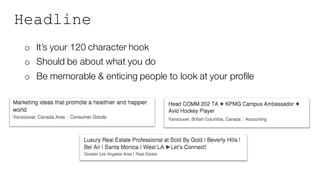
Headline
o It’s your 120 character hook
o Should be about what you do
o Be memorable & enticing people to look at your profile
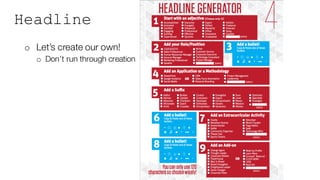
Headline
o Let’s create our own!
o Don’t run through creation
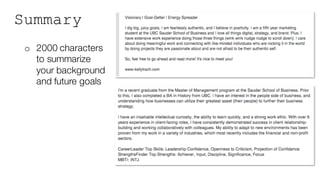
Summary
o 2000 characters
to summarize
your background
and future goals
Tips for a Great Summary
o Speak in the first person
o Keep it visually organized using bullet points
o What you can write about:
o Education (your current job): What you do, your specialization, why you
chose it
o Other involvements: What you do outside of class, why you like it
o What makes you - you: Personal work style / important character traits
o Your aspirations: Your goals and intended professional path
o Finish off with a call to action
Key Elements of Your Profile
o Experiences
o Try not to copy-paste from your resume
o Talk about the challenges you faced and a couple key wins
o Prove your accomplishments by showing examples of your work (i.e.
video projects, presentations, photography…)
o Education
o Join UBC and Sauder (AND the alumni communities!)
o Honours/Awards
Key Elements of Your Profile
o Projects
o List academic or extra-curricular projects as you see fit
o Skills
o Searchable, so aim for brand-specific not generic
o Influencers
o Follow your idols! Helps others to see who inspires you.
Resume -> LinkedIn
Resume:
LinkedIn:
Groups/Publish
o Having a profile is step 1, using LinkedIn is what will get you
noticed. The more active you are on the site the more likely your
profile will be seen by potential employers
o Join groups in your interest areas…for now myBCom Careers to
stay up to date on job postings and career relevant info from the
BCC and CUS.
Etiquette: Adding Connections
o Best practices:
o Request to connect once you
have met them in person (where
possible)
o Personalize your connection
request
o Keep it friendly and professional
Etiquette: Adding Connections
General tips for success
o Share something memorable
from your conversation
o Be brief
o Include a call to action if
you’d like to meet again
o Gauge the audience – your
message to the Dean will
look different than your
message to your COMM202
classmate!
too
casual
too
generic
personal &
professional
Etiquette: Adding Connections
• Generally split your requests into three categories:
1. People you know well:
• More casual, can be how you would talk to the person
2. People you know a little:
• Professional requests, bring up where you’ve met, etc.
3. People you don’t know but want to know
• Brief intro and why you want to talk to them, shared
commonalities (university, degree, interests, etc.)
Recommendations vs. Endorsements
Recommendations
o Written by other LinkedIn members as a way to recognize or
applaud a business partner or colleague
Endorsements
o Less specific, vague
o Virtual thumbs-up
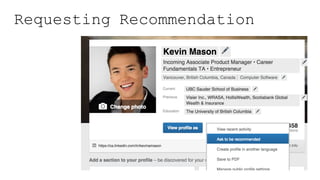
Requesting Recommendation
1. Identify the best witnesses of your work.
2. Ask personally first. Email if not possible.
3. If they say yes to your email/personal request, send a request
through LinkedIn.
4. Send thank-you email.
Requesting Recommendation
Social Media Warning
Networking Event
Reflection Paper
Due Monday, March 14th
Min. of One Page | submit to TurnItIn
o Your goals in attending the event
o What is your purpose in going?
o Define SMART goals beforehand – How will you define the success of your
evening?
o How did you prepare for the event (research potential delegates)
o What was it about these people that motivated you wanting to talk to them?
o Conversation summaries (who you talked to, what you learned)
o Reflection of the lessons learned
o Action steps to build relationship
Info Interview Assignment
o Contact details (name, company, title, phone,
email)
o List of questions asked
o Major insights gained – What did you learn during
your informational interview? **This is the most
important part, should be 40% of final paper.
o Did you request/receive any information regarding
additional connections?
o Follow up action – What will you do to maintain
this connection? *Screen shot of thank you email
required
o What are your next steps having conducted this
information interview?
Assignment Guidelines
10% of your final grade
Due Thursday April 14th
Minimum of one page
In-person and not
current UBC
student/staff/faculty or
family member
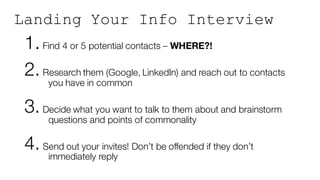
Landing Your Info Interview
1. Find 4 or 5 potential contacts – WHERE?!
2. Research them (Google, LinkedIn) and reach out to contacts
you have in common
3. Decide what you want to talk to them about and brainstorm
questions and points of commonality
4. Send out your invites! Don’t be offended if they don’t
immediately reply
Action Items
Networking Reflection due March 14th @ TurnItIn
Lecture next week!
No more office hours :(
Informational Interview due April 14th @ TurnItIn

W09 - LinkedIn

  • 1.
    COMM 202 W09: LinkedIn T35& T36 Laptops out! :) But no phones please. Tutorial 7
  • 2.
  • 3.
  • 4.
    LinkedIn vs. Resume oLinkedIn is social! o Be personable, speak in first person, show your personality o Follow influencers, share articles, engage with the community through posts and updates – the more you engage the more likely people will find your profile. o LinkedIn is all about you! o Your profile is tailored to your professional brand more so than to a company o Include broader experiences, projects, skills, and interests in a variety of formats
  • 5.
    Key Profile Elements o Needmy LinkedIn 5. Interesting Summary Showcasing Personality 1. Professional Headshot 2. Attention Grabbing Header 3. Complete Experiences 4. Connections, Contact Info, Customized URL
  • 6.
    Before we start… oTurn off “Notify your network” when making many small changes o Don’t mark a connection request as “I Don’t Know” unless they are negatively impacting you o After too many IDK’s, LinkedIn will ban them from the network Found on the right side of your profile under “Who’s Viewed your Profile?”
  • 7.
    Demo o Adding connections oDon’t go to people you may know (only sends the generic message) o Go directly to their profile o Public Profile settings
  • 8.
    Profile Photo o Professional-lookingphoto o Reasonably close-up (from the shoulders up) o High quality, good lighting, looks like you!
  • 9.
    Headline o It’s your120 character hook o Should be about what you do o Be memorable & enticing people to look at your profile
  • 10.
    Headline o Let’s createour own! o Don’t run through creation
  • 11.
    Summary o 2000 characters tosummarize your background and future goals
  • 12.
    Tips for aGreat Summary o Speak in the first person o Keep it visually organized using bullet points o What you can write about: o Education (your current job): What you do, your specialization, why you chose it o Other involvements: What you do outside of class, why you like it o What makes you - you: Personal work style / important character traits o Your aspirations: Your goals and intended professional path o Finish off with a call to action
  • 13.
    Key Elements ofYour Profile o Experiences o Try not to copy-paste from your resume o Talk about the challenges you faced and a couple key wins o Prove your accomplishments by showing examples of your work (i.e. video projects, presentations, photography…) o Education o Join UBC and Sauder (AND the alumni communities!) o Honours/Awards
  • 14.
    Key Elements ofYour Profile o Projects o List academic or extra-curricular projects as you see fit o Skills o Searchable, so aim for brand-specific not generic o Influencers o Follow your idols! Helps others to see who inspires you.
  • 15.
  • 16.
    Groups/Publish o Having aprofile is step 1, using LinkedIn is what will get you noticed. The more active you are on the site the more likely your profile will be seen by potential employers o Join groups in your interest areas…for now myBCom Careers to stay up to date on job postings and career relevant info from the BCC and CUS.
  • 17.
    Etiquette: Adding Connections oBest practices: o Request to connect once you have met them in person (where possible) o Personalize your connection request o Keep it friendly and professional
  • 18.
    Etiquette: Adding Connections Generaltips for success o Share something memorable from your conversation o Be brief o Include a call to action if you’d like to meet again o Gauge the audience – your message to the Dean will look different than your message to your COMM202 classmate! too casual too generic personal & professional
  • 19.
    Etiquette: Adding Connections •Generally split your requests into three categories: 1. People you know well: • More casual, can be how you would talk to the person 2. People you know a little: • Professional requests, bring up where you’ve met, etc. 3. People you don’t know but want to know • Brief intro and why you want to talk to them, shared commonalities (university, degree, interests, etc.)
  • 20.
    Recommendations vs. Endorsements Recommendations oWritten by other LinkedIn members as a way to recognize or applaud a business partner or colleague Endorsements o Less specific, vague o Virtual thumbs-up
  • 21.
    Requesting Recommendation 1. Identifythe best witnesses of your work. 2. Ask personally first. Email if not possible. 3. If they say yes to your email/personal request, send a request through LinkedIn. 4. Send thank-you email.
  • 22.
  • 23.
  • 24.
  • 25.
    Reflection Paper Due Monday,March 14th Min. of One Page | submit to TurnItIn o Your goals in attending the event o What is your purpose in going? o Define SMART goals beforehand – How will you define the success of your evening? o How did you prepare for the event (research potential delegates) o What was it about these people that motivated you wanting to talk to them? o Conversation summaries (who you talked to, what you learned) o Reflection of the lessons learned o Action steps to build relationship
  • 26.
    Info Interview Assignment oContact details (name, company, title, phone, email) o List of questions asked o Major insights gained – What did you learn during your informational interview? **This is the most important part, should be 40% of final paper. o Did you request/receive any information regarding additional connections? o Follow up action – What will you do to maintain this connection? *Screen shot of thank you email required o What are your next steps having conducted this information interview? Assignment Guidelines 10% of your final grade Due Thursday April 14th Minimum of one page In-person and not current UBC student/staff/faculty or family member
  • 27.
    Landing Your InfoInterview 1. Find 4 or 5 potential contacts – WHERE?! 2. Research them (Google, LinkedIn) and reach out to contacts you have in common 3. Decide what you want to talk to them about and brainstorm questions and points of commonality 4. Send out your invites! Don’t be offended if they don’t immediately reply
  • 28.
    Action Items Networking Reflectiondue March 14th @ TurnItIn Lecture next week! No more office hours :( Informational Interview due April 14th @ TurnItIn