Trigger
V. Saranya AP/CSE,
Sri Vidya College of Engg & Tech,
virudhunagar
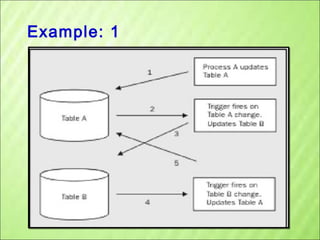
Example: 1
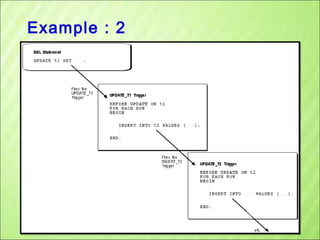
Example : 2
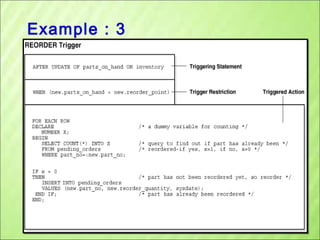
Example : 3
Trigger
• A

procedure

that

starts

automatically

specified changes occur to the DBMS

if
Triggers (Active database)
• Three parts:
– Event (activates the trigger)
– Condition (tests whether the triggers should run)
[Optional]
– Action (what happens if the trigger runs)
• Semantics:
– When event occurs, and condition is satisfied, the
action is performed.
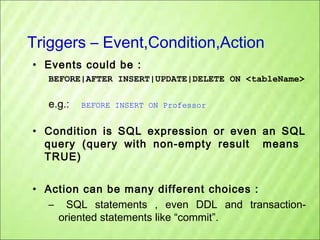
Triggers – Event,Condition,Action
• Events could be :
BEFORE|AFTER INSERT|UPDATE|DELETE ON <tableName>

e.g.:

BEFORE INSERT ON Professor

• Condition is SQL expression or even an SQL
query (query with non-empty result means
TRUE)
• Action can be many different choices :
– SQL statements , even DDL and transactionoriented statements like “commit”.
Example Trigger
Assume our DB has a relation schema
:

salary)

Professor (pNum, pName,

We want to write a trigger that :
Ensures that any new professor
inserted has salary >= 60000
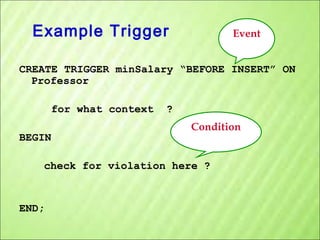
Example Trigger

Event

CREATE TRIGGER minSalary “BEFORE INSERT” ON
Professor
for what context
BEGIN

?
Condition

check for violation here ?

END;
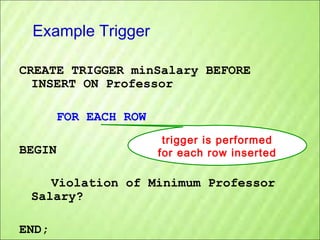
Example Trigger
CREATE TRIGGER minSalary BEFORE
INSERT ON Professor
FOR EACH ROW
BEGIN

trigger is performed
for each row inserted

Violation of Minimum Professor
Salary?
END;
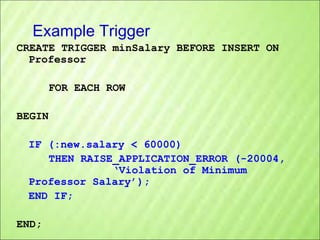
Example Trigger
CREATE TRIGGER minSalary BEFORE INSERT ON
Professor
FOR EACH ROW
BEGIN
IF (:new.salary < 60000)
THEN RAISE_APPLICATION_ERROR (-20004,
‘Violation of Minimum
Professor Salary’);
END IF;
END;
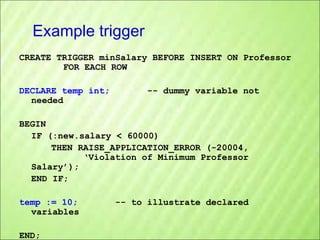
Example trigger
CREATE TRIGGER minSalary BEFORE INSERT ON Professor
FOR EACH ROW
DECLARE temp int;
needed

-- dummy variable not

BEGIN
IF (:new.salary < 60000)
THEN RAISE_APPLICATION_ERROR (-20004,
‘Violation of Minimum Professor
Salary’);
END IF;
temp := 10;
variables
END;

-- to illustrate declared
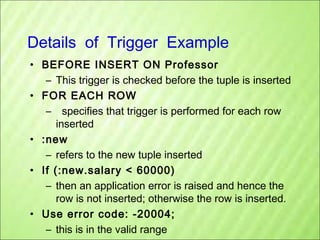
Details of Trigger Example
• BEFORE INSERT ON Professor
– This trigger is checked before the tuple is inserted
• FOR EACH ROW
– specifies that trigger is performed for each row
inserted
• :new
– refers to the new tuple inserted
• If (:new.salary < 60000)
– then an application error is raised and hence the
row is not inserted; otherwise the row is inserted.
• Use error code: -20004;
– this is in the valid range
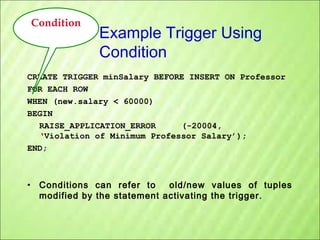
Condition

Example Trigger Using
Condition

CREATE TRIGGER minSalary BEFORE INSERT ON Professor
FOR EACH ROW
WHEN (new.salary < 60000)
BEGIN
RAISE_APPLICATION_ERROR
(-20004,
‘Violation of Minimum Professor Salary’);
END;

• Conditions can refer to
old/new values of tuples
modified by the statement activating the trigger.
Triggers: REFERENCING
CREATE TRIGGER minSalary BEFORE INSERT ON Professor
REFERENCING NEW as newTuple
FOR EACH ROW
WHEN (newTuple.salary < 60000)
BEGIN
RAISE_APPLICATION_ERROR (-20004,
‘Violation of Minimum Professor Salary’);
END;
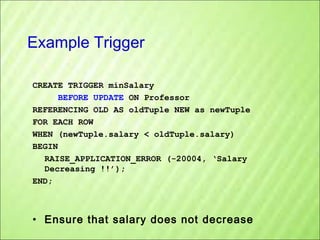
Example Trigger
CREATE TRIGGER minSalary
BEFORE UPDATE ON Professor
REFERENCING OLD AS oldTuple NEW as newTuple
FOR EACH ROW
WHEN (newTuple.salary < oldTuple.salary)
BEGIN
RAISE_APPLICATION_ERROR (-20004, ‘Salary
Decreasing !!’);
END;

• Ensure that salary does not decrease
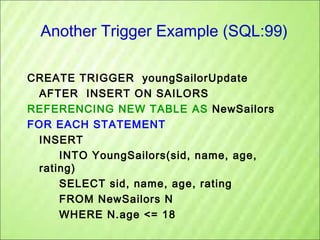
Another Trigger Example (SQL:99)
CREATE TRIGGER youngSailorUpdate
AFTER INSERT ON SAILORS
REFERENCING NEW TABLE AS NewSailors
FOR EACH STATEMENT
INSERT
INTO YoungSailors(sid, name, age,
rating)
SELECT sid, name, age, rating
FROM NewSailors N
WHERE N.age <= 18
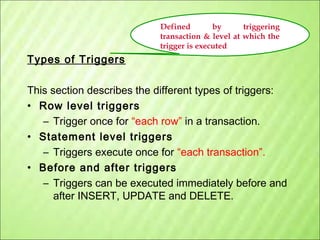
Defined
by
triggering
transaction & level at which the
trigger is executed

Types of Triggers
This section describes the different types of triggers:
• Row level triggers
– Trigger once for “each row” in a transaction.
• Statement level triggers
– Triggers execute once for “each transaction”.
• Before and after triggers
– Triggers can be executed immediately before and
after INSERT, UPDATE and DELETE.
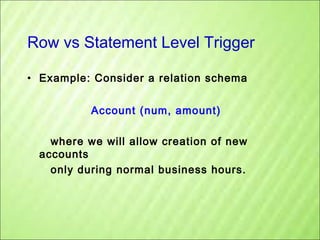
Row vs Statement Level Trigger
• Example: Consider a relation schema
Account (num, amount)
where we will allow creation of new
accounts
only during normal business hours.
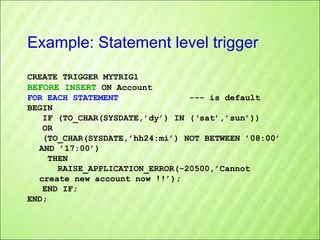
Example: Statement level trigger
CREATE TRIGGER MYTRIG1
BEFORE INSERT ON Account
FOR EACH STATEMENT
--- is default
BEGIN
IF (TO_CHAR(SYSDATE,’dy’) IN (‘sat’,’sun’))
OR
(TO_CHAR(SYSDATE,’hh24:mi’) NOT BETWEEN ’08:00’
AND ’17:00’)
THEN
RAISE_APPLICATION_ERROR(-20500,’Cannot
create new account now !!’);
END IF;
END;
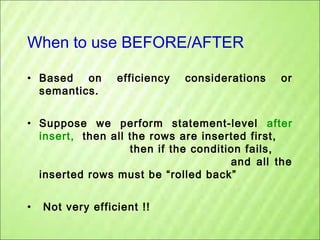
When to use BEFORE/AFTER
• Based on
semantics.

efficiency

considerations

or

• Suppose we perform statement-level after
insert, then all the rows are inserted first,
then if the condition fails,
and all the
inserted rows must be “rolled back”
•

Not very efficient !!
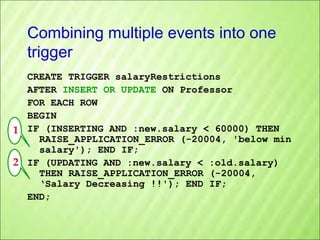
Combining multiple events into one
trigger
CREATE TRIGGER salaryRestrictions
AFTER INSERT OR UPDATE ON Professor
FOR EACH ROW
BEGIN
1 IF (INSERTING AND :new.salary < 60000) THEN
RAISE_APPLICATION_ERROR (-20004, 'below min
salary'); END IF;
2 IF (UPDATING AND :new.salary < :old.salary)
THEN RAISE_APPLICATION_ERROR (-20004,
‘Salary Decreasing !!'); END IF;
END;
Summary : Trigger Syntax
CREATE TRIGGER <triggerName>
BEFORE|AFTER
INSERT|DELETE|UPDATE
[OF <columnList>] ON <tableName>|<viewName>
[REFERENCING [OLD AS <oldName>] [NEW AS
<newName>]]
[FOR EACH ROW] (default is “FOR EACH STATEMENT”)
[WHEN (<condition>)]
<PSM body>;
Some Points about Triggers
• Check the system tables :
– user_triggers
– user_trigger_cols
– user_errors
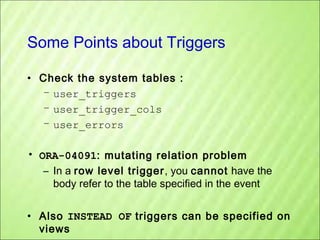
• ORA-04091: mutating relation problem
– In a row level trigger, you cannot have the
body refer to the table specified in the event
• Also INSTEAD OF triggers can be specified on
views
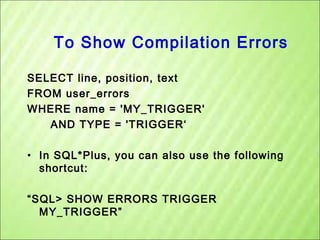
To Show Compilation Errors
SELECT line, position, text
FROM user_errors
WHERE name = 'MY_TRIGGER'
AND TYPE = 'TRIGGER‘
• In SQL*Plus, you can also use the following
shortcut:
“SQL> SHOW ERRORS TRIGGER
MY_TRIGGER”
Mutating Trigger

“Trigger that triggers itself”
Constraints versus Triggers
•

Constraints are useful for database consistency

•

Triggers are flexible and powerful

•

But can be hard to understand ……

– More opportunity for optimization
– Not restricted into insert/delete/update

–
–
–
–
–

Alerts
Event logging for auditing
Security enforcement
Analysis of table accesses (statistics)
Workflow and business intelligence …

– Several triggers
(Arbitrary order  unpredictable !?)
– Chain triggers
(When to stop ?)
– Recursive triggers (Termination?)
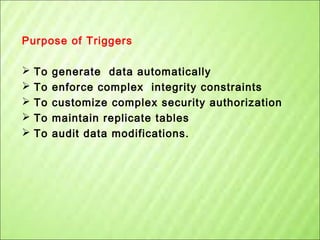
Purpose of Triggers






To
To
To
To
To

generate data automatically
enforce complex integrity constraints
customize complex security authorization
maintain replicate tables
audit data modifications.

Trigger

  • 1.
    Trigger V. Saranya AP/CSE, SriVidya College of Engg & Tech, virudhunagar
  • 2.
  • 3.
  • 4.
  • 5.
  • 6.
    Triggers (Active database) •Three parts: – Event (activates the trigger) – Condition (tests whether the triggers should run) [Optional] – Action (what happens if the trigger runs) • Semantics: – When event occurs, and condition is satisfied, the action is performed.
  • 7.
    Triggers – Event,Condition,Action •Events could be : BEFORE|AFTER INSERT|UPDATE|DELETE ON <tableName> e.g.: BEFORE INSERT ON Professor • Condition is SQL expression or even an SQL query (query with non-empty result means TRUE) • Action can be many different choices : – SQL statements , even DDL and transactionoriented statements like “commit”.
  • 8.
    Example Trigger Assume ourDB has a relation schema : salary) Professor (pNum, pName, We want to write a trigger that : Ensures that any new professor inserted has salary >= 60000
  • 9.
    Example Trigger Event CREATE TRIGGERminSalary “BEFORE INSERT” ON Professor for what context BEGIN ? Condition check for violation here ? END;
  • 10.
    Example Trigger CREATE TRIGGERminSalary BEFORE INSERT ON Professor FOR EACH ROW BEGIN trigger is performed for each row inserted Violation of Minimum Professor Salary? END;
  • 11.
    Example Trigger CREATE TRIGGERminSalary BEFORE INSERT ON Professor FOR EACH ROW BEGIN IF (:new.salary < 60000) THEN RAISE_APPLICATION_ERROR (-20004, ‘Violation of Minimum Professor Salary’); END IF; END;
  • 12.
    Example trigger CREATE TRIGGERminSalary BEFORE INSERT ON Professor FOR EACH ROW DECLARE temp int; needed -- dummy variable not BEGIN IF (:new.salary < 60000) THEN RAISE_APPLICATION_ERROR (-20004, ‘Violation of Minimum Professor Salary’); END IF; temp := 10; variables END; -- to illustrate declared
  • 13.
    Details of TriggerExample • BEFORE INSERT ON Professor – This trigger is checked before the tuple is inserted • FOR EACH ROW – specifies that trigger is performed for each row inserted • :new – refers to the new tuple inserted • If (:new.salary < 60000) – then an application error is raised and hence the row is not inserted; otherwise the row is inserted. • Use error code: -20004; – this is in the valid range
  • 14.
    Condition Example Trigger Using Condition CREATETRIGGER minSalary BEFORE INSERT ON Professor FOR EACH ROW WHEN (new.salary < 60000) BEGIN RAISE_APPLICATION_ERROR (-20004, ‘Violation of Minimum Professor Salary’); END; • Conditions can refer to old/new values of tuples modified by the statement activating the trigger.
  • 15.
    Triggers: REFERENCING CREATE TRIGGERminSalary BEFORE INSERT ON Professor REFERENCING NEW as newTuple FOR EACH ROW WHEN (newTuple.salary < 60000) BEGIN RAISE_APPLICATION_ERROR (-20004, ‘Violation of Minimum Professor Salary’); END;
  • 16.
    Example Trigger CREATE TRIGGERminSalary BEFORE UPDATE ON Professor REFERENCING OLD AS oldTuple NEW as newTuple FOR EACH ROW WHEN (newTuple.salary < oldTuple.salary) BEGIN RAISE_APPLICATION_ERROR (-20004, ‘Salary Decreasing !!’); END; • Ensure that salary does not decrease
  • 17.
    Another Trigger Example(SQL:99) CREATE TRIGGER youngSailorUpdate AFTER INSERT ON SAILORS REFERENCING NEW TABLE AS NewSailors FOR EACH STATEMENT INSERT INTO YoungSailors(sid, name, age, rating) SELECT sid, name, age, rating FROM NewSailors N WHERE N.age <= 18
  • 18.
    Defined by triggering transaction & levelat which the trigger is executed Types of Triggers This section describes the different types of triggers: • Row level triggers – Trigger once for “each row” in a transaction. • Statement level triggers – Triggers execute once for “each transaction”. • Before and after triggers – Triggers can be executed immediately before and after INSERT, UPDATE and DELETE.
  • 19.
    Row vs StatementLevel Trigger • Example: Consider a relation schema Account (num, amount) where we will allow creation of new accounts only during normal business hours.
  • 20.
    Example: Statement leveltrigger CREATE TRIGGER MYTRIG1 BEFORE INSERT ON Account FOR EACH STATEMENT --- is default BEGIN IF (TO_CHAR(SYSDATE,’dy’) IN (‘sat’,’sun’)) OR (TO_CHAR(SYSDATE,’hh24:mi’) NOT BETWEEN ’08:00’ AND ’17:00’) THEN RAISE_APPLICATION_ERROR(-20500,’Cannot create new account now !!’); END IF; END;
  • 21.
    When to useBEFORE/AFTER • Based on semantics. efficiency considerations or • Suppose we perform statement-level after insert, then all the rows are inserted first, then if the condition fails, and all the inserted rows must be “rolled back” • Not very efficient !!
  • 22.
    Combining multiple eventsinto one trigger CREATE TRIGGER salaryRestrictions AFTER INSERT OR UPDATE ON Professor FOR EACH ROW BEGIN 1 IF (INSERTING AND :new.salary < 60000) THEN RAISE_APPLICATION_ERROR (-20004, 'below min salary'); END IF; 2 IF (UPDATING AND :new.salary < :old.salary) THEN RAISE_APPLICATION_ERROR (-20004, ‘Salary Decreasing !!'); END IF; END;
  • 23.
    Summary : TriggerSyntax CREATE TRIGGER <triggerName> BEFORE|AFTER INSERT|DELETE|UPDATE [OF <columnList>] ON <tableName>|<viewName> [REFERENCING [OLD AS <oldName>] [NEW AS <newName>]] [FOR EACH ROW] (default is “FOR EACH STATEMENT”) [WHEN (<condition>)] <PSM body>;
  • 24.
    Some Points aboutTriggers • Check the system tables : – user_triggers – user_trigger_cols – user_errors • ORA-04091: mutating relation problem – In a row level trigger, you cannot have the body refer to the table specified in the event • Also INSTEAD OF triggers can be specified on views
  • 25.
    To Show CompilationErrors SELECT line, position, text FROM user_errors WHERE name = 'MY_TRIGGER' AND TYPE = 'TRIGGER‘ • In SQL*Plus, you can also use the following shortcut: “SQL> SHOW ERRORS TRIGGER MY_TRIGGER”
  • 26.
  • 27.
    Constraints versus Triggers • Constraintsare useful for database consistency • Triggers are flexible and powerful • But can be hard to understand …… – More opportunity for optimization – Not restricted into insert/delete/update – – – – – Alerts Event logging for auditing Security enforcement Analysis of table accesses (statistics) Workflow and business intelligence … – Several triggers (Arbitrary order  unpredictable !?) – Chain triggers (When to stop ?) – Recursive triggers (Termination?)
  • 28.
    Purpose of Triggers      To To To To To generatedata automatically enforce complex integrity constraints customize complex security authorization maintain replicate tables audit data modifications.