Created by : Aliya Saldanha
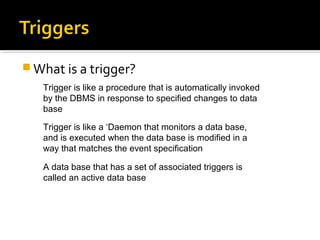
 What is a trigger?
Trigger is like a procedure that is automatically invoked
by the DBMS in response to specified changes to data
base
Trigger is like a ‘Daemon that monitors a data base,
and is executed when the data base is modified in a
way that matches the event specification
A data base that has a set of associated triggers is
called an active data base
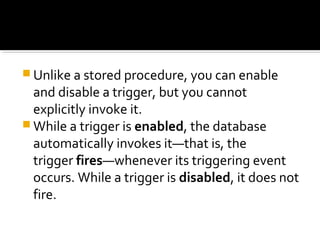
 Unlike a stored procedure, you can enable
and disable a trigger, but you cannot
explicitly invoke it.
 While a trigger is enabled, the database
automatically invokes it—that is, the
trigger fires—whenever its triggering event
occurs. While a trigger is disabled, it does not
fire.
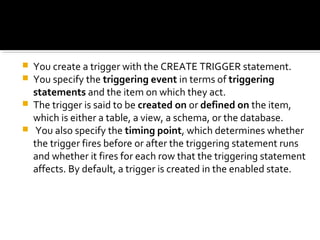
 You create a trigger with the CREATE TRIGGER statement.
 You specify the triggering event in terms of triggering
statements and the item on which they act.
 The trigger is said to be created on or defined on the item,
which is either a table, a view, a schema, or the database.
 You also specify the timing point, which determines whether
the trigger fires before or after the triggering statement runs
and whether it fires for each row that the triggering statement
affects. By default, a trigger is created in the enabled state.
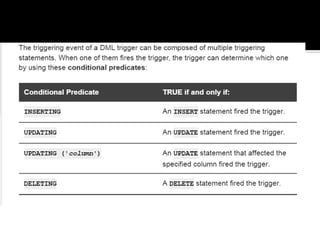
 If the trigger is created on a table or view,
then the triggering event is composed of
DML statements, and the trigger is called
a DML trigger.
 If the trigger is created on a schema or the
database, then the triggering event is
composed of either DDL or database
operation statements, and the trigger is
called a system trigger.
 Just like with procedures and functions, creating triggers
requires certain privileges which are not part of the default
privilege set.
 If you cannot create triggers from these notes because of
permissions, you (or the admin) has to GRANT CREATE
TRIGGER privilege on your username.
 For example, to allow user ‘alex’ to create triggers, I may do
something like this:
 GRANT CREATE TRIGGER TO alex; Note that if you are
accessing a public Oracle server you must ask the admin to
setup these things for you
 Event
A change to data base that activates the trigger
• Restriction
A trigger restriction specifies a Boolean (logical) expression
that must be TRUE for the trigger to fire
• Action
A procedure that is executed when the trigger is activated.
Similar to stored procedures, a trigger action can contain
PL/SQL statements
 Row Triggers
A row trigger is fired each time the table is affected by
the triggering statement. If a triggering statement affects
no rows, a row trigger is not executed at all.
• Statement Triggers
A statement trigger is fired once on behalf of the
triggering statement, regardless of the number of
rows in the table that the triggering statement affects
(even if no rows are affected)
 Before Trigger
Execute the trigger action before the triggering statement.
Eliminate unnecessary processing of the triggering statement.
• After Trigger
AFTER triggers are used when you want the triggering statement
to complete before executing the trigger action
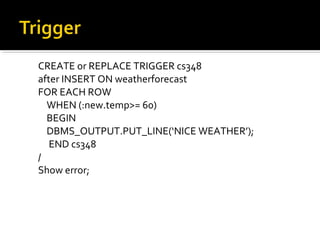
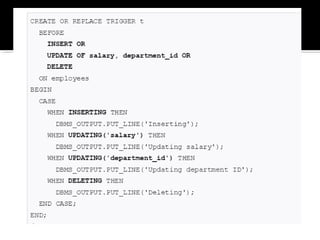
CREATE or REPLACE TRIGGER cs348
after INSERT ON weatherforecast
FOR EACH ROW
WHEN (:new.temp>= 60)
BEGIN
DBMS_OUTPUT.PUT_LINE(‘NICE WEATHER’);
END cs348
/
Show error;
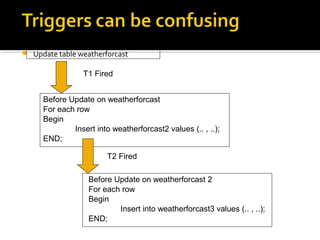
 Update table weatherforcast
T1 Fired
Before Update on weatherforcast
For each row
Begin
Insert into weatherforcast2 values (.. , ..);
END;
T2 Fired
Before Update on weatherforcast 2
For each row
Begin
Insert into weatherforcast3 values (.. , ..);
END;
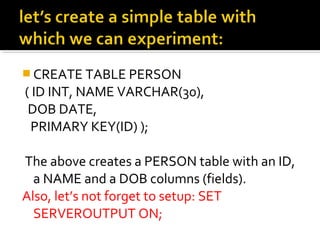
 CREATE TABLE PERSON
( ID INT, NAME VARCHAR(30),
DOB DATE,
PRIMARY KEY(ID) );
The above creates a PERSON table with an ID,
a NAME and a DOB columns (fields).
Also, let’s not forget to setup: SET
SERVEROUTPUT ON;
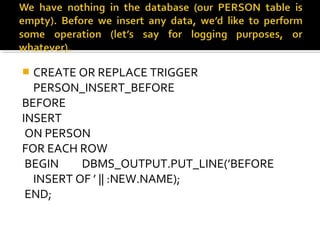
 CREATE OR REPLACE TRIGGER
PERSON_INSERT_BEFORE
BEFORE
INSERT
ON PERSON
FOR EACH ROW
BEGIN DBMS_OUTPUT.PUT_LINE(’BEFORE
INSERT OF ’ || :NEW.NAME);
END;
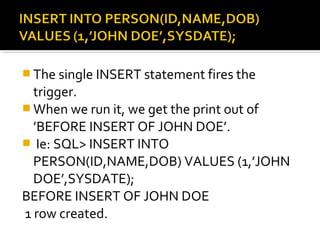
 The single INSERT statement fires the
trigger.
 When we run it, we get the print out of
’BEFORE INSERT OF JOHN DOE’.
 Ie: SQL> INSERT INTO
PERSON(ID,NAME,DOB) VALUES (1,’JOHN
DOE’,SYSDATE);
BEFORE INSERT OF JOHN DOE
1 row created.
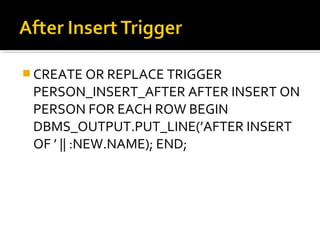
 CREATE OR REPLACE TRIGGER
PERSON_INSERT_AFTER AFTER INSERT ON
PERSON FOR EACH ROW BEGIN
DBMS_OUTPUT.PUT_LINE(’AFTER INSERT
OF ’ || :NEW.NAME); END;
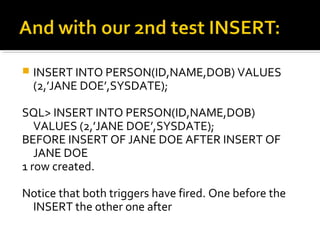
 INSERT INTO PERSON(ID,NAME,DOB) VALUES
(2,’JANE DOE’,SYSDATE);
SQL> INSERT INTO PERSON(ID,NAME,DOB)
VALUES (2,’JANE DOE’,SYSDATE);
BEFORE INSERT OF JANE DOE AFTER INSERT OF
JANE DOE
1 row created.
Notice that both triggers have fired. One before the
INSERT the other one after
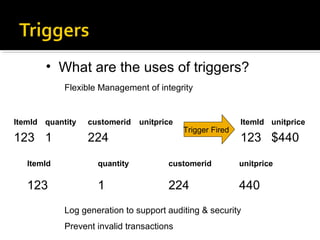
ItemId quantity customerid unitprice
123 1 224
ItemId unitprice
123 $440
ItemId quantity customerid unitprice
123 1 224 440
• What are the uses of triggers?
Flexible Management of integrity
Trigger Fired
Log generation to support auditing & security
Prevent invalid transactions
 Automatically generate virtual column values
 Log events
 Gather statistics on table access
 Modify table data when DML statements are issued against views
 Enforce referential integrity when child and parent tables are on
different nodes of a distributed database
 Publish information about database events, user events, and SQL
statements to subscribing applications
 Prevent DML operations on a table after regular business hours
 Prevent invalid transactions
 Enforce complex business or referential integrity rules that you
cannot define with constraints
USES
Advantages

Database Triggers

  • 1.
    Created by :Aliya Saldanha
  • 2.
     What isa trigger? Trigger is like a procedure that is automatically invoked by the DBMS in response to specified changes to data base Trigger is like a ‘Daemon that monitors a data base, and is executed when the data base is modified in a way that matches the event specification A data base that has a set of associated triggers is called an active data base
  • 3.
     Unlike astored procedure, you can enable and disable a trigger, but you cannot explicitly invoke it.  While a trigger is enabled, the database automatically invokes it—that is, the trigger fires—whenever its triggering event occurs. While a trigger is disabled, it does not fire.
  • 4.
     You createa trigger with the CREATE TRIGGER statement.  You specify the triggering event in terms of triggering statements and the item on which they act.  The trigger is said to be created on or defined on the item, which is either a table, a view, a schema, or the database.  You also specify the timing point, which determines whether the trigger fires before or after the triggering statement runs and whether it fires for each row that the triggering statement affects. By default, a trigger is created in the enabled state.
  • 5.
     If thetrigger is created on a table or view, then the triggering event is composed of DML statements, and the trigger is called a DML trigger.  If the trigger is created on a schema or the database, then the triggering event is composed of either DDL or database operation statements, and the trigger is called a system trigger.
  • 6.
     Just likewith procedures and functions, creating triggers requires certain privileges which are not part of the default privilege set.  If you cannot create triggers from these notes because of permissions, you (or the admin) has to GRANT CREATE TRIGGER privilege on your username.  For example, to allow user ‘alex’ to create triggers, I may do something like this:  GRANT CREATE TRIGGER TO alex; Note that if you are accessing a public Oracle server you must ask the admin to setup these things for you
  • 8.
     Event A changeto data base that activates the trigger • Restriction A trigger restriction specifies a Boolean (logical) expression that must be TRUE for the trigger to fire • Action A procedure that is executed when the trigger is activated. Similar to stored procedures, a trigger action can contain PL/SQL statements
  • 9.
     Row Triggers Arow trigger is fired each time the table is affected by the triggering statement. If a triggering statement affects no rows, a row trigger is not executed at all. • Statement Triggers A statement trigger is fired once on behalf of the triggering statement, regardless of the number of rows in the table that the triggering statement affects (even if no rows are affected)
  • 10.
     Before Trigger Executethe trigger action before the triggering statement. Eliminate unnecessary processing of the triggering statement. • After Trigger AFTER triggers are used when you want the triggering statement to complete before executing the trigger action
  • 12.
    CREATE or REPLACETRIGGER cs348 after INSERT ON weatherforecast FOR EACH ROW WHEN (:new.temp>= 60) BEGIN DBMS_OUTPUT.PUT_LINE(‘NICE WEATHER’); END cs348 / Show error;
  • 13.
     Update tableweatherforcast T1 Fired Before Update on weatherforcast For each row Begin Insert into weatherforcast2 values (.. , ..); END; T2 Fired Before Update on weatherforcast 2 For each row Begin Insert into weatherforcast3 values (.. , ..); END;
  • 15.
     CREATE TABLEPERSON ( ID INT, NAME VARCHAR(30), DOB DATE, PRIMARY KEY(ID) ); The above creates a PERSON table with an ID, a NAME and a DOB columns (fields). Also, let’s not forget to setup: SET SERVEROUTPUT ON;
  • 16.
     CREATE ORREPLACE TRIGGER PERSON_INSERT_BEFORE BEFORE INSERT ON PERSON FOR EACH ROW BEGIN DBMS_OUTPUT.PUT_LINE(’BEFORE INSERT OF ’ || :NEW.NAME); END;
  • 17.
     The singleINSERT statement fires the trigger.  When we run it, we get the print out of ’BEFORE INSERT OF JOHN DOE’.  Ie: SQL> INSERT INTO PERSON(ID,NAME,DOB) VALUES (1,’JOHN DOE’,SYSDATE); BEFORE INSERT OF JOHN DOE 1 row created.
  • 18.
     CREATE ORREPLACE TRIGGER PERSON_INSERT_AFTER AFTER INSERT ON PERSON FOR EACH ROW BEGIN DBMS_OUTPUT.PUT_LINE(’AFTER INSERT OF ’ || :NEW.NAME); END;
  • 19.
     INSERT INTOPERSON(ID,NAME,DOB) VALUES (2,’JANE DOE’,SYSDATE); SQL> INSERT INTO PERSON(ID,NAME,DOB) VALUES (2,’JANE DOE’,SYSDATE); BEFORE INSERT OF JANE DOE AFTER INSERT OF JANE DOE 1 row created. Notice that both triggers have fired. One before the INSERT the other one after
  • 20.
    ItemId quantity customeridunitprice 123 1 224 ItemId unitprice 123 $440 ItemId quantity customerid unitprice 123 1 224 440 • What are the uses of triggers? Flexible Management of integrity Trigger Fired Log generation to support auditing & security Prevent invalid transactions
  • 21.
     Automatically generatevirtual column values  Log events  Gather statistics on table access  Modify table data when DML statements are issued against views  Enforce referential integrity when child and parent tables are on different nodes of a distributed database  Publish information about database events, user events, and SQL statements to subscribing applications  Prevent DML operations on a table after regular business hours  Prevent invalid transactions  Enforce complex business or referential integrity rules that you cannot define with constraints USES Advantages