Unit 4

Trigger

          1
Content:
 Triggers and their usage

 Trigger Activation

 BEFORE and AFTER Trigger

 INSTEAD OF Trigger


                                  2
Triggers
• Trigger : A trigger is a set of actions that will be executed
  when defined event like insert, update and delete occurs.

• The trigger event can be following statement:

   – Insert

   – Update

   – Delete


                                                                  3
Trigger
• Trigger is defined for specific table.

• Once trigger is defined, It will automatically active.

• A table have multiple triggers defined on it.

• If multiple triggers defined for a given table, the order of
  given trigger activation is based on the trigger creation
  timestamp.

• Timestamp : order in which trigger were created.


                                                                 4
Trigger Storage
• Trigger definitions are stored in the system catalog table.

• Catalog View :

   – SYSCAT.TRIGGERS

       • Contains the trigger definition information, one row for
         each trigger defined.

   – SYSCAT.TRIDEP

       • Contains one row for every dependency of trigger on
         some other object.
                                                                5
Trigger Activation
• Trigger can be defined to fire (be activate) in two way:

   – Before Trigger

       • Activated before integrity constraints are checked.

   – After Trigger

       • occur after the trigger event executes, and after the
         database manager checks all constraints


                                                                 6
Syntax of Trigger
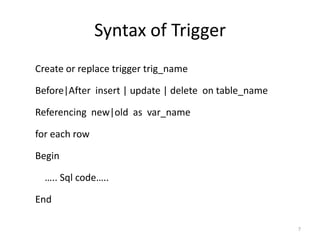
Create or replace trigger trig_name

Before|After insert | update | delete on table_name

Referencing new|old as var_name

for each row

Begin

  ….. Sql code…..

End

                                                      7
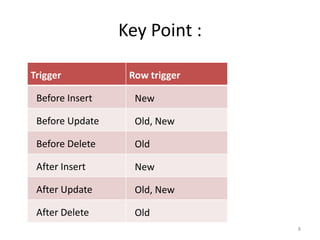
Key Point :

Trigger           Row trigger

 Before Insert     New

 Before Update     Old, New

 Before Delete     Old

 After Insert      New

 After Update      Old, New

 After Delete      Old
                                8
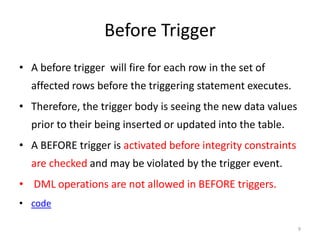
Before Trigger
• A before trigger will fire for each row in the set of
  affected rows before the triggering statement executes.
• Therefore, the trigger body is seeing the new data values
  prior to their being inserted or updated into the table.
• A BEFORE trigger is activated before integrity constraints
  are checked and may be violated by the trigger event.
• DML operations are not allowed in BEFORE triggers.
• code

                                                               9
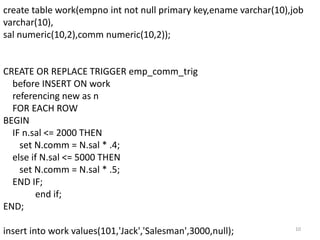
create table work(empno int not null primary key,ename varchar(10),job
varchar(10),
sal numeric(10,2),comm numeric(10,2));


CREATE OR REPLACE TRIGGER emp_comm_trig
  before INSERT ON work
  referencing new as n
  FOR EACH ROW
BEGIN
  IF n.sal <= 2000 THEN
    set N.comm = N.sal * .4;
  else if N.sal <= 5000 THEN
    set N.comm = N.sal * .5;
  END IF;
        end if;
END;

insert into work values(101,'Jack','Salesman',3000,null);           10
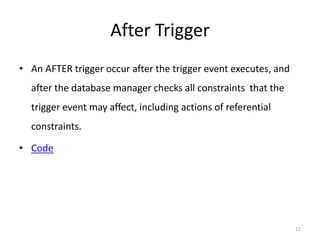
After Trigger
• An AFTER trigger occur after the trigger event executes, and
  after the database manager checks all constraints that the
  trigger event may affect, including actions of referential
  constraints.

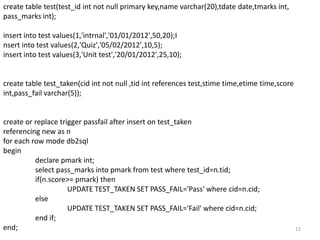
• Code


                                                                 11
create table test(test_id int not null primary key,name varchar(20),tdate date,tmarks int,
pass_marks int);

insert into test values(1,'intrnal','01/01/2012',50,20);I
nsert into test values(2,'Quiz','05/02/2012',10,5);
insert into test values(3,'Unit test','20/01/2012',25,10);


create table test_taken(cid int not null ,tid int references test,stime time,etime time,score
int,pass_fail varchar(5));


create or replace trigger passfail after insert on test_taken
referencing new as n
for each row mode db2sql
begin
          declare pmark int;
          select pass_marks into pmark from test where test_id=n.tid;
          if(n.score>= pmark) then
                     UPDATE TEST_TAKEN SET PASS_FAIL='Pass' where cid=n.cid;
          else
                     UPDATE TEST_TAKEN SET PASS_FAIL='Fail' where cid=n.cid;
          end if;
end;                                                                                            12
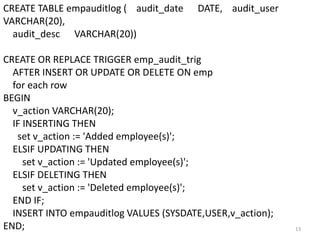
CREATE TABLE empauditlog ( audit_date    DATE, audit_user
VARCHAR(20),
  audit_desc VARCHAR(20))

CREATE OR REPLACE TRIGGER emp_audit_trig
  AFTER INSERT OR UPDATE OR DELETE ON emp
  for each row
BEGIN
  v_action VARCHAR(20);
  IF INSERTING THEN
   set v_action := 'Added employee(s)';
  ELSIF UPDATING THEN
     set v_action := 'Updated employee(s)';
  ELSIF DELETING THEN
     set v_action := 'Deleted employee(s)';
  END IF;
  INSERT INTO empauditlog VALUES (SYSDATE,USER,v_action);
END;                                                        13
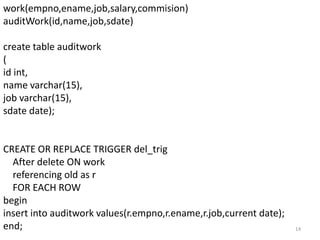
work(empno,ename,job,salary,commision)
auditWork(id,name,job,sdate)

create table auditwork
(
id int,
name varchar(15),
job varchar(15),
sdate date);


CREATE OR REPLACE TRIGGER del_trig
  After delete ON work
  referencing old as r
  FOR EACH ROW
begin
insert into auditwork values(r.empno,r.ename,r.job,current date);
end;                                                                14
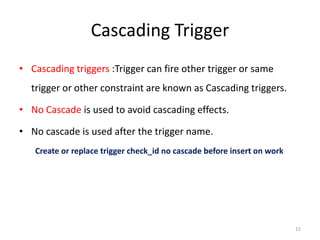
Cascading Trigger
• Cascading triggers :Trigger can fire other trigger or same
  trigger or other constraint are known as Cascading triggers.

• No Cascade is used to avoid cascading effects.

• No cascade is used after the trigger name.
   Create or replace trigger check_id no cascade before insert on work


                                                                         15
Cont…
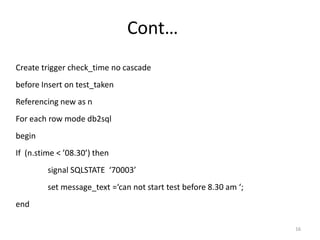
Create trigger check_time no cascade
before Insert on test_taken
Referencing new as n
For each row mode db2sql
begin
If (n.stime < ’08.30’) then
         signal SQLSTATE ‘70003’
         set message_text =‘can not start test before 8.30 am ‘;
end

                                                                   16
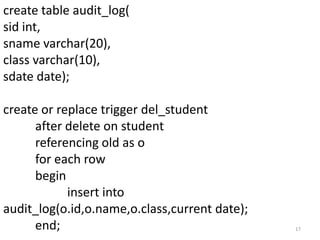
create table audit_log(
sid int,
sname varchar(20),
class varchar(10),
sdate date);

create or replace trigger del_student
      after delete on student
      referencing old as o
      for each row
      begin
            insert into
audit_log(o.id,o.name,o.class,current date);
      end;                                     17
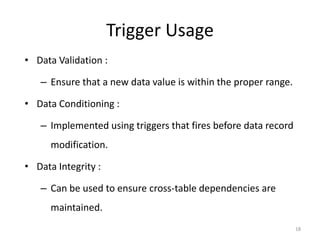
Trigger Usage
• Data Validation :

   – Ensure that a new data value is within the proper range.

• Data Conditioning :

   – Implemented using triggers that fires before data record
      modification.

• Data Integrity :

   – Can be used to ensure cross-table dependencies are
      maintained.
                                                                18
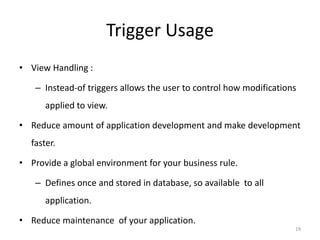
Trigger Usage
• View Handling :

   – Instead-of triggers allows the user to control how modifications
      applied to view.

• Reduce amount of application development and make development
  faster.

• Provide a global environment for your business rule.

   – Defines once and stored in database, so available to all
      application.

• Reduce maintenance of your application.
                                                                    19
View
•     View : Data can be presented to the user in different logical
    combinations, called views.

•     View are used as a way of limiting access to base table.

•     It can restrict both the columns and sets of rows that user
    can access.

•     code


                                                                      20
Con…
• To solve this problem, DBA can do following steps :

   – Create a better database design to avoid this error.

   – Allow null value in sales field or set default to zero.

   – Create an instead of trigger.


                                                               21
Instead of trigger
• Instead of trigger used only on views, not on base tables.

• It has similar characteristic to a normal trigger.

• Except for the following restriction.

   – Only allow on view.

   – Always for each row

   – Default values get passed as null.


                                                               22
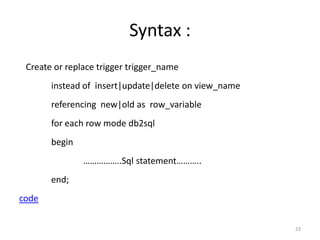
Syntax :
 Create or replace trigger trigger_name
       instead of insert|update|delete on view_name
       referencing new|old as row_variable
       for each row mode db2sql
       begin
               ……………..Sql statement………..
       end;
code


                                                      23
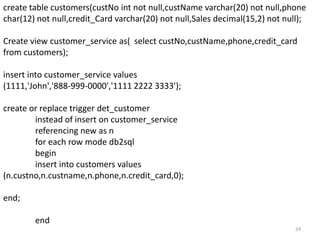
create table customers(custNo int not null,custName varchar(20) not null,phone
char(12) not null,credit_Card varchar(20) not null,Sales decimal(15,2) not null);

Create view customer_service as( select custNo,custName,phone,credit_card
from customers);

insert into customer_service values
(1111,'John','888-999-0000','1111 2222 3333');

create or replace trigger det_customer
        instead of insert on customer_service
        referencing new as n
        for each row mode db2sql
        begin
        insert into customers values
(n.custno,n.custname,n.phone,n.credit_card,0);

end;

        end
                                                                              24

Unit 4

  • 1.
  • 2.
    Content:  Triggers andtheir usage  Trigger Activation  BEFORE and AFTER Trigger  INSTEAD OF Trigger 2
  • 3.
    Triggers • Trigger :A trigger is a set of actions that will be executed when defined event like insert, update and delete occurs. • The trigger event can be following statement: – Insert – Update – Delete 3
  • 4.
    Trigger • Trigger isdefined for specific table. • Once trigger is defined, It will automatically active. • A table have multiple triggers defined on it. • If multiple triggers defined for a given table, the order of given trigger activation is based on the trigger creation timestamp. • Timestamp : order in which trigger were created. 4
  • 5.
    Trigger Storage • Triggerdefinitions are stored in the system catalog table. • Catalog View : – SYSCAT.TRIGGERS • Contains the trigger definition information, one row for each trigger defined. – SYSCAT.TRIDEP • Contains one row for every dependency of trigger on some other object. 5
  • 6.
    Trigger Activation • Triggercan be defined to fire (be activate) in two way: – Before Trigger • Activated before integrity constraints are checked. – After Trigger • occur after the trigger event executes, and after the database manager checks all constraints 6
  • 7.
    Syntax of Trigger Createor replace trigger trig_name Before|After insert | update | delete on table_name Referencing new|old as var_name for each row Begin ….. Sql code….. End 7
  • 8.
    Key Point : Trigger Row trigger Before Insert New Before Update Old, New Before Delete Old After Insert New After Update Old, New After Delete Old 8
  • 9.
    Before Trigger • Abefore trigger will fire for each row in the set of affected rows before the triggering statement executes. • Therefore, the trigger body is seeing the new data values prior to their being inserted or updated into the table. • A BEFORE trigger is activated before integrity constraints are checked and may be violated by the trigger event. • DML operations are not allowed in BEFORE triggers. • code 9
  • 10.
    create table work(empnoint not null primary key,ename varchar(10),job varchar(10), sal numeric(10,2),comm numeric(10,2)); CREATE OR REPLACE TRIGGER emp_comm_trig before INSERT ON work referencing new as n FOR EACH ROW BEGIN IF n.sal <= 2000 THEN set N.comm = N.sal * .4; else if N.sal <= 5000 THEN set N.comm = N.sal * .5; END IF; end if; END; insert into work values(101,'Jack','Salesman',3000,null); 10
  • 11.
    After Trigger • AnAFTER trigger occur after the trigger event executes, and after the database manager checks all constraints that the trigger event may affect, including actions of referential constraints. • Code 11
  • 12.
    create table test(test_idint not null primary key,name varchar(20),tdate date,tmarks int, pass_marks int); insert into test values(1,'intrnal','01/01/2012',50,20);I nsert into test values(2,'Quiz','05/02/2012',10,5); insert into test values(3,'Unit test','20/01/2012',25,10); create table test_taken(cid int not null ,tid int references test,stime time,etime time,score int,pass_fail varchar(5)); create or replace trigger passfail after insert on test_taken referencing new as n for each row mode db2sql begin declare pmark int; select pass_marks into pmark from test where test_id=n.tid; if(n.score>= pmark) then UPDATE TEST_TAKEN SET PASS_FAIL='Pass' where cid=n.cid; else UPDATE TEST_TAKEN SET PASS_FAIL='Fail' where cid=n.cid; end if; end; 12
  • 13.
    CREATE TABLE empauditlog( audit_date DATE, audit_user VARCHAR(20), audit_desc VARCHAR(20)) CREATE OR REPLACE TRIGGER emp_audit_trig AFTER INSERT OR UPDATE OR DELETE ON emp for each row BEGIN v_action VARCHAR(20); IF INSERTING THEN set v_action := 'Added employee(s)'; ELSIF UPDATING THEN set v_action := 'Updated employee(s)'; ELSIF DELETING THEN set v_action := 'Deleted employee(s)'; END IF; INSERT INTO empauditlog VALUES (SYSDATE,USER,v_action); END; 13
  • 14.
    work(empno,ename,job,salary,commision) auditWork(id,name,job,sdate) create table auditwork ( idint, name varchar(15), job varchar(15), sdate date); CREATE OR REPLACE TRIGGER del_trig After delete ON work referencing old as r FOR EACH ROW begin insert into auditwork values(r.empno,r.ename,r.job,current date); end; 14
  • 15.
    Cascading Trigger • Cascadingtriggers :Trigger can fire other trigger or same trigger or other constraint are known as Cascading triggers. • No Cascade is used to avoid cascading effects. • No cascade is used after the trigger name. Create or replace trigger check_id no cascade before insert on work 15
  • 16.
    Cont… Create trigger check_timeno cascade before Insert on test_taken Referencing new as n For each row mode db2sql begin If (n.stime < ’08.30’) then signal SQLSTATE ‘70003’ set message_text =‘can not start test before 8.30 am ‘; end 16
  • 17.
    create table audit_log( sidint, sname varchar(20), class varchar(10), sdate date); create or replace trigger del_student after delete on student referencing old as o for each row begin insert into audit_log(o.id,o.name,o.class,current date); end; 17
  • 18.
    Trigger Usage • DataValidation : – Ensure that a new data value is within the proper range. • Data Conditioning : – Implemented using triggers that fires before data record modification. • Data Integrity : – Can be used to ensure cross-table dependencies are maintained. 18
  • 19.
    Trigger Usage • ViewHandling : – Instead-of triggers allows the user to control how modifications applied to view. • Reduce amount of application development and make development faster. • Provide a global environment for your business rule. – Defines once and stored in database, so available to all application. • Reduce maintenance of your application. 19
  • 20.
    View • View : Data can be presented to the user in different logical combinations, called views. • View are used as a way of limiting access to base table. • It can restrict both the columns and sets of rows that user can access. • code 20
  • 21.
    Con… • To solvethis problem, DBA can do following steps : – Create a better database design to avoid this error. – Allow null value in sales field or set default to zero. – Create an instead of trigger. 21
  • 22.
    Instead of trigger •Instead of trigger used only on views, not on base tables. • It has similar characteristic to a normal trigger. • Except for the following restriction. – Only allow on view. – Always for each row – Default values get passed as null. 22
  • 23.
    Syntax : Createor replace trigger trigger_name instead of insert|update|delete on view_name referencing new|old as row_variable for each row mode db2sql begin ……………..Sql statement……….. end; code 23
  • 24.
    create table customers(custNoint not null,custName varchar(20) not null,phone char(12) not null,credit_Card varchar(20) not null,Sales decimal(15,2) not null); Create view customer_service as( select custNo,custName,phone,credit_card from customers); insert into customer_service values (1111,'John','888-999-0000','1111 2222 3333'); create or replace trigger det_customer instead of insert on customer_service referencing new as n for each row mode db2sql begin insert into customers values (n.custno,n.custname,n.phone,n.credit_card,0); end; end 24