國立臺北護理健康大學 NTUNHS
Transfer Learning
Orozco Hsu
2023-05-16
1
About me
• Education
• NCU (MIS)、NCCU (CS)
• Work Experience
• Telecom big data Innovation
• AI projects
• Retail marketing technology
• User Group
• TW Spark User Group
• TW Hadoop User Group
• Taiwan Data Engineer Association Director
• Research
• Big Data/ ML/ AIOT/ AI Columnist
2
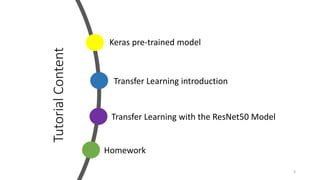
Tutorial
Content
3
Transfer Learning introduction
Homework
Keras pre-trained model
Transfer Learning with the ResNet50 Model
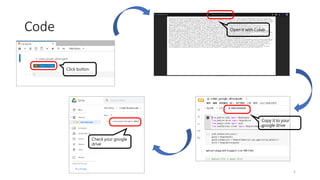
Code
• Download code
• https://github.com/orozcohsu/ntunhs_2023_01
• Folder/file
• 20230516_01/run.ipynb
4
Code
5
Click button
Open it with Colab
Copy it to your
google drive
Check your google
drive
Pretrained Deep Neural Networks
• You can take a pretrained image classification neural network that has
already learned to extract powerful and informative features from
natural images.
• The majority of the pretrained neural networks are trained on a
subset of the ImageNet database, which is used in the ImageNet
Large-Scale Visual Recognition Challenge (ILSVRC).
• Using a pretrained neural network with transfer learning is typically
much faster and easier than training a neural network from scratch.
6
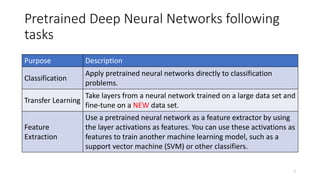
Pretrained Deep Neural Networks following
tasks
7
Purpose Description
Classification
Apply pretrained neural networks directly to classification
problems.
Transfer Learning
Take layers from a neural network trained on a large data set and
fine-tune on a NEW data set.
Feature
Extraction
Use a pretrained neural network as a feature extractor by using
the layer activations as features. You can use these activations as
features to train another machine learning model, such as a
support vector machine (SVM) or other classifiers.
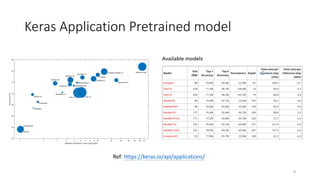
Keras Application Pretrained model
8
Ref: https://keras.io/api/applications/
Keras Application Pretrained model
• Keras’s Applications are deep learning models that are made available
alongside pre-trained weights.
• These models can be used for prediction, feature extraction, and fine-
tuning.
• Weights are downloaded automatically when instantiating a model.
They are stored at ~/.keras/models/
9
Exercise
• Try it up!
10
pre-trained
Transfer Learning introduction
• Transfer Learning is a process where a model built for a problem is
again reused for another problem based on some factors
• Using Transfer Learning you can achieve good results if the data is
kind of SIMILAR to the data on which model is already trained
11
Transfer Learning introduction
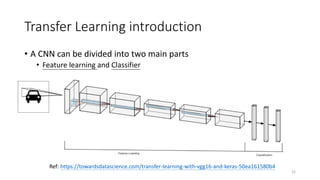
• A CNN can be divided into two main parts
• Feature learning and Classifier
12
Ref: https://towardsdatascience.com/transfer-learning-with-vgg16-and-keras-50ea161580b4
13
1 2 3 4 5 6 7 8 9 10 11 12 13 14 15 16
Transfer Learning introduction
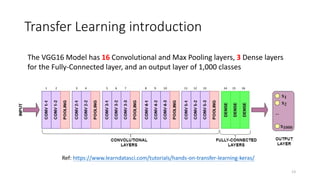
The VGG16 Model has 16 Convolutional and Max Pooling layers, 3 Dense layers
for the Fully-Connected layer, and an output layer of 1,000 classes
Ref: https://www.learndatasci.com/tutorials/hands-on-transfer-learning-keras/
Transfer Learning introduction
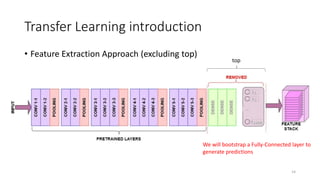
• Feature Extraction Approach (excluding top)
14
We will bootstrap a Fully-Connected layer to
generate predictions
top
Exercise
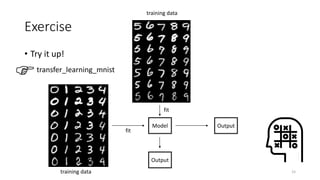
• Try it up!
15
transfer_learning_mnist
training data
training data
Model Output
Output
fit
fit
Transfer Learning introduction
16
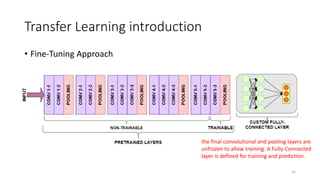
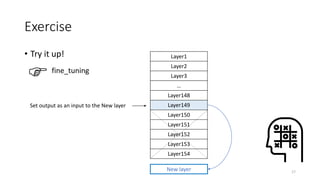
• Fine-Tuning Approach
the final convolutional and pooling layers are
unfrozen to allow training. A Fully-Connected
layer is defined for training and prediction.
Exercise
• Try it up!
17
fine_tuning
Layer1
Layer2
Layer3
…
Layer148
Layer149
Layer150
Layer151
Layer152
Layer153
Layer154
Set output as an input to the New layer
New layer
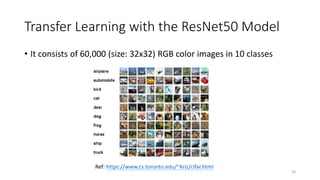
Transfer Learning with the ResNet50 Model
• It consists of 60,000 (size: 32x32) RGB color images in 10 classes
18
Ref: https://www.cs.toronto.edu/~kriz/cifar.html
Transfer Learning with the ResNet50 Model
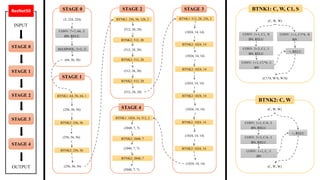
• ResNet model of Computer Vision that is trained on the ImageNet
dataset having 14 million images that can be used for Image
classification tasks
• imagenet 1,000 class
• https://gist.github.com/yrevar/942d3a0ac09ec9e5eb3a
19
STAGE 1
STAGE 2
STAGE 3
STAGE 4
STAGE 0
INPUT
OUTPUT
ResNet50
CONV: 7× 7, 64, /2
BN, RELU
MAXPOOL: 3× 3, /2
STAGE 0
(3, 224, 224)
(64, 56, 56)
STAGE 1
BTNK1: 64, 56, 64, 1
(256, 56, 56)
BTNK2: 256, 56
(256, 56, 56)
BTNK2: 256, 56
(256, 56, 56)
STAGE 2
BTNK1: 256, 56, 128, 2
(512, 28, 28)
BTNK2: 512, 28
(512, 28, 28)
BTNK2: 512, 28
(512, 28, 28)
BTNK2: 512, 28
(512, 28, 28)
STAGE 3
BTNK1: 512, 28, 256, 2
(1024, 14, 14)
BTNK2: 1024, 14
(1024, 14, 14)
BTNK2: 1024, 14
(1024, 14, 14)
BTNK2: 1024, 14
(1024, 14, 14)
BTNK2: 1024, 14
(1024, 14, 14)
BTNK2: 1024, 14
(1024, 14, 14)
STAGE 4
BTNK1: 1024, 14, 512, 2
(2048, 7, 7)
BTNK2: 2048, 7
(2048, 7, 7)
BTNK2: 2048, 7
(2048, 7, 7)
BTNK1: C, W, C1, S
CONV: 1× 1, C1, /S
BN, RELU
CONV: 3× 3, C1, /1
BN, RELU
CONV: 1× 1, C1*4, /1
BN
CONV: 1× 1, C1*4, /S
BN
+, RELU
(C, W, W)
(C1*4, W/S, W/S)
BTNK2: C, W
CONV: 1× 1, C/4, /1
BN, RELU
CONV: 3× 3, C/4, /1
BN, RELU
CONV: 1× 1, C, /1
BN
+, RELU
(C, W, W)
(C, W, W)
Exercise
• Try it up!
21
transfer_learning_resnet50
Homework
• Try to use some images to make a prediction with Top5 in pre-
trained.ipynb.
• Print the Top-5 prediction results
• Try to inference some images to make a prediction for BOTH
fine_tuning.ipynb and transfer_learning_resnet50.ipynb.
22

Transfer Learning (20230516)

  • 1.
  • 2.
    About me • Education •NCU (MIS)、NCCU (CS) • Work Experience • Telecom big data Innovation • AI projects • Retail marketing technology • User Group • TW Spark User Group • TW Hadoop User Group • Taiwan Data Engineer Association Director • Research • Big Data/ ML/ AIOT/ AI Columnist 2
  • 3.
    Tutorial Content 3 Transfer Learning introduction Homework Keraspre-trained model Transfer Learning with the ResNet50 Model
  • 4.
    Code • Download code •https://github.com/orozcohsu/ntunhs_2023_01 • Folder/file • 20230516_01/run.ipynb 4
  • 5.
    Code 5 Click button Open itwith Colab Copy it to your google drive Check your google drive
  • 6.
    Pretrained Deep NeuralNetworks • You can take a pretrained image classification neural network that has already learned to extract powerful and informative features from natural images. • The majority of the pretrained neural networks are trained on a subset of the ImageNet database, which is used in the ImageNet Large-Scale Visual Recognition Challenge (ILSVRC). • Using a pretrained neural network with transfer learning is typically much faster and easier than training a neural network from scratch. 6
  • 7.
    Pretrained Deep NeuralNetworks following tasks 7 Purpose Description Classification Apply pretrained neural networks directly to classification problems. Transfer Learning Take layers from a neural network trained on a large data set and fine-tune on a NEW data set. Feature Extraction Use a pretrained neural network as a feature extractor by using the layer activations as features. You can use these activations as features to train another machine learning model, such as a support vector machine (SVM) or other classifiers.
  • 8.
    Keras Application Pretrainedmodel 8 Ref: https://keras.io/api/applications/
  • 9.
    Keras Application Pretrainedmodel • Keras’s Applications are deep learning models that are made available alongside pre-trained weights. • These models can be used for prediction, feature extraction, and fine- tuning. • Weights are downloaded automatically when instantiating a model. They are stored at ~/.keras/models/ 9
  • 10.
    Exercise • Try itup! 10 pre-trained
  • 11.
    Transfer Learning introduction •Transfer Learning is a process where a model built for a problem is again reused for another problem based on some factors • Using Transfer Learning you can achieve good results if the data is kind of SIMILAR to the data on which model is already trained 11
  • 12.
    Transfer Learning introduction •A CNN can be divided into two main parts • Feature learning and Classifier 12 Ref: https://towardsdatascience.com/transfer-learning-with-vgg16-and-keras-50ea161580b4
  • 13.
    13 1 2 34 5 6 7 8 9 10 11 12 13 14 15 16 Transfer Learning introduction The VGG16 Model has 16 Convolutional and Max Pooling layers, 3 Dense layers for the Fully-Connected layer, and an output layer of 1,000 classes Ref: https://www.learndatasci.com/tutorials/hands-on-transfer-learning-keras/
  • 14.
    Transfer Learning introduction •Feature Extraction Approach (excluding top) 14 We will bootstrap a Fully-Connected layer to generate predictions top
  • 15.
    Exercise • Try itup! 15 transfer_learning_mnist training data training data Model Output Output fit fit
  • 16.
    Transfer Learning introduction 16 •Fine-Tuning Approach the final convolutional and pooling layers are unfrozen to allow training. A Fully-Connected layer is defined for training and prediction.
  • 17.
    Exercise • Try itup! 17 fine_tuning Layer1 Layer2 Layer3 … Layer148 Layer149 Layer150 Layer151 Layer152 Layer153 Layer154 Set output as an input to the New layer New layer
  • 18.
    Transfer Learning withthe ResNet50 Model • It consists of 60,000 (size: 32x32) RGB color images in 10 classes 18 Ref: https://www.cs.toronto.edu/~kriz/cifar.html
  • 19.
    Transfer Learning withthe ResNet50 Model • ResNet model of Computer Vision that is trained on the ImageNet dataset having 14 million images that can be used for Image classification tasks • imagenet 1,000 class • https://gist.github.com/yrevar/942d3a0ac09ec9e5eb3a 19
  • 20.
    STAGE 1 STAGE 2 STAGE3 STAGE 4 STAGE 0 INPUT OUTPUT ResNet50 CONV: 7× 7, 64, /2 BN, RELU MAXPOOL: 3× 3, /2 STAGE 0 (3, 224, 224) (64, 56, 56) STAGE 1 BTNK1: 64, 56, 64, 1 (256, 56, 56) BTNK2: 256, 56 (256, 56, 56) BTNK2: 256, 56 (256, 56, 56) STAGE 2 BTNK1: 256, 56, 128, 2 (512, 28, 28) BTNK2: 512, 28 (512, 28, 28) BTNK2: 512, 28 (512, 28, 28) BTNK2: 512, 28 (512, 28, 28) STAGE 3 BTNK1: 512, 28, 256, 2 (1024, 14, 14) BTNK2: 1024, 14 (1024, 14, 14) BTNK2: 1024, 14 (1024, 14, 14) BTNK2: 1024, 14 (1024, 14, 14) BTNK2: 1024, 14 (1024, 14, 14) BTNK2: 1024, 14 (1024, 14, 14) STAGE 4 BTNK1: 1024, 14, 512, 2 (2048, 7, 7) BTNK2: 2048, 7 (2048, 7, 7) BTNK2: 2048, 7 (2048, 7, 7) BTNK1: C, W, C1, S CONV: 1× 1, C1, /S BN, RELU CONV: 3× 3, C1, /1 BN, RELU CONV: 1× 1, C1*4, /1 BN CONV: 1× 1, C1*4, /S BN +, RELU (C, W, W) (C1*4, W/S, W/S) BTNK2: C, W CONV: 1× 1, C/4, /1 BN, RELU CONV: 3× 3, C/4, /1 BN, RELU CONV: 1× 1, C, /1 BN +, RELU (C, W, W) (C, W, W)
  • 21.
    Exercise • Try itup! 21 transfer_learning_resnet50
  • 22.
    Homework • Try touse some images to make a prediction with Top5 in pre- trained.ipynb. • Print the Top-5 prediction results • Try to inference some images to make a prediction for BOTH fine_tuning.ipynb and transfer_learning_resnet50.ipynb. 22