Erin Melvin
Lead Learning & Development Specialist
Training Essentials for Your LMS
A C C E L E R A T E L E A R N I N G
P E R F O R M A N C E
Erin Melvin
Learning &
Development
Specialist
Your Presenter
 Audio
 Q&A
 Poll questions
 Post-survey
Housekeeping
1. About Lambda
2. Why Training Matters
3. Lambda Training
4. Setup & Configuration
5. Questions
Today’s Agenda
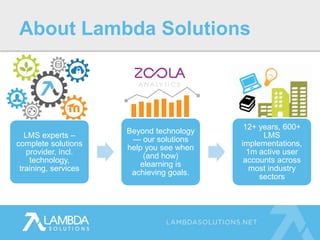
LMS experts –
complete solutions
provider, incl.
technology,
training, services
Beyond technology
— our solutions
help you see when
(and how)
elearning is
achieving goals.
12+ years, 600+
LMS
implementations,
1m active user
accounts across
most industry
sectors
About Lambda Solutions
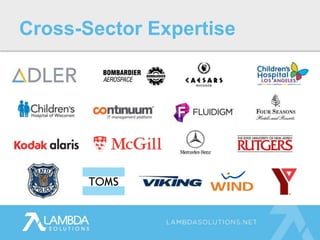
Cross-Sector Expertise
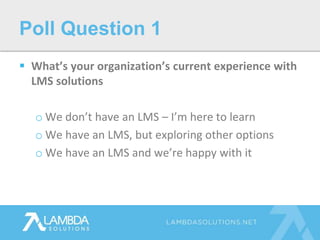
 What’s your organization’s current experience with
LMS solutions
o We don’t have an LMS – I’m here to learn
o We have an LMS, but exploring other options
o We have an LMS and we’re happy with it
Poll Question 1
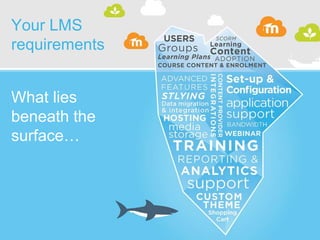
Your LMS
requirements
What lies
beneath the
surface…
 If you are currently using an LMS, did you receive
training?
o Yes, the training was effective.
o Yes, but the training was not effective.
o No, there was no training and we could have used
some.
o No, there was no training and we didn’t need it.
Poll Question 2
Why Training
Matters
 Efficiency & Success of Project
 Close Skills Gap
 Build Strong Team
 Train the Trainer
 Business Success
Why Training Matters
 Reduce or eliminate time wasted on:
o Where do we start?
o What’s the workflow?
o How do I?
o What’s the best way to…?
Efficiency & Success of Project
 New system:
o More work
o Resistance
o Frustration
Close Skills Gap
 Just-in-time learning
 Hands-on practice
 Q&A sessions directed at client’s
needs
Close Skills Gap
 Reduce attrition rates
 Increase enthusiasm for the project
 Build employee confidence
Build a Strong Team
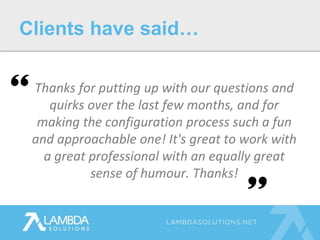
Thanks for putting up with our questions and
quirks over the last few months, and for
making the configuration process such a fun
and approachable one! It's great to work with
a great professional with an equally great
sense of humour. Thanks!
Clients have said…
 Share knowledge with team
 Use resources
 Logical workflow
 End user support
Train the Trainer
 Our goal is your success
 We work as a team: “Win as a Village”
 Word of Mouth
 Model best practices
o Questions by clients on how we created our
courses
o Use courses for internal training
Business Success
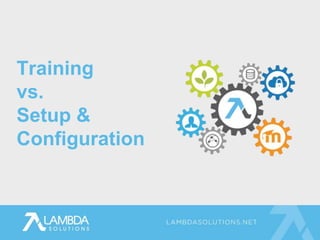
Training
vs.
Setup &
Configuration
 Order Processing
 Training
 Setup & Configuration
 Support
Customer Experience Journey
 Sales → Order Processing
 Personable Experience
 Kick-off call
o Review order
o Teams meet
o Set expectations and implementation
requirements
Order Processing
 Lambda’s Training Vision
 “This is what your LMS can do.”
 Asynchronous online learning
 Q&A Sessions with an Expert
Training
 Modular
 Searchable
 Context driven
 Practical
 Hands-on learning with sandbox
Lambda Learning Space
 Human element
 Expert
 Guided by your needs
 No questions? No problem
o Discuss your needs
o Review most important topics to get started
 Every session is recorded for future reference
Training Q&A Sessions
The training sessions were extremely helpful in our
implementation process.
Team went out of their way to make sure that the
content was directly aligned with our needs and
questions.
Clients have said…
 Series of live Q&A sessions
 Specific topics in logical workflow
 Guided by critical questions
 Spaced to give you time to complete work
 Offline testing and troubleshooting
 All sessions are recorded for future reference
Setup & Configuration
Lambda was very organized and quickly followed up on
any questions that arose requiring input from the
software engineers.
We couldn't have asked for a better experience!
Clients have said…
 Handoff from Training
 Provide support via helpdesk ticks, phone, email,
chat
 “Second Line Support”
 Client Manages End User Support
Support
Increasing Learning
Engagement
 Searchable
 Modular
 Just-in-time
 Context-driven
 Task-related
 Hands-on
Fundamentals Training
 Instructional design
 Branding, Aesthetics, Theme
 Gradebook
 Badges and Gamification
 Best practices
Future: Advanced Topics
 Communities based on LMS platform
 Groups based on LMS use:
o Public schools
o Universities
o Hospitals
o Trades
Social Learning
Questions? Ask Away
 Post-webinar satisfaction survey – please provide
feedback!
 To be sent out in our follow-up email
o PowerPoint & Recording
o Satisfaction Survey
Next Steps
TOLL FREE +1.877.700.1118
EMAIL SALES@LAMBDASOLUTIONS.NET
WWW LAMBDASOLUTIONS.NET

Training Essentials for Your LMS

  • 1.
    Erin Melvin Lead Learning& Development Specialist Training Essentials for Your LMS A C C E L E R A T E L E A R N I N G P E R F O R M A N C E
  • 2.
  • 3.
     Audio  Q&A Poll questions  Post-survey Housekeeping
  • 4.
    1. About Lambda 2.Why Training Matters 3. Lambda Training 4. Setup & Configuration 5. Questions Today’s Agenda
  • 5.
    LMS experts – completesolutions provider, incl. technology, training, services Beyond technology — our solutions help you see when (and how) elearning is achieving goals. 12+ years, 600+ LMS implementations, 1m active user accounts across most industry sectors About Lambda Solutions
  • 6.
  • 7.
     What’s yourorganization’s current experience with LMS solutions o We don’t have an LMS – I’m here to learn o We have an LMS, but exploring other options o We have an LMS and we’re happy with it Poll Question 1
  • 8.
  • 9.
     If youare currently using an LMS, did you receive training? o Yes, the training was effective. o Yes, but the training was not effective. o No, there was no training and we could have used some. o No, there was no training and we didn’t need it. Poll Question 2
  • 10.
  • 11.
     Efficiency &Success of Project  Close Skills Gap  Build Strong Team  Train the Trainer  Business Success Why Training Matters
  • 12.
     Reduce oreliminate time wasted on: o Where do we start? o What’s the workflow? o How do I? o What’s the best way to…? Efficiency & Success of Project
  • 13.
     New system: oMore work o Resistance o Frustration Close Skills Gap
  • 14.
     Just-in-time learning Hands-on practice  Q&A sessions directed at client’s needs Close Skills Gap
  • 15.
     Reduce attritionrates  Increase enthusiasm for the project  Build employee confidence Build a Strong Team
  • 16.
    Thanks for puttingup with our questions and quirks over the last few months, and for making the configuration process such a fun and approachable one! It's great to work with a great professional with an equally great sense of humour. Thanks! Clients have said…
  • 17.
     Share knowledgewith team  Use resources  Logical workflow  End user support Train the Trainer
  • 18.
     Our goalis your success  We work as a team: “Win as a Village”  Word of Mouth  Model best practices o Questions by clients on how we created our courses o Use courses for internal training Business Success
  • 19.
  • 20.
     Order Processing Training  Setup & Configuration  Support Customer Experience Journey
  • 21.
     Sales →Order Processing  Personable Experience  Kick-off call o Review order o Teams meet o Set expectations and implementation requirements Order Processing
  • 22.
     Lambda’s TrainingVision  “This is what your LMS can do.”  Asynchronous online learning  Q&A Sessions with an Expert Training
  • 23.
     Modular  Searchable Context driven  Practical  Hands-on learning with sandbox Lambda Learning Space
  • 24.
     Human element Expert  Guided by your needs  No questions? No problem o Discuss your needs o Review most important topics to get started  Every session is recorded for future reference Training Q&A Sessions
  • 25.
    The training sessionswere extremely helpful in our implementation process. Team went out of their way to make sure that the content was directly aligned with our needs and questions. Clients have said…
  • 26.
     Series oflive Q&A sessions  Specific topics in logical workflow  Guided by critical questions  Spaced to give you time to complete work  Offline testing and troubleshooting  All sessions are recorded for future reference Setup & Configuration
  • 27.
    Lambda was veryorganized and quickly followed up on any questions that arose requiring input from the software engineers. We couldn't have asked for a better experience! Clients have said…
  • 28.
     Handoff fromTraining  Provide support via helpdesk ticks, phone, email, chat  “Second Line Support”  Client Manages End User Support Support
  • 29.
  • 30.
     Searchable  Modular Just-in-time  Context-driven  Task-related  Hands-on Fundamentals Training
  • 31.
     Instructional design Branding, Aesthetics, Theme  Gradebook  Badges and Gamification  Best practices Future: Advanced Topics
  • 32.
     Communities basedon LMS platform  Groups based on LMS use: o Public schools o Universities o Hospitals o Trades Social Learning
  • 33.
  • 34.
     Post-webinar satisfactionsurvey – please provide feedback!  To be sent out in our follow-up email o PowerPoint & Recording o Satisfaction Survey Next Steps
  • 35.
    TOLL FREE +1.877.700.1118 EMAILSALES@LAMBDASOLUTIONS.NET WWW LAMBDASOLUTIONS.NET

Editor's Notes

  • #3 I’ll introduce your presenter for today. As the Lead Learning & Development Specialist at Lambda Solutions, Erin works closely with out clients prior to launching their LMS, to ensure they’re well trained and knowledgeable on their learning management system. Thank you Erin, for presenting for us today.
  • #4 Let’s go through some housekeeping items. We tested the audio earlier, but if you experience issues with the sound, just let us know in the chat box. This is an interactive webinar, so we do have some poll questions throughout the presentation, we’d love if you would participate. We will have a question and answer period at the end of the webinar, so ask your questions as they come, and we will go through them at the end. There will be a post-webinar survey at the end, where you can provide your feedback!
  • #6 A little bit about Lambda Solutions: We are LMS experts and a complete solutions provider – we offer everything from the technology, to training and services. Beyond just the technology, our solutions help you see when, and how, eLearning is achieving goals. We’ve developed a reporting and analytics solution to provide deeper insight into your learners, and learning programs. We have 12 years of experience, over 600 customer implementations, and 1 million active user accounts across most industry sectors.
  • #7 We work with some amazing industry leading clients such as TOMS Shoes, Children’s Hospital of Wisconsin and Kodak Alaris to improve their training programs, enhance performance, and reduce the cost of their learning and training management. One of our Moodle clients we like to highlight is Children’s Hospital of Wisconsin. With the custom Moodle reports we build for them, they were able to save weeks of time, and significant costs.
  • #9 This is a great infographic we like to use, because it really highlights the many components of your learning management system. When thinking about getting an LMS, people often think about the items ‘above water’ like who the users will be, and what kind of learning they will be doing. They might not think about the essential elements to successfully implement an LMS that are below the surface, like reporting, and training.
  • #11 Next slide: topics of Why Training Matters
  • #12 topics of Why Training Matters
  • #13  Stakeholders: Project Managers will be happy to see things move along. Employees will feel more empowered knowing what to do, so they can spend their time focusing on doing quality work rather than struggling through how-tos; in many cases, the LMS is part of an individual’s workload so the additional stress of not knowing how to use it can be overwhelming Example: I got a ticket from a client who hadn’t gone through training. They had migrated their site and so having already worked in it for years didn’t take advantage of our training package. She said she had spent three days manually inputting all the new students for the new school year (the LMS was being used for one faculty at a major Canadian university. I gently let her know that there are faster ways to do this and to please let us know next time you need to add users to the system. We can complete this task in minutes, not days. With training, this wouldn’t have been an issue. In fact, a lot of what is highlighted in training comes out of common how to requests from the Support Desk.
  • #14 Training can not only make you a more efficient user in a platform you may already be familiar with, it can also close the skills gap for those new to it. New system: decision makers bring in the new system: teams have to change the way they work and learn a new system: can result in extra work, steep learning curve, high expectations can equal resistance & frustration In a previous position, we had a new database system implemented. They called for mandatory 2-day training for the entire staff. About 15 minutes out of the 16 hours was relevant to my position. The training was not directed at any team or at all contextual to our work or tasks and because it was not relevant, people tuned out. It was a colossal waste of time for the organization. We needed the skills and we needed the training to be delivered team by team and task by task, with hands-on practice. Rather than leading us to do our work better, it alienated the entire staff. This was a great motivator for me to build a learning system that teams can use as a learning opportunity that inspires work. Our Response: Start each new client training with discovery: who are you? What’s your experience with this platform? What skills do you bring to the table? What’s your role? Hands on practice in the sandbox
  • #15  Our Response: Design online learning to meet today’s need for “just-in-time” learning. Our videos are modular and searchable as well as contextual and task based. Hands on practice in the sandbox Start each new client training with discovery: who are you? What’s your experience with this platform? What skills do you bring to the table? What’s your role?
  • #16 If you don’t have the skills to complete a job, time is wasted, self-confidence can be lowered and the employee or team can be weakened and the project may drag on and perhaps fail to get off the ground With the proper skills and guidance, enthusiasm for the project increases as employees are empowered to do their work and gain new skills. One of my favorite parts of this job is getting off a call with people who are excited to get to work and start building their site. I can see their enthusiasm in their sandbox as well as they build out things. Improve the situation Employee confidence can take your company to the next level (come back to this idea later)
  • #17 A team with a project manager who knew nothing about Learning Management systems or learning, a marketing professional with a background in teaching and two eLearning specialists. The realisation of the skills gap and frustration arose in one of our calls as high tensions, so we backed up, found out the needs in skills, met those needs and then moved on when everyone was ready.
  • #18 From the previous example, after training was completed, they brought on a new eLearning Specialist so those who had completed the training were able to help the new person find their way around. This is actually really common situation. People move in their work. Ask yourself as you set up your training if those who you are training will be training other. How can you set this up? Share knowledge with team: Many of the participants in our training are the main administrators who then teach and provide support for: New staff Managers Course Creators Instructors End Users Since we don’t provide support for end users, it’s really important that you know enough troubleshooting issues that will let your team do this work. Lambda provides and connects you to resources that make learning easy and available. We are constantly building new materials and resources to help our clients better use their LMS
  • #19 Our goal is your success: we develop our training with efficient use of time and resources in mind because we know how busy you are. We also know that many LMS projects are run off the side of people’s desks: that this isn’t their main task, so it is even more important to have streamlined training. One of the mottoes our company works on is ”Win as a Village” in that not one of us has all the skills but together we do. If you have a need that exceeds the trainer’s own knowledge, then we our in-house bring experts onto the call to ensure that you get the best service for your needs. Word of mouth: See how they use the site for competencies in trades and another industry picked it up See a client’s site and want one as well We’ve had clients who are so happy with the training and setup and configuration process that they have brought in other clients in similar industries because they KNOW that our system works and that we will WORK to ensure that you have the skills and knowledge to thrive—not just survive—with your LMS.
  • #21 Human element: From the beginning that you become our client, we focus on what we call the Customer Experience Journey. Our clients begin in Order Processing and then move through Training, Setup & Configuration and then on to Support. Each step of the way, we like to ensure that you are working with humans who will stay with you until you until the need is met. Let’s look at what this journey looks like.
  • #22 Human service experience begins here: personable, human, Before Training, our clients meet the Order Processing team. Really important part of this process is the kickoff call where both teams meet and expectations are made. The emphasis here is on the human element and setting expectations.
  • #23 There is then a Hand off from Order Processing to training where our team takes over. We want you to know your LMS inside and out, starting with fundamentals and site setup, then when you are comfortable moving on to more advanced topics. We have Training and Setup and Configuration. I’ll start by focusing on Training, Training has 2 main components: Online learning and Live Q&A sessions led by an expert with you and your team. (Deeper dive: More details in the next slide)
  • #24 Lambda Learning Space is our Online Basedon current best practices in adult learning and corporate training, we have designed our online learning to be: modular, searchable, context-driven, practical and hands-on. The training is modular in that you can either follow the training from beginning to end (which we recommend the first time around) or you can choose the pieces that you need to know, right now. The training consists of video content and our average video length is 7 minutes and each video is task-based and arranged in the logical workflow of building out your LMS. Each video is then matched with a hands-on task that you can try out safely in your ‘training sandbox’, a basic, out-of-the-box LMS that we provision for three months. We think of Training as “this is what your LMS can do” We are planting seeds for use of the LMS
  • #25 The training Q&A sessions are where you get to spend time with an expert. While the intention is that you’ve completed some training and have questions, often—and especially if you are new to using an LMS—you might not even know what to ask. So, our experts will review key areas during which questions will be asked to initiate discussion. At this point, these questions are designed to plant seeds of possibility for your use of the LMS or points of discussion to be taken up with your team offline. This also continues the human element, which is essential for us. Our calls begin with time devoted to discovery on how you will be using the LMS and your experience level. This knowledge drives the rest of the session as, depending on your answers, different key points will be emphasized during the training as well as different kinds of questions.
  • #26 To say that Erin is phenomenal as a trainer is an understatement. The training sessions with Erin were extremely helpful in our implementation process. She went out of her way to make sure that the content was directly aligned with our needs and questions. She is very organized and quickly followed up on any questions that arose requiring input from the software engineers. We couldn't have asked for a better experience!!!!
  • #27 Series of live Q&A sessions based on a logical workflow Guided by critical questions that are provided to help teams do their work. There are points in the setup and configuration that require either knowledge of or sometimes, rethinking certain organizational structures. Included in the setup and configuration package is “offline time” where certain workflows may need to be tested prior to moving forward, or more information may need to be collected. Our resident experts will do this work, capture the details and bring the conclusions to the next call. Setup and configuration is different from training in that this is a direct consultation for you and your organization’s needs. Build a course
  • #28 To say that Erin is phenomenal as a trainer is an understatement. The training sessions with Erin were extremely helpful in our implementation process. She went out of her way to make sure that the content was directly aligned with our needs and questions. She is very organized and quickly followed up on any questions that arose requiring input from the software engineers. We couldn't have asked for a better experience!!!!
  • #31 Training for the LMS but also building the LMS Also, all our training videos are uploaded into your very own course on how to use the Platform
  • #32 Crowd-sourced content
  • #33 Most valuable learning often comes from each other, so building in social learning opportunities for your learners is a great way to encourage people to come together. You become a hub.