WWW.LAMBDASOLUTIONS.NET
Top 5 Tips for Keeping Reporting
Simple
Lambda Lab: Zoola Analytics
Presenters
Stewart Rogers - Presenter
VP, Products
Erin Melvin - Moderator
Director of Client Engagement
What is Zoola Analytics?
Zoola Analytics is an award winning, cloud-based reporting and analytics solution that
allows you to prove the impact of your Learning. Zoola gives complete and secure access
to your data, stunning reports and dashboards, embedded reports, and automated
delivery. Zoola Analytics is built for Moodle, Totara Learn, and xAPI-conformant systems.
● Complete access to all your data including custom fields and tables,
● Choose from a library of over 30 out-of-the-box reports and dashboards
● Use the drag and drop designer to create your reports and dashboards,
● Embed your reports and dashboards in your LMS, or
● Schedule them to automate the delivery to your stakeholders
3 | WWW.LAMBDASOLUTIONS.NET
The Zoola Information Hierarchy
4 | WWW.LAMBDASOLUTIONS.NET
Data Connections Data Sources Ad Hoc Views Reports Dashboards
This is the definition of the connection to your database.
Only visible when you are creating Data Sources.
The Zoola Information Hierarchy
5 | WWW.LAMBDASOLUTIONS.NET
A metadata layer that provides a clean view of the
database. A Data Source allows you to control access to
the data based on security permissions.
Data Connections Data Sources Ad Hoc Views Reports Dashboards
The Zoola Information Hierarchy
6 | WWW.LAMBDASOLUTIONS.NET
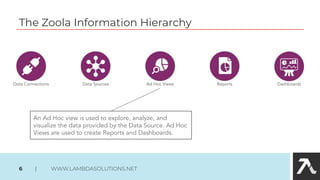
An Ad Hoc view is used to explore, analyze, and
visualize the data provided by the Data Source. Ad Hoc
Views are used to create Reports and Dashboards.
Data Connections Data Sources Ad Hoc Views Reports Dashboards
The Zoola Information Hierarchy
7 | WWW.LAMBDASOLUTIONS.NET
Reports are finalized versions of Ad Hoc Views intended for
presentation and analysis purposes, allowing stakeholders
to interact with data and export the final result.
Data Connections Data Sources Ad Hoc Views Reports Dashboards
The Zoola Information Hierarchy
8 | WWW.LAMBDASOLUTIONS.NET
Dashboards combine Reports to deliver an at-a-glance and
interactive summary of information for users to view the
state of their Learning.
Data Connections Data Sources Ad Hoc Views Reports Dashboards
Training
9 | WWW.LAMBDASOLUTIONS.NET
Top 5 Tips for Keeping Reporting Simple
10 | WWW.LAMBDASOLUTIONS.NET
moodleschema.zoola.io
totaraschema.zoola.io
1. Ask for help // Get help // Use the schemas
2. Get a feel for what is possible // run the out-of-the-box reports
3. Artifact Dependencies Report
4. Think through what you really want
4.1. Who is it for?
4.2. What data do they need? // What data can they see?
4.3. Fields, Filters, Sorting.
5. Confidence // Practice // Build it according to how your courses are structured
5.1. Steps are on next slide
Data Analyst with
SQL knowledge.
Play with it.
You cannot break it.
Find friendlies
Practice Steps - Build your first report
11 | WWW.LAMBDASOLUTIONS.NET
1. Details
1.1. Who is it for? >>> Teachers
1.2. What data do they need? >>> See students grades by course
1.3. What data can they see? >>> Their students and their grades
1.4. Fields? >>> Student name, course, status, date, grade
1.5. Filters? >>> Course name
1.6. Sorting? >>> Student name
2. Steps
2.1. Duplicate the <<1. Your Zoola Starter Data Source>> // rename it
2.2. Create Ad Hoc View // drag and drop fields // edit labels // add course filter // soft by name
2.3. Save and create Report // Close Ad Hoc View designer
2.4. Edit Data Source // Options // Add Security File <<course_managers.xml>> // Save Data Source
2.5. Log out // Back to LMS
2.6. Site Administration // Appearance // Default Dashboard Page // Blocks editing on
2.7. Add Zoola Reports Block // Configure Block // Add reports // Add users // Save changes
2.8. Blocks editing off // Reset Dashboard for all users
Consider adding
the “Instructor
Dashboard” too.
Thank you!
12 | WWW.LAMBDASOLUTIONS.NET
Zoola Trial
13 | WWW.LAMBDASOLUTIONS.NET
Sign up for our monthly
newsletter
Zoola Analytics Newsletter
lambdasolutions.net/subscribe-zoola-newsletter
Top 5 Practical Applications for Building Engaging Learning
● Tuesday November 19, 10am PT / 1pm ET
Ask Me Anything! Best Practices in eLearning
● Tuesday December 3, 10am PT / 1pm ET
Upcoming Sessions
15 | WWW.LAMBDASOLUTIONS.NET
Contact Us
Phone: 1.877.694.5289
Email: support@lambdasolutions.net
Web: www.lambdasolutions.net
16 | WWW.LAMBDASOLUTIONS.NET

Top 5 Tips for Keeping Reporting Simple

  • 1.
    WWW.LAMBDASOLUTIONS.NET Top 5 Tipsfor Keeping Reporting Simple Lambda Lab: Zoola Analytics
  • 2.
    Presenters Stewart Rogers -Presenter VP, Products Erin Melvin - Moderator Director of Client Engagement
  • 3.
    What is ZoolaAnalytics? Zoola Analytics is an award winning, cloud-based reporting and analytics solution that allows you to prove the impact of your Learning. Zoola gives complete and secure access to your data, stunning reports and dashboards, embedded reports, and automated delivery. Zoola Analytics is built for Moodle, Totara Learn, and xAPI-conformant systems. ● Complete access to all your data including custom fields and tables, ● Choose from a library of over 30 out-of-the-box reports and dashboards ● Use the drag and drop designer to create your reports and dashboards, ● Embed your reports and dashboards in your LMS, or ● Schedule them to automate the delivery to your stakeholders 3 | WWW.LAMBDASOLUTIONS.NET
  • 4.
    The Zoola InformationHierarchy 4 | WWW.LAMBDASOLUTIONS.NET Data Connections Data Sources Ad Hoc Views Reports Dashboards This is the definition of the connection to your database. Only visible when you are creating Data Sources.
  • 5.
    The Zoola InformationHierarchy 5 | WWW.LAMBDASOLUTIONS.NET A metadata layer that provides a clean view of the database. A Data Source allows you to control access to the data based on security permissions. Data Connections Data Sources Ad Hoc Views Reports Dashboards
  • 6.
    The Zoola InformationHierarchy 6 | WWW.LAMBDASOLUTIONS.NET An Ad Hoc view is used to explore, analyze, and visualize the data provided by the Data Source. Ad Hoc Views are used to create Reports and Dashboards. Data Connections Data Sources Ad Hoc Views Reports Dashboards
  • 7.
    The Zoola InformationHierarchy 7 | WWW.LAMBDASOLUTIONS.NET Reports are finalized versions of Ad Hoc Views intended for presentation and analysis purposes, allowing stakeholders to interact with data and export the final result. Data Connections Data Sources Ad Hoc Views Reports Dashboards
  • 8.
    The Zoola InformationHierarchy 8 | WWW.LAMBDASOLUTIONS.NET Dashboards combine Reports to deliver an at-a-glance and interactive summary of information for users to view the state of their Learning. Data Connections Data Sources Ad Hoc Views Reports Dashboards
  • 9.
  • 10.
    Top 5 Tipsfor Keeping Reporting Simple 10 | WWW.LAMBDASOLUTIONS.NET moodleschema.zoola.io totaraschema.zoola.io 1. Ask for help // Get help // Use the schemas 2. Get a feel for what is possible // run the out-of-the-box reports 3. Artifact Dependencies Report 4. Think through what you really want 4.1. Who is it for? 4.2. What data do they need? // What data can they see? 4.3. Fields, Filters, Sorting. 5. Confidence // Practice // Build it according to how your courses are structured 5.1. Steps are on next slide Data Analyst with SQL knowledge. Play with it. You cannot break it. Find friendlies
  • 11.
    Practice Steps -Build your first report 11 | WWW.LAMBDASOLUTIONS.NET 1. Details 1.1. Who is it for? >>> Teachers 1.2. What data do they need? >>> See students grades by course 1.3. What data can they see? >>> Their students and their grades 1.4. Fields? >>> Student name, course, status, date, grade 1.5. Filters? >>> Course name 1.6. Sorting? >>> Student name 2. Steps 2.1. Duplicate the <<1. Your Zoola Starter Data Source>> // rename it 2.2. Create Ad Hoc View // drag and drop fields // edit labels // add course filter // soft by name 2.3. Save and create Report // Close Ad Hoc View designer 2.4. Edit Data Source // Options // Add Security File <<course_managers.xml>> // Save Data Source 2.5. Log out // Back to LMS 2.6. Site Administration // Appearance // Default Dashboard Page // Blocks editing on 2.7. Add Zoola Reports Block // Configure Block // Add reports // Add users // Save changes 2.8. Blocks editing off // Reset Dashboard for all users Consider adding the “Instructor Dashboard” too.
  • 12.
    Thank you! 12 |WWW.LAMBDASOLUTIONS.NET
  • 13.
    Zoola Trial 13 |WWW.LAMBDASOLUTIONS.NET
  • 14.
    Sign up forour monthly newsletter Zoola Analytics Newsletter lambdasolutions.net/subscribe-zoola-newsletter
  • 15.
    Top 5 PracticalApplications for Building Engaging Learning ● Tuesday November 19, 10am PT / 1pm ET Ask Me Anything! Best Practices in eLearning ● Tuesday December 3, 10am PT / 1pm ET Upcoming Sessions 15 | WWW.LAMBDASOLUTIONS.NET
  • 16.
    Contact Us Phone: 1.877.694.5289 Email:support@lambdasolutions.net Web: www.lambdasolutions.net 16 | WWW.LAMBDASOLUTIONS.NET