Software 
Process Models
Outline 
• Generic process framework 
• Waterfall model 
• Incremental model 
• Prototyping model 
• Spiral model 
• Summary
3 
Generic Process Framework 
• Communication 
– Involves communication among the customer and 
other stake holders; encompasses requirements 
gathering 
• Planning 
– Establishes a plan for software engineering work; 
addresses technical tasks, resources, work products, 
and work schedule 
• Modelling (Analyse, Design) 
– Encompasses the creation of models to better under 
the requirements and the design
• Construction (Code, Test) 
– Combines code generation and testing to uncover 
errors 
• Deployment 
– Involves delivery of software to the customer for 
evaluation and feedback
5 
Modelling: Software 
Requirements Analysis 
• Helps software engineers to better understand the 
problem they will work to solve 
• Encompasses the set of tasks that lead to an 
understanding of what the business impact of the 
software will be, what the customer wants, and how 
end-users will interact with the software 
• Uses a combination of text and diagrams to depict 
requirements for data, function, and behavior 
– Provides a relatively easy way to understand and review 
requirements for correctness, completeness and 
consistency
6 
Modelling: Software Design 
• Brings together customer requirements, business needs, 
and technical considerations to form the “blueprint” for 
a product 
• Creates a model that provides detail about software 
data structures, software architecture, interfaces, and 
components that are necessary to implement the 
system 
• Architectural design 
– Represents the structure of data and program components 
that are required to build the software 
– Considers the architectural style, the structure and properties 
of components that constitute the system, and 
interrelationships that occur among all architectural 
components
• User Interface Design 
– Creates an effective communication medium 
between a human and a computer 
– Identifies interface objects and actions and then 
creates a screen layout that forms the basis for a 
user interface prototype 
• Component-level Design 
– Defines the data structures, algorithms, interface 
characteristics, and communication mechanisms 
allocated to each software component
Traditional Process Models
9 
Process Model 
• Defines a distinct set of activities, actions, 
tasks, milestones, and work products that 
are required to engineer high-quality 
software 
• The activities may be linear, incremental, or 
evolutionary
10 
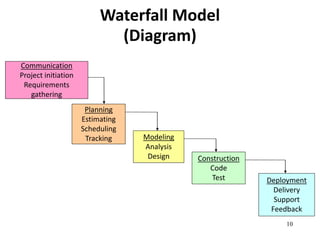
Waterfall Model 
(Diagram) 
Communication 
Project initiation 
Requirements 
gathering 
Planning 
Estimating 
Scheduling 
Tracking Modeling 
Analysis 
Design Construction 
Code 
Test Deployment 
Delivery 
Support 
Feedback
11 
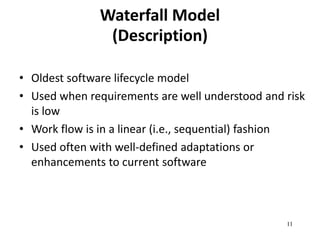
Waterfall Model 
(Description) 
• Oldest software lifecycle model 
• Used when requirements are well understood and risk 
is low 
• Work flow is in a linear (i.e., sequential) fashion 
• Used often with well-defined adaptations or 
enhancements to current software
12 
Waterfall Model 
(Problems) 
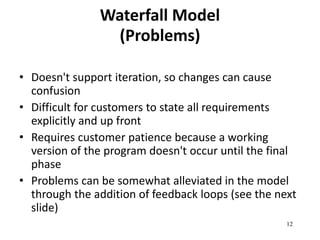
• Doesn't support iteration, so changes can cause 
confusion 
• Difficult for customers to state all requirements 
explicitly and up front 
• Requires customer patience because a working 
version of the program doesn't occur until the final 
phase 
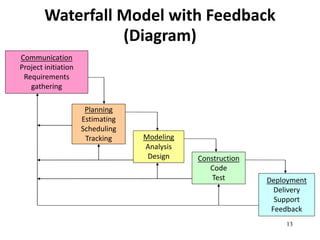
• Problems can be somewhat alleviated in the model 
through the addition of feedback loops (see the next 
slide)
13 
Waterfall Model with Feedback 
(Diagram) 
Communication 
Project initiation 
Requirements 
gathering 
Planning 
Estimating 
Scheduling 
Tracking Modeling 
Analysis 
Design Construction 
Code 
Test Deployment 
Delivery 
Support 
Feedback
14 
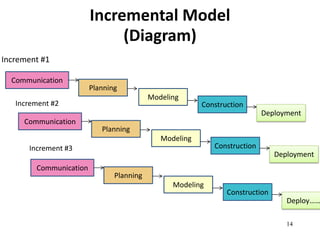
Incremental Model 
(Diagram) 
Increment #1 
Communication 
Increment #2 
Increment #3 
Planning 
Modeling 
Construction 
Deployment 
Communication 
Planning 
Modeling 
Construction 
Deployment 
Communication 
Planning 
Modeling 
Construction 
Deploy………
15 
Incremental Model 
(Description) 
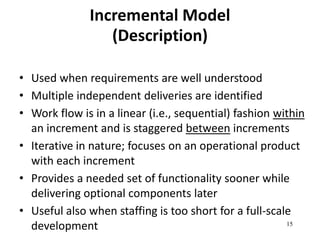
• Used when requirements are well understood 
• Multiple independent deliveries are identified 
• Work flow is in a linear (i.e., sequential) fashion within 
an increment and is staggered between increments 
• Iterative in nature; focuses on an operational product 
with each increment 
• Provides a needed set of functionality sooner while 
delivering optional components later 
• Useful also when staffing is too short for a full-scale 
development
16 
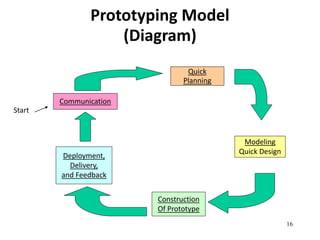
Prototyping Model 
(Diagram) 
Communication 
Quick 
Planning 
Modeling 
Quick Design 
Construction 
Of Prototype 
Deployment, 
Delivery, 
and Feedback 
Start
17 
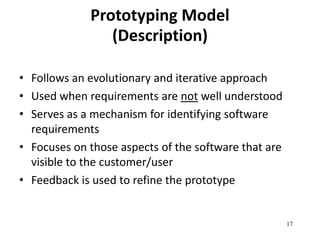
Prototyping Model 
(Description) 
• Follows an evolutionary and iterative approach 
• Used when requirements are not well understood 
• Serves as a mechanism for identifying software 
requirements 
• Focuses on those aspects of the software that are 
visible to the customer/user 
• Feedback is used to refine the prototype
18 
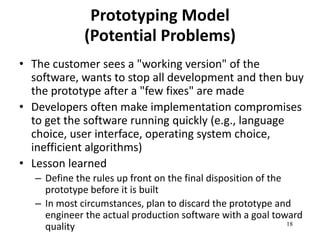
Prototyping Model 
(Potential Problems) 
• The customer sees a "working version" of the 
software, wants to stop all development and then buy 
the prototype after a "few fixes" are made 
• Developers often make implementation compromises 
to get the software running quickly (e.g., language 
choice, user interface, operating system choice, 
inefficient algorithms) 
• Lesson learned 
– Define the rules up front on the final disposition of the 
prototype before it is built 
– In most circumstances, plan to discard the prototype and 
engineer the actual production software with a goal toward 
quality
19 
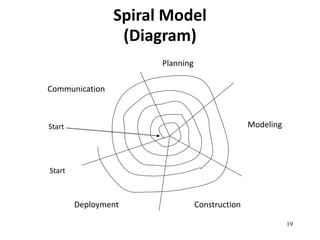
Spiral Model 
(Diagram) 
Communication 
Start 
Start 
Planning 
Modeling 
Deployment Construction
20 
Spiral Model 
(Description) 
• Follows an evolutionary approach 
• Used when requirements are not well understood and 
risks are high 
• Inner spirals focus on identifying software requirements 
and project risks; may also incorporate prototyping 
• Outer spirals take on a classical waterfall approach after 
requirements have been defined, but permit iterative 
growth of the software
• Operates as a risk-driven model…a go/no-go 
decision occurs after each complete spiral in 
order to react to risk determinations 
• Requires considerable expertise in risk 
assessment 
• Serves as a realistic model for large-scale 
software development
22 
General Weaknesses of 
Evolutionary Process Models 
1) Prototyping poses a problem to project planning 
because of the uncertain number of iterations 
required to construct the product 
2) Evolutionary software processes do not establish 
the maximum speed of the evolution 
• If too fast, the process will fall into chaos 
• If too slow, productivity could be affected
3) Software processes should focus first on flexibility 
and extensibility, and second on high quality 
• We should prioritize the speed of the development over 
zero defects 
• Extending the development in order to reach higher 
quality could result in late delivery

Traditional Process Models

  • 1.
  • 2.
    Outline • Genericprocess framework • Waterfall model • Incremental model • Prototyping model • Spiral model • Summary
  • 3.
    3 Generic ProcessFramework • Communication – Involves communication among the customer and other stake holders; encompasses requirements gathering • Planning – Establishes a plan for software engineering work; addresses technical tasks, resources, work products, and work schedule • Modelling (Analyse, Design) – Encompasses the creation of models to better under the requirements and the design
  • 4.
    • Construction (Code,Test) – Combines code generation and testing to uncover errors • Deployment – Involves delivery of software to the customer for evaluation and feedback
  • 5.
    5 Modelling: Software Requirements Analysis • Helps software engineers to better understand the problem they will work to solve • Encompasses the set of tasks that lead to an understanding of what the business impact of the software will be, what the customer wants, and how end-users will interact with the software • Uses a combination of text and diagrams to depict requirements for data, function, and behavior – Provides a relatively easy way to understand and review requirements for correctness, completeness and consistency
  • 6.
    6 Modelling: SoftwareDesign • Brings together customer requirements, business needs, and technical considerations to form the “blueprint” for a product • Creates a model that provides detail about software data structures, software architecture, interfaces, and components that are necessary to implement the system • Architectural design – Represents the structure of data and program components that are required to build the software – Considers the architectural style, the structure and properties of components that constitute the system, and interrelationships that occur among all architectural components
  • 7.
    • User InterfaceDesign – Creates an effective communication medium between a human and a computer – Identifies interface objects and actions and then creates a screen layout that forms the basis for a user interface prototype • Component-level Design – Defines the data structures, algorithms, interface characteristics, and communication mechanisms allocated to each software component
  • 8.
  • 9.
    9 Process Model • Defines a distinct set of activities, actions, tasks, milestones, and work products that are required to engineer high-quality software • The activities may be linear, incremental, or evolutionary
  • 10.
    10 Waterfall Model (Diagram) Communication Project initiation Requirements gathering Planning Estimating Scheduling Tracking Modeling Analysis Design Construction Code Test Deployment Delivery Support Feedback
  • 11.
    11 Waterfall Model (Description) • Oldest software lifecycle model • Used when requirements are well understood and risk is low • Work flow is in a linear (i.e., sequential) fashion • Used often with well-defined adaptations or enhancements to current software
  • 12.
    12 Waterfall Model (Problems) • Doesn't support iteration, so changes can cause confusion • Difficult for customers to state all requirements explicitly and up front • Requires customer patience because a working version of the program doesn't occur until the final phase • Problems can be somewhat alleviated in the model through the addition of feedback loops (see the next slide)
  • 13.
    13 Waterfall Modelwith Feedback (Diagram) Communication Project initiation Requirements gathering Planning Estimating Scheduling Tracking Modeling Analysis Design Construction Code Test Deployment Delivery Support Feedback
  • 14.
    14 Incremental Model (Diagram) Increment #1 Communication Increment #2 Increment #3 Planning Modeling Construction Deployment Communication Planning Modeling Construction Deployment Communication Planning Modeling Construction Deploy………
  • 15.
    15 Incremental Model (Description) • Used when requirements are well understood • Multiple independent deliveries are identified • Work flow is in a linear (i.e., sequential) fashion within an increment and is staggered between increments • Iterative in nature; focuses on an operational product with each increment • Provides a needed set of functionality sooner while delivering optional components later • Useful also when staffing is too short for a full-scale development
  • 16.
    16 Prototyping Model (Diagram) Communication Quick Planning Modeling Quick Design Construction Of Prototype Deployment, Delivery, and Feedback Start
  • 17.
    17 Prototyping Model (Description) • Follows an evolutionary and iterative approach • Used when requirements are not well understood • Serves as a mechanism for identifying software requirements • Focuses on those aspects of the software that are visible to the customer/user • Feedback is used to refine the prototype
  • 18.
    18 Prototyping Model (Potential Problems) • The customer sees a "working version" of the software, wants to stop all development and then buy the prototype after a "few fixes" are made • Developers often make implementation compromises to get the software running quickly (e.g., language choice, user interface, operating system choice, inefficient algorithms) • Lesson learned – Define the rules up front on the final disposition of the prototype before it is built – In most circumstances, plan to discard the prototype and engineer the actual production software with a goal toward quality
  • 19.
    19 Spiral Model (Diagram) Communication Start Start Planning Modeling Deployment Construction
  • 20.
    20 Spiral Model (Description) • Follows an evolutionary approach • Used when requirements are not well understood and risks are high • Inner spirals focus on identifying software requirements and project risks; may also incorporate prototyping • Outer spirals take on a classical waterfall approach after requirements have been defined, but permit iterative growth of the software
  • 21.
    • Operates asa risk-driven model…a go/no-go decision occurs after each complete spiral in order to react to risk determinations • Requires considerable expertise in risk assessment • Serves as a realistic model for large-scale software development
  • 22.
    22 General Weaknessesof Evolutionary Process Models 1) Prototyping poses a problem to project planning because of the uncertain number of iterations required to construct the product 2) Evolutionary software processes do not establish the maximum speed of the evolution • If too fast, the process will fall into chaos • If too slow, productivity could be affected
  • 23.
    3) Software processesshould focus first on flexibility and extensibility, and second on high quality • We should prioritize the speed of the development over zero defects • Extending the development in order to reach higher quality could result in late delivery