Process Models
1
What / who / why is
Process Models?
 What: Series of steps--- a road map that helps you create a timely, high-quality
software.
 Who: Software engineers and their managers, clients also. People adapt the
process to their needs and follow it.
 Why: Provides stability, control, and organization to an activity
2
A Generic Process Model
A generic process framework for software engineering
defines five framework activities-communication, planning,
modeling, construction, and deployment.
In addition, a set of activities like project tracking and
control, risk management, quality assurance, configuration
management, technical reviews, and others are applied
throughout the process.
3
Process Flow
4
Process Flow
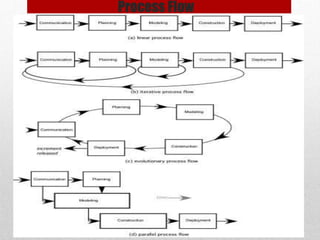
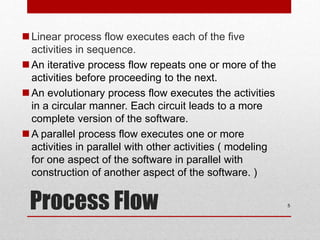
Linear process flow executes each of the five
activities in sequence.
An iterative process flow repeats one or more of the
activities before proceeding to the next.
An evolutionary process flow executes the activities
in a circular manner. Each circuit leads to a more
complete version of the software.
A parallel process flow executes one or more
activities in parallel with other activities ( modeling
for one aspect of the software in parallel with
construction of another aspect of the software. )
5
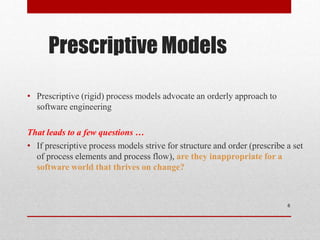
Prescriptive Models
• Prescriptive (rigid) process models advocate an orderly approach to
software engineering
That leads to a few questions …
• If prescriptive process models strive for structure and order (prescribe a set
of process elements and process flow), are they inappropriate for a
software world that thrives on change?
6
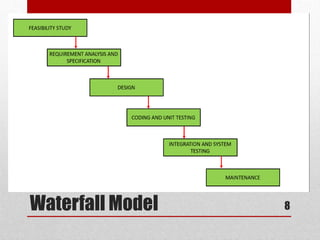
The Waterfall Model
7
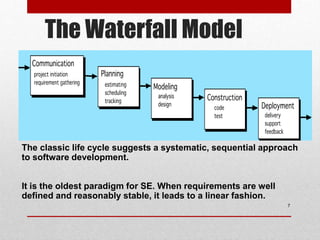
The classic life cycle suggests a systematic, sequential approach
to software development.
It is the oldest paradigm for SE. When requirements are well
defined and reasonably stable, it leads to a linear fashion.
Waterfall Model 8
Waterfall Model 9
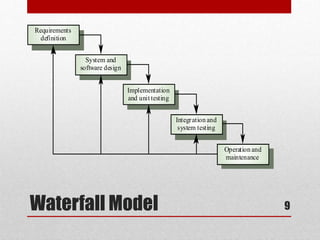
Requirements
definition
System and
software design
Implementation
and unit testing
Integration and
system testing
Operation and
maintenance
Waterfall Model 10
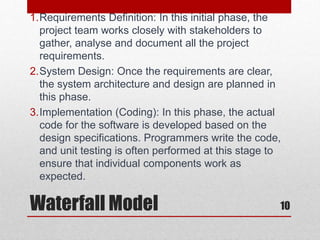
1.Requirements Definition: In this initial phase, the
project team works closely with stakeholders to
gather, analyse and document all the project
requirements.
2.System Design: Once the requirements are clear,
the system architecture and design are planned in
this phase.
3.Implementation (Coding): In this phase, the actual
code for the software is developed based on the
design specifications. Programmers write the code,
and unit testing is often performed at this stage to
ensure that individual components work as
expected.
Waterfall Model 11
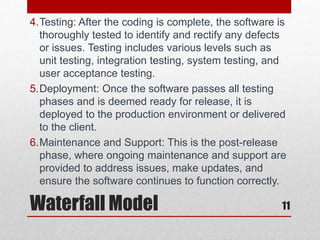
4.Testing: After the coding is complete, the software is
thoroughly tested to identify and rectify any defects
or issues. Testing includes various levels such as
unit testing, integration testing, system testing, and
user acceptance testing.
5.Deployment: Once the software passes all testing
phases and is deemed ready for release, it is
deployed to the production environment or delivered
to the client.
6.Maintenance and Support: This is the post-release
phase, where ongoing maintenance and support are
provided to address issues, make updates, and
ensure the software continues to function correctly.
The Waterfall Model
12
• The Waterfall model is characterized by its strict sequential
nature, meaning that each phase must be completed before the
next one begins.
• This approach works well for projects with well-defined
requirements and little expected change.
• However, it may not be suitable for projects where
requirements are subject to change or where stakeholders need
to see incremental progress.
The Waterfall Model
13
Advantages
• Simple and easy to understand and use
• Each phase has specific set of deliverables.
• Phases are processed and completed one at a time.
• Works well for smaller projects where requirements are very
well understood.
The Waterfall Model
14
Disadvantages
• Limited Flexibility: The Waterfall model is rigid and sequential
• No Early Working Product: Stakeholders don't get to see a
working product until the later stages of development.
• Long Delivery Time: The linear nature of the Waterfall model
can result in long project durations, especially for complex
projects.
• Risk of Customer Dissatisfaction: If the customer's
expectations are not accurately captured in the initial
requirements phase, it can lead to dissatisfaction when the final
product is delivered.
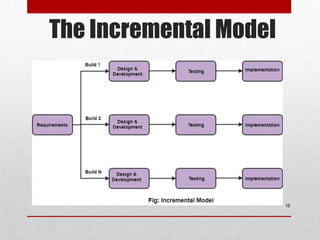
The Incremental Model
15
• Incremental Model is a process of software
development where requirements divided into multiple
standalone modules of the software development
cycle.
• In this model, each module goes through the
requirements, design, implementation and testing
phases.
• Every subsequent release of the module adds function
to the previous release. The process continues until
the complete system achieved
The Incremental Model
16
The Incremental Model
• It combines elements of linear and parallel process flows.
Each linear sequence produces deliverable increments of
the software.
• The first increment is often a core product with many
supplementary features. Users use it and evaluate it with
more modifications to better meet the needs.
17
Example
• Consider an example where a bank wants to develop
software includes insurance services, personal banking,
home and automobile loans. The bank wants the
automation of personal banking system immediately
because it will enhance the customer services. You can
implement the incremental approach to develop the
banking software. In the first increment, you can
implement the personal banking feature and deliver it to
the customer. In the later increments, you can implement
the insurance services, home loans, and automobile loans
features of the bank.
18
Example
Advantage
• Errors are easy to be recognized.
• Easier to test and debug
• More flexible.
• The Client gets important functionality early.
Disadvantage
• Need for good planning
• Total Cost is high.
• Well defined module interfaces are needed.
19
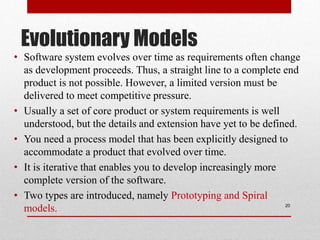
Evolutionary Models
• Software system evolves over time as requirements often change
as development proceeds. Thus, a straight line to a complete end
product is not possible. However, a limited version must be
delivered to meet competitive pressure.
• Usually a set of core product or system requirements is well
understood, but the details and extension have yet to be defined.
• You need a process model that has been explicitly designed to
accommodate a product that evolved over time.
• It is iterative that enables you to develop increasingly more
complete version of the software.
• Two types are introduced, namely Prototyping and Spiral
models. 20
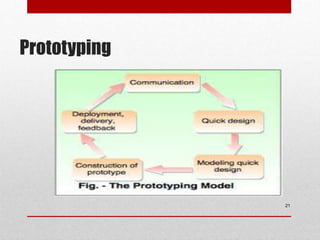
Prototyping
21
Construction
of prototype
Prototyping
22
Construction
of prototype
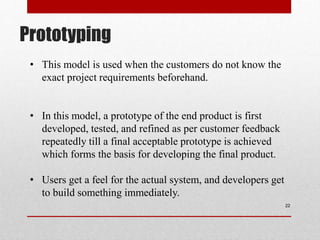
• This model is used when the customers do not know the
exact project requirements beforehand.
• In this model, a prototype of the end product is first
developed, tested, and refined as per customer feedback
repeatedly till a final acceptable prototype is achieved
which forms the basis for developing the final product.
• Users get a feel for the actual system, and developers get
to build something immediately.
Prototyping
Advantages:
1. Due to the customers’ active participation, problems are found early on, simplifying the
procedure.
2. Feedback from customers is provided much more quickly since they may engage
directly with the prototype model.
3. Higher levels of client satisfaction since the customer has the opportunity feel the
product early on.
Disadvantages:
1. The creation of the prototype make take lot of time.
2. Customers may become upset with the prototype model and lose interest in the final
product.
3. High up-front expenditures associated with creating a prototype.
23
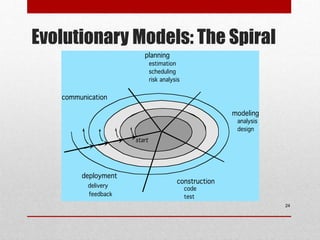
Evolutionary Models: The Spiral
24
Evolutionary Models: The Spiral
• The spiral model combines the idea of iterative development with the systematic,
controlled aspects of the waterfall model.
• The spiral model is a risk-driven software development process model.
• A series of evolutionary releases are delivered. During the early iterations, the release
might be a model or prototype.
• During later iterations, increasingly more complete version of the engineered system are
produced.
• Good to develop large-scale system as software evolves as the process progresses and
risk should be understood and properly reacted to. Prototyping is used to reduce risk.
25
When to use?
• When there is a budget constraint and risk evaluation is important.
• For medium to high-risk projects.
• Customer is not sure of their requirements which is usually the case.
• Requirements are complex and need evaluation to get clarity.
• Requires customer feedback as the project proceeds.
• Significant changes are expected in the product during the development cycle.
26
Advantages:
1. Changing requirements can be accommodated.
2. Allows extensive use of prototypes.
3. Requirements can be captured more accurately.
4. Users see the system early.
5. Development can be divided into smaller parts and the risky parts can be developed
earlier which helps in better risk management.
Disadvantages:
1. Management is more complex.
2. End of the project may not be known early.
3. Not suitable for small or low risk projects and could be expensive for small projects.
4. Spiral may go on indefinitely.
5. Large number of intermediate stages requires excessive documentation.
.
27
Spiral Model
Three Concerns on Evolutionary
Processes
• First concern is that prototyping poses a problem to project planning because of
the uncertain number of cycles required to construct the product.
• Second, it does not establish the maximum speed of the evolution. If the
evolution occur too fast, without a period of relaxation, it is certain that the
process will fall into chaos. On the other hand if the speed is too slow then
productivity could be affected.
• We should prioritize the speed of the development over zero defects. Extending
the development in order to reach high quality could result in a late delivery of
the product when the opportunity niche has disappeared. 28
Agile process
 Agile approaches are based on some common principles
 Working software is the key measure of progress in a project.
 For progress in a project, therefore, software should be developed
and delivered rapidly in small increments.
 Even late changes in the requirements should be entertained (small-
increment model of development helps in accommodating them).
 Face-to-face communication is preferred over documentation.
 Continuous feedback and involvement of customer is necessary for
developing good-quality software.
 Simple design which evolves and improves with time is a better
approach than doing an elaborate design up front for handling all
possible scenarios.
 The delivery dates are decided by empowered teams of talented
individuals (and are not dictated).
Extreme Programming
• Extreme programming (XP) is one of the most popular
and well-known approaches in the family of agile
methods.
• Like all agile approaches, it believes that changes are
inevitable and rather than treating changes as undesirable,
development should embrace change.
• And to accommodate change, the development process
has to be lightweight and quick to respond.
• For this, it develops software iteratively, and avoids
reliance on detailed and multiple documents which are
hard to maintain. Instead it relies on face-to-face
communication, simplicity, and feedback to ensure that
the desired changes are quickly and correctly reflected in
the programs.
Extreme Programming
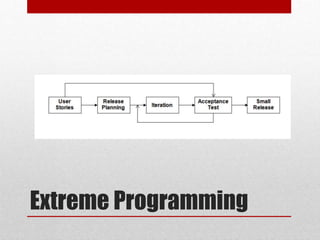
• An extreme programming project starts with short user stories describing
what scenarios the customers & users wants in the system.
• User stories do not contain detailed requirements
• Each story is written on a separate card to be flexibly grouped.
• The development team estimates time (rough) in weeks required to
implement a user story.
• Using these estimates and the stories, release planning is done which defines
which stories are to be built in which system release, and the dates of these
releases.
• Frequent and small releases are encouraged, and for a release, iterations are
employed.
• Acceptance tests are also built from the stories, which are used to test the
software before the release.
• Bugs found during the acceptance testing for an iteration can form work
items for the next iteration.
Extreme Programming

Process Model in Software Engineering.ppt

  • 1.
  • 2.
    What / who/ why is Process Models?  What: Series of steps--- a road map that helps you create a timely, high-quality software.  Who: Software engineers and their managers, clients also. People adapt the process to their needs and follow it.  Why: Provides stability, control, and organization to an activity 2
  • 3.
    A Generic ProcessModel A generic process framework for software engineering defines five framework activities-communication, planning, modeling, construction, and deployment. In addition, a set of activities like project tracking and control, risk management, quality assurance, configuration management, technical reviews, and others are applied throughout the process. 3
  • 4.
  • 5.
    Process Flow Linear processflow executes each of the five activities in sequence. An iterative process flow repeats one or more of the activities before proceeding to the next. An evolutionary process flow executes the activities in a circular manner. Each circuit leads to a more complete version of the software. A parallel process flow executes one or more activities in parallel with other activities ( modeling for one aspect of the software in parallel with construction of another aspect of the software. ) 5
  • 6.
    Prescriptive Models • Prescriptive(rigid) process models advocate an orderly approach to software engineering That leads to a few questions … • If prescriptive process models strive for structure and order (prescribe a set of process elements and process flow), are they inappropriate for a software world that thrives on change? 6
  • 7.
    The Waterfall Model 7 Theclassic life cycle suggests a systematic, sequential approach to software development. It is the oldest paradigm for SE. When requirements are well defined and reasonably stable, it leads to a linear fashion.
  • 8.
  • 9.
    Waterfall Model 9 Requirements definition Systemand software design Implementation and unit testing Integration and system testing Operation and maintenance
  • 10.
    Waterfall Model 10 1.RequirementsDefinition: In this initial phase, the project team works closely with stakeholders to gather, analyse and document all the project requirements. 2.System Design: Once the requirements are clear, the system architecture and design are planned in this phase. 3.Implementation (Coding): In this phase, the actual code for the software is developed based on the design specifications. Programmers write the code, and unit testing is often performed at this stage to ensure that individual components work as expected.
  • 11.
    Waterfall Model 11 4.Testing:After the coding is complete, the software is thoroughly tested to identify and rectify any defects or issues. Testing includes various levels such as unit testing, integration testing, system testing, and user acceptance testing. 5.Deployment: Once the software passes all testing phases and is deemed ready for release, it is deployed to the production environment or delivered to the client. 6.Maintenance and Support: This is the post-release phase, where ongoing maintenance and support are provided to address issues, make updates, and ensure the software continues to function correctly.
  • 12.
    The Waterfall Model 12 •The Waterfall model is characterized by its strict sequential nature, meaning that each phase must be completed before the next one begins. • This approach works well for projects with well-defined requirements and little expected change. • However, it may not be suitable for projects where requirements are subject to change or where stakeholders need to see incremental progress.
  • 13.
    The Waterfall Model 13 Advantages •Simple and easy to understand and use • Each phase has specific set of deliverables. • Phases are processed and completed one at a time. • Works well for smaller projects where requirements are very well understood.
  • 14.
    The Waterfall Model 14 Disadvantages •Limited Flexibility: The Waterfall model is rigid and sequential • No Early Working Product: Stakeholders don't get to see a working product until the later stages of development. • Long Delivery Time: The linear nature of the Waterfall model can result in long project durations, especially for complex projects. • Risk of Customer Dissatisfaction: If the customer's expectations are not accurately captured in the initial requirements phase, it can lead to dissatisfaction when the final product is delivered.
  • 15.
    The Incremental Model 15 •Incremental Model is a process of software development where requirements divided into multiple standalone modules of the software development cycle. • In this model, each module goes through the requirements, design, implementation and testing phases. • Every subsequent release of the module adds function to the previous release. The process continues until the complete system achieved
  • 16.
  • 17.
    The Incremental Model •It combines elements of linear and parallel process flows. Each linear sequence produces deliverable increments of the software. • The first increment is often a core product with many supplementary features. Users use it and evaluate it with more modifications to better meet the needs. 17
  • 18.
    Example • Consider anexample where a bank wants to develop software includes insurance services, personal banking, home and automobile loans. The bank wants the automation of personal banking system immediately because it will enhance the customer services. You can implement the incremental approach to develop the banking software. In the first increment, you can implement the personal banking feature and deliver it to the customer. In the later increments, you can implement the insurance services, home loans, and automobile loans features of the bank. 18
  • 19.
    Example Advantage • Errors areeasy to be recognized. • Easier to test and debug • More flexible. • The Client gets important functionality early. Disadvantage • Need for good planning • Total Cost is high. • Well defined module interfaces are needed. 19
  • 20.
    Evolutionary Models • Softwaresystem evolves over time as requirements often change as development proceeds. Thus, a straight line to a complete end product is not possible. However, a limited version must be delivered to meet competitive pressure. • Usually a set of core product or system requirements is well understood, but the details and extension have yet to be defined. • You need a process model that has been explicitly designed to accommodate a product that evolved over time. • It is iterative that enables you to develop increasingly more complete version of the software. • Two types are introduced, namely Prototyping and Spiral models. 20
  • 21.
  • 22.
    Prototyping 22 Construction of prototype • Thismodel is used when the customers do not know the exact project requirements beforehand. • In this model, a prototype of the end product is first developed, tested, and refined as per customer feedback repeatedly till a final acceptable prototype is achieved which forms the basis for developing the final product. • Users get a feel for the actual system, and developers get to build something immediately.
  • 23.
    Prototyping Advantages: 1. Due tothe customers’ active participation, problems are found early on, simplifying the procedure. 2. Feedback from customers is provided much more quickly since they may engage directly with the prototype model. 3. Higher levels of client satisfaction since the customer has the opportunity feel the product early on. Disadvantages: 1. The creation of the prototype make take lot of time. 2. Customers may become upset with the prototype model and lose interest in the final product. 3. High up-front expenditures associated with creating a prototype. 23
  • 24.
  • 25.
    Evolutionary Models: TheSpiral • The spiral model combines the idea of iterative development with the systematic, controlled aspects of the waterfall model. • The spiral model is a risk-driven software development process model. • A series of evolutionary releases are delivered. During the early iterations, the release might be a model or prototype. • During later iterations, increasingly more complete version of the engineered system are produced. • Good to develop large-scale system as software evolves as the process progresses and risk should be understood and properly reacted to. Prototyping is used to reduce risk. 25
  • 26.
    When to use? •When there is a budget constraint and risk evaluation is important. • For medium to high-risk projects. • Customer is not sure of their requirements which is usually the case. • Requirements are complex and need evaluation to get clarity. • Requires customer feedback as the project proceeds. • Significant changes are expected in the product during the development cycle. 26
  • 27.
    Advantages: 1. Changing requirementscan be accommodated. 2. Allows extensive use of prototypes. 3. Requirements can be captured more accurately. 4. Users see the system early. 5. Development can be divided into smaller parts and the risky parts can be developed earlier which helps in better risk management. Disadvantages: 1. Management is more complex. 2. End of the project may not be known early. 3. Not suitable for small or low risk projects and could be expensive for small projects. 4. Spiral may go on indefinitely. 5. Large number of intermediate stages requires excessive documentation. . 27 Spiral Model
  • 28.
    Three Concerns onEvolutionary Processes • First concern is that prototyping poses a problem to project planning because of the uncertain number of cycles required to construct the product. • Second, it does not establish the maximum speed of the evolution. If the evolution occur too fast, without a period of relaxation, it is certain that the process will fall into chaos. On the other hand if the speed is too slow then productivity could be affected. • We should prioritize the speed of the development over zero defects. Extending the development in order to reach high quality could result in a late delivery of the product when the opportunity niche has disappeared. 28
  • 29.
    Agile process  Agileapproaches are based on some common principles  Working software is the key measure of progress in a project.  For progress in a project, therefore, software should be developed and delivered rapidly in small increments.  Even late changes in the requirements should be entertained (small- increment model of development helps in accommodating them).  Face-to-face communication is preferred over documentation.  Continuous feedback and involvement of customer is necessary for developing good-quality software.  Simple design which evolves and improves with time is a better approach than doing an elaborate design up front for handling all possible scenarios.  The delivery dates are decided by empowered teams of talented individuals (and are not dictated).
  • 30.
    Extreme Programming • Extremeprogramming (XP) is one of the most popular and well-known approaches in the family of agile methods. • Like all agile approaches, it believes that changes are inevitable and rather than treating changes as undesirable, development should embrace change. • And to accommodate change, the development process has to be lightweight and quick to respond. • For this, it develops software iteratively, and avoids reliance on detailed and multiple documents which are hard to maintain. Instead it relies on face-to-face communication, simplicity, and feedback to ensure that the desired changes are quickly and correctly reflected in the programs.
  • 31.
  • 32.
    • An extremeprogramming project starts with short user stories describing what scenarios the customers & users wants in the system. • User stories do not contain detailed requirements • Each story is written on a separate card to be flexibly grouped. • The development team estimates time (rough) in weeks required to implement a user story. • Using these estimates and the stories, release planning is done which defines which stories are to be built in which system release, and the dates of these releases. • Frequent and small releases are encouraged, and for a release, iterations are employed. • Acceptance tests are also built from the stories, which are used to test the software before the release. • Bugs found during the acceptance testing for an iteration can form work items for the next iteration. Extreme Programming