User Interface
Analysis and Design
- Introduction
- User Interface Development
- Golden rules of user interface design
- User Interface DesignTrends
- User Interface Analysis
- User Interface Design
- User Interface evaluation
2
 Interface design focuses on the following
 The design of interfaces between software components
 The design of interfaces between the software and other nonhuman
producers
 The design of the interface between a human and the computer
 Graphical user interfaces (GUIs) have helped to eliminate many of
the most horrific interface problems
 However, some are still difficult to learn, hard to use, confusing, and
frustrating
 User interface analysis and design has to do with the study of
people and how they relate to technology
4
 User interface development follows a spiral process
 Interface analysis (user, task, and environment analysis)
▪ Focuses on the profile of the users who will interact with the system
▪ Concentrates on users, tasks, content and work environment
▪ Delineates the human- and computer-oriented tasks that are required to
achieve system function
 Interface design
▪ Defines a set of interface objects and actions (and their screen
representations) that enable a user to perform all defined tasks in a manner
that meets every usability goal defined for the system
 Interface construction
▪ Begins with a prototype that enables usage scenarios to be evaluated
▪ Continues with development tools to complete the construction
 Interface validation, focuses on
▪ The ability of the interface to implement every user task correctly, to
accommodate all task variations, and to achieve all general user
requirements
▪ The degree to which the interface is easy to use and easy to learn
▪ The users' acceptance of the interface as a useful tool in their work
5
 Define interaction modes in a way that does not force a user into
unnecessary or undesired actions
 The user shall be able to enter and exit a mode with little or no effort
 Provide for flexible interaction
 The user shall be able to perform the same action via keyboard commands,
mouse movement, or voice recognition
 Allow user interaction to be interruptible and "undo“ able
 The user shall be able to easily interrupt a sequence of actions to do
something else (without losing the work that has been done so far)
 The user shall be able to "undo" any action
7
(More on next slide)
 Hide technical internals from the casual user
 The user shall not be required to directly use operating system, file
management, networking. etc., commands to perform any actions.
Instead, these operations shall be hidden from the user and performed
"behind the scenes"
 Design for direct interaction with objects that appear on the
screen
 The user shall be able to manipulate objects on the screen in a manner
similar to what would occur if the object were a physical thing (e.g.,
stretch a rectangle, press a button, move a slider)
8
 Reduce demand on short-term memory
 The interface shall reduce the user's requirement to remember past actions and
results by providing visual cues of such actions
 Define shortcuts that are intuitive
 The user shall be provided mnemonics (i.e., control or alt combinations) that tie
easily to the action in a way that is easy to remember such as the first letter
9
(More on next slide)
 The visual layout of the interface should be based on a real world
metaphor
 The screen layout of the user interface shall contain well-understood visuals
that the user can relate to real-world actions
 Disclose information in a progressive fashion
 When interacting with a task, an object or some behavior, the interface shall
be organized hierarchically by moving the user progressively in a step-wise
fashion from an abstract concept to a concrete action (e.g., text format
options  format dialog box)
10
The more a user has to remember, the more
error-prone interaction with the system will be
 The interface should present and acquire information in a consistent
fashion
 All visual information shall be organized according to a design standard that is
maintained throughout all screen displays
 Input mechanisms shall be constrained to a limited set that is used consistently
throughout the application
 Mechanisms for navigating from task to task shall be consistently defined and
implemented
 Maintain consistency across a family of applications
 A set of applications performing complimentary functionality shall all implement
the same design rules so that consistency is maintained for all interaction
 If past interactive models have created user expectations, do not make
changes unless there is a compelling reason to do so
 Once a particular interactive sequence has become a de facto standard (e.g., alt-
S to save a file), the application shall continue this expectation in every part of its
functionality
11
 Whenever there is a user, there is user interface
 As graphic and web designers, our job is not only create
good looking stuff – it’s to create stuff that’s actually easy
to use and creates minimum user interface friction. In other
words, we need to think how people are actually going to use
our websites or apps and do our best to make their life easier
 To get started, let’s take a look on current trends in user
interface design
12
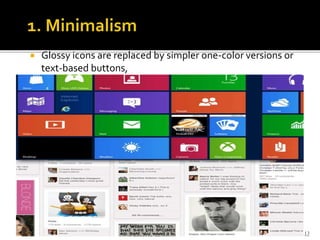
 Glossy icons are replaced by simpler one-color versions or
text-based buttons,
13
14
 Skeumorphic user interface design was first popularized by
Apple, and then adopted by many other companies
 this design approach relies on imitating the look and
functionality of traditional and familiar objects
 When to use it: when designing mobile applications,
skeumorphic designs are highly popular and well accepted
among the community.
15
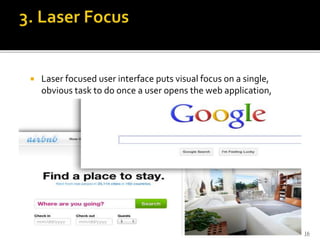
 Laser focused user interface puts visual focus on a single,
obvious task to do once a user opens the web application,
16
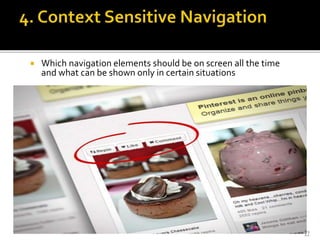
 Which navigation elements should be on screen all the time
and what can be shown only in certain situations
17
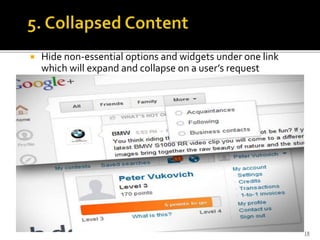
 Hide non-essential options and widgets under one link
which will expand and collapse on a user’s request
18
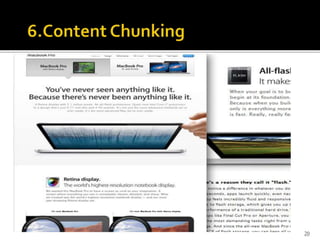
 Content chunking is a technique of presenting a large
amount of content in smaller visual chunks, so it’s easier
for people to read and mentally digest. For example,
splitting this article into several sections with headings
and accompanying pictures makes it a lot easier to read
compared to long monotonous stream of text.
19
20
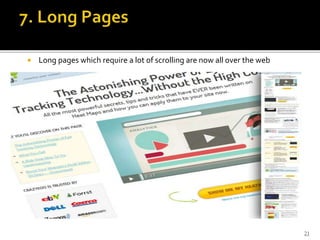
 Long pages which require a lot of scrolling are now all over the web
21
 Four different models come into play when a user interface is analyzed
and designed
 User profile model – Established by a human engineer or software engineer
 Design model – Created by a software engineer
 Implementation model – Created by the software implementers
 User's mental model – Developed by the user when interacting with the
application
 The role of the interface designer is to reconcile these differences and
derive a consistent representation of the interface
23
 Establishes the profile of the end-users of the system
 Based on age, gender, physical abilities, education, cultural or ethnic
background, motivation, goals, and personality
 Considers syntactic knowledge of the user
 The level of interaction that are required to use the interface effectively
 Considers semantic knowledge of the user
 The underlying sense of the application; an understanding of the functions that
are performed, the meaning of input and output, and the objectives of the
system
 Categorizes users as
 Novices
▪ No syntactic knowledge of the system, little semantic knowledge of the application,
only general computer usage
 Knowledgeable, intermittent users
▪ Reasonable semantic knowledge of the system, low recall of syntactic information to
use the interface
 Knowledgeable, frequent users
▪ Good semantic and syntactic knowledge (i.e., power user), look for shortcuts and
abbreviated modes of operation
24
 To perform user interface analysis, the practitioner needs to study and
understand four elements
 The users who will interact with the system through the interface
 The tasks that end users must perform to do their work
 The content that is presented as part of the interface
 The work environment in which these tasks will be conducted
26
 The analyst strives to get the end user's mental model and the design
model to converge by understanding
 The users themselves
 How these people use the system
 Information can be obtained from
 User interviews with the end users
 Sales input from the sales people who interact with customers and users on
a regular basis
 Marketing input based on a market analysis to understand how different
population segments might use the software
 Support input from the support staff who are aware of what works and what
doesn't, what users like and dislike, what features generate questions, and
what features are easy to use
 A set of questions should be answered during user analysis (see next
slide)
27
1) Are the users trained professionals, technicians, clerical or manufacturing
workers?
2) What level of formal education does the average user have?
3) Are the users capable of learning on their own from written materials or have
they expressed a desire for classroom training?
4) Are the users expert typists or are they keyboard phobic?
5) What is the age range of the user community?
6) Will the users be represented predominately by one gender?
7) Do users work normal office hours, or do they work whenever the job is
required?
8) Is the software to be an integral part of the work users do, or will it be used
only occasionally?
9) What is the primary spoken language among users?
10) What are the consequences if a user makes a mistake using the system?
11) Are users experts in the subject matter that is addressed by the system?
12) Do users want to know about the technology that sits behind the interface?
28
 Task analysis strives to know and understand
 The work the user performs in specific circumstances
 The tasks and subtasks that will be performed as the user does the work
 The specific problem domain objects that the user manipulates as work is
performed
 The sequence of work tasks (i.e., the workflow)
 The hierarchy of tasks
 Use cases
 Show how an end user performs some specific work-related task
 Enable the software engineer to extract tasks, objects, and overall workflow
of the interaction
 Helps the software engineer to identify additional helpful features
29
 The display content may range from character-based reports, to
graphical displays, to multimedia information
 Display content may be
 Generated by components in other parts of the application
 Acquired from data stored in a database that is accessible from the
application
 The format of the content (as it is displayed by the interface) needs
to be considered
 A set of questions should be answered during content analysis (see
next slide)
30
1) Are various types of data assigned to consistent locations on the screen
(e.g., photos always in upper right corner)?
2) Are users able to customize the screen location for content?
3) Is proper on-screen identification assigned to all content?
4) Can large reports be partitioned for ease of understanding?
5) Are mechanisms available for moving directly to summary information
for large collections of data?
6) Is graphical output scaled to fit within the bounds of the display device
that is used?
7) How is color used to enhance understanding?
8) How are error messages and warnings presented in order to make them
quick and easy to see and understand?
31
 Software products need to be designed to fit into the work
environment, otherwise they may be difficult or frustrating to use
 Factors to consider include
 Display size and height
 Keyboard size, height and ease of use
 Mouse type and ease of use
 Surrounding noise
 Space limitations for computer and/or user
 Weather or other atmospheric conditions
 Temperature or pressure restrictions
 Time restrictions (when, how fast, and for how long)
32
 User interface design is an iterative process, where each iteration
elaborate and refines the information developed in the preceding
step
 General steps for user interface design
1) Using information developed during user interface analysis, define user
interface objects and actions (operations)
2) Define events (user actions) that will cause the state of the user
interface to change; model this behavior
3) Depict each interface state as it will actually look to the end user
4) Indicate how the user interprets the state of the system from
information provided through the interface
 During all of these steps, the designer must
 Always follow the three golden rules of user interfaces
 Model how the interface will be implemented
 Consider the computing environment (e.g., display technology,
operating system, development tools) that will be used
34
 Before prototyping occurs, a number of evaluation criteria can be applied
during design reviews to the design model itself
 The amount of learning required by the users
 The interaction time and overall efficiency
▪ Derived from the number of user tasks specified and the average number of actions per
task
 The memory load on users
▪ Derived from the number of actions, tasks, and system states
 The complexity of the interface and the degree to which it will be accepted
by the user
▪ Derived from the interface style, help facilities, and error handling procedures
36
(More on next slide)
 Prototype evaluation can range from an informal test drive to a formally
designed study using statistical methods and questionnaires
 The prototype evaluation cycle consists of prototype creation followed
by user evaluation and back to prototype modification until all user
issues are resolved
 The prototype is evaluated for
 Satisfaction of user requirements
 Conformance to the three golden rules of user interface design
37
38

User Interface Analysis and Design

  • 1.
  • 2.
    - Introduction - UserInterface Development - Golden rules of user interface design - User Interface DesignTrends - User Interface Analysis - User Interface Design - User Interface evaluation 2
  • 4.
     Interface designfocuses on the following  The design of interfaces between software components  The design of interfaces between the software and other nonhuman producers  The design of the interface between a human and the computer  Graphical user interfaces (GUIs) have helped to eliminate many of the most horrific interface problems  However, some are still difficult to learn, hard to use, confusing, and frustrating  User interface analysis and design has to do with the study of people and how they relate to technology 4
  • 5.
     User interfacedevelopment follows a spiral process  Interface analysis (user, task, and environment analysis) ▪ Focuses on the profile of the users who will interact with the system ▪ Concentrates on users, tasks, content and work environment ▪ Delineates the human- and computer-oriented tasks that are required to achieve system function  Interface design ▪ Defines a set of interface objects and actions (and their screen representations) that enable a user to perform all defined tasks in a manner that meets every usability goal defined for the system  Interface construction ▪ Begins with a prototype that enables usage scenarios to be evaluated ▪ Continues with development tools to complete the construction  Interface validation, focuses on ▪ The ability of the interface to implement every user task correctly, to accommodate all task variations, and to achieve all general user requirements ▪ The degree to which the interface is easy to use and easy to learn ▪ The users' acceptance of the interface as a useful tool in their work 5
  • 7.
     Define interactionmodes in a way that does not force a user into unnecessary or undesired actions  The user shall be able to enter and exit a mode with little or no effort  Provide for flexible interaction  The user shall be able to perform the same action via keyboard commands, mouse movement, or voice recognition  Allow user interaction to be interruptible and "undo“ able  The user shall be able to easily interrupt a sequence of actions to do something else (without losing the work that has been done so far)  The user shall be able to "undo" any action 7 (More on next slide)
  • 8.
     Hide technicalinternals from the casual user  The user shall not be required to directly use operating system, file management, networking. etc., commands to perform any actions. Instead, these operations shall be hidden from the user and performed "behind the scenes"  Design for direct interaction with objects that appear on the screen  The user shall be able to manipulate objects on the screen in a manner similar to what would occur if the object were a physical thing (e.g., stretch a rectangle, press a button, move a slider) 8
  • 9.
     Reduce demandon short-term memory  The interface shall reduce the user's requirement to remember past actions and results by providing visual cues of such actions  Define shortcuts that are intuitive  The user shall be provided mnemonics (i.e., control or alt combinations) that tie easily to the action in a way that is easy to remember such as the first letter 9 (More on next slide)
  • 10.
     The visuallayout of the interface should be based on a real world metaphor  The screen layout of the user interface shall contain well-understood visuals that the user can relate to real-world actions  Disclose information in a progressive fashion  When interacting with a task, an object or some behavior, the interface shall be organized hierarchically by moving the user progressively in a step-wise fashion from an abstract concept to a concrete action (e.g., text format options  format dialog box) 10 The more a user has to remember, the more error-prone interaction with the system will be
  • 11.
     The interfaceshould present and acquire information in a consistent fashion  All visual information shall be organized according to a design standard that is maintained throughout all screen displays  Input mechanisms shall be constrained to a limited set that is used consistently throughout the application  Mechanisms for navigating from task to task shall be consistently defined and implemented  Maintain consistency across a family of applications  A set of applications performing complimentary functionality shall all implement the same design rules so that consistency is maintained for all interaction  If past interactive models have created user expectations, do not make changes unless there is a compelling reason to do so  Once a particular interactive sequence has become a de facto standard (e.g., alt- S to save a file), the application shall continue this expectation in every part of its functionality 11
  • 12.
     Whenever thereis a user, there is user interface  As graphic and web designers, our job is not only create good looking stuff – it’s to create stuff that’s actually easy to use and creates minimum user interface friction. In other words, we need to think how people are actually going to use our websites or apps and do our best to make their life easier  To get started, let’s take a look on current trends in user interface design 12
  • 13.
     Glossy iconsare replaced by simpler one-color versions or text-based buttons, 13
  • 14.
  • 15.
     Skeumorphic userinterface design was first popularized by Apple, and then adopted by many other companies  this design approach relies on imitating the look and functionality of traditional and familiar objects  When to use it: when designing mobile applications, skeumorphic designs are highly popular and well accepted among the community. 15
  • 16.
     Laser focuseduser interface puts visual focus on a single, obvious task to do once a user opens the web application, 16
  • 17.
     Which navigationelements should be on screen all the time and what can be shown only in certain situations 17
  • 18.
     Hide non-essentialoptions and widgets under one link which will expand and collapse on a user’s request 18
  • 19.
     Content chunkingis a technique of presenting a large amount of content in smaller visual chunks, so it’s easier for people to read and mentally digest. For example, splitting this article into several sections with headings and accompanying pictures makes it a lot easier to read compared to long monotonous stream of text. 19
  • 20.
  • 21.
     Long pageswhich require a lot of scrolling are now all over the web 21
  • 23.
     Four differentmodels come into play when a user interface is analyzed and designed  User profile model – Established by a human engineer or software engineer  Design model – Created by a software engineer  Implementation model – Created by the software implementers  User's mental model – Developed by the user when interacting with the application  The role of the interface designer is to reconcile these differences and derive a consistent representation of the interface 23
  • 24.
     Establishes theprofile of the end-users of the system  Based on age, gender, physical abilities, education, cultural or ethnic background, motivation, goals, and personality  Considers syntactic knowledge of the user  The level of interaction that are required to use the interface effectively  Considers semantic knowledge of the user  The underlying sense of the application; an understanding of the functions that are performed, the meaning of input and output, and the objectives of the system  Categorizes users as  Novices ▪ No syntactic knowledge of the system, little semantic knowledge of the application, only general computer usage  Knowledgeable, intermittent users ▪ Reasonable semantic knowledge of the system, low recall of syntactic information to use the interface  Knowledgeable, frequent users ▪ Good semantic and syntactic knowledge (i.e., power user), look for shortcuts and abbreviated modes of operation 24
  • 26.
     To performuser interface analysis, the practitioner needs to study and understand four elements  The users who will interact with the system through the interface  The tasks that end users must perform to do their work  The content that is presented as part of the interface  The work environment in which these tasks will be conducted 26
  • 27.
     The analyststrives to get the end user's mental model and the design model to converge by understanding  The users themselves  How these people use the system  Information can be obtained from  User interviews with the end users  Sales input from the sales people who interact with customers and users on a regular basis  Marketing input based on a market analysis to understand how different population segments might use the software  Support input from the support staff who are aware of what works and what doesn't, what users like and dislike, what features generate questions, and what features are easy to use  A set of questions should be answered during user analysis (see next slide) 27
  • 28.
    1) Are theusers trained professionals, technicians, clerical or manufacturing workers? 2) What level of formal education does the average user have? 3) Are the users capable of learning on their own from written materials or have they expressed a desire for classroom training? 4) Are the users expert typists or are they keyboard phobic? 5) What is the age range of the user community? 6) Will the users be represented predominately by one gender? 7) Do users work normal office hours, or do they work whenever the job is required? 8) Is the software to be an integral part of the work users do, or will it be used only occasionally? 9) What is the primary spoken language among users? 10) What are the consequences if a user makes a mistake using the system? 11) Are users experts in the subject matter that is addressed by the system? 12) Do users want to know about the technology that sits behind the interface? 28
  • 29.
     Task analysisstrives to know and understand  The work the user performs in specific circumstances  The tasks and subtasks that will be performed as the user does the work  The specific problem domain objects that the user manipulates as work is performed  The sequence of work tasks (i.e., the workflow)  The hierarchy of tasks  Use cases  Show how an end user performs some specific work-related task  Enable the software engineer to extract tasks, objects, and overall workflow of the interaction  Helps the software engineer to identify additional helpful features 29
  • 30.
     The displaycontent may range from character-based reports, to graphical displays, to multimedia information  Display content may be  Generated by components in other parts of the application  Acquired from data stored in a database that is accessible from the application  The format of the content (as it is displayed by the interface) needs to be considered  A set of questions should be answered during content analysis (see next slide) 30
  • 31.
    1) Are varioustypes of data assigned to consistent locations on the screen (e.g., photos always in upper right corner)? 2) Are users able to customize the screen location for content? 3) Is proper on-screen identification assigned to all content? 4) Can large reports be partitioned for ease of understanding? 5) Are mechanisms available for moving directly to summary information for large collections of data? 6) Is graphical output scaled to fit within the bounds of the display device that is used? 7) How is color used to enhance understanding? 8) How are error messages and warnings presented in order to make them quick and easy to see and understand? 31
  • 32.
     Software productsneed to be designed to fit into the work environment, otherwise they may be difficult or frustrating to use  Factors to consider include  Display size and height  Keyboard size, height and ease of use  Mouse type and ease of use  Surrounding noise  Space limitations for computer and/or user  Weather or other atmospheric conditions  Temperature or pressure restrictions  Time restrictions (when, how fast, and for how long) 32
  • 34.
     User interfacedesign is an iterative process, where each iteration elaborate and refines the information developed in the preceding step  General steps for user interface design 1) Using information developed during user interface analysis, define user interface objects and actions (operations) 2) Define events (user actions) that will cause the state of the user interface to change; model this behavior 3) Depict each interface state as it will actually look to the end user 4) Indicate how the user interprets the state of the system from information provided through the interface  During all of these steps, the designer must  Always follow the three golden rules of user interfaces  Model how the interface will be implemented  Consider the computing environment (e.g., display technology, operating system, development tools) that will be used 34
  • 36.
     Before prototypingoccurs, a number of evaluation criteria can be applied during design reviews to the design model itself  The amount of learning required by the users  The interaction time and overall efficiency ▪ Derived from the number of user tasks specified and the average number of actions per task  The memory load on users ▪ Derived from the number of actions, tasks, and system states  The complexity of the interface and the degree to which it will be accepted by the user ▪ Derived from the interface style, help facilities, and error handling procedures 36 (More on next slide)
  • 37.
     Prototype evaluationcan range from an informal test drive to a formally designed study using statistical methods and questionnaires  The prototype evaluation cycle consists of prototype creation followed by user evaluation and back to prototype modification until all user issues are resolved  The prototype is evaluated for  Satisfaction of user requirements  Conformance to the three golden rules of user interface design 37
  • 38.