Toward  Universal e-Learning June 17, 2004 Greg Shin ( 신승식 ) http://ituniv.or.kr http:// gregshin.pe.kr /blog e-Learning 센터 ,  정보통신사이버대학
Table of Contents E-learning features Unique features E-Learning outreach Universal design Universality of the Web Self-checkpoints Principles of universal e-learning Universal e-learning content Interoperability Accessibility Semantics Separate structure from presentation Benefits of universal e-learning Problems to be solved
I. Features of E-Learning Unique features of e-learning E-learning outreach
1. Unique Features of e-learning E-learning is the only window to the knowledge world for some people. People with disability People alienated People not affordable for classroom training of high quality Only e-learning can accommodate for the individual learner. Learner control Learner preference Sustainable (human) contact with learners I. Features of E-Learning
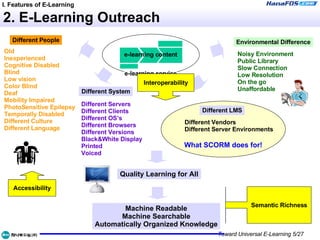
2. E-Learning Outreach What SCORM does for! e-learning content e-learning service I. Features of E-Learning Accessibility Interoperability Semantic Richness Machine Readable Machine Searchable Automatically Organized Knowledge Quality Learning for All Different People Old Inexperienced Cognitive Disabled Blind Low vision Color Blind Deaf Mobility Impaired PhotoSensitive Epilepsy Temporally Disabled Different Culture Different Language Different System Different Servers Different Clients Different OS’s Different Browsers Different Versions Black&White Display Printed Voiced Different LMS Different Vendors Different Server Environments Environmental Difference Noisy Environment Public Library Slow Connection Low Resolution On the go Unaffordable
II. Universal Design Universality Web Non-normative Checkpoints
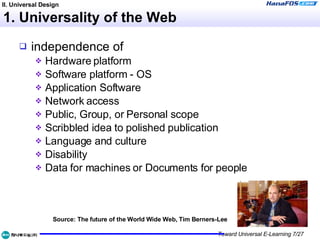
1. Universality of the Web independence of Hardware platform  Software platform - OS  Application Software  Network access  Public, Group, or Personal scope  Scribbled idea to polished publication  Language and culture  Disability  Data for machines or Documents for people  Source: The future of the World Wide Web, Tim Berners-Lee II. Universal Design
2. Is your learning content…? valid with HTML 4 and CSS2, DOM spec? acceptable on Mac/Linux, Mozilla/Opera? flexible enough for small screens? easily understandable for novice learners? operable via keyboard? readable through screen readers? ready for i18n, or l10n? excluding some learners intentionally? reachable by general search robot? II. Universal Design
III. Principles of Universal E-Learning Universal e-learning content Interoperability Accessibility Semantics Separate structure from presentation
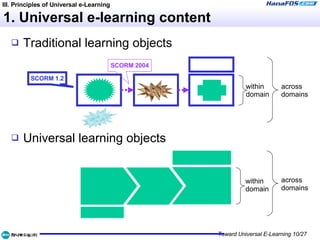
1. Universal e-learning content Traditional learning objects Universal learning objects III. Principles of Universal e-Learning within domain across domains within domain across domains SCORM 1.2 SCORM 2004
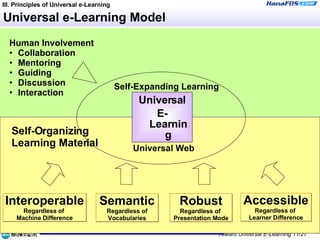
Universal e-Learning Model Universal E-Learning Human Involvement Collaboration Mentoring Guiding Discussion Interaction III. Principles of Universal e-Learning Self-Expanding Learning Self-Organizing  Learning Material Universal Web Accessible Regardless of  Learner Difference Interoperable Regardless of  Machine Difference Semantic Regardless of Vocabularies Robust Regardless of  Presentation Mode
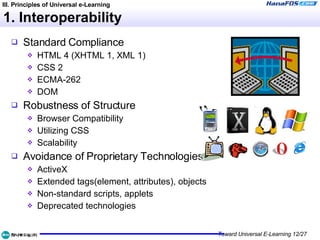
1. Interoperability Standard Compliance HTML 4 (XHTML 1, XML 1) CSS 2 ECMA-262 DOM Robustness of Structure Browser Compatibility Utilizing CSS Scalability Avoidance of Proprietary Technologies ActiveX Extended tags(element, attributes), objects Non-standard scripts, applets Deprecated technologies III. Principles of Universal e-Learning
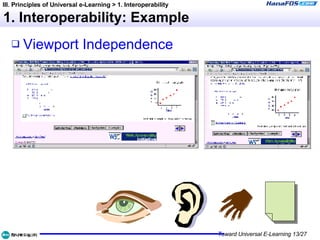
1. Interoperability: Example Viewport Independence III. Principles of Universal e-Learning > 1. Interoperability
2. Accessibility: Norms World wide W3C(1999), Web Content Accessibility Guidelines 1.0 US(1998), Section 508 of Rehabilitation Act UK(1995), Disability Discrimination Act Australia(1992), Disability Discrimination Act IMS(2002), Guidelines for Developing Accessible Learning Applications IMS(2003), Learner Information Package Accessibility Domestic 정통부 (2002),  장애인 노인 등의 정보통신 접근성 향상을 위한 권장지침 K-WCAG 1.0 (in processing) III. Principles of Universal e-Learning > 2. Accessibility
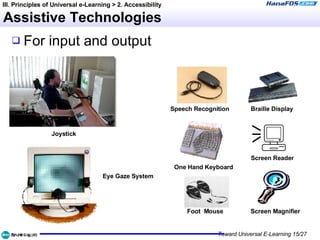
Assistive Technologies For input and output III. Principles of Universal e-Learning > 2. Accessibility Braille Display Screen Reader Screen Magnifier Speech Recognition One Hand Keyboard Foot  Mouse Joystick Eye Gaze System
Design guidelines for the disabled Examples of design requirements for people with different kinds of disabilities include: Visual:  described graphics or video; well marked-up tables or frames; keyboard support, screen reader compatibility; Hearing:  captioning for audio, supplemental illustration; Physical, Speech:  keyboard or single-switch support; alternatives for speech input on voice portals; Cognitive, Neurological:  consistent navigation, appropriate language level; illustration; no flickering designs. Source: http://www.w3.org/Talks/WAI-Intro/slide6-0.html III. Principles of Universal e-Learning > 2. Accessibility
Accessibility: General Principles Provide alternate access route. Provide multi-modality. Use gracefully transforming technology. Think device independence. Organize robust structure. (not necessarily same as “robust design”) Think forward & backward compatibility. Maximize user control. III. Principles of Universal e-Learning > 2. Accessibility
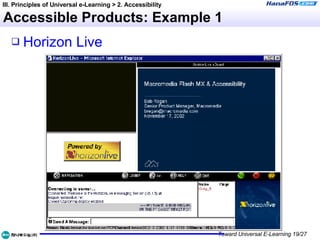
Accessible Learning Products Content Thomson NETg Web Conference Horizon Live, … Learning Management System Black Board, THINQ, Pathlore, ATutor Authoring(Developing) Tools Macromedia Flash MX Trivantis Lectora III. Principles of Universal e-Learning > 2. Accessibility
Accessible Products: Example 1 Horizon Live III. Principles of Universal e-Learning > 2. Accessibility
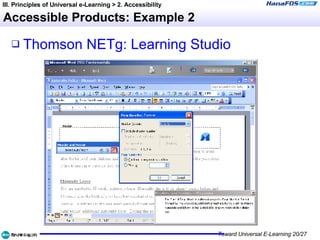
Accessible Products: Example 2 Thomson  NETg : Learning Studio III. Principles of Universal e-Learning > 2. Accessibility
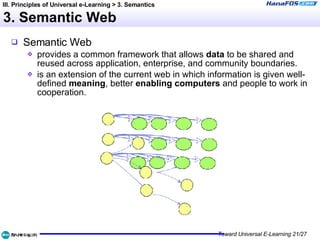
3. Semantic Web Semantic Web provides a common framework that allows  data  to be shared and reused across application, enterprise, and community boundaries. is an extension of the current web in which information is given well-defined  meaning , better  enabling computers  and people to work in cooperation. III. Principles of Universal e-Learning > 3. Semantics
Semantic e-Learning HTML has  already  limited   semantic features! Link types Alternate, Stylesheet, Next, Prev, Contents, Index, Glossary, Copyright, Chapter, Section, Subsection, Appendix, Help, Bookmark Structural Markup <h1>, <h2>, <q>, <dl>, <ol>, <acronym>, <title>, title,… URI, Unicode, UTC Correction history: <del>, <ins> Metadata (DC) III. Principles of Universal e-Learning > 3. Semantics
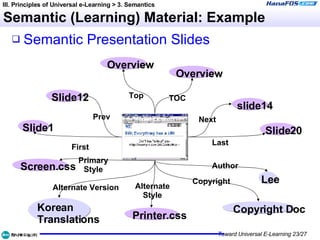
Semantic (Learning) Material: Example Semantic Presentation Slides III. Principles of Universal e-Learning > 3. Semantics Overview Slide1 slide14 Slide12 Slide20 Overview Screen.css Lee Copyright Doc Korean  Translations Printer.css First Prev Top TOC Next Last Author Copyright Alternate Style Primary Style Alternate Version
4. Separation of Presentation Content-Form Separation Content creator needs to focus on content! Designer needs to focus on how it shows! How? Use standard compliant, structural markups! Utilize CSS and XML(including SVG, SMIL, MathML)! III. Principles of Universal e-Learning > 4. Separate Structure from Presentation
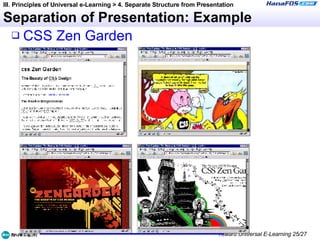
Separation of Presentation: Example CSS Zen Garden III. Principles of Universal e-Learning > 4. Separate Structure from Presentation
IV. Benefits of Universal E-Learning Technical efficiency Increase usability. Reduce maintenance cost. Become search engine friendly. Repurpose content for multiple formats. Forward compatibility (semantic web, device independence…) Business benefits Increase market/audience reach. Be ready for internationalization. (eg. caption, alt text, Section 508) IV. Benefits of Universal E-Learning
V. Yet to be Solved Complex interaction (including simulation) Traditional design practice Universal learning environment Authoring tool accessibility Accessible application, OS Assistive technologies Individual preference smart card? Collaboration, Integrated learning Learning goals and result (effectiveness) V. Problems to be Solved

Toward Universal e-Learning

  • 1.
    Toward Universale-Learning June 17, 2004 Greg Shin ( 신승식 ) http://ituniv.or.kr http:// gregshin.pe.kr /blog e-Learning 센터 , 정보통신사이버대학
  • 2.
    Table of ContentsE-learning features Unique features E-Learning outreach Universal design Universality of the Web Self-checkpoints Principles of universal e-learning Universal e-learning content Interoperability Accessibility Semantics Separate structure from presentation Benefits of universal e-learning Problems to be solved
  • 3.
    I. Features ofE-Learning Unique features of e-learning E-learning outreach
  • 4.
    1. Unique Featuresof e-learning E-learning is the only window to the knowledge world for some people. People with disability People alienated People not affordable for classroom training of high quality Only e-learning can accommodate for the individual learner. Learner control Learner preference Sustainable (human) contact with learners I. Features of E-Learning
  • 5.
    2. E-Learning OutreachWhat SCORM does for! e-learning content e-learning service I. Features of E-Learning Accessibility Interoperability Semantic Richness Machine Readable Machine Searchable Automatically Organized Knowledge Quality Learning for All Different People Old Inexperienced Cognitive Disabled Blind Low vision Color Blind Deaf Mobility Impaired PhotoSensitive Epilepsy Temporally Disabled Different Culture Different Language Different System Different Servers Different Clients Different OS’s Different Browsers Different Versions Black&White Display Printed Voiced Different LMS Different Vendors Different Server Environments Environmental Difference Noisy Environment Public Library Slow Connection Low Resolution On the go Unaffordable
  • 6.
    II. Universal DesignUniversality Web Non-normative Checkpoints
  • 7.
    1. Universality ofthe Web independence of Hardware platform Software platform - OS Application Software Network access Public, Group, or Personal scope Scribbled idea to polished publication Language and culture Disability Data for machines or Documents for people Source: The future of the World Wide Web, Tim Berners-Lee II. Universal Design
  • 8.
    2. Is yourlearning content…? valid with HTML 4 and CSS2, DOM spec? acceptable on Mac/Linux, Mozilla/Opera? flexible enough for small screens? easily understandable for novice learners? operable via keyboard? readable through screen readers? ready for i18n, or l10n? excluding some learners intentionally? reachable by general search robot? II. Universal Design
  • 9.
    III. Principles ofUniversal E-Learning Universal e-learning content Interoperability Accessibility Semantics Separate structure from presentation
  • 10.
    1. Universal e-learningcontent Traditional learning objects Universal learning objects III. Principles of Universal e-Learning within domain across domains within domain across domains SCORM 1.2 SCORM 2004
  • 11.
    Universal e-Learning ModelUniversal E-Learning Human Involvement Collaboration Mentoring Guiding Discussion Interaction III. Principles of Universal e-Learning Self-Expanding Learning Self-Organizing Learning Material Universal Web Accessible Regardless of Learner Difference Interoperable Regardless of Machine Difference Semantic Regardless of Vocabularies Robust Regardless of Presentation Mode
  • 12.
    1. Interoperability StandardCompliance HTML 4 (XHTML 1, XML 1) CSS 2 ECMA-262 DOM Robustness of Structure Browser Compatibility Utilizing CSS Scalability Avoidance of Proprietary Technologies ActiveX Extended tags(element, attributes), objects Non-standard scripts, applets Deprecated technologies III. Principles of Universal e-Learning
  • 13.
    1. Interoperability: ExampleViewport Independence III. Principles of Universal e-Learning > 1. Interoperability
  • 14.
    2. Accessibility: NormsWorld wide W3C(1999), Web Content Accessibility Guidelines 1.0 US(1998), Section 508 of Rehabilitation Act UK(1995), Disability Discrimination Act Australia(1992), Disability Discrimination Act IMS(2002), Guidelines for Developing Accessible Learning Applications IMS(2003), Learner Information Package Accessibility Domestic 정통부 (2002), 장애인 노인 등의 정보통신 접근성 향상을 위한 권장지침 K-WCAG 1.0 (in processing) III. Principles of Universal e-Learning > 2. Accessibility
  • 15.
    Assistive Technologies Forinput and output III. Principles of Universal e-Learning > 2. Accessibility Braille Display Screen Reader Screen Magnifier Speech Recognition One Hand Keyboard Foot Mouse Joystick Eye Gaze System
  • 16.
    Design guidelines forthe disabled Examples of design requirements for people with different kinds of disabilities include: Visual: described graphics or video; well marked-up tables or frames; keyboard support, screen reader compatibility; Hearing: captioning for audio, supplemental illustration; Physical, Speech: keyboard or single-switch support; alternatives for speech input on voice portals; Cognitive, Neurological: consistent navigation, appropriate language level; illustration; no flickering designs. Source: http://www.w3.org/Talks/WAI-Intro/slide6-0.html III. Principles of Universal e-Learning > 2. Accessibility
  • 17.
    Accessibility: General PrinciplesProvide alternate access route. Provide multi-modality. Use gracefully transforming technology. Think device independence. Organize robust structure. (not necessarily same as “robust design”) Think forward & backward compatibility. Maximize user control. III. Principles of Universal e-Learning > 2. Accessibility
  • 18.
    Accessible Learning ProductsContent Thomson NETg Web Conference Horizon Live, … Learning Management System Black Board, THINQ, Pathlore, ATutor Authoring(Developing) Tools Macromedia Flash MX Trivantis Lectora III. Principles of Universal e-Learning > 2. Accessibility
  • 19.
    Accessible Products: Example1 Horizon Live III. Principles of Universal e-Learning > 2. Accessibility
  • 20.
    Accessible Products: Example2 Thomson NETg : Learning Studio III. Principles of Universal e-Learning > 2. Accessibility
  • 21.
    3. Semantic WebSemantic Web provides a common framework that allows data to be shared and reused across application, enterprise, and community boundaries. is an extension of the current web in which information is given well-defined meaning , better enabling computers and people to work in cooperation. III. Principles of Universal e-Learning > 3. Semantics
  • 22.
    Semantic e-Learning HTMLhas already limited semantic features! Link types Alternate, Stylesheet, Next, Prev, Contents, Index, Glossary, Copyright, Chapter, Section, Subsection, Appendix, Help, Bookmark Structural Markup <h1>, <h2>, <q>, <dl>, <ol>, <acronym>, <title>, title,… URI, Unicode, UTC Correction history: <del>, <ins> Metadata (DC) III. Principles of Universal e-Learning > 3. Semantics
  • 23.
    Semantic (Learning) Material:Example Semantic Presentation Slides III. Principles of Universal e-Learning > 3. Semantics Overview Slide1 slide14 Slide12 Slide20 Overview Screen.css Lee Copyright Doc Korean Translations Printer.css First Prev Top TOC Next Last Author Copyright Alternate Style Primary Style Alternate Version
  • 24.
    4. Separation ofPresentation Content-Form Separation Content creator needs to focus on content! Designer needs to focus on how it shows! How? Use standard compliant, structural markups! Utilize CSS and XML(including SVG, SMIL, MathML)! III. Principles of Universal e-Learning > 4. Separate Structure from Presentation
  • 25.
    Separation of Presentation:Example CSS Zen Garden III. Principles of Universal e-Learning > 4. Separate Structure from Presentation
  • 26.
    IV. Benefits ofUniversal E-Learning Technical efficiency Increase usability. Reduce maintenance cost. Become search engine friendly. Repurpose content for multiple formats. Forward compatibility (semantic web, device independence…) Business benefits Increase market/audience reach. Be ready for internationalization. (eg. caption, alt text, Section 508) IV. Benefits of Universal E-Learning
  • 27.
    V. Yet tobe Solved Complex interaction (including simulation) Traditional design practice Universal learning environment Authoring tool accessibility Accessible application, OS Assistive technologies Individual preference smart card? Collaboration, Integrated learning Learning goals and result (effectiveness) V. Problems to be Solved