IDENTIFICATION OF
PARTS OF THE
COMPUTER SYSTEM
 Understanding Computer System
 Components of Computer System
 Hardware Components of Computer System
Hardware- the physical, touchable,
electronic and mechanical
parts of a computer system.
Understanding the Computer System
A. Major hardware
1. System Unit
2. Motherboard / Mainboard /
System Board
3. CPU (Central Processing Unit)
4. Primary storage
-ROM
-RAM
5. Expansion Bus
6. Adapters
7. Power Supply Unit (PSU)
8. Hard Disk Drive (HDD)
9. Optical Drive
B. Input Devices
C. Output Devices
1. System Unit- The main part of a personal
computer, sometimes
called the chassis. It
includes the following
parts: Motherboard,
Microprocessor, Memory
Chips, Buses, Ports,
Expansion Slots and Cards.
A. Major hardware components of
a computer system.
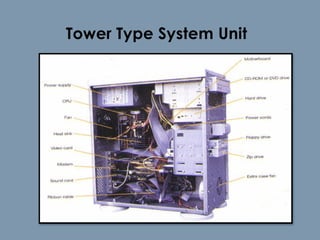
Tower Type System Unit
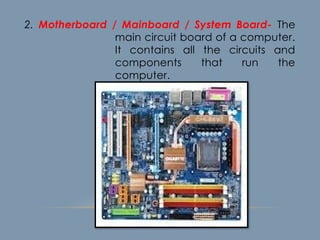
2. Motherboard / Mainboard / System Board- The
main circuit board of a computer.
It contains all the circuits and
components that run the
computer.
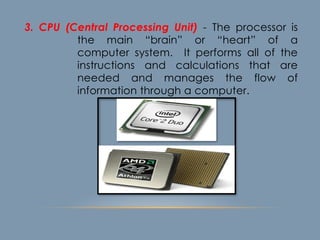
3. CPU (Central Processing Unit) - The processor is
the main “brain” or “heart” of a
computer system. It performs all of the
instructions and calculations that are
needed and manages the flow of
information through a computer.
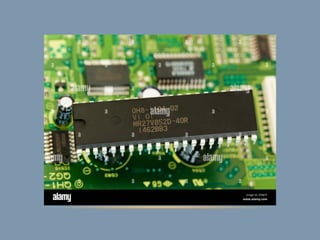
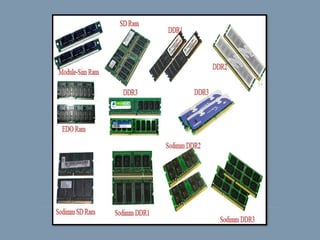
4. Primary storage- (internal storage, main
memory or memory) is the
computer's working storage space
that holds data, instructions for
processing and processed data
(information) waiting to be sent to
secondary storage. Physically,
primary storage is a collection of
RAM chips.
Two (2) Types of Memory
ROM – (Read Only Memory) ROM is non-
volatile, meaning it holds data even
when the power is ON or OFF.
RAM – (Random Access Memory) RAM is
volatile, meaning it holds data only
when the power is on. When the
power is off, RAM's contents are lost.
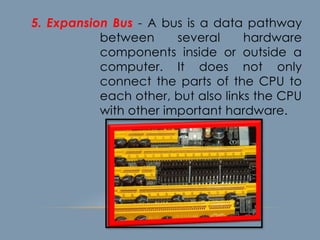
5. Expansion Bus - A bus is a data pathway
between several hardware
components inside or outside a
computer. It does not only
connect the parts of the CPU to
each other, but also links the CPU
with other important hardware.
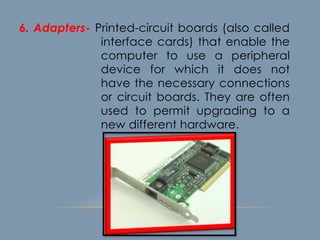
6. Adapters- Printed-circuit boards (also called
interface cards) that enable the
computer to use a peripheral
device for which it does not
have the necessary connections
or circuit boards. They are often
used to permit upgrading to a
new different hardware.
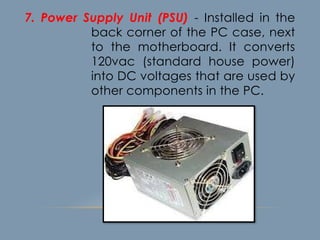
7. Power Supply Unit (PSU) - Installed in the
back corner of the PC case, next
to the motherboard. It converts
120vac (standard house power)
into DC voltages that are used by
other components in the PC.
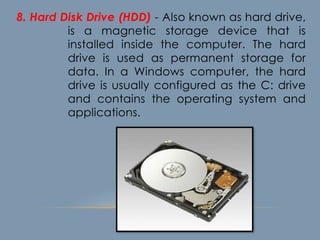
8. Hard Disk Drive (HDD) - Also known as hard drive,
is a magnetic storage device that is
installed inside the computer. The hard
drive is used as permanent storage for
data. In a Windows computer, the hard
drive is usually configured as the C: drive
and contains the operating system and
applications.
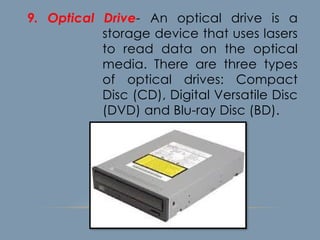
9. Optical Drive- An optical drive is a
storage device that uses lasers
to read data on the optical
media. There are three types
of optical drives: Compact
Disc (CD), Digital Versatile Disc
(DVD) and Blu-ray Disc (BD).
B. Input Devices - Accepts data and
instructions from the user or from
another computer system.
Two (2) Types of Input Devices
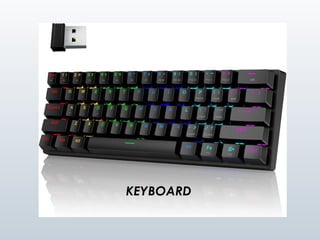
1. Keyboard Entry – Data is inputted to the
computer through a keyboard.
Keyboard - The first input device developed for
the PC. Data is transferred to the
PC over a short cable with a
circular 6-pin Mini-din connector
that plugs into the back of the
motherboard.
KEYBOARD
2. Direct Entry – A form of input that does
not require data to be keyed
by someone sitting at a
keyboard. Direct-entry devices
create machine-readable
data on paper, or magnetic
media, or feed it directly into
the computer’s CPU.
Three Categories of Direct Entry Devices
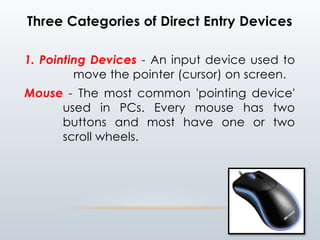
1. Pointing Devices - An input device used to
move the pointer (cursor) on screen.
Mouse - The most common 'pointing device'
used in PCs. Every mouse has two
buttons and most have one or two
scroll wheels.
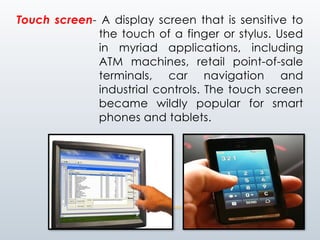
Touch screen- A display screen that is sensitive to
the touch of a finger or stylus. Used
in myriad applications, including
ATM machines, retail point-of-sale
terminals, car navigation and
industrial controls. The touch screen
became wildly popular for smart
phones and tablets.
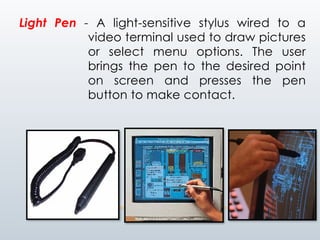
Light Pen - A light-sensitive stylus wired to a
video terminal used to draw pictures
or select menu options. The user
brings the pen to the desired point
on screen and presses the pen
button to make contact.
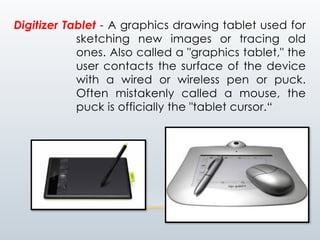
Digitizer Tablet - A graphics drawing tablet used for
sketching new images or tracing old
ones. Also called a "graphics tablet," the
user contacts the surface of the device
with a wired or wireless pen or puck.
Often mistakenly called a mouse, the
puck is officially the "tablet cursor.“
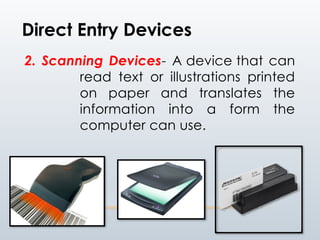
2. Scanning Devices- A device that can
read text or illustrations printed
on paper and translates the
information into a form the
computer can use.
Direct Entry Devices
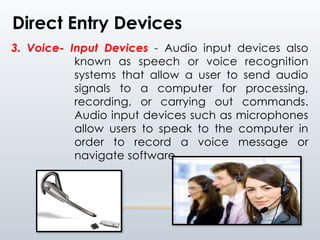
3. Voice- Input Devices - Audio input devices also
known as speech or voice recognition
systems that allow a user to send audio
signals to a computer for processing,
recording, or carrying out commands.
Audio input devices such as microphones
allow users to speak to the computer in
order to record a voice message or
navigate software.
Direct Entry Devices
C. Output Devices - Any piece of
computer hardware that
displays results after the
computer has processed
the input data that has
been entered.
1. Computer Display Monitor-
It displays information in visual
form, using text and graphics. The
portion of the monitor that
displays the information is called
the screen or video display
terminal.
Types of Monitor
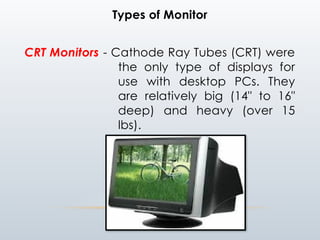
CRT Monitors - Cathode Ray Tubes (CRT) were
the only type of displays for
use with desktop PCs. They
are relatively big (14" to 16"
deep) and heavy (over 15
lbs).
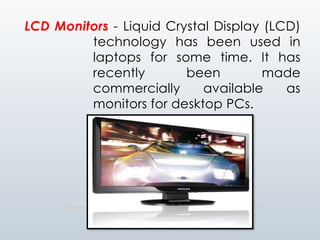
LCD Monitors - Liquid Crystal Display (LCD)
technology has been used in
laptops for some time. It has
recently been made
commercially available as
monitors for desktop PCs.
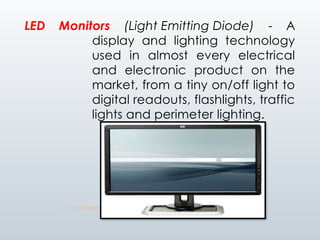
LED Monitors (Light Emitting Diode) - A
display and lighting technology
used in almost every electrical
and electronic product on the
market, from a tiny on/off light to
digital readouts, flashlights, traffic
lights and perimeter lighting.
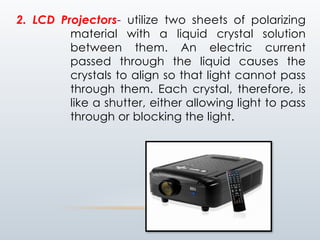
2. LCD Projectors- utilize two sheets of polarizing
material with a liquid crystal solution
between them. An electric current
passed through the liquid causes the
crystals to align so that light cannot pass
through them. Each crystal, therefore, is
like a shutter, either allowing light to pass
through or blocking the light.
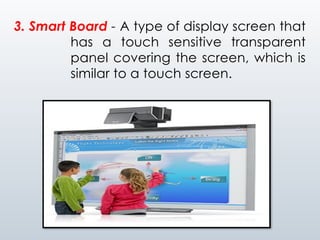
3. Smart Board - A type of display screen that
has a touch sensitive transparent
panel covering the screen, which is
similar to a touch screen.
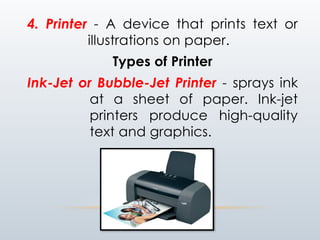
4. Printer - A device that prints text or
illustrations on paper.
Types of Printer
Ink-Jet or Bubble-Jet Printer - sprays ink
at a sheet of paper. Ink-jet
printers produce high-quality
text and graphics.
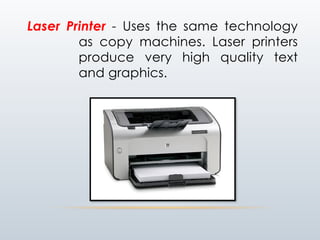
Laser Printer - Uses the same technology
as copy machines. Laser printers
produce very high quality text
and graphics.
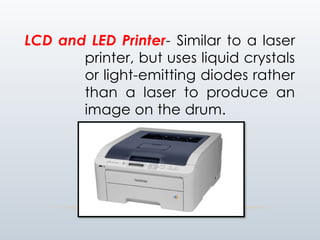
LCD and LED Printer- Similar to a laser
printer, but uses liquid crystals
or light-emitting diodes rather
than a laser to produce an
image on the drum.
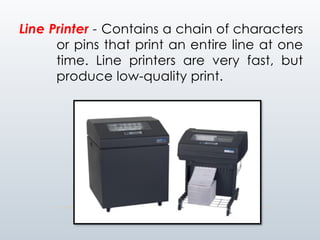
Line Printer - Contains a chain of characters
or pins that print an entire line at one
time. Line printers are very fast, but
produce low-quality print.
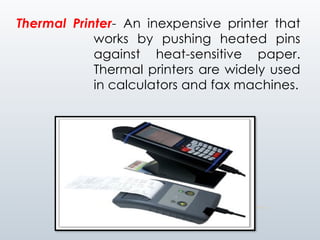
Thermal Printer- An inexpensive printer that
works by pushing heated pins
against heat-sensitive paper.
Thermal printers are widely used
in calculators and fax machines.
5. Speakers - Used to play sound. They
may be built into the system
unit or connected with
cables. Speakers allow you
to listen to music and hear
sound effects from your
computer.
D. Ports - External connecting sockets on
the outside of the computer. This
is a pathway into and out of the
computer. A port lets users plug
in outside peripherals, such as
monitors, scanners and printers.
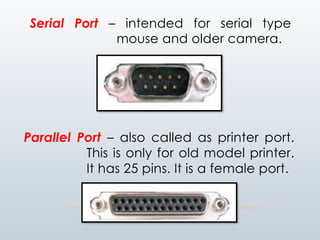
Serial Port – intended for serial type
mouse and older camera.
Parallel Port – also called as printer port.
This is only for old model printer.
It has 25 pins. It is a female port.
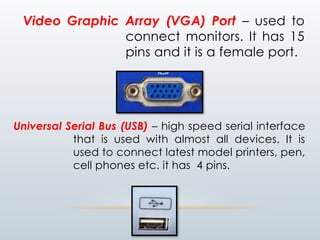
Video Graphic Array (VGA) Port – used to
connect monitors. It has 15
pins and it is a female port.
Universal Serial Bus (USB) – high speed serial interface
that is used with almost all devices. It is
used to connect latest model printers, pen,
cell phones etc. it has 4 pins.
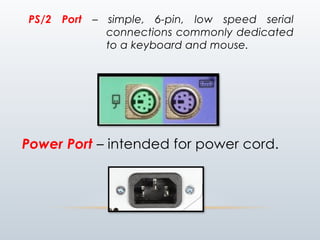
PS/2 Port – simple, 6-pin, low speed serial
connections commonly dedicated
to a keyboard and mouse.
Power Port – intended for power cord.
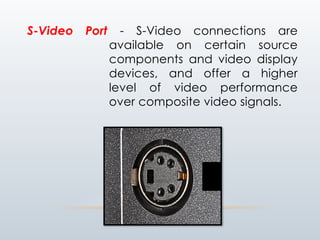
S-Video Port - S-Video connections are
available on certain source
components and video display
devices, and offer a higher
level of video performance
over composite video signals.
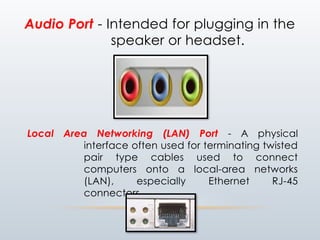
Audio Port - Intended for plugging in the
speaker or headset.
Local Area Networking (LAN) Port - A physical
interface often used for terminating twisted
pair type cables used to connect
computers onto a local-area networks
(LAN), especially Ethernet RJ-45
connectors.
E. Cables and Wires- A cable is most
often two or more wires
running side by side and
bonded, twisted or braided
together to form a single
assembly, but can also refer
to a heavy strong rope.
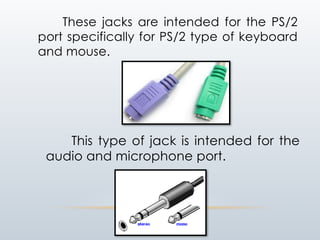
These jacks are intended for the PS/2
port specifically for PS/2 type of keyboard
and mouse.
This type of jack is intended for the
audio and microphone port.
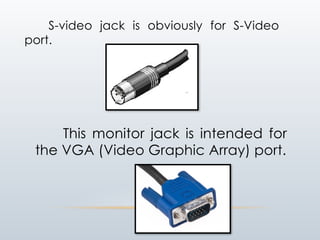
S-video jack is obviously for S-Video
port.
This monitor jack is intended for
the VGA (Video Graphic Array) port.
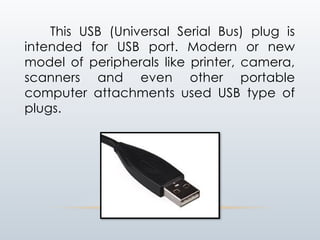
This USB (Universal Serial Bus) plug is
intended for USB port. Modern or new
model of peripherals like printer, camera,
scanners and even other portable
computer attachments used USB type of
plugs.
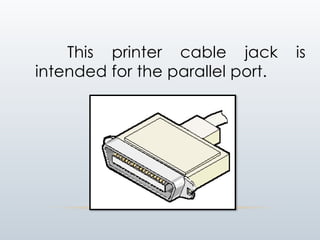
This printer cable jack is
intended for the parallel port.
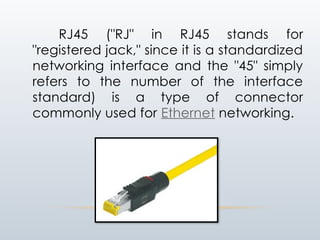
RJ45 ("RJ" in RJ45 stands for
"registered jack," since it is a standardized
networking interface and the "45" simply
refers to the number of the interface
standard) is a type of connector
commonly used for Ethernet networking.
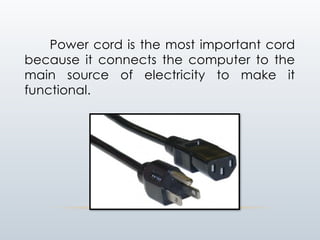
Power cord is the most important cord
because it connects the computer to the
main source of electricity to make it
functional.

Parts ossff a ssfsfsfsfsfsfscomputer.pptx

  • 1.
    IDENTIFICATION OF PARTS OFTHE COMPUTER SYSTEM  Understanding Computer System  Components of Computer System  Hardware Components of Computer System
  • 2.
    Hardware- the physical,touchable, electronic and mechanical parts of a computer system. Understanding the Computer System
  • 3.
    A. Major hardware 1.System Unit 2. Motherboard / Mainboard / System Board 3. CPU (Central Processing Unit) 4. Primary storage -ROM -RAM 5. Expansion Bus 6. Adapters 7. Power Supply Unit (PSU) 8. Hard Disk Drive (HDD) 9. Optical Drive B. Input Devices C. Output Devices
  • 4.
    1. System Unit-The main part of a personal computer, sometimes called the chassis. It includes the following parts: Motherboard, Microprocessor, Memory Chips, Buses, Ports, Expansion Slots and Cards. A. Major hardware components of a computer system.
  • 5.
  • 6.
    2. Motherboard /Mainboard / System Board- The main circuit board of a computer. It contains all the circuits and components that run the computer.
  • 7.
    3. CPU (CentralProcessing Unit) - The processor is the main “brain” or “heart” of a computer system. It performs all of the instructions and calculations that are needed and manages the flow of information through a computer.
  • 8.
    4. Primary storage-(internal storage, main memory or memory) is the computer's working storage space that holds data, instructions for processing and processed data (information) waiting to be sent to secondary storage. Physically, primary storage is a collection of RAM chips.
  • 9.
    Two (2) Typesof Memory ROM – (Read Only Memory) ROM is non- volatile, meaning it holds data even when the power is ON or OFF. RAM – (Random Access Memory) RAM is volatile, meaning it holds data only when the power is on. When the power is off, RAM's contents are lost.
  • 12.
    5. Expansion Bus- A bus is a data pathway between several hardware components inside or outside a computer. It does not only connect the parts of the CPU to each other, but also links the CPU with other important hardware.
  • 13.
    6. Adapters- Printed-circuitboards (also called interface cards) that enable the computer to use a peripheral device for which it does not have the necessary connections or circuit boards. They are often used to permit upgrading to a new different hardware.
  • 14.
    7. Power SupplyUnit (PSU) - Installed in the back corner of the PC case, next to the motherboard. It converts 120vac (standard house power) into DC voltages that are used by other components in the PC.
  • 15.
    8. Hard DiskDrive (HDD) - Also known as hard drive, is a magnetic storage device that is installed inside the computer. The hard drive is used as permanent storage for data. In a Windows computer, the hard drive is usually configured as the C: drive and contains the operating system and applications.
  • 16.
    9. Optical Drive-An optical drive is a storage device that uses lasers to read data on the optical media. There are three types of optical drives: Compact Disc (CD), Digital Versatile Disc (DVD) and Blu-ray Disc (BD).
  • 17.
    B. Input Devices- Accepts data and instructions from the user or from another computer system. Two (2) Types of Input Devices 1. Keyboard Entry – Data is inputted to the computer through a keyboard. Keyboard - The first input device developed for the PC. Data is transferred to the PC over a short cable with a circular 6-pin Mini-din connector that plugs into the back of the motherboard.
  • 18.
  • 19.
    2. Direct Entry– A form of input that does not require data to be keyed by someone sitting at a keyboard. Direct-entry devices create machine-readable data on paper, or magnetic media, or feed it directly into the computer’s CPU.
  • 20.
    Three Categories ofDirect Entry Devices 1. Pointing Devices - An input device used to move the pointer (cursor) on screen. Mouse - The most common 'pointing device' used in PCs. Every mouse has two buttons and most have one or two scroll wheels.
  • 21.
    Touch screen- Adisplay screen that is sensitive to the touch of a finger or stylus. Used in myriad applications, including ATM machines, retail point-of-sale terminals, car navigation and industrial controls. The touch screen became wildly popular for smart phones and tablets.
  • 22.
    Light Pen -A light-sensitive stylus wired to a video terminal used to draw pictures or select menu options. The user brings the pen to the desired point on screen and presses the pen button to make contact.
  • 23.
    Digitizer Tablet -A graphics drawing tablet used for sketching new images or tracing old ones. Also called a "graphics tablet," the user contacts the surface of the device with a wired or wireless pen or puck. Often mistakenly called a mouse, the puck is officially the "tablet cursor.“
  • 24.
    2. Scanning Devices-A device that can read text or illustrations printed on paper and translates the information into a form the computer can use. Direct Entry Devices
  • 25.
    3. Voice- InputDevices - Audio input devices also known as speech or voice recognition systems that allow a user to send audio signals to a computer for processing, recording, or carrying out commands. Audio input devices such as microphones allow users to speak to the computer in order to record a voice message or navigate software. Direct Entry Devices
  • 26.
    C. Output Devices- Any piece of computer hardware that displays results after the computer has processed the input data that has been entered.
  • 27.
    1. Computer DisplayMonitor- It displays information in visual form, using text and graphics. The portion of the monitor that displays the information is called the screen or video display terminal.
  • 28.
    Types of Monitor CRTMonitors - Cathode Ray Tubes (CRT) were the only type of displays for use with desktop PCs. They are relatively big (14" to 16" deep) and heavy (over 15 lbs).
  • 29.
    LCD Monitors -Liquid Crystal Display (LCD) technology has been used in laptops for some time. It has recently been made commercially available as monitors for desktop PCs.
  • 30.
    LED Monitors (LightEmitting Diode) - A display and lighting technology used in almost every electrical and electronic product on the market, from a tiny on/off light to digital readouts, flashlights, traffic lights and perimeter lighting.
  • 31.
    2. LCD Projectors-utilize two sheets of polarizing material with a liquid crystal solution between them. An electric current passed through the liquid causes the crystals to align so that light cannot pass through them. Each crystal, therefore, is like a shutter, either allowing light to pass through or blocking the light.
  • 32.
    3. Smart Board- A type of display screen that has a touch sensitive transparent panel covering the screen, which is similar to a touch screen.
  • 33.
    4. Printer -A device that prints text or illustrations on paper. Types of Printer Ink-Jet or Bubble-Jet Printer - sprays ink at a sheet of paper. Ink-jet printers produce high-quality text and graphics.
  • 34.
    Laser Printer -Uses the same technology as copy machines. Laser printers produce very high quality text and graphics.
  • 35.
    LCD and LEDPrinter- Similar to a laser printer, but uses liquid crystals or light-emitting diodes rather than a laser to produce an image on the drum.
  • 36.
    Line Printer -Contains a chain of characters or pins that print an entire line at one time. Line printers are very fast, but produce low-quality print.
  • 37.
    Thermal Printer- Aninexpensive printer that works by pushing heated pins against heat-sensitive paper. Thermal printers are widely used in calculators and fax machines.
  • 38.
    5. Speakers -Used to play sound. They may be built into the system unit or connected with cables. Speakers allow you to listen to music and hear sound effects from your computer.
  • 39.
    D. Ports -External connecting sockets on the outside of the computer. This is a pathway into and out of the computer. A port lets users plug in outside peripherals, such as monitors, scanners and printers.
  • 40.
    Serial Port –intended for serial type mouse and older camera. Parallel Port – also called as printer port. This is only for old model printer. It has 25 pins. It is a female port.
  • 41.
    Video Graphic Array(VGA) Port – used to connect monitors. It has 15 pins and it is a female port. Universal Serial Bus (USB) – high speed serial interface that is used with almost all devices. It is used to connect latest model printers, pen, cell phones etc. it has 4 pins.
  • 42.
    PS/2 Port –simple, 6-pin, low speed serial connections commonly dedicated to a keyboard and mouse. Power Port – intended for power cord.
  • 43.
    S-Video Port -S-Video connections are available on certain source components and video display devices, and offer a higher level of video performance over composite video signals.
  • 44.
    Audio Port -Intended for plugging in the speaker or headset. Local Area Networking (LAN) Port - A physical interface often used for terminating twisted pair type cables used to connect computers onto a local-area networks (LAN), especially Ethernet RJ-45 connectors.
  • 45.
    E. Cables andWires- A cable is most often two or more wires running side by side and bonded, twisted or braided together to form a single assembly, but can also refer to a heavy strong rope.
  • 46.
    These jacks areintended for the PS/2 port specifically for PS/2 type of keyboard and mouse. This type of jack is intended for the audio and microphone port.
  • 47.
    S-video jack isobviously for S-Video port. This monitor jack is intended for the VGA (Video Graphic Array) port.
  • 48.
    This USB (UniversalSerial Bus) plug is intended for USB port. Modern or new model of peripherals like printer, camera, scanners and even other portable computer attachments used USB type of plugs.
  • 49.
    This printer cablejack is intended for the parallel port.
  • 50.
    RJ45 ("RJ" inRJ45 stands for "registered jack," since it is a standardized networking interface and the "45" simply refers to the number of the interface standard) is a type of connector commonly used for Ethernet networking.
  • 51.
    Power cord isthe most important cord because it connects the computer to the main source of electricity to make it functional.