© 2008 Cisco Systems, Inc. All rights reserved. Cisco Confidential
Presentation_ID
1
Chapter 2: Introduction
to Switched Networks
Routing And Switching
2.0
Presentation_ID
2
© 2008 Cisco Systems, Inc. All rights reserved. Cisco Confidential
Chapter 2
2.0 Introduction
2.1 Basic Switch Configuration
2.2 Switch Security: Management and Implementation
2.0
Presentation_ID
3
© 2008 Cisco Systems, Inc. All rights reserved. Cisco Confidential
Chapter 2: Objectives
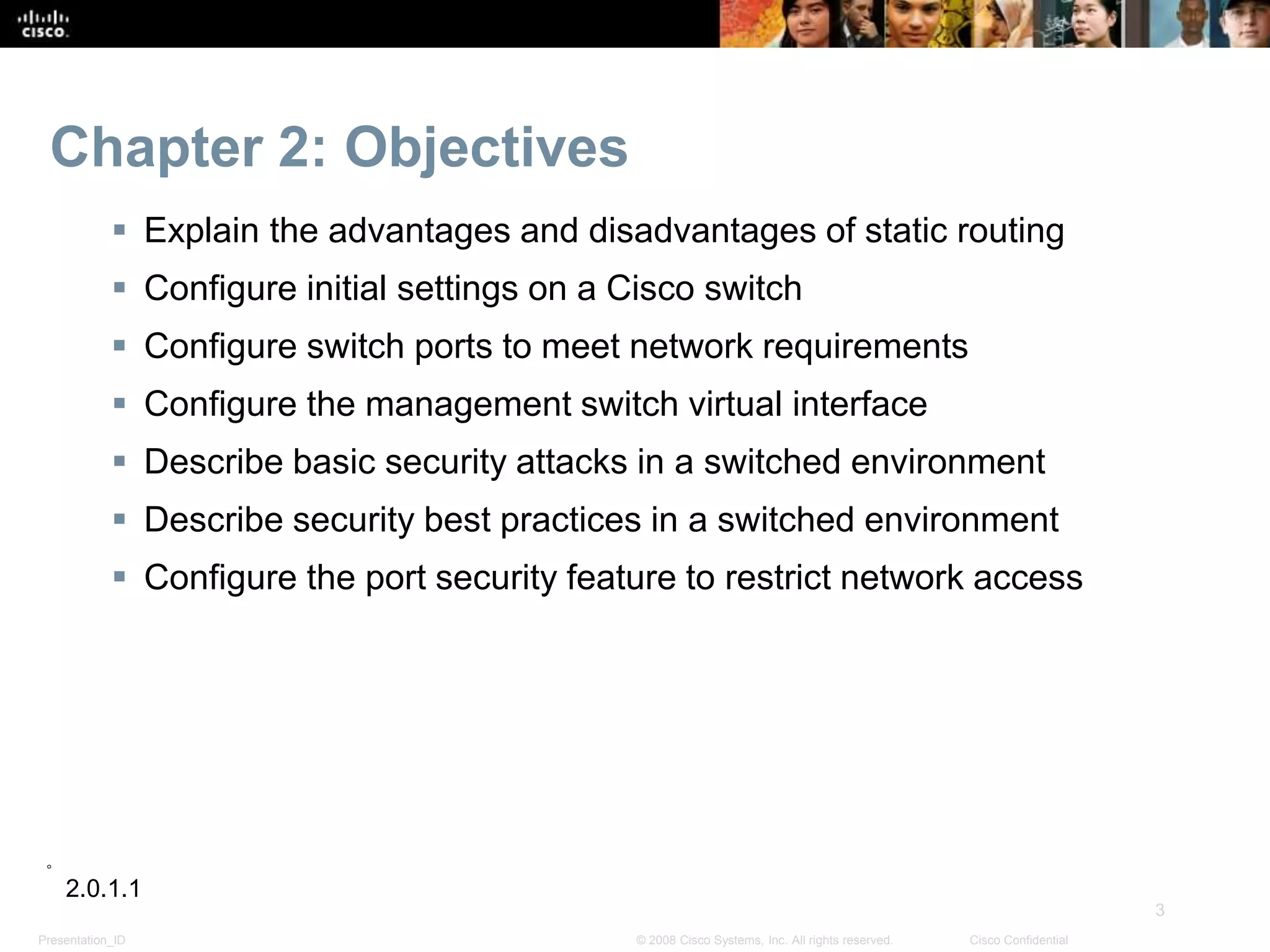
 Explain the advantages and disadvantages of static routing
 Configure initial settings on a Cisco switch
 Configure switch ports to meet network requirements
 Configure the management switch virtual interface
 Describe basic security attacks in a switched environment
 Describe security best practices in a switched environment
 Configure the port security feature to restrict network access
2.0.1.1
Presentation_ID
4
© 2008 Cisco Systems, Inc. All rights reserved. Cisco Confidential
Basic Switch Configuration
Switch Boot Sequence
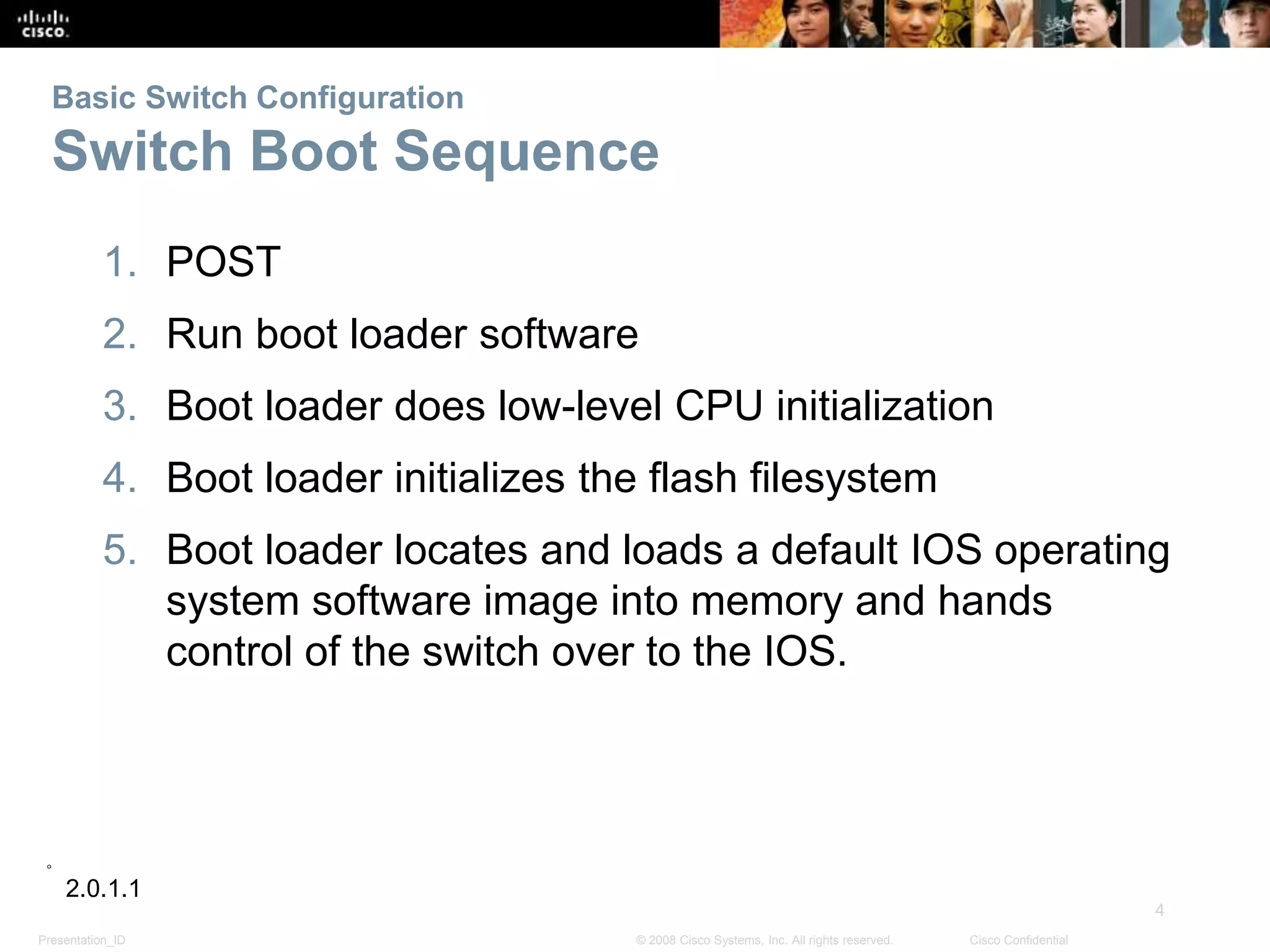
1. POST
2. Run boot loader software
3. Boot loader does low-level CPU initialization
4. Boot loader initializes the flash filesystem
5. Boot loader locates and loads a default IOS operating
system software image into memory and hands
control of the switch over to the IOS.
2.0.1.1
Presentation_ID
5
© 2008 Cisco Systems, Inc. All rights reserved. Cisco Confidential
Basic Switch Configuration
Switch Boot Sequence
In order to find a suitable IOS image, the switch goes
through the following steps:
1. It attempts to automatically boot by using information
in the BOOT environment variable
2. If this variable is not set, the switch performs a top-to-
bottom search through the flash file system. It will
load and execute the first executable file, if it can.
3. The IOS operating system then initializes the
interfaces using the Cisco IOS commands found in
the configuration file, startup configuration, which is
stored in NVRAM.
Note: the command boot system can be used to set the
BOOT environment variable.
2.1.1.1
Presentation_ID
6
© 2008 Cisco Systems, Inc. All rights reserved. Cisco Confidential
Basic Switch Configuration
Recovering From a System Crash
 The boot loader can also be used to manage the switch
if the IOS can’t be loaded.
 The boot loader can be accessed through a console
connection by:
1. Connect a PC by console cable to the switch console port.
Unplug the switch power cord.
2. Reconnect the power cord to the switch and press and hold
down the Mode button.
3. The System LED turns briefly amber and then solid green.
Release the Mode button.
 The boot loader switch:prompt appears in the terminal
emulation software on the PC.
2.1.1.2
Presentation_ID
7
© 2008 Cisco Systems, Inc. All rights reserved. Cisco Confidential
Basic Switch Configuration
Switch LED Indicators
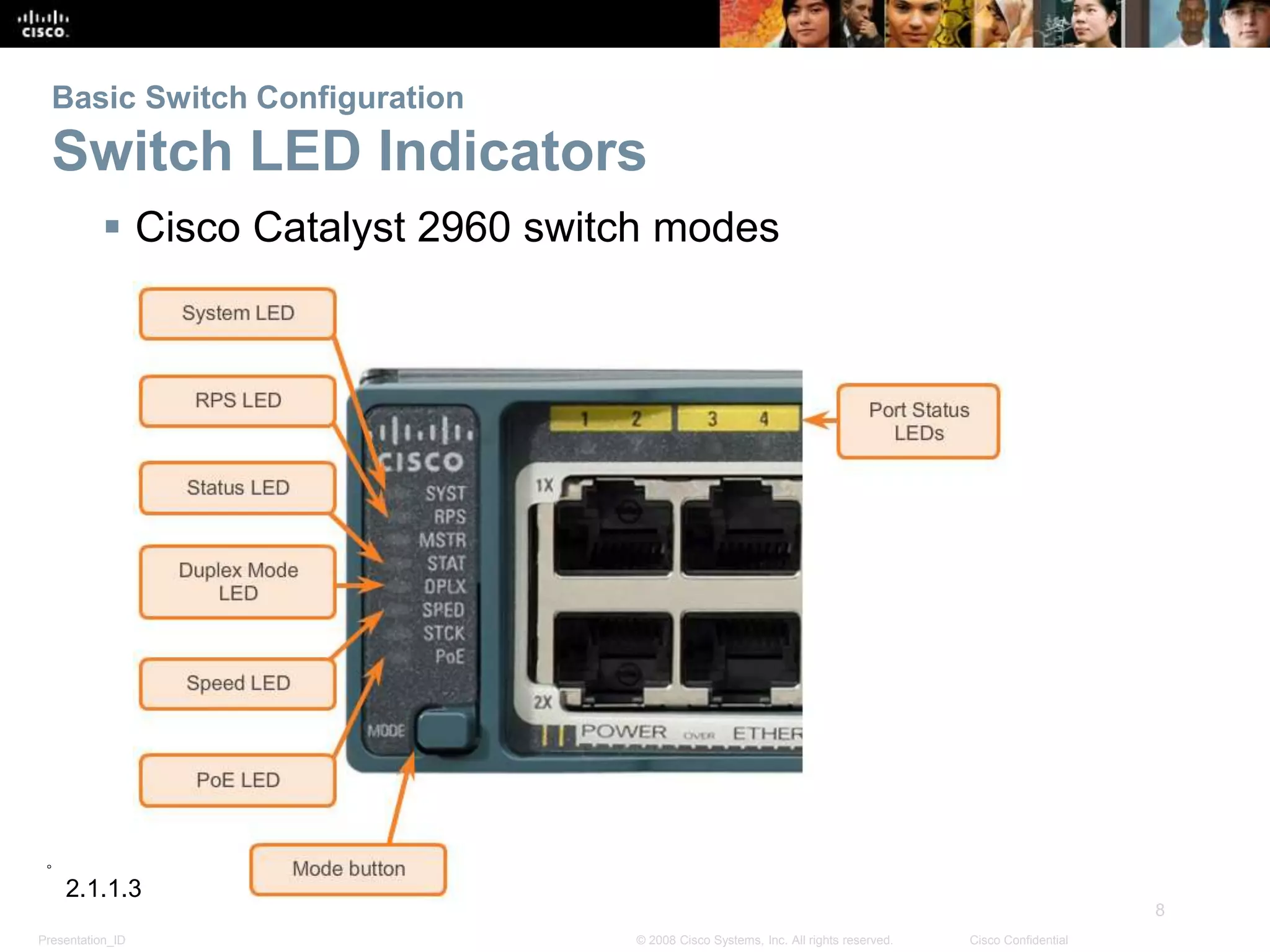
 Each port on Cisco Catalyst switches have status LED
indicator lights.
 By default these LED lights reflect port activity but they
can also provide other information about the switch
through the Mode button
 The following modes are available on Cisco Catalyst
2960 switches:
System LED
Redundant Power System (RPS) LED
Port Status LED
Port Duplex LED
Port Speed LED
Power over Ethernet (PoE) Mode LED
2.1.1.3
Presentation_ID
8
© 2008 Cisco Systems, Inc. All rights reserved. Cisco Confidential
Basic Switch Configuration
Switch LED Indicators
 Cisco Catalyst 2960 switch modes
2.1.1.3
Presentation_ID
9
© 2008 Cisco Systems, Inc. All rights reserved. Cisco Confidential
Basic Switch Configuration
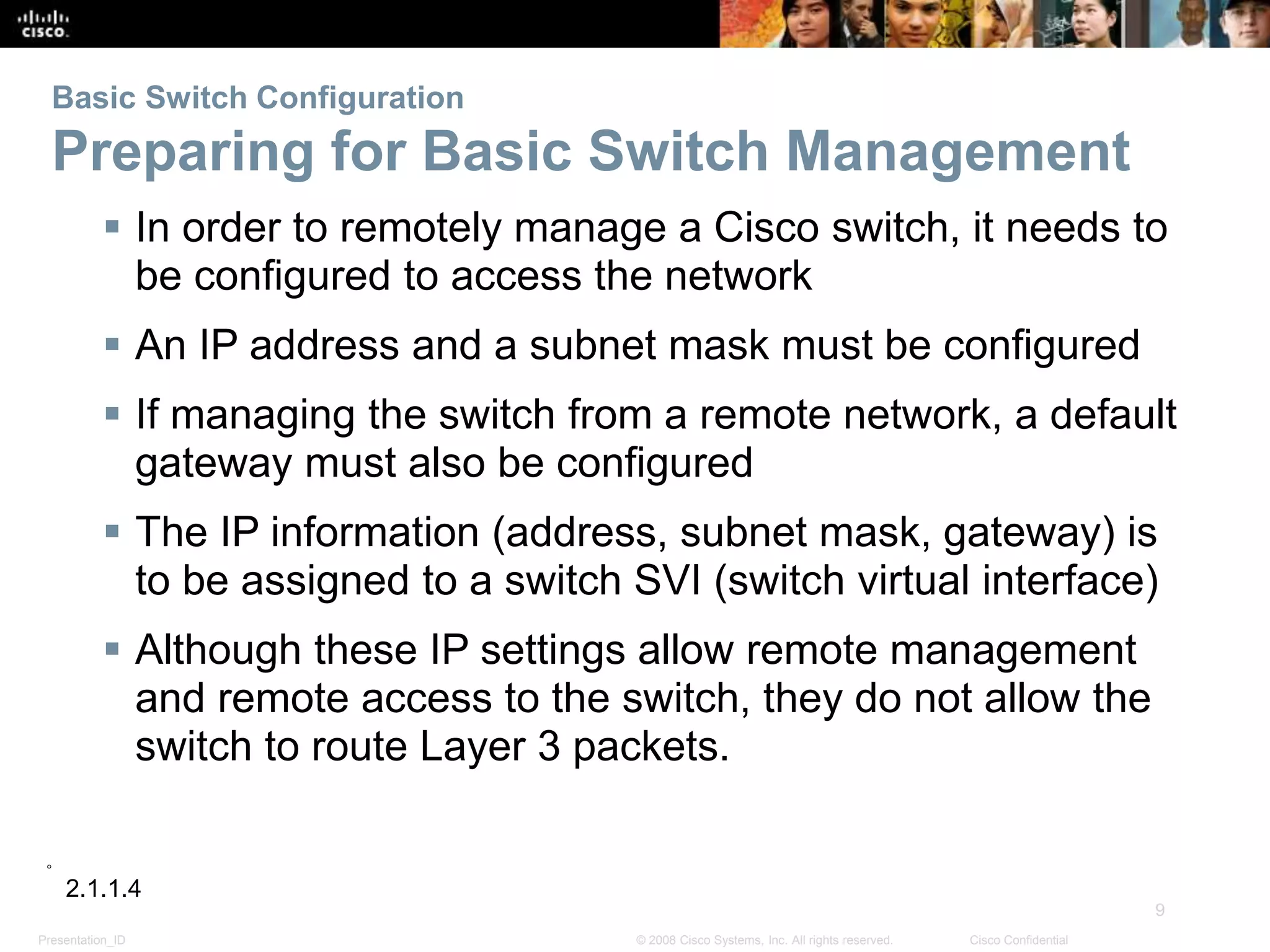
Preparing for Basic Switch Management
 In order to remotely manage a Cisco switch, it needs to
be configured to access the network
 An IP address and a subnet mask must be configured
 If managing the switch from a remote network, a default
gateway must also be configured
 The IP information (address, subnet mask, gateway) is
to be assigned to a switch SVI (switch virtual interface)
 Although these IP settings allow remote management
and remote access to the switch, they do not allow the
switch to route Layer 3 packets.
2.1.1.4
Presentation_ID
10
© 2008 Cisco Systems, Inc. All rights reserved. Cisco Confidential
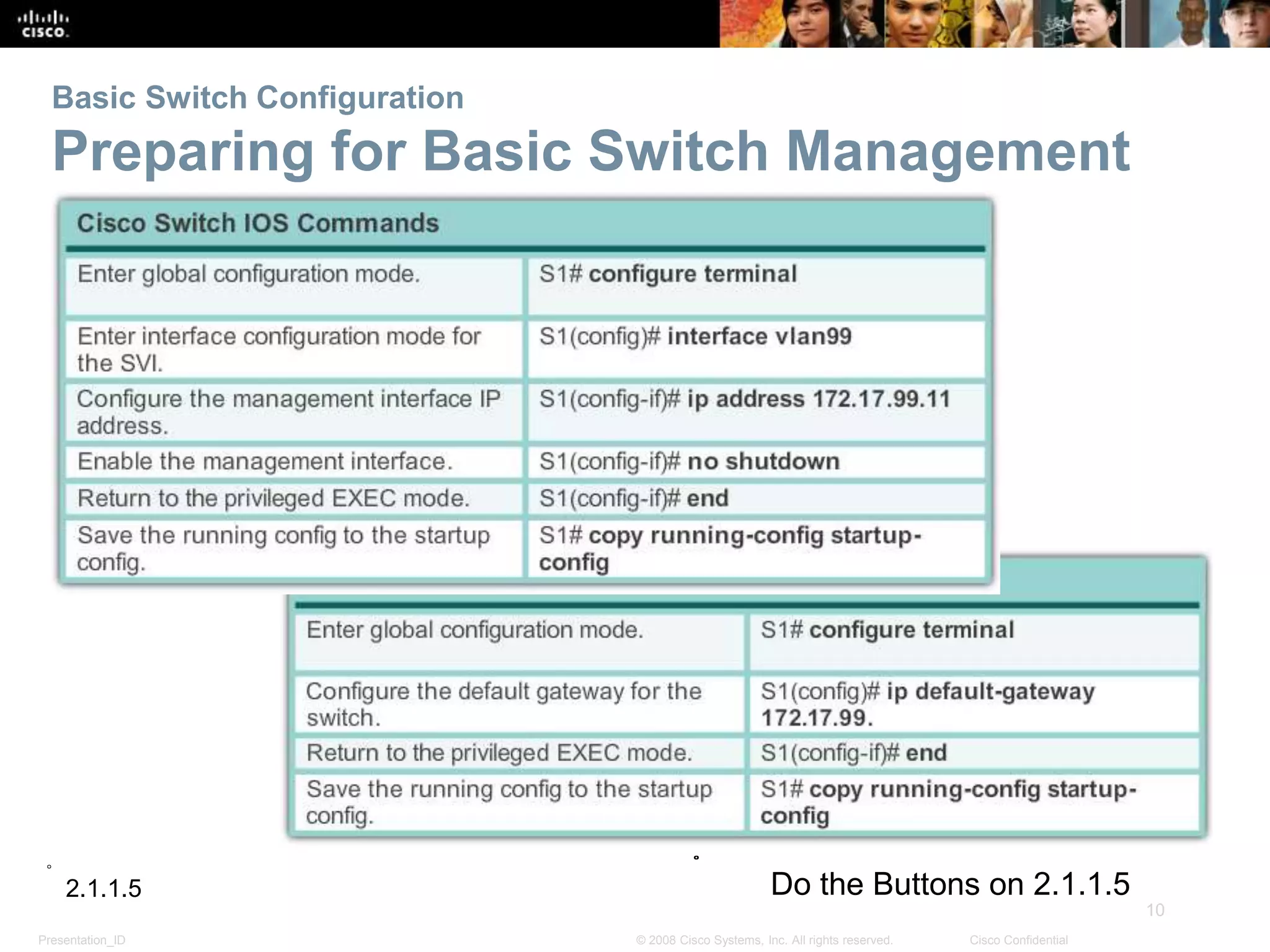
Basic Switch Configuration
Preparing for Basic Switch Management
2.1.1.5 Do the Buttons on 2.1.1.5
Presentation_ID
11
© 2008 Cisco Systems, Inc. All rights reserved. Cisco Confidential
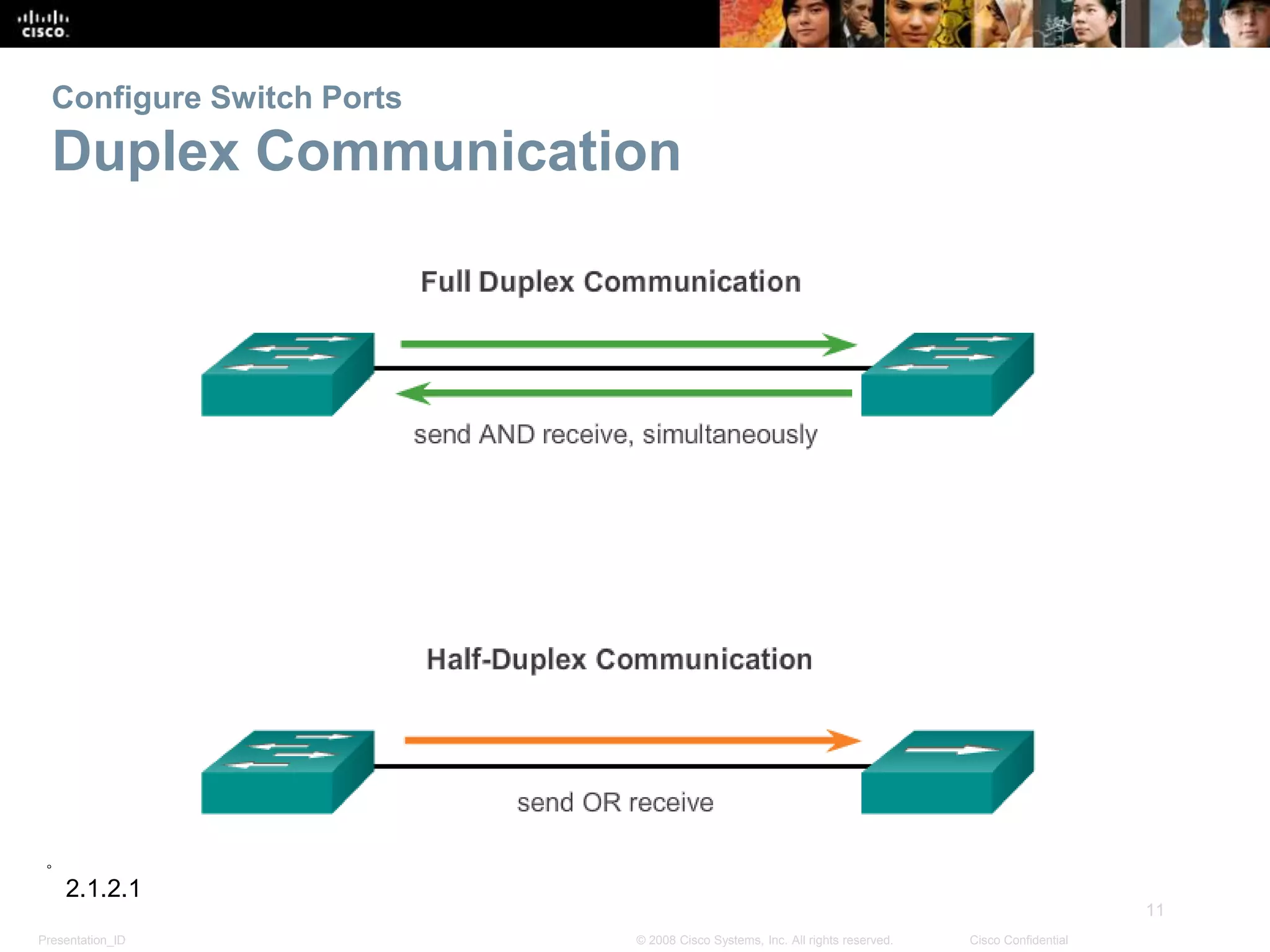
Configure Switch Ports
Duplex Communication
2.1.2.1
Presentation_ID
12
© 2008 Cisco Systems, Inc. All rights reserved. Cisco Confidential
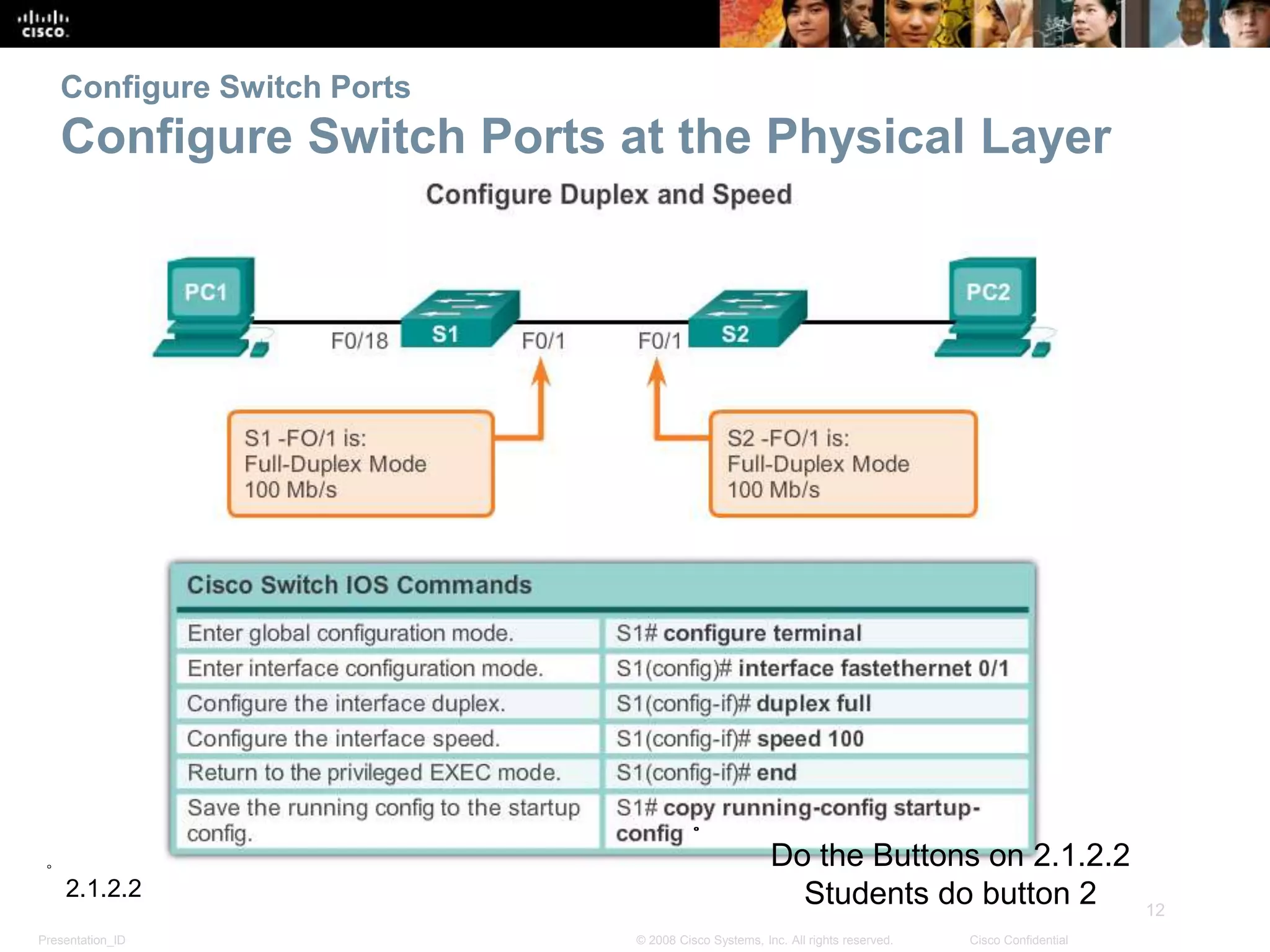
Configure Switch Ports
Configure Switch Ports at the Physical Layer
2.1.2.2
Do the Buttons on 2.1.2.2
Students do button 2
Presentation_ID
13
© 2008 Cisco Systems, Inc. All rights reserved. Cisco Confidential
Configure Switch Ports
MDIX Auto Feature
 Certain cable types (straight-through or crossover)
were required when connecting devices
 The automatic medium-dependent interface crossover
(auto-MDIX) feature eliminates this problem
 When auto-MDIX is enabled, the interface automatically
detects and configures the connection appropriately
 When using auto-MDIX on an interface, the interface
speed and duplex must be set to auto
2.1.2.3
Do the Buttons on 2.1.2.3
Students do button 3
Presentation_ID
14
© 2008 Cisco Systems, Inc. All rights reserved. Cisco Confidential
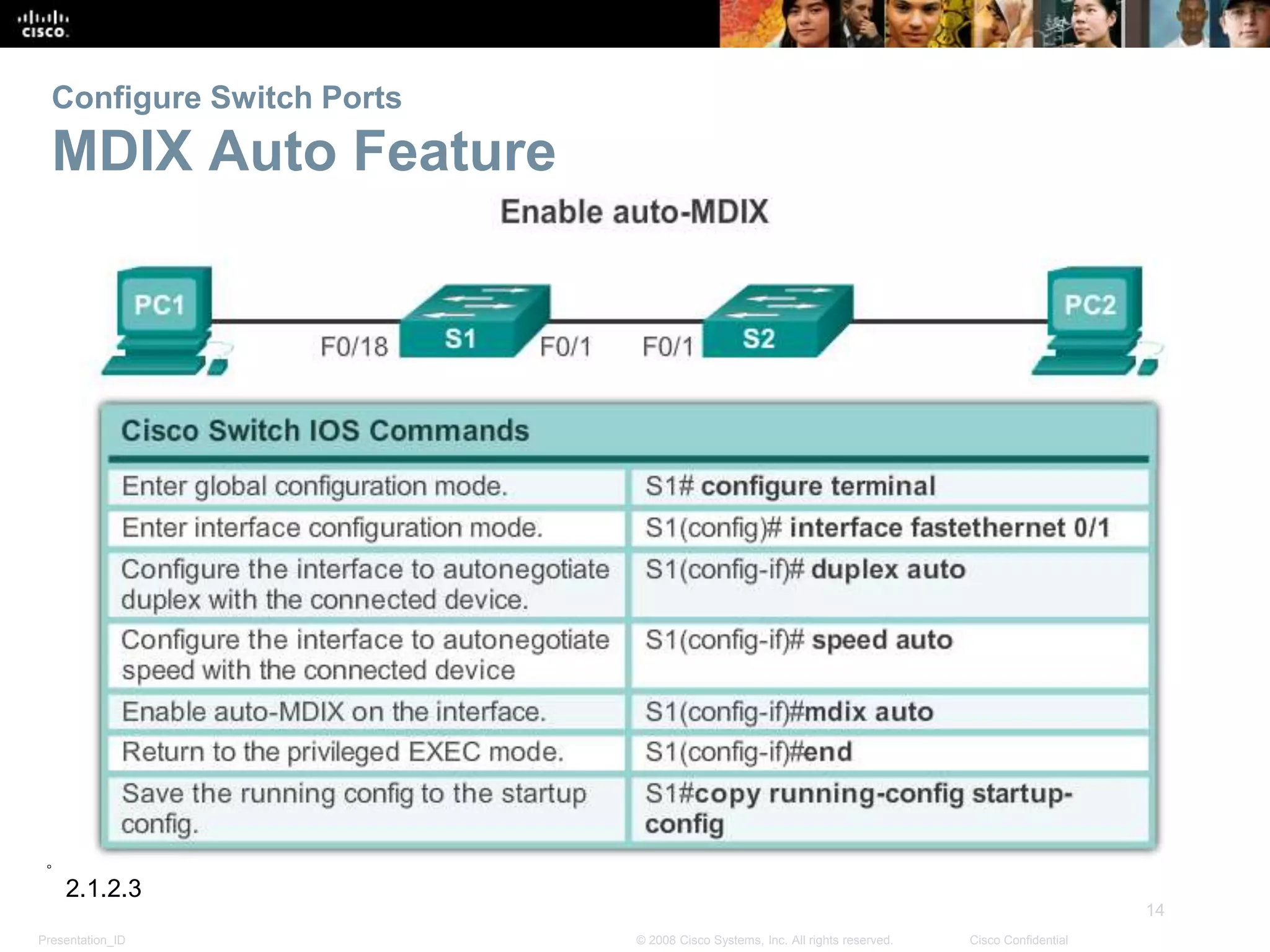
Configure Switch Ports
MDIX Auto Feature
2.1.2.3
Presentation_ID
15
© 2008 Cisco Systems, Inc. All rights reserved. Cisco Confidential
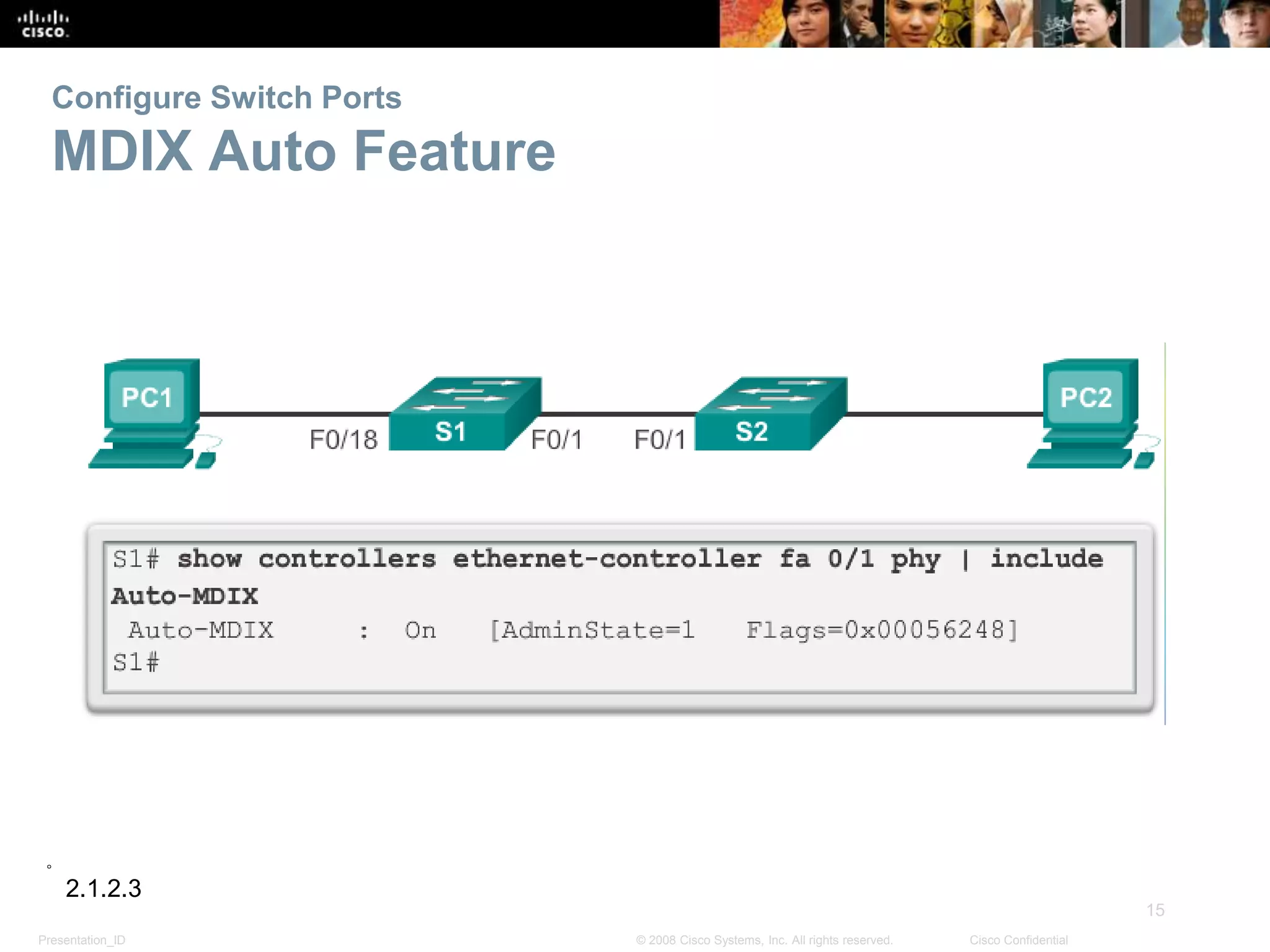
Configure Switch Ports
MDIX Auto Feature
2.1.2.3
Presentation_ID
16
© 2008 Cisco Systems, Inc. All rights reserved. Cisco Confidential
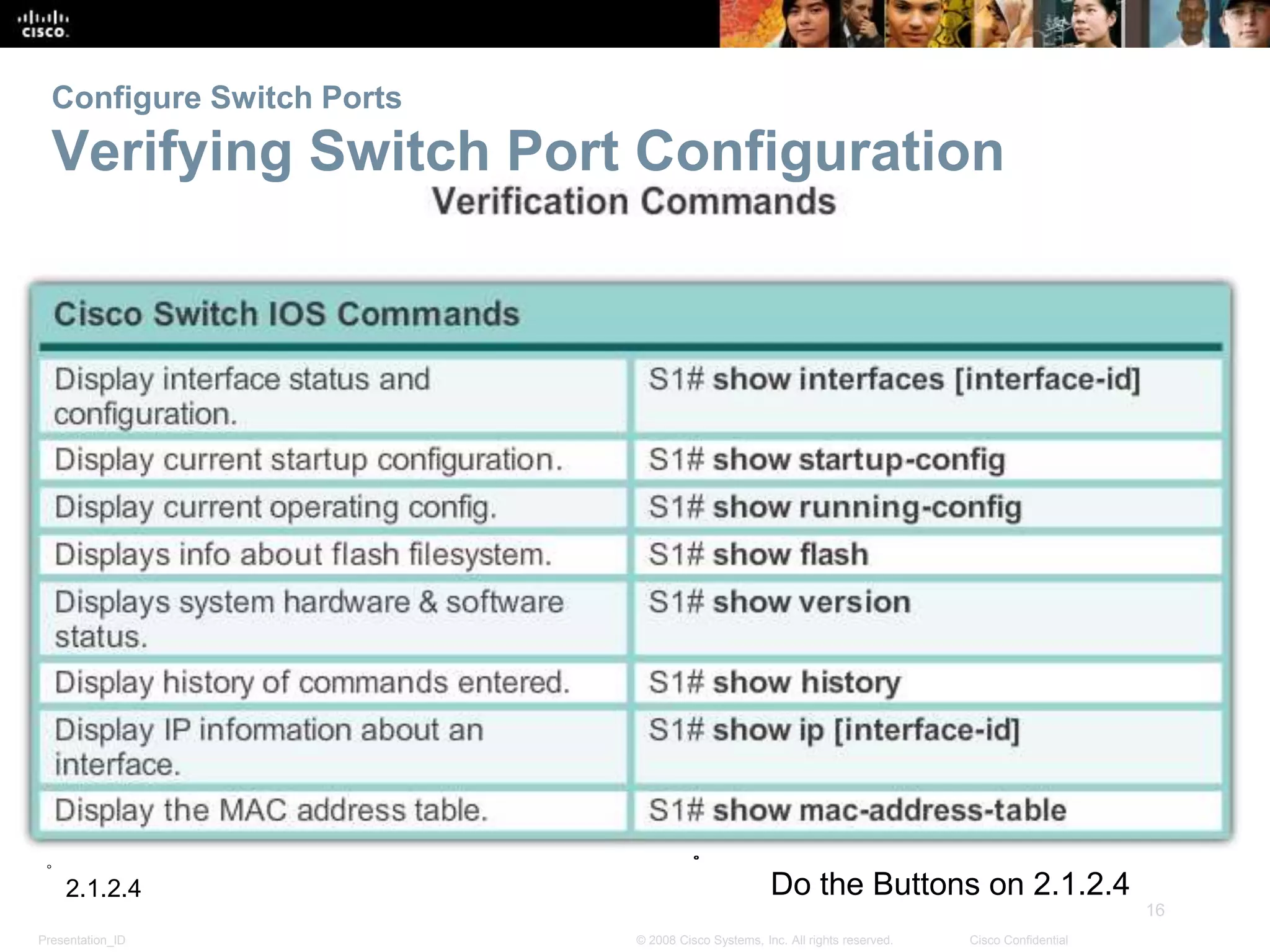
Configure Switch Ports
Verifying Switch Port Configuration
2.1.2.4 Do the Buttons on 2.1.2.4
Presentation_ID
17
© 2008 Cisco Systems, Inc. All rights reserved. Cisco Confidential
Configure Switch Ports
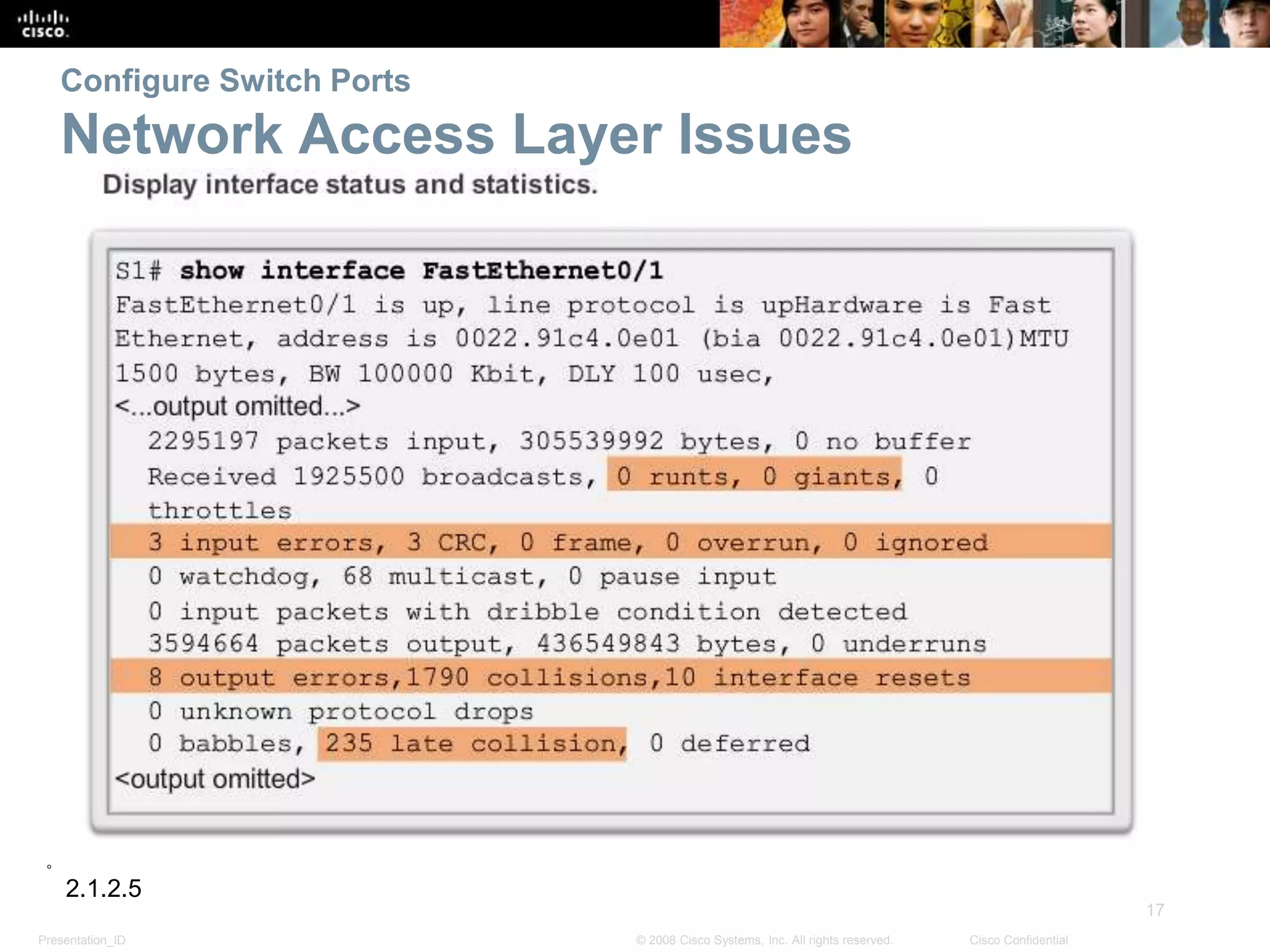
Network Access Layer Issues
2.1.2.5
Presentation_ID
18
© 2008 Cisco Systems, Inc. All rights reserved. Cisco Confidential
Configure Switch Ports
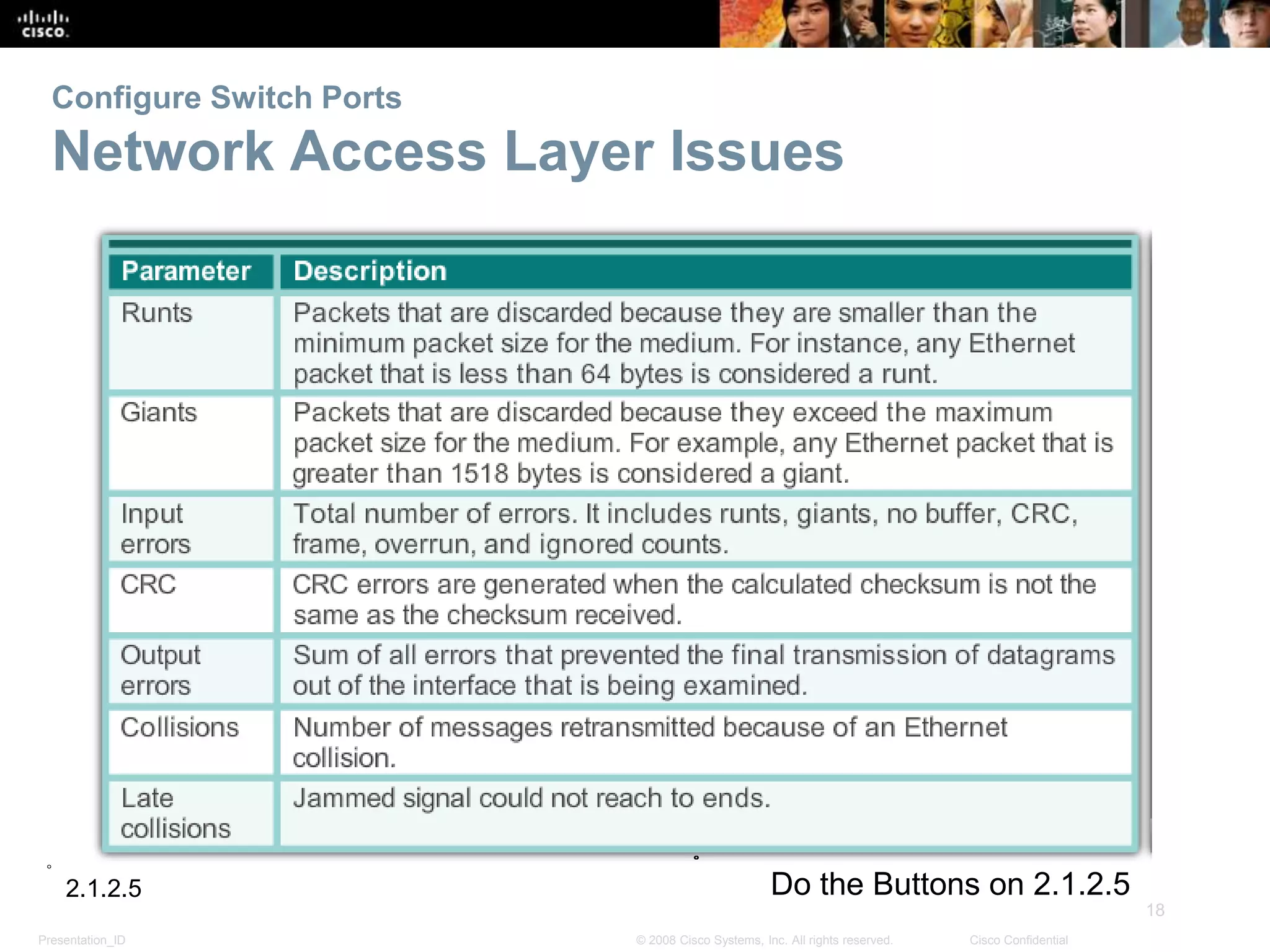
Network Access Layer Issues
2.1.2.5 Do the Buttons on 2.1.2.5
Presentation_ID
19
© 2008 Cisco Systems, Inc. All rights reserved. Cisco Confidential
Configure Switch Ports
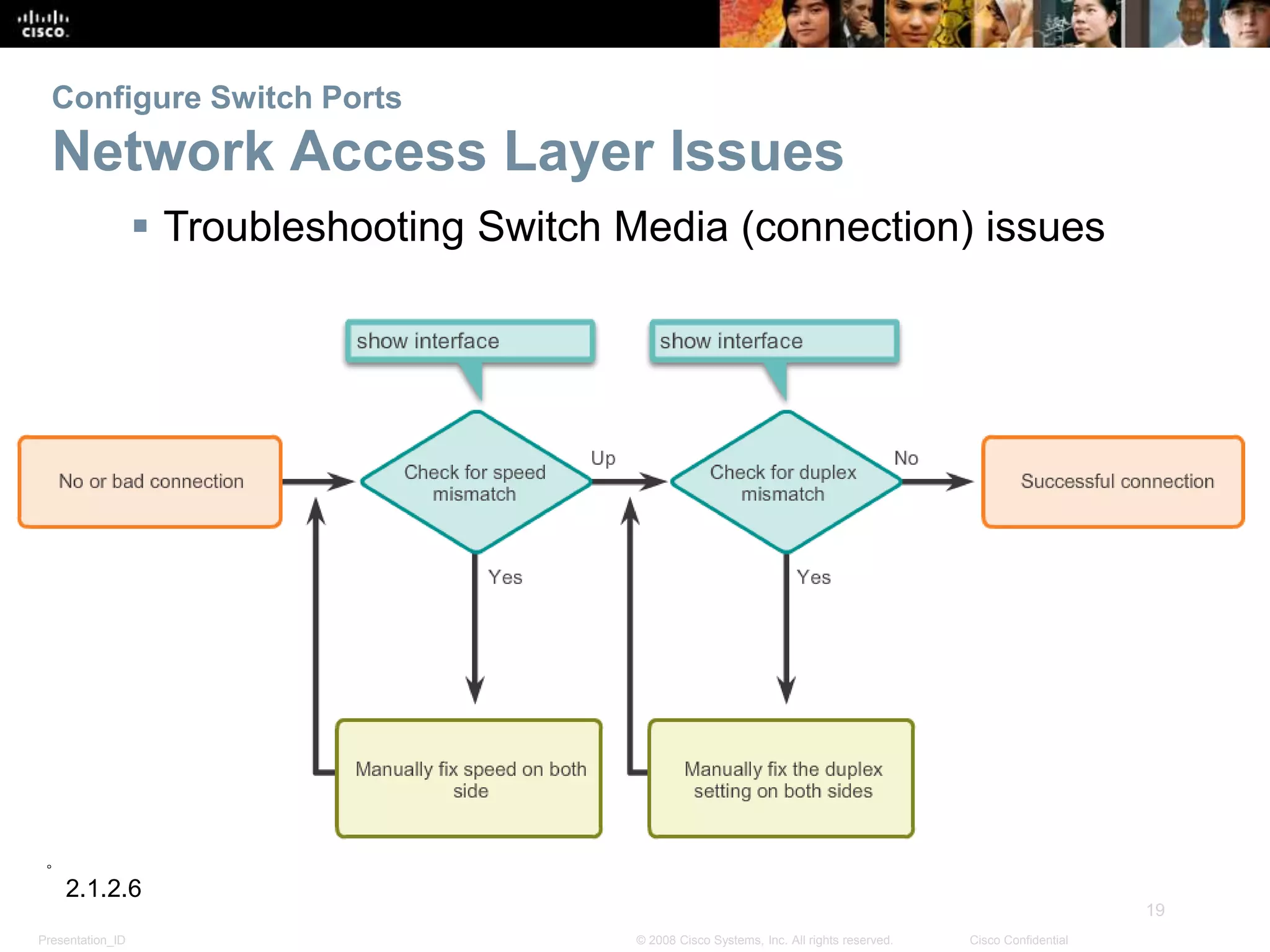
Network Access Layer Issues
 Troubleshooting Switch Media (connection) issues
2.1.2.6
Presentation_ID
20
© 2008 Cisco Systems, Inc. All rights reserved. Cisco Confidential
Configure Switch Ports
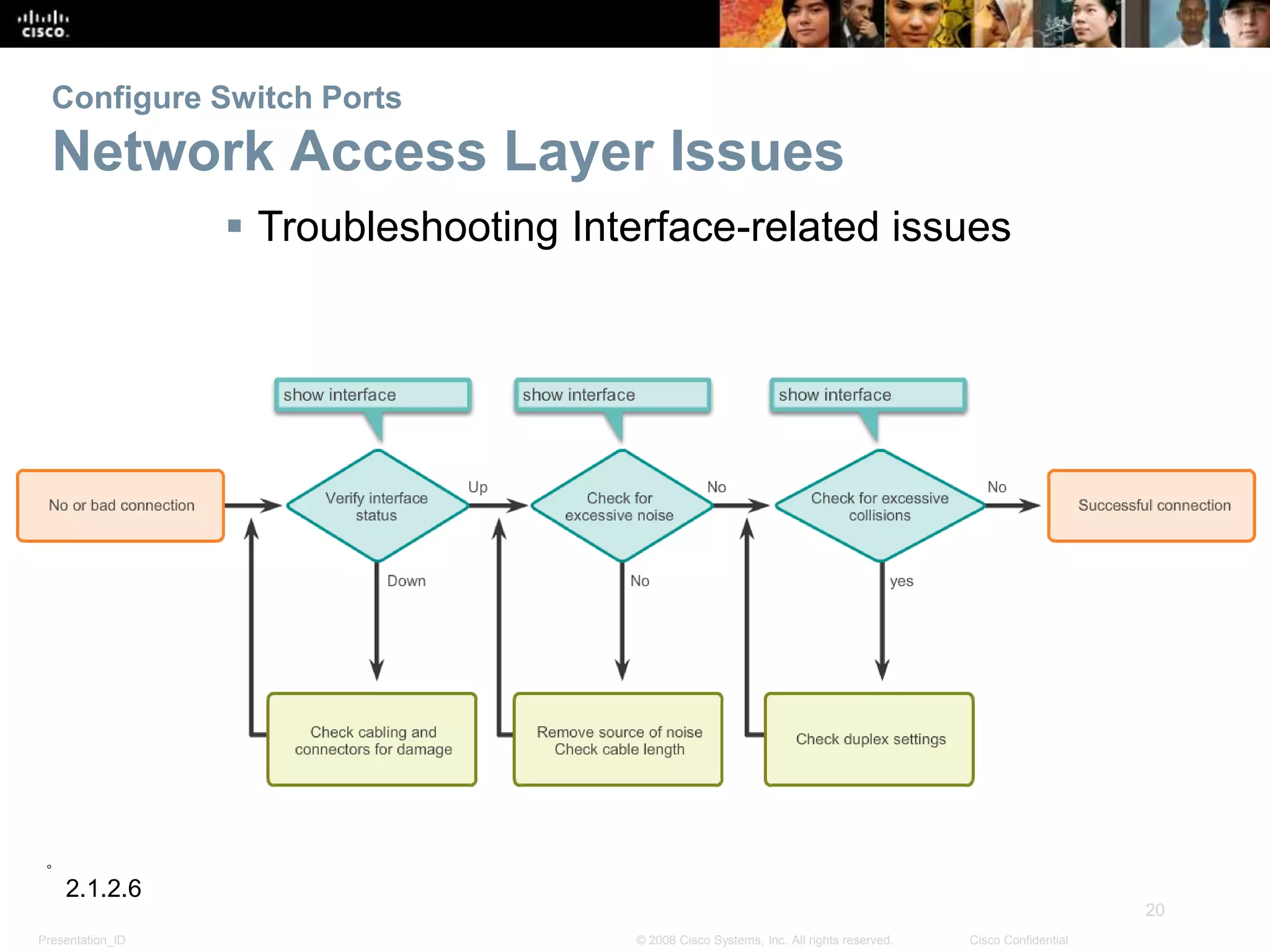
Network Access Layer Issues
 Troubleshooting Interface-related issues
2.1.2.6
Presentation_ID
21
© 2008 Cisco Systems, Inc. All rights reserved. Cisco Confidential
Tada!

PC111.Lesson2

  • 1.
    © 2008 CiscoSystems, Inc. All rights reserved. Cisco Confidential Presentation_ID 1 Chapter 2: Introduction to Switched Networks Routing And Switching 2.0
  • 2.
    Presentation_ID 2 © 2008 CiscoSystems, Inc. All rights reserved. Cisco Confidential Chapter 2 2.0 Introduction 2.1 Basic Switch Configuration 2.2 Switch Security: Management and Implementation 2.0
  • 3.
    Presentation_ID 3 © 2008 CiscoSystems, Inc. All rights reserved. Cisco Confidential Chapter 2: Objectives  Explain the advantages and disadvantages of static routing  Configure initial settings on a Cisco switch  Configure switch ports to meet network requirements  Configure the management switch virtual interface  Describe basic security attacks in a switched environment  Describe security best practices in a switched environment  Configure the port security feature to restrict network access 2.0.1.1
  • 4.
    Presentation_ID 4 © 2008 CiscoSystems, Inc. All rights reserved. Cisco Confidential Basic Switch Configuration Switch Boot Sequence 1. POST 2. Run boot loader software 3. Boot loader does low-level CPU initialization 4. Boot loader initializes the flash filesystem 5. Boot loader locates and loads a default IOS operating system software image into memory and hands control of the switch over to the IOS. 2.0.1.1
  • 5.
    Presentation_ID 5 © 2008 CiscoSystems, Inc. All rights reserved. Cisco Confidential Basic Switch Configuration Switch Boot Sequence In order to find a suitable IOS image, the switch goes through the following steps: 1. It attempts to automatically boot by using information in the BOOT environment variable 2. If this variable is not set, the switch performs a top-to- bottom search through the flash file system. It will load and execute the first executable file, if it can. 3. The IOS operating system then initializes the interfaces using the Cisco IOS commands found in the configuration file, startup configuration, which is stored in NVRAM. Note: the command boot system can be used to set the BOOT environment variable. 2.1.1.1
  • 6.
    Presentation_ID 6 © 2008 CiscoSystems, Inc. All rights reserved. Cisco Confidential Basic Switch Configuration Recovering From a System Crash  The boot loader can also be used to manage the switch if the IOS can’t be loaded.  The boot loader can be accessed through a console connection by: 1. Connect a PC by console cable to the switch console port. Unplug the switch power cord. 2. Reconnect the power cord to the switch and press and hold down the Mode button. 3. The System LED turns briefly amber and then solid green. Release the Mode button.  The boot loader switch:prompt appears in the terminal emulation software on the PC. 2.1.1.2
  • 7.
    Presentation_ID 7 © 2008 CiscoSystems, Inc. All rights reserved. Cisco Confidential Basic Switch Configuration Switch LED Indicators  Each port on Cisco Catalyst switches have status LED indicator lights.  By default these LED lights reflect port activity but they can also provide other information about the switch through the Mode button  The following modes are available on Cisco Catalyst 2960 switches: System LED Redundant Power System (RPS) LED Port Status LED Port Duplex LED Port Speed LED Power over Ethernet (PoE) Mode LED 2.1.1.3
  • 8.
    Presentation_ID 8 © 2008 CiscoSystems, Inc. All rights reserved. Cisco Confidential Basic Switch Configuration Switch LED Indicators  Cisco Catalyst 2960 switch modes 2.1.1.3
  • 9.
    Presentation_ID 9 © 2008 CiscoSystems, Inc. All rights reserved. Cisco Confidential Basic Switch Configuration Preparing for Basic Switch Management  In order to remotely manage a Cisco switch, it needs to be configured to access the network  An IP address and a subnet mask must be configured  If managing the switch from a remote network, a default gateway must also be configured  The IP information (address, subnet mask, gateway) is to be assigned to a switch SVI (switch virtual interface)  Although these IP settings allow remote management and remote access to the switch, they do not allow the switch to route Layer 3 packets. 2.1.1.4
  • 10.
    Presentation_ID 10 © 2008 CiscoSystems, Inc. All rights reserved. Cisco Confidential Basic Switch Configuration Preparing for Basic Switch Management 2.1.1.5 Do the Buttons on 2.1.1.5
  • 11.
    Presentation_ID 11 © 2008 CiscoSystems, Inc. All rights reserved. Cisco Confidential Configure Switch Ports Duplex Communication 2.1.2.1
  • 12.
    Presentation_ID 12 © 2008 CiscoSystems, Inc. All rights reserved. Cisco Confidential Configure Switch Ports Configure Switch Ports at the Physical Layer 2.1.2.2 Do the Buttons on 2.1.2.2 Students do button 2
  • 13.
    Presentation_ID 13 © 2008 CiscoSystems, Inc. All rights reserved. Cisco Confidential Configure Switch Ports MDIX Auto Feature  Certain cable types (straight-through or crossover) were required when connecting devices  The automatic medium-dependent interface crossover (auto-MDIX) feature eliminates this problem  When auto-MDIX is enabled, the interface automatically detects and configures the connection appropriately  When using auto-MDIX on an interface, the interface speed and duplex must be set to auto 2.1.2.3 Do the Buttons on 2.1.2.3 Students do button 3
  • 14.
    Presentation_ID 14 © 2008 CiscoSystems, Inc. All rights reserved. Cisco Confidential Configure Switch Ports MDIX Auto Feature 2.1.2.3
  • 15.
    Presentation_ID 15 © 2008 CiscoSystems, Inc. All rights reserved. Cisco Confidential Configure Switch Ports MDIX Auto Feature 2.1.2.3
  • 16.
    Presentation_ID 16 © 2008 CiscoSystems, Inc. All rights reserved. Cisco Confidential Configure Switch Ports Verifying Switch Port Configuration 2.1.2.4 Do the Buttons on 2.1.2.4
  • 17.
    Presentation_ID 17 © 2008 CiscoSystems, Inc. All rights reserved. Cisco Confidential Configure Switch Ports Network Access Layer Issues 2.1.2.5
  • 18.
    Presentation_ID 18 © 2008 CiscoSystems, Inc. All rights reserved. Cisco Confidential Configure Switch Ports Network Access Layer Issues 2.1.2.5 Do the Buttons on 2.1.2.5
  • 19.
    Presentation_ID 19 © 2008 CiscoSystems, Inc. All rights reserved. Cisco Confidential Configure Switch Ports Network Access Layer Issues  Troubleshooting Switch Media (connection) issues 2.1.2.6
  • 20.
    Presentation_ID 20 © 2008 CiscoSystems, Inc. All rights reserved. Cisco Confidential Configure Switch Ports Network Access Layer Issues  Troubleshooting Interface-related issues 2.1.2.6
  • 21.
    Presentation_ID 21 © 2008 CiscoSystems, Inc. All rights reserved. Cisco Confidential Tada!