Srinivasulu Rajendran
Centre for the Study of Regional Development (CSRD)
School of Social Sciences (SSS)
Jawaharlal Nehru University (JNU)
New Delhi - 110067
India
r.srinivasulu@gmail.com
Objective of the session
To understand the
fundamental
knowledge of
STATA/SPSS package
1. How do we decide better
software for the econometric
analysis
2. Why do we need SPSS and
STATA?
3. Introduction to STATA/SPSS
and Differences
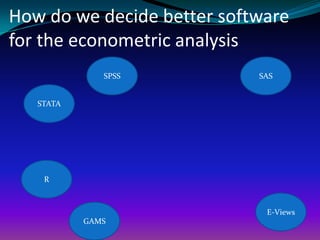
How do we decide better software
for the econometric analysis
STATA
E-Views
GAMS
SPSS SAS
R
It depends on
your analysis
Most preferred Packages for the
relevant analysis based on
Literature
 Descriptive Statistics - SPSS
 Cross section , Time series and panel data and
Complex Data Management system – STATA and SAS
 Advanced Econometrics analysis – STATA
 Advanced Econometrics Analysis - Linear
Programming – R
 Time series analysis - Eviews
 Qualitative Limited Dependent Variable Analysis -
STATA
Why do we need SPSS?
SPSS is the statistical
package most widely
used by political
scientists NOT by
econometrician. There
are several reasons for
why
It is easier to handle and widely used for descriptive
statistics and basic statistical analysis.
One can use it with either a Windows point-and-
click approach or through syntax (i.e., writing out of
SPSS commands). Each has its own advantages, and
the user can switch between the approaches.
Many of the widely used social science data sets
come with SPSS format; this significantly reduces the
work load for transferring the data into SPSS format.
Source: Harvard-MIT Center
Limitations
 Firstly, SPSS users have less control over statistical output than
many other packages
 For beginner , this hardly causes a problem, but once a
researcher wants greater control over the equations or the
output, she or he will need to either choose another package or
learn techniques for working around on SPSS Limitations.
 Secondly, SPSS has problems with certain types of data
manipulations But once a researcher begins wanting to
significantly alter data sets, he/she will have to either learn a new
package or develop greater skills at manipulating SPSS.
 Source: Harvard-MIT Center
Overall, SPSS is a friendly
package for beginner users
NOT for EXPERTS in the field
of ECONOMETRICS.
Why do we need STATA?
 “STATA is ideal for people who are developing
or modifying statistical procedures…” Acock
(2005)
 STATA is adequate on basic analysis but
extraordinary on multivariate
analysis, complex survey designs, limited
dependent variables, epidemiological
methods, survival analysis, panel
designs, time series, and diagnostics
 STATA - fast and clear
 Can handle large dataset with quick output
Cont.,
 STATA have the strongest collection of advanced
statistical procedures.
 STATA has a command structure that is simple and
consistent
 The consistency of STATA is impressive
 User-developed procedures can be installed over the
Internet without leaving STATA
 The expandability of STATA is its special strength
 The documentation for STATA is excellent, and the
ability to download data sets that are used in the
examples in the documentation is very helpful
 More information – reference course manual.
Introduction to SPSS
 SPSS (Statistical Package for the Social Sciences) is a
statistical analysis and data management software
package. It can generate tabulated reports, charts, and
plots of distributions and trends, descriptive
statistics, and conduct complex statistical analyses.
More details in SPSS manual
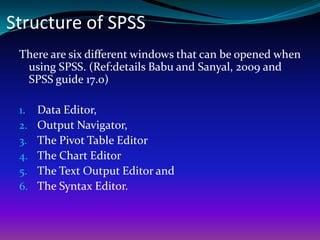
Structure of SPSS
There are six different windows that can be opened when
using SPSS. (Ref:details Babu and Sanyal, 2009 and
SPSS guide 17.0)
1. Data Editor,
2. Output Navigator,
3. The Pivot Table Editor
4. The Chart Editor
5. The Text Output Editor and
6. The Syntax Editor.
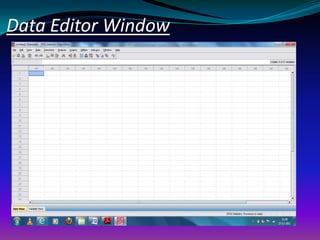
Data Editor Window
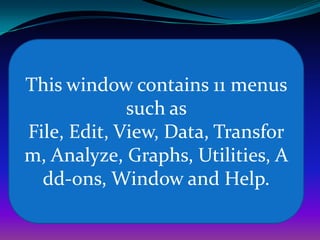
This window contains 11 menus
such as
File, Edit, View, Data, Transfor
m, Analyze, Graphs, Utilities, A
dd-ons, Window and Help.
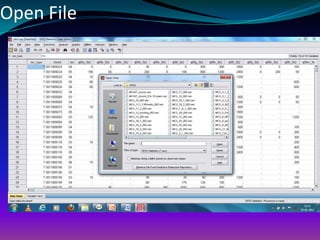
Open File
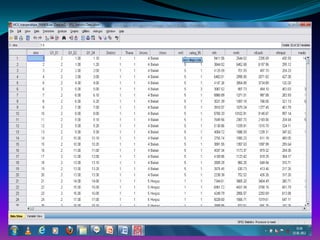
Data Editor
 In the Data Editor, if you put the mouse cursor on a
variable name (the column heading), a more
descriptive variable label is displayed (if a label has
been defined for that variable).
 Further, to view the label one can also choose the
“view” and “value labels”. Descriptive value labels are
now displayed to make it easier to interpret the
responses.
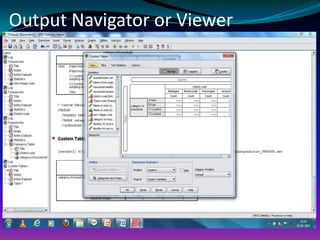
Output Navigator or Viewer
 The Output Navigator window displays the statistical
results, tables, and charts from the analysis you
performed.
 An Output Navigator window opens automatically
when you run a procedure that generates output
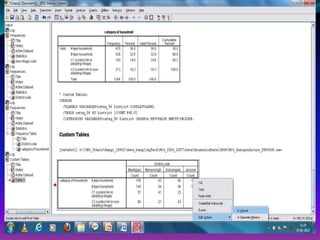
 In the Output Navigator windows, you can
edit, move, delete and copy your results in a Microsoft
Explorer-like environment.
 Running a Analysis
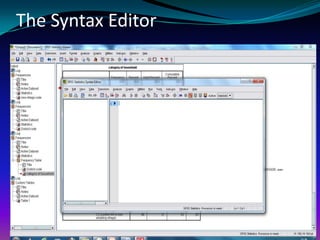
The Syntax Editor
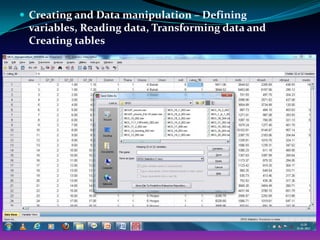
 Creating and Data manipulation – Defining
variables, Reading data, Transforming data and
Creating tables
Introduction to STATA
 Stata is a general-purpose statistical software
package created in 1985 by StataCorp.
There are four major builds of each
version of Stata
1. Stata/MP for multiprocessor
computers,
2. Stata/SE for large databases,
3. Stata/IC which is the standard
version,
4. Small Stata which is a
smaller, student version of
educational purchase only
STATA MP
Stata/MP is the fastest and
largest version of Stata.
Stata/SE, Stata/IC, and Small
Stata differ only in the
dataset size that each can
analyze.
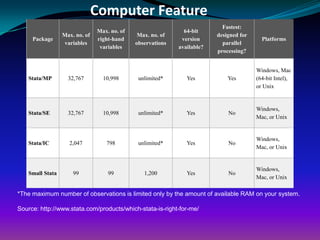
Computer Feature
Package
Max. no. of
variables
Max. no. of
right-hand
variables
Max. no. of
observations
64-bit
version
available?
Fastest:
designed for
parallel
processing?
Platforms
Stata/MP 32,767 10,998 unlimited* Yes Yes
Windows, Mac
(64-bit Intel),
or Unix
Stata/SE 32,767 10,998 unlimited* Yes No
Windows,
Mac, or Unix
Stata/IC 2,047 798 unlimited* Yes No
Windows,
Mac, or Unix
Small Stata 99 99 1,200 Yes No
Windows,
Mac, or Unix
*The maximum number of observations is limited only by the amount of available RAM on your system.
Source: http://www.stata.com/products/which-stata-is-right-for-me/
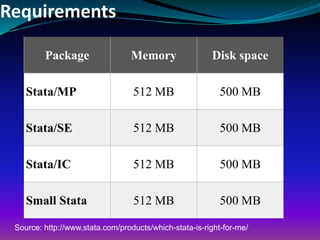
Requirements
Package Memory Disk space
Stata/MP 512 MB 500 MB
Stata/SE 512 MB 500 MB
Stata/IC 512 MB 500 MB
Small Stata 512 MB 500 MB
Source: http://www.stata.com/products/which-stata-is-right-for-me/

Topic 4 intro spss_stata

  • 1.
    Srinivasulu Rajendran Centre forthe Study of Regional Development (CSRD) School of Social Sciences (SSS) Jawaharlal Nehru University (JNU) New Delhi - 110067 India r.srinivasulu@gmail.com
  • 2.
    Objective of thesession To understand the fundamental knowledge of STATA/SPSS package
  • 3.
    1. How dowe decide better software for the econometric analysis 2. Why do we need SPSS and STATA? 3. Introduction to STATA/SPSS and Differences
  • 4.
    How do wedecide better software for the econometric analysis STATA E-Views GAMS SPSS SAS R
  • 5.
  • 6.
    Most preferred Packagesfor the relevant analysis based on Literature  Descriptive Statistics - SPSS  Cross section , Time series and panel data and Complex Data Management system – STATA and SAS  Advanced Econometrics analysis – STATA  Advanced Econometrics Analysis - Linear Programming – R  Time series analysis - Eviews  Qualitative Limited Dependent Variable Analysis - STATA
  • 7.
    Why do weneed SPSS? SPSS is the statistical package most widely used by political scientists NOT by econometrician. There are several reasons for why
  • 8.
    It is easierto handle and widely used for descriptive statistics and basic statistical analysis. One can use it with either a Windows point-and- click approach or through syntax (i.e., writing out of SPSS commands). Each has its own advantages, and the user can switch between the approaches. Many of the widely used social science data sets come with SPSS format; this significantly reduces the work load for transferring the data into SPSS format. Source: Harvard-MIT Center
  • 9.
    Limitations  Firstly, SPSSusers have less control over statistical output than many other packages  For beginner , this hardly causes a problem, but once a researcher wants greater control over the equations or the output, she or he will need to either choose another package or learn techniques for working around on SPSS Limitations.  Secondly, SPSS has problems with certain types of data manipulations But once a researcher begins wanting to significantly alter data sets, he/she will have to either learn a new package or develop greater skills at manipulating SPSS.  Source: Harvard-MIT Center
  • 10.
    Overall, SPSS isa friendly package for beginner users NOT for EXPERTS in the field of ECONOMETRICS.
  • 11.
    Why do weneed STATA?  “STATA is ideal for people who are developing or modifying statistical procedures…” Acock (2005)  STATA is adequate on basic analysis but extraordinary on multivariate analysis, complex survey designs, limited dependent variables, epidemiological methods, survival analysis, panel designs, time series, and diagnostics  STATA - fast and clear  Can handle large dataset with quick output
  • 12.
    Cont.,  STATA havethe strongest collection of advanced statistical procedures.  STATA has a command structure that is simple and consistent  The consistency of STATA is impressive  User-developed procedures can be installed over the Internet without leaving STATA  The expandability of STATA is its special strength  The documentation for STATA is excellent, and the ability to download data sets that are used in the examples in the documentation is very helpful  More information – reference course manual.
  • 13.
    Introduction to SPSS SPSS (Statistical Package for the Social Sciences) is a statistical analysis and data management software package. It can generate tabulated reports, charts, and plots of distributions and trends, descriptive statistics, and conduct complex statistical analyses. More details in SPSS manual
  • 14.
    Structure of SPSS Thereare six different windows that can be opened when using SPSS. (Ref:details Babu and Sanyal, 2009 and SPSS guide 17.0) 1. Data Editor, 2. Output Navigator, 3. The Pivot Table Editor 4. The Chart Editor 5. The Text Output Editor and 6. The Syntax Editor.
  • 15.
  • 16.
    This window contains11 menus such as File, Edit, View, Data, Transfor m, Analyze, Graphs, Utilities, A dd-ons, Window and Help.
  • 17.
  • 18.
    Data Editor  Inthe Data Editor, if you put the mouse cursor on a variable name (the column heading), a more descriptive variable label is displayed (if a label has been defined for that variable).  Further, to view the label one can also choose the “view” and “value labels”. Descriptive value labels are now displayed to make it easier to interpret the responses.
  • 19.
    Output Navigator orViewer  The Output Navigator window displays the statistical results, tables, and charts from the analysis you performed.  An Output Navigator window opens automatically when you run a procedure that generates output  In the Output Navigator windows, you can edit, move, delete and copy your results in a Microsoft Explorer-like environment.  Running a Analysis
  • 21.
  • 22.
     Creating andData manipulation – Defining variables, Reading data, Transforming data and Creating tables
  • 23.
    Introduction to STATA Stata is a general-purpose statistical software package created in 1985 by StataCorp.
  • 24.
    There are fourmajor builds of each version of Stata 1. Stata/MP for multiprocessor computers, 2. Stata/SE for large databases, 3. Stata/IC which is the standard version, 4. Small Stata which is a smaller, student version of educational purchase only
  • 25.
    STATA MP Stata/MP isthe fastest and largest version of Stata. Stata/SE, Stata/IC, and Small Stata differ only in the dataset size that each can analyze.
  • 26.
    Computer Feature Package Max. no.of variables Max. no. of right-hand variables Max. no. of observations 64-bit version available? Fastest: designed for parallel processing? Platforms Stata/MP 32,767 10,998 unlimited* Yes Yes Windows, Mac (64-bit Intel), or Unix Stata/SE 32,767 10,998 unlimited* Yes No Windows, Mac, or Unix Stata/IC 2,047 798 unlimited* Yes No Windows, Mac, or Unix Small Stata 99 99 1,200 Yes No Windows, Mac, or Unix *The maximum number of observations is limited only by the amount of available RAM on your system. Source: http://www.stata.com/products/which-stata-is-right-for-me/
  • 27.
    Requirements Package Memory Diskspace Stata/MP 512 MB 500 MB Stata/SE 512 MB 500 MB Stata/IC 512 MB 500 MB Small Stata 512 MB 500 MB Source: http://www.stata.com/products/which-stata-is-right-for-me/