Charts and Graphs It is not length of life, but depth of life. Ralph Waldo Emerson  Gantt Chart Pert Chart Introduction to Microsoft Project Work breakdown structure
Introduction These charts are used for Strategic Management Project Management Project Management Application of knowledge, skills, tools and techniques for  project activities in order to meet or exceed stakeholder needs and expectation from a project.
Introduction Helps project manager and team in term of Scope management Time management Cost management Quality management Charts for project scheduling  Gantt Chart , also known as (Time Line Charts ) PERT chart  (Evaluation Review Technique)-network diagram.
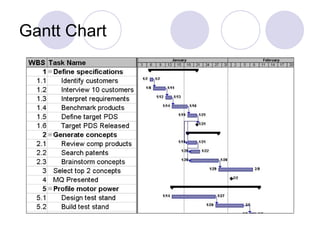
Gantt Chart A Gantt chart is a graphical representation of the duration of tasks against the progression of time.  useful tools for planning and scheduling projects.  allow you to assess how long a project should take.  lay out the order in which tasks need to be carried out.  help manage the dependencies between tasks.  determine the resources needed.
Advantages Gantt charts are useful tools when a project is under way.  monitor progress. You can immediately see what should have been achieved at a point in time. Show how remedial action may bring the project back on course.
Gantt Chart
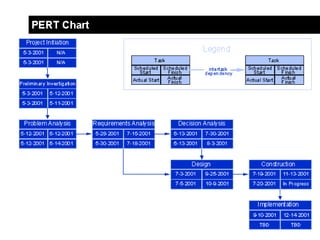
PERT chart "PERT" developed by the United States Department of Defense as a management tool for complex military projects is an acronym for "Program Evaluation and Review Technique".  This technique was soon adapted for used in educational research and evaluation. Through PERT, complex projects can be blueprinted as a network of activities and events (Activity Network Diagram).
PERT chart It is used for project scheduling. Pert charts allow software planners, or individuals to: Determine the critical path a project must follow.  Critical path  is the longest overall duration, determining the shortest time to complete the project   Establish most likely time estimates for individual task by applying statistical models.  Calculate boundary times that define a time ‘window’ for a particular task.
 
Project Management Software Among the project management software used to create charts and graph are: Microsoft Project Microsoft Visio
Microsoft Project Ikon Microsoft Project
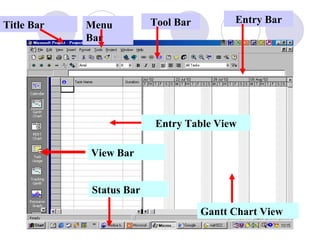
Title Bar Menu Bar Tool Bar Entry Bar View Bar Status   Bar Gantt Chart View Entry Table View
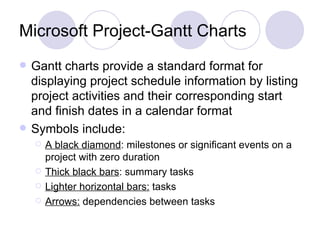
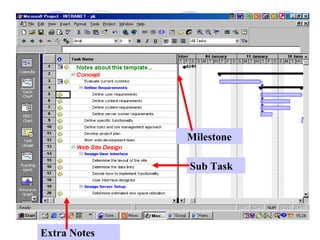
Microsoft Project-Gantt Charts Gantt charts provide a standard format for displaying project schedule information by listing project activities and their corresponding start and finish dates in a calendar format Symbols include: A black diamond : milestones or significant events on a project with zero duration Thick black bars : summary tasks Lighter horizontal bars:  tasks Arrows:  dependencies between tasks
Creating a Gantt Chart The Gantt chart is constructed with a horizontal axis representing the total time span of the project, broken down into increments (days, weeks, or months). constructed with a vertical axis representing the tasks that make up the project and constructed with a graph area which contains horizontal bars for each task connecting the period start and period ending symbols.
The Gantt chart also has variants such as:  Milestones:  important checkpoints or interim goals for a project Resources : for team projects, it often helps to have an additional column containing numbers or initials which identify who on the team is responsible for the task
Status : the projects progress, the chart is updated by filling in the task's bar to a length proportional to the amount of work that has been finished   Dependencies : an essential concept that some activities are dependent on other activities being completed first
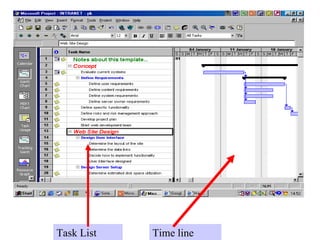
Task List Time line
Milestone Sub Task Extra Notes
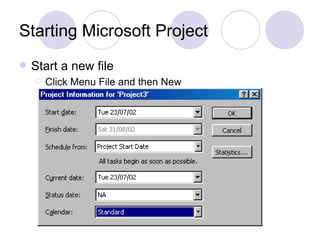
Starting Microsoft Project Start a new file Click Menu File and then New
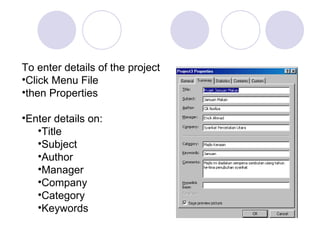
To enter details of the project Click Menu File then Properties Enter details on: Title Subject Author Manager Company Category Keywords
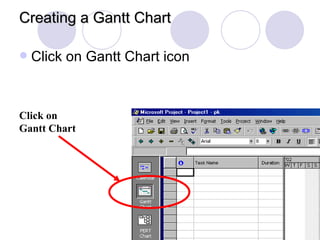
Creating a Gantt Chart Click on Gantt Chart icon Click on Gantt Chart
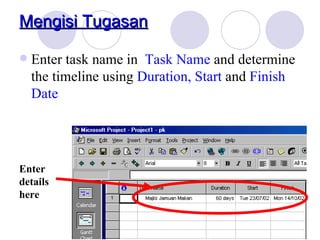
Enter task name in  Task Name  and determine the timeline using  Duration, Start  and  Finish Date Enter details here Mengisi Tugasan
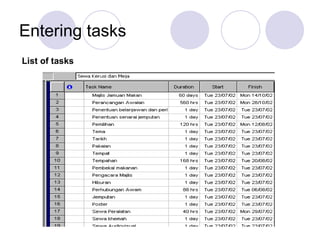
Entering tasks List of tasks
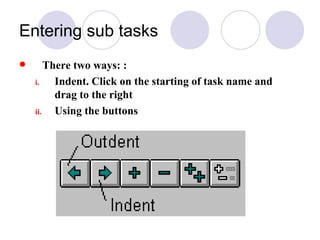
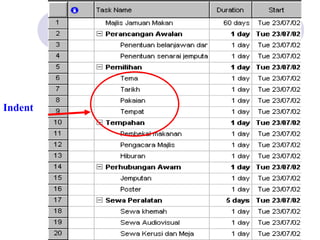
Entering sub tasks There two ways: : Indent. Click on the starting of task name and drag to the right Using the buttons
Indent
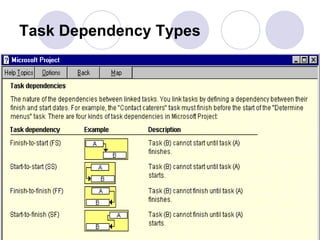
Task Dependency Types
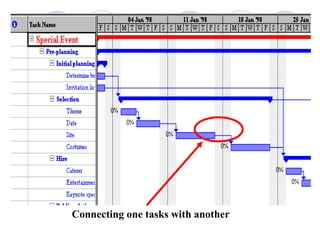
Connecting one tasks with another
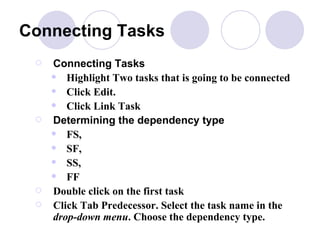
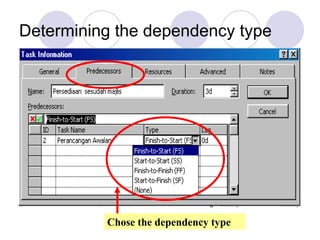
Connecting Tasks Connecting Tasks   Highlight Two tasks that is going to be connected  Click Edit.  Click Link Task Determining the dependency type FS,  SF,  SS,  FF Double click on the first task Click Tab Predecessor. Select the task name in the  drop-down menu . Choose the dependency type.
Determining the dependency type Chose the dependency type
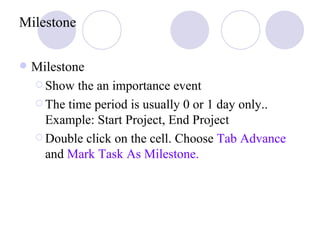
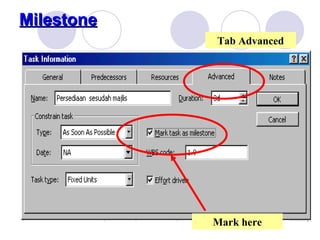
Milestone Milestone Show the an importance event The time period is usually 0 or 1 day only.. Example: Start Project, End Project Double click on the cell. Choose  Tab Advance  and  Mark Task As Milestone.
Milestone Tab Advanced Mark here
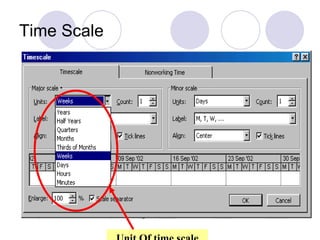
Time scale To change the Time scale For example days, weeks, months Click on  Format .  Choose Timescale .  Choose the time scale unit desired
Time Scale Unit Of time scale                                                                                                                                                   
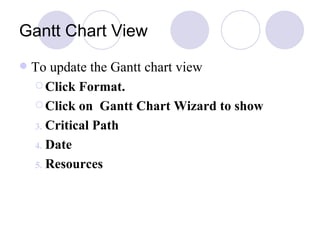
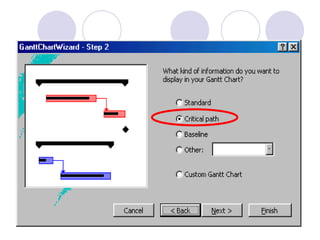
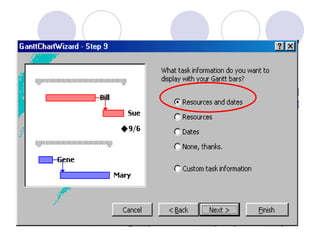
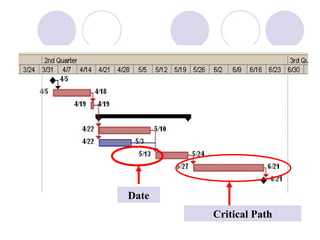
Gantt Chart View To update the Gantt chart view Click Format.  Click on  Gantt Chart Wizard to show  Critical Path  Date Resources
 
 
Critical Path Date                                                                                                                                   
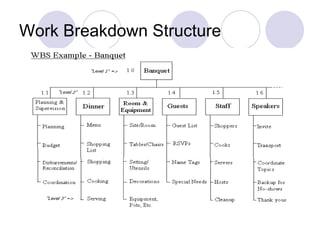
Work Breakdown Structure a results-oriented family tree that captures all the work of a project in an organized way  portrayed graphically as a hierarchical tree, tabular list of "element" and tasks or the indented task list that appears in Gantt chart schedule
Work Breakdown Structure
PERT Chart  Microsoft Project
Starting Pert Chart in Ms Project Click on  View.  Choose PERT Chart or Click on  PERT Chart icon on the left side of Ms Project window t
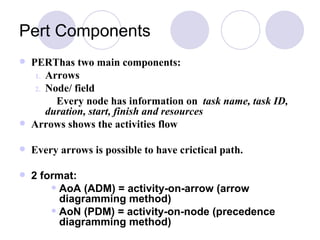
Pert Components PERThas two main components: Arrows Node/ field Every node has information on  task name, task ID, duration, start, finish and resources   Arrows shows the activities flow Every arrows is possible to have crictical path. 2 format: AoA (ADM) = activity-on-arrow (arrow diagramming method) AoN (PDM) = activity-on-node (precedence diagramming method)
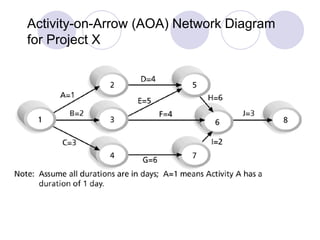
Activity-on-Arrow (AOA) Network Diagram for Project X
Arrow Diagramming Method (ADM) Known as activity-on-arrow (AOA) Every activities is presented by arrows Node shows the starting and finishing date
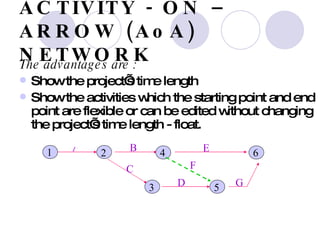
ACTIVITY - ON – ARROW (AoA) NETWORK The advantages are : Show the project’s time length  Show the activities which the starting point and end point are flexible or can be edited without changing the project’s time length - float.   1 A B C D E  F G 2 4 6 3 5
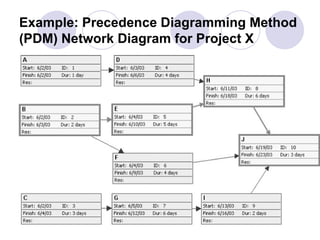
Precedence Diagramming Method (PDM) Activities are presented by boxes Arrows show the dependency between activities  More popular compared to ADM (AOA) Better in showing different types of dependencies
Creating PERT Chart Creating PERT  chart Determine the activities Determine the flow of the activities  Estimate the time for each activities  Prepare a time-scale chart for activities to determine the critical path
Example: Precedence Diagramming Method (PDM) Network Diagram for Project X
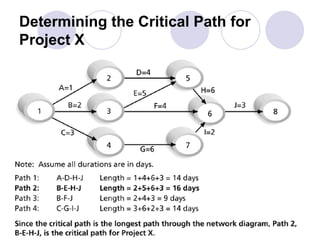
Critical Path the flow of activites that must be completed in order to complete the whole project  The delay in critical path will delayed the whole project.
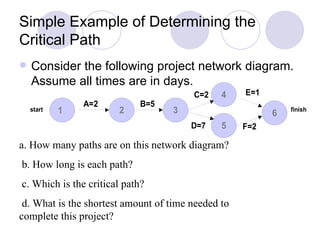
Simple Example of Determining the Critical Path Consider the following project network diagram.  Assume all times are in days. a. How many paths are on this network diagram? b. How long is each path? c. Which is the critical path? d. What is the shortest amount of time needed to  complete this project?
Determining the Critical Path for Project X
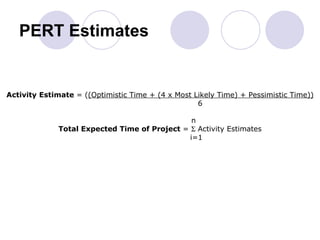
PERT Estimates Activity Estimate  = ( (Optimistic Time + (4 x Most Likely Time) + Pessimistic Time)) 6     n Total Expected Time of Project  =    Activity Estimates i=1
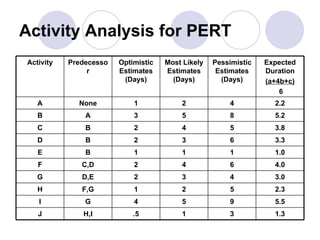
Activity Analysis for PERT 1.3 3 1 .5 H,I J 5.5 9 5 4 G I 2.3 5 2 1 F,G H 3.0 4 3 2 D,E G 4.0 6 4 2 C,D F 1.0 1 1 1 B E 3.3 6 3 2 B D 3.8 5 4 2 B C 5.2 8 5 3 A B 2.2 4 2 1 None A Expected Duration (a+4b+c) 6 Pessimistic Estimates (Days) Most Likely Estimates (Days) Optimistic Estimates (Days) Predecessor Activity
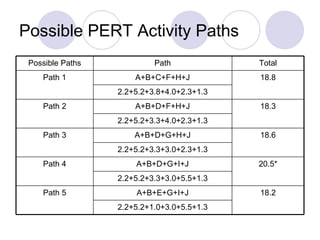
Possible PERT Activity Paths 18.2 A+B+E+G+I+J Path 5 2.2+5.2+1.0+3.0+5.5+1.3 2.2+5.2+3.3+3.0+5.5+1.3 20.5* A+B+D+G+I+J Path 4 2.2+5.2+3.3+3.0+2.3+1.3 18.6 A+B+D+G+H+J Path 3 2.2+5.2+3.3+4.0+2.3+1.3 18.3 A+B+D+F+H+J Path 2 2.2+5.2+3.8+4.0+2.3+1.3 18.8 A+B+C+F+H+J Path 1 Total Path Possible Paths

TID Chapter 6 Introduction To Microsoft Project

  • 1.
    Charts and GraphsIt is not length of life, but depth of life. Ralph Waldo Emerson Gantt Chart Pert Chart Introduction to Microsoft Project Work breakdown structure
  • 2.
    Introduction These chartsare used for Strategic Management Project Management Project Management Application of knowledge, skills, tools and techniques for project activities in order to meet or exceed stakeholder needs and expectation from a project.
  • 3.
    Introduction Helps projectmanager and team in term of Scope management Time management Cost management Quality management Charts for project scheduling Gantt Chart , also known as (Time Line Charts ) PERT chart (Evaluation Review Technique)-network diagram.
  • 4.
    Gantt Chart AGantt chart is a graphical representation of the duration of tasks against the progression of time. useful tools for planning and scheduling projects. allow you to assess how long a project should take. lay out the order in which tasks need to be carried out. help manage the dependencies between tasks. determine the resources needed.
  • 5.
    Advantages Gantt chartsare useful tools when a project is under way. monitor progress. You can immediately see what should have been achieved at a point in time. Show how remedial action may bring the project back on course.
  • 6.
  • 7.
    PERT chart "PERT"developed by the United States Department of Defense as a management tool for complex military projects is an acronym for "Program Evaluation and Review Technique". This technique was soon adapted for used in educational research and evaluation. Through PERT, complex projects can be blueprinted as a network of activities and events (Activity Network Diagram).
  • 8.
    PERT chart Itis used for project scheduling. Pert charts allow software planners, or individuals to: Determine the critical path a project must follow. Critical path is the longest overall duration, determining the shortest time to complete the project Establish most likely time estimates for individual task by applying statistical models. Calculate boundary times that define a time ‘window’ for a particular task.
  • 9.
  • 10.
    Project Management SoftwareAmong the project management software used to create charts and graph are: Microsoft Project Microsoft Visio
  • 11.
    Microsoft Project IkonMicrosoft Project
  • 12.
    Title Bar MenuBar Tool Bar Entry Bar View Bar Status Bar Gantt Chart View Entry Table View
  • 13.
    Microsoft Project-Gantt ChartsGantt charts provide a standard format for displaying project schedule information by listing project activities and their corresponding start and finish dates in a calendar format Symbols include: A black diamond : milestones or significant events on a project with zero duration Thick black bars : summary tasks Lighter horizontal bars: tasks Arrows: dependencies between tasks
  • 14.
    Creating a GanttChart The Gantt chart is constructed with a horizontal axis representing the total time span of the project, broken down into increments (days, weeks, or months). constructed with a vertical axis representing the tasks that make up the project and constructed with a graph area which contains horizontal bars for each task connecting the period start and period ending symbols.
  • 15.
    The Gantt chartalso has variants such as: Milestones: important checkpoints or interim goals for a project Resources : for team projects, it often helps to have an additional column containing numbers or initials which identify who on the team is responsible for the task
  • 16.
    Status : theprojects progress, the chart is updated by filling in the task's bar to a length proportional to the amount of work that has been finished  Dependencies : an essential concept that some activities are dependent on other activities being completed first
  • 17.
  • 18.
    Milestone Sub TaskExtra Notes
  • 19.
    Starting Microsoft ProjectStart a new file Click Menu File and then New
  • 20.
    To enter detailsof the project Click Menu File then Properties Enter details on: Title Subject Author Manager Company Category Keywords
  • 21.
    Creating a GanttChart Click on Gantt Chart icon Click on Gantt Chart
  • 22.
    Enter task namein Task Name and determine the timeline using Duration, Start and Finish Date Enter details here Mengisi Tugasan
  • 23.
  • 24.
    Entering sub tasksThere two ways: : Indent. Click on the starting of task name and drag to the right Using the buttons
  • 25.
  • 26.
  • 27.
  • 28.
    Connecting Tasks ConnectingTasks Highlight Two tasks that is going to be connected Click Edit. Click Link Task Determining the dependency type FS, SF, SS, FF Double click on the first task Click Tab Predecessor. Select the task name in the drop-down menu . Choose the dependency type.
  • 29.
    Determining the dependencytype Chose the dependency type
  • 30.
    Milestone Milestone Showthe an importance event The time period is usually 0 or 1 day only.. Example: Start Project, End Project Double click on the cell. Choose Tab Advance and Mark Task As Milestone.
  • 31.
  • 32.
    Time scale Tochange the Time scale For example days, weeks, months Click on Format . Choose Timescale . Choose the time scale unit desired
  • 33.
    Time Scale UnitOf time scale                                                                                                                                                   
  • 34.
    Gantt Chart ViewTo update the Gantt chart view Click Format. Click on Gantt Chart Wizard to show Critical Path Date Resources
  • 35.
  • 36.
  • 37.
    Critical Path Date                                                                                                                                  
  • 38.
    Work Breakdown Structurea results-oriented family tree that captures all the work of a project in an organized way portrayed graphically as a hierarchical tree, tabular list of "element" and tasks or the indented task list that appears in Gantt chart schedule
  • 39.
  • 40.
    PERT Chart Microsoft Project
  • 41.
    Starting Pert Chartin Ms Project Click on View. Choose PERT Chart or Click on PERT Chart icon on the left side of Ms Project window t
  • 42.
    Pert Components PERThastwo main components: Arrows Node/ field Every node has information on task name, task ID, duration, start, finish and resources Arrows shows the activities flow Every arrows is possible to have crictical path. 2 format: AoA (ADM) = activity-on-arrow (arrow diagramming method) AoN (PDM) = activity-on-node (precedence diagramming method)
  • 43.
    Activity-on-Arrow (AOA) NetworkDiagram for Project X
  • 44.
    Arrow Diagramming Method(ADM) Known as activity-on-arrow (AOA) Every activities is presented by arrows Node shows the starting and finishing date
  • 45.
    ACTIVITY - ON– ARROW (AoA) NETWORK The advantages are : Show the project’s time length Show the activities which the starting point and end point are flexible or can be edited without changing the project’s time length - float. 1 A B C D E F G 2 4 6 3 5
  • 46.
    Precedence Diagramming Method(PDM) Activities are presented by boxes Arrows show the dependency between activities More popular compared to ADM (AOA) Better in showing different types of dependencies
  • 47.
    Creating PERT ChartCreating PERT chart Determine the activities Determine the flow of the activities Estimate the time for each activities Prepare a time-scale chart for activities to determine the critical path
  • 48.
    Example: Precedence DiagrammingMethod (PDM) Network Diagram for Project X
  • 49.
    Critical Path theflow of activites that must be completed in order to complete the whole project The delay in critical path will delayed the whole project.
  • 50.
    Simple Example ofDetermining the Critical Path Consider the following project network diagram. Assume all times are in days. a. How many paths are on this network diagram? b. How long is each path? c. Which is the critical path? d. What is the shortest amount of time needed to complete this project?
  • 51.
    Determining the CriticalPath for Project X
  • 52.
    PERT Estimates ActivityEstimate = ( (Optimistic Time + (4 x Most Likely Time) + Pessimistic Time)) 6 n Total Expected Time of Project =  Activity Estimates i=1
  • 53.
    Activity Analysis forPERT 1.3 3 1 .5 H,I J 5.5 9 5 4 G I 2.3 5 2 1 F,G H 3.0 4 3 2 D,E G 4.0 6 4 2 C,D F 1.0 1 1 1 B E 3.3 6 3 2 B D 3.8 5 4 2 B C 5.2 8 5 3 A B 2.2 4 2 1 None A Expected Duration (a+4b+c) 6 Pessimistic Estimates (Days) Most Likely Estimates (Days) Optimistic Estimates (Days) Predecessor Activity
  • 54.
    Possible PERT ActivityPaths 18.2 A+B+E+G+I+J Path 5 2.2+5.2+1.0+3.0+5.5+1.3 2.2+5.2+3.3+3.0+5.5+1.3 20.5* A+B+D+G+I+J Path 4 2.2+5.2+3.3+3.0+2.3+1.3 18.6 A+B+D+G+H+J Path 3 2.2+5.2+3.3+4.0+2.3+1.3 18.3 A+B+D+F+H+J Path 2 2.2+5.2+3.8+4.0+2.3+1.3 18.8 A+B+C+F+H+J Path 1 Total Path Possible Paths