Objective:
• The software system that
could be used in teaching and
learning process.
• Importance of Software in
computers.
The Software
as an
Educational
Resource
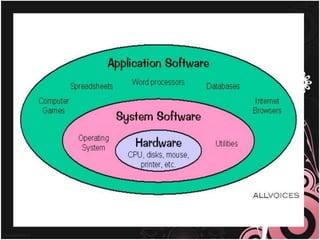
Software
 Is a general term for
the various kinds of
programs used to
operate computers and
related devices.
Microsoft Windows
 Also referred to as a
program, Microsoft
Windows or Windows
for short is an
operating between the
user and the computer
operating system.
•User Convenience
•A new look
•Information center
•Plug and play
Instructional Software
Instructional Software can be
visited on the Internet or can be
bought from software shops and
dealers. The teacher through his
school should decide on the
computer-based instructional
(CBI) materials for the school
resource collection.
In evaluating computer-based educational
materials, the following can serve as guidelines:
• Be extremely cautions in using CBIs and ‘free’
Internet materials
• Don’t be caught up by attractive graphics,
sounds, animation, pictures, video clips and
music forgetting their instructional worth
• Teachers must evaluate these resources using
sound pedagogical principles
• Among design and content elements to evaluate
are: the text legibility, effective use of color
schemes, attractive layout and design, and easy
navigation from section to section
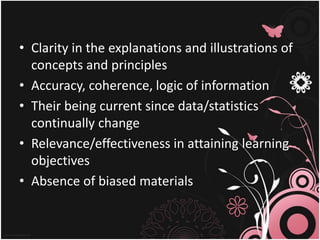
• Clarity in the explanations and illustrations of
concepts and principles
• Accuracy, coherence, logic of information
• Their being current since data/statistics
continually change
• Relevance/effectiveness in attaining learning
objectives
• Absence of biased materials

Thesoftwareasaneducationalresource copy-130305161007-phpapp02

  • 1.
    Objective: • The softwaresystem that could be used in teaching and learning process. • Importance of Software in computers.
  • 2.
  • 3.
    Software  Is ageneral term for the various kinds of programs used to operate computers and related devices.
  • 5.
    Microsoft Windows  Alsoreferred to as a program, Microsoft Windows or Windows for short is an operating between the user and the computer operating system.
  • 6.
    •User Convenience •A newlook •Information center •Plug and play
  • 7.
    Instructional Software Instructional Softwarecan be visited on the Internet or can be bought from software shops and dealers. The teacher through his school should decide on the computer-based instructional (CBI) materials for the school resource collection.
  • 8.
    In evaluating computer-basededucational materials, the following can serve as guidelines: • Be extremely cautions in using CBIs and ‘free’ Internet materials • Don’t be caught up by attractive graphics, sounds, animation, pictures, video clips and music forgetting their instructional worth • Teachers must evaluate these resources using sound pedagogical principles • Among design and content elements to evaluate are: the text legibility, effective use of color schemes, attractive layout and design, and easy navigation from section to section
  • 9.
    • Clarity inthe explanations and illustrations of concepts and principles • Accuracy, coherence, logic of information • Their being current since data/statistics continually change • Relevance/effectiveness in attaining learning objectives • Absence of biased materials