Along came
            a Spider!
The Web
  and
Websites


             Fall 2012
2   2
           First: What is the Internet?

For one thing, it‟s not really
 “the net”, it‟s the “nets”:
  – ―the Internet: a cooperatively-run
    collection of computer networks that
    span the globe.‖
3   3
             Is it the same as the Web?

Internet ≠ World Wide Web
  – The Internet is a massive network of
    networks, a networking infrastructure.
  – The World Wide Web, or simply Web, is a
    way of accessing information over the
    medium of the Internet. It is an
    information-sharing model that is built on
    top of the Internet.
  – The Internet, not the Web, is also used for
    e-mail, which relies on SMTP, Usenet news
    groups, instant messaging and FTP.
     • The Difference Between the Internet and the
       World Wide Web
4
             Cold War Technology?

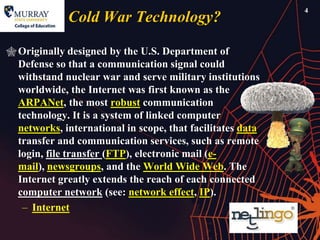
 Originally designed by the U.S. Department of
  Defense so that a communication signal could
  withstand nuclear war and serve military institutions
  worldwide, the Internet was first known as the
  ARPANet, the most robust communication
  technology. It is a system of linked computer
  networks, international in scope, that facilitates data
  transfer and communication services, such as remote
  login, file transfer (FTP), electronic mail (e-
  mail), newsgroups, and the World Wide Web. The
  Internet greatly extends the reach of each connected
  computer network (see: network effect, IP).
   – Internet
5
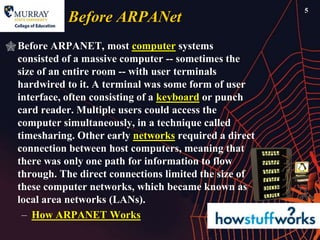
             Before ARPANet
 Before ARPANET, most computer systems
  consisted of a massive computer -- sometimes the
  size of an entire room -- with user terminals
  hardwired to it. A terminal was some form of user
  interface, often consisting of a keyboard or punch
  card reader. Multiple users could access the
  computer simultaneously, in a technique called
  timesharing. Other early networks required a direct
  connection between host computers, meaning that
  there was only one path for information to flow
  through. The direct connections limited the size of
  these computer networks, which became known as
  local area networks (LANs).
   – How ARPANET Works
6
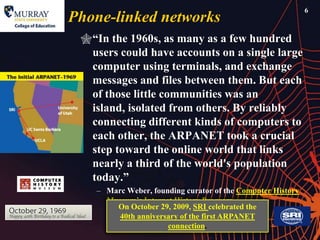
Phone-linked networks
 ―In the 1960s, as many as a few hundred
  users could have accounts on a single large
  computer using terminals, and exchange
  messages and files between them. But each
  of those little communities was an
  island, isolated from others. By reliably
  connecting different kinds of computers to
  each other, the ARPANET took a crucial
  step toward the online world that links
  nearly a third of the world's population
  today.‖
    – Marc Weber, founding curator of the Computer History
      Museum’s Internet History Program
        On October 29, 2009, SRI celebrated the
         40th anniversary of the first ARPANET
                      connection.
7
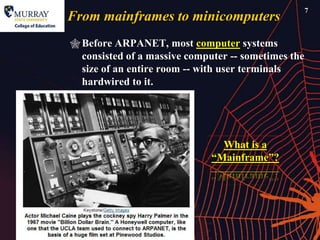
From mainframes to minicomputers
 Before ARPANET, most computer systems
  consisted of a massive computer -- sometimes the
  size of an entire room -- with user terminals
  hardwired to it.


                                What is a
                              ―Mainframe‖?
8
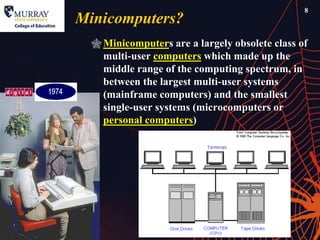
Minicomputers?
   Minicomputers are a largely obsolete class of
    multi-user computers which made up the
    middle range of the computing spectrum, in
    between the largest multi-user systems
    (mainframe computers) and the smallest
    single-user systems (microcomputers or
    personal computers)
9
When did ARPAnet become the Internet?

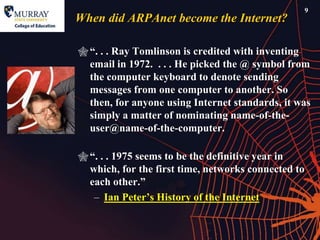
 ―. . . Ray Tomlinson is credited with inventing
  email in 1972. . . . He picked the @ symbol from
  the computer keyboard to denote sending
  messages from one computer to another. So
  then, for anyone using Internet standards, it was
  simply a matter of nominating name-of-the-
  user@name-of-the-computer.

 ―. . . 1975 seems to be the definitive year in
  which, for the first time, networks connected to
  each other.‖
   – Ian Peter’s History of the Internet
10
          1975, the net goes commercial

Telenet
 – One of the first value-added, packet
   switching networks that enabled
   terminals and computers to exchange
   data. Established in 1975 by Dr.
   Lawrence Roberts, who helped to
   develop ARPANET, Telenet was
   acquired by GTE in 1979. After it
   was acquired by Sprint in 1986, it
   was renamed SprintNet
11
            Telenet is not to be
            confused with Telnet
What is telnet?
  – Telnet and its close
    cousins rlogin and
    tn3270 are methods of connecting to a remote
    [mainframe] computer over the Internet that
    let you use programs and data just as if you
    were using the computer locally. Do not confuse
    telnet with Telenet, the old name for Sprintnet.
  – Telnet is a text-only protocol. At one time it was
    one of the most common ways to connect to
    other sites.
     • Telnet FAQ © 2001 Walt Howe
       (last updated 30 April 2001)
12
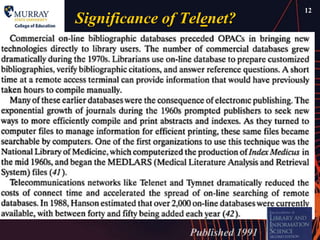
Significance of Telenet?


                 Published 1991
13
                 1980s

  Main uses scholarly or military
      – Libraries use networks like Telenet and
        Tymnet for remote searching of databases
      – Scientists and scholars communicate by email


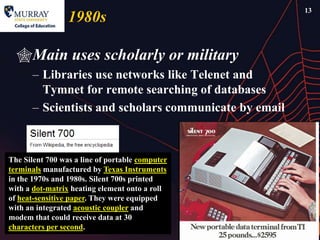
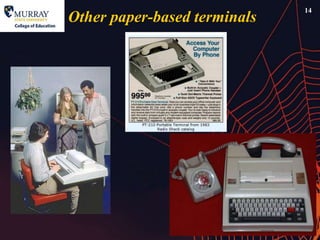
The Silent 700 was a line of portable computer
terminals manufactured by Texas Instruments
in the 1970s and 1980s. Silent 700s printed
with a dot-matrix heating element onto a roll
of heat-sensitive paper. They were equipped
with an integrated acoustic coupler and
modem that could receive data at 30
characters per second.
14
Other paper-based terminals
15
         What, no fun things?

Enter the BBS!
– Bulletin Board System
    • A Bulletin Board System, or BBS, is a computer
      system running software that allows users to connect
      and log in to the system using a terminal program.
      Once logged in, a user can perform functions such as
      uploading and downloading software and
      data, reading news and bulletins, and exchanging
      messages with other users, either through electronic
      mail or in public message boards. Many BBSes also
      offer on-line games, in which users can compete with
      each other, and BBSes with multiple phone lines often
      provide chat rooms, allowing users to interact with
      each other.
16
               BBS all text, very little graphics


Monochrome BBS, known to users as ―Mono‖, was originally a student bulletin board
system at [London’s] City University in the early 1990s. The BBS is still in existence
with a web presence at http://www.mono.org/ from where you can connect to the real
     thing by telnet. See also Monochrome BBS – Definition.
17
      Related to BBS
Gopher
 – The Gopher Protocol is a distributed document search
   and retrieval protocol that was developed at the
   University of Minnesota in the late 1980s. Resources are
   stored on Gopher servers, which organize information
   using a hierarchical directory structure. Gopher clients
   access servers to retrieve directory listings of available
   resources, which are presented to the user as a menu
   from which an item may be selected for retrieval.
     • Gopher Protocol (Gopher) (Page 4 of 4)
18
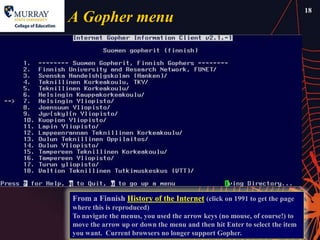
A Gopher menu


From a Finnish History of the Internet (click on 1991 to get the page
where this is reproduced)
To navigate the menus, you used the arrow keys (no mouse, of course!) to
move the arrow up or down the menu and then hit Enter to select the item
you want. Current browsers no longer support Gopher.
Veronica, Jughead and                          19


            Archie (but not Betty)!
Rodent companions!
 – Veronica: ―Very Easy Rodent-Oriented Net-wide Index to
   Computerized Archives‖
 – Jughead: ―Jonzy's Universal Gopher Hierarchy Excavation
   and Display‖
 – Archie: a popular FTP [―File Transfer Protocol‖] search
   program of the time. Though the legend of Archie being
   named for the cartoon, the name in fact is shorthand for
   ―Archives.‖
    • A Pre-Web Search Engine, Gopher Turns Ten
      By Chris Sherman, Search Engine Watch, Feb 6, 2002
20
         Experience Gopherspace

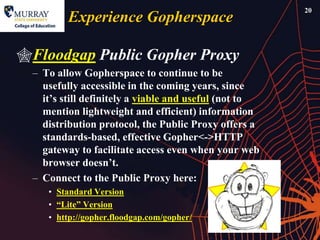
Floodgap Public Gopher Proxy
  – To allow Gopherspace to continue to be
    usefully accessible in the coming years, since
    it’s still definitely a viable and useful (not to
    mention lightweight and efficient) information
    distribution protocol, the Public Proxy offers a
    standards-based, effective Gopher<->HTTP
    gateway to facilitate access even when your web
    browser doesn’t.
  – Connect to the Public Proxy here:
     • Standard Version
     • ―Lite‖ Version
     • http://gopher.floodgap.com/gopher/
Finally, The Web is spun:                                 21


                1991
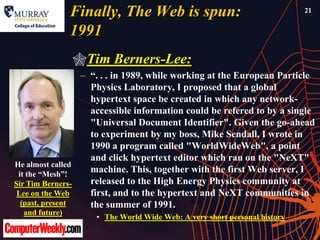
                Tim Berners-Lee:
                 – ―. . . in 1989, while working at the European Particle
                   Physics Laboratory, I proposed that a global
                   hypertext space be created in which any network-
                   accessible information could be refered to by a single
                   "Universal Document Identifier". Given the go-ahead
                   to experiment by my boss, Mike Sendall, I wrote in
                   1990 a program called "WorldWideWeb", a point
                   and click hypertext editor which ran on the "NeXT"
He almost called
 it the ―Mesh‖!
                   machine. This, together with the first Web server, I
Sir Tim Berners-   released to the High Energy Physics community at
 Lee on the Web    first, and to the hypertext and NeXT communities in
  (past, present   the summer of 1991.
  and future)
                    • The World Wide Web: A very short personal history
The first “real” browser
                                       22


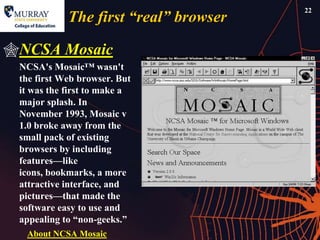
NCSA Mosaic
 NCSA's Mosaic™ wasn't
 the first Web browser. But
 it was the first to make a
 major splash. In
 November 1993, Mosaic v
 1.0 broke away from the
 small pack of existing
 browsers by including
 features—like
 icons, bookmarks, a more
 attractive interface, and
 pictures—that made the
 software easy to use and
 appealing to ―non-geeks.‖
  About NCSA Mosaic
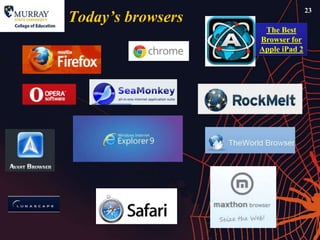
Today‟s browsers
                                  23

                    The Best
                   Browser for
                   Apple iPad 2
24
         Alphabet soup of the Web
URL
 – Uniform Resource Locator
HTTP
 – HyperText Transfer Protocol
HTML
 – Hypertext Markup Language
 – Now being complemented by
   XML
   • EXtensible Markup Language
       – See What is XML?
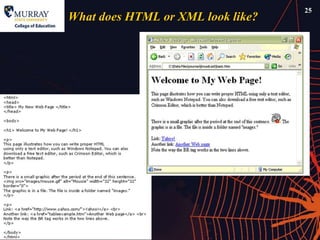
25
What does HTML or XML look like?
26
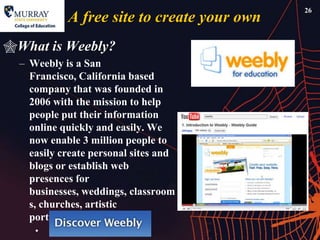
            A free site to create your own
What is Weebly?
  – Weebly is a San
    Francisco, California based
    company that was founded in
    2006 with the mission to help
    people put their information
    online quickly and easily. We
    now enable 3 million people to
    easily create personal sites and
    blogs or establish web
    presences for
    businesses, weddings, classroom
    s, churches, artistic
    portfolios, and more.
     •
27
         Google Sites

Beginner‟s Guide
  – With Google Sites, you can easily create
    and update your own site. Google Sites
    allows you display a variety of
    information in one place—including
    videos, slideshows, calendars, presentati
    ons, attachments, and text—and share it
    for viewing or editing with a small
    group, an entire organization, or the
    world. You always control who has
    access to your site.
28
             Basic URL Structure
Parts
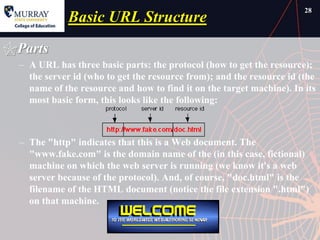
  – A URL has three basic parts: the protocol (how to get the resource);
    the server id (who to get the resource from); and the resource id (the
    name of the resource and how to find it on the target machine). In its
    most basic form, this looks like the following:


  – The "http" indicates that this is a Web document. The
    "www.fake.com" is the domain name of the (in this case, fictional)
    machine on which the web server is running (we know it's a web
    server because of the protocol). And, of course, "doc.html" is the
    filename of the HTML document (notice the file extension ".html")
    on that machine.
29
         Domain name?

What is a „Domain Name‟?
  – Domain Name System, or DNS, is the most
    recognized system for assigning addresses to
    Internet web servers (aka ―Internet hosts‖).
    Somewhat like international phone
    numbers, the domain name system helps to
    give every Internet server a memorable and
    easy-to-spell address. Simultaneously, the
    domain names keep the really technical IP
    address invisible for most viewers.
     • By Paul Gil, About.com Guide
30
          Structure of a Domain Name 1

What is a Top Level Domain (TLD)?
  – A Top Level Domain (TLD) is the ―suffix‖
    or the end of each domain name. (e.g., the
    ―.com‖ in yahoo.com is the TLD.) There
    are two types of TLDs - global and country
    code.

   Generic Top Level Domain (gTLDs)
   extensions include:
   .com, .net, .org, .biz, .coop, .edu, .gov, .info,
   .int, .mil, and .museum.
31
         Country code TLDs

– Country Code Top Level Domains
  (ccTLDs) are TLDs created by a
  country, such as .it, which is the
  country code for Italy or .tv which is
  the country code for Tuvalu, and of
  course .us for the United States
   • A complete list of ccTLDs (sorted by
     ccTLD) can be found at
     http://www.iana.org/cctld/cctld-whois.htm.
   o What is a Top Level Domain (TLD)?
32
        Structure of a Domain Name 2

Second-level domain
  – In the Domain Name System
    (DNS) hierarchy, it is the
    highest level underneath the
    top-level domains. It is that
    portion of the domain name
    that appears immediately to the
    left of the top-level
    domain, separated by a dot. For
    example, the ―NetLingo‖ in
    www.netlingo.com is a second-
    level domain.
33
           Structure of a Domain Name 3

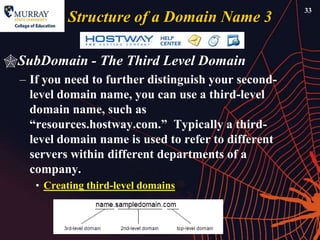
SubDomain - The Third Level Domain
  – If you need to further distinguish your second-
    level domain name, you can use a third-level
    domain name, such as
    ―resources.hostway.com.‖ Typically a third-
    level domain name is used to refer to different
    servers within different departments of a
    company.
     • Creating third-level domains
34
                Success of the web?
Tim Berners-Lee:
  – The success of the World Wide Web, itself built on the open Internet, has
    depended on three critical factors: 1) unlimited links from any part of the
    Web to any other; 2) open technical standards as the basis for continued
    growth of innovation applications; and 3) separation of network
    layers, enabling independent innovation for network transport, routing and
    information applications. Today these characteristics of the Web are easily
    overlooked as obvious, self-maintaining, or just unimportant. All who use
    the Web to publish or access information take it for granted that any Web
    page on the planet will be accessible to anyone who has an Internet
    connection, regardless whether it is over a dialup modem or a high speed
    multi-megabit per second digital access line. The last decade has seen so
    many new ecommerce startups, some of which have formed the foundations
    of the new economy, that we now expect that the next blockbuster Web site
    or the new homepage for your kid's local soccer team will just appear on
    the Web without any difficulty.
      • Testimony of Sir Timothy Berners-Lee, Hearing on the ―Digital Future of the United
        States: Part I -- The Future of the World Wide Web‖
 The Internet is a far more speech-
  enhancing medium than print, the village
  green, or the mails.... The Internet may
  fairly be regarded as a never-ending
  worldwide conversation.[1]
        Statement by a federal judge in American Civil
  Liberties Union v. Reno, 929 F. Supp. 824, 844 (E.D. Pa.
  1996) (Dalzell, J.). Quoted by Tim Berners-Lee in his
  Testimony at Hearing on the ―Digital Future of the
  United States: Part I -- The Future of the World Wide
  Web‖
36

The Web and Websites

  • 1.
    Along came a Spider! The Web and Websites Fall 2012
  • 2.
    2 2 First: What is the Internet? For one thing, it‟s not really “the net”, it‟s the “nets”: – ―the Internet: a cooperatively-run collection of computer networks that span the globe.‖
  • 3.
    3 3 Is it the same as the Web? Internet ≠ World Wide Web – The Internet is a massive network of networks, a networking infrastructure. – The World Wide Web, or simply Web, is a way of accessing information over the medium of the Internet. It is an information-sharing model that is built on top of the Internet. – The Internet, not the Web, is also used for e-mail, which relies on SMTP, Usenet news groups, instant messaging and FTP. • The Difference Between the Internet and the World Wide Web
  • 4.
    4 Cold War Technology?  Originally designed by the U.S. Department of Defense so that a communication signal could withstand nuclear war and serve military institutions worldwide, the Internet was first known as the ARPANet, the most robust communication technology. It is a system of linked computer networks, international in scope, that facilitates data transfer and communication services, such as remote login, file transfer (FTP), electronic mail (e- mail), newsgroups, and the World Wide Web. The Internet greatly extends the reach of each connected computer network (see: network effect, IP). – Internet
  • 5.
    5 Before ARPANet  Before ARPANET, most computer systems consisted of a massive computer -- sometimes the size of an entire room -- with user terminals hardwired to it. A terminal was some form of user interface, often consisting of a keyboard or punch card reader. Multiple users could access the computer simultaneously, in a technique called timesharing. Other early networks required a direct connection between host computers, meaning that there was only one path for information to flow through. The direct connections limited the size of these computer networks, which became known as local area networks (LANs). – How ARPANET Works
  • 6.
    6 Phone-linked networks ―Inthe 1960s, as many as a few hundred users could have accounts on a single large computer using terminals, and exchange messages and files between them. But each of those little communities was an island, isolated from others. By reliably connecting different kinds of computers to each other, the ARPANET took a crucial step toward the online world that links nearly a third of the world's population today.‖ – Marc Weber, founding curator of the Computer History Museum’s Internet History Program On October 29, 2009, SRI celebrated the 40th anniversary of the first ARPANET connection.
  • 7.
    7 From mainframes tominicomputers  Before ARPANET, most computer systems consisted of a massive computer -- sometimes the size of an entire room -- with user terminals hardwired to it. What is a ―Mainframe‖?
  • 8.
    8 Minicomputers? Minicomputers are a largely obsolete class of multi-user computers which made up the middle range of the computing spectrum, in between the largest multi-user systems (mainframe computers) and the smallest single-user systems (microcomputers or personal computers)
  • 9.
    9 When did ARPAnetbecome the Internet?  ―. . . Ray Tomlinson is credited with inventing email in 1972. . . . He picked the @ symbol from the computer keyboard to denote sending messages from one computer to another. So then, for anyone using Internet standards, it was simply a matter of nominating name-of-the- user@name-of-the-computer.  ―. . . 1975 seems to be the definitive year in which, for the first time, networks connected to each other.‖ – Ian Peter’s History of the Internet
  • 10.
    10 1975, the net goes commercial Telenet – One of the first value-added, packet switching networks that enabled terminals and computers to exchange data. Established in 1975 by Dr. Lawrence Roberts, who helped to develop ARPANET, Telenet was acquired by GTE in 1979. After it was acquired by Sprint in 1986, it was renamed SprintNet
  • 11.
    11 Telenet is not to be confused with Telnet What is telnet? – Telnet and its close cousins rlogin and tn3270 are methods of connecting to a remote [mainframe] computer over the Internet that let you use programs and data just as if you were using the computer locally. Do not confuse telnet with Telenet, the old name for Sprintnet. – Telnet is a text-only protocol. At one time it was one of the most common ways to connect to other sites. • Telnet FAQ © 2001 Walt Howe (last updated 30 April 2001)
  • 12.
  • 13.
    13 1980s Main uses scholarly or military – Libraries use networks like Telenet and Tymnet for remote searching of databases – Scientists and scholars communicate by email The Silent 700 was a line of portable computer terminals manufactured by Texas Instruments in the 1970s and 1980s. Silent 700s printed with a dot-matrix heating element onto a roll of heat-sensitive paper. They were equipped with an integrated acoustic coupler and modem that could receive data at 30 characters per second.
  • 14.
  • 15.
    15 What, no fun things? Enter the BBS! – Bulletin Board System • A Bulletin Board System, or BBS, is a computer system running software that allows users to connect and log in to the system using a terminal program. Once logged in, a user can perform functions such as uploading and downloading software and data, reading news and bulletins, and exchanging messages with other users, either through electronic mail or in public message boards. Many BBSes also offer on-line games, in which users can compete with each other, and BBSes with multiple phone lines often provide chat rooms, allowing users to interact with each other.
  • 16.
    16 BBS all text, very little graphics Monochrome BBS, known to users as ―Mono‖, was originally a student bulletin board system at [London’s] City University in the early 1990s. The BBS is still in existence with a web presence at http://www.mono.org/ from where you can connect to the real thing by telnet. See also Monochrome BBS – Definition.
  • 17.
    17 Related to BBS Gopher – The Gopher Protocol is a distributed document search and retrieval protocol that was developed at the University of Minnesota in the late 1980s. Resources are stored on Gopher servers, which organize information using a hierarchical directory structure. Gopher clients access servers to retrieve directory listings of available resources, which are presented to the user as a menu from which an item may be selected for retrieval. • Gopher Protocol (Gopher) (Page 4 of 4)
  • 18.
    18 A Gopher menu Froma Finnish History of the Internet (click on 1991 to get the page where this is reproduced) To navigate the menus, you used the arrow keys (no mouse, of course!) to move the arrow up or down the menu and then hit Enter to select the item you want. Current browsers no longer support Gopher.
  • 19.
    Veronica, Jughead and 19 Archie (but not Betty)! Rodent companions! – Veronica: ―Very Easy Rodent-Oriented Net-wide Index to Computerized Archives‖ – Jughead: ―Jonzy's Universal Gopher Hierarchy Excavation and Display‖ – Archie: a popular FTP [―File Transfer Protocol‖] search program of the time. Though the legend of Archie being named for the cartoon, the name in fact is shorthand for ―Archives.‖ • A Pre-Web Search Engine, Gopher Turns Ten By Chris Sherman, Search Engine Watch, Feb 6, 2002
  • 20.
    20 Experience Gopherspace Floodgap Public Gopher Proxy – To allow Gopherspace to continue to be usefully accessible in the coming years, since it’s still definitely a viable and useful (not to mention lightweight and efficient) information distribution protocol, the Public Proxy offers a standards-based, effective Gopher<->HTTP gateway to facilitate access even when your web browser doesn’t. – Connect to the Public Proxy here: • Standard Version • ―Lite‖ Version • http://gopher.floodgap.com/gopher/
  • 21.
    Finally, The Webis spun: 21 1991 Tim Berners-Lee: – ―. . . in 1989, while working at the European Particle Physics Laboratory, I proposed that a global hypertext space be created in which any network- accessible information could be refered to by a single "Universal Document Identifier". Given the go-ahead to experiment by my boss, Mike Sendall, I wrote in 1990 a program called "WorldWideWeb", a point and click hypertext editor which ran on the "NeXT" He almost called it the ―Mesh‖! machine. This, together with the first Web server, I Sir Tim Berners- released to the High Energy Physics community at Lee on the Web first, and to the hypertext and NeXT communities in (past, present the summer of 1991. and future) • The World Wide Web: A very short personal history
  • 22.
    The first “real”browser 22 NCSA Mosaic NCSA's Mosaic™ wasn't the first Web browser. But it was the first to make a major splash. In November 1993, Mosaic v 1.0 broke away from the small pack of existing browsers by including features—like icons, bookmarks, a more attractive interface, and pictures—that made the software easy to use and appealing to ―non-geeks.‖ About NCSA Mosaic
  • 23.
    Today‟s browsers 23 The Best Browser for Apple iPad 2
  • 24.
    24 Alphabet soup of the Web URL – Uniform Resource Locator HTTP – HyperText Transfer Protocol HTML – Hypertext Markup Language – Now being complemented by XML • EXtensible Markup Language – See What is XML?
  • 25.
    25 What does HTMLor XML look like?
  • 26.
    26 A free site to create your own What is Weebly? – Weebly is a San Francisco, California based company that was founded in 2006 with the mission to help people put their information online quickly and easily. We now enable 3 million people to easily create personal sites and blogs or establish web presences for businesses, weddings, classroom s, churches, artistic portfolios, and more. •
  • 27.
    27 Google Sites Beginner‟s Guide – With Google Sites, you can easily create and update your own site. Google Sites allows you display a variety of information in one place—including videos, slideshows, calendars, presentati ons, attachments, and text—and share it for viewing or editing with a small group, an entire organization, or the world. You always control who has access to your site.
  • 28.
    28 Basic URL Structure Parts – A URL has three basic parts: the protocol (how to get the resource); the server id (who to get the resource from); and the resource id (the name of the resource and how to find it on the target machine). In its most basic form, this looks like the following: – The "http" indicates that this is a Web document. The "www.fake.com" is the domain name of the (in this case, fictional) machine on which the web server is running (we know it's a web server because of the protocol). And, of course, "doc.html" is the filename of the HTML document (notice the file extension ".html") on that machine.
  • 29.
    29 Domain name? What is a „Domain Name‟? – Domain Name System, or DNS, is the most recognized system for assigning addresses to Internet web servers (aka ―Internet hosts‖). Somewhat like international phone numbers, the domain name system helps to give every Internet server a memorable and easy-to-spell address. Simultaneously, the domain names keep the really technical IP address invisible for most viewers. • By Paul Gil, About.com Guide
  • 30.
    30 Structure of a Domain Name 1 What is a Top Level Domain (TLD)? – A Top Level Domain (TLD) is the ―suffix‖ or the end of each domain name. (e.g., the ―.com‖ in yahoo.com is the TLD.) There are two types of TLDs - global and country code. Generic Top Level Domain (gTLDs) extensions include: .com, .net, .org, .biz, .coop, .edu, .gov, .info, .int, .mil, and .museum.
  • 31.
    31 Country code TLDs – Country Code Top Level Domains (ccTLDs) are TLDs created by a country, such as .it, which is the country code for Italy or .tv which is the country code for Tuvalu, and of course .us for the United States • A complete list of ccTLDs (sorted by ccTLD) can be found at http://www.iana.org/cctld/cctld-whois.htm. o What is a Top Level Domain (TLD)?
  • 32.
    32 Structure of a Domain Name 2 Second-level domain – In the Domain Name System (DNS) hierarchy, it is the highest level underneath the top-level domains. It is that portion of the domain name that appears immediately to the left of the top-level domain, separated by a dot. For example, the ―NetLingo‖ in www.netlingo.com is a second- level domain.
  • 33.
    33 Structure of a Domain Name 3 SubDomain - The Third Level Domain – If you need to further distinguish your second- level domain name, you can use a third-level domain name, such as ―resources.hostway.com.‖ Typically a third- level domain name is used to refer to different servers within different departments of a company. • Creating third-level domains
  • 34.
    34 Success of the web? Tim Berners-Lee: – The success of the World Wide Web, itself built on the open Internet, has depended on three critical factors: 1) unlimited links from any part of the Web to any other; 2) open technical standards as the basis for continued growth of innovation applications; and 3) separation of network layers, enabling independent innovation for network transport, routing and information applications. Today these characteristics of the Web are easily overlooked as obvious, self-maintaining, or just unimportant. All who use the Web to publish or access information take it for granted that any Web page on the planet will be accessible to anyone who has an Internet connection, regardless whether it is over a dialup modem or a high speed multi-megabit per second digital access line. The last decade has seen so many new ecommerce startups, some of which have formed the foundations of the new economy, that we now expect that the next blockbuster Web site or the new homepage for your kid's local soccer team will just appear on the Web without any difficulty. • Testimony of Sir Timothy Berners-Lee, Hearing on the ―Digital Future of the United States: Part I -- The Future of the World Wide Web‖
  • 35.
     The Internetis a far more speech- enhancing medium than print, the village green, or the mails.... The Internet may fairly be regarded as a never-ending worldwide conversation.[1] Statement by a federal judge in American Civil Liberties Union v. Reno, 929 F. Supp. 824, 844 (E.D. Pa. 1996) (Dalzell, J.). Quoted by Tim Berners-Lee in his Testimony at Hearing on the ―Digital Future of the United States: Part I -- The Future of the World Wide Web‖
  • 36.