CMP-3110 ~ E-Commerce Applications Development
Chapter 06
The Shopping Basket
Shopping baskets
• Shopping baskets the first stage in enabling an online purchase
• Number of other methods that can facilitate e-commerce, including:
• One-click payments
• Service subscription payments
• Auctions (Nilami)
Shopping baskets
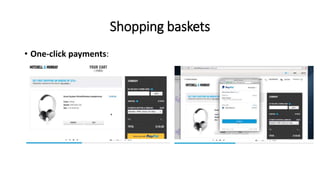
• One-click payments:
• customer clicks on the button
• payment is processed
• payment processor notifies the administrator:
• Customer
• delivery details
• the amount paid
• the product and cost data is defined within the payment button
• Disadvantage:
• customers can easily order things by mistake
• customers need to be sure their default delivery details are correct in advance
• it isn't easy to add voucher codes without adding more clicks
Shopping baskets
• One-click payments:
Shopping baskets
• Service subscription payments:
• generally similar to one-click payments; you click on the subscription level,
and then you pay.
• Subscription sites give access to products or services for the duration of a
subscription, from a business perspective
• This often allows measurable recurring income, and can reduce transaction
fees
Shopping baskets
• Auctions
• Auctions lead to bidding for products
• The customer commits to purchase the product at a certain price
• No other customer commits to a higher price within the auction time window
Per-page basket
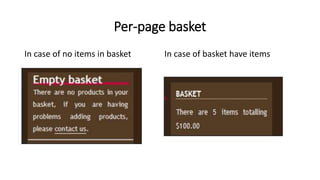
In case of no items in basket In case of basket have items
Per-page basket
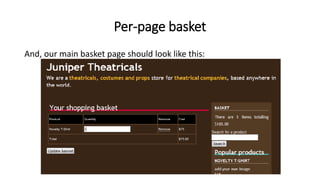
And, our main basket page should look like this:
Considerations for our shopping basket
• Stock levels:
• Is there sufficient stock when a customer adds a product to their basket?
• Product variations
• Product customizations
• Templates:
• An empty basket
• summary of the basket
• Subtotals:
• We need to calculate subtotals for each product in the basket
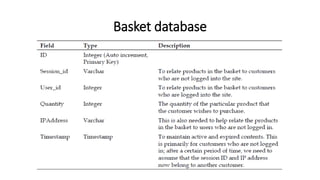
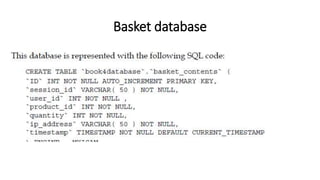
Basket database
Basket database
Basket contents
• We have a basket structure in our database, but we now need to
allow our customers to control the contents of the basket
• Allowing them to:
• View the basket
• Add products to their basket
• Add customizable products to their basket
• Add variations of a product to their basket
• Edit quantities of products in their basket
Viewing the basket
• CheckBasket method
1. Why are we using before adding the product?
2. customer adds a product to their basket twice
3. The second instance should increment the quantity of the first instance of
the product
Adding products
• we only need to record
• The product's ID number
• Information of the user
• addProduct method
• First, we check that the product is valid and active
• Secondly, we check that it is not a customizable product or variations
• Finally, we check to see if the product is already in the basket
• If it is, then we increment the product's quantity in the basket
• if it isn't, then we add it to the basket.
Adding customizable products
• To facilitate the purchase of such products, there are a number of
things we need to do:
• Restructure the basket database
• adding a field to store the uploaded file field to store custom text
• Change how we view the shopping basket
• Change how we add a product to the basket
• Process the customized information, if the product was customizable
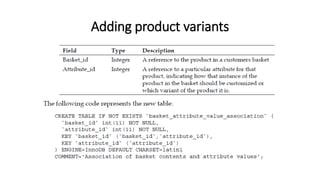
Adding product variants
Editing quantities
• customer wants to change the quantity
• The hope here is obviously that they will increase the quantities and purchase
more
• But equally, we need to allow them to reduce quantities or remove products
• updateBasket()
Cleaning the basket
• The customer wants to empty their basket
• The customer confirms an order
• The basket contents are old and are not tied to a customer account
Displaying the basket on every page
• Most e-commerce websites display a small shopping basket at the top
of the page or the side of the page, reminding the customer how
many products are in their basket
• To display the basket on each page we will need:
• An empty basket template file
• A basket template file, which displays the number of products in the
customer's basket
• A template tag in our main templates
• Something in our framework to link into the basket on each page

The Shopping Basket

  • 1.
    CMP-3110 ~ E-CommerceApplications Development Chapter 06 The Shopping Basket
  • 2.
    Shopping baskets • Shoppingbaskets the first stage in enabling an online purchase • Number of other methods that can facilitate e-commerce, including: • One-click payments • Service subscription payments • Auctions (Nilami)
  • 3.
    Shopping baskets • One-clickpayments: • customer clicks on the button • payment is processed • payment processor notifies the administrator: • Customer • delivery details • the amount paid • the product and cost data is defined within the payment button • Disadvantage: • customers can easily order things by mistake • customers need to be sure their default delivery details are correct in advance • it isn't easy to add voucher codes without adding more clicks
  • 4.
  • 5.
    Shopping baskets • Servicesubscription payments: • generally similar to one-click payments; you click on the subscription level, and then you pay. • Subscription sites give access to products or services for the duration of a subscription, from a business perspective • This often allows measurable recurring income, and can reduce transaction fees
  • 6.
    Shopping baskets • Auctions •Auctions lead to bidding for products • The customer commits to purchase the product at a certain price • No other customer commits to a higher price within the auction time window
  • 7.
    Per-page basket In caseof no items in basket In case of basket have items
  • 8.
    Per-page basket And, ourmain basket page should look like this:
  • 9.
    Considerations for ourshopping basket • Stock levels: • Is there sufficient stock when a customer adds a product to their basket? • Product variations • Product customizations • Templates: • An empty basket • summary of the basket • Subtotals: • We need to calculate subtotals for each product in the basket
  • 10.
  • 11.
  • 12.
    Basket contents • Wehave a basket structure in our database, but we now need to allow our customers to control the contents of the basket • Allowing them to: • View the basket • Add products to their basket • Add customizable products to their basket • Add variations of a product to their basket • Edit quantities of products in their basket
  • 13.
    Viewing the basket •CheckBasket method 1. Why are we using before adding the product? 2. customer adds a product to their basket twice 3. The second instance should increment the quantity of the first instance of the product
  • 14.
    Adding products • weonly need to record • The product's ID number • Information of the user • addProduct method • First, we check that the product is valid and active • Secondly, we check that it is not a customizable product or variations • Finally, we check to see if the product is already in the basket • If it is, then we increment the product's quantity in the basket • if it isn't, then we add it to the basket.
  • 15.
    Adding customizable products •To facilitate the purchase of such products, there are a number of things we need to do: • Restructure the basket database • adding a field to store the uploaded file field to store custom text • Change how we view the shopping basket • Change how we add a product to the basket • Process the customized information, if the product was customizable
  • 16.
  • 17.
    Editing quantities • customerwants to change the quantity • The hope here is obviously that they will increase the quantities and purchase more • But equally, we need to allow them to reduce quantities or remove products • updateBasket()
  • 18.
    Cleaning the basket •The customer wants to empty their basket • The customer confirms an order • The basket contents are old and are not tied to a customer account
  • 19.
    Displaying the basketon every page • Most e-commerce websites display a small shopping basket at the top of the page or the side of the page, reminding the customer how many products are in their basket • To display the basket on each page we will need: • An empty basket template file • A basket template file, which displays the number of products in the customer's basket • A template tag in our main templates • Something in our framework to link into the basket on each page