Textbox , Label & Button Tools in VB.NET
Prof. Neeraj Bhargava
Kapil Chauhan
Department of Computer Science
School of Engineering & Systems Sciences
MDS University, Ajmer
VB.Net - TextBox Control
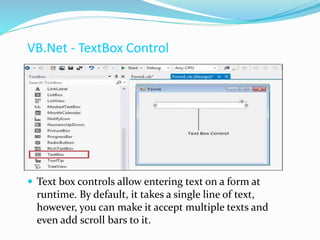
 Text box controls allow entering text on a form at
runtime. By default, it takes a single line of text,
however, you can make it accept multiple texts and
even add scroll bars to it.
TextBox Control
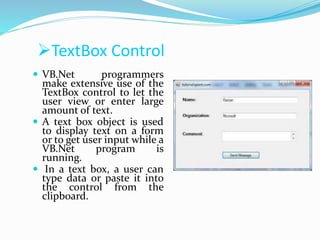
 VB.Net programmers
make extensive use of the
TextBox control to let the
user view or enter large
amount of text.
 A text box object is used
to display text on a form
or to get user input while a
VB.Net program is
running.
 In a text box, a user can
type data or paste it into
the control from the
clipboard.
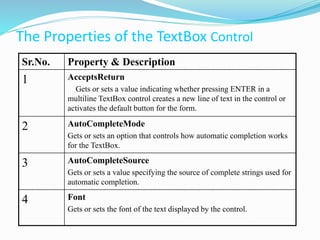
The Properties of the TextBox Control
Sr.No. Property & Description
1 AcceptsReturn
Gets or sets a value indicating whether pressing ENTER in a
multiline TextBox control creates a new line of text in the control or
activates the default button for the form.
2 AutoCompleteMode
Gets or sets an option that controls how automatic completion works
for the TextBox.
3 AutoCompleteSource
Gets or sets a value specifying the source of complete strings used for
automatic completion.
4 Font
Gets or sets the font of the text displayed by the control.
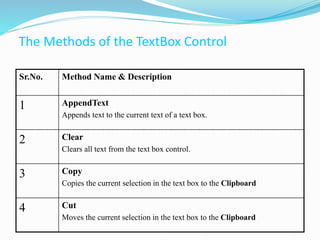
The Methods of the TextBox Control
Sr.No. Method Name & Description
1 AppendText
Appends text to the current text of a text box.
2 Clear
Clears all text from the text box control.
3 Copy
Copies the current selection in the text box to the Clipboard
4 Cut
Moves the current selection in the text box to the Clipboard
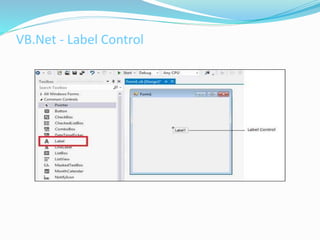
VB.Net - Label Control
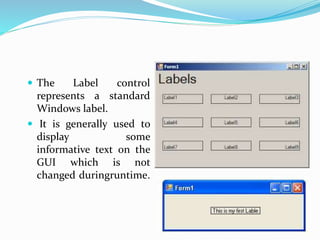
 The Label control
represents a standard
Windows label.
 It is generally used to
display some
informative text on the
GUI which is not
changed duringruntime.
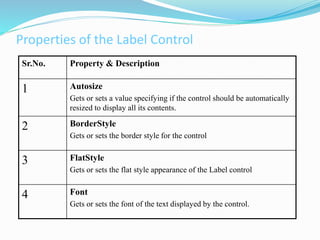
Properties of the Label Control
Sr.No. Property & Description
1 Autosize
Gets or sets a value specifying if the control should be automatically
resized to display all its contents.
2 BorderStyle
Gets or sets the border style for the control
3 FlatStyle
Gets or sets the flat style appearance of the Label control
4 Font
Gets or sets the font of the text displayed by the control.
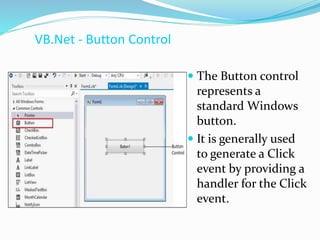
VB.Net - Button Control
 The Button control
represents a
standard Windows
button.
 It is generally used
to generate a Click
event by providing a
handler for the Click
event.
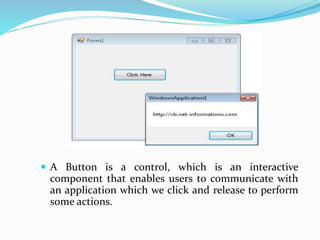
 A Button is a control, which is an interactive
component that enables users to communicate with
an application which we click and release to perform
some actions.
Assignment Question
Q1.Explain the following tools with suitable example
(i) Button
(ii) Label
(iii) TextBox

Textbox n label

  • 1.
    Textbox , Label& Button Tools in VB.NET Prof. Neeraj Bhargava Kapil Chauhan Department of Computer Science School of Engineering & Systems Sciences MDS University, Ajmer
  • 2.
    VB.Net - TextBoxControl  Text box controls allow entering text on a form at runtime. By default, it takes a single line of text, however, you can make it accept multiple texts and even add scroll bars to it.
  • 3.
    TextBox Control  VB.Netprogrammers make extensive use of the TextBox control to let the user view or enter large amount of text.  A text box object is used to display text on a form or to get user input while a VB.Net program is running.  In a text box, a user can type data or paste it into the control from the clipboard.
  • 4.
    The Properties ofthe TextBox Control Sr.No. Property & Description 1 AcceptsReturn Gets or sets a value indicating whether pressing ENTER in a multiline TextBox control creates a new line of text in the control or activates the default button for the form. 2 AutoCompleteMode Gets or sets an option that controls how automatic completion works for the TextBox. 3 AutoCompleteSource Gets or sets a value specifying the source of complete strings used for automatic completion. 4 Font Gets or sets the font of the text displayed by the control.
  • 5.
    The Methods ofthe TextBox Control Sr.No. Method Name & Description 1 AppendText Appends text to the current text of a text box. 2 Clear Clears all text from the text box control. 3 Copy Copies the current selection in the text box to the Clipboard 4 Cut Moves the current selection in the text box to the Clipboard
  • 6.
  • 7.
     The Labelcontrol represents a standard Windows label.  It is generally used to display some informative text on the GUI which is not changed duringruntime.
  • 8.
    Properties of theLabel Control Sr.No. Property & Description 1 Autosize Gets or sets a value specifying if the control should be automatically resized to display all its contents. 2 BorderStyle Gets or sets the border style for the control 3 FlatStyle Gets or sets the flat style appearance of the Label control 4 Font Gets or sets the font of the text displayed by the control.
  • 9.
    VB.Net - ButtonControl  The Button control represents a standard Windows button.  It is generally used to generate a Click event by providing a handler for the Click event.
  • 10.
     A Buttonis a control, which is an interactive component that enables users to communicate with an application which we click and release to perform some actions.
  • 11.
    Assignment Question Q1.Explain thefollowing tools with suitable example (i) Button (ii) Label (iii) TextBox