Arrays
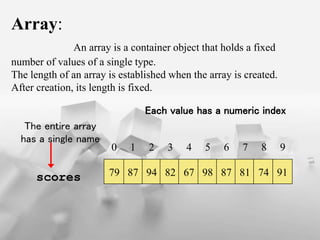
Array:
An array is a container object that holds a fixed
number of values of a single type.
The length of an array is established when the array is created.
After creation, its length is fixed.
79 87 94 82 67 98 87 81 74 91
0 1 2 3 4 5 6 7 8 9
scores
The entire array
has a single name
Each value has a numeric index
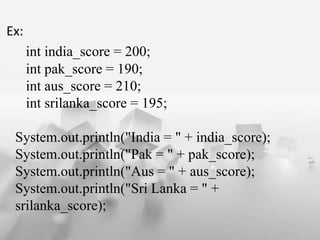
Ex:
int india_score = 200;
int pak_score = 190;
int aus_score = 210;
int srilanka_score = 195;
System.out.println("India = " + india_score);
System.out.println("Pak = " + pak_score);
System.out.println("Aus = " + aus_score);
System.out.println("Sri Lanka = " +
srilanka_score);
Ex:
class PrintTeamScores
{
public static void main(String arg[])
{
int[] scores = new int[4]; // LINE A - Creating the scores array.
scores[0] = 200; // assigning score for team 0 or India
scores[1] = 190; // assigning score for team 1 or Pakistan
scores[2] = 210; // assigning score for team 2 or Australia
scores[3] = 195; // assigning score for team 3 or Sri Lanka
System.out.println("India = " + scores[0]);
System.out.println("Pak = " + scores[1]);
System.out.println("Aus = " + scores[2]);
System.out.println("Sri Lanka = " + scores[3]);
}
}
One-Dimensional Array
 A List of items can be given one variable name using only one
Subscript and such variable is called One-Dimensional Array.
 The Subscript always begin with number 0
i.e., x[ 0 ].
 We Create variable size as
int num [ ] = new int [ 12 ];
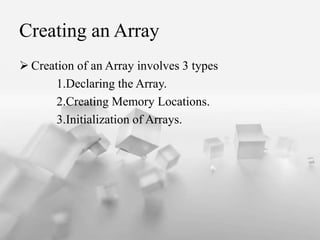
Creating an Array
 Creation of an Array involves 3 types
1.Declaring the Array.
2.Creating Memory Locations.
3.Initialization of Arrays.
Array Declartion
Array in java Declared in Two Forms
Form 1: type arrayname[ ];
Ex:
Form 2: type[ ]arrayname;
Ex:
Int number[ ];
Int average[ ];
Int [ ] counter;
Int[ ] marks;
Creation of Memory Allocation
 Java allows us to create arrays using new operator only.
arrayname = new type[ size ];
Ex:
int number = new int [ 12 ];
float average = new float[ 5 ];
Initialization of Arrays.
 Assigning the values into Arrays. This is
known as Initialization.
 This is done using Array SubScripts.
arrayname[ SubScripts ] = value;
Ex:
number[ 0 ] = 46;
number[ 1 ] = 44;
number[ 2 ] = 37;
 Array Initializer is a list of values seperated by Comas and
Surrounded by Curly braces.
 No size is given.
Ex: int number[ ]= {10,20,30,40};
 It is also possible to assign an array object to another.
Ex: int a[ ]={10,20,30};
int b[ ];
b=a;
Strings
 Character array:
char charArray[ ]= new char[ 2 ];
charArray[ 0 ]=‘H’;
charArray[ 1 ]=‘I’;
 Java Strings are more reliable and predictable
 This is bascially due to C’s lack of bounds checking
 Java String is not Character Array.
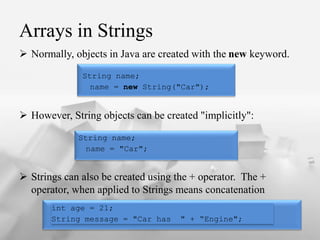
Arrays in Strings
 Normally, objects in Java are created with the new keyword.
 However, String objects can be created "implicitly":
 Strings can also be created using the + operator. The +
operator, when applied to Strings means concatenation
String name;
name = new String("Car");
String name;
name = "Car";
int age = 21;
String message = "Car has " + “Engine";
Immutable String
 string objects are immutable. Immutable simply means unmodifiable or
unchangeable.
 Once string object is created its data or state can't be changed but a new
string object is created.
class Testimmutablestring
{
public static void main(String args[])
{
String s="Sachin";
s.concat(" Tendulkar");//concat() method appends the string at the end
System.out.println(s);//will print Sachin because strings are immutable objects
}
}
 There are multiple ways to initialize a String Array.
 Initialization can also be done at the same time as the declaration.
String[ ] StrArray = {"AAA", "BBB", "CCC", "DDD", "EEE"};
 This will create a String Array of length 5. Element at index 0 will
have the value "AAA", element at index 1 will have the value
"BBB", and so on.
String[] StrArray = {"AAA", "BBB", "CCC", "DDD", "EEE"};
System.out.println(StrArray[0] );
System.out.println(StrArray[1] );
System.out.println( StrArray[2] );
System.out.println( StrArray[3] );
System.out.println( StrArray[4] );
 We can also create and use arrays that contain strings.
String[] StrArray = new String[4];
 The statement will create an StringArray of size 5 to hold 5
string constants.
private void StringArray()
{
StrArray [0] = “Jack”;;
StrArray [1] = “Mayn”;
StrArray[2] = “Aryan”;
StrArray[3] = “Arav”;
}
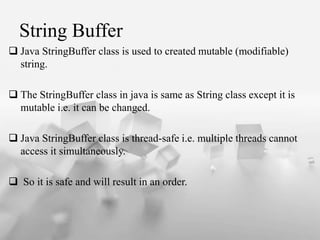
String Buffer
 Java StringBuffer class is used to created mutable (modifiable)
string.
 The StringBuffer class in java is same as String class except it is
mutable i.e. it can be changed.
 Java StringBuffer class is thread-safe i.e. multiple threads cannot
access it simultaneously.
 So it is safe and will result in an order.
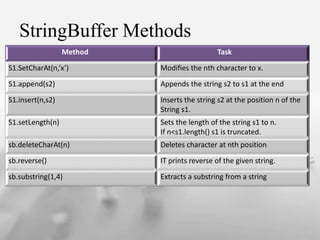
StringBuffer Methods
Method Task
S1.SetCharAt(n,’x’) Modifies the nth character to x.
S1.append(s2) Appends the string s2 to s1 at the end
S1.insert(n,s2) Inserts the string s2 at the position n of the
String s1.
S1.setLength(n) Sets the length of the string s1 to n.
If n<s1.length() s1 is truncated.
sb.deleteCharAt(n) Deletes character at nth position
sb.reverse() IT prints reverse of the given string.
sb.substring(1,4) Extracts a substring from a string

Arrays in java

  • 1.
  • 2.
    Array: An array isa container object that holds a fixed number of values of a single type. The length of an array is established when the array is created. After creation, its length is fixed. 79 87 94 82 67 98 87 81 74 91 0 1 2 3 4 5 6 7 8 9 scores The entire array has a single name Each value has a numeric index
  • 3.
    Ex: int india_score =200; int pak_score = 190; int aus_score = 210; int srilanka_score = 195; System.out.println("India = " + india_score); System.out.println("Pak = " + pak_score); System.out.println("Aus = " + aus_score); System.out.println("Sri Lanka = " + srilanka_score);
  • 4.
    Ex: class PrintTeamScores { public staticvoid main(String arg[]) { int[] scores = new int[4]; // LINE A - Creating the scores array. scores[0] = 200; // assigning score for team 0 or India scores[1] = 190; // assigning score for team 1 or Pakistan scores[2] = 210; // assigning score for team 2 or Australia scores[3] = 195; // assigning score for team 3 or Sri Lanka System.out.println("India = " + scores[0]); System.out.println("Pak = " + scores[1]); System.out.println("Aus = " + scores[2]); System.out.println("Sri Lanka = " + scores[3]); } }
  • 5.
    One-Dimensional Array  AList of items can be given one variable name using only one Subscript and such variable is called One-Dimensional Array.  The Subscript always begin with number 0 i.e., x[ 0 ].  We Create variable size as int num [ ] = new int [ 12 ];
  • 6.
    Creating an Array Creation of an Array involves 3 types 1.Declaring the Array. 2.Creating Memory Locations. 3.Initialization of Arrays.
  • 7.
    Array Declartion Array injava Declared in Two Forms Form 1: type arrayname[ ]; Ex: Form 2: type[ ]arrayname; Ex: Int number[ ]; Int average[ ]; Int [ ] counter; Int[ ] marks;
  • 8.
    Creation of MemoryAllocation  Java allows us to create arrays using new operator only. arrayname = new type[ size ]; Ex: int number = new int [ 12 ]; float average = new float[ 5 ];
  • 9.
    Initialization of Arrays. Assigning the values into Arrays. This is known as Initialization.  This is done using Array SubScripts. arrayname[ SubScripts ] = value; Ex: number[ 0 ] = 46; number[ 1 ] = 44; number[ 2 ] = 37;
  • 10.
     Array Initializeris a list of values seperated by Comas and Surrounded by Curly braces.  No size is given. Ex: int number[ ]= {10,20,30,40};  It is also possible to assign an array object to another. Ex: int a[ ]={10,20,30}; int b[ ]; b=a;
  • 12.
    Strings  Character array: charcharArray[ ]= new char[ 2 ]; charArray[ 0 ]=‘H’; charArray[ 1 ]=‘I’;  Java Strings are more reliable and predictable  This is bascially due to C’s lack of bounds checking  Java String is not Character Array.
  • 13.
    Arrays in Strings Normally, objects in Java are created with the new keyword.  However, String objects can be created "implicitly":  Strings can also be created using the + operator. The + operator, when applied to Strings means concatenation String name; name = new String("Car"); String name; name = "Car"; int age = 21; String message = "Car has " + “Engine";
  • 14.
    Immutable String  stringobjects are immutable. Immutable simply means unmodifiable or unchangeable.  Once string object is created its data or state can't be changed but a new string object is created. class Testimmutablestring { public static void main(String args[]) { String s="Sachin"; s.concat(" Tendulkar");//concat() method appends the string at the end System.out.println(s);//will print Sachin because strings are immutable objects } }
  • 15.
     There aremultiple ways to initialize a String Array.  Initialization can also be done at the same time as the declaration. String[ ] StrArray = {"AAA", "BBB", "CCC", "DDD", "EEE"};  This will create a String Array of length 5. Element at index 0 will have the value "AAA", element at index 1 will have the value "BBB", and so on. String[] StrArray = {"AAA", "BBB", "CCC", "DDD", "EEE"}; System.out.println(StrArray[0] ); System.out.println(StrArray[1] ); System.out.println( StrArray[2] ); System.out.println( StrArray[3] ); System.out.println( StrArray[4] );
  • 16.
     We canalso create and use arrays that contain strings. String[] StrArray = new String[4];  The statement will create an StringArray of size 5 to hold 5 string constants. private void StringArray() { StrArray [0] = “Jack”;; StrArray [1] = “Mayn”; StrArray[2] = “Aryan”; StrArray[3] = “Arav”; }
  • 18.
    String Buffer  JavaStringBuffer class is used to created mutable (modifiable) string.  The StringBuffer class in java is same as String class except it is mutable i.e. it can be changed.  Java StringBuffer class is thread-safe i.e. multiple threads cannot access it simultaneously.  So it is safe and will result in an order.
  • 19.
    StringBuffer Methods Method Task S1.SetCharAt(n,’x’)Modifies the nth character to x. S1.append(s2) Appends the string s2 to s1 at the end S1.insert(n,s2) Inserts the string s2 at the position n of the String s1. S1.setLength(n) Sets the length of the string s1 to n. If n<s1.length() s1 is truncated. sb.deleteCharAt(n) Deletes character at nth position sb.reverse() IT prints reverse of the given string. sb.substring(1,4) Extracts a substring from a string