FEDT Presentation
GGS INDRAPRASTH UNIVERSITY
Submitted to Submitted
MANISH
BCA E1 2016-2019
TOPIC
Button control in VB.NET
VISUAL BASIC INTERFACE
When we write a Visual Basic program, you first have to
design the user interface. Essentially, a Visual Basic user
interface consists of objects that you place on the screen.
The common elements of a Visual Basic user interface
consist of the following:
•Forms (also known as windows)
•Buttons (such as command buttons and radio buttons)
•Boxes (such as text boxes and check boxes)
•Labels
•Pictures (such as icons and graphics)
BUTTON
The button control is your standard GUI function, usually
used to confirm something or trigger an event. Such uses
for a button include search engine's, dialog boxes, message
boxes, etc. They are usually used to give the user an option
or choice.
Button can be clicked by a mouse click or by pressing
ENTER or ESC keys.
CREATING A BUTTON
BY DRAG & DROP
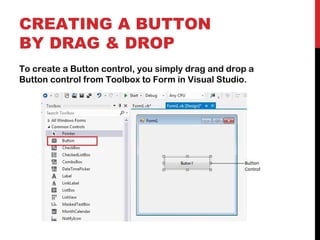
To create a Button control, you simply drag and drop a
Button control from Toolbox to Form in Visual Studio.
CREATING A BUTTON
AT RUN-TIME
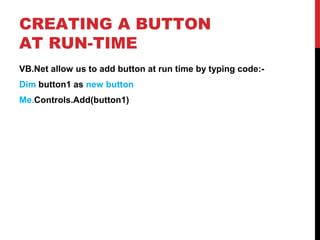
VB.Net allow us to add button at run time by typing code:-
Dim button1 as new button
Me.Controls.Add(button1)
PROPERTIES OF THE
BUTTON CONTROL
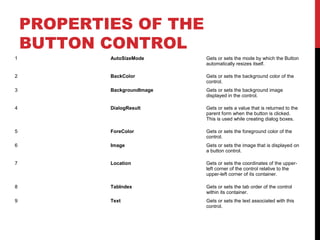
1 AutoSizeMode Gets or sets the mode by which the Button
automatically resizes itself.
2 BackColor Gets or sets the background color of the
control.
3 BackgroundImage Gets or sets the background image
displayed in the control.
4 DialogResult Gets or sets a value that is returned to the
parent form when the button is clicked.
This is used while creating dialog boxes.
5 ForeColor Gets or sets the foreground color of the
control.
6 Image Gets or sets the image that is displayed on
a button control.
7 Location Gets or sets the coordinates of the upper-
left corner of the control relative to the
upper-left corner of its container.
8 TabIndex Gets or sets the tab order of the control
within its container.
9 Text Gets or sets the text associated with this
control.
WORKING OF
BUTTON
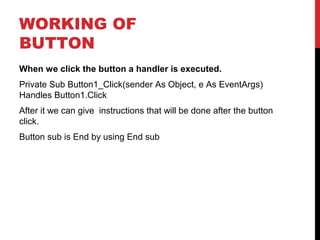
When we click the button a handler is executed.
Private Sub Button1_Click(sender As Object, e As EventArgs)
Handles Button1.Click
After it we can give instructions that will be done after the button
click.
Button sub is End by using End sub
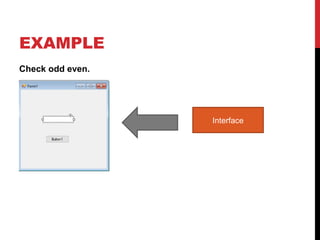
EXAMPLE
Check odd even.
Interface
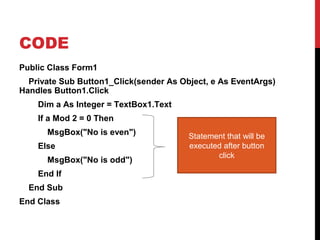
CODE
Public Class Form1
Private Sub Button1_Click(sender As Object, e As EventArgs)
Handles Button1.Click
Dim a As Integer = TextBox1.Text
If a Mod 2 = 0 Then
MsgBox("No is even")
Else
MsgBox("No is odd")
End If
End Sub
End Class
Statement that will be
executed after button
click
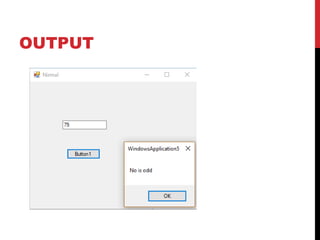
OUTPUT
THANK YOU

Buttons In .net Visual Basic

  • 1.
    FEDT Presentation GGS INDRAPRASTHUNIVERSITY Submitted to Submitted MANISH BCA E1 2016-2019
  • 2.
  • 3.
    VISUAL BASIC INTERFACE Whenwe write a Visual Basic program, you first have to design the user interface. Essentially, a Visual Basic user interface consists of objects that you place on the screen. The common elements of a Visual Basic user interface consist of the following: •Forms (also known as windows) •Buttons (such as command buttons and radio buttons) •Boxes (such as text boxes and check boxes) •Labels •Pictures (such as icons and graphics)
  • 4.
    BUTTON The button controlis your standard GUI function, usually used to confirm something or trigger an event. Such uses for a button include search engine's, dialog boxes, message boxes, etc. They are usually used to give the user an option or choice. Button can be clicked by a mouse click or by pressing ENTER or ESC keys.
  • 5.
    CREATING A BUTTON BYDRAG & DROP To create a Button control, you simply drag and drop a Button control from Toolbox to Form in Visual Studio.
  • 6.
    CREATING A BUTTON ATRUN-TIME VB.Net allow us to add button at run time by typing code:- Dim button1 as new button Me.Controls.Add(button1)
  • 7.
    PROPERTIES OF THE BUTTONCONTROL 1 AutoSizeMode Gets or sets the mode by which the Button automatically resizes itself. 2 BackColor Gets or sets the background color of the control. 3 BackgroundImage Gets or sets the background image displayed in the control. 4 DialogResult Gets or sets a value that is returned to the parent form when the button is clicked. This is used while creating dialog boxes. 5 ForeColor Gets or sets the foreground color of the control. 6 Image Gets or sets the image that is displayed on a button control. 7 Location Gets or sets the coordinates of the upper- left corner of the control relative to the upper-left corner of its container. 8 TabIndex Gets or sets the tab order of the control within its container. 9 Text Gets or sets the text associated with this control.
  • 8.
    WORKING OF BUTTON When weclick the button a handler is executed. Private Sub Button1_Click(sender As Object, e As EventArgs) Handles Button1.Click After it we can give instructions that will be done after the button click. Button sub is End by using End sub
  • 9.
  • 10.
    CODE Public Class Form1 PrivateSub Button1_Click(sender As Object, e As EventArgs) Handles Button1.Click Dim a As Integer = TextBox1.Text If a Mod 2 = 0 Then MsgBox("No is even") Else MsgBox("No is odd") End If End Sub End Class Statement that will be executed after button click
  • 11.
  • 12.